Pelajari cara mengintegrasikan deteksi keaktivitas wajah ke dalam alur kerja Anda dengan menggunakan logika sisi server dan aplikasi klien frontend pendamping.
Petunjuk / Saran
Untuk informasi umum tentang deteksi keaslian wajah, lihat panduan konseptual.
Dalam tutorial ini, Anda mempelajari cara menjalankan aplikasi frontend dengan server aplikasi untuk melakukan deteksi kehadiran. Anda juga dapat menambahkan verifikasi wajah di berbagai platform dan bahasa.
Penting
SDK klien Face untuk liveness adalah fitur yang dibatasi. Anda harus meminta akses ke fitur liveness dengan mengisi formulir pendaftaran Pengenalan Wajah. Saat langganan Azure Anda diberikan akses, Anda dapat mengunduh Face liveness SDK.
Prasyarat
- Langganan Azure - Buat langganan secara gratis
- Akun Azure Anda harus memiliki peran Cognitive Services Contributor yang ditetapkan sehingga Anda dapat menyetujui persyaratan AI yang bertanggung jawab dan membuat sumber daya. Agar peran ini ditetapkan ke akun Anda, ikuti langkah-langkah dalam dokumentasi Menetapkan peran, atau hubungi administrator Anda.
- Setelah Anda memiliki langganan Azure, buat sumber daya Face di portal Microsoft Azure untuk mendapatkan kunci dan titik akhir Anda. Setelah dideploy, pilih Buka halaman sumber daya.
- Anda memerlukan kunci dan titik akhir dari sumber daya yang Anda buat untuk menghubungkan aplikasi Anda ke layanan Face.
- Akses ke artefak yang dibatasi untuk Azure Vision pada Foundry Tools Face Client SDK untuk Mobile (iOS dan Android) dan Web.
- Untuk memulai, Anda perlu mengajukan permohonan untuk "fitur Face Recognition Limited Access" untuk mendapatkan akses ke artefak yang terkunci. Untuk informasi selengkapnya, lihat halaman Face Limited Access.
- Memahami fitur deteksi keaslian wajah. Lihat panduan konseptual.
Petunjuk / Saran
Setelah menyelesaikan prasyarat, Anda dapat mencoba pengalaman liveness pada platform berikut:
- iOS: iOS App Store — ketuk layar aplikasi 10 kali setelah penginstalan untuk mengaktifkan mode pengembang.
- Android: Google Play Store — ketuk layar aplikasi 10 kali setelah penginstalan untuk mengaktifkan mode pengembang.
- Web: Coba langsung di Vision Studio.
Anda juga dapat membuat dan menjalankan sampel frontend lengkap (iOS, Android, atau Web) dari bagian Samples.
Menyiapkan aplikasi frontend
SDK tersedia dalam beberapa bahasa untuk menyederhanakan integrasi dengan aplikasi frontend Anda. Lihat README untuk SDK pilihan Anda di bagian berikut untuk mengintegrasikan UI dan kode yang diperlukan.
Penting
Setiap SDK frontend memerlukan akses ke aset terjaga agar berhasil dikompilasi. Lihat instruksi berikut untuk menyiapkan akses ini.
Untuk Swift iOS:
Untuk Kotlin/Java Android:
Untuk JavaScript Web:
Setelah diintegrasikan ke dalam aplikasi antarmuka depan Anda, SDK akan memulai kamera, memandu pengguna untuk menyesuaikan posisi mereka, menyusun muatan liveness, dan mengirimkannya ke layanan Azure Face untuk diproses.
Pantau bagian Rilis repositori untuk pembaruan versi SDK baru dan aktifkan pemberitahuan pembaruan dependensi otomatis—seperti Dependabot GitHub (untuk repositori GitHub) atau Renovasi (GitHub, GitLab, Bitbucket, Azure Repos).
Langkah-langkah berikut menjelaskan proses orkestrasi kehidupan:
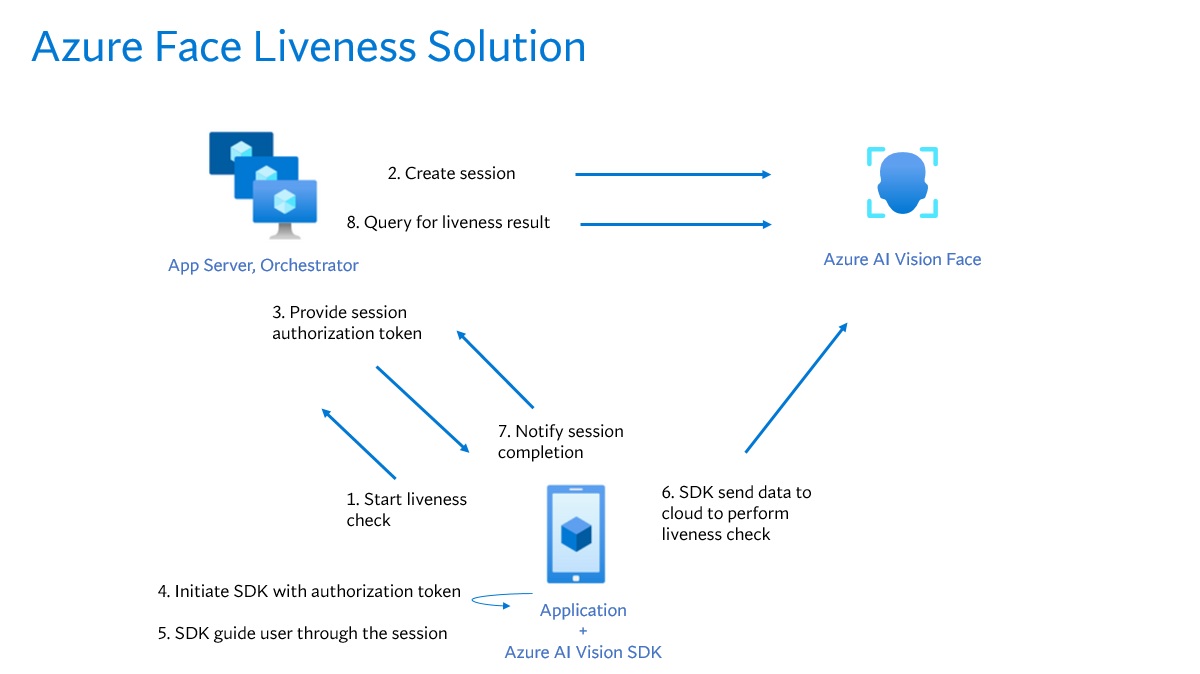
Aplikasi frontend memulai pemeriksaan keaktifan dan memberi tahu server aplikasi.
Server aplikasi membuat sesi liveness baru menggunakan Azure Face Service. Layanan ini membuat sesi liveness dan merespons dengan token untuk otorisasi sesi. Untuk informasi selengkapnya tentang setiap parameter permintaan yang terlibat dalam membuat sesi liveness, lihat Liveness Create Session Operation.
var endpoint = new Uri(System.Environment.GetEnvironmentVariable("FACE_ENDPOINT"));
var key = new AzureKeyCredential(System.Environment.GetEnvironmentVariable("FACE_APIKEY"));

var body = JsonSerializer.Serialize(new
{
    livenessOperationMode = "PassiveActive",
    deviceCorrelationId = "723d6d03-ef33-40a8-9682-23a1feb7bccd",
    enableSessionImage = true
});

using var client = new HttpClient();
client.DefaultRequestHeaders.Add("Ocp-Apim-Subscription-Key", key);

var response = await client.PostAsync(
    $"{endpoint}/face/v1.2/detectLiveness-sessions",
    new StringContent(body, Encoding.UTF8, "application/json"));

response.EnsureSuccessStatusCode();

using var doc  = JsonDocument.Parse(await response.Content.ReadAsStringAsync());
var root       = doc.RootElement;

Console.WriteLine("Session created");
Console.WriteLine($"sessionId : {root.GetProperty("sessionId").GetString()}");
Console.WriteLine($"authToken : {root.GetProperty("authToken").GetString()}");
String endpoint = System.getenv("FACE_ENDPOINT");
String key = System.getenv("FACE_APIKEY");

String body = """
{
    "livenessOperationMode": "PassiveActive",
    "deviceCorrelationId": "723d6d03-ef33-40a8-9682-23a1feb7bccd",
    "enableSessionImage": true,
}
""";

HttpRequest req = HttpRequest.newBuilder()
        .uri(URI.create(endpoint + "/face/v1.2/detectLiveness-sessions"))
        .header("Content-Type", "application/json")
        .header("Ocp-Apim-Subscription-Key", key)
        .POST(HttpRequest.BodyPublishers.ofString(body))
        .build();

HttpResponse<String> res = HttpClient.newHttpClient()
        .send(req, HttpResponse.BodyHandlers.ofString());

if (res.statusCode() != 200) throw new RuntimeException("HTTP error: " + res.statusCode());

JsonNode json = new ObjectMapper().readTree(res.body());
System.out.println("Session created");
System.out.println("sessionId : " + json.get("sessionId").asText());
System.out.println("authToken : " + json.get("authToken").asText());
endpoint = os.environ["FACE_ENDPOINT"]
key = os.environ["FACE_APIKEY"]

url  = f"{endpoint}/face/v1.2/detectLiveness-sessions"
body = {
    "livenessOperationMode": "PassiveActive",
    "deviceCorrelationId":  "723d6d03-ef33-40a8-9682-23a1feb7bccd",
    "enableSessionImage":   True
}

headers = {
    "Ocp-Apim-Subscription-Key": key,
    "Content-Type": "application/json"
}

res = requests.post(url, headers=headers, data=json.dumps(body))
res.raise_for_status()

data = res.json()
print("Session created")
print("sessionId :", data["sessionId"])
print("authToken :", data["authToken"])
const endpoint = process.env['FACE_ENDPOINT'];
const apikey = process.env['FACE_APIKEY'];

const url  = `${endpoint}/face/v1.2/detectLiveness-sessions`;
const body = {
    livenessOperationMode: "PassiveActive",
    deviceCorrelationId:  "723d6d03-ef33-40a8-9682-23a1feb7bccd",
    enableSessionImage:   true
};

const headers = {
    "Ocp-Apim-Subscription-Key": key,
    "Content-Type": "application/json"
};

async function createLivenessSession() {
    const res = await fetch(url, {
        method: "POST",
        headers,
        body: JSON.stringify(body)
    });

    if (!res.ok) {
        throw new Error(`${res.status} ${await res.text()}`);
    }

    const data = await res.json();
    console.log("Session created");
    console.log("sessionId :", data.sessionId);
    console.log("authToken :", data.authToken);
}
curl --request POST --location "%FACE_ENDPOINT%/face/v1.2/detectLiveness-sessions" ^
--header "Ocp-Apim-Subscription-Key: %FACE_APIKEY%" ^
--header "Content-Type: application/json" ^
--data ^
"{ ^
    ""livenessOperationMode"": ""passiveactive"", ^
    ""deviceCorrelationId"": ""723d6d03-ef33-40a8-9682-23a1feb7bccd"", ^
    ""enableSessionImage"": ""true"" ^
}"
curl --request POST --location "${FACE_ENDPOINT}/face/v1.2/detectLivenesswithVerify-sessions" \
--header "Ocp-Apim-Subscription-Key: ${FACE_APIKEY}" \
--header "Content-Type: application/json" \
--data \
'{
    "livenessOperationMode": "passiveactive",
    "deviceCorrelationId": "723d6d03-ef33-40a8-9682-23a1feb7bccd",
    "enableSessionImage": "true"
}'
Contoh isi respons:
{
    "sessionId": "a6e7193e-b638-42e9-903f-eaf60d2b40a5",
    "authToken": "<session-authorization-token>",
    "status": "NotStarted",
    "modelVersion": "2025-05-20",
    "results": {
        "attempts": []
    }
}
Server aplikasi menyediakan token otorisasi sesi kembali ke aplikasi frontend.
Aplikasi frontend menggunakan token otorisasi sesi untuk memulai detektor keaktifan wajah, yang memulai aliran keaktifan.
    FaceLivenessDetector(
        sessionAuthorizationToken = FaceSessionToken.sessionToken,
        verifyImageFileContent = FaceSessionToken.sessionSetInClientVerifyImage,
        deviceCorrelationId = "null",
        onSuccess = viewModel::onSuccess,
        onError = viewModel::onError
    )
struct HostView: View {
   @State var livenessDetectionResult: LivenessDetectionResult? = nil
   var token: String
   var body: some View {
       if livenessDetectionResult == nil {
           FaceLivenessDetectorView(result: $livenessDetectionResult,
                                    sessionAuthorizationToken: token)
       } else if let result = livenessDetectionResult {
           VStack {
               switch result {
                   case .success(let success):
                   /// <#show success#>
                   case .failure(let error):
                   /// <#show failure#>
               }
           }
       }
   }
}
faceLivenessDetector = document.createElement("azure-ai-vision-face-ui");
document.getElementById("container").appendChild(faceLivenessDetector);
faceLivenessDetector.start(session.authToken)
SDK mengaktifkan kamera, memandu pengguna untuk memposisikan dengan benar, kemudian menyiapkan payload untuk mengakses endpoint layanan deteksi keaktifan.
SDK memanggil layanan Azure Vision Face untuk melakukan deteksi keaktivaan. Ketika layanan merespons, SDK memberi tahu aplikasi frontend bahwa pemeriksaan keaktivaan selesai. Respons layanan tidak berisi keputusan keberlangsungan. Kueri informasi ini dari server aplikasi.
Aplikasi frontend menyampaikan penyelesaian pemeriksaan keaktivitas ke server aplikasi.
Server aplikasi meminta hasil deteksi liveness dari layanan Azure Vision Face.
using var client = new HttpClient();
client.DefaultRequestHeaders.Add("Ocp-Apim-Subscription-Key", key);

var response = await client.GetAsync(
    $"{endpoint}/face/v1.2/livenessSessions/{sessionId}/result");

response.EnsureSuccessStatusCode();

using var doc = JsonDocument.Parse(await response.Content.ReadAsStringAsync());
var root = doc.RootElement;
var attempts = root.GetProperty("results").GetProperty("attempts");
var latestAttempt = attempts[attempts.GetArrayLength() - 1];
var attemptStatus = latestAttempt.GetProperty("attemptStatus").GetString();

Console.WriteLine($"Session id: {root.GetProperty("sessionId").GetString()}");
Console.WriteLine($"Session status: {root.GetProperty("status").GetString()}");
Console.WriteLine($"Latest attempt status: {attemptStatus}");

if (attemptStatus == "Succeeded")
    Console.WriteLine($"Liveness detection decision: {latestAttempt.GetProperty("result").GetProperty("livenessDecision").GetString()}");
else
{
    var error = latestAttempt.GetProperty("error");
    Console.WriteLine($"Error: {error.GetProperty("code").GetString()} - {error.GetProperty("message").GetString()}");
}
HttpRequest req = HttpRequest.newBuilder()
    .uri(URI.create(endpoint + "/face/v1.2/livenessSessions/" + sessionId + "/result"))
    .header("Ocp-Apim-Subscription-Key", key)
    .GET()
    .build();

HttpResponse<String> res = HttpClient.newHttpClient()
    .send(req, HttpResponse.BodyHandlers.ofString());

if (res.statusCode() != 200) throw new RuntimeException("HTTP error: " + res.statusCode());

JsonNode root = new ObjectMapper().readTree(res.body());
JsonNode attempts = root.path("results").path("attempts");
JsonNode latestAttempt = attempts.get(attempts.size() - 1);

String attemptStatus = latestAttempt.path("attemptStatus").asText();

System.out.println("Session id: " + root.path("sessionId").asText());
System.out.println("Session status: " + root.path("status").asText());
System.out.println("Latest attempt status: " + attemptStatus);

if ("Succeeded".equals(attemptStatus)) {
    System.out.println("Liveness detection decision: " +
        latestAttempt.path("result").path("livenessDecision").asText());
} else {
    JsonNode error = latestAttempt.path("error");
    System.out.println("Error: " + error.path("code").asText() + " - " +
        error.path("message").asText());
}
url = f"{endpoint}/face/v1.2/livenessSessions/{sessionId}/result"
headers = { "Ocp-Apim-Subscription-Key": key }

res = requests.get(url, headers=headers)
res.raise_for_status()

data = res.json()
attempts = data["results"]["attempts"]
latest_attempt = attempts[-1]
attempt_status = latest_attempt.get("attemptStatus")

print(f"Session id: {data['sessionId']}")
print(f"Session status: {data['status']}")
print(f"Latest attempt status: {attempt_status}")

if attempt_status == "Succeeded":
    print(f"Liveness detection decision: {latest_attempt['result']['livenessDecision']}")
else:
    err = latest_attempt.get("error", {})
    print(f"Error: {err.get('code')} - {err.get('message')}")
const url = `${endpoint}/face/v1.2/livenessSessions/${sessionId}/result`;
const headers = {
    "Ocp-Apim-Subscription-Key": apikey
};

async function getLivenessSessionResult() {
    const res = await fetch(url, { method: "GET", headers });
    if (!res.ok) {
        throw new Error(`${res.status} ${await res.text()}`);
    }

    const data = await res.json();
    const attempts = data.results.attempts;
    const latestAttempt = attempts[attempts.length - 1];
    const attemptStatus = latestAttempt.attemptStatus;

    console.log("Session id :", data.sessionId);
    console.log("Session status :", data.status);
    console.log("Latest attempt status :", attemptStatus);

    if (attemptStatus === "Succeeded") {
        console.log("Liveness detection decision :", latestAttempt.result.livenessDecision);
    } else {
            const err = latestAttempt.error || {};
            console.log(`Error: ${err.code} - ${err.message}`);
    }
}
curl --request GET --location "%FACE_ENDPOINT%/face/v1.2/detectLiveness-sessions/<session-id>" ^
--header "Ocp-Apim-Subscription-Key: %FACE_APIKEY%"
curl --request GET --location "${FACE_ENDPOINT}/face/v1.2/detectLiveness-sessions/<session-id>" \
--header "Ocp-Apim-Subscription-Key: ${FACE_APIKEY}"
Contoh isi respons:
{
    "sessionId": "b12e033e-bda7-4b83-a211-e721c661f30e",
    "authToken": "eyJhbGciOiJFUzI1NiIsIm",
    "status": "NotStarted",
    "modelVersion": "2024-11-15",
    "results": {
        "attempts": [
            {
                "attemptId": 2,
                "attemptStatus": "Succeeded",
                "result": {
                "livenessDecision": "realface",
                "targets": {
                    "color": {
                    "faceRectangle": {
                            "top": 669,
                            "left": 203,
                            "width": 646,
                            "height": 724
                        }
                    }
                },
                "digest": "B0A803BB7B26F3C8F29CD36030F8E63ED3FAF955FEEF8E01C88AB8FD89CCF761",
                "sessionImageId": "Ae3PVWlXAmVAnXgkAFt1QSjGUWONKzWiSr2iPh9p9G4I"
                }
            },
            {
                "attemptId": 1,
                "attemptStatus": "Failed",
                "error": {
                "code": "FaceWithMaskDetected",
                "message": "Mask detected on face image.",
                "targets": {
                        "color": {
                        "faceRectangle": {
                            "top": 669,
                            "left": 203,
                            "width": 646,
                            "height": 724
                        }
                        }
                    }
                }
            }
        ]
    }
}
Server aplikasi menghapus sesi setelah meminta semua hasil sesi.
using var client = new HttpClient();
client.DefaultRequestHeaders.Add("Ocp-Apim-Subscription-Key", key);

await client.DeleteAsync($"{endpoint}/face/v1.2/livenessSessions/{sessionId}");
Console.WriteLine($"Session deleted: {sessionId}");
HttpRequest req = HttpRequest.newBuilder()
    .uri(URI.create(endpoint + "/face/v1.2/livenessSessions/" + sessionId))
    .header("Ocp-Apim-Subscription-Key", key)
    .DELETE()
    .build();

HttpClient.newHttpClient().send(req, HttpResponse.BodyHandlers.ofString());
System.out.println("Session deleted: " + sessionId);
headers = { "Ocp-Apim-Subscription-Key": key }
requests.delete(f"{endpoint}/face/v1.2/livenessSessions/{sessionId}", headers=headers)
print(f"Session deleted: {sessionId}")
const headers = { "Ocp-Apim-Subscription-Key": apikey };
await fetch(`${endpoint}/face/v1.2/livenessSessions/${sessionId}`, { method: "DELETE", headers });
console.log(`Session deleted: ${sessionId}`);
curl --request DELETE --location "%FACE_ENDPOINT%/face/v1.2/detectLiveness-sessions/<session-id>" ^
--header "Ocp-Apim-Subscription-Key: %FACE_APIKEY%"
curl --request DELETE --location "${FACE_ENDPOINT}/face/v1.2/detectLiveness-sessions/<session-id>" \
--header "Ocp-Apim-Subscription-Key: ${FACE_APIKEY}"
Menggabungkan verifikasi wajah dengan deteksi keaktifan memungkinkan verifikasi biometrik orang tertentu yang tertarik dengan jaminan tambahan bahwa orang tersebut secara fisik ada dalam sistem.
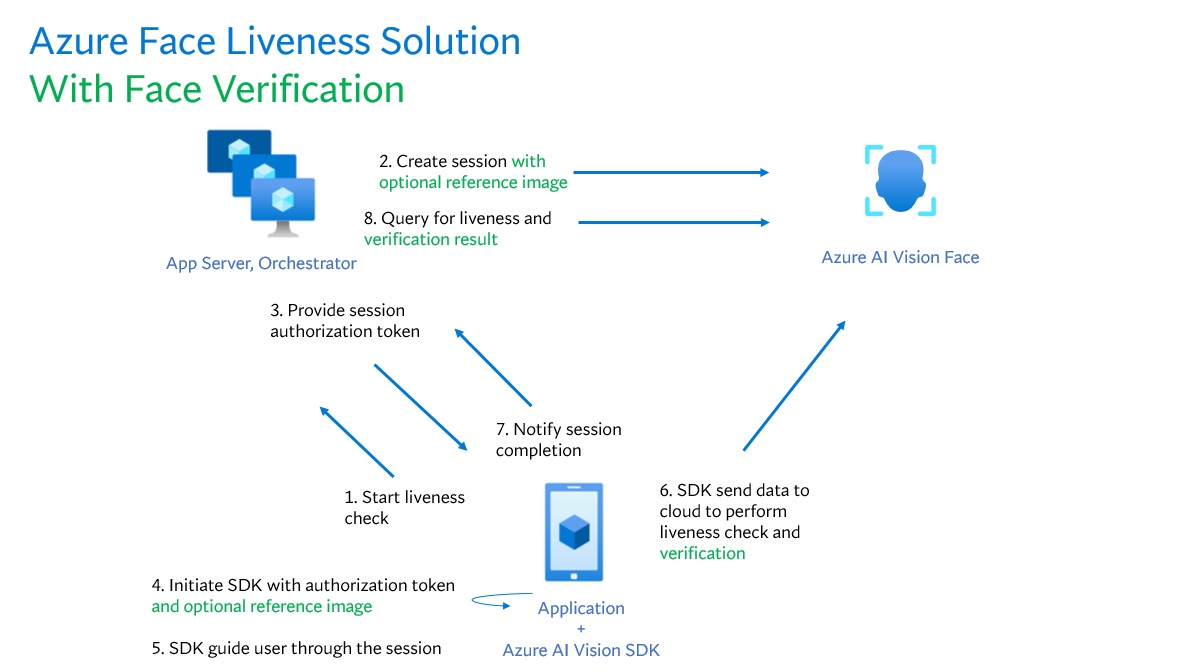
Mengintegrasikan deteksi keaktifan dengan verifikasi melibatkan dua bagian:
Langkah 1 - Pilih gambar referensi
Untuk mendapatkan hasil pengenalan yang paling akurat, ikuti tips yang tercantum dalam persyaratan komposisi untuk skenario verifikasi ID.
Langkah 2 - Siapkan orkestrasi kehidupan dengan verifikasi
Langkah-langkah tingkat tinggi berikut menunjukkan cara mengatur keakuratan dengan verifikasi:
Berikan gambar referensi verifikasi dengan menggunakan salah satu dari dua metode berikut:
Server aplikasi menyediakan gambar referensi saat membuat sesi liveness. Untuk informasi selengkapnya tentang setiap parameter permintaan yang terlibat dalam membuat sesi liveness dengan verifikasi, lihat Liveness With Verify Create Session Operation.
var endpoint = new Uri(System.Environment.GetEnvironmentVariable("FACE_ENDPOINT"));
var key      = System.Environment.GetEnvironmentVariable("FACE_APIKEY");

// Create the JSON part
var jsonPart = new StringContent(
    JsonSerializer.Serialize(new
    {
        livenessOperationMode = "PassiveActive",
        deviceCorrelationId = "723d6d03-ef33-40a8-9682-23a1feb7bcc",
        enableSessionImage = true
    }),
    Encoding.UTF8,
    "application/json"
);
jsonPart.Headers.ContentDisposition = new ContentDispositionHeaderValue("form-data")
{
    Name = "CreateLivenessWithVerifySessionRequest"
};

// Create the file part
using var fileStream = File.OpenRead("test.png");
var filePart = new StreamContent(fileStream);
filePart.Headers.ContentType = new MediaTypeHeaderValue("image/png");
filePart.Headers.ContentDisposition = new ContentDispositionHeaderValue("form-data")
{
    Name = "VerifyImage",
    FileName = "test.png"
};

// Build multipart form data
using var formData = new MultipartFormDataContent();
formData.Add(jsonPart);
formData.Add(filePart);

using var client = new HttpClient();
client.DefaultRequestHeaders.Add("Ocp-Apim-Subscription-Key", key);

var response = await client.PostAsync($"{endpoint}/face/v1.2/createLivenessWithVerifySession", formData);
response.EnsureSuccessStatusCode();

using var doc = JsonDocument.Parse(await response.Content.ReadAsStringAsync());
var root = doc.RootElement;

Console.WriteLine("Session created.");
Console.WriteLine($"Session id: {root.GetProperty("sessionId").GetString()}");
Console.WriteLine($"Auth token: {root.GetProperty("authToken").GetString()}");
String endpoint = System.getenv("FACE_ENDPOINT");
String key      = System.getenv("FACE_APIKEY");

String json = """
{
"livenessOperationMode": "PassiveActive",
"deviceCorrelationId": "723d6d03-ef33-40a8-9682-23a1feb7bcc",
"enableSessionImage": true
}
""";

byte[] img = Files.readAllBytes(Path.of("test.png"));
String boundary = "----faceBoundary" + java.util.UUID.randomUUID();

var head =
    "--" + boundary + "\r\n" +
    "Content-Disposition: form-data; name=\"CreateLivenessWithVerifySessionRequest\"\r\n" +
    "Content-Type: application/json\r\n\r\n" +
    json + "\r\n" +
    "--" + boundary + "\r\n" +
    "Content-Disposition: form-data; name=\"VerifyImage\"; filename=\"test.png\"\r\n" +
    "Content-Type: image/png\r\n\r\n";

var tail = "\r\n--" + boundary + "--\r\n";

byte[] body = java.nio.ByteBuffer
    .allocate(head.getBytes(StandardCharsets.UTF_8).length + img.length + tail.getBytes(StandardCharsets.UTF_8).length)
    .put(head.getBytes(StandardCharsets.UTF_8))
    .put(img)
    .put(tail.getBytes(StandardCharsets.UTF_8))
    .array();

HttpRequest req = HttpRequest.newBuilder()
    .uri(URI.create(endpoint + "/face/v1.2/createLivenessWithVerifySession"))
    .header("Ocp-Apim-Subscription-Key", key)
    .header("Content-Type", "multipart/form-data; boundary=" + boundary)
    .POST(HttpRequest.BodyPublishers.ofByteArray(body))
    .build();

HttpResponse<String> res = HttpClient.newHttpClient().send(req, HttpResponse.BodyHandlers.ofString());
if (res.statusCode() != 200) throw new RuntimeException("HTTP error: " + res.statusCode());

JsonNode root = new ObjectMapper().readTree(res.body());
System.out.println("Session created.");
System.out.println("Session id: " + root.get("sessionId").asText());
System.out.println("Auth token: " + root.get("authToken").asText());
endpoint = os.environ["FACE_ENDPOINT"]
key      = os.environ["FACE_APIKEY"]

url = f"{endpoint}/face/v1.2/createLivenessWithVerifySession"
files = {
    "CreateLivenessWithVerifySessionRequest": (
        "request.json",
        json.dumps({
            "livenessOperationMode": "PassiveActive",
            "deviceCorrelationId": "723d6d03-ef33-40a8-9682-23a1feb7bcc",
            "enableSessionImage": True
        }),
        "application/json"
    ),
    "VerifyImage": ("test.png", open("test.png", "rb"), "image/png")
}
headers = { "Ocp-Apim-Subscription-Key": key }

res = requests.post(url, headers=headers, files=files)
res.raise_for_status()

data = res.json()
print("Session created.")
print("Session id:", data["sessionId"])
print("Auth token:", data["authToken"])
const endpoint = process.env["FACE_ENDPOINT"];
const apikey   = process.env["FACE_APIKEY"];

const form = new FormData();
form.append(
    "CreateLivenessWithVerifySessionRequest",
    new Blob([JSON.stringify({
        livenessOperationMode: "PassiveActive",
        deviceCorrelationId: "723d6d03-ef33-40a8-9682-23a1feb7bcc",
        enableSessionImage: true
    })], { type: "application/json" }),
    "request.json"
);
// If your runtime doesn't support Blob here, you can use fs.createReadStream instead.
form.append("VerifyImage", new Blob([fs.readFileSync("test.png")], { type: "image/png" }), "test.png");

const res = await fetch(`${endpoint}/face/v1.2/createLivenessWithVerifySession`, {
    method: "POST",
    headers: { "Ocp-Apim-Subscription-Key": apikey },
    body: form
});
if (!res.ok) {
    throw new Error(`${res.status} ${await res.text()}`);
}

const data = await res.json();
console.log("Session created.");
console.log("Session id:", data.sessionId);
console.log("Auth token:", data.authToken);
curl --request POST --location "%FACE_ENDPOINT%/face/v1.2/detectLivenesswithVerify-sessions" ^
--header "Ocp-Apim-Subscription-Key: %FACE_APIKEY%" ^
--form "Parameters=""{\\\""livenessOperationMode\\\"": \\\""passiveactive\\\"", \\\""deviceCorrelationId\\\"": \\\""723d6d03-ef33-40a8-9682-23a1feb7bccd\\\"", ""enableSessionImage"": ""true""}""" ^
--form "VerifyImage=@""test.png"""
curl --request POST --location "${FACE_ENDPOINT}/face/v1.2/detectLivenesswithVerify-sessions" \
--header "Ocp-Apim-Subscription-Key: ${FACE_APIKEY}" \
--form 'Parameters="{
    \"livenessOperationMode\": \"passiveactive\",
    \"deviceCorrelationId\": \"723d6d03-ef33-40a8-9682-23a1feb7bccd\"
}"' \
--form 'VerifyImage=@"test.png"'
Contoh isi respons:
{
    "sessionId": "3847ffd3-4657-4e6c-870c-8e20de52f567",
    "authToken": "<session-authorization-token>",
    "status": "NotStarted",
    "modelVersion": "2024-11-15",
    "results": {
        "attempts": [],
        "verifyReferences": [
        {
            "referenceType": "image",
            "faceRectangle": {
            "top": 98,
            "left": 131,
            "width": 233,
            "height": 300
            },
            "qualityForRecognition": "high"
        }
        ]
    }
}
Aplikasi frontend menyediakan gambar referensi saat menginisialisasi SDK seluler. Skenario ini tidak didukung dalam solusi web.
    FaceLivenessDetector(
        sessionAuthorizationToken = FaceSessionToken.sessionToken,
        verifyImageFileContent = FaceSessionToken.sessionSetInClientVerifyImage,
        deviceCorrelationId = "null",
        onSuccess = viewModel::onSuccess,
        onError = viewModel::onError
    )
struct HostView: View {
    @State var livenessDetectionResult: LivenessDetectionResult? = nil
    var token: String
    var body: some View {
        if livenessDetectionResult == nil {
            FaceLivenessDetectorView(result: $livenessDetectionResult,
                                        sessionAuthorizationToken: token)
        } else if let result = livenessDetectionResult {
            VStack {
                switch result {
                    case .success(let success):
                    /// <#show success#>
                    case .failure(let error):
                    /// <#show failure#>
                }
            }
        }
    }
}
Server aplikasi sekarang dapat mengkueri hasil verifikasi selain hasil keaktivaan.
using var client = new HttpClient();
client.DefaultRequestHeaders.Add("Ocp-Apim-Subscription-Key", key);

var response = await client.GetAsync($"{endpoint}/face/v1.2/livenessSessions/{sessionId}/result");
response.EnsureSuccessStatusCode();

using var doc = JsonDocument.Parse(await response.Content.ReadAsStringAsync());
var root = doc.RootElement;

var attempts = root.GetProperty("results").GetProperty("attempts");
var latestAttempt = attempts[attempts.GetArrayLength() - 1];
var attemptStatus = latestAttempt.GetProperty("attemptStatus").GetString();

Console.WriteLine($"Session id: {root.GetProperty("sessionId").GetString()}");
Console.WriteLine($"Session status: {root.GetProperty("status").GetString()}");
Console.WriteLine($"Latest attempt status: {attemptStatus}");

if (attemptStatus == "Succeeded")
{
    var decision = latestAttempt.GetProperty("result").GetProperty("livenessDecision").GetString();
    var verify   = latestAttempt.GetProperty("verifyResult");
    Console.WriteLine($"Liveness detection decision: {decision}");
    Console.WriteLine($"Verify isIdentical: {verify.GetProperty("isIdentical").GetBoolean()}");
    Console.WriteLine($"Verify matchConfidence: {verify.GetProperty("matchConfidence").GetDouble()}");
}
else
{
    var err = latestAttempt.GetProperty("error");
    Console.WriteLine($"Error: {err.GetProperty("code").GetString()} - {err.GetProperty("message").GetString()}");
}
HttpRequest req = HttpRequest.newBuilder()
    .uri(URI.create(endpoint + "/face/v1.2/livenessSessions/" + sessionId + "/result"))
    .header("Ocp-Apim-Subscription-Key", key)
    .GET()
    .build();

HttpResponse<String> res = HttpClient.newHttpClient().send(req, HttpResponse.BodyHandlers.ofString());
if (res.statusCode() != 200) throw new RuntimeException("HTTP error: " + res.statusCode());

ObjectMapper om = new ObjectMapper();
JsonNode root = om.readTree(res.body());

JsonNode attempts = root.path("results").path("attempts");
JsonNode latest   = attempts.get(attempts.size() - 1);
String attemptStatus = latest.path("attemptStatus").asText();

System.out.println("Session id: " + root.path("sessionId").asText());
System.out.println("Session status: " + root.path("status").asText());
System.out.println("Latest attempt status: " + attemptStatus);

if ("Succeeded".equals(attemptStatus)) {
    String decision = latest.path("result").path("livenessDecision").asText();
    JsonNode verify = latest.path("verifyResult");
    System.out.println("Liveness detection decision: " + decision);
    System.out.println("Verify isIdentical: " + verify.path("isIdentical").asBoolean());
    System.out.println("Verify matchConfidence: " + verify.path("matchConfidence").asDouble());
} else {
    JsonNode err = latest.path("error");
    System.out.println("Error: " + err.path("code").asText() + " - " + err.path("message").asText());
}
url = f"{endpoint}/face/v1.2/livenessSessions/{sessionId}/result"
headers = {"Ocp-Apim-Subscription-Key": key}

res = requests.get(url, headers=headers)
res.raise_for_status()

data = res.json()
attempts = data["results"]["attempts"]
latest = attempts[-1]
attempt_status = latest.get("attemptStatus")

print(f"Session id: {data['sessionId']}")
print(f"Session status: {data['status']}")
print(f"Latest attempt status: {attempt_status}")

if attempt_status == "Succeeded":
    decision = latest["result"]["livenessDecision"]
    verify   = latest.get("verifyResult", {})
    print(f"Liveness detection decision: {decision}")
    print(f"Verify isIdentical: {verify.get('isIdentical')}")
    print(f"Verify matchConfidence: {verify.get('matchConfidence')}")
else:
    err = latest.get("error", {})
    print(f"Error: {err.get('code')} - {err.get('message')}")
const url = `${endpoint}/face/v1.2/livenessSessions/${sessionId}/result`;
const headers = { "Ocp-Apim-Subscription-Key": apikey };

async function getLivenessWithVerifyResult() {
const res = await fetch(url, { method: "GET", headers });
if (!res.ok) throw new Error(`${res.status} ${await res.text()}`);

const data = await res.json();
const attempts = data.results.attempts;
const latest = attempts[attempts.length - 1];
const attemptStatus = latest.attemptStatus;

console.log("Session id:", data.sessionId);
console.log("Session status:", data.status);
console.log("Latest attempt status:", attemptStatus);

if (attemptStatus === "Succeeded") {
    console.log("Liveness detection decision:", latest.result.livenessDecision);
    console.log("Verify isIdentical:", latest.verifyResult?.isIdentical);
    console.log("Verify matchConfidence:", latest.verifyResult?.matchConfidence);
} else {
    const err = latest.error || {};
    console.log(`Error: ${err.code} - ${err.message}`);
}
}
curl --request GET --location "%FACE_ENDPOINT%/face/v1.2/detectLivenesswithVerify-sessions/<session-id>" ^
--header "Ocp-Apim-Subscription-Key: %FACE_APIKEY%"
curl --request GET --location "${FACE_ENDPOINT}/face/v1.2/detectLivenesswithVerify-sessions/<session-id>" \
--header "Ocp-Apim-Subscription-Key: ${FACE_APIKEY}"
Contoh isi respons:
{
    "sessionId": "b12e033e-bda7-4b83-a211-e721c661f30e",
    "authToken": "eyJhbGciOiJFUzI1NiIsIm",
    "status": "NotStarted",
    "modelVersion": "2024-11-15",
    "results": {
        "attempts": [
        {
            "attemptId": 2,
            "attemptStatus": "Succeeded",
            "result": {
            "livenessDecision": "realface",
            "targets": {
                "color": {
                "faceRectangle": {
                    "top": 669,
                    "left": 203,
                    "width": 646,
                    "height": 724
                }
                }
            },
            "verifyResult": {
                "matchConfidence": 0.08871888,
                "isIdentical": false
            },
            "digest": "B0A803BB7B26F3C8F29CD36030F8E63ED3FAF955FEEF8E01C88AB8FD89CCF761",
            "sessionImageId": "Ae3PVWlXAmVAnXgkAFt1QSjGUWONKzWiSr2iPh9p9G4I",
            "verifyImageHash": "43B7D8E8769533C3290DBD37A84D821B2C28CB4381DF9C6784DBC4AAF7E45018"
            }
        },
        {
            "attemptId": 1,
            "attemptStatus": "Failed",
            "error": {
                "code": "FaceWithMaskDetected",
                "message": "Mask detected on face image.",
                "targets": {
                    "color": {
                    "faceRectangle": {
                            "top": 669,
                            "left": 203,
                            "width": 646,
                            "height": 724
                        }
                    }
                }
            }
        }
        ],
        "verifyReferences": [
            {
                "referenceType": "image",
                "faceRectangle": {
                "top": 316,
                "left": 131,
                "width": 498,
                "height": 677
                },
                "qualityForRecognition": "high"
            }
        ]
        }
    }
Server aplikasi dapat menghapus sesi jika Anda tidak memerlukan hasilnya lagi.
using var client = new HttpClient();
client.DefaultRequestHeaders.Add("Ocp-Apim-Subscription-Key", key);

await client.DeleteAsync($"{endpoint}/face/v1.2/livenessWithVerifySessions/{sessionId}");
Console.WriteLine($"Liveness-with-Verify session deleted: {sessionId}");
HttpRequest req = HttpRequest.newBuilder()
    .uri(URI.create(endpoint + "/face/v1.2/livenessWithVerifySessions/" + sessionId))
    .header("Ocp-Apim-Subscription-Key", key)
    .DELETE()
    .build();

HttpClient.newHttpClient().send(req, HttpResponse.BodyHandlers.ofString());
System.out.println("Liveness-with-Verify session deleted: " + sessionId);
headers = { "Ocp-Apim-Subscription-Key": key }
requests.delete(f"{endpoint}/face/v1.2/livenessWithVerifySessions/{sessionId}", headers=headers)
print(f"Liveness-with-Verify session deleted: {sessionId}")
const headers = { "Ocp-Apim-Subscription-Key": apikey };
await fetch(`${endpoint}/face/v1.2/livenessWithVerifySessions/${sessionId}`, { method: "DELETE", headers });
console.log(`Liveness-with-Verify session deleted: ${sessionId}`);
curl --request DELETE --location "%FACE_ENDPOINT%/face/v1.2/detectLivenesswithVerify-sessions/<session-id>" ^
--header "Ocp-Apim-Subscription-Key: %FACE_APIKEY%"
curl --request DELETE --location "${FACE_ENDPOINT}/face/v1.2/detectLivenesswithVerify-sessions/<session-id>" \
--header "Ocp-Apim-Subscription-Key: ${FACE_APIKEY}"
Secara opsional, Anda dapat melakukan operasi wajah tambahan setelah pemeriksaan keaktifan, seperti analisis wajah (untuk mendapatkan atribut wajah) dan operasi identifikasi wajah.
- Atur parameter
enableSessionImage menjadi true selama langkah Session-Creation.
- Ekstrak
sessionImageId dari langkah Session-Get-Result.
- Unduh gambar sesi (dirujuk dalam Liveness Get Session Image Operation API), atau berikan
sessionImageId dalam operasi Detect from Session Image ID API untuk melanjutkan analisis wajah atau operasi identitas wajah lainnya.
Untuk informasi selengkapnya tentang operasi ini, lihat Konsep deteksi wajah dan konsep Pengenalan Wajah.
Opsi dukungan
Selain menggunakan opsi dukungan Foundry Tools utama, Anda juga dapat memposting pertanyaan Anda di bagian masalah repositori SDK.
Konten terkait
Untuk mempelajari cara mengintegrasikan solusi liveness ke dalam aplikasi Anda yang sudah ada, lihat referensi Azure Vision SDK.
Untuk mempelajari selengkapnya tentang fitur yang tersedia untuk mengatur solusi keaktivaan, lihat referensi REST API Sesi.
