Catatan
Akses ke halaman ini memerlukan otorisasi. Anda dapat mencoba masuk atau mengubah direktori.
Akses ke halaman ini memerlukan otorisasi. Anda dapat mencoba mengubah direktori.
Important
Fitur ini ada di Pratinjau Umum.
Important
Untuk kasus penggunaan baru, Databricks merekomendasikan penyebaran agen di Databricks Apps untuk kontrol penuh atas kode agen, konfigurasi server, dan alur kerja penyebaran. Lihat Menulis agen AI dan menyebarkannya di Aplikasi Databricks. Untuk memigrasikan agen yang ada, lihat Memigrasikan agen dari Model Melayani ke Aplikasi Databricks.
Memori memungkinkan agen AI mengingat informasi dari sebelumnya dalam percakapan atau dari percakapan sebelumnya. Ini memungkinkan agen memberikan respons sadar konteks dan membangun pengalaman yang dipersonalisasi dari waktu ke waktu. Gunakan Databricks Lakebase, database Postgres OLTP yang dikelola sepenuhnya, untuk mengelola status dan riwayat percakapan.
Persyaratan
- Instans Lakebase, lihat Membuat dan mengelola instans database.
Memori jangka pendek vs. jangka panjang
Memori jangka pendek menangkap konteks dalam satu sesi percakapan sementara memori jangka panjang mengekstrak dan menyimpan informasi utama di beberapa percakapan. Anda dapat membangun agen Anda dengan salah satu atau kedua jenis memori.
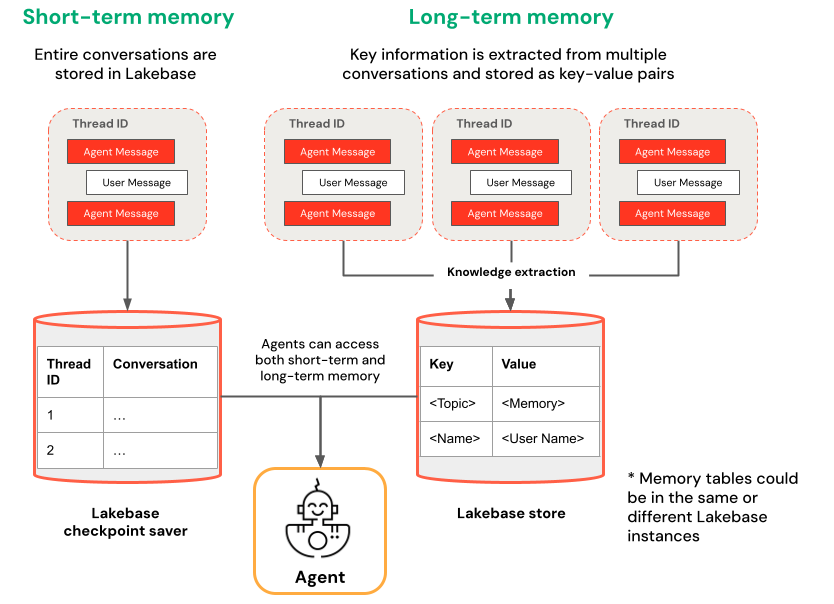
| Memori jangka pendek | Memori jangka panjang |
|---|---|
| Menangkap konteks dalam satu sesi percakapan menggunakan ID utas dan titik pemeriksaan Mempertahankan konteks untuk pertanyaan tindak lanjut dalam sesi Debug dan uji alur percakapan menggunakan perjalanan waktu |
Mengekstrak dan menyimpan wawasan utama secara otomatis di beberapa sesi Mempersonalisasi interaksi berdasarkan preferensi sebelumnya Membangun pangkalan pengetahuan tentang pengguna yang meningkatkan respons dari waktu ke waktu |
Contoh buku catatan
Agen dengan memori jangka pendek
Agen dengan memori jangka panjang
Mengkueri agen yang Anda sebarkan
Setelah Anda menyebarkan agen Anda ke titik akhir Model Serving, lihat Mengkueri agen yang disebarkan di Azure Databricks untuk instruksi kueri.
Untuk memasukkan ID utas, gunakan parameter extra_body. Contoh berikut menunjukkan kepada Anda cara meneruskan ID utas ke ResponsesAgent titik akhir:
   response1 = client.responses.create(
    model=endpoint,
    input=[{"role": "user", "content": "What are stateful agents?"}],
    extra_body={
        "custom_inputs": {"thread_id": thread_id}
    }
)
Jika Anda menggunakan klien yang secara otomatis melewati ChatContext seperti aplikasi Playground atau Review, ID percakapan dan id pengguna akan secara otomatis diteruskan untuk kasus penggunaan memori jangka pendek/jangka panjang.
Perjalanan waktu memori jangka pendek
Untuk agen dengan memori jangka pendek, gunakan LangGraph time-travel untuk melanjutkan pelaksanaan dari titik pemeriksaan. Anda dapat memutar ulang percakapan atau memodifikasinya untuk menjelajahi jalur alternatif. Setiap kali Anda melanjutkan dari titik pemeriksaan, LangGraph membuat percabangan baru dalam riwayat percakapan, mempertahankan aslinya sambil memungkinkan eksperimen.
Dalam kode agen, buat fungsi yang mengambil riwayat titik pemeriksaan dan memperbarui status titik pemeriksaan di
LangGraphResponsesAgentkelas :from typing import List, Dict def get_checkpoint_history(self, thread_id: str, limit: int = 10) -> List[Dict[str, Any]]: """Retrieve checkpoint history for a thread. Args: thread_id: The thread identifier limit: Maximum number of checkpoints to return Returns: List of checkpoint information including checkpoint_id, timestamp, and next nodes """ config = {"configurable": {"thread_id": thread_id}} with CheckpointSaver(instance_name=LAKEBASE_INSTANCE_NAME) as checkpointer: graph = self._create_graph(checkpointer) history = [] for state in graph.get_state_history(config): if len(history) >= limit: break history.append({ "checkpoint_id": state.config["configurable"]["checkpoint_id"], "thread_id": thread_id, "timestamp": state.created_at, "next_nodes": state.next, "message_count": len(state.values.get("messages", [])), # Include last message summary for context "last_message": self._get_last_message_summary(state.values.get("messages", [])) }) return history def _get_last_message_summary(self, messages: List[Any]) -> Optional[str]: """Get a snippet of the last message for checkpoint identification""" return getattr(messages[-1], "content", "")[:100] if messages else None def update_checkpoint_state(self, thread_id: str, checkpoint_id: str, new_messages: Optional[List[Dict]] = None) -> Dict[str, Any]: """Update state at a specific checkpoint (used for modifying conversation history). Args: thread_id: The thread identifier checkpoint_id: The checkpoint to update new_messages: Optional new messages to set at this checkpoint Returns: New checkpoint configuration including the new checkpoint_id """ config = { "configurable": { "thread_id": thread_id, "checkpoint_id": checkpoint_id } } with CheckpointSaver(instance_name=LAKEBASE_INSTANCE_NAME) as checkpointer: graph = self._create_graph(checkpointer) # Prepare the values to update values = {} if new_messages: cc_msgs = self.prep_msgs_for_cc_llm(new_messages) values["messages"] = cc_msgs # Update the state (creates a new checkpoint) new_config = graph.update_state(config, values=values) return { "thread_id": thread_id, "checkpoint_id": new_config["configurable"]["checkpoint_id"], "parent_checkpoint_id": checkpoint_id }Perbarui fungsi
predictdanpredict_streamuntuk mendukung pengiriman checkpoint:Predict
def predict(self, request: ResponsesAgentRequest) -> ResponsesAgentResponse:
    """Non-streaming prediction"""
    # The same thread_id is used by BOTH predict() and predict_stream()
    ci = dict(request.custom_inputs or {})
    if "thread_id" not in ci:
        ci["thread_id"] = str(uuid.uuid4())
    request.custom_inputs = ci

    outputs = [
        event.item
        for event in self.predict_stream(request)
        if event.type == "response.output_item.done"
    ]

    # Include thread_id and checkpoint_id in custom outputs
    custom_outputs = {
        "thread_id": ci["thread_id"]
    }
    if "checkpoint_id" in ci:
        custom_outputs["parent_checkpoint_id"] = ci["checkpoint_id"]

    try:
        history = self.get_checkpoint_history(ci["thread_id"], limit=1)
        if history:
            custom_outputs["checkpoint_id"] = history[0]["checkpoint_id"]
    except Exception as e:
        logger.warning(f"Could not retrieve new checkpoint_id: {e}")

    return ResponsesAgentResponse(output=outputs, custom_outputs=custom_outputs)
Predict_stream
def predict_stream(
    self,
    request: ResponsesAgentRequest,
) -> Generator[ResponsesAgentStreamEvent, None, None]:
    """Streaming prediction with PostgreSQL checkpoint branching support.

    Accepts in custom_inputs:
    - thread_id: Conversation thread identifier for session
    - checkpoint_id (optional): Checkpoint to resume from (for branching)
    """
    # Get thread ID and checkpoint ID from custom inputs
    custom_inputs = request.custom_inputs or {}
    thread_id = custom_inputs.get("thread_id", str(uuid.uuid4()))  # generate new thread ID if one is not passed in
    checkpoint_id = custom_inputs.get("checkpoint_id")  # Optional for branching

    # Convert incoming Responses messages to LangChain format
    langchain_msgs = self.prep_msgs_for_cc_llm([i.model_dump() for i in request.input])

    # Build checkpoint configuration
    checkpoint_config = {"configurable": {"thread_id": thread_id}}
    # If checkpoint_id is provided, we're branching from that checkpoint
    if checkpoint_id:
        checkpoint_config["configurable"]["checkpoint_id"] = checkpoint_id
        logger.info(f"Branching from checkpoint: {checkpoint_id} in thread: {thread_id}")

    # DATABASE CONNECTION POOLING LOGIC FOLLOWS
    # Use connection from pool
Kemudian, uji percabangan titik kontrol Anda:
Mulai utas percakapan dan tambahkan beberapa pesan:
from agent import AGENT
# Initial conversation - starts a new thread
response1 = AGENT.predict({
    "input": [{"role": "user", "content": "I'm planning for an upcoming trip!"}],
})
print(response1.model_dump(exclude_none=True))
thread_id = response1.custom_outputs["thread_id"]

# Within the same thread, ask a follow-up question - short-term memory will remember previous messages in the same thread/conversation session
response2 = AGENT.predict({
    "input": [{"role": "user", "content": "I'm headed to SF!"}],
    "custom_inputs": {"thread_id": thread_id}
})
print(response2.model_dump(exclude_none=True))

# Within the same thread, ask a follow-up question - short-term memory will remember previous messages in the same thread/conversation session
response3 = AGENT.predict({
    "input": [{"role": "user", "content": "Where did I say I'm going?"}],
    "custom_inputs": {"thread_id": thread_id}
})
print(response3.model_dump(exclude_none=True))
Ambil riwayat titik pemeriksaan dan cabangkan percakapan dengan pesan yang berbeda.
# Get checkpoint history to find branching point
history = AGENT.get_checkpoint_history(thread_id, 20)
# Retrieve checkpoint at index - indices count backward from most recent checkpoint
index = max(1, len(history) - 4)
branch_checkpoint = history[index]["checkpoint_id"]

# Branch from node with next_node = `('__start__',)` to re-input message to agent at certain part of conversation
# I want to update the information of which city I am going to
# Within the same thread, branch from a checkpoint and override it with different context to continue the conversation in a new fork
response4 = AGENT.predict({
    "input": [{"role": "user", "content": "I'm headed to New York!"}],
    "custom_inputs": {
        "thread_id": thread_id,
        "checkpoint_id": branch_checkpoint # Branch from this checkpoint!
    }
})
print(response4.model_dump(exclude_none=True))

# Thread ID stays the same even though it branched from a checkpoint:
branched_thread_id = response4.custom_outputs["thread_id"]
print(f"original thread id was {thread_id}")
print(f"new thread id after branching is the same as original: {branched_thread_id}")

# Continue the conversation in the same thread and it will pick up from the information you tell it in your branch
response5 = AGENT.predict({
    "input": [{"role": "user", "content": "Where am I going?"}],
    "custom_inputs": {
        "thread_id": thread_id,
    }
})
print(response5.model_dump(exclude_none=True))