Catatan
Akses ke halaman ini memerlukan otorisasi. Anda dapat mencoba masuk atau mengubah direktori.
Akses ke halaman ini memerlukan otorisasi. Anda dapat mencoba mengubah direktori.
Dalam panduan memulai cepat ini, Anda mempelajari cara menggunakan TypeSpec untuk merancang, menerapkan, dan menghasilkan aplikasi API yang RESTful. TypeSpec adalah bahasa sumber terbuka untuk menjelaskan API layanan cloud dan menghasilkan kode klien dan server untuk beberapa platform. Dengan mengikuti mulai cepat ini, Anda mempelajari cara menentukan kontrak API sekali dan menghasilkan implementasi yang konsisten, membantu Anda membangun layanan API yang lebih terawat dan terdokumen dengan baik.
Anda akan menggunakan generator kode TypeSpec untuk membuat perancah server ASP.NET Core dengan perutean dan antarmuka pengguna Swagger, menyambungkannya ke Azure Cosmos DB untuk persistensi, dan menyebarkannya ke Azure Container Apps.
Untuk konteks tentang peran TypeSpec dalam pengembangan API, lihat Gambaran Umum TypeSpec.
Waktu selesai: 20–25 menit
Dalam panduan singkat ini, Anda akan:
- Tentukan API Anda menggunakan TypeSpec
- Membuat aplikasi server API
- Mengintegrasikan Azure Cosmos DB untuk penyimpanan persisten
- Menjalankan dan menguji API Anda secara lokal
- Menyebarkan ke Azure Container Apps
Prerequisites
- Akun Azure aktif. Buat akun secara gratis jika Anda tidak memilikinya.
- .NET 9 SDK
- Node.js LTS — diperlukan untuk TypeSpec CLI dan manajer paket.
- Visual Studio Code dengan ekstensi berikut:
- Ekstensi TypeSpec
- Opsional: Penyebaran dengan Azure Developer CLI
Mengembangkan dengan TypeSpec
TypeSpec mendefinisikan API Anda dengan cara bahasa agnostik dan menghasilkan server API dan pustaka klien untuk beberapa platform. Fungsionalitas ini memungkinkan Anda untuk:
- Tentukan kontrak API Anda sekali
- Hasilkan server dan kode klien yang konsisten
- Fokus pada penerapan logika bisnis daripada infrastruktur API
TypeSpec menyediakan manajemen layanan API:
- Bahasa definisi API
- Middleware untuk perutean sisi server bagi API
- Pustaka bagi klien untuk memanfaatkan API
Anda menyediakan permintaan klien dan integrasi server:
- Menerapkan logika bisnis di middleware seperti layanan Azure untuk database, penyimpanan, dan olahpesan
- Hosting server untuk API Anda (secara lokal atau di Azure)
- Skrip penyebaran untuk penyediaan dan penyebaran berulang
Membuat aplikasi TypeSpec baru
Buat folder baru untuk menyimpan server API dan file TypeSpec.
mkdir my_typespec_quickstart
cd my_typespec_quickstart
Instal pengkompilasi TypeSpec secara global:
npm install -g @typespec/compilerPeriksa TypeSpec yang terinstal dengan benar:
tsp --versionInisialisasi proyek TypeSpec:
tsp initJawab perintah berikut dengan jawaban yang disediakan:
- Menginisialisasi proyek baru di sini? Y
- Pilih templat proyek? API REST umum
- Masukkan nama proyek: Widget
- Emiter apa yang ingin Anda gunakan?
- Dokumen OpenAPI 3.1
- Stub server untuk C#
TypeSpec emitters adalah pustaka yang menggunakan berbagai API kompilator TypeSpec untuk merefleksikan proses kompilasi TypeSpec dan menghasilkan artefak.
Tunggu hingga inisialisasi selesai sebelum melanjutkan.
Run tsp compile . to build the project.

Please review the following messages from emitters:
  @typespec/http-server-csharp:

        Generated ASP.Net services require dotnet 9:
        https://dotnet.microsoft.com/download

        Create an ASP.Net service project for your TypeSpec:
        > npx hscs-scaffold . --use-swaggerui --overwrite

        More information on getting started:
        https://aka.ms/tsp/hscs/start
Kompilasi proyek:
tsp compile .Petunjuk / Saran
Untuk pengembangan berulang, gunakan mode pemantauan untuk mengkompilasi ulang perubahan file secara otomatis:
tsp compile . --watch. Ini membuat server dan skema yang Anda buat tetap terbaru saat Anda memodifikasimain.tsp.TypeSpec menghasilkan proyek default di
./tsp-output, membuat dua folder terpisah:- skema
- server
Buka file
./tsp-output/schema/openapi.yaml. Perhatikan bahwa beberapa baris dalam./main.tspdihasilkan lebih dari 200 baris spesifikasi OpenApi untuk Anda.Buka folder
./tsp-output/server/aspnet. Perhatikan bahwa file .NET yang dihasilkan menurut template meliputi:-
./generated/operations/IWidgets.csmenentukan antarmuka untuk metode Widget. -
./generated/controllers/WidgetsController.csmengimplementasikan integrasi ke metode Widget. Di sinilah Anda menempatkan logika bisnis Anda. -
./generated/modelsmendefinisikan model untuk WIDGET API.
-
Mengonfigurasi pengemisi TypeSpec
Gunakan file TypeSpec untuk mengonfigurasi pembuatan server API.
tspconfig.yamlBuka dan ganti konfigurasi yang ada dengan YAML berikut:emit: - "@typespec/openapi3" - "@typespec/http-server-csharp" options: "@typespec/openapi3": emitter-output-dir: "{cwd}/server/wwwroot" openapi-versions: - 3.1.0 "@typespec/http-server-csharp": emitter-output-dir: "{cwd}/server/" use-swaggerui: true overwrite: true emit-mocks: "mocks-and-project-files"Konfigurasi ini memproyeksikan beberapa perubahan yang kita butuhkan untuk server .NET API yang dihasilkan sepenuhnya:
-
emit-mocks: Buat semua file proyek yang diperlukan untuk server. -
use-swaggerui: Integrasikan UI Swagger sehingga Anda dapat menggunakan API dengan cara yang ramah browser. -
emitter-output-dir: Atur direktori output untuk pembuatan server dan pembuatan spesifikasi OpenApi. - Hasilkan semuanya menjadi
./server.
-
Kompilasi ulang proyek:
tsp compile .Ubah ke direktori baru
/server:cd serverBuat sertifikat pengembang default jika Anda belum memilikinya:
dotnet dev-certs httpsJalankan proyek:
dotnet runTunggu pemberitahuan untuk Membuka di browser.
Buka browser dan tambahkan rute UI Swagger,
/swagger.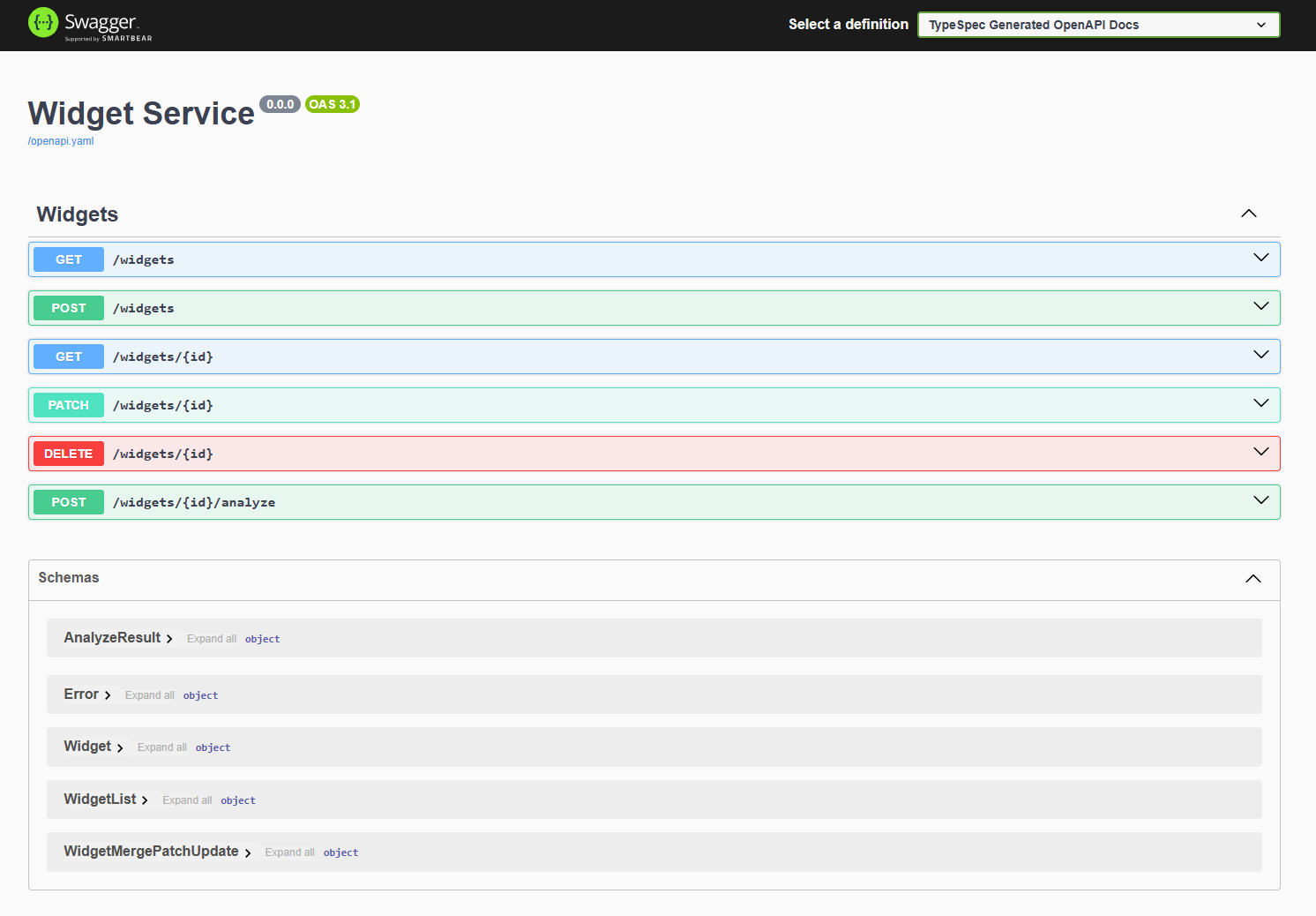
TypeSpec API dan server default berfungsi.
Memahami struktur file aplikasi
Struktur proyek untuk server yang dihasilkan mencakup server API berbasis pengontrol .NET, file .NET untuk membangun proyek, dan middleware untuk integrasi Azure Anda.
├── appsettings.Development.json
├── appsettings.json
├── docs
├── generated
├── mocks
├── Program.cs
├── Properties
├── README.md
├── ServiceProject.csproj
└── wwwroot
-
Tambahkan logika bisnis Anda: dalam contoh ini, mulailah dengan
./server/mocks/Widget.csdari file. Yang dihasilkanWidget.csmenyediakan metode boilerplate. -
Perbarui server: tambahkan konfigurasi server tertentu ke
./program.cs. -
Gunakan spesifikasi OpenApi: TypeSpec menghasilkan file OpenApi3.json ke dalam
./server/wwwrootfile dan membuatnya tersedia untuk UI Swagger selama pengembangan. Ini menyediakan UI untuk spesifikasi Anda. Anda dapat berinteraksi dengan API tanpa harus menyediakan mekanisme permintaan seperti klien REST atau front-end web.
Mengubah persistensi ke Azure Cosmos DB no-sql
Sekarang setelah server API Widget dasar berfungsi, perbarui server untuk bekerja dengan Azure Cosmos DB untuk penyimpanan data persisten.
./serverDi direktori, tambahkan Azure Cosmos DB ke proyek:dotnet add package Microsoft.Azure.CosmosTambahkan pustaka Azure Identity untuk mengautentikasi ke Azure:
dotnet add package Azure.IdentityPerbarui
./server/ServiceProject.csprojterkait pengaturan integrasi Cosmos DB.<Project Sdk="Microsoft.NET.Sdk.Web"> <PropertyGroup> ... existing settings ... <EnableSdkContainerSupport>true</EnableSdkContainerSupport> </PropertyGroup> <ItemGroup> ... existing settings ... <PackageReference Include="Newtonsoft.Json" Version="13.0.3" /> </ItemGroup> </Project>- EnableSdkContainerSupport memungkinkan Anda menggunakan dukungan build kontainer bawaan .NET SDK (dotnet publish ––container) tanpa menulis Dockerfile.
- Newtonsoft.Json menambahkan serializer Json .NET yang digunakan Cosmos DB SDK untuk mengonversi objek .NET Anda ke dan dari JSON.
Buat file pendaftaran baru,
./azure/CosmosDbRegistrationuntuk mengelola pendaftaran Cosmos DB:using Microsoft.Azure.Cosmos; using Microsoft.Extensions.Configuration; using System; using System.Threading.Tasks; using Azure.Identity; using DemoService; namespace WidgetService.Service { /// <summary> /// Registration class for Azure Cosmos DB services and implementations /// </summary> public static class CosmosDbRegistration { /// <summary> /// Registers the Cosmos DB client and related services for dependency injection /// </summary> /// <param name="builder">The web application builder</param> public static void RegisterCosmosServices(this WebApplicationBuilder builder) { // Register the HttpContextAccessor for accessing the HTTP context builder.Services.AddHttpContextAccessor(); // Get configuration settings var cosmosEndpoint = builder.Configuration["Configuration:AzureCosmosDb:Endpoint"]; // Validate configuration ValidateCosmosDbConfiguration(cosmosEndpoint); // Configure Cosmos DB client options var cosmosClientOptions = new CosmosClientOptions { SerializerOptions = new CosmosSerializationOptions { PropertyNamingPolicy = CosmosPropertyNamingPolicy.CamelCase }, ConnectionMode = ConnectionMode.Direct }; builder.Services.AddSingleton(serviceProvider => { var credential = new DefaultAzureCredential(); // Create Cosmos client with token credential authentication return new CosmosClient(cosmosEndpoint, credential, cosmosClientOptions); }); // Initialize Cosmos DB if needed builder.Services.AddHostedService<CosmosDbInitializer>(); // Register WidgetsCosmos implementation of IWidgets builder.Services.AddScoped<IWidgets, WidgetsCosmos>(); } /// <summary> /// Validates the Cosmos DB configuration settings /// </summary> /// <param name="cosmosEndpoint">The Cosmos DB endpoint</param> /// <exception cref="ArgumentException">Thrown when configuration is invalid</exception> private static void ValidateCosmosDbConfiguration(string cosmosEndpoint) { if (string.IsNullOrEmpty(cosmosEndpoint)) { throw new ArgumentException("Cosmos DB Endpoint must be specified in configuration"); } } } }Perhatikan variabel lingkungan untuk titik akhir:
var cosmosEndpoint = builder.Configuration["Configuration:AzureCosmosDb:Endpoint"];Buat kelas Widget baru,
./azure/WidgetsCosmos.csuntuk menyediakan logika bisnis untuk diintegrasikan dengan Azure Cosmos DB untuk penyimpanan persisten Anda.using System; using System.Net; using System.Threading.Tasks; using Microsoft.Azure.Cosmos; using Microsoft.Extensions.Logging; using System.Collections.Generic; using System.Linq; // Use generated models and operations using DemoService; namespace WidgetService.Service { /// <summary> /// Implementation of the IWidgets interface that uses Azure Cosmos DB for persistence /// </summary> public class WidgetsCosmos : IWidgets { private readonly CosmosClient _cosmosClient; private readonly ILogger<WidgetsCosmos> _logger; private readonly IHttpContextAccessor _httpContextAccessor; private readonly string _databaseName = "WidgetDb"; private readonly string _containerName = "Widgets"; /// <summary> /// Initializes a new instance of the WidgetsCosmos class. /// </summary> /// <param name="cosmosClient">The Cosmos DB client instance</param> /// <param name="logger">Logger for diagnostic information</param> /// <param name="httpContextAccessor">Accessor for the HTTP context</param> public WidgetsCosmos( CosmosClient cosmosClient, ILogger<WidgetsCosmos> logger, IHttpContextAccessor httpContextAccessor) { _cosmosClient = cosmosClient; _logger = logger; _httpContextAccessor = httpContextAccessor; } /// <summary> /// Gets a reference to the Cosmos DB container for widgets /// </summary> private Container WidgetsContainer => _cosmosClient.GetContainer(_databaseName, _containerName); /// <summary> /// Lists all widgets in the database /// </summary> /// <returns>Array of Widget objects</returns> public async Task<WidgetList> ListAsync() { try { var queryDefinition = new QueryDefinition("SELECT * FROM c"); var widgets = new List<Widget>(); using var iterator = WidgetsContainer.GetItemQueryIterator<Widget>(queryDefinition); while (iterator.HasMoreResults) { var response = await iterator.ReadNextAsync(); widgets.AddRange(response.ToList()); } // Create and return a WidgetList instead of Widget[] return new WidgetList { Items = widgets.ToArray() }; } catch (Exception ex) { _logger.LogError(ex, "Error listing widgets from Cosmos DB"); throw new Error(500, "Failed to retrieve widgets from database"); } } /// <summary> /// Retrieves a specific widget by ID /// </summary> /// <param name="id">The ID of the widget to retrieve</param> /// <returns>The retrieved Widget</returns> public async Task<Widget> ReadAsync(string id) { try { var response = await WidgetsContainer.ReadItemAsync<Widget>( id, new PartitionKey(id)); return response.Resource; } catch (CosmosException ex) when (ex.StatusCode == HttpStatusCode.NotFound) { _logger.LogWarning("Widget with ID {WidgetId} not found", id); throw new Error(404, $"Widget with ID '{id}' not found"); } catch (Exception ex) { _logger.LogError(ex, "Error reading widget {WidgetId} from Cosmos DB", id); throw new Error(500, "Failed to retrieve widget from database"); } } /// <summary> /// Creates a new widget from the provided Widget object /// </summary> /// <param name="body">The Widget object to store in the database</param> /// <returns>The created Widget</returns> public async Task<Widget> CreateAsync(Widget body) { try { // Validate the Widget if (body == null) { throw new Error(400, "Widget data cannot be null"); } if (string.IsNullOrEmpty(body.Id)) { throw new Error(400, "Widget must have an Id"); } if (body.Color != "red" && body.Color != "blue") { throw new Error(400, "Color must be 'red' or 'blue'"); } // Save the widget to Cosmos DB var response = await WidgetsContainer.CreateItemAsync( body, new PartitionKey(body.Id)); _logger.LogInformation("Created widget with ID {WidgetId}", body.Id); return response.Resource; } catch (CosmosException ex) when (ex.StatusCode == HttpStatusCode.Conflict) { _logger.LogError(ex, "Widget with ID {WidgetId} already exists", body.Id); throw new Error(409, $"Widget with ID '{body.Id}' already exists"); } catch (Exception ex) when (!(ex is Error)) { _logger.LogError(ex, "Error creating widget in Cosmos DB"); throw new Error(500, "Failed to create widget in database"); } } /// <summary> /// Updates an existing widget with properties specified in the patch document /// </summary> /// <param name="id">The ID of the widget to update</param> /// <param name="body">The WidgetMergePatchUpdate object containing properties to update</param> /// <returns>The updated Widget</returns> public async Task<Widget> UpdateAsync(string id, TypeSpec.Http.WidgetMergePatchUpdate body) { try { // Validate input parameters if (body == null) { throw new Error(400, "Update data cannot be null"); } if (body.Color != null && body.Color != "red" && body.Color != "blue") { throw new Error(400, "Color must be 'red' or 'blue'"); } // First check if the item exists Widget existingWidget; try { var response = await WidgetsContainer.ReadItemAsync<Widget>( id, new PartitionKey(id)); existingWidget = response.Resource; } catch (CosmosException ex) when (ex.StatusCode == HttpStatusCode.NotFound) { _logger.LogWarning("Widget with ID {WidgetId} not found for update", id); throw new Error(404, $"Widget with ID '{id}' not found"); } // Apply the patch updates only where properties are provided bool hasChanges = false; if (body.Weight.HasValue) { existingWidget.Weight = body.Weight.Value; hasChanges = true; } if (body.Color != null) { existingWidget.Color = body.Color; hasChanges = true; } // Only perform the update if changes were made if (hasChanges) { // Use ReplaceItemAsync for the update var updateResponse = await WidgetsContainer.ReplaceItemAsync( existingWidget, id, new PartitionKey(id)); _logger.LogInformation("Updated widget with ID {WidgetId}", id); return updateResponse.Resource; } // If no changes, return the existing widget _logger.LogInformation("No changes to apply for widget with ID {WidgetId}", id); return existingWidget; } catch (Error) { // Rethrow Error exceptions throw; } catch (Exception ex) { _logger.LogError(ex, "Error updating widget {WidgetId} in Cosmos DB", id); throw new Error(500, "Failed to update widget in database"); } } /// <summary> /// Deletes a widget by its ID /// </summary> /// <param name="id">The ID of the widget to delete</param> public async Task DeleteAsync(string id) { try { await WidgetsContainer.DeleteItemAsync<Widget>(id, new PartitionKey(id)); _logger.LogInformation("Deleted widget with ID {WidgetId}", id); } catch (CosmosException ex) when (ex.StatusCode == HttpStatusCode.NotFound) { _logger.LogWarning("Widget with ID {WidgetId} not found for deletion", id); throw new Error(404, $"Widget with ID '{id}' not found"); } catch (Exception ex) { _logger.LogError(ex, "Error deleting widget {WidgetId} from Cosmos DB", id); throw new Error(500, "Failed to delete widget from database"); } } /// <summary> /// Analyzes a widget by ID and returns a simplified analysis result /// </summary> /// <param name="id">The ID of the widget to analyze</param> /// <returns>An AnalyzeResult containing the analysis of the widget</returns> public async Task<AnalyzeResult> AnalyzeAsync(string id) { try { // First retrieve the widget from the database Widget widget; try { var response = await WidgetsContainer.ReadItemAsync<Widget>( id, new PartitionKey(id)); widget = response.Resource; } catch (CosmosException ex) when (ex.StatusCode == HttpStatusCode.NotFound) { _logger.LogWarning("Widget with ID {WidgetId} not found for analysis", id); throw new Error(404, $"Widget with ID '{id}' not found"); } // Create the analysis result var result = new AnalyzeResult { Id = widget.Id, Analysis = $"Weight: {widget.Weight}, Color: {widget.Color}" }; _logger.LogInformation("Analyzed widget with ID {WidgetId}", id); return result; } catch (Error) { // Rethrow Error exceptions throw; } catch (Exception ex) { _logger.LogError(ex, "Error analyzing widget {WidgetId} from Cosmos DB", id); throw new Error(500, "Failed to analyze widget from database"); } } } }Buat file
./server/services/CosmosDbInitializer.csuntuk mengotentikasi ke Azure.using System; using System.Threading; using System.Threading.Tasks; using Microsoft.Azure.Cosmos; using Microsoft.Extensions.Configuration; using Microsoft.Extensions.Hosting; using Microsoft.Extensions.Logging; namespace WidgetService.Service { /// <summary> /// Hosted service that initializes Cosmos DB resources on application startup /// </summary> public class CosmosDbInitializer : IHostedService { private readonly CosmosClient _cosmosClient; private readonly ILogger<CosmosDbInitializer> _logger; private readonly IConfiguration _configuration; private readonly string _databaseName; private readonly string _containerName = "Widgets"; public CosmosDbInitializer(CosmosClient cosmosClient, ILogger<CosmosDbInitializer> logger, IConfiguration configuration) { _cosmosClient = cosmosClient; _logger = logger; _configuration = configuration; _databaseName = _configuration["CosmosDb:DatabaseName"] ?? "WidgetDb"; } public async Task StartAsync(CancellationToken cancellationToken) { _logger.LogInformation("Ensuring Cosmos DB database and container exist..."); try { // Create database if it doesn't exist var databaseResponse = await _cosmosClient.CreateDatabaseIfNotExistsAsync( _databaseName, cancellationToken: cancellationToken); _logger.LogInformation("Database {DatabaseName} status: {Status}", _databaseName, databaseResponse.StatusCode == System.Net.HttpStatusCode.Created ? "Created" : "Already exists"); // Create container if it doesn't exist (using id as partition key) var containerResponse = await databaseResponse.Database.CreateContainerIfNotExistsAsync( new ContainerProperties { Id = _containerName, PartitionKeyPath = "/id" }, throughput: 400, // Minimum RU/s cancellationToken: cancellationToken); _logger.LogInformation("Container {ContainerName} status: {Status}", _containerName, containerResponse.StatusCode == System.Net.HttpStatusCode.Created ? "Created" : "Already exists"); } catch (Exception ex) { _logger.LogError(ex, "Error initializing Cosmos DB"); throw; } } public Task StopAsync(CancellationToken cancellationToken) { return Task.CompletedTask; } } }Perbarui
./server/program.csuntuk menggunakan Cosmos DB dan memungkinkan Swagger UI digunakan dalam penyebaran produksi. Salin seluruh file// Generated by @typespec/http-server-csharp // <auto-generated /> #nullable enable using TypeSpec.Helpers; using WidgetService.Service; var builder = WebApplication.CreateBuilder(args); // Add services to the container. builder.Services.AddControllersWithViews(options => { options.Filters.Add<HttpServiceExceptionFilter>(); }); builder.Services.AddEndpointsApiExplorer(); builder.Services.AddSwaggerGen(); // Replace original registration with the Cosmos DB one CosmosDbRegistration.RegisterCosmosServices(builder); var app = builder.Build(); // Configure the HTTP request pipeline. if (!app.Environment.IsDevelopment()) { app.UseExceptionHandler("/Home/Error"); // The default HSTS value is 30 days. You may want to change this for production scenarios, see https://aka.ms/aspnetcore-hsts. app.UseHsts(); } // Swagger UI is always available app.UseSwagger(); app.UseSwaggerUI(c => { c.DocumentTitle = "TypeSpec Generated OpenAPI Viewer"; c.SwaggerEndpoint("/openapi.yaml", "TypeSpec Generated OpenAPI Docs"); c.RoutePrefix = "swagger"; }); app.UseHttpsRedirection(); app.UseStaticFiles(); app.Use(async (context, next) => { context.Request.EnableBuffering(); await next(); }); app.MapGet("/openapi.yaml", async (HttpContext context) => { var externalFilePath = "wwwroot/openapi.yaml"; if (!File.Exists(externalFilePath)) { context.Response.StatusCode = StatusCodes.Status404NotFound; await context.Response.WriteAsync("OpenAPI spec not found."); return; } context.Response.ContentType = "application/json"; await context.Response.SendFileAsync(externalFilePath); }); app.UseRouting(); app.UseAuthorization(); app.MapControllerRoute( name: "default", pattern: "{controller=Home}/{action=Index}/{id?}"); app.Run();Bangun proyek tersebut:
dotnet buildProyek ini sekarang dibangun dengan integrasi Cosmos DB. Mari kita buat skrip penyebaran untuk membuat sumber daya Azure dan menyebarkan proyek.
Membuat infrastruktur penyebaran
Buat file yang diperlukan untuk membuat proses penerapan berulang dengan Azure Developer CLI dan templat Bicep.
Di akar proyek TypeSpec, buat
azure.yamlfile definisi penyebaran dan tempelkan di sumber berikut:# yaml-language-server: $schema=https://raw.githubusercontent.com/Azure/azure-dev/main/schemas/v1.0/azure.yaml.json name: azure-typespec-scaffold-dotnet metadata: template: azd-init@1.14.0 services: api: project: ./server host: containerapp language: dotnet pipeline: provider: githubPerhatikan bahwa konfigurasi ini mereferensikan lokasi proyek yang dihasilkan (
./server). Pastikan bahwa./tspconfig.yamlcocok dengan lokasi yang ditentukan dalam./azure.yaml.Di akar proyek TypeSpec, buat
./infradirektori.Buat file
./infra/main.bicepparamdan salin konten berikut untuk menentukan parameter yang kita butuhkan untuk deployment:using './main.bicep' param environmentName = readEnvironmentVariable('AZURE_ENV_NAME', 'dev') param location = readEnvironmentVariable('AZURE_LOCATION', 'eastus2') param deploymentUserPrincipalId = readEnvironmentVariable('AZURE_PRINCIPAL_ID', '')Daftar param ini menyediakan parameter minimum yang diperlukan untuk penyebaran ini.
Buat file
./infra/main.bicepdan salin yang berikut ini untuk menentukan sumber daya Azure untuk provisi dan penyebaran.metadata description = 'Bicep template for deploying a GitHub App using Azure Container Apps and Azure Container Registry.' targetScope = 'resourceGroup' param serviceName string = 'api' var databaseName = 'WidgetDb' var containerName = 'Widgets' @minLength(1) @maxLength(64) @description('Name of the environment that can be used as part of naming resource convention') param environmentName string @minLength(1) @description('Primary location for all resources') param location string @description('Id of the principal to assign database and application roles.') param deploymentUserPrincipalId string = '' var resourceToken = toLower(uniqueString(resourceGroup().id, environmentName, location)) var tags = { 'azd-env-name': environmentName repo: 'https://github.com/typespec' } module managedIdentity 'br/public:avm/res/managed-identity/user-assigned-identity:0.4.1' = { name: 'user-assigned-identity' params: { name: 'identity-${resourceToken}' location: location tags: tags } } module cosmosDb 'br/public:avm/res/document-db/database-account:0.8.1' = { name: 'cosmos-db-account' params: { name: 'cosmos-db-nosql-${resourceToken}' location: location locations: [ { failoverPriority: 0 locationName: location isZoneRedundant: false } ] tags: tags disableKeyBasedMetadataWriteAccess: true disableLocalAuth: true networkRestrictions: { publicNetworkAccess: 'Enabled' ipRules: [] virtualNetworkRules: [] } capabilitiesToAdd: [ 'EnableServerless' ] sqlRoleDefinitions: [ { name: 'nosql-data-plane-contributor' dataAction: [ 'Microsoft.DocumentDB/databaseAccounts/readMetadata' 'Microsoft.DocumentDB/databaseAccounts/sqlDatabases/containers/items/*' 'Microsoft.DocumentDB/databaseAccounts/sqlDatabases/containers/*' ] } ] sqlRoleAssignmentsPrincipalIds: union( [ managedIdentity.outputs.principalId ], !empty(deploymentUserPrincipalId) ? [deploymentUserPrincipalId] : [] ) sqlDatabases: [ { name: databaseName containers: [ { name: containerName paths: [ '/id' ] } ] } ] } } module containerRegistry 'br/public:avm/res/container-registry/registry:0.5.1' = { name: 'container-registry' params: { name: 'containerreg${resourceToken}' location: location tags: tags acrAdminUserEnabled: false anonymousPullEnabled: true publicNetworkAccess: 'Enabled' acrSku: 'Standard' } } var containerRegistryRole = subscriptionResourceId( 'Microsoft.Authorization/roleDefinitions', '8311e382-0749-4cb8-b61a-304f252e45ec' ) module registryUserAssignment 'br/public:avm/ptn/authorization/resource-role-assignment:0.1.1' = if (!empty(deploymentUserPrincipalId)) { name: 'container-registry-role-assignment-push-user' params: { principalId: deploymentUserPrincipalId resourceId: containerRegistry.outputs.resourceId roleDefinitionId: containerRegistryRole } } module logAnalyticsWorkspace 'br/public:avm/res/operational-insights/workspace:0.7.0' = { name: 'log-analytics-workspace' params: { name: 'log-analytics-${resourceToken}' location: location tags: tags } } module containerAppsEnvironment 'br/public:avm/res/app/managed-environment:0.8.0' = { name: 'container-apps-env' params: { name: 'container-env-${resourceToken}' location: location tags: tags logAnalyticsWorkspaceResourceId: logAnalyticsWorkspace.outputs.resourceId zoneRedundant: false } } module containerAppsApp 'br/public:avm/res/app/container-app:0.9.0' = { name: 'container-apps-app' params: { name: 'container-app-${resourceToken}' environmentResourceId: containerAppsEnvironment.outputs.resourceId location: location tags: union(tags, { 'azd-service-name': serviceName }) ingressTargetPort: 8080 ingressExternal: true ingressTransport: 'auto' stickySessionsAffinity: 'sticky' scaleMaxReplicas: 1 scaleMinReplicas: 1 corsPolicy: { allowCredentials: true allowedOrigins: [ '*' ] } managedIdentities: { systemAssigned: false userAssignedResourceIds: [ managedIdentity.outputs.resourceId ] } secrets: { secureList: [ { name: 'azure-cosmos-db-nosql-endpoint' value: cosmosDb.outputs.endpoint } { name: 'user-assigned-managed-identity-client-id' value: managedIdentity.outputs.clientId } ] } containers: [ { image: 'mcr.microsoft.com/dotnet/samples:aspnetapp-9.0' name: serviceName resources: { cpu: '0.25' memory: '.5Gi' } env: [ { name: 'CONFIGURATION__AZURECOSMOSDB__ENDPOINT' secretRef: 'azure-cosmos-db-nosql-endpoint' } { name: 'AZURE_CLIENT_ID' secretRef: 'user-assigned-managed-identity-client-id' } ] } ] } } output CONFIGURATION__AZURECOSMOSDB__ENDPOINT string = cosmosDb.outputs.endpoint output CONFIGURATION__AZURECOSMOSDB__DATABASENAME string = databaseName output CONFIGURATION__AZURECOSMOSDB__CONTAINERNAME string = containerName output AZURE_CONTAINER_REGISTRY_ENDPOINT string = containerRegistry.outputs.loginServerVariabel output memungkinkan Anda menggunakan sumber daya cloud yang disediakan dengan pengembangan lokal Anda.
Tag containerAppsApp menggunakan variabel serviceName (diatur ke
apidi bagian atas file) danapiyang ditentukan dalam./azure.yaml. Koneksi ini memberi tahu Azure Developer CLI tempat untuk menyebarkan proyek .NET ke sumber daya hosting Azure Container Apps....bicep... module containerAppsApp 'br/public:avm/res/app/container-app:0.9.0' = { name: 'container-apps-app' params: { name: 'container-app-${resourceToken}' environmentResourceId: containerAppsEnvironment.outputs.resourceId location: location tags: union(tags, { 'azd-service-name': serviceName }) <--------- `API` ...bicep..
Struktur proyek
Struktur proyek akhir mencakup file TYPESpec API, server Express.js, dan file penyebaran Azure:
├── infra
├── tsp-output
├── .gitignore
├── .azure.yaml
├── Dockerfile
├── main.tsp
├── package-lock.json
├── package.json
├── tspconfig.yaml
| Area | File/Direktori |
|---|---|
| TypeSpec |
main.tsp, tspconfig.yaml |
| serverExpress.js |
./tsp-output/server/ (termasuk file yang dihasilkan seperti controllers/, models/, ServiceProject.csproj) |
| Penerapan Azure Developer CLI |
./azure.yaml,./infra/ |
Menyebarkan aplikasi ke Azure
Anda dapat menyebarkan aplikasi ini ke Azure menggunakan Azure Container Apps:
Autentikasi ke Azure Developer CLI:
azd auth loginSebarkan ke Azure Container Apps menggunakan Azure Developer CLI:
azd up
Menggunakan aplikasi di browser
Setelah disebarkan, Anda dapat:
- Akses antarmuka pengguna Swagger untuk menguji API Anda di
/swagger. - Gunakan fitur Coba sekarang di setiap API untuk membuat, membaca, memperbarui, dan menghapus widget melalui API.
Kembangkan aplikasi Anda
Sekarang setelah Anda memiliki seluruh proses end-to-end yang berfungsi, terus bangun API Anda:
- Pelajari selengkapnya tentang bahasa TypeSpec untuk menambahkan lebih banyak API dan fitur lapisan API di
./main.tsp. - Tambahkan emiter tambahan dan konfigurasikan parameternya di
./tspconfig.yaml. - Saat Anda menambahkan lebih banyak fitur dalam file TypeSpec Anda, dukung perubahan tersebut dengan kode sumber di proyek server.
- Terus gunakan autentikasi tanpa kata sandi dengan Azure Identity.
Membersihkan sumber daya
Setelah selesai dengan panduan cepat ini, Anda dapat menghapus sumber daya Azure.
azd down
Atau hapus grup sumber daya langsung dari portal Microsoft Azure.
Troubleshooting
Persyaratan .NET 9 tidak terpenuhi
Kesalahan:Build error: This project requires .NET 9. You have <version> installed.
Solution:
- Periksa versi .NET Anda:
dotnet --version. - Instal .NET 9 dari dot.net.
Kesalahan sertifikat HTTPS
Kesalahan:System.IO.IOException: The certificate generation failed saat berjalan dotnet dev-certs https
Solution:
- Percayai sertifikat yang ada:
dotnet dev-certs https --trust. - Jika gagal, bersihkan dan buat ulang:
dotnet dev-certs https --clean, makadotnet dev-certs https. - Di Windows, pastikan Anda menjalankan terminal sebagai administrator.
@typespec/http-server-csharp konflik pengemisi
Kesalahan:Emitter error: Dependency conflict saat berjalan tsp compile .
Solution:
Pastikan
tspconfig.yamlmencakup kedua pemancar di dalamemit::emit: - "@typespec/openapi3" - "@typespec/http-server-csharp"Hapus cache:
npm cache clean --force, lalu coba lagi:tsp compile ..
Autentikasi Cosmos DB gagal
Kesalahan:Azure.Identity.AuthenticationFailedException Atau Connection string/key not set
Solution:
- Pastikan variabel lingkungan diatur:
echo $AZURE_COSMOS_ENDPOINT(macOS/Linux) atauecho %AZURE_COSMOS_ENDPOINT%(Windows). - Untuk pengembangan lokal, atur nilai dalam
Program.csatau.envfile. - Untuk produksi, pastikan kredensial Aplikasi Kontainer diatur (lihat bagian "Buat infrastruktur penyebaran").
UI Swagger menunjukkan 404
Kesalahan: Browser menampilkan 404 Not Found di /swagger
Solution:
Verifikasi konfigurasi titik akhir Swagger di
Program.cs:c.SwaggerEndpoint("/openapi.yaml", "TypeSpec Generated OpenAPI Docs"); c.RoutePrefix = "swagger";Pastikan
openapi.yamlberada diwwwroot/direktori.Bangun ulang dan mulai ulang:
dotnet clean && dotnet build && dotnet run.