Catatan
Akses ke halaman ini memerlukan otorisasi. Anda dapat mencoba masuk atau mengubah direktori.
Akses ke halaman ini memerlukan otorisasi. Anda dapat mencoba mengubah direktori.
If your workflow includes moving data to Azure Blob storage, make sure you are using an efficient strategy. You should create the cache, add the blob container as a storage target, and then copy your data using Azure HPC Cache.
This article explains the best ways to move data to blob storage for use with Azure HPC Cache.
Petunjuk / Saran
This article does not apply to NFS-mounted blob storage (ADLS-NFS storage targets). You can use any NFS-based method to populate an ADLS-NFS blob container before or after adding it to the HPC Cache. Read Pre-load data with NFS protocol to learn more.
Keep these facts in mind:
Azure HPC Cache uses a specialized storage format to organize data in blob storage. This is why a blob storage target must either be a new, empty container, or a blob container that was previously used for Azure HPC Cache data.
Copying data through the Azure HPC Cache to a back-end storage target is more efficient when you use multiple clients and parallel operations. A simple copy command from one client will move data slowly.
The strategies outlined in this article work for populating an empty blob container or for adding files to a previously used storage target.
Copy data through the Azure HPC Cache
Azure HPC Cache is designed to serve multiple clients simultaneously, so to copy data through the cache, you should use parallel writes from multiple clients.
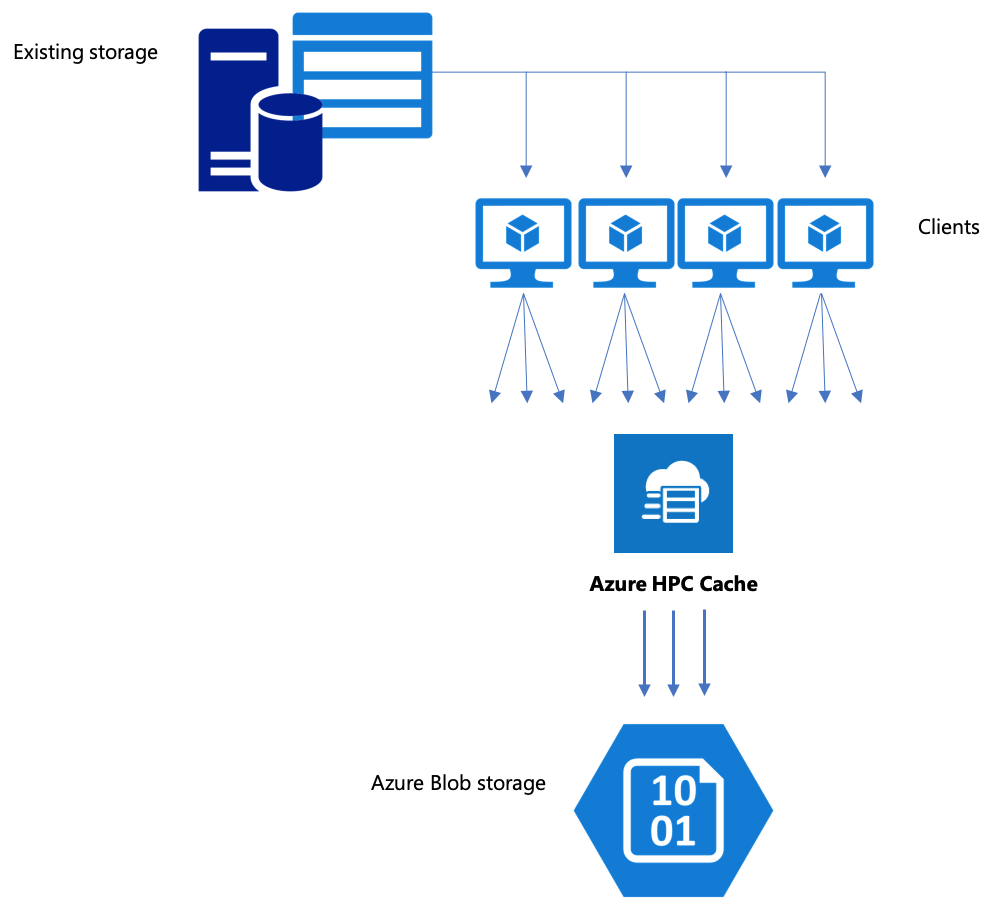
The cp or copy commands that you typically use to transfer data from one storage system to another are single-threaded processes that copy only one file at a time. This means that the file server is ingesting only one file at a time - which is a waste of the cache's resources.
This section explains strategies for creating a multi-client, multi-threaded file copying system to move data to blob storage with Azure HPC Cache. Ini menjelaskan konsep transfer file dan poin keputusan yang dapat digunakan untuk penyalinan data yang efisien menggunakan beberapa klien dan perintah salin sederhana.
Ini juga menjelaskan beberapa utilitas yang dapat membantu. The msrsync utility can be used to partially automate the process of dividing a dataset into buckets and using rsync commands.
parallelcp Skrip adalah utilitas lain yang membaca direktori sumber dan mengeluarkan perintah salin secara otomatis.
Perencanaan strategis
When building a strategy to copy data in parallel, you should understand the tradeoffs in file size, file count, and directory depth.
- Ketika ukurannya kecil, metrik yang relevan adalah file per detik.
- Ketika file besar (10MiBi atau lebih besar), metrik yang diminati adalah byte per detik.
Setiap proses salin memiliki laju throughput dan laju pemindahan file, yang dapat diukur dengan mengukur durasi perintah salin dan memperhitungkan ukuran file serta jumlah file. Explaining how to measure the rates is outside the scope of this document, but it is imperative to understand whether you’ll be dealing with small or large files.
Strategies for parallel data ingest with Azure HPC Cache include:
Manual copying - You can manually create a multi-threaded copy on a client by running more than one copy command at once in the background against predefined sets of files or paths. Read Azure HPC Cache data ingest - manual copy method for details.
Partially automated copying with
msrsync-msrsyncis a wrapper utility that runs multiple parallelrsyncprocesses. For details, read Azure HPC Cache data ingest - msrsync method.Scripted copying with
parallelcp- Learn how to create and run a parallel copy script in Azure HPC Cache data ingest - parallel copy script method.
Langkah berikutnya
After you set up your storage, learn how clients can mount the cache.