Catatan
Akses ke halaman ini memerlukan otorisasi. Anda dapat mencoba masuk atau mengubah direktori.
Akses ke halaman ini memerlukan otorisasi. Anda dapat mencoba mengubah direktori.
Catatan
Paket Basic, Standard, dan Enterprise memasuki periode pensiun pada 17 Maret 2025. Untuk informasi selengkapnya, lihat pengumuman penghentian Azure Spring Apps.
Artikel ini berlaku untuk:✅ Basic/Standard ✅ Enterprise
Artikel ini menunjukkan kepada Anda cara membangun alur kerja CI/CD untuk Azure Spring Apps dengan GitHub Actions.
GitHub Actions mendukung alur kerja siklus hidup pengembangan perangkat lunak otomatis. Dengan GitHub Actions for Azure Spring Apps Anda dapat membuat alur kerja di repositori Anda untuk membangun, menguji, mengemas, merilis, dan menyebarkan ke Azure.
Prasyarat
Contoh ini memerlukan Azure CLI.
Menyiapkan repositori GitHub dan mengautentikasi
Anda memerlukan kredensial prinsipal layanan Azure untuk mengotorisasi aksi login Azure. Untuk mendapatkan info masuk Azure, jalankan perintah berikut ini di komputer lokal Anda:
az login
az ad sp create-for-rbac \
    --role contributor \
    --scopes /subscriptions/<SUBSCRIPTION_ID> \
    --json-auth
Untuk mengakses grup sumber daya tertentu, Anda bisa mengurangi cakupan:
az ad sp create-for-rbac \
    --role contributor \
    --scopes /subscriptions/<SUBSCRIPTION_ID>/resourceGroups/<RESOURCE_GROUP> \
    --json-auth
Perintah harus mengeluarkan objek JSON:
{
    "clientId": "<GUID>",
    "clientSecret": "<GUID>",
    "subscriptionId": "<GUID>",
    "tenantId": "<GUID>",
    ...
}
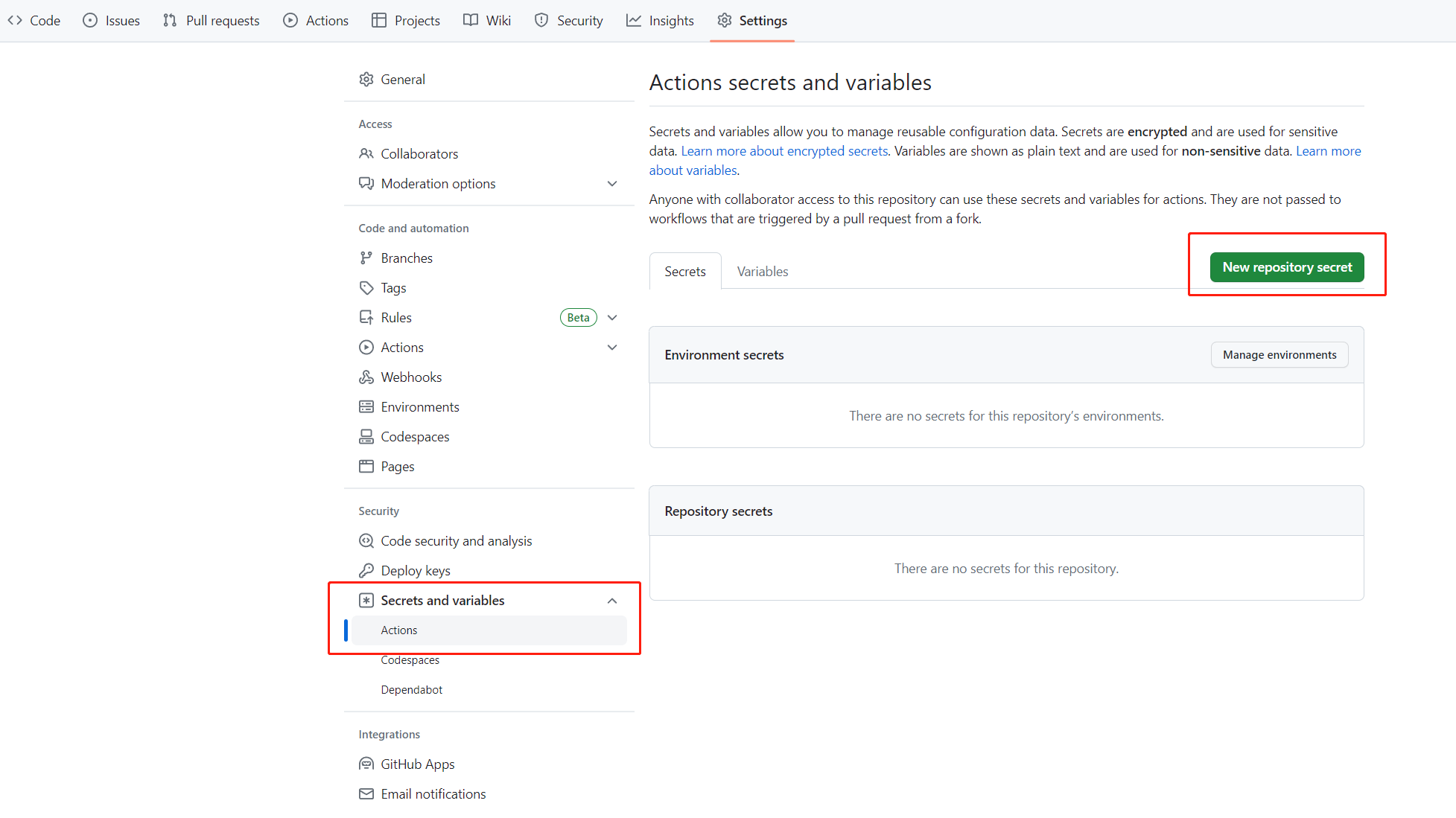
Contoh ini menggunakan sampel steeltoe pada GitHub. Fork repositori, buka halaman repositori GitHub untuk fork, dan pilih tab Pengaturan. Buka menu Rahasia, dan pilih Rahasia baru:
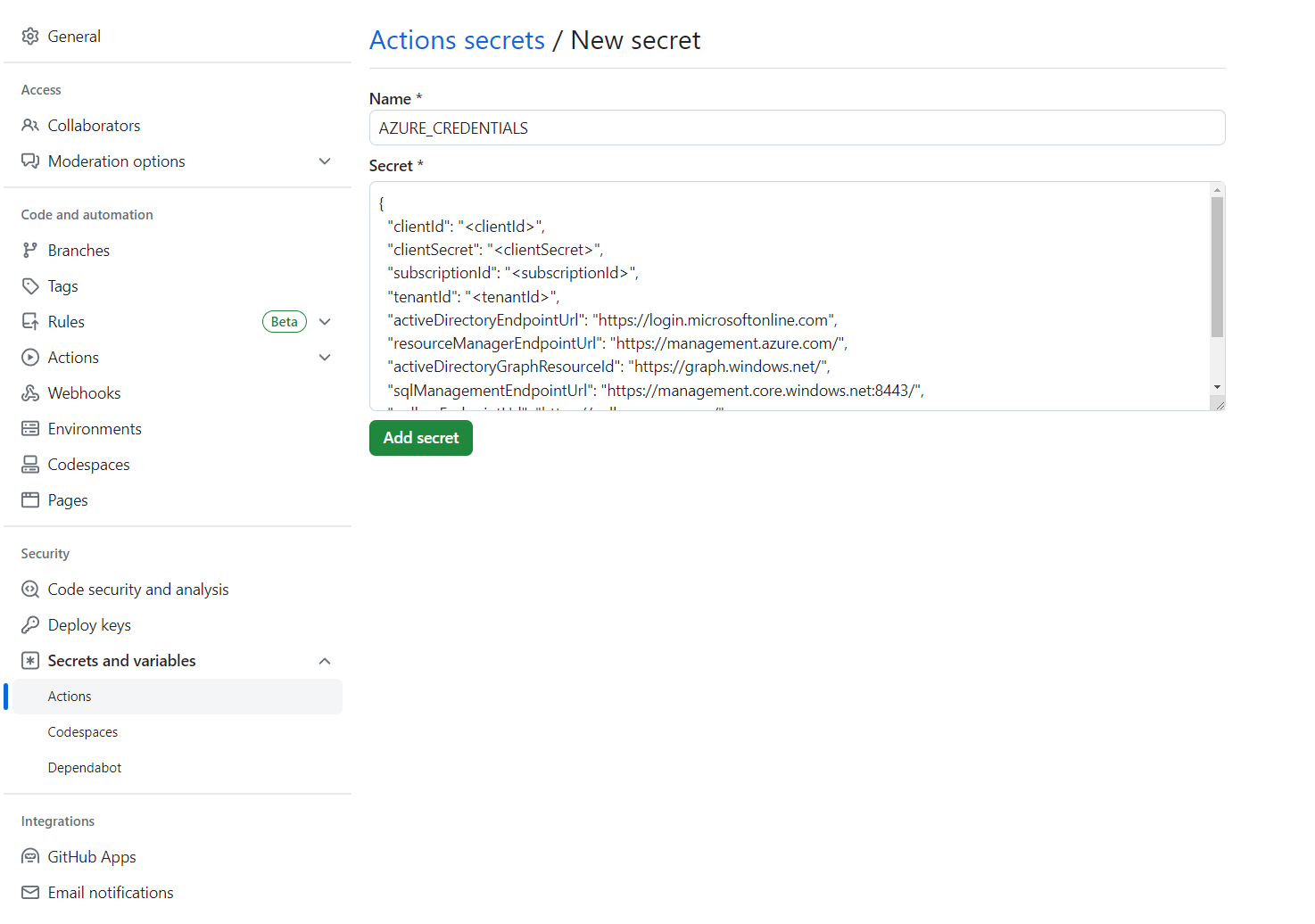
Atur nama rahasia ke AZURE_CREDENTIALS dan nilainya ke string JSON yang Anda temukan di bawah judul Siapkan repositori GitHub Anda dan autentikasi.
Anda juga bisa mendapatkan info masuk login Azure dari Key Vault dalam Tindakan GitHub seperti yang dijelaskan dalam Mengautentikasi Azure Spring dengan Key Vault di Tindakan GitHub.
Memprovisikan instans layanan
Untuk menyediakan instans layanan Azure Spring Apps Anda, jalankan perintah berikut menggunakan CLI Azure.
az extension add --name spring
az group create \
    --name <resource-group-name> \
    --location eastus
az spring create \
    --resource-group <resource-group-name> \
    --name <service-instance-name>
az spring config-server git set \
    --name <service-instance-name> \
    --uri https://github.com/Azure-Samples/azure-spring-apps-samples \
    --label main \
    --search-paths steeltoe-sample/config
Menyusun alur kerja
Alur kerja ditentukan menggunakan opsi berikut.
Bersiap untuk penyebaran dengan Azure CLI
Perintah az spring app create saat ini tidak idempotent. Setelah menjalankannya sekali, Anda mendapatkan kesalahan jika Menjalankan perintah yang sama lagi. Kami merekomendasikan alur kerja ini pada aplikasi dan instans Azure Spring Apps yang ada.
Gunakan perintah Cli Azure berikut ini untuk persiapan:
az config set defaults.group=<service-group-name>
az config set defaults.spring=<service-instance-name>
az spring app create --name planet-weather-provider
az spring app create --name solar-system-weather
Sebarkan dengan Azure CLI secara langsung
Buat file .github/workflows/main.yml di repositori dengan konten berikut. Ganti <your resource group name> dan <your service name> dengan nilai yang benar.
name: Steeltoe-CD

# Controls when the action runs. Triggers the workflow on push or pull request
# events but only for the main branch
on:
  push:
    branches: [ main]

# A workflow run is made up of one or more jobs that can run sequentially or in parallel
jobs:
  # This workflow contains a single job called "build"
  build:
    # The type of runner that the job runs on
    runs-on: ubuntu-latest
    env:
      working-directory: ./steeltoe-sample
      resource-group-name: <your resource group name>
      service-name: <your service name>

    # Supported .NET Core version matrix.
    strategy:
      matrix:
        dotnet: [ '3.1.x' ]

    # Steps represent a sequence of tasks that is executed as part of the job
    steps:
      # Checks-out your repository under $GITHUB_WORKSPACE, so your job can access it
      - uses: actions/checkout@v2

      # Set up .NET Core 3.1 SDK
      - uses: actions/setup-dotnet@v1
        with:
          dotnet-version: ${{ matrix.dotnet }}

      # Set credential for az login
      - uses: azure/login@v1.1
        with:
          creds: ${{ secrets.AZURE_CREDENTIALS }}

      - name: install Azure CLI extension
        run: |
          az extension add --name spring --yes

      - name: Build and package planet-weather-provider app
        working-directory: ${{env.working-directory}}/src/planet-weather-provider
        run: |
          dotnet publish
          az spring app deploy -n planet-weather-provider --runtime-version NetCore_31 --main-entry Microsoft.Azure.SpringCloud.Sample.PlanetWeatherProvider.dll --artifact-path ./publish-deploy-planet.zip -s ${{ env.service-name }} -g ${{ env.resource-group-name }}
      - name: Build solar-system-weather app
        working-directory: ${{env.working-directory}}/src/solar-system-weather
        run: |
          dotnet publish
          az spring app deploy -n solar-system-weather --runtime-version NetCore_31 --main-entry Microsoft.Azure.SpringCloud.Sample.SolarSystemWeather.dll --artifact-path ./publish-deploy-solar.zip -s ${{ env.service-name }} -g ${{ env.resource-group-name }}
Menyiapkan repositori GitHub dan mengautentikasi
Anda memerlukan kredensial prinsipal layanan Azure untuk mengotorisasi aksi login Azure. Untuk mendapatkan info masuk Azure, jalankan perintah berikut ini di komputer lokal Anda:
az login
az ad sp create-for-rbac \
    --role contributor \
    --scopes /subscriptions/<SUBSCRIPTION_ID> \
    --json-auth
Untuk mengakses grup sumber daya tertentu, Anda bisa mengurangi cakupan:
az ad sp create-for-rbac \
    --role contributor \
    --scopes /subscriptions/<SUBSCRIPTION_ID>/resourceGroups/<RESOURCE_GROUP> \
    --json-auth
Perintah harus mengeluarkan objek JSON:
{
    "clientId": "<GUID>",
    "clientSecret": "<GUID>",
    "subscriptionId": "<GUID>",
    "tenantId": "<GUID>",
    ...
}
Contoh ini menggunakan sampel PiggyMetrics di GitHub. Fork sampel, hapus centang Salin cabang Azure saja, buka halaman repositori GitHub, dan pilih tab Pengaturan . Buka menu Rahasia , dan pilih Tambahkan rahasia baru:
Atur nama rahasia ke AZURE_CREDENTIALS dan nilainya ke string JSON yang Anda temukan di bawah judul Siapkan repositori GitHub Anda dan autentikasi.
Anda juga bisa mendapatkan info masuk login Azure dari Key Vault dalam Tindakan GitHub seperti yang dijelaskan dalam Mengautentikasi Azure Spring dengan Key Vault di Tindakan GitHub.
Memprovisikan instans layanan
Untuk menyediakan instans layanan Azure Spring Apps Anda, jalankan perintah berikut menggunakan CLI Azure.
az extension add --name spring
az group create --location eastus --name <resource group name>
az spring create -n <service instance name> -g <resource group name>
az spring config-server git set -n <service instance name> --uri https://github.com/xxx/piggymetrics --label config
Alur kerja contoh dari awal hingga akhir
Contoh berikut menunjukkan skenario penggunaan yang umum.
Meluncurkan
Bagian berikut menunjukkan kepada Anda berbagai opsi untuk menyebarkan aplikasi Anda.
Ke produksi
Azure Spring Apps mendukung penyebaran ke penyebaran dengan artefak bawaan (misalnya, JAR atau .NET Core ZIP) atau arsip kode sumber.
Contoh berikut menyebarkan ke penyebaran produksi default dalam Azure Spring Apps dengan menggunakan file JAR yang dibangun dengan Maven. Contoh ini adalah satu-satunya skenario penyebaran yang mungkin saat menggunakan SKU Dasar:
Catatan
Pola pencarian paket hanya boleh mengembalikan tepat satu paket. Jika tugas build menghasilkan beberapa paket JAR seperti sources.jar dan javadoc.jar, Anda perlu memperbaiki pola pencarian sehingga hanya cocok dengan artefak biner aplikasi.
name: AzureSpringApps
on: push
env:
  ASC_PACKAGE_PATH: ${{ github.workspace }}
  AZURE_SUBSCRIPTION: <azure subscription name>

jobs:
  deploy_to_production:
    runs-on: ubuntu-latest
    name: deploy to production with artifact
    steps:
      - name: Checkout GitHub Action
        uses: actions/checkout@v2

      - name: Set up Java 11
        uses: actions/setup-java@v3
        with:
          distribution: 'temurin'
          java-version: '11'

      - name: maven build, clean
        run: |
          mvn clean package

      - name: Login via Azure CLI
        uses: azure/login@v1
        with:
          creds: ${{ secrets.AZURE_CREDENTIALS }}

      - name: deploy to production with artifact
        uses: azure/spring-apps-deploy@v1
        with:
          azure-subscription: ${{ env.AZURE_SUBSCRIPTION }}
          action: Deploy
          service-name: <service instance name>
          app-name: <app name>
          use-staging-deployment: false
          package: ${{ env.ASC_PACKAGE_PATH }}/**/*.jar
Contoh berikut menyebarkan ke penyebaran produksi default di Azure Spring Apps menggunakan kode sumber.
name: AzureSpringApps
on: push
env:
  ASC_PACKAGE_PATH: ${{ github.workspace }}
  AZURE_SUBSCRIPTION: <azure subscription name>

jobs:
  deploy_to_production:
    runs-on: ubuntu-latest
    name: deploy to production with source code
    steps:
      - name: Checkout GitHub Action
        uses: actions/checkout@v2

      - name: Login via Azure CLI
        uses: azure/login@v1
        with:
          creds: ${{ secrets.AZURE_CREDENTIALS }}

      - name: deploy to production step with source code
        uses: azure/spring-apps-deploy@v1
        with:
          azure-subscription: ${{ env.AZURE_SUBSCRIPTION }}
          action: deploy
          service-name: <service instance name>
          app-name: <app name>
          use-staging-deployment: false
          package: ${{ env.ASC_PACKAGE_PATH }}
Contoh berikut mengimplementasikan pada penerapan produksi default di Azure Spring Apps menggunakan kode sumber dalam rencana Enterprise. Anda dapat menentukan penyusun mana yang akan digunakan untuk menyebarkan tindakan menggunakan builder opsi .
name: AzureSpringApps
on: push
env:
  ASC_PACKAGE_PATH: ${{ github.workspace }}
  AZURE_SUBSCRIPTION: <azure subscription name>

jobs:
  deploy_to_production:
    runs-on: ubuntu-latest
    name: deploy to production with source code
    steps:
      - name: Checkout GitHub Action
        uses: actions/checkout@v2

      - name: Login via Azure CLI
        uses: azure/login@v1
        with:
          creds: ${{ secrets.AZURE_CREDENTIALS }}

      - name: deploy to production step with source code in the Enterprise plan
        uses: azure/spring-apps-deploy@v1
        with:
          azure-subscription: ${{ env.AZURE_SUBSCRIPTION }}
          action: deploy
          service-name: <service instance name>
          app-name: <app name>
          use-staging-deployment: false
          package: ${{ env.ASC_PACKAGE_PATH }}
          builder: <builder>
Contoh berikut menerapkan ke penyebaran lingkungan produksi default di Azure Spring Apps dengan image kontainer yang ada.
name: AzureSpringApps
on: push
env:
  ASC_PACKAGE_PATH: ${{ github.workspace }}
  AZURE_SUBSCRIPTION: <azure subscription name>

jobs:
  deploy_to_production:
    runs-on: ubuntu-latest
    name: deploy to production with source code
    steps:
      - name: Checkout GitHub Action
        uses: actions/checkout@v2

      - name: Login via Azure CLI
        uses: azure/login@v1
        with:
          creds: ${{ secrets.AZURE_CREDENTIALS }}

      - name: Deploy Custom Image
        uses: Azure/spring-apps-deploy@v1
        with:
          azure-subscription: ${{ env.AZURE_SUBSCRIPTION }}
          action: deploy
          service-name: <service instance name>
          app-name: <app name>
          deployment-name: <deployment name>
          container-registry: <your container image registry>
          registry-username: ${{ env.REGISTRY_USERNAME }}
          registry-password: ${{ secrets.REGISTRY_PASSWORD }}
          container-image: <your image tag>
Selama penyebaran, Anda dapat mencapai lebih banyak fungsionalitas dengan menggunakan lebih banyak argumen. Untuk informasi selengkapnya, lihat bagian Argumen dari GitHub Action untuk menyebarkan ke Azure Spring Apps.
Biru-hijau
Contoh berikut diterapkan pada instalasi tahap pengujian yang sudah ada. Penyebaran ini tidak menerima lalu lintas produksi sampai ditentukan sebagai penyebaran produksi. Anda dapat mengatur "use-staging-deployment true" untuk menemukan penyebaran penahapan secara otomatis atau menentukan nama penyebaran tertentu. Kami hanya fokus pada tindakan spring-apps-deploy dan mengabaikan pekerjaan persiapan pada sisa artikel.
# environment preparation configurations omitted
    steps:
      - name: blue green deploy step use-staging-deployment
        uses: azure/spring-apps-deploy@v1
        with:
          azure-subscription: ${{ env.AZURE_SUBSCRIPTION }}
          action: deploy
          service-name: <service instance name>
          app-name: <app name>
          use-staging-deployment: true
          package: ${{ env.ASC_PACKAGE_PATH }}/**/*.jar
# environment preparation configurations omitted
    steps:
      - name: blue green deploy step with deployment-name
        uses: azure/spring-apps-deploy@v1
        with:
          azure-subscription: ${{ env.AZURE_SUBSCRIPTION }}
          action: deploy
          service-name: <service instance name>
          app-name: <app name>
          deployment-name: staging
          package: ${{ env.ASC_PACKAGE_PATH }}/**/*.jar
Untuk informasi selengkapnya tentang penyebaran biru-hijau, termasuk pendekatan alternatif, lihat Strategi penyebaran biru-hijau.
Mengatur penyebaran produksi
Contoh berikut menetapkan penyebaran staging saat ini sebagai produksi, dengan efektif menukar penyebaran mana yang menerima lalu lintas produksi.
# environment preparation configurations omitted
    steps:
      - name: set production deployment step
        uses: azure/spring-apps-deploy@v1
        with:
          azure-subscription: ${{ env.AZURE_SUBSCRIPTION }}
          action: set-production
          service-name: <service instance name>
          app-name: <app name>
          use-staging-deployment: true
Menghapus penyebaran penahapan
Tindakan ini Delete Staging Deployment memungkinkan Anda menghapus penempatan yang tidak mendapatkan lalu lintas produksi. Penghapusan ini membebaskan sumber daya yang digunakan oleh penyebaran tersebut dan memberikan ruang untuk penyebaran penahapan baru:
# environment preparation configurations omitted
    steps:
      - name: Delete staging deployment step
        uses: azure/spring-apps-deploy@v1
        with:
          azure-subscription: ${{ env.AZURE_SUBSCRIPTION }}
          action: delete-staging-deployment
          service-name: <service instance name>
          app-name: <app name>
Membuat atau memperbarui build (hanya paket Perusahaan)
Contoh berikut membuat atau memperbarui sumber daya build dalam paket Enterprise:
# environment preparation configurations omitted
    steps:
      - name: Create or update build
        uses: azure/spring-apps-deploy@v1
        with:
          azure-subscription: ${{ env.AZURE_SUBSCRIPTION }}
          action: build
          service-name: <service instance name>
          build-name: <build name>
          package: ${{ env.ASC_PACKAGE_PATH }}
          builder: <builder>
Hapus build (hanya untuk rencana Enterprise)
Contoh berikut menghapus sumber daya build dalam paket Enterprise:
# environment preparation configurations omitted
    steps:
      - name: Delete build
        uses: azure/spring-apps-deploy@v1
        with:
          azure-subscription: ${{ env.AZURE_SUBSCRIPTION }}
          action: delete-build
          service-name: <service instance name>
          build-name: <build name>
Sebarkan dengan Maven Plugin
Opsi lain adalah menggunakan Plugin Maven untuk menyebarkan Jar dan memperbarui pengaturan Aplikasi. Perintah mvn azure-spring-apps:deploy bersifat idempotent dan secara otomatis membuat aplikasi jika diperlukan. Anda tidak perlu membuat aplikasi yang sesuai terlebih dahulu.
name: AzureSpringApps
on: push

jobs:
  build-and-deploy:
    runs-on: ubuntu-latest
    steps:

    - uses: actions/checkout@main

    - name: Set up Java 11
      uses: actions/setup-java@v3
      with:
        distribution: 'temurin'
        java-version: '11'

    - name: maven build, clean
      run: |
        mvn clean package -DskipTests

    # Maven plugin can consume this authentication method automatically
    - name: Azure Login
      uses: azure/login@v1
      with:
        creds: ${{ secrets.AZURE_CREDENTIALS }}

    # Maven deploy, make sure you have correct configurations in your pom.xml
    - name: deploy to Azure Spring Apps using Maven
      run: |
        mvn azure-spring-apps:deploy
Jalankan alur kerja
GitHub Actions harus diaktifkan secara otomatis setelah Anda mengunggah .github/workflow/main.yml ke GitHub. Tindakan dipicu saat Anda mendorong komit baru. Jika Anda membuat file ini di browser, tindakan Anda seharusnya sudah berjalan.
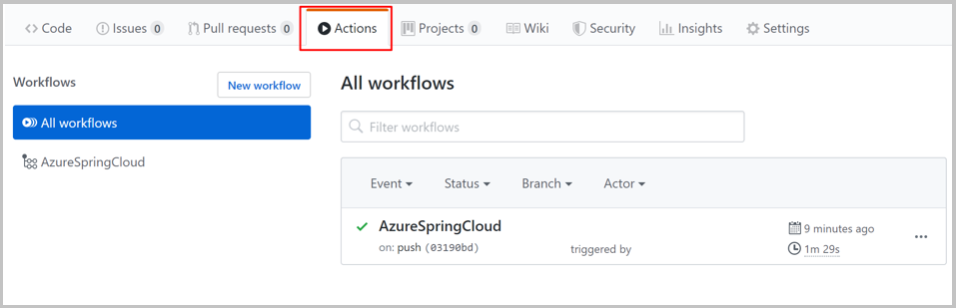
Untuk memverifikasi bahwa tindakan telah diaktifkan, pilih tab Tindakan di halaman repositori GitHub:
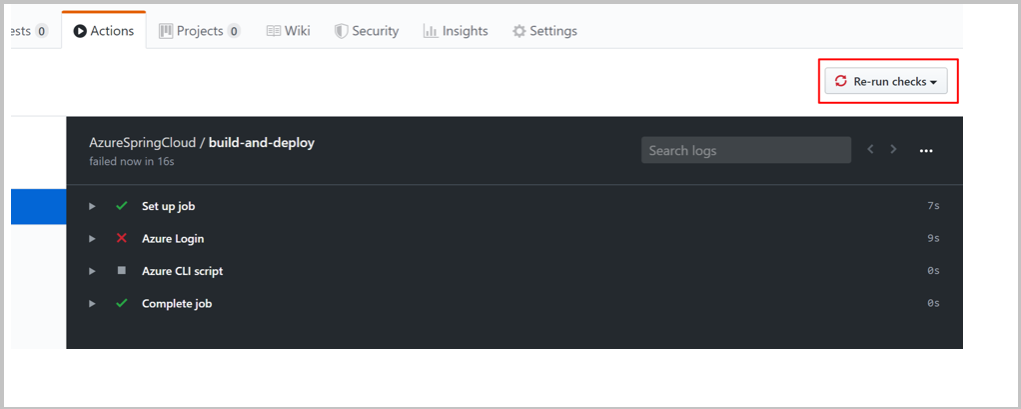
Jika tindakan Anda mengalami kesalahan, misalnya, jika Anda belum mengatur kredensial Azure, Anda dapat menjalankan ulang pemeriksaan setelah memperbaiki kesalahan. Pada halaman repositori GitHub, pilih Tindakan, pilih tugas alur kerja tertentu, lalu pilih tombol Jalankan ulang pemeriksaan untuk menjalankan ulang pemeriksaan: