LineStackingStrategy Enum
Definisi
Penting
Beberapa informasi terkait produk prarilis yang dapat diubah secara signifikan sebelum dirilis. Microsoft tidak memberikan jaminan, tersirat maupun tersurat, sehubungan dengan informasi yang diberikan di sini.
Menjelaskan mekanisme di mana kotak garis ditentukan untuk setiap baris.
public enum class LineStackingStrategypublic enum LineStackingStrategytype LineStackingStrategy = Public Enum LineStackingStrategy- Warisan
Bidang
| Nama | Nilai | Deskripsi |
|---|---|---|
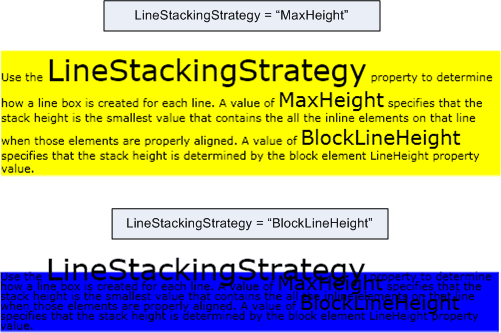
| BlockLineHeight | 0 | Tinggi tumpukan ditentukan oleh nilai properti tinggi baris elemen blok. |
| MaxHeight | 1 | Tinggi tumpukan adalah nilai terkecil yang berisi semua elemen sebaris pada baris tersebut ketika elemen tersebut diratakan dengan benar. |
Contoh
Contoh berikut menunjukkan cara menggunakan LineStackingStrategy properti untuk menentukan bagaimana kotak baris dibuat untuk baris teks dari TextBlock. Yang pertama TextBlock memiliki LineStackingStrategy nilai MaxHeight dan yang kedua TextBlock memiliki nilai BlockLineHeight.
<Page xmlns="http://schemas.microsoft.com/winfx/2006/xaml/presentation"
  xmlns:x="http://schemas.microsoft.com/winfx/2006/xaml">
  <StackPanel>

    <!-- This TextBlock has a LineStackingStrategy set to "MaxHeight". -->
    <TextBlock LineStackingStrategy="MaxHeight" LineHeight="10" Width="500" TextWrapping="Wrap"
     Background="Yellow">
      Use the <Span FontSize="30">LineStackingStrategy</Span> property to determine how a line box is
      created for each line. A value of <Span FontSize="20">MaxHeight</Span> specifies that the stack
      height is the smallest value that contains all the inline elements on that line when those
      elements are properly aligned. A value of <Span FontSize="20">BlockLineHeight</Span> specifies
      that the stack height is determined by the block element LineHeight property value.
    </TextBlock>

    <!-- Here is the same TextBlock but the LineStackingStrategy is set to "BlockLineHeight". -->
    <TextBlock LineStackingStrategy="BlockLineHeight" LineHeight="10" Width="500" TextWrapping="Wrap"
     Background="Blue" Margin="0,40,0,0">
      Use the <Span FontSize="30">LineStackingStrategy</Span> property to determine how a line box is
      created for each line. A value of <Span FontSize="20">MaxHeight</Span> specifies that the stack
      height is the smallest value that contains all the inline elements on that line when those
      elements are properly aligned. A value of <Span FontSize="20">BlockLineHeight</Span> specifies
      that the stack height is determined by the block element LineHeight property value.
    </TextBlock>

  </StackPanel>
</Page>
Ilustrasi berikut menunjukkan hasil kode di atas.