Catatan
Akses ke halaman ini memerlukan otorisasi. Anda dapat mencoba masuk atau mengubah direktori.
Akses ke halaman ini memerlukan otorisasi. Anda dapat mencoba mengubah direktori.
Tutorial ini mengeksplorasi integrasi pola RAG menggunakan model OpenAI dan kemampuan pencarian vektor di aplikasi .NET. Aplikasi sampel melakukan pencarian vektor pada data kustom yang disimpan di Azure Cosmos DB untuk MongoDB dan lebih menyempurnakan respons menggunakan model AI generatif, seperti gpt-5. Di bagian berikut, Anda akan menyiapkan aplikasi sampel dan menjelajahi contoh kode kunci yang menunjukkan konsep ini.
Prasyarat
- .NET 8.0
- Akun Azure
- Layanan Azure Cosmos DB untuk MongoDB vCore
- Layanan Azure OpenAI
- Menerapkan
text-embedding-ada-002model untuk fitur penyematan - Menerapkan model
gpt-35-turbountuk melengkapi obrolan
- Menerapkan
Gambaran umum aplikasi
Aplikasi Cosmos Recipe Guide memungkinkan Anda melakukan pencarian berbasis vektor dan AI terhadap sekumpulan data resep. Cari resep yang tersedia secara langsung atau gunakan nama bahan di aplikasi untuk menemukan resep terkait. Aplikasi dan bagian di depan memandu Anda melalui alur kerja berikut untuk menunjukkan jenis fungsionalitas ini:
Unggah data sampel ke database Azure Cosmos DB for MongoDB.
Buat penyematan dan indeks vektor untuk data sampel yang diunggah menggunakan model Azure OpenAI
text-embedding-3-small.Lakukan pencarian kesamaan vektor berdasarkan perintah pengguna.
Gunakan model penyelesaian Azure OpenAI
gpt-35-turbountuk menyusun jawaban yang lebih bermakna berdasarkan data hasil pencarian.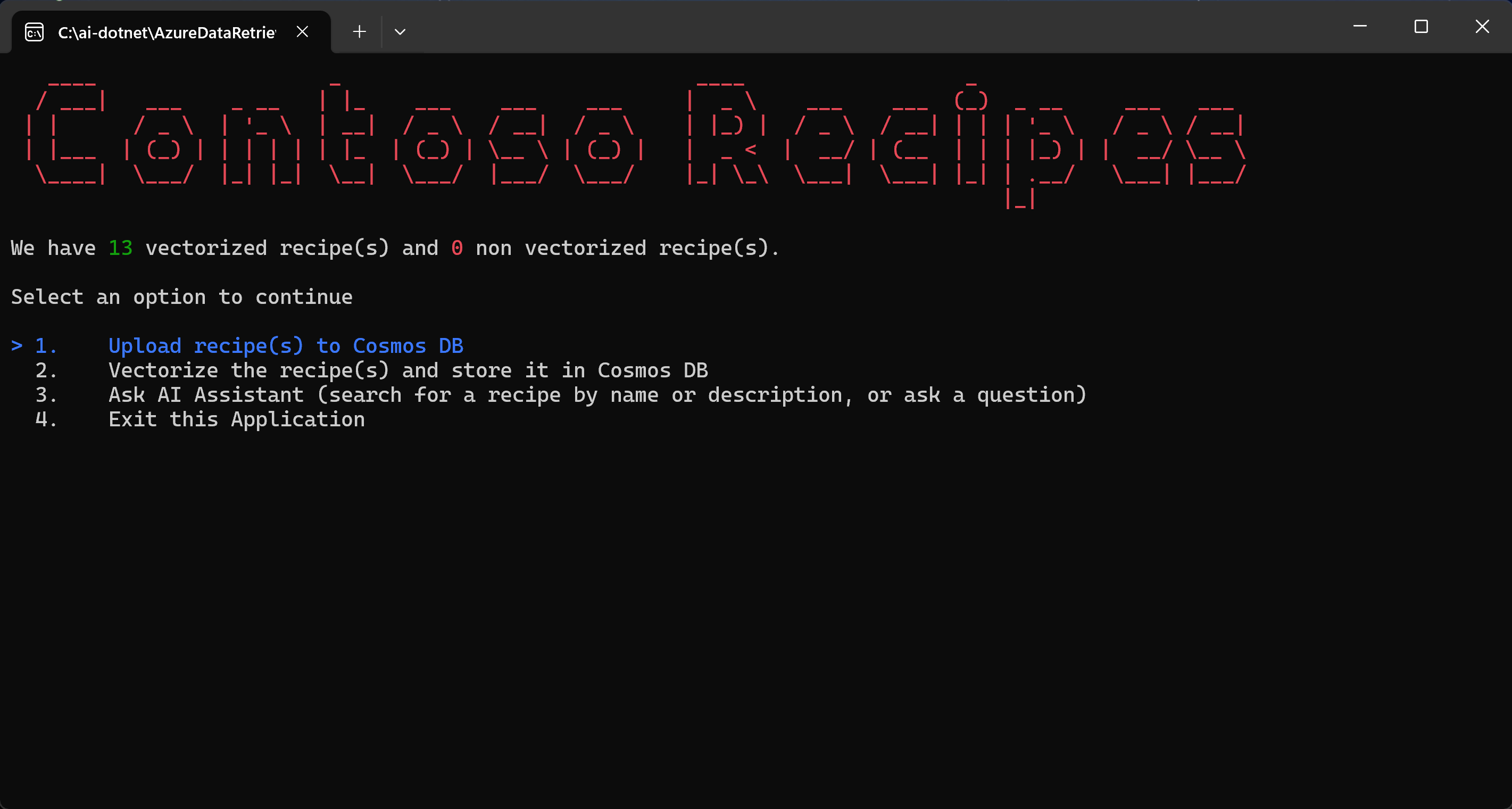
Get started
Kloning repositori GitHub berikut:
git clone https://github.com/microsoft/AzureDataRetrievalAugmentedGenerationSamples.gitDi folder C#/CosmosDB-MongoDBvCore , buka file CosmosRecipeGuide.sln .
Dalam file appsettings.json , ganti nilai konfigurasi berikut dengan nilai Azure OpenAI dan Azure Cosmos DB untuk MongoDB Anda:
"OpenAIEndpoint": "https://<your-service-name>.openai.azure.com/",
"OpenAIKey": "<your-API-key>",
"OpenAIEmbeddingDeployment": "<your-ADA-deployment-name>",
"OpenAIcompletionsDeployment": "<your-GPT-deployment-name>",
"MongoVcoreConnection": "<your-Mongo-connection-string>"
Luncurkan aplikasi dengan menekan tombol Mulai di bagian atas Visual Studio.
Menjelajahi aplikasi
Saat Anda menjalankan aplikasi untuk pertama kalinya, aplikasi terhubung ke Azure Cosmos DB dan melaporkan bahwa belum ada resep yang tersedia. Ikuti langkah-langkah yang ditampilkan oleh aplikasi untuk memulai alur kerja inti.
Pilih Unggah resep ke Cosmos DB dan tekan Enter. Perintah ini membaca sampel file JSON dari proyek lokal dan mengunggahnya ke akun Cosmos DB.
Kode dari kelas Utility.cs mengurai file JSON lokal.
public static List<Recipe> ParseDocuments(string Folderpath)
{
    List<Recipe> recipes = new List<Recipe>();

    Directory.GetFiles(Folderpath)
        .ToList()
        .ForEach(f =>
        {
            var jsonString= System.IO.File.ReadAllText(f);
            Recipe recipe = JsonConvert.DeserializeObject<Recipe>(jsonString);
            recipe.id = recipe.name.ToLower().Replace(" ", "");
            recipes.Add(recipe);
        }
    );

    return recipes;
}
Metode
UpsertVectorAsyncdalam file VCoreMongoService.cs mengunggah dokumen ke Azure Cosmos DB untuk MongoDB.public async Task UpsertVectorAsync(Recipe recipe) { BsonDocument document = recipe.ToBsonDocument(); if (!document.Contains("_id")) { Console.WriteLine("UpsertVectorAsync: Document does not contain _id."); throw new ArgumentException("UpsertVectorAsync: Document does not contain _id."); } string? _idValue = document["_id"].ToString(); try { var filter = Builders<BsonDocument>.Filter.Eq("_id", _idValue); var options = new ReplaceOptions { IsUpsert = true }; await _recipeCollection.ReplaceOneAsync(filter, document, options); } catch (Exception ex) { Console.WriteLine($"Exception: UpsertVectorAsync(): {ex.Message}"); throw; } }Pilih Vektorisasi resep dan simpan di Cosmos DB.
Item JSON yang diunggah ke Cosmos DB tidak berisi penyematan dan oleh karena itu tidak dioptimalkan untuk RAG melalui pencarian vektor. Penyematan adalah representasi numerik yang padat informasi dari arti semantik dari sepotong teks. Pencarian vektor dapat menemukan item dengan penyematan yang serupa secara kontekstual.
Metode
GetEmbeddingsAsyncdalam file OpenAIService.cs membuat penyematan untuk setiap item dalam database.public async Task<float[]?> GetEmbeddingsAsync(dynamic data) { try { EmbeddingsOptions options = new EmbeddingsOptions(data) { Input = data }; var response = await _openAIClient.GetEmbeddingsAsync(openAIEmbeddingDeployment, options); Embeddings embeddings = response.Value; float[] embedding = embeddings.Data[0].Embedding.ToArray(); return embedding; } catch (Exception ex) { Console.WriteLine($"GetEmbeddingsAsync Exception: {ex.Message}"); return null; } }CreateVectorIndexIfNotExistsdalam file VCoreMongoService.cs membuat indeks vektor, yang memungkinkan Anda melakukan pencarian kesamaan vektor.public void CreateVectorIndexIfNotExists(string vectorIndexName) { try { //Find if vector index exists in vectors collection using (IAsyncCursor<BsonDocument> indexCursor = _recipeCollection.Indexes.List()) { bool vectorIndexExists = indexCursor.ToList().Any(x => x["name"] == vectorIndexName); if (!vectorIndexExists) { BsonDocumentCommand<BsonDocument> command = new BsonDocumentCommand<BsonDocument>( BsonDocument.Parse(@" { createIndexes: 'Recipe', indexes: [{ name: 'vectorSearchIndex', key: { embedding: 'cosmosSearch' }, cosmosSearchOptions: { kind: 'vector-ivf', numLists: 5, similarity: 'COS', dimensions: 1536 } }] }")); BsonDocument result = _database.RunCommand(command); if (result["ok"] != 1) { Console.WriteLine("CreateIndex failed with response: " + result.ToJson()); } } } } catch (MongoException ex) { Console.WriteLine("MongoDbService InitializeVectorIndex: " + ex.Message); throw; } }Pilih opsi Minta Asisten AI (cari resep berdasarkan nama atau deskripsi, atau ajukan pertanyaan) di aplikasi untuk menjalankan kueri pengguna.
Aplikasi ini mengonversi kueri pengguna ke penyematan menggunakan layanan OpenAI dan model penyematan, lalu mengirim penyematan ke Azure Cosmos DB untuk MongoDB untuk melakukan pencarian vektor. Metode SearchAsync dalam file VCoreMongoService.cs melakukan pencarian vektor untuk menemukan vektor yang dekat dengan vektor yang disediakan dan mengembalikan daftar dokumen dari Azure Cosmos DB untuk MongoDB vCore.
public async Task<List<Recipe>> VectorSearchAsync(float[] queryVector)
    {
        List<string> retDocs = new List<string>();
        string resultDocuments = string.Empty;

        try
        {
            //Search Azure Cosmos DB for MongoDB vCore collection for similar embeddings
            //Project the fields that are needed
            BsonDocument[] pipeline = new BsonDocument[]
            {
                BsonDocument.Parse(
                    @$"{{$search: {{
                            cosmosSearch:
                                {{ vector: [{string.Join(',', queryVector)}],
                                   path: 'embedding',
                                   k: {_maxVectorSearchResults}}},
                                   returnStoredSource:true
                                }}
                            }}"),
                BsonDocument.Parse($"{{$project: {{embedding: 0}}}}"),
            };

            var bsonDocuments = await _recipeCollection
                .Aggregate<BsonDocument>(pipeline).ToListAsync();

            var recipes = bsonDocuments
                .ToList()
                .ConvertAll(bsonDocument =>
                    BsonSerializer.Deserialize<Recipe>(bsonDocument));
            return recipes;
        }
        catch (MongoException ex)
        {
            Console.WriteLine($"Exception: VectorSearchAsync(): {ex.Message}");
            throw;
        }
    }
Metode ini
GetChatCompletionAsyncmenghasilkan respons penyelesaian obrolan yang ditingkatkan berdasarkan permintaan pengguna dan hasil pencarian vektor terkait.public async Task<(string response, int promptTokens, int responseTokens)> GetChatCompletionAsync(string userPrompt, string documents) { try { ChatMessage systemMessage = new ChatMessage( ChatRole.System, _systemPromptRecipeAssistant + documents); ChatMessage userMessage = new ChatMessage( ChatRole.User, userPrompt); ChatCompletionsOptions options = new() { Messages = { systemMessage, userMessage }, MaxTokens = openAIMaxTokens, Temperature = 0.5f, //0.3f, NucleusSamplingFactor = 0.95f, FrequencyPenalty = 0, PresencePenalty = 0 }; Azure.Response<ChatCompletions> completionsResponse = await openAIClient.GetChatCompletionsAsync(openAICompletionDeployment, options); ChatCompletions completions = completionsResponse.Value; return ( response: completions.Choices[0].Message.Content, promptTokens: completions.Usage.PromptTokens, responseTokens: completions.Usage.CompletionTokens ); } catch (Exception ex) { string message = $"OpenAIService.GetChatCompletionAsync(): {ex.Message}"; Console.WriteLine(message); throw; } }Aplikasi ini juga menggunakan rekayasa prompt untuk memastikan batas layanan OpenAI dan memformat respons untuk resep yang disediakan.
//System prompts to send with user prompts to instruct the model for chat session
private readonly string _systemPromptRecipeAssistant = @"
    You are an intelligent assistant for Contoso Recipes.
    You are designed to provide helpful answers to user questions about
    recipes, cooking instructions provided in JSON format below.

    Instructions:
    - Only answer questions related to the recipe provided below.
    - Don't reference any recipe not provided below.
    - If you're unsure of an answer, say ""I don't know"" and recommend users search themselves.
    - Your response  should be complete.
    - List the Name of the Recipe at the start of your response followed by step by step cooking instructions.
    - Assume the user is not an expert in cooking.
    - Format the content so that it can be printed to the Command Line console.
    - In case there is more than one recipe you find, let the user pick the most appropriate recipe.";
Berkolaborasi dengan kami di GitHub
Sumber untuk konten ini dapat ditemukan di GitHub, yang juga dapat Anda gunakan untuk membuat dan meninjau masalah dan menarik permintaan. Untuk informasi selengkapnya, lihat panduan kontributor kami.
