Catatan
Akses ke halaman ini memerlukan otorisasi. Anda dapat mencoba masuk atau mengubah direktori.
Akses ke halaman ini memerlukan otorisasi. Anda dapat mencoba mengubah direktori.
Artikel ini memandu Anda membangun antarmuka obrolan yang sepenuhnya disesuaikan untuk situs Power Pages Anda menggunakan API klien agent. Tidak seperti widget obrolan standar, pendekatan ini memberi Anda kontrol penuh atas desain antarmuka pengguna, gaya, dan pengalaman pengguna.
Langkah 1: Membuat agen situs
Masuk ke Power Pages.
Pilih + Edit.
Buka Siapkan ruang kerja, lalu pilih Agen.
Aktifkan Agen situs menggunakan sakelar pengalih untuk membuat agen.
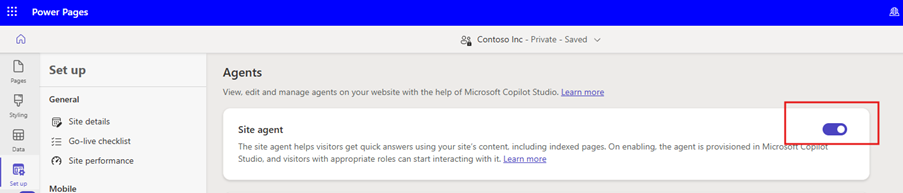
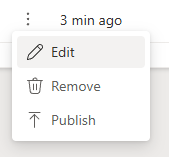
Setelah penyediaan berhasil, Power Pages menambahkan agen baru dengan nama situs yang ditambahkan sufiks "bot." Agen muncul di bagian Agents pada daftar situs. Pilih tiga titik vertikal di samping agen yang baru disediakan, lalu pilih Edit.
Pastikan tombol Tampilkan di Widget Obrolan tetap pada posisi Aktif.
Note
Saat diatur ke Nonaktif, agen tidak tersedia untuk pengguna mana pun.
Pilih peran Administrator untuk pengguna yang dapat berinteraksi dengan agen.
Salin nama skema yang akan digunakan nanti.
Pilih Simpan.
Langkah 2. Membuat halaman web
Luncurkan studio desain Power Pages. Untuk informasi selengkapnya, lihat Menggunakan studio desain.
Di ruang kerja Halaman , pilih + Halaman.
Di kotak dialog Jelaskan halaman untuk membuatnya , pilih Cara lain untuk menambahkan halaman.
Dalam kotak dialog Tambahkan halaman , masukkan detail untuk halaman sebagai berikut:
- Di bidang Name, masukkan Virtual Assistant dan pilih Mulai dari tata letak kosong.
- Pilih Tambahkan.
Pilih opsi Edit Kode di sudut kanan atas.
Dalam kotak dialog Edit di Visual Studio Code untuk Web, pilih Buka Visual Studio Code.
Ganti kode yang ditemukan di halaman HTML dengan yang berikut ini:
<div class="row sectionBlockLayout text-start" style="min-height:auto;padding:8px">
<div class="container" style="display:flex;flex-wrap:wrap">
<div class="col-lg-12 columnBlockLayout" style="padding:0;margin:0;min-height:200px">
<style>
#va-shell {
--accent: #0f6cbd;
--accent-dk: #0c57a8;
--bg: #f5f7fa;
--bot-bg: #f0f4f9;
--fg: #1b2333;
--border: #e2e8f0;
display: flex;
flex-direction: column;
max-width: 860px;
height: calc(100vh - 150px);
min-height: 480px;
margin: 20px auto;
background: #fff;
border-radius: 16px;
box-shadow: 0 4px 24px rgba(0, 0, 0, .10);
border: 1px solid var(--border);
overflow: hidden;
font: 15px/1.55 -apple-system, BlinkMacSystemFont, "Segoe UI", sans-serif;
color: var(--fg);
}
/* Transcript */
#va-transcript {
flex: 1;
min-height: 0;
overflow-y: auto;
padding: 20px;
background: var(--bg);
display: flex;
flex-direction: column;
gap: 4px;
scroll-behavior: smooth;
}
#va-transcript::-webkit-scrollbar {
width: 6px;
}
#va-transcript::-webkit-scrollbar-thumb {
background: #c8d0db;
border-radius: 3px;
}
/* Message rows */
.msg {
display: flex;
align-items: flex-end;
gap: 8px;
max-width: 78%;
animation: fadeUp .18s ease-out;
}
.msg.user {
flex-direction: row-reverse;
align-self: flex-end;
}
.msg.bot,
.msg.error {
align-self: flex-start;
}
@keyframes fadeUp {
from {
opacity: 0;
transform: translateY(6px);
}
to {
opacity: 1;
transform: none;
}
}
.bot-icon {
width: 28px;
height: 28px;
border-radius: 50%;
background: var(--accent);
color: #fff;
display: grid;
place-items: center;
flex-shrink: 0;
}
.bot-icon svg {
width: 14px;
height: 14px;
}
.bubble {
padding: 10px 14px;
border-radius: 10px;
word-break: break-word;
}
.user .bubble {
background: var(--accent);
color: #fff;
border-bottom-right-radius: 3px;
}
.bot .bubble {
background: var(--bot-bg);
border-bottom-left-radius: 3px;
}
.error .bubble {
background: #fef2f2;
color: #b91c1c;
border: 1px solid #fca5a5;
border-bottom-left-radius: 3px;
}
.bubble p {
margin: 0 0 .5em;
}
.bubble p:last-child {
margin: 0;
}
.bubble strong {
font-weight: 600;
}
.bubble code {
font-family: Consolas, monospace;
font-size: .88em;
background: rgba(0, 0, 0, .08);
padding: 1px 5px;
border-radius: 4px;
}
.user .bubble code {
background: rgba(255, 255, 255, .2);
}
.bubble pre {
background: #1e293b;
color: #e2e8f0;
padding: 12px;
border-radius: 8px;
overflow-x: auto;
margin: 8px 0;
font-size: .85em;
}
.bubble pre code {
background: none;
padding: 0;
}
.bubble a {
color: inherit;
text-decoration: underline;
text-underline-offset: 2px;
}
.bubble ul,
.bubble ol {
margin: 6px 0;
padding-left: 20px;
}
.ts {
font-size: 11px;
opacity: .5;
margin-top: 4px;
display: block;
}
.user .ts {
text-align: right;
}
/* Typing indicator */
#va-typing {
display: none;
align-items: flex-end;
gap: 8px;
align-self: flex-start;
padding-bottom: 4px;
}
#va-typing.show {
display: flex;
animation: fadeUp .18s ease-out;
}
#va-dots {
background: var(--bot-bg);
border-radius: 10px;
border-bottom-left-radius: 3px;
padding: 12px 16px;
display: flex;
gap: 5px;
}
.dot {
width: 7px;
height: 7px;
border-radius: 50%;
background: #94a3b8;
animation: bounce 1.2s infinite;
}
.dot:nth-child(2) {
animation-delay: .2s;
}
.dot:nth-child(3) {
animation-delay: .4s;
}
@keyframes bounce {
0%,
60%,
100% {
transform: translateY(0);
opacity: .5;
}
30% {
transform: translateY(-5px);
opacity: 1;
}
}
/* Date divider */
.divider {
display: flex;
align-items: center;
gap: 10px;
color: #94a3b8;
font-size: 12px;
margin: 10px 0 6px;
user-select: none;
}
.divider::before,
.divider::after {
content: '';
flex: 1;
height: 1px;
background: var(--border);
}
/* Composer */
#va-composer {
padding: 12px 16px 10px;
background: #fff;
border-top: 1px solid var(--border);
flex-shrink: 0;
}
#va-wrap {
display: flex;
align-items: flex-end;
gap: 8px;
background: var(--bg);
border: 1.5px solid var(--border);
border-radius: 12px;
padding: 8px 8px 8px 14px;
transition: border-color .15s, box-shadow .15s;
}
#va-wrap:focus-within {
border-color: var(--accent);
box-shadow: 0 0 0 3px rgba(15, 108, 189, .12);
}
#va-input {
flex: 1;
border: none;
background: none;
outline: none;
resize: none;
font: inherit;
color: inherit;
max-height: 160px;
overflow-y: auto;
}
#va-input::placeholder {
color: #94a3b8;
}
#va-input:disabled {
opacity: .55;
}
#va-send {
width: 38px;
height: 38px;
border-radius: 9px;
border: none;
background: var(--accent);
color: #fff;
cursor: pointer;
display: grid;
place-items: center;
flex-shrink: 0;
transition: background .15s, transform .1s, opacity .15s;
}
#va-send:hover:not(:disabled) {
background: var(--accent-dk);
transform: scale(1.05);
}
#va-send:disabled {
opacity: .4;
cursor: not-allowed;
}
#va-hint {
margin: 6px 0 0;
font-size: 12px;
color: #94a3b8;
text-align: center;
}
#va-hint kbd {
background: #f1f5f9;
border: 1px solid #cbd5e1;
border-radius: 4px;
padding: 1px 5px;
font-size: 11px;
font-family: inherit;
color: #475569;
}
@media (max-width: 640px) {
#va-shell {
height: 100svh;
min-height: unset;
margin: 0;
border-radius: 0;
border-inline: none;
}
.msg {
max-width: 92%;
}
#va-hint {
display: none;
}
}
</style>
<div id="va-shell">
<main id="va-transcript" role="log" aria-live="polite" aria-label="Chat transcript">
<div id="va-typing" role="status" aria-label="Assistant is typing">
<div class="bot-icon" aria-hidden="true">
<svg viewBox="0 0 24 24" fill="currentColor">
<path d="M12 2C6.48 2 2 6.48 2 12s4.48 10 10 10 10-4.48 10-10S17.52 2 12 2zm-1 15v-4H7l5-8v4h4l-5 8z" />
</svg>
</div>
<div id="va-dots" aria-hidden="true">
<span class="dot"></span><span class="dot"></span><span class="dot"></span>
</div>
</div>
</main>
<footer id="va-composer">
<div id="va-wrap">
<textarea id="va-input" placeholder="Ask me anything…" rows="1" maxlength="4000" spellcheck="true"
aria-label="Message input"></textarea>
<button id="va-send" type="button" aria-label="Send message" disabled>
<svg viewBox="0 0 24 24" width="20" height="20" fill="currentColor">
<path d="M2.01 21L23 12 2.01 3 2 10l15 2-15 2z" />
</svg>
</button>
</div>
<p id="va-hint">Press <kbd>Enter</kbd> to send · <kbd>Shift</kbd>+<kbd>Enter</kbd> for new line
· <kbd>Ctrl</kbd>+<kbd>N</kbd> for new conversation</p>
</footer>
</div>
<script>
(function () {
'use strict';
const AGENT_SCHEMA = '<Replace agent schema name>';
const WELCOME = "Hello! I'm your Virtual Assistant. How can I help you today?";
let msgs = [], busy = false;
const el = id => document.getElementById(id);
const transcript = el('va-transcript');
const input = el('va-input');
const sendBtn = el('va-send');
const typing = el('va-typing');
/* ── Safe markdown renderer ── */
const md = (() => {
const esc = s => s.replace(/&/g, '&').replace(/</g, '<').replace(/>/g, '>').replace(/"/g, '"');
const href = u => { try { return /^https?:|mailto:/.test(new URL(u).protocol) ? esc(u) : '#'; } catch { return '#'; } };
const span = s => s
.replace(/`([^`]+)`/g, (_, c) => `<code>${c}</code>`)
.replace(/\*\*(.+?)\*\*/g, (_, t) => `<strong>${t}</strong>`)
.replace(/\*(.+?)\*/g, (_, t) => `<em>${t}</em>`)
.replace(/\[([^\]]+)\]\(([^)]+)\)/g, (_, l, u) => `<a href="${href(u)}" target="_blank" rel="noopener">${l}</a>`);
return {
esc, render: raw => {
if (!raw) return '';
const blocks = [];
const src = raw.replace(/\r\n/g, '\n')
.replace(/```(\w*)\n?([\s\S]*?)```/g, (_, l, c) => (blocks.push({ l, c }), `\x00${blocks.length - 1}\x00`));
let html = '', list = [], lt = '';
const flush = () => {
if (!list.length) return;
html += `<${lt}>${list.map(i => `<li>${span(i)}</li>`).join('')}</${lt}>`;
list = []; lt = '';
};
src.split('\n').forEach(line => {
if (/^\x00\d+\x00$/.test(line)) {
flush();
const { l, c } = blocks[+line.replace(/\x00/g, '')];
html += `<pre><code${l ? ` class="language-${esc(l)}"` : ''}>${esc(c)}</code></pre>`;
return;
}
const ul = line.match(/^[*-] (.+)/);
const ol = line.match(/^\d+\. (.+)/);
if (ul) { if (lt && lt !== 'ul') flush(); lt = 'ul'; list.push(ul[1]); return; }
if (ol) { if (lt && lt !== 'ol') flush(); lt = 'ol'; list.push(ol[1]); return; }
flush();
const h = line.match(/^(#{1,3}) (.+)/);
if (h) { const n = h[1].length + 2; html += `<h${n}>${span(h[2])}</h${n}>`; return; }
if (/^(-{3,}|\*{3,})$/.test(line.trim())) { html += '<hr>'; return; }
html += line.trim() ? `<p>${span(line)}</p>` : '<br>';
});
flush();
return html.replace(/(<br>){2,}/g, '<br>');
}
};
})();
/* ── Render a message bubble ── */
function bubble(msg) {
const row = document.createElement('div');
row.className = `msg ${msg.role}`;
const plain = msg.role === 'user' || msg.role === 'error' || msg.format === 'plain';
const content = plain
? `<p>${md.esc(msg.text).replace(/\n/g, '<br>')}</p>`
: md.render(msg.text);
const icon = `<div class="bot-icon" aria-hidden="true"><svg viewBox="0 0 24 24" fill="currentColor"><path d="M12 2C6.48 2 2 6.48 2 12s4.48 10 10 10 10-4.48 10-10S17.52 2 12 2zm-1 15v-4H7l5-8v4h4l-5 8z"/></svg></div>`;
const d = new Date(msg.time);
const h = d.getHours() % 12 || 12;
const ts = `${h}:${String(d.getMinutes()).padStart(2, '0')} ${d.getHours() < 12 ? 'AM' : 'PM'}`;
row.innerHTML = `${msg.role !== 'user' ? icon : ''}<div class="bubble">${content}<time class="ts">${ts}</time></div>`;
transcript.insertBefore(row, typing);
transcript.scrollTop = transcript.scrollHeight;
}
function addDivider() {
const d = document.createElement('div');
d.className = 'divider';
d.textContent = new Date().toLocaleDateString([], { weekday: 'long', month: 'long', day: 'numeric' });
transcript.insertBefore(d, typing);
}
/* ── State helpers ── */
const setBusy = b => { busy = b; input.disabled = b; sendBtn.disabled = b || !input.value.trim(); };
const showTyping = () => { typing.classList.add('show'); transcript.scrollTop = transcript.scrollHeight; };
const hideTyping = () => { typing.classList.remove('show'); };
/* ── Send ── */
function send() {
const text = input.value.trim();
if (!text || busy) return;
msgs.push({ role: 'user', text, format: 'plain', time: new Date() });
bubble(msgs[msgs.length - 1]);
input.value = ''; resize(); setBusy(true); showTyping();
if (typeof window.$pages?.agent?.SendActivity !== 'function') {
console.error('[VA] $pages.agent.SendActivity not available. Add the Agent component to this page in Power Pages Studio.');
return onError({ message: '$pages.agent not available' });
}
try {
window.$pages.agent.SendActivity(AGENT_SCHEMA, { text }, onResponse, onError);
} catch (e) { console.error('[VA]', e); onError(e); }
}
function onResponse(r) {
hideTyping(); setBusy(false);
if (!r || r.type !== 'message' || !r.text) return;
const m = { role: 'bot', text: r.text, format: (r.textFormat || 'markdown').toLowerCase(), time: new Date() };
msgs.push(m); bubble(m); input.focus();
}
function onError(e) {
console.error('[VA] Agent error:', e);
hideTyping(); setBusy(false);
const text = e?.message?.includes('$pages.agent')
? 'The Virtual Assistant integration isn\'t available here. Ensure the Agent component is configured in Power Pages Studio for this page.'
: 'Sorry \u2014 I couldn\'t reach the assistant. Please try again.';
const m = { role: 'error', text, format: 'plain', time: new Date() };
msgs.push(m); bubble(m); input.focus();
}
/* ── Clear chat ── */
function clearChat() {
msgs = [];
Array.from(transcript.children).forEach(c => { if (c !== typing) transcript.removeChild(c); });
addDivider();
const w = { role: 'bot', text: WELCOME, format: 'plain', time: new Date() };
msgs.push(w); bubble(w); input.focus();
}
/* ── Auto-resize textarea ── */
function resize() {
input.style.height = 'auto';
input.style.height = Math.min(input.scrollHeight, 160) + 'px';
}
/* ── Init ── */
sendBtn.addEventListener('click', send);
input.addEventListener('keydown', e => { if (e.key === 'Enter' && !e.shiftKey) { e.preventDefault(); send(); } });
input.addEventListener('input', () => { resize(); sendBtn.disabled = busy || !input.value.trim(); });
document.addEventListener('keydown', e => { if ((e.ctrlKey || e.metaKey) && e.key === 'n') { e.preventDefault(); clearChat(); } });
addDivider();
const w = { role: 'bot', text: WELCOME, format: 'plain', time: new Date() };
msgs.push(w); bubble(w); input.focus();
})();
</script>
</div>
</div>
</div>
- Perbarui variabel AGENT_SCHEMA dengan nilai yang disalin sebelumnya.
- Simpan file tersebut.
- Kembali ke perancang Power Pages.
- Dalam Anda mengedit kode di Visual Studio Code untuk kotak dialog Web, ikuti instruksi dan pilih tombol Sync.
Langkah 3: Sembunyikan widget obrolan default
Timpa gaya, seperti ditampilkan dalam kode berikut, di templat header untuk menyembunyikan widget default sehingga halaman tidak memiliki dua antarmuka obrolan.
  /* Hide the default floating bot widget */
  .pva-floating-style { display: none !important; }
Langkah 4: Mulai percakapan dengan agen
Untuk menguji fungsionalitas agen:
- Pilih Pratinjau, lalu pilih Desktop.
- Masuk ke situs Anda dengan akun pengguna yang telah ditetapkan. Saat kami memilih peran Administrator di langkah sebelumnya, dalam contoh ini, masuk sebagai administrator.
- Buka halaman web Virtual Assistant yang Anda buat sebelumnya.
- Verifikasi operasi.