Catatan
Akses ke halaman ini memerlukan otorisasi. Anda dapat mencoba masuk atau mengubah direktori.
Akses ke halaman ini memerlukan otorisasi. Anda dapat mencoba mengubah direktori.
PowerShell 7.4 memperkenalkan konsep penyedia umpan balik. Penyedia umpan balik adalah modul PowerShell yang mengimplementasikan antarmuka IFeedbackProvider untuk memberikan saran perintah berdasarkan upaya eksekusi perintah pengguna. Penyedia akan diaktifkan ketika ada keberhasilan atau kegagalan dalam eksekusi. Penyedia umpan balik menggunakan informasi dari keberhasilan atau kegagalan untuk memberikan umpan balik.
Prasyarat
Untuk membuat penyedia umpan balik, Anda harus memenuhi prasyarat berikut:
- Menginstal PowerShell 7.4 atau yang lebih tinggi
- Anda harus mengaktifkan fitur eksperimental
PSFeedbackProvideruntuk mengaktifkan dukungan bagi penyedia umpan balik dan prediktor. Untuk informasi selengkapnya, lihat Menggunakan Fitur Eksperimental.
- Anda harus mengaktifkan fitur eksperimental
- Instal .NET 8 SDK - 8.0.0 atau yang lebih tinggi
- Lihat halaman Unduh .NET 8.0 untuk mendapatkan versi terbaru dari SDK.
Gambaran umum penyedia umpan balik
Penyedia umpan balik adalah modul biner PowerShell yang mengimplementasikan antarmuka System.Management.Automation.Subsystem.Feedback.IFeedbackProvider. Antarmuka ini mendeklarasikan metode untuk mendapatkan umpan balik berdasarkan input baris perintah. Antarmuka umpan balik dapat memberikan saran berdasarkan keberhasilan atau kegagalan perintah yang dipanggil oleh pengguna. Saran bisa menjadi apa pun yang Anda inginkan. Misalnya, Anda mungkin menyarankan cara untuk mengatasi kesalahan atau praktik yang lebih baik, seperti menghindari penggunaan alias. Untuk informasi selengkapnya, lihat Apa itu Penyedia Umpan Balik? artikel blog.
Diagram berikut menunjukkan arsitektur penyedia umpan balik:
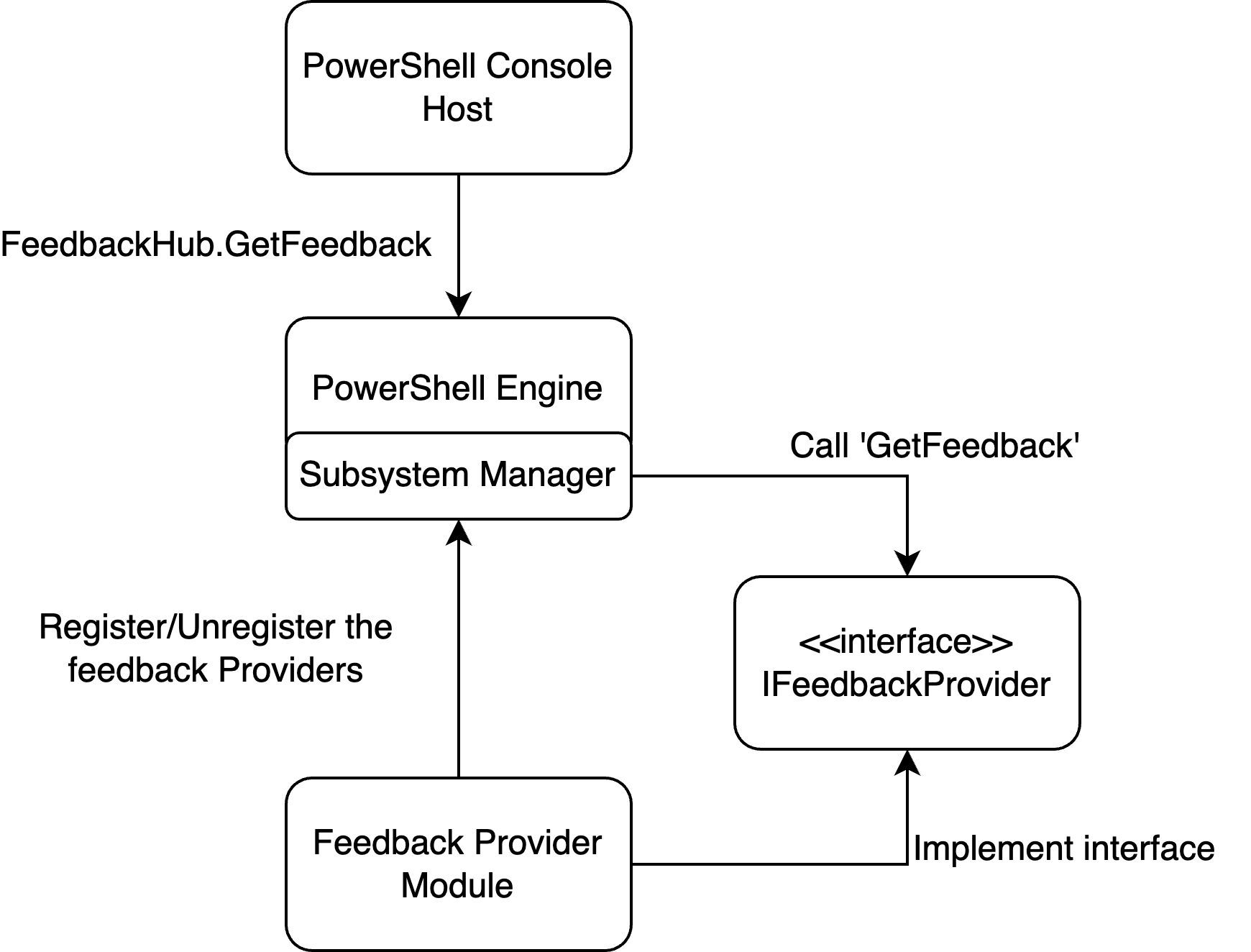
Contoh berikut memandu Anda melalui proses pembuatan penyedia umpan balik sederhana. Selain itu, Anda dapat mendaftarkan penyedia dengan antarmuka prediktor perintah untuk menambahkan saran berbasis umpan balik ke pengalaman menggunakan prediktor baris perintah. Untuk informasi selengkapnya tentang prediktor, lihat Menggunakan prediktor di PSReadLine dan Cara membuat prediktor baris perintah.
Langkah 1 - Membuat proyek pustaka kelas baru
Gunakan perintah berikut untuk membuat proyek baru di direktori proyek:
dotnet new classlib --name MyFeedbackProvider
Tambahkan referensi paket untuk paket System.Management.Automation ke file .csproj Anda. Contoh berikut menunjukkan file .csproj yang diperbarui:
<Project Sdk="Microsoft.NET.Sdk">

  <PropertyGroup>
    <TargetFramework>net8.0</TargetFramework>
    <ImplicitUsings>enable</ImplicitUsings>
    <Nullable>enable</Nullable>
  </PropertyGroup>

  <ItemGroup>
    <PackageReference Include="System.Management.Automation" Version="7.4.0-preview.3">
        <ExcludeAssets>contentFiles</ExcludeAssets>
        <PrivateAssets>All</PrivateAssets>
    </PackageReference>
  </ItemGroup>
</Project>
Nota
Anda harus mengubah versi rakitan System.Management.Automation agar sesuai dengan versi pratinjau PowerShell yang Anda targetkan. Versi minimumnya adalah 7.4.0-preview.3.
Langkah 2 - Tambahkan definisi kelas untuk penyedia Anda
Ubah nama file Class1.cs agar sesuai dengan nama penyedia Anda. Contoh ini menggunakan myFeedbackProvider.cs. File ini berisi dua kelas utama yang menentukan penyedia umpan balik.
Contoh berikut menunjukkan templat dasar untuk definisi kelas.
using System.Management.Automation;
using System.Management.Automation.Subsystem;
using System.Management.Automation.Subsystem.Feedback;
using System.Management.Automation.Subsystem.Prediction;
using System.Management.Automation.Language;

namespace myFeedbackProvider;

public sealed class myFeedbackProvider : IFeedbackProvider, ICommandPredictor
{

}

public class Init : IModuleAssemblyInitializer, IModuleAssemblyCleanup
{

}
Langkah 3 - Implementasikan kelas Init
Kelas Init mendaftar dan membatalkan pendaftaran penyedia umpan balik dengan manajer subsistem. Metode OnImport() berjalan ketika modul biner sedang dimuat. Metode OnRemove() berjalan ketika modul biner sedang dihapus. Contoh ini mendaftarkan penyedia umpan balik dan subsistem prediktor perintah.
public class Init : IModuleAssemblyInitializer, IModuleAssemblyCleanup
{
    private const string Id = "<ADD YOUR GUID HERE>";

    public void OnImport()
    {
        var feedback = new myFeedbackProvider(Id);
        SubsystemManager.RegisterSubsystem(SubsystemKind.FeedbackProvider, feedback);
        SubsystemManager.RegisterSubsystem(SubsystemKind.CommandPredictor, feedback);
    }

    public void OnRemove(PSModuleInfo psModuleInfo)
    {
        SubsystemManager.UnregisterSubsystem<ICommandPredictor>(new Guid(Id));
        SubsystemManager.UnregisterSubsystem<IFeedbackProvider>(new Guid(Id));
    }
}
Ganti nilai placeholder <ADD YOUR GUID HERE> dengan Guid unik (Identifikasi unik). Anda dapat membuat Guid menggunakan cmdlet New-Guid.
New-Guid
Guid adalah pengidentifikasi unik untuk penyedia Anda. Penyedia harus memiliki Id unik untuk didaftarkan ke subsistem.
Langkah 4 - Tambahkan anggota kelas dan tentukan konstruktor
Kode berikut mengimplementasikan properti yang ditentukan dalam antarmuka, menambahkan anggota kelas yang diperlukan, dan membuat konstruktor untuk kelas myFeedbackProvider.
/// <summary>
/// Gets the global unique identifier for the subsystem implementation.
/// </summary>
private readonly Guid _guid;
public Guid Id => _guid;

/// <summary>
/// Gets the name of a subsystem implementation, this will be the name displayed when triggered
/// </summary>
public string Name => "myFeedbackProvider";

/// <summary>
/// Gets the description of a subsystem implementation.
/// </summary>
public string Description => "This is very simple feedback provider";

/// <summary>
/// Default implementation. No function is required for a feedback provider.
/// </summary>
Dictionary<string, string>? ISubsystem.FunctionsToDefine => null;

/// <summary>
/// Gets the types of trigger for this feedback provider.
/// </summary>
/// <remarks>
/// The default implementation triggers a feedback provider by <see cref="FeedbackTrigger.CommandNotFound"/> only.
/// </remarks>
public FeedbackTrigger Trigger => FeedbackTrigger.All;

/// <summary>
/// List of candidates from the feedback provider to be passed as predictor results
/// </summary>
private List<string>? _candidates;

/// <summary>
/// PowerShell session used to run PowerShell commands that help create suggestions.
/// </summary>
private PowerShell _powershell;

internal myFeedbackProvider(string guid)
{
    _guid = new Guid(guid); // Save guid
    _powershell = PowerShell.Create(); // Create PowerShell instance
}
Langkah 5 - Buat metode GetFeedback()
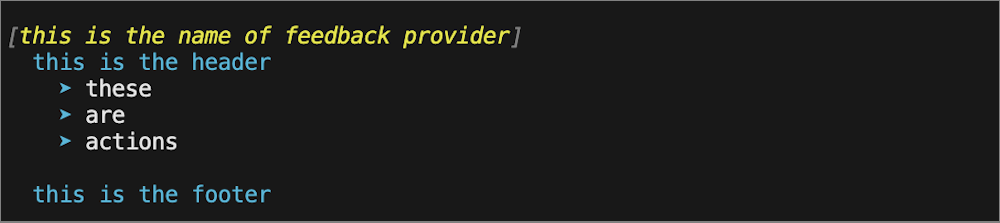
Metode GetFeedback mengambil dua parameter, context dan token. Parameter context menerima informasi tentang pemicu sehingga Anda dapat memutuskan cara merespons dengan saran. Parameter token digunakan untuk pembatalan. Fungsi ini mengembalikan FeedbackItem yang berisi saran.
/// <summary>
/// Gets feedback based on the given commandline and error record.
/// </summary>
/// <param name="context">The context for the feedback call.</param>
/// <param name="token">The cancellation token to cancel the operation.</param>
/// <returns>The feedback item.</returns>
public FeedbackItem? GetFeedback(FeedbackContext context, CancellationToken token)
{
    // Target describes the different kinds of triggers to activate on,
    var target = context.Trigger;
    var commandLine = context.CommandLine;
    var ast = context.CommandLineAst;

    // defining the header and footer variables
    string header;
    string footer;

    // List of the actions
    List<string>? actions = new List<string>();

    // Trigger on success code goes here

    // Trigger on error code goes here

    return null;
}
Gambar berikut menunjukkan bagaimana bidang ini digunakan dalam saran yang ditampilkan kepada pengguna.
Membuat saran untuk pemicu Keberhasilan
Untuk invokasi yang berhasil, kami ingin memperluas alias apa pun yang digunakan dalam eksekusi sebelumnya. Dengan menggunakan CommandLineAst, kami mengidentifikasi perintah alias apa pun dan membuat saran untuk menggunakan nama perintah yang sepenuhnya memenuhi syarat sebagai gantinya.
// Trigger on success
if (target == FeedbackTrigger.Success)
{
    // Getting the commands from the AST and only finding those that are Commands
    var astCmds = ast.FindAll((cAst) => cAst is CommandAst, true);

    // Inspect each of the commands
    foreach(var command in astCmds)
    {

        // Get the command name
        var aliasedCmd = ((CommandAst) command).GetCommandName();

        // Check if its an alias or not, if so then add it to the list of actions
        if(TryGetAlias(aliasedCmd, out string commandString))
        {
            actions.Add($"{aliasedCmd} --> {commandString}");
        }
    }

    // If no alias was found return null
    if(actions.Count == 0)
    {
        return null;
    }

    // If aliases are found, set the header to a description and return a new FeedbackItem.
    header = "You have used an aliased command:";
    // Copy actions to _candidates for the predictor
    _candidates = actions;

    return new FeedbackItem(header, actions);
}
Menerapkan metode TryGetAlias()
Metode TryGetAlias() adalah fungsi pembantu privat yang mengembalikan nilai boolean untuk menunjukkan apakah perintah tersebut adalah alias. Di konstruktor kelas, kami membuat instans PowerShell yang dapat kami gunakan untuk menjalankan perintah PowerShell. Metode TryGetAlias() menggunakan instans PowerShell ini untuk memanggil metode GetCommand untuk menentukan apakah perintah adalah alias. Objek AliasInfo yang dikembalikan oleh GetCommand berisi nama lengkap perintah alias.
/// <summary>
/// Checks if a command is an alias.
/// </summary>
/// <param name="command">The command to check if alias</param>
/// <param name="targetCommand">The referenced command by the aliased command</param>
/// <returns>True if an alias and false if not</returns>
private bool TryGetAlias(string command, out string targetCommand)
{
    // Create PowerShell runspace as a session state proxy to run GetCommand and check
    // if its an alias
    AliasInfo? pwshAliasInfo =
        _powershell.Runspace.SessionStateProxy.InvokeCommand.GetCommand(command, CommandTypes.Alias) as AliasInfo;

    // if its null then it is not an aliased command so just return false
    if(pwshAliasInfo is null)
    {
        targetCommand = String.Empty;
        return false;
    }

    // Set targetCommand to referenced command name
    targetCommand = pwshAliasInfo.ReferencedCommand.Name;
    return true;
}
Menghasilkan saran untuk pemicu kegagalan
Ketika eksekusi perintah gagal, kami ingin menyarankan agar pengguna Get-Help untuk mendapatkan informasi selengkapnya tentang cara menggunakan perintah.
// Trigger on error
if (target == FeedbackTrigger.Error)
{
    // Gets the command that caused the error.
    var erroredCommand = context.LastError?.InvocationInfo.MyCommand;
    if (erroredCommand is null)
    {
        return null;
    }

    header = $"You have triggered an error with the command {erroredCommand}. Try using the following command to get help:";

    actions.Add($"Get-Help {erroredCommand}");
    footer = $"You can also check online documentation at https://learn.microsoft.com/en-us/powershell/module/?term={erroredCommand}";

    // Copy actions to _candidates for the predictor
    _candidates = actions;
    return new FeedbackItem(header, actions, footer, FeedbackDisplayLayout.Portrait);
}
Langkah 6 - Kirim saran ke prediktor baris perintah
Cara lain penyedia umpan balik Anda dapat meningkatkan pengalaman pengguna adalah dengan memberikan saran perintah ke antarmuka ICommandPredictor. Untuk informasi selengkapnya tentang membuat prediktor baris perintah, lihat Cara membuat prediktor baris perintah.
Kode berikut mengimplementasikan metode yang diperlukan dari antarmuka ICommandPredictor untuk menambahkan perilaku prediktor ke penyedia umpan balik Anda.
-
CanAcceptFeedback()- Metode ini mengembalikan nilai Boolean yang menunjukkan apakah prediktor menerima jenis umpan balik tertentu. -
GetSuggestion()- Metode ini mengembalikan objekSuggestionPackageyang berisi saran yang akan ditampilkan oleh prediktor. -
OnCommandLineAccepted()- Metode ini dipanggil ketika baris perintah diterima untuk dijalankan.
/// <summary>
/// Gets a value indicating whether the predictor accepts a specific kind of feedback.
/// </summary>
/// <param name="client">Represents the client that initiates the call.</param>
/// <param name="feedback">A specific type of feedback.</param>
/// <returns>True or false, to indicate whether the specific feedback is accepted.</returns>
public bool CanAcceptFeedback(PredictionClient client, PredictorFeedbackKind feedback)
{
    return feedback switch
    {
        PredictorFeedbackKind.CommandLineAccepted => true,
        _ => false,
    };
}

/// <summary>
/// Get the predictive suggestions. It indicates the start of a suggestion rendering session.
/// </summary>
/// <param name="client">Represents the client that initiates the call.</param>
/// <param name="context">The <see cref="PredictionContext"/> object to be used for prediction.</param>
/// <param name="cancellationToken">The cancellation token to cancel the prediction.</param>
/// <returns>An instance of <see cref="SuggestionPackage"/>.</returns>
public SuggestionPackage GetSuggestion(
    PredictionClient client,
    PredictionContext context,
    CancellationToken cancellationToken)
{
    if (_candidates is not null)
    {
        string input = context.InputAst.Extent.Text;
        List<PredictiveSuggestion>? result = null;

        foreach (string c in _candidates)
        {
            if (c.StartsWith(input, StringComparison.OrdinalIgnoreCase))
            {
                result ??= new List<PredictiveSuggestion>(_candidates.Count);
                result.Add(new PredictiveSuggestion(c));
            }
        }

        if (result is not null)
        {
            return new SuggestionPackage(result);
        }
    }

    return default;
}

/// <summary>
/// A command line was accepted to execute.
/// The predictor can start processing early as needed with the latest history.
/// </summary>
/// <param name="client">Represents the client that initiates the call.</param>
/// <param name="history">History command lines provided as references for prediction.</param>
public void OnCommandLineAccepted(PredictionClient client, IReadOnlyList<string> history)
{
    // Reset the candidate state once the command is accepted.
    _candidates = null;
}
Langkah 7 - Bangun penyedia umpan balik
Sekarang Anda siap untuk membangun dan mulai menggunakan penyedia umpan balik Anda! Untuk membangun proyek, jalankan perintah berikut:
dotnet build
Perintah ini membuat modul PowerShell sebagai file DLL di jalur folder proyek Anda berikut: bin/Debug/net8.0/myFeedbackProvider
Anda mungkin mengalami kesalahan error NU1101: Unable to find package System.Management.Automation. saat membangun pada komputer Windows. Untuk memperbaiki hal ini, tambahkan file nuget.config ke direktori proyek Anda dan tambahkan yang berikut ini:
<?xml version="1.0" encoding="utf-8"?>
<configuration>
  <packageSources>
    <clear />
    <add key="nuget.org" value="https://api.nuget.org/v3/index.json" />
  </packageSources>
  <disabledPackageSources>
    <clear />
  </disabledPackageSources>
</configuration>
Menggunakan penyedia umpan balik
Untuk menguji penyedia umpan balik baru Anda, impor modul yang dikompilasi ke sesi PowerShell Anda. Ini dapat dilakukan dengan mengimpor folder yang disebutkan setelah proses build selesai dengan sukses.
Import-Module ./bin/Debug/net8.0/myFeedbackProvider
Setelah puas dengan modul, Anda harus membuat manifes modul, menerbitkannya ke Galeri PowerShell, dan menginstalnya di $Env:PSModulePathAnda. Untuk informasi selengkapnya, lihat Cara membuat manifes modul. Anda dapat menambahkan perintah Import-Module ke skrip $PROFILE Sehingga modul tersedia di sesi PowerShell.
Anda bisa mendapatkan daftar penyedia umpan balik yang diinstal, menggunakan perintah berikut:
Get-PSSubsystem -Kind FeedbackProvider
Kind              SubsystemType      IsRegistered Implementations
----              -------------      ------------ ---------------
FeedbackProvider  IFeedbackProvider          True {general}
Nota
Get-PSSubsystem adalah cmdlet eksperimental yang diperkenalkan di PowerShell 7.1 Anda harus mengaktifkan fitur eksperimental PSSubsystemPluginModel untuk menggunakan cmdlet ini. Untuk informasi selengkapnya, lihat Menggunakan Fitur Eksperimental.
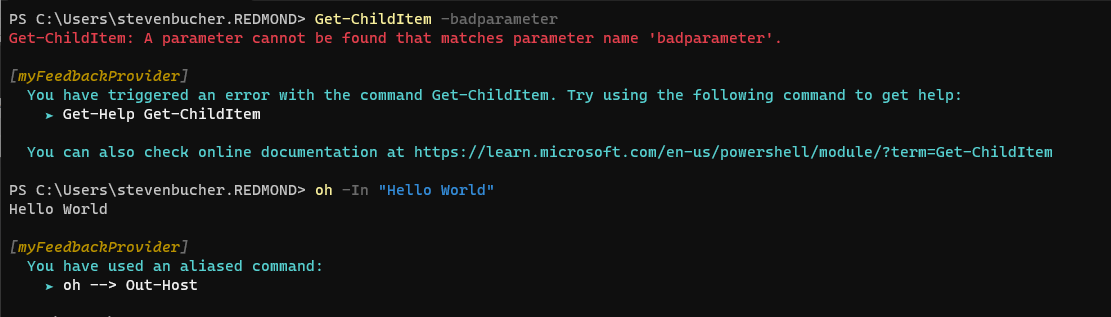
Cuplikan layar berikut menunjukkan beberapa contoh saran dari penyedia baru.
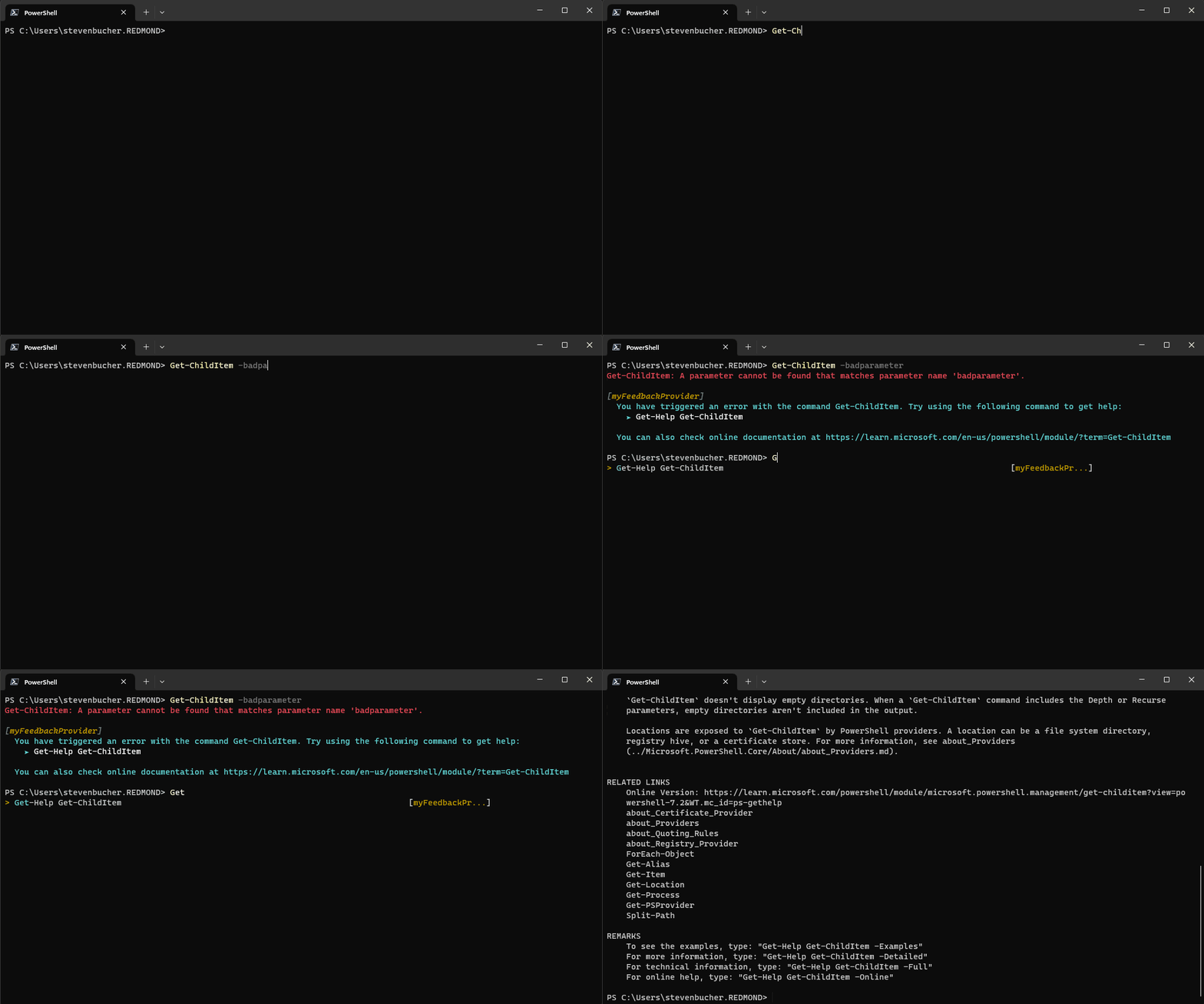
Berikut ini adalah GIF yang menunjukkan cara kerja integrasi prediktor dari penyedia baru.
Penyedia umpan balik lainnya
Kami telah membuat penyedia umpan balik lain yang dapat digunakan sebagai referensi yang baik untuk contoh yang lebih dalam.
perintah tidak ditemukan
Penyedia umpan balik command-not-found menggunakan alat utilitas command-not-found pada sistem Linux untuk memberikan saran ketika perintah asli dicoba untuk dijalankan tetapi hilang. Anda dapat menemukan kode di Repositori GitHub atau dapat mengunduh sendiri di PowerShell Gallery.
Adaptor PowerShell
Microsoft.PowerShell.PowerShellAdapter adalah penyedia umpan balik yang membantu Anda mengonversi output teks dari perintah asli menjadi objek PowerShell. Ini mendeteksi "adaptor" pada sistem Anda dan menyarankan Anda untuk menggunakannya saat Anda menggunakan perintah asli. Anda dapat mempelajari lebih lanjut tentang Adaptor PowerShell dari Penyedia Umpan Balik Adaptor PowerShell pada posting blog. Anda juga dapat menemukan kode di Repositori GitHub atau dapat mengunduh sendiri di PowerShell Gallery.
Lampiran - Kode implementasi lengkap
Kode berikut menggabungkan contoh sebelumnya untuk menemukan implementasi penuh dari kelas penyedia.
using System.Management.Automation;
using System.Management.Automation.Subsystem;
using System.Management.Automation.Subsystem.Feedback;
using System.Management.Automation.Subsystem.Prediction;
using System.Management.Automation.Language;

namespace myFeedbackProvider;

public sealed class myFeedbackProvider : IFeedbackProvider, ICommandPredictor
{
    /// <summary>
    /// Gets the global unique identifier for the subsystem implementation.
    /// </summary>
    private readonly Guid _guid;
    public Guid Id => _guid;

    /// <summary>
    /// Gets the name of a subsystem implementation, this will be the name displayed when triggered
    /// </summary>
    public string Name => "myFeedbackProvider";

    /// <summary>
    /// Gets the description of a subsystem implementation.
    /// </summary>
    public string Description => "This is very simple feedback provider";

    /// <summary>
    /// Default implementation. No function is required for a feedback provider.
    /// </summary>
    Dictionary<string, string>? ISubsystem.FunctionsToDefine => null;

    /// <summary>
    /// Gets the types of trigger for this feedback provider.
    /// </summary>
    /// <remarks>
    /// The default implementation triggers a feedback provider by <see cref="FeedbackTrigger.CommandNotFound"/> only.
    /// </remarks>
    public FeedbackTrigger Trigger => FeedbackTrigger.All;

    /// <summary>
    /// List of candidates from the feedback provider to be passed as predictor results
    /// </summary>
    private List<string>? _candidates;

    /// <summary>
    /// PowerShell session used to run PowerShell commands that help create suggestions.
    /// </summary>
    private PowerShell _powershell;

    // Constructor
    internal myFeedbackProvider(string guid)
    {
        _guid = new Guid(guid); // Save guid
        _powershell = PowerShell.Create(); // Create PowerShell instance
    }

    #region IFeedbackProvider
    /// <summary>
    /// Gets feedback based on the given commandline and error record.
    /// </summary>
    /// <param name="context">The context for the feedback call.</param>
    /// <param name="token">The cancellation token to cancel the operation.</param>
    /// <returns>The feedback item.</returns>
    public FeedbackItem? GetFeedback(FeedbackContext context, CancellationToken token)
    {
        // Target describes the different kinds of triggers to activate on,
        var target = context.Trigger;
        var commandLine = context.CommandLine;
        var ast = context.CommandLineAst;

        // defining the header and footer variables
        string header;
        string footer;

        // List of the actions
        List<string>? actions = new List<string>();

        // Trigger on success
        if (target == FeedbackTrigger.Success)
        {
            // Getting the commands from the AST and only finding those that are Commands
            var astCmds = ast.FindAll((cAst) => cAst is CommandAst, true);

            // Inspect each of the commands
            foreach(var command in astCmds)
            {

                // Get the command name
                var aliasedCmd = ((CommandAst) command).GetCommandName();

                // Check if its an alias or not, if so then add it to the list of actions
                if(TryGetAlias(aliasedCmd, out string commandString))
                {
                    actions.Add($"{aliasedCmd} --> {commandString}");
                }
            }

            // If no alias was found return null
            if(actions.Count == 0)
            {
                return null;
            }

            // If aliases are found, set the header to a description and return a new FeedbackItem.
            header = "You have used an aliased command:";
            // Copy actions to _candidates for the predictor
            _candidates = actions;

            return new FeedbackItem(header, actions);
        }

        // Trigger on error
        if (target == FeedbackTrigger.Error)
        {
            // Gets the command that caused the error.
            var erroredCommand = context.LastError?.InvocationInfo.MyCommand;
            if (erroredCommand is null)
            {
                return null;
            }

            header = $"You have triggered an error with the command {erroredCommand}. Try using the following command to get help:";

            actions.Add($"Get-Help {erroredCommand}");
            footer = $"You can also check online documentation at https://learn.microsoft.com/en-us/powershell/module/?term={erroredCommand}";

            // Copy actions to _candidates for the predictor
            _candidates = actions;
            return new FeedbackItem(header, actions, footer, FeedbackDisplayLayout.Portrait);
        }
        return null;
    }

    /// <summary>
    /// Checks if a command is an alias.
    /// </summary>
    /// <param name="command">The command to check if alias</param>
    /// <param name="targetCommand">The referenced command by the aliased command</param>
    /// <returns>True if an alias and false if not</returns>
    private bool TryGetAlias(string command, out string targetCommand)
    {
        // Create PowerShell runspace as a session state proxy to run GetCommand and check
        // if its an alias
        AliasInfo? pwshAliasInfo =
            _powershell.Runspace.SessionStateProxy.InvokeCommand.GetCommand(command, CommandTypes.Alias) as AliasInfo;

        // if its null then it is not an aliased command so just return false
        if(pwshAliasInfo is null)
        {
            targetCommand = String.Empty;
            return false;
        }

        // Set targetCommand to referenced command name
        targetCommand = pwshAliasInfo.ReferencedCommand.Name;
        return true;
    }
    #endregion IFeedbackProvider

    #region ICommandPredictor

    /// <summary>
    /// Gets a value indicating whether the predictor accepts a specific kind of feedback.
    /// </summary>
    /// <param name="client">Represents the client that initiates the call.</param>
    /// <param name="feedback">A specific type of feedback.</param>
    /// <returns>True or false, to indicate whether the specific feedback is accepted.</returns>
    public bool CanAcceptFeedback(PredictionClient client, PredictorFeedbackKind feedback)
    {
        return feedback switch
        {
            PredictorFeedbackKind.CommandLineAccepted => true,
            _ => false,
        };
    }

    /// <summary>
    /// Get the predictive suggestions. It indicates the start of a suggestion rendering session.
    /// </summary>
    /// <param name="client">Represents the client that initiates the call.</param>
    /// <param name="context">The <see cref="PredictionContext"/> object to be used for prediction.</param>
    /// <param name="cancellationToken">The cancellation token to cancel the prediction.</param>
    /// <returns>An instance of <see cref="SuggestionPackage"/>.</returns>
    public SuggestionPackage GetSuggestion(
        PredictionClient client,
        PredictionContext context,
        CancellationToken cancellationToken)
    {
        if (_candidates is not null)
        {
            string input = context.InputAst.Extent.Text;
            List<PredictiveSuggestion>? result = null;

            foreach (string c in _candidates)
            {
                if (c.StartsWith(input, StringComparison.OrdinalIgnoreCase))
                {
                    result ??= new List<PredictiveSuggestion>(_candidates.Count);
                    result.Add(new PredictiveSuggestion(c));
                }
            }

            if (result is not null)
            {
                return new SuggestionPackage(result);
            }
        }

        return default;
    }

    /// <summary>
    /// A command line was accepted to execute.
    /// The predictor can start processing early as needed with the latest history.
    /// </summary>
    /// <param name="client">Represents the client that initiates the call.</param>
    /// <param name="history">History command lines provided as references for prediction.</param>
    public void OnCommandLineAccepted(PredictionClient client, IReadOnlyList<string> history)
    {
        // Reset the candidate state once the command is accepted.
        _candidates = null;
    }

    #endregion;
}

public class Init : IModuleAssemblyInitializer, IModuleAssemblyCleanup
{
    private const string Id = "<ADD YOUR GUID HERE>";

    public void OnImport()
    {
        var feedback = new myFeedbackProvider(Id);
        SubsystemManager.RegisterSubsystem(SubsystemKind.FeedbackProvider, feedback);
        SubsystemManager.RegisterSubsystem(SubsystemKind.CommandPredictor, feedback);
    }

    public void OnRemove(PSModuleInfo psModuleInfo)
    {
        SubsystemManager.UnregisterSubsystem<ICommandPredictor>(new Guid(Id));
        SubsystemManager.UnregisterSubsystem<IFeedbackProvider>(new Guid(Id));
    }
}
Berkolaborasi dengan kami di GitHub
Sumber untuk konten ini dapat ditemukan di GitHub, yang juga dapat Anda gunakan untuk membuat dan meninjau masalah dan menarik permintaan. Untuk informasi selengkapnya, lihat panduan kontributor kami.
