Catatan
Akses ke halaman ini memerlukan otorisasi. Anda dapat mencoba masuk atau mengubah direktori.
Akses ke halaman ini memerlukan otorisasi. Anda dapat mencoba mengubah direktori.
Pendahuluan
Untuk bekerja dengan FABRIC API, seperti banyak layanan Microsoft lainnya, Anda harus terlebih dahulu mendapatkan token Microsoft Entra untuk layanan Fabric, lalu menggunakan token tersebut di header otorisasi panggilan API.
Dalam tutorial mulai cepat ini, Anda akan membuat aplikasi konsol C#, yang akan memperoleh token ID Entra menggunakan pustaka MSAL.Net, lalu menggunakan C# HttpClient untuk memanggil List workspaces API.
Membuat pendaftaran aplikasi
Untuk mendapatkan token Microsoft Entra, Anda harus terlebih dahulu mendaftarkan aplikasi dengan ID Microsoft Entra.
Untuk mempelajari selengkapnya tentang mendaftarkan aplikasi dan properti aplikasi yang berbeda dan bagaimana mungkin berlaku untuk skenario Anda, lihat Mendaftarkan aplikasi di platform identitas Microsoft.
Dalam tutorial pengenalan cepat ini, Anda akan membuat klien terbuka dengan URI pengalihan = http://localhost
Masuk ke pusat admin Microsoft Entra dengan peran minimal sebagai administrator aplikasi cloud.
Telusuri ke Aplikasi > Pendaftaran Aplikasi.
Klik Pendaftaran baru.
Masukkan Nama tampilan untuk aplikasi Anda, dan tambahkan URI pengalihan klien Publik
http://localhost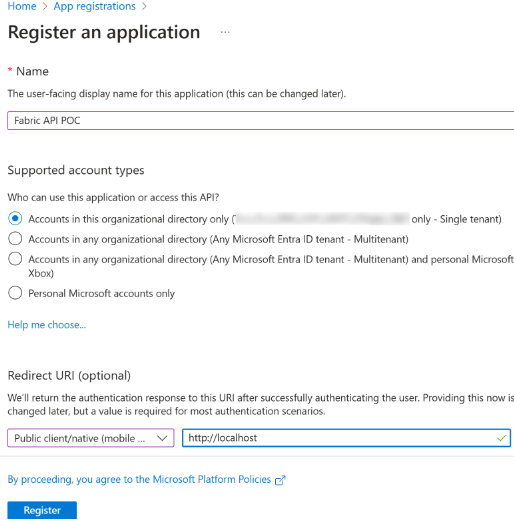
Pilih Daftarkan.
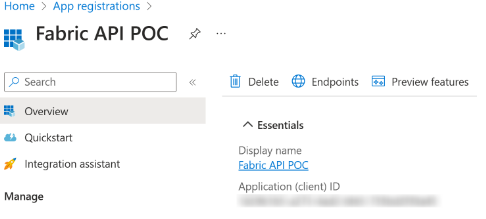
Salin ID Aplikasi (klien) dan tempelkan di notepad untuk digunakan nanti.
Dapatkan token
Dalam tutorial ini Anda akan menggunakan MSAL.Net untuk memperoleh token ID Entra untuk layanan Fabric dengan cakupan berikut: Workspace.ReadWrite.All, Item.ReadWrite.All.
Untuk informasi selengkapnya tentang akuisisi token dengan MSAL.Net, lihat Akuisisi Token - Microsoft Authentication Library untuk .NET.
Tempelkan ID Aplikasi (klien) yang Anda salin sebelumnya dan tempelkan untuk variabel ClientId.
Sampel kode C# untuk memperoleh token akses Microsoft Entra
#region parameters section
string ClientId = "YourApplicationId";
string Authority = "https://login.microsoftonline.com/organizations";
string RedirectURI = "http://localhost";
#endregion

#region Acquire a token for Fabric APIs
// In this sample we acquire a token for Fabric service with the scopes
// Workspace.ReadWrite.All and Item.ReadWrite.All
string[] scopes = new string[] { "https://api.fabric.microsoft.com/Workspace.ReadWrite.All https://api.fabric.microsoft.com/Item.ReadWrite.All" };

PublicClientApplicationBuilder PublicClientAppBuilder =
        PublicClientApplicationBuilder.Create(ClientId)
        .WithAuthority(Authority)
        .WithRedirectUri(RedirectURI);

IPublicClientApplication PublicClientApplication = PublicClientAppBuilder.Build();

AuthenticationResult result = await PublicClientApplication.AcquireTokenInteractive(scopes)
        .ExecuteAsync()
        .ConfigureAwait(false);

Console.WriteLine(result.AccessToken);
#endregion
API ruang kerja daftar panggilan
Di bagian ini Anda akan:
- Buat C# HttpClient dengan token yang kami peroleh di bagian sebelumnya.
- Tambahkan
https://api.fabric.microsoft.com/v1/sebagai URL dasar untuk klien. - Panggil API daftar ruang kerja dan menulis respons ke konsol.
Sampel kode C# untuk membuat klien http dan memanggil List Workspaces API
// Create client
HttpClient client = new HttpClient();
client.DefaultRequestHeaders.Authorization = new AuthenticationHeaderValue("Bearer", result.AccessToken);
string baseUrl = "https://api.fabric.microsoft.com/v1/";
client.BaseAddress = new Uri(baseUrl);

// Call list workspaces API
HttpResponseMessage response = await client.GetAsync("workspaces");
string responseBody = await response.Content.ReadAsStringAsync();
Console.WriteLine(responseBody);
Sampel kode aplikasi konsol C# lengkap
using Microsoft.Identity.Client;
using System.Net.Http.Headers;

#region parameters section
string ClientId = "YourApplicationId";
string Authority = "https://login.microsoftonline.com/organizations";
string RedirectURI = "http://localhost";
#endregion

#region Acquire a token for Fabric APIs
// In this sample we acquire a token for Fabric service with the scopes Workspace.ReadWrite.All and Item.ReadWrite.All
string[] scopes = new string[] { "https://api.fabric.microsoft.com/Workspace.ReadWrite.All https://api.fabric.microsoft.com/Item.ReadWrite.All" };

PublicClientApplicationBuilder PublicClientAppBuilder =
        PublicClientApplicationBuilder.Create(ClientId)
        .WithAuthority(Authority)
        .WithRedirectUri(RedirectURI);

IPublicClientApplication PublicClientApplication = PublicClientAppBuilder.Build();

AuthenticationResult result = await PublicClientApplication.AcquireTokenInteractive(scopes)
        .ExecuteAsync()
        .ConfigureAwait(false);

Console.WriteLine(result.AccessToken);
#endregion

#region Create an HTTP client and call the Fabric APIs
// Create client
HttpClient client = new HttpClient();
client.DefaultRequestHeaders.Authorization = new AuthenticationHeaderValue("Bearer", result.AccessToken);
string baseUrl = "https://api.fabric.microsoft.com/v1/";
client.BaseAddress = new Uri(baseUrl);

// Call list workspaces API
HttpResponseMessage response = await client.GetAsync("workspaces");
string responseBody = await response.Content.ReadAsStringAsync();
Console.WriteLine(responseBody);
#endregion