Catatan
Akses ke halaman ini memerlukan otorisasi. Anda dapat mencoba masuk atau mengubah direktori.
Akses ke halaman ini memerlukan otorisasi. Anda dapat mencoba mengubah direktori.
Berlaku untuk: SQL Server
Artikel ini menjelaskan cara untuk mengidentifikasi ekstensi tidak sehat yang tidak diinstal dengan benar, berjalan dengan benar, atau tidak tersambung ke Azure.
Mengidentifikasi ekstensi yang tidak sehat
Menggunakan dasbor kesehatan ekstensi bawaan di portal Microsoft Azure
Anda dapat menggunakan dasbor kesehatan ekstensi bawaan di portal Microsoft Azure untuk menampilkan kesehatan semua ekstensi Azure yang disebarkan untuk SQL Server.
Petunjuk / Saran
Buat dasbor kustom Anda sendiri dengan file ini dari repositori GitHub sql-server-samples: SQL Server dengan dukungan Arc Health.json.
Mengkueri ekstensi yang tidak sehat menggunakan Azure Resource Graph
Gunakan Azure Resource Graph untuk mengidentifikasi status ekstensi Azure untuk SQL Server di server dengan dukungan Azure Arc Anda.
Petunjuk / Saran
Jika Anda belum terbiasa, pelajari tentang Azure Resource Graph:
Kueri ini mengembalikan instans SQL Server di server dengan ekstensi terinstal, tetapi tidak sehat.
resources
| where type == "microsoft.hybridcompute/machines/extensions"
| where properties.type in ("WindowsAgent.SqlServer", "LinuxAgent.SqlServer")
| extend targetMachineName = tolower(tostring(split(id, '/')[8])) // Extract the machine name from the extension's id
| join kind=leftouter (
    resources
    | where type == "microsoft.hybridcompute/machines"
    | project machineId = id, MachineName = name, subscriptionId, LowerMachineName = tolower(name), resourceGroup , MachineStatus= properties.status , MachineProvisioningStatus= properties.provisioningState, MachineErrors = properties.errorDetails //Project relevant machine health information.
) on $left.targetMachineName == $right.LowerMachineName and $left.resourceGroup == $right.resourceGroup and $left.subscriptionId == $right.subscriptionId // Join Based on MachineName in the id and the machine's name, the resource group, and the subscription. This join allows us to present the data of the machine as well as the extension in the final output.
| extend statusExpirationLengthRange = 3d // Change this value to change the acceptable range for the last time an extension should have reported its status.
| extend startDate = startofday(now() - statusExpirationLengthRange), endDate = startofday(now()) // Get the start and end position for the given range.
| extend extractedDateString = extract("timestampUTC : (\\d{4}\\W\\d{2}\\W\\d{2})", 1, tostring(properties.instanceView.status.message)) // Extracting the date string for the LastUploadTimestamp. Is empty if none is found.
| extend extractedDateStringYear = split(extractedDateString, '/')[0], extractedDateStringMonth = split(extractedDateString, '/')[1], extractedDateStringDay = split(extractedDateString, '/')[2] // Identifying each of the parts of the date that was extracted from the message.
| extend extractedDate = todatetime(strcat(extractedDateStringYear,"-",extractedDateStringMonth,"-",extractedDateStringDay,"T00:00:00Z")) // Converting to a datetime object and rewriting string into ISO format because todatetime() does not work using the previous format.
| extend isNotInDateRange = not(extractedDate >= startDate and extractedDate <= endDate) // Created bool which is true if the date we extracted from the message is not within the specified range. This bool will also be true if the date was not found in the message.
| where properties.instanceView.status.message !contains "SQL Server Extension Agent: Healthy" // Begin searching for unhealthy extensions using the following 1. Does extension report being healthy. 2. Is last upload within the given range. 3. Is the upload status in an OK state. 4. Is provisioning state not in a succeeded state.
    or isNotInDateRange
    or properties.instanceView.status.message !contains "uploadStatus : OK"
    or properties.provisioningState != "Succeeded"
    or MachineStatus != "Connected"
| extend FailureReasons = strcat( // Makes a String to list all the reason that this resource got flagged for
        iif(MachineStatus != "Connected",strcat("- Machine's status is ", MachineStatus," -"),"") ,
        iif(MachineErrors != "[]","- Machine reports errors -", ""),
        iif(properties.instanceView.status.message !contains "SQL Server Extension Agent: Healthy","- Extension reported unhealthy -",""),
        iif(isNotInDateRange,"- Last upload outside acceptable range -",""),
        iif(properties.instanceView.status.message !contains "uploadStatus : OK","- Upload status is not reported OK -",""),
        iif(properties.provisioningState != "Succeeded",strcat("- Extension provisiong state is ", properties.provisioningState," -"),"")
    )
| extend RecommendedAction = //Attempt to Identify RootCause based on information gathered, and point customer to what they should investigate first.
    iif(MachineStatus == "Disconnected", "Machine is disconnected. Please reconnect the machine.",
        iif(MachineStatus == "Expired", "Machine cert is expired. Go to the machine on the Azure portal for more information on how to resolve this issue.",
            iif(MachineStatus != "Connected", strcat("Machine status is ", MachineStatus,". Investigate and resolve this issue."),
                iif(MachineProvisioningStatus != "Succeeded", strcat("Machine provisioning status is ", MachineProvisioningStatus, ". Investigate and resolve machine provisioning status"),
                    iff(MachineErrors != "[]", "Machine is reporting errors. Investigate and resolve machine errors",
                        iif(properties.provisioningState != "Succeeded", strcat("Extension provisioning status is ", properties.provisioningState,". Investigate and resolve extension provisioning state."),
                            iff(properties.instanceView.status.message !contains "SQL Server Extension Agent:" and properties.instanceView.status.message contains "SQL Server Extension Agent Deployer", "SQL Server extension employer ran. However, SQL Server extension seems to not be running. Verify that the extension is currently running.",
                                iff(properties.instanceView.status.message !contains "uploadStatus : OK" or isNotInDateRange or properties.instanceView.status.message !contains "SQL Server Extension Agent: Healthy", "Extension reported as unhealthy. View FailureReasons and LastExtensionStatusMessage for more information as to the cause of the failure.",
                                    "Unable to recommend actions. Please view FailureReasons."
                                )
                            )
                        )
                    )
                )
            )
        )
    )
| project ID = id, MachineName, ResourceGroup = resourceGroup, SubscriptionID = subscriptionId, Location = location, RecommendedAction, FailureReasons, LicenseType = properties.settings.LicenseType,
    LastReportedExtensionHealth = iif(properties.instanceView.status.message !contains "SQL Server Extension Agent: Healthy", "Unhealthy", "Healthy"),
    LastExtensionUploadTimestamp = iif(indexof(properties.instanceView.status.message, "timestampUTC : ") > 0,
        substring(properties.instanceView.status.message, indexof(properties.instanceView.status.message, "timestampUTC : ") + 15, 10),
        "no timestamp"),
    LastExtensionUploadStatus = iif(indexof(properties.instanceView.status.message, "uploadStatus : OK") > 0, "OK", "Unhealthy"),
    ExtensionProvisioningState = properties.provisioningState,
    MachineStatus, MachineErrors, MachineProvisioningStatus,MachineId = machineId,
    LastExtensionStatusMessage = properties.instanceView.status.message
Untuk mengidentifikasi kemungkinan masalah, tinjau nilai di kolom RecommendedAction atau FailureReasons. Kolom RecommendedAction menyediakan kemungkinan langkah pertama untuk menyelesaikan masalah atau petunjuk apa yang harus diperiksa terlebih dahulu. Kolom FailureReasons mencantumkan alasan sumber daya dianggap tidak sehat. Terakhir, periksa LastExtensionStatusMessage untuk melihat pesan terakhir yang dilaporkan oleh agen.
Rekomendasi
| Tindakan yang Direkomendasikan | Rincian Tindakan |
|---|---|
| Sertifikasi mesin kedaluwarsa. Buka komputer di portal Microsoft Azure untuk informasi selengkapnya tentang cara mengatasi masalah ini. |
Komputer berkemampuan Arc harus di-onboard ulang ke Arc karena sertifikat yang digunakan untuk mengautentikasi ke Azure kedaluwarsa. Status mesin Arc adalah Kedaluwarsa di portal Microsoft Azure. Anda dapat menghapus instalan agen lalu melakukan onboard ulang. Tidak perlu menghapus sumber daya SQL Server dengan dukungan Arc di portal jika Anda melakukan onboarding ulang. Ekstensi SQL secara otomatis diinstal ulang selama onboarding otomatis diaktifkan (default). |
| Komputer terputus. Sambungkan kembali komputer. |
Mesin Arc berada dalam state = Disconnected. Status ini bisa karena berbagai alasan:Agen mesin yang terhubung ke Arc dihentikan, dinonaktifkan, atau terus-menerus mengalami kegagalan atau Konektivitas diblokir antara agen dan Azure. Periksa status layanan/daemon komputer yang terhubung dengan Arc untuk memastikan mereka diaktifkan dan berjalan. Periksakonektivitas . Memecahkan masalah agen menggunakan log verbose. |
| Ekstensi dilaporkan tidak sehat. Lihat FailureReasons dan LastExtensionStatusMessage untuk informasi selengkapnya tentang penyebab kegagalan. Unggahan terakhir di luar rentang yang dapat diterima (dalam tiga hari terakhir). |
Periksa kolom LastExtensionUploadTimestamp. Jika Tidak ada tanda waktu, itu tidak pernah melaporkan inventori atau data penggunaan ke Azure.
Memecahkan masalah konektivitas ke layanan pemrosesan data dan titik akhir telemetri. Jika unggahan terakhir berada di luar rentang yang dapat diterima (dalam tiga hari terakhir) dan yang lainnya terlihat OK seperti LastExtensionUploadStatus, ExtensionProvisioningState, dan MachineStatus, maka ada kemungkinan ekstensi Azure untuk layanan/daemon SQL Server dihentikan. Cari tahu mengapa itu dihentikan dan mulai lagi. Periksa LastExtensionStatusMessage untuk petunjuk lain tentang masalah tersebut. |
| Status penyediaan ekstensi Gagal. Selidiki dan atasi status penyediaan ekstensi. |
Baik penginstalan awal ekstensi SQL maupun pembaruan gagal. Pemecahan masalah ekstensi Azure untuk penyebaran SQL Server. Periksa nilai dalam LastExtensionStatusMessage. |
| Status unggahan tidak dilaporkan OK | Periksa kolom LastExtensionMessage di dasbor dan lihat nilai uploadStatus dan nilai uploadMessage (jika ada, tergantung pada versi). Nilai uploadStatus biasanya merupakan kode kesalahan HTTP. Tinjau Memecahkan masalah kode kesalahan. UploadMessage mungkin memiliki informasi yang lebih spesifik. Memecahkan masalah konektivitas ke layanan pemrosesan data dan titik akhir telemetri. |
| Status penyediaan ekstensi Memperbarui atau Status penyediaan ekstensi Membuat atau Status penyediaan ekstensi Gagal atau Keadaan provisi ekstensi Menghapus |
Jika ekstensi tertentu tetap berada dalam salah satu status ini selama lebih dari 30 menit, kemungkinan ada masalah dengan penyediaan. Hapus instalan ekstensi dan instal ulang menggunakan CLI atau portal. Jika masalah berlanjut, periksalah log penyebar dan ekstensi. Jika pembuatan ekstensi gagal, verifikasi bahwa agen terhubung dan layanan agen terkait sedang berjalan. Jika penghapusan gagal, coba hapus instalan agen dan hapus sumber daya komputer Arc di portal jika diperlukan lalu sebarkan ulang. Anda dapat menghapus instalan agen lalu melakukan onboard ulang. |
Mengidentifikasi ekstensi yang tidak sehat (PowerShell)
Contoh ini berjalan di PowerShell. Contoh mengembalikan hasil yang sama dengan kueri sebelumnya tetapi melalui skrip PowerShell.
# PowerShell script to execute an Azure Resource Graph query using Azure CLI
# where the extension status is unhealthy or the extension last upload time isn't in this month or the previous month.

# Requires the Az.ResourceGraph PowerShell module

# Login to Azure if needed
#az login

# Define the Azure Resource Graph query
$query = @"
resources
| where type == "microsoft.hybridcompute/machines/extensions"
| where properties.type in ("WindowsAgent.SqlServer", "LinuxAgent.SqlServer")
| extend targetMachineName = tolower(tostring(split(id, '/')[8])) // Extract the machine name from the extension's id
| join kind=leftouter (
    resources
    | where type == "microsoft.hybridcompute/machines"
    | project machineId = id, MachineName = name, subscriptionId, LowerMachineName = tolower(name), resourceGroup , MachineStatus= properties.status , MachineProvisioningStatus= properties.provisioningState, MachineErrors = properties.errorDetails //Project relevant machine health information.
) on $left.targetMachineName == $right.LowerMachineName and $left.resourceGroup == $right.resourceGroup and $left.subscriptionId == $right.subscriptionId // Join Based on MachineName in the id and the machine's name, the resource group, and the subscription. This join allows us to present the data of the machine as well as the extension in the final output.
| extend statusExpirationLengthRange = 3d // Change this value to change the acceptable range for the last time an extension should have reported its status.
| extend startDate = startofday(now() - statusExpirationLengthRange), endDate = startofday(now()) // Get the start and end position for the given range.
| extend extractedDateString = extract("timestampUTC : (\\d{4}\\W\\d{2}\\W\\d{2})", 1, tostring(properties.instanceView.status.message)) // Extracting the date string for the LastUploadTimestamp. Is empty if none is found.
| extend extractedDateStringYear = split(extractedDateString, '/')[0], extractedDateStringMonth = split(extractedDateString, '/')[1], extractedDateStringDay = split(extractedDateString, '/')[2] // Identifying each of the parts of the date that was extracted from the message.
| extend extractedDate = todatetime(strcat(extractedDateStringYear,"-",extractedDateStringMonth,"-",extractedDateStringDay,"T00:00:00Z")) // Converting to a datetime object and rewriting string into ISO format because todatetime() does not work using the previous format.
| extend isNotInDateRange = not(extractedDate >= startDate and extractedDate <= endDate) // Created bool which is true if the date we extracted from the message is not within the specified range. This bool will also be true if the date was not found in the message.
| where properties.instanceView.status.message !contains "SQL Server Extension Agent: Healthy" // Begin searching for unhealthy extensions using the following 1. Does extension report being healthy. 2. Is last upload within the given range. 3. Is the upload status in an OK state. 4. Is provisioning state not in a succeeded state.
    or isNotInDateRange
    or properties.instanceView.status.message !contains "uploadStatus : OK"
    or properties.provisioningState != "Succeeded"
    or MachineStatus != "Connected"
| extend FailureReasons = strcat( // Makes a String to list all the reason that this resource got flagged for
        iif(MachineStatus != "Connected",strcat("- Machine's status is ", MachineStatus," -"),"") ,
        iif(MachineErrors != "[]","- Machine reports errors -", ""),
        iif(properties.instanceView.status.message !contains "SQL Server Extension Agent: Healthy","- Extension reported unhealthy -",""),
        iif(isNotInDateRange,"- Last upload outside acceptable range -",""),
        iif(properties.instanceView.status.message !contains "uploadStatus : OK","- Upload status is not reported OK -",""),
        iif(properties.provisioningState != "Succeeded",strcat("- Extension provisiong state is ", properties.provisioningState," -"),"")
    )
| extend RecommendedAction = //Attempt to Identify RootCause based on information gathered, and point customer to what they should investigate first.
    iif(MachineStatus == "Disconnected", "Machine is disconnected. Please reconnect the machine.",
        iif(MachineStatus == "Expired", "Machine cert is expired. Go to the machine on the Azure portal for more information on how to resolve this issue.",
            iif(MachineStatus != "Connected", strcat("Machine status is ", MachineStatus,". Investigate and resolve this issue."),
                iif(MachineProvisioningStatus != "Succeeded", strcat("Machine provisioning status is ", MachineProvisioningStatus, ". Investigate and resolve machine provisioning status"),
                    iff(MachineErrors != "[]", "Machine is reporting errors. Investigate and resolve machine errors",
                        iif(properties.provisioningState != "Succeeded", strcat("Extension provisioning status is ", properties.provisioningState,". Investigate and resolve extension provisioning state."),
                            iff(properties.instanceView.status.message !contains "SQL Server Extension Agent:" and properties.instanceView.status.message contains "SQL Server Extension Agent Deployer", "SQL Server extension employer ran. However, SQL Server extension seems to not be running. Verify that the extension is currently running.",
                                iff(properties.instanceView.status.message !contains "uploadStatus : OK" or isNotInDateRange or properties.instanceView.status.message !contains "SQL Server Extension Agent: Healthy", "Extension reported as unhealthy. View FailureReasons and LastExtensionStatusMessage for more information as to the cause of the failure.",
                                    "Unable to recommend actions. Please view FailureReasons."
                                )
                            )
                        )
                    )
                )
            )
        )
    )
| project ID = id, MachineName, ResourceGroup = resourceGroup, SubscriptionID = subscriptionId, Location = location, RecommendedAction, FailureReasons, LicenseType = properties.settings.LicenseType,
    LastReportedExtensionHealth = iif(properties.instanceView.status.message !contains "SQL Server Extension Agent: Healthy", "Unhealthy", "Healthy"),
    LastExtensionUploadTimestamp = iif(indexof(properties.instanceView.status.message, "timestampUTC : ") > 0,
        substring(properties.instanceView.status.message, indexof(properties.instanceView.status.message, "timestampUTC : ") + 15, 10),
        "no timestamp"),
    LastExtensionUploadStatus = iif(indexof(properties.instanceView.status.message, "uploadStatus : OK") > 0, "OK", "Unhealthy"),
    ExtensionProvisioningState = properties.provisioningState,
    MachineStatus, MachineErrors, MachineProvisioningStatus,MachineId = machineId,
    LastExtensionStatusMessage = properties.instanceView.status.message
"@

# Execute the Azure Resource Graph query
$result = Search-AzGraph -Query $query

# Output the results
$result | Format-Table -Property ExtensionHealth, LastUploadTimestamp, LastUploadStatus, Message
Untuk mengidentifikasi kemungkinan masalah, tinjau nilai di kolom RecommendedAction atau FailureReasons. Kolom RecommendedAction menyediakan kemungkinan langkah pertama untuk menyelesaikan masalah atau petunjuk apa yang harus diperiksa terlebih dahulu. Kolom FailureReasons mencantumkan alasan sumber daya dianggap tidak sehat. Terakhir, periksa LastExtensionStatusMessage untuk melihat pesan terakhir yang dilaporkan oleh agen.
Mengidentifikasi pembaruan ekstensi yang hilang
Identifikasi ekstensi yang tidak memiliki pembaruan status terbaru. Kueri ini mengembalikan daftar ekstensi Azure untuk SQL Server yang diurutkan berdasarkan jumlah hari sejak ekstensi terakhir memperbarui statusnya. Nilai '-1' menunjukkan bahwa ekstensi mengalami crash dan ada callstack dalam status ekstensi.
// Show the timestamp extracted
// If an extension has crashed (i.e. no heartbeat), fill timestamp with "1900/01/01, 00:00:00.000"
//
resources
| where type =~ 'microsoft.hybridcompute/machines/extensions'
| extend extensionStatus = parse_json(properties).instanceView.status.message
| extend timestampExtracted = extract(@"timestampUTC\s*:\s*(\d{4}/\d{2}/\d{2}, \d{2}:\d{2}:\d{2}\.\d{3})", 1, tostring(extensionStatus))
| extend timestampNullFilled = iff(isnull(timestampExtracted) or timestampExtracted == "", "1900/01/01, 00:00:00.000", timestampExtracted)
| extend timestampKustoFormattedString = strcat(replace(",", "", replace("/", "-", replace("/", "-", timestampNullFilled))), "Z")
| extend agentHeartbeatUtcTimestamp = todatetime(timestampKustoFormattedString)
| extend agentHeartbeatLagInDays = datetime_diff('day', now(), agentHeartbeatUtcTimestamp)
| project id, extensionStatus, agentHeartbeatUtcTimestamp, agentHeartbeatLagInDays
| limit 100
| order by ['agentHeartbeatLagInDays'] asc
Kueri ini mengembalikan jumlah ekstensi yang dikelompokkan menurut jumlah hari sejak ekstensi terakhir memperbarui statusnya. Nilai '-1' menunjukkan bahwa ekstensi mengalami crash dan ada callstack dalam status ekstensi.
// Aggregate by timestamp
//
// -1: Crashed extension with no heartbeat, we got a stacktrace instead
//  0: Healthy
// >1: Stale/Offline
//
resources
| where type =~ 'microsoft.hybridcompute/machines/extensions'
| extend extensionStatus = parse_json(properties).instanceView.status.message
| extend timestampExtracted = extract(@"timestampUTC\s*:\s*(\d{4}/\d{2}/\d{2}, \d{2}:\d{2}:\d{2}\.\d{3})", 1, tostring(extensionStatus))
| extend timestampNullFilled = iff(isnull(timestampExtracted) or timestampExtracted == "", "1900/01/01, 00:00:00.000", timestampExtracted)
| extend timestampKustoFormattedString = strcat(replace(",", "", replace("/", "-", replace("/", "-", timestampNullFilled))), "Z")
| extend agentHeartbeatUtcTimestamp = todatetime(timestampKustoFormattedString)
| extend agentHeartbeatLagInDays = iff(agentHeartbeatUtcTimestamp == todatetime("1900/01/01, 00:00:00.000Z"), -1, datetime_diff('day', now(), agentHeartbeatUtcTimestamp))
| summarize numExtensions = count() by agentHeartbeatLagInDays
| order by numExtensions desc
Tingkatkan ekstensi
Untuk menentukan versi rilis ekstensi saat ini, tinjau catatan rilis.
Untuk memeriksa versi ekstensi Anda, gunakan perintah PowerShell berikut ini:
azcmagent version
Untuk menyederhanakan peningkatan ekstensi, pastikan untuk mengaktifkan pembaruan otomatis. Anda juga dapat meningkatkan ekstensi secara manual dengan menggunakan portal Microsoft Azure, PowerShell, dan Azure CLI.
Untuk meningkatkan ekstensi di portal Microsoft Azure, ikuti langkah-langkah berikut:
Di portal Microsoft Azure, buka Mesin - Azure Arc.
Pilih nama komputer tempat SQL Server diinstal untuk membuka panel Gambaran Umum untuk server Anda.
Di bawah Pengaturan, pilih Ekstensi.
Centang kotak untuk
WindowsAgent.SqlServerekstensi lalu pilih Perbarui dari menu navigasi.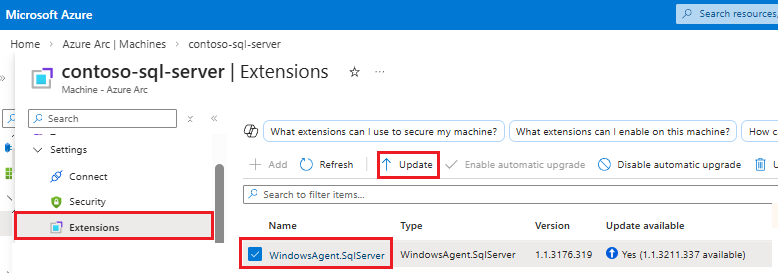
Pilih Ya pada kotak dialog Konfirmasi ekstensi pembaruan untuk menyelesaikan pemutakhiran.
Untuk informasi selengkapnya tentang memutakhirkan ekstensi Azure untuk SQL Server, lihat Meningkatkan ekstensi.