Catatan
Akses ke halaman ini memerlukan otorisasi. Anda dapat mencoba masuk atau mengubah direktori.
Akses ke halaman ini memerlukan otorisasi. Anda dapat mencoba mengubah direktori.
Topik ini menyediakan ringkasan komunikasi silang driver pada tumpukan ganda dalam Audio Class eXtensions (ACX).
Untuk informasi umum tentang ACX, lihat Gambaran umum ekstensi kelas audio ACX dan Ringkasan Objek ACX.
Untuk informasi dasar tentang target ACX, lihat target ACX dan sinkronisasi driver dan paket permintaan ACX IO IRP.
Single-Stack driver audio
Driver PortCls dan KS kelas audio lama hanya mendukung driver audio dengan "satu tumpukan." Kerangka audio lama berkomunikasi dan berantarmuka hanya dengan satu driver miniport. Terserah driver miniport untuk mengelola komunikasi dan sinkronisasi dengan tumpukan driver lain jika diperlukan.
ACX sepenuhnya mendukung driver audio satu lapis. Pengembang audio dapat mengganti driver Portcls dan miniport KS mereka saat ini dengan driver berbasis ACX sambil menjaga perilaku yang sama terhadap komponen tumpukan lainnya. Meskipun jika subsistem audio menggunakan tumpukan multi-audio, pendekatan yang lebih baik akan digunakan untuk menggunakan dukungan multi-tumpukan di ACX, dan membiarkan ACX menyinkronkan semua tumpukan ini bersama-sama, seperti yang dijelaskan di bagian berikutnya dari topik ini.
Driver audio multi-Tumpukan - komponenisasi
Sangat umum bagi jalur audio untuk melalui beberapa komponen perangkat keras yang ditangani oleh tumpukan driver yang berbeda untuk menciptakan pengalaman audio yang lengkap. Sistem biasanya memiliki fungsionalitas DSP, CODEC, dan AMP yang diimplementasikan oleh vendor teknologi audio yang berbeda seperti yang ditunjukkan pada diagram berikut.

Dalam arsitektur multi-lapisan tanpa standar yang terdefinisi dengan baik, setiap vendor dipaksa untuk menentukan antarmuka proprietari dan protokol komunikasi mereka sendiri. Ini adalah tujuan ACX untuk memfasilitasi pengembangan driver audio multi-stack dengan mengendalikan sinkronisasi antara tumpukan ini dan menyediakan pola yang mudah digunakan dan dapat digunakan kembali untuk driver yang berkomunikasi satu sama lain.
Menggunakan ACX, contoh sistem desain perangkat keras DSP, CODEC, dan AMP dapat didukung dengan arsitektur perangkat lunak berikut.
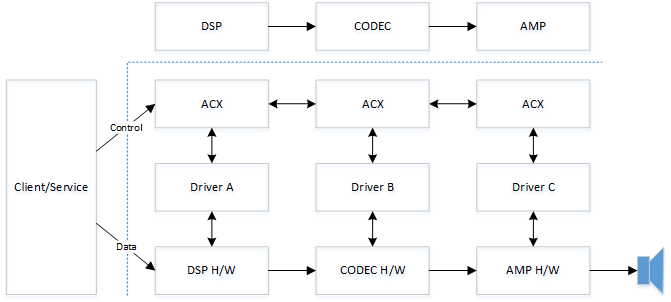
Perhatikan bahwa semua jenis komponen, bukan DSP, CODEC, dan AMP yang ditampilkan, dapat digunakan, karena ACX tidak bergantung pada jenis komponen tertentu, atau pengaturan komponen tertentu.
Driver pihak ketiga berkomunikasi satu sama lain melalui ACX dengan protokol yang terdefinisi dengan baik. Salah satu keuntungan dari pendekatan ini adalah bahwa satu tumpukan dapat diganti dengan tumpukan lain dari vendor yang berbeda tanpa memerlukan perubahan pada tumpukan perangkat lunak yang berdekatan. Salah satu tujuan utama kerangka kerja ekstensi kelas audio (ACX) adalah untuk menyederhanakan upaya yang diperlukan untuk mengembangkan driver audio multi-tumpukan yang dirakit dari komponen yang berasal dari vendor yang berbeda.
Contoh komunikasi target ACX - Sirkuit
Contoh kode ini menunjukkan penggunaan AcxTargetCircuit dan AcxTargetCircuitGetWdfIoTarget untuk berkomunikasi dengan sirkuit jarak jauh yang diekspos oleh tumpukan yang berbeda. Untuk informasi selengkapnya tentang Sirkuit ACX, lihat acxcircuit.h.
Agregator yang cukup kompleks ini menemukan sirkuit dan kemudian membuat ioTarget menggunakan AcxTargetCircuitGetWdfIoTarget. Kemudian mengatur opsi pengiriman WDF kustom dan secara asinkron mengirim permintaan. Terakhir, memeriksa status kirim untuk mengonfirmasi bahwa permintaan telah dikirim.
NTSTATUS
Aggregator_SendModuleCommand(
    _In_ PAGGREGATOR_RENDER_CIRCUIT_CONTEXT CircuitCtx,
    _In_ ACX_REQUEST_PARAMETERS             Params,
    _Out_ ULONG_PTR *                       OutSize
    )
{
    NTSTATUS                    status = STATUS_NOT_SUPPORTED;
    PKSAUDIOMODULE_PROPERTY     moduleProperty = nullptr;
    ULONG                       aggregationDeviceIndex = 0;
    PLIST_ENTRY                 ple;

    *OutSize = 0;

    moduleProperty = CONTAINING_RECORD(Params.Parameters.Property.Control, KSAUDIOMODULE_PROPERTY, ClassId);
    aggregationDeviceIndex = AUDIOMODULE_GET_AGGDEVICEID(moduleProperty->InstanceId);

    ple = CircuitCtx->AggregatorCircuit->AggregatorEndpoint->AudioPaths[aggregationDeviceIndex]->TargetCircuitList.Flink;
    while (ple != &CircuitCtx->AggregatorCircuit->AggregatorEndpoint->AudioPaths[aggregationDeviceIndex]->TargetCircuitList)
    {
        PAUDIO_CIRCUIT circuit = (PAUDIO_CIRCUIT)CONTAINING_RECORD(ple, AUDIO_CIRCUIT, ListEntry);

        if (circuit->Modules)
        {
            for(ULONG i = 0; i < circuit->Modules->Count; i++)
            {
                PACX_AUDIOMODULE_DESCRIPTOR descriptor = ((PACX_AUDIOMODULE_DESCRIPTOR)(circuit->Modules + 1) + i);

                // we've identified which aggregation device this call is targeting,
                // now locate which circuit implements this module. Within an aggregated device,
                // the module class id + instance id must uniquely identify a module. There should
                // never be duplicates.
                if (IsEqualGUIDAligned(descriptor->ClassId, moduleProperty->ClassId) &&
                    descriptor->InstanceId == moduleProperty->InstanceId)
                {
                    WDFREQUEST                  request = NULL;
                    WDF_REQUEST_SEND_OPTIONS    sendOptions;
                    WDF_OBJECT_ATTRIBUTES       attributes;
                    WDFIOTARGET                 ioTarget;

                    // We've now identified which aggregated device this call is targeting.
                    // The cached module information contains the ID adjusted with the aggregation device
                    // index. remove the aggregation device index before forwarding the call to the aggregated circuit.
                    moduleProperty->InstanceId = AUDIOMODULE_GET_INSTANCEID(moduleProperty->InstanceId);

                    ioTarget = AcxTargetCircuitGetWdfIoTarget(circuit->AcxTargetCircuit);

                    WDF_OBJECT_ATTRIBUTES_INIT(&attributes);
                    attributes.ParentObject = CircuitCtx->AggregatorCircuit->Circuit;
                    status = WdfRequestCreate(&attributes, ioTarget, &request);
                    if (!NT_SUCCESS(status))
                    {
                        goto exit;
                    }

                    status = AcxTargetCircuitFormatRequestForProperty(circuit->AcxTargetCircuit, request, &Params);
                    if (!NT_SUCCESS(status))
                    {
                        goto exit;
                    }

                    WDF_REQUEST_SEND_OPTIONS_INIT(&sendOptions, WDF_REQUEST_SEND_OPTION_SYNCHRONOUS);
                    WDF_REQUEST_SEND_OPTIONS_SET_TIMEOUT(&sendOptions, WDF_REL_TIMEOUT_IN_SEC(REQUEST_TIMEOUT_SECONDS));

                    // Whether WdfRequestSend succeeds or fails, we return the status & information, so
                    // there's no need to inspect the result.
                    WdfRequestSend(request, ioTarget, &sendOptions);
                    status = WdfRequestGetStatus(request);
                    *OutSize = WdfRequestGetInformation(request);

                    WdfObjectDelete(request);
                    goto exit;
                }
            }
        }

        ple = ple->Flink;
    }

    status = STATUS_SUCCESS;

exit:
    return status;
}
Contoh komunikasi sasaran ACX - Pin
Contoh kode ini menunjukkan penggunaan AcxTargetPin untuk berkomunikasi dengan pin sirkuit jarak jauh yang diekspos oleh tumpukan yang berbeda. Untuk informasi selengkapnya tentang ACX Pin, lihat acxpin.h.
Ini memilih elemen Volume dan Matikan Suara terakhir yang keduanya ada di sirkuit yang sama di Jalur Titik Akhir.
NTSTATUS FindDownstreamVolumeMute(
_In_ ACXCIRCUIT Circuit,
_In_ ACXTARGETCIRCUIT TargetCircuit
)
{
NTSTATUS status;
PDSP_CIRCUIT_CONTEXT circuitCtx;
ACX_REQUEST_PARAMETERS params;
WDF_REQUEST_SEND_OPTIONS sendOptions;
WDF_OBJECT_ATTRIBUTES attributes;
WDF_REQUEST_REUSE_PARAMS reuseParams;
circuitCtx = GetDspCircuitContext(Circuit);
//
// Note on behavior: This search algorithm will select the last Volume and Mute elements that are both
// present in the same circuit in the Endpoint Path.
// This logic could be updated to select the last Volume and Mute elements, or the first or last
// Volume or the first or last Mute element.
//
//
// First look through target's pins to determine if there's another circuit downstream.
// If there is, we'll look at that circuit for volume/mute.
//
for (ULONG pinIndex = 0; pinIndex < AcxTargetCircuitGetPinsCount(TargetCircuit); ++pinIndex)
{
ACXTARGETPIN targetPin = AcxTargetCircuitGetTargetPin(TargetCircuit, pinIndex);
ULONG targetPinFlow = 0;
ACX_REQUEST_PARAMETERS_INIT_PROPERTY(¶ms,
KSPROPSETID_Pin,
KSPROPERTY_PIN_DATAFLOW,
AcxPropertyVerbGet,
AcxItemTypePin,
AcxTargetPinGetId(targetPin),
nullptr, 0,
&targetPinFlow,
sizeof(targetPinFlow));
RETURN_NTSTATUS_IF_FAILED(SendProperty(targetPin, ¶ms, nullptr));
//
// Searching for the downstream pins. For Render, these are the dataflow out pins
//
if (circuitCtx->IsRenderCircuit && targetPinFlow != KSPIN_DATAFLOW_OUT)
{
continue;
}
else if (!circuitCtx->IsRenderCircuit && targetPinFlow != KSPIN_DATAFLOW_IN)
{
continue;
}
// Get the target pin's physical connection. We'll do this twice: first to get size and allocate, second to get the connection
PKSPIN_PHYSICALCONNECTION pinConnection = nullptr;
auto connection_free = scope_exit([&pinConnection]()
{
if (pinConnection)
{
ExFreePool(pinConnection);
pinConnection = nullptr;
}
});
ULONG pinConnectionSize = 0;
ULONG_PTR info = 0;
for (ULONG i = 0; i < 2; ++i)
{
ACX_REQUEST_PARAMETERS_INIT_PROPERTY(¶ms,
KSPROPSETID_Pin,
KSPROPERTY_PIN_PHYSICALCONNECTION,
AcxPropertyVerbGet,
AcxItemTypePin,
AcxTargetPinGetId(targetPin),
nullptr, 0,
pinConnection,
pinConnectionSize);
status = SendProperty(targetPin, ¶ms, &info);
if (status == STATUS_BUFFER_OVERFLOW)
{
// Pin connection already allocated, so how did this fail?
RETURN_NTSTATUS_IF_TRUE(pinConnection != nullptr, status);
pinConnectionSize = (ULONG)info;
pinConnection = (PKSPIN_PHYSICALCONNECTION)ExAllocatePool2(POOL_FLAG_NON_PAGED, pinConnectionSize, DRIVER_TAG);
// RETURN_NTSTATUS_IF_NULL_ALLOC causes compile errors
RETURN_NTSTATUS_IF_TRUE(pinConnection == nullptr, STATUS_INSUFFICIENT_RESOURCES);
}
else if (!NT_SUCCESS(status))
{
// There are no more connected circuits. Continue with processing this circuit.
break;
}
}
if (!NT_SUCCESS(status))
{
// There are no more connected circuits. Continue handling this circuit.
break;
}
ACXTARGETCIRCUIT nextTargetCircuit;
RETURN_NTSTATUS_IF_FAILED(CreateTargetCircuit(Circuit, pinConnection, pinConnectionSize, &nextTargetCircuit));
auto circuit_free = scope_exit([&nextTargetCircuit]()
{
if (nextTargetCircuit)
{
WdfObjectDelete(nextTargetCircuit);
nextTargetCircuit = nullptr;
}
});
RETURN_NTSTATUS_IF_FAILED_UNLESS_ALLOWED(FindDownstreamVolumeMute(Circuit, nextTargetCircuit), STATUS_NOT_FOUND);
if (circuitCtx->TargetVolumeMuteCircuit == nextTargetCircuit)
{
// The nextTargetCircuit is the owner of the volume/mute target elements.
// We will delete it when the pin is disconnected.
circuit_free.release();
// We found volume/mute. Return.
return STATUS_SUCCESS;
}
// There's only one downstream pin on the current targetcircuit, and we just processed it.
break;
}
//
// Search the target circuit for a volume or mute element.
// This sample code doesn't support downstream audioengine elements.
//
for (ULONG elementIndex = 0; elementIndex < AcxTargetCircuitGetElementsCount(TargetCircuit); ++elementIndex)
{
ACXTARGETELEMENT targetElement = AcxTargetCircuitGetTargetElement(TargetCircuit, elementIndex);
GUID elementType = AcxTargetElementGetType(targetElement);
if (IsEqualGUID(elementType, KSNODETYPE_VOLUME) &&
circuitCtx->TargetVolumeHandler == nullptr)
{
// Found Volume
circuitCtx->TargetVolumeHandler = targetElement;
}
if (IsEqualGUID(elementType, KSNODETYPE_MUTE) &&
circuitCtx->TargetMuteHandler == nullptr)
{
// Found Mute
circuitCtx->TargetMuteHandler = targetElement;
}
}
if (circuitCtx->TargetVolumeHandler && circuitCtx->TargetMuteHandler)
{
circuitCtx->TargetVolumeMuteCircuit = TargetCircuit;
return STATUS_SUCCESS;
}
//
// If we only found one of volume or mute, keep searching for both
//
if (circuitCtx->TargetVolumeHandler || circuitCtx->TargetMuteHandler)
{
circuitCtx->TargetMuteHandler = circuitCtx->TargetVolumeHandler = nullptr;
}
return STATUS_NOT_FOUND;
}
Contoh komunikasi target ACX - Aliran
Contoh kode ini menunjukkan penggunaan AcxTargetStream untuk berkomunikasi dengan aliran sirkuit jarak jauh. Untuk informasi selengkapnya tentang ACX Streams, lihat acxstreams.h.
    NTSTATUS                        status;
    PRENDER_DEVICE_CONTEXT          devCtx;
    WDF_OBJECT_ATTRIBUTES           attributes;
    ACXSTREAM                       stream;
    STREAM_CONTEXT *                streamCtx;
    ACXELEMENT                      elements[2] = {0};
    ACX_ELEMENT_CONFIG              elementCfg;
    ELEMENT_CONTEXT *               elementCtx;
    ACX_STREAM_CALLBACKS            streamCallbacks;
    ACX_RT_STREAM_CALLBACKS         rtCallbacks;
    CRenderStreamEngine *           streamEngine = NULL;

    PAGED_CODE();
    UNREFERENCED_PARAMETER(Pin);
    UNREFERENCED_PARAMETER(SignalProcessingMode);
    UNREFERENCED_PARAMETER(VarArguments);

    // This unit-test added support for RAW and DEFAULT.
    ASSERT(IsEqualGUID(*SignalProcessingMode, AUDIO_SIGNALPROCESSINGMODE_RAW) ||
           IsEqualGUID(*SignalProcessingMode, AUDIO_SIGNALPROCESSINGMODE_DEFAULT));

    devCtx = GetRenderDeviceContext(Device);
    ASSERT(devCtx != NULL);

    //
    // Init streaming callbacks.
    //
    ACX_STREAM_CALLBACKS_INIT(&streamCallbacks);
    streamCallbacks.EvtAcxStreamPrepareHardware         = EvtStreamPrepareHardware;
    streamCallbacks.EvtAcxStreamReleaseHardware         = EvtStreamReleaseHardware;
    streamCallbacks.EvtAcxStreamRun                     = EvtStreamRun;
    streamCallbacks.EvtAcxStreamPause                   = EvtStreamPause;
    streamCallbacks.EvtAcxStreamAssignDrmContentId      = EvtStreamAssignDrmContentId;

    status = AcxStreamInitAssignAcxStreamCallbacks(StreamInit, &streamCallbacks);
    if (!NT_SUCCESS(status))
    {
        ASSERT(FALSE);
        goto exit;
    }

    //
    // Init RT streaming callbacks.
    //
    ACX_RT_STREAM_CALLBACKS_INIT(&rtCallbacks);
    rtCallbacks.EvtAcxStreamGetHwLatency                = EvtStreamGetHwLatency;
    rtCallbacks.EvtAcxStreamAllocateRtPackets           = EvtStreamAllocateRtPackets;
    rtCallbacks.EvtAcxStreamFreeRtPackets               = EvtStreamFreeRtPackets;
    rtCallbacks.EvtAcxStreamSetRenderPacket             = R_EvtStreamSetRenderPacket;
    rtCallbacks.EvtAcxStreamGetCurrentPacket            = EvtStreamGetCurrentPacket;
    rtCallbacks.EvtAcxStreamGetPresentationPosition     = EvtStreamGetPresentationPosition;

    status = AcxStreamInitAssignAcxRtStreamCallbacks(StreamInit, &rtCallbacks);
    if (!NT_SUCCESS(status))
    {
        ASSERT(FALSE);
        goto exit;
    }

    //
    // Create the stream.
    //
    WDF_OBJECT_ATTRIBUTES_INIT_CONTEXT_TYPE(&attributes, STREAM_CONTEXT);
    attributes.EvtCleanupCallback = EvtStreamCleanup;
    attributes.EvtDestroyCallback = EvtStreamDestroy;
    status = AcxRtStreamCreate(Device, Circuit, &attributes, &StreamInit, &stream);
    if (!NT_SUCCESS(status))
    {
        ASSERT(FALSE);
        goto exit;
    }

    // START-TESTING: inverted create-stream sequence.
    {
        ACXSTREAMBRIDGE             bridge          = NULL;
        ACXPIN                      bridgePin       = NULL;
        ACXTARGETSTREAM             targetStream    = NULL;
        ACX_STREAM_BRIDGE_CONFIG    bridgeCfg;

        ACX_STREAM_BRIDGE_CONFIG_INIT(&bridgeCfg);
        bridgeCfg.InModesCount = 0;     // no in-modes. this stream-bridge is manually managed.
        bridgeCfg.InModes      = NULL;
        bridgeCfg.OutMode      = NULL;  // no mode, i.e., default (1st) and raw (2nd).
        bridgeCfg.Flags |= AcxStreamBridgeInvertChangeStateSequence;

        WDF_OBJECT_ATTRIBUTES_INIT(&attributes);
        attributes.ParentObject = WdfGetDriver(); // bridge is deleted by driver obj in case of error.

        status = AcxStreamBridgeCreate(Circuit, &attributes, &bridgeCfg, &bridge);
        if (!NT_SUCCESS(status))
        {
            ASSERT(FALSE);
            goto exit;
        }

        ...

        status = AcxStreamBridgeAddStream(bridge, stream);
        if (!NT_SUCCESS(status))
        {
            ASSERT(FALSE);
            goto exit;
        }

        // Get the Target Stream
        targetStream = AcxStreamBridgeGetTargetStream(bridge, stream);
        if (targetStream == NULL)
        {
            ASSERT(FALSE);
            goto exit;
        }
Contoh komunikasi target ACX - Element
Contoh kode ini menunjukkan penggunaan AcxTargetElement untuk berkomunikasi dengan elemen sirkuit. Untuk informasi selengkapnya tentang Target ACX, lihat acxtargets.h.
    _In_    ACXCIRCUIT          Circuit,
    _In_    ACXTARGETCIRCUIT    TargetCircuit

...

    //
    // Search the target circuit for a volume or mute element.
    // This sample code doesn't support downstream audioengine elements.
    //
    for (ULONG elementIndex = 0; elementIndex < AcxTargetCircuitGetElementsCount(TargetCircuit); ++elementIndex)
    {
        ACXTARGETELEMENT targetElement = AcxTargetCircuitGetTargetElement(TargetCircuit, elementIndex);
        GUID elementType = AcxTargetElementGetType(targetElement);

        if (IsEqualGUID(elementType, KSNODETYPE_VOLUME) &&
            circuitCtx->TargetVolumeHandler == nullptr)
        {
            // Found Volume
            circuitCtx->TargetVolumeHandler = targetElement;
        }
        if (IsEqualGUID(elementType, KSNODETYPE_MUTE) &&
            circuitCtx->TargetMuteHandler == nullptr)
        {
            // Found Mute
            circuitCtx->TargetMuteHandler = targetElement;
        }
    }
Lihat juga
Ikhtisar Ekstensi Kelas Audio ACX