Catatan
Akses ke halaman ini memerlukan otorisasi. Anda dapat mencoba masuk atau mengubah direktori.
Akses ke halaman ini memerlukan otorisasi. Anda dapat mencoba mengubah direktori.
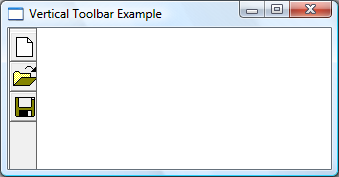
Kunci untuk membuat toolbar vertikal adalah menyertakan CCS_VERT dalam gaya jendela, dan untuk mengatur gaya TBSTATE_WRAP untuk setiap tombol.
Apa yang perlu Anda ketahui
Teknologi
Prasyarat
- C/C++
- Pemrograman Antarmuka Pengguna Windows
Peraturan
Membuat Bilah Alat Vertikal
Contoh kode berikut membuat toolbar vertikal yang diperlihatkan dalam ilustrasi berikut.
HIMAGELIST g_hImageList = NULL;

HWND CreateVerticalToolbar(HWND hWndParent)
{
    // Define the buttons.
    // IDM_NEW, IDM_0PEN, and IDM_SAVE are application-defined command IDs.

    TBBUTTON tbButtons3[numButtons] =
    {
        {STD_FILENEW,  IDM_NEW,  TBSTATE_ENABLED | TBSTATE_WRAP, BTNS_BUTTON, {0}, 0L, 0},
        {STD_FILEOPEN, IDM_OPEN, TBSTATE_ENABLED | TBSTATE_WRAP, BTNS_BUTTON, {0}, 0L, 0},
        {STD_FILESAVE, IDM_SAVE, TBSTATE_ENABLED | TBSTATE_WRAP, BTNS_BUTTON, {0}, 0L, 0}
    };

    // Create the toolbar window.
    HWND hWndToolbar = CreateWindowEx(0, TOOLBARCLASSNAME, NULL,
                                      WS_CHILD | WS_VISIBLE | CCS_VERT | WS_BORDER, 0, 0, 0, 0,
                                      hWndParent, NULL, g_hInst, NULL);

    // Create the image list.
    g_hImageList = ImageList_Create(24, 24,                   // Dimensions of individual bitmaps.
                                    ILC_COLOR16 | ILC_MASK,   // Ensures transparent background.
                                    numButtons, 0);

    // Set the image list.
    SendMessage(hWndToolbar, TB_SETIMAGELIST, 0, (LPARAM)g_hImageList);

    // Load the button images.
    SendMessage(hWndToolbar, TB_LOADIMAGES, (WPARAM)IDB_STD_LARGE_COLOR, (LPARAM)HINST_COMMCTRL);

    // Add them to the toolbar.
    SendMessage(hWndToolbar, TB_BUTTONSTRUCTSIZE,       (WPARAM)sizeof(TBBUTTON), 0);
    SendMessage(hWndToolbar, TB_ADDBUTTONS, numButtons, (LPARAM)&tbButtons3);

    return hWndToolbar;
}
Topik terkait