Catatan
Akses ke halaman ini memerlukan otorisasi. Anda dapat mencoba masuk atau mengubah direktori.
Akses ke halaman ini memerlukan otorisasi. Anda dapat mencoba mengubah direktori.
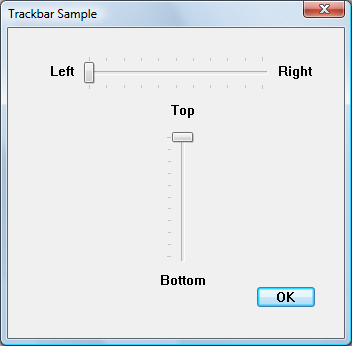
Dengan mengatur kontrol lain sebagai jendela teman untuk trackbar, Anda dapat secara otomatis memposisikan kontrol tersebut di ujung trackbar sebagai label.
Ilustrasi berikut menunjukkan trackbar horizontal dan vertikal, keduanya dengan kontrol statis sebagai jendela teman.
Apa yang perlu Anda ketahui
Teknologi
Prasyarat
- C/C++
- Pemrograman Antarmuka Pengguna Windows
Petunjuk
Gunakan Windows Teman
Contoh kode berikut membuat jendela teman yang ditampilkan dalam ilustrasi.
void LabelTrackbarsWithBuddies(HWND hDlg)
{
    HWND hwndTrackbar;
    HWND hwndBuddy;

    const int staticWidth   = 50;
    const int staticHeight  = 20;

//======================================================
// For horizontal Trackbar.

    hwndTrackbar = GetDlgItem(hDlg, IDC_SLIDER1);

    hwndBuddy = CreateWindowEx(0, L"STATIC", L"Left", SS_RIGHT | WS_CHILD | WS_VISIBLE,
                                    0, 0, staticWidth, staticHeight, hDlg, NULL, g_hInst, NULL);

    SendMessage(hwndTrackbar, TBM_SETBUDDY, (WPARAM)TRUE, (LPARAM)hwndBuddy);

    //-------------------------------------------------

    hwndBuddy = CreateWindowEx(0, L"STATIC", L"Right", SS_LEFT | WS_CHILD | WS_VISIBLE,
                               0, 0, staticWidth, staticHeight, hDlg, NULL, g_hInst, NULL);

    SendMessage(hwndTrackbar, TBM_SETBUDDY, (WPARAM)FALSE, (LPARAM)hwndBuddy);

//======================================================
// For vertical Trackbar.

    hwndTrackbar = GetDlgItem(hDlg, IDC_SLIDER2);

    hwndBuddy = CreateWindowEx(0, L"STATIC", L"Top", SS_CENTER | WS_CHILD | WS_VISIBLE,
                               0, 0, staticWidth, staticHeight, hDlg, NULL, g_hInst, NULL);

    SendMessage(hwndTrackbar, TBM_SETBUDDY, (WPARAM)TRUE, (LPARAM)hwndBuddy);

    //-------------------------------------------------

    hwndBuddy = CreateWindowEx(0, L"STATIC", L"Bottom", SS_CENTER | WS_CHILD | WS_VISIBLE,
                               0, 0, staticWidth, staticHeight, hDlg, NULL, g_hInst, NULL);

    SendMessage(hwndTrackbar, TBM_SETBUDDY, (WPARAM)FALSE, (LPARAM)hwndBuddy);
}
Keterangan
IDC_SLIDER1 dan IDC_SLIDER2 adalah trackbar yang dibuat di editor sumber daya.
Topik terkait