Nóta
Aðgangur að þessari síðu krefst heimildar. Þú getur prófað aðskrá þig inn eða breyta skráasöfnum.
Aðgangur að þessari síðu krefst heimildar. Þú getur prófað að breyta skráasöfnum.
Unity Catalog is the unified governance layer built into Azure Databricks. When enabled for a workspace, Unity Catalog operates beneath every data interaction in your workspaces automatically: enforcing access control when you query a table, tracking lineage as data moves, logging activity for auditing, and more. You work with the objects Unity Catalog governs through Catalog Explorer, SQL, the Azure Databricks CLI, and REST APIs.
Unity Catalog is also available as an open-source implementation. See the announcement blog and the public Unity Catalog GitHub repo.
The Unity Catalog object model
Every asset you govern in Unity Catalog is modeled as a securable object, an object on which you can grant permissions to users, service principals, or groups. Data assets such as tables, views, volumes, functions, and models follow a three-level namespace (catalog.schema.object). Tables and volumes can be managed, where Unity Catalog handles both governance and the underlying file storage lifecycle, or external, where Unity Catalog handles governance only. Other objects, such as storage credentials, external locations, connections, and shares, sit directly under the metastore.
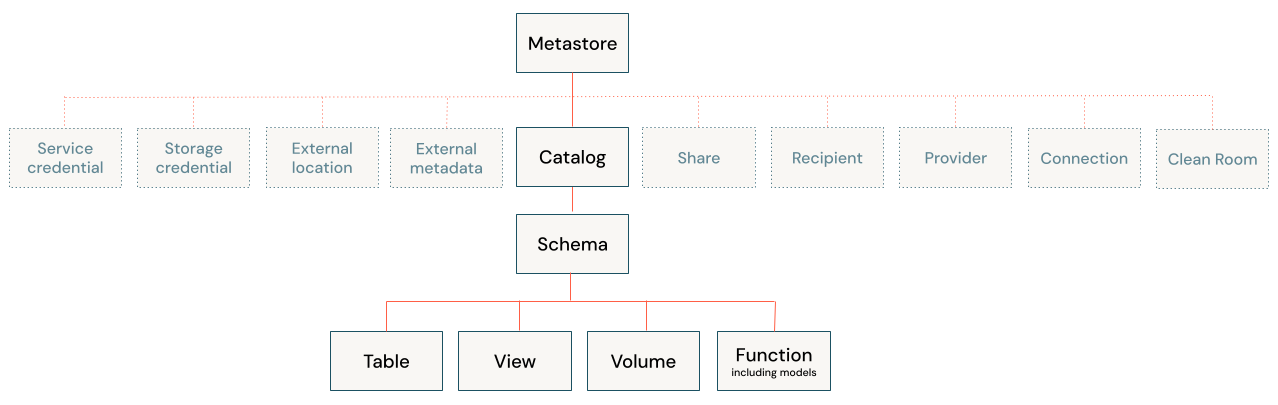
The following pages explain core Unity Catalog concepts and workflows in more detail.
| Topic | Description |
|---|---|
| Securable objects | Learn about each object type in the Unity Catalog hierarchy and how permissions apply to them. |
| Managed versus external assets | Understand the difference between managed and external tables and volumes, and when to use each. |
| Requirements and limitations | Review compute requirements, supported file formats, naming constraints, and known limitations. |
Unity Catalog capabilities
Unity Catalog provides built-in tools for governing every dimension of your data and AI environment. The following topics cover the major capability areas.
| Topic | Description |
|---|---|
| Access control | Manage who can access what using privileges, attribute-based policies, row and column filters, and workspace bindings. |
| Data discovery | Interact with securable objects using Catalog Explorer, the Azure Databricks UI for discovering and managing data and AI assets registered in Unity Catalog. |
| Data lineage | Automatically track how data flows and transforms from source to final views and dashboards. |
| Auditing | Maintain a complete record of all data access and system activity using the audit log system table. |
| Data classification | Automatically classify and tag sensitive data in your catalog. |
| Data quality monitoring | Proactively track data health with built-in profiling and alerts that catch anomalies before they reach downstream consumers. |
| Data sharing | Securely share live data and AI assets across organizations and clouds using the open Delta Sharing protocol. |
| AI governance | Govern AI assets and AI traffic using Unity Catalog and AI Gateway. |
Get started
The following resources help you get started with Unity Catalog. If your workspace was created after November 9, 2023, it is automatically enabled with Unity Catalog.
| Topic | Description |
|---|---|
| Get started with Unity Catalog | Check if Unity Catalog is already enabled for your workspace, and configure your first catalog, schema, and data access controls. |
| Upgrade to Unity Catalog | Learn how to upgrade a workspace that is not yet using Unity Catalog. |