Nóta
Aðgangur að þessari síðu krefst heimildar. Þú getur prófað aðskrá þig inn eða breyta skráasöfnum.
Aðgangur að þessari síðu krefst heimildar. Þú getur prófað að breyta skráasöfnum.
VM Applications are a resource type in Azure Compute Gallery that simplifies application management for your virtual machines (VMs) and Virtual Machine Scale Sets. You package your applications once, store them in your gallery, and deploy them to any VM in your organization.
With VM Applications, you decouple application deployment from your base VM images. This separation enables you to update applications independently without rebuilding images, reducing maintenance overhead, accelerating deployment cycles, and effectively handle critical vulnerabilities and disaster recovery.
When to use VM Applications
VM Applications are the recommended approach when you need to publish, deploy, and manage software across Azure VMs. Consider VM Applications when you want to:
- Deploy applications across large VM fleets with consistent configuration.
- Update applications frequently without rebuilding VM images.
- Manage application versions and roll back when issues arise.
- Respond to zero-day vulnerabilities by publishing new versions quickly and updating your fleet centrally with Azure Policy.
- Enforce application presence and configuration using Azure Policy.
- Reduce deployment latency for high-scale and time-sensitive workloads like AI inferencing and gaming.
- Gain visibility into deployed applications with post-deployment inventory and monitoring.
- Modularize applications and scripts for reusability and operational efficiency.
- Consolidate application management into a single Azure-managed solution.
How VM Applications work
VM Applications integrate with your existing development workflows and Azure infrastructure to provide end-to-end application lifecycle management.
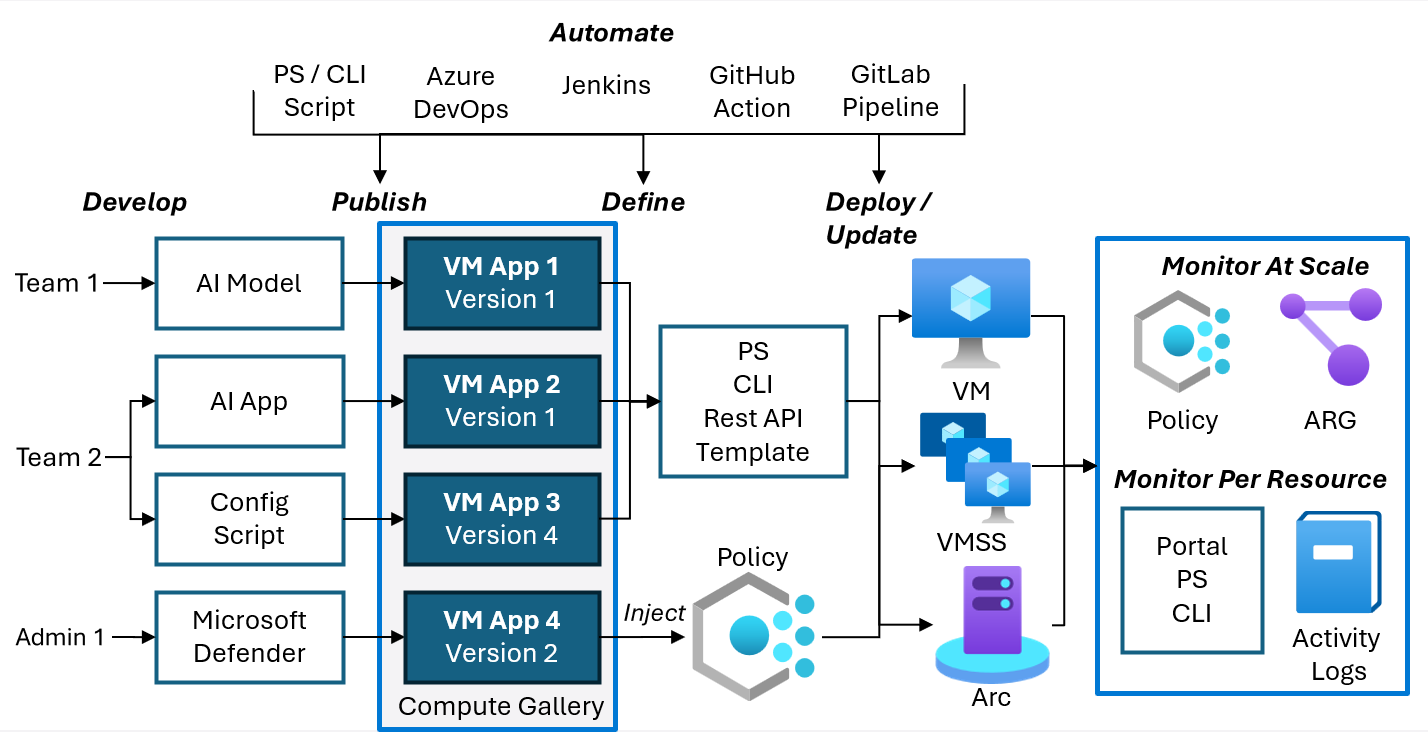
- Develop and publish: Different teams develop applications, scripts, and configurations independently. Each team publishes their packages as Azure VM Application to Azure Compute Gallery, which serves as a personal app repository.
- Deploy or update: Deploy published applications to VMs and Virtual Machine Scale Sets using Azure portal, PowerShell, CLI, REST API, or ARM/Bicep templates.
- Enforce: Use Azure Policy to automatically inject required applications across your fleet.
- Automate: Automate publishing, deployment and updates using CI/CD pipelines like Azure DevOps, GitHub Actions, GitLab pipelines, Jenkins, and scripts.
- Monitor: View application inventory & state across your infrastructure. Use Azure Policy and Azure Resource Graph for fleet-wide compliance monitoring, or view per-resource details in the Azure portal, PowerShell, CLI, and activity logs.
Key capabilities
Private application store for your organization
- Store and manage all application packages in Azure Compute Gallery.
- Package applications, scripts, configurations, and files in any format:
.zip,.msi,.exe,.tar.gz,.deb,.rpm,.sh, or others. - Maintain multiple versions of each application and deploy
latestor specific version. - Deploy test versions without being considered as
latest.
Access control and sharing
- Control who can publish applications to gallery and access published app to deploy using Azure role-based access control (RBAC).
- Share gallery across subscriptions, Microsoft tenant or publicly.
Security
- Download packages from Azure-managed infrastructure instead of external URLs eliminating need to keep VM internet facing.
- Use Managed Identity assigned to Azure Compute Gallery for securely publishing VM applications.
- Handle critical security vulnerabilities by quickly publishing new version and updating your fleet using Azure Policy or Scripts.
- Use Azure Policy to enforce specific applications, security components, or application configuration across the infrastructure.
Flexible deployment options
- Deploy to individual VMs, flexible, or uniform Virtual Machine Scale Sets.
- Install, update, or remove applications independently without rebuilding VM images.
- Define custom install, update, and remove commands for each application.
- Specify deployment order when installing multiple applications.
- Configure reboot handling using the
scriptBehaviorAfterRebootproperty. - Use
treatFailureAsDeploymentFailureto mark VM deployment as failed when an application fails to install.
Failure resiliency and high-scale performance
- Automatically replicate application packages across Azure regions and availability zones providing resiliency to region, zone, or content delivery network (CDN) failure.
- Create up to 10 replicas per region to distribute load during high-scale deployments.
- Deploy 25 packages up to 2 GB each, 50 GB total per VM.
- Use block blobs for chunked uploads and background streaming of large packages.
Governance and compliance
- Use Azure Policy to audit and enforce application presence and configuration across your fleet.
- Monitor application inventory and state using Azure portal, Azure Policy, and Azure Resource Graph.
- Monitor and apply pending updates across your infrastructure.
Cost
There's no extra charge for using VM Application Packages, but you're charged for the following resources:
- Storage costs of storing each package and any replicas.
- Network egress charges for replication of the first version from the source region to the replicated regions. Subsequent replicas are handled within the region, so there are no extra charges.
For more information on network egress, see Bandwidth pricing.
Publish application as Azure VM Application
To deploy VM applications, first the application needs to be published to Azure Compute Gallery. To publish Azure VM Application
- First, create a VM Application Resource which is a logical resource containing metadata about the application.
- Then create a VM Application Version Resource within the VM Application resource containing the application package and instructions on how to install, update, delete and replicate the VM application.
Azure resources required to publish Azure VM Application
| Resource | ARM Resource Type | Description |
|---|---|---|
| Azure Compute Gallery | Microsoft.Compute/galleries | A gallery is a repository for managing and sharing application packages. Users can share the gallery resource and all the child resources are shared automatically. The gallery name must be unique per subscription. For example, you may have one gallery to store all your OS images and another gallery to store all your VM applications. |
| VM Application | Microsoft.Compute/galleries/applications | The definition of your VM application. This logical resource stores the common metadata for all its versions, including the name, description, supported OS type, and end-of-life information. Think of it as a container that holds all versions of a single application. For example, you might have a VM Application called Apache Tomcat that contains version 9.0.0, 9.0.1, and 10.0.0. |
| VM Application Version | Microsoft.Compute/galleries/applications/versions | The deployable resource that contains your actual application package and version-specific configuration. Each version points to the application binary or script in your storage account and defines the install, update, and remove commands. You can replicate versions to multiple Azure regions to improve deployment reliability and reduce latency. Before you deploy an application to a VM, the version must be replicated to the VM's region. |
| Storage Account | Microsoft.Storage/storageAccounts | Application packages are first uploaded to your storage account. Azure Compute Gallery then downloads the application package from this storage account using SAS URLs and stores it within the VM Application version. Azure Compute Gallery also replicates this package across regions & regional replicas per the VM Application version definition. The application package in the storage account can be deleted after VM application version is created in Azure Compute Gallery. |
Properties in VM Application Resource
The VM Application resource defines follows properties:
| Property | Description | Updatable | Limitations |
|---|---|---|---|
| name | Name of the application | Yes | Max length of 117 characters. Allowed characters are uppercase or lowercase letters, digits, hyphen(-), period (.), underscore (_). Names not allowed to end with period(.). |
| location | Location of the resource | No | |
| supportedOSType | Define the supported OS type | No | "Linux" or "Windows" |
| endOfLifeDate | Optional. A future end of life date for the application. The date is for reference only and isn't enforced. | Yes | |
| description | Optional. A description of the VM application | Yes | |
| eula | Optional. Reference to End User License Agreement (EULA) | Yes | |
| privacyStatementUri | Optional. Reference to privacy statement for the application. | Yes | |
| releaseNoteUri | Optional. Reference to release notes for the application. | Yes |
Properties in VM Application Version Resource
VM application versions are the deployable resources within the VM Application resource. Versions are defined with the following properties:
| Property | Description | Updatable | Limitations |
|---|---|---|---|
| location | Source location for the VM Application version. | No | Valid Azure Region |
| source/mediaLink | Link to the application package file in a storage account | Partially. | Valid and existing storage url. Only SASToken within the SASURL can be changed. |
| source/defaultConfigurationLink | Optional. A link to the configuration file for the VM application. It can be overridden at deployment time. | Partially | Valid and existing storage url. Only SASToken within the SASURL can be changed. |
| manageActions/install | Install script as string to properly install the application | No | Valid command for the given OS in string format. |
| manageActions/remove | Remove script as string to properly remove the application | No | Valid command for the given OS in string format |
| manageActions/update | Optional. Update script as string to properly update the VM application to a newer version. | No | Valid command for the given OS in string format |
| targetRegions/name | Name of target regions to which to replicate. Improves resiliency to region failure and create latency. | Yes | Valid Azure region |
| targetRegions/regionalReplicaCount | Optional. The number of replicas to create in the region. Improves load handling and create latency. Defaults to 1. | Yes | Integer between 1 and 3 inclusive |
| replicaCount | Optional. Defines the number of replicas across each region. Takes effect if regionalReplicaCount isn't defined. Improves resiliency to region or cluster failure and create latency during high scale. | Yes | Integer between 1 and 3 inclusive. |
| endOfLifeDate | Optional. A future end of life date for the application version. This property is for customer reference only and isn't enforced. | Yes | Valid future date |
| excludeFromLatest | Optional. Exclude version from being used as the latest version of the application when 'latest' keyword is used in applicationProfile. | Yes | Defaults to false. |
| storageAccountType | Optional. Type of storage account to use in each region for storing application package. Defaults to Standard_LRS. | No | |
| safetyProfile/allowDeletionOfReplicatedLocations | Optional. Indicates whether or not removing this Gallery Image Version from replicated regions is allowed. | Yes | |
| settings/packageFileName | Optional. Package file name to use when the package is downloaded to the VM. | No | Character limit is of 4,096 characters. |
| settings/configFileName | Optional. Configuration file name to be use when the configuration is downloaded to the VM. | No | Character limit is of 4,096 characters. |
| settings/scriptBehaviorAfterReboot | Optional. The action to be taken for installing, updating, or removing gallery application after the VM is rebooted. | No |
Deploy Azure VM Applications
After the VM Application version is published to Azure Compute Gallery, you can deploy the version across Azure Virtual Machines (VM) and Azure Virtual Machine Scale Sets. This deployment is done by referencing the ARM ID of the VM application in the applicationProfile of the Azure Virtual Machine and Virtual Machine Scale Sets.
Properties in applicationProfile of VM and Virtual Machine Scale Sets
The applicationProfile in Azure VM and Virtual Machine Scale Sets defines the following properties:
| Property | Description | Limitations |
|---|---|---|
| galleryApplications | Gallery Applications to deploy | |
| packageReferenceId | Reference to application version to deploy | Valid application version reference |
| configurationReference | Optional. The full url of a storage blob containing the configuration for this deployment. This overrides any value provided for defaultConfiguration earlier. | Valid storage blob reference |
| order | Optional. Order in which to deploy applications. When not set, the application is installed last after all ordered applications are installed. | Valid integer |
| treatFailureAsDeploymentFailure | Optional. Mark application failure as VM deployment failure for failure handling | True or False |
The order field may be used to specify dependencies between applications. The rules for order are as follows:
| Case | Install Meaning | Failure Meaning |
|---|---|---|
| No order specified | Unordered applications are installed after ordered applications. There's no guarantee of installation order among the unordered applications. | Installation failures of other applications, be it ordered or unordered doesn’t affect the installation of unordered applications. |
| Duplicate order values | Application is installed in any order compared to other applications with the same order. All applications of the same order are installed after the ones with lower orders and before the ones with higher orders. | If a previous application with a lower order failed to install, no applications with this order install. If any application with this order fails to install, no applications with a higher order install. |
| Increasing orders | Application will be installed after the ones with lower orders and before the ones with higher orders. | If a previous application with a lower order failed to install, this application doesn't install. If this application fails to install, no application with a higher order installs. |
Technical Details for VM Applications
Considerations and Current Limits for VM Applications
Up to 10 replicas per region: When you're creating a VM Application version, the maximum number of replicas per region is 10 for both page blob and block blob.
Up to 300 versions per region: When creating a VM Application version, you can have up to 300 application versions per region across all applications.
Manual retry for failed installations: Currently, the only way to retry a failed installation is to remove the application from the profile, then add it back.
Up to 25 applications per VM: A maximum of 25 applications can be deployed to a single virtual machine.
2 GB application size: The maximum file size of an application version
mediaLinkis 2 GB. The maximum file size fordefaultConfigurationLinkis 1 GB.Requires a VM Agent: The VM agent must exist on the VM and be able to receive goal states.
Single version of the application per VM: Only one version of a given application can be deployed to a VM.
Move operations currently not supported: Moving VMs with associated VM Applications across resource groups is currently not supported.
Note
For Azure Compute Gallery and VM Applications, Storage SAS can be deleted after replication. However, any subsequent update operation requires a valid SAS.
Download directory within the VM
The download location of the application package and the configuration files are:
- Linux:
/var/lib/waagent/Microsoft.CPlat.Core.VMApplicationManagerLinux/<application name>/<application version> - Windows:
C:\Packages\Plugins\Microsoft.CPlat.Core.VMApplicationManagerWindows\1.0.9\Downloads\<application name>\<application version>
The install/update/remove commands should be written assuming the application package and the configuration file are in the current directory.
File naming for deployed VM application
When the application file gets downloaded to the VM, Azure uses VM Application name as the file name without any file extension. For example, if VM Application name is "TestPythonApp", the python.exe file uploaded in the VM Application gets downloaded as TestPythonApp. Azure is unable to retain the original file name and file extension.
Similarly, if configuration file is passes via defaultConfigurationLink in publishingProfile or via configurationReference in applicationProfile, Azure downloads the file with <vm application name>-config. For example, if the configuration file name is `config.json' and VM Application name is "TestPythonApp", the downloaded file is named TestPythonApp-config.
VM Applications provide packageFileName and configFileName properties in the publishingProfile\settings to override the default file names and allow customers to set custom file names. For example, if packageFileName="pythonApp.exe" and configFileName="pythonConfig.json, Azure downloads the files with respective names.
Alternatively, include a command for renaming the files before execution in the installScript.
Command interpreter used by VM application
The default command interpreters are:
- Linux:
/bin/bash - Windows:
cmd.exe
It's possible to use a different interpreter like Chocolatey or PowerShell, as long as it's installed on the machine, by calling the executable and passing the command to it. For example, to have your command run in PowerShell on Windows instead of cmd, you can pass powershell.exe -Command '<powershell commmand>'
How VM Application updates are handled
When you update an application version on a VM or Virtual Machine Scale Sets, the update command you provided during deployment is used. If the updated version doesn't have an update command, then the current version is removed and the new version is installed.
Update commands should be written with the expectation that it could be updating from any older version of the VM Application.
Treat VM Application failure as deployment failure
By default, if an application fails to install, update, or remove, the VM Application extension still reports its status as success. The extension only reports a failure on its own when there's a problem with the extension itself or the underlying infrastructure, not with your application scripts.
To change this behavior, set the treatFailureAsDeploymentFailure property to true on the application in the VM's applicationProfile. When you enable this setting, any application installation, update, or removal failure causes the VMAppExtension provisioning status to report failure. This failure also causes the VM provisioning status to report as failed.
Error messages
These are the error messages that you might encounter when publishing and deploying your VM applications.
| Message | Description |
|---|---|
| Current VM Application Version {name} was deprecated at {date}. | You tried to deploy a VM Application version that was deprecated. Try using latest instead of specifying a specific version. |
| Current VM Application Version {name} supports OS {OS}, while current OSDisk's OS is {OS}. | You tried to deploy a Linux application to Windows instance or vice versa. |
| The maximum number of VM applications (max=5, current={count}) has been exceeded. Use fewer applications and retry the request. | We currently only support five VM applications per VM or Virtual Machine Scale Sets. |
| More than one VM Application was specified with the same packageReferenceId. | The same application was specified more than once. |
| Subscription not authorized to access this image. | The subscription doesn't have access to this application version. |
| Storage account in the arguments doesn't exist. | There are no applications for this subscription. |
| The platform image {image} isn't available. Verify that all fields in the storage profile are correct. For more information about storage profile, see https://aka.ms/storageprofile. | The application doesn't exist. |
| The gallery image {image} isn't available in {region} region. Contact image owner to replicate to this region, or change your requested region. | The gallery application version exists, but it wasn't replicated to this region. |
| The SAS isn't valid for source uri {uri}. | A Forbidden error was received from storage when attempting to retrieve information about the url (either mediaLink or defaultConfigurationLink). |
| The blob referenced by source uri {uri} doesn't exist. | The blob provided for the mediaLink or defaultConfigurationLink properties doesn't exist. |
| The gallery application version url {url} can't be accessed due to the following error: remote name not found. Ensure that the blob exists and that it's either publicly accessible or is a SAS url with read privileges. | The most likely case is that a SAS uri with read privileges wasn't provided. |
| The gallery application version url {url} can't be accessed due to the following error: {error description}. Ensure that the blob exists and that it's either publicly accessible or is a SAS url with read privileges. | There was an issue with the storage blob provided. The error description provides more information. |
| Operation {operationName} isn't allowed on {application} since it's marked for deletion. You can only retry the delete operation (or wait for an ongoing one to complete). | Attempt to update an application that's currently being deleted. |
| The value {value} of parameter 'galleryApplicationVersion.properties.publishingProfile.replicaCount' is out of range. The value must be between one and three, inclusive. | Only between one and three replicas are allowed for VM Application versions. |
| Changing property 'galleryApplicationVersion.properties.publishingProfile.manageActions.install' isn't allowed. (Or update, delete) | It isn't possible to change any of the manage actions on an existing VmApplication. A new VmApplication version must be created. |
| Changing property ' galleryApplicationVersion.properties.publishingProfile.settings.packageFileName ' isn't allowed. (Or configFileName) | It isn't possible to change any of the settings, such as the package file name or config file name. A new VmApplication version must be created. |
| The blob referenced by source uri {uri} is too large: size = {size}. The maximum blob size allowed is '1 GB'. | The maximum size for a blob referred to by mediaLink or defaultConfigurationLink is currently 1 GB. |
| The blob referenced by source uri {uri} is empty. | An empty blob was referenced. |
| {type} blob type isn't supported for {operation} operation. Only page blobs and block blobs are supported. | VmApplications only supports page blobs and block blobs. |
| The SAS isn't valid for source uri {uri}. | The SAS uri supplied for mediaLink or defaultConfigurationLink isn't a valid SAS uri. |
| Can't specify {region} in target regions because the subscription is missing required feature {featureName}. Either register your subscription with the required feature or remove the region from the target region list. | To use VmApplications in certain restricted regions, one must have the feature flag registered for that subscription. |
| Gallery image version publishing profile regions {regions} must contain the location of image version {location}. | The list of regions for replication must contain the location where the application version is. |
| Duplicate regions aren't allowed in target publishing regions. | The publishing regions may not have duplicates. |
| Gallery application version resources currently don't support encryption. | The encryption property for target regions isn't supported for VM Applications |
| Entity name doesn't match the name in the request URL. | The gallery application version specified in the request url doesn't match the one specified in the request body. |
The gallery application version name is invalid. The application version name should follow Major(int32). Minor(int32). Patch(int32) format, where int is between 0 and 2,147,483,647 (inclusive). For example, 1.0.0, 2018.12.1 etc. |
The gallery application version must follow the format specified. |
Next steps
Learn how to
- Create and deploy VM application packages.
- Manage and delete Azure VM Applications.
- Create application package for VM Applications
- Publish VM application using Managed Identity
- Govern and enforce applications using Azure Policy
Check out