Nóta
Aðgangur að þessari síðu krefst heimildar. Þú getur prófað aðskrá þig inn eða breyta skráasöfnum.
Aðgangur að þessari síðu krefst heimildar. Þú getur prófað að breyta skráasöfnum.
Azure Accelerated Networking significantly improves virtual machine networking performance by reducing latency and CPU utilization. This article describes the benefits, constraints, and supported configurations of Accelerated Networking. Accelerated Networking enables single root I/O virtualization (SR-IOV) on supported virtual machine (VM) types, greatly improving networking performance. This high-performance data path bypasses the host, which reduces latency, jitter, and CPU utilization for the most demanding network workloads.
The following diagram illustrates how two VMs communicate with and without Accelerated Networking.
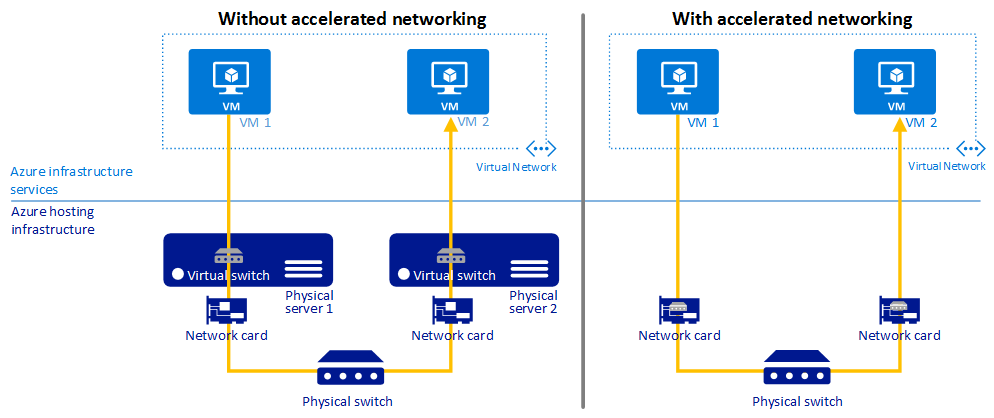
Without Accelerated Networking, all networking traffic in and out of the VM traverses the host and the virtual switch. The virtual switch provides all policy enforcement to network traffic. Policies include network security groups, access control lists, isolation, and other network virtualized services.
With Accelerated Networking, network traffic that arrives at the VM's network interface (NIC) is forwarded directly to the VM. Accelerated Networking offloads all network policies that the virtual switch applied, and it applies them in hardware. Because hardware applies policies, the NIC can forward network traffic directly to the VM. The NIC bypasses the host and the virtual switch, while it maintains all the policies that it applied in the host.
Benefits
Accelerated Networking has the following benefits:
Lower latency and higher packets per second. Removing the virtual switch from the data path eliminates the time that packets spend in the host for policy processing. It also increases the number of packets that the VM can process.
Reduced jitter. Processing time for virtual switches depends on the amount of policy to apply and the workload of the CPU that does the processing. Offloading policy enforcement to the hardware removes that variability by delivering packets directly to the VM. Offloading also removes the host-to-VM communication, all software interrupts, and all context switches.
Decreased CPU utilization. Bypassing the virtual switch in the host leads to less CPU utilization for processing network traffic.
Limitations and constraints
The benefits of Accelerated Networking apply only to the VM that enables it.
For best results, enable Accelerated Networking on at least two VMs in the same Azure virtual network. This feature has minimal effect on latency when you communicate across virtual networks or connect on-premises.
You can't enable Accelerated Networking on a running VM. You can enable Accelerated Networking on a supported VM only when the VM is stopped and deallocated.
You can't deploy virtual machines (classic) with Accelerated Networking through Azure Resource Manager.
The Azure platform doesn't update the Mellanox NIC or MANA drivers in the VM. For VMs running Linux and FreeBSD, you should stay current with the latest kernel updates offered by the distribution. For VMs running Windows, apply updated drivers from the NVIDIA support page if you encounter any issues with the driver delivered with the Marketplace image or applied to a custom image. The latest MANA drivers can be found at the documentation page for MANA on Windows
Supported regions
Accelerated Networking is available in all global Azure regions and the Azure Government Cloud.
Supported operating systems
The following versions of Windows support Accelerated Networking for all interfaces:
- Windows Server 2022
- Windows Server 2019
- Windows Server 2016
- Windows 11
The following Linux and FreeBSD distributions from Azure Marketplace support Accelerated Networking out of the box:
- Ubuntu 22.04 LTS
- Ubuntu 24.04 LTS
- Red Hat Enterprise Linux 8.8
- Red Hat Enterprise Linux 8.10
- Red Hat Enterprise Linux 9.2
- Red Hat Enterprise Linux 9.4
- Red Hat Enterprise Linux 9.6
- SUSE Linux Enterprise Server 15 SP4
- Rocky Linux (CIQ) 8.10 (all variants)
- Rocky Linux (CIQ) 9.2+ (all variants)
- Debian 12 "Bookworm"
- Oracle Linux 8.0 UEK R7
- Oracle Linux 9.0 UEK R7
For users of non endorsed Linux distributions or utilizing custom kernels, we recommend the Linux Kernel 6.12 or later found at kernel.org
Note
Newer MANA features are under active development and Linux distribution vendors partner with Microsoft to update their kernels with upstream changes. The Cadence of updates varies by distribution vendor. The newer your distribution and kernel is, the more likely it is to have the latest updates.
Supported VM instances
Most general-purpose and compute-optimized VM instance sizes with two or more vCPUs support Accelerated Networking. On instances that support hyperthreading, VM instances with four or more vCPUs support Accelerated Networking.
To check whether a VM size supports Accelerated Networking, see Sizes for virtual machines in Azure.
You can directly query the list of VM SKUs that support Accelerated Networking by using the Azure CLI az vm list-skus command:
az vm list-skus \
  --location westus \
  --all true \
  --resource-type virtualMachines \
  --query '[].{size:size, name:name, acceleratedNetworkingEnabled: capabilities[?name==`AcceleratedNetworkingEnabled`].value | [0]}' \
  --output table
Note
Although NC and NV sizes appear in the command output, those sizes don't support Accelerated Networking. Enabling Accelerated Networking on NC or NV VMs has no effect.
Custom VM images
If you use a custom image that supports Accelerated Networking, make sure you meet the following requirements.
Device and driver support
Any custom image supporting Accelerated Networking must include drivers that enable Single Root I/O Virtualization for the network interface cards (NIC) which are used on Azure platforms. This hardware list includes NVIDIA ConnectX-3, ConnectX-4 Lx, ConnectX-5 and the Microsoft Azure Network Adapter (MANA).
Dynamic binding and revocation of virtual function
Accelerated Networking requires guest OS images to properly handle the virtual function being removed or added dynamically. Scenarios such as host maintenance or live migration will result in dynamic revocation of the virtual function and restoration after the maintenance event. Additionally, applications must ensure that they bind to the synthetic device and not the virtual function in order to maintain network connectivity during these events.
For more information about application binding requirements, see How Accelerated Networking works in Linux and FreeBSD VMs.
Configure drivers to be unmanaged
Accelerated Networking requires configuring the NVIDIA drivers as unmanaged devices in your network settings. Images using cloud-init version 23.2 or later automatically apply the correct network configuration to support Accelerated Networking during provisioning. We strongly recommend avoiding concurrent network interface management tools (such as ifupdown and networkd) on custom images, and not running dhcpclient directly on multiple interfaces.
Ensure azure-vm-utils version 0.6.0 or later is installed.
Verify /usr/lib/udev/rules.d/10-azure-unmanaged-sriov.rules exists.
If it's not available for the distro, then use a custom udev rule in /etc/udev/rules.d/10-azure-unmanaged-sriov.rules with the content:
# Azure VMs with accelerated networking may have MANA, mlx4, or mlx5 SR-IOV devices which are transparently bonded to a synthetic
# hv_netvsc device.  Mark devices with the 0x800 bit set as unmanaged devices:
#   AZURE_UNMANAGED_SRIOV=1 for 01-azure-unmanaged-sriov.network
#   ID_NET_MANAGED_BY=unmanaged for systemd-networkd >= 255
#   NM_UNMANAGED=1 for NetworkManager
#
# ATTR{flags}=="0x?[89ABCDEF]??" checks the 0x800 bit.
SUBSYSTEM=="net", ACTION!="remove", DRIVERS=="mana|mlx4_core|mlx5_core", ATTR{flags}=="0x?[89ABCDEF]??", ENV{AZURE_UNMANAGED_SRIOV}="1", ENV{ID_NET_MANAGED_BY}="unmanaged", ENV{NM_UNMANAGED}="1"
Network traffic uses the Accelerated Networking data path
For NVIDIA drivers: Verify that the packets are flowing over the VF interface
For MANA driver: Verify that the traffic is flowing through MANA