Work with identifiers, syntax, and variables
Before you can start working with variables and functions, you first need to learn some important concepts. Identifiers, syntax, and variables are central concepts of AL and other programming languages.
An identifier is the name of a programming element, while a variable is a location in memory where data is stored. You can use an identifier to give your variable a name so that you can use it.
Syntax describes the grammatical rules for using these identifiers. The application language and best practices determine the syntax of identifiers.
A few grammatical rules are in place for using identifiers. Within one scope, all identifiers must be unique. Therefore, within one scope, you can't declare two variables with the same identifier (or name). An identifier can't have the same name as an AL method or a reserved word, and its maximum length is 128 characters.
When you're defining a variable by an identifier, the first character must be an underscore or a letter. When you use a special character or a space in the identifier, you must enclose the identifier with double quotation marks.
Though application language isn't case-sensitive, it doesn't differentiate between upper and lowercase letters in identifiers. We recommend that you create identifiers with PascalCase. PascalCase means that you start the name of your variable with an uppercase letter. If your name is combination of two words, you would start the second word with an uppercase letter as well. For example, if you have a variable for storing a customer's name, you can use CustomerName, which is an example of PascalCase notation.
Before working with variables, you need to declare them, which means that the variables must:
Have an identifier
Have a scope
Have a data type
Be initialized
Your variable also needs to have a scope, which defines where you can access and use your variable.
A variable can be defined with a global or a local scope. If you define your variable with a global scope, your variable is available everywhere in the object. Therefore, whenever you write code in a trigger, that variable is available. When the scope is local, you can only access that variable in the specific trigger in the procedure where it was declared.
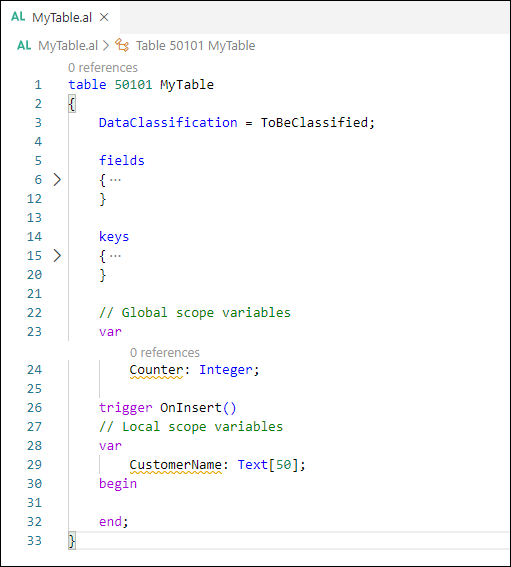
In the preceding example, the variable Counter is declared with a global scope, and it can be used in every trigger and function in the table MyTable. The variable CustomerName is defined in the OnInsert trigger; therefore, it has a local scope. The variable can only be used in this trigger and can't be called from another trigger. Defining all your variables with a global scope can be easier, but then this variable can be used in every trigger. The variable can then be changed within every trigger, which can lead to unwanted or unsuspected results. Accordingly, when you're declaring variables, think about the scope definition and then choose the correct one.
The system automatically defines and maintains system-defined variables and determines their scope. The Rec, xRec, CurrPage, and CurrReport variables are examples of system-defined variables. Rec gives access to the current record, and xRec gives access to the previous record (for example before an update occurred). CurrPage and CurrReport provide access to the current page or report object.
A variable always has a certain data type. It could be an integer, a text, a code, a date, an option, and so on. When a variable is created in memory, you initialize it, meaning that the variable gets a default starting value before you assign a value to this variable. This default value depends on the data type of that variable.
For variables with a numeric data type, the system uses a value of zero to initialize. String variables are initialized with an empty string. A Boolean variable has a default value of false. Date and time variables are initialized to the undefined date 0D and the undefined time 0T, respectively.
You can declare multiple variables of the same type on a single line. This approach reduces scrolling, improves readability, and makes related variables easier to identify.
Declare multiple variables of the same type in the same line, using a comma to separate variable names.
For example:
var
        myInt, nextInt, thirdInt : Integer;
        isValid, doCheck : Boolean;
Protected Variables
The protected keyword can be used to make variables accessible between tables and table extensions, between pages and page extensions, and between reports and report extensions. It also makes variables accessible between extensions that belong to apps that depend on each other.
If you want to only expose some variables as protected, you must create two sections of var declarations. See the syntax which follows.
protected var
        myInt: Integer; // protected var

var
        myLocalInt: Integer; // local var
This example shows how to declare and use a protected variable.
page 50100 MyPage
{
    SourceTable = Customer;
    PageType = Card;

    layout
    {
        area(Content)
        {
            group(General)
            {
                field(Name; Name)
                {
                    ApplicationArea = All;
                }
            }
            group(Advanced)
            {
                Visible = ShowBalance;

                field(Balance; Balance)
                {
                    ApplicationArea = All;
                }
            }
        }
    }

    protected var
        ShowBalance: Boolean;
}

pageextension 50101 MyPageExt extends MyPage
{
    layout
    {
        addlast(Content)
        {
            group(MoreBalance)
            {
                Visible = ShowBalance; // ShowBalance from MyPage

                field("Balance (LCY)"; "Balance (LCY)")
                {
                    ApplicationArea = All;
                }
            }
        }

    }

    actions
    {
        addlast(Navigation)
        {
            action(ToggleBalance)
            {
                ApplicationArea = All;
                trigger OnAction()
                begin
                    ShowBalance := not ShowBalance; // Toggle ShowBalance from MyPage.
                end;
            }
        }
    }
}
Guidelines for placing AL code
We recommend the following guidelines for AL code:
In general, write the code in codeunits instead of on the object on which it operates. This promotes a clean design and provides the ability to reuse code. It also helps enforce security. For example, typically users don't have direct access to tables that contain sensitive data, such as the General Ledger Entry table, nor do they have permission to modify objects.
If you put the code that operates on the general ledger in a codeunit, give the codeunit access to the table, and give the user permission to run the codeunit, then you won't compromise the security of the table and the user will be able to access the table.
If you must put code on an object instead of in a codeunit, then put the code as close as possible to the object on which it operates. For example, put code that modifies records in the triggers of the table fields.
Reusing code
Reusing code makes developing applications both faster and easier. More importantly, organizing your AL code in this way helps reduce errors in your applications. By centralizing the code, you don't unintentionally create inconsistencies by performing the same calculation in many places, for example, in several triggers that have the same table field as their source expression. If you have to change the code, you could either forget about some of these triggers or make a mistake when you modify one of them.