InlineUIContainer.Child Proprietà
Definizione
Importante
Alcune informazioni sono relative alla release non definitiva del prodotto, che potrebbe subire modifiche significative prima della release definitiva. Microsoft non riconosce alcuna garanzia, espressa o implicita, in merito alle informazioni qui fornite.
Ottiene o imposta l'oggetto UIElement ospitato da InlineUIContainer.
public:
 property System::Windows::UIElement ^ Child { System::Windows::UIElement ^ get(); void set(System::Windows::UIElement ^ value); };
public System.Windows.UIElement Child { get; set; }member this.Child : System.Windows.UIElement with get, setPublic Property Child As UIElementValore della proprietà
Oggetto UIElement ospitato da InlineUIContainer.
Esempio
Nell'esempio seguente viene illustrato come usare gli InlineUIContainer elementi per ospitare UIElement elementi all'interno del contenuto del flusso.
<FlowDocument ColumnWidth="400">
  <Paragraph Background="GhostWhite">
    <Run>
      A UIElement element may be embedded directly in flow content
      by enclosing it in an InlineUIContainer element.
    </Run>
    <LineBreak/>
    <LineBreak/>
    <InlineUIContainer>
      <Button>Click me!</Button>
    </InlineUIContainer>
    <LineBreak/>
    <LineBreak/>
    <Run>
      The InlineUIContainer element may host no more than one top-level
      UIElement.  However, other UIElements may be nested within the
      UIElement contained by an InlineUIContainer element.  For example,
      a StackPanel can be used to host multiple UIElement elements within
      an InlineUIContainer element.
    </Run>
    <InlineUIContainer>
      <StackPanel>
        <Label Foreground="Blue">Choose a value:</Label>
        <ComboBox>
          <ComboBoxItem IsSelected="True">a</ComboBoxItem>
          <ComboBoxItem>b</ComboBoxItem>
          <ComboBoxItem>c</ComboBoxItem>
        </ComboBox>
        <Label Foreground ="Red">Choose a value:</Label>
        <StackPanel>
          <RadioButton>x</RadioButton>
          <RadioButton>y</RadioButton>
          <RadioButton>z</RadioButton>
        </StackPanel>
        <Label>Enter a value:</Label>
        <TextBox>
          A text editor embedded in flow content.
        </TextBox>
      </StackPanel>
    </InlineUIContainer>
  </Paragraph>
</FlowDocument>
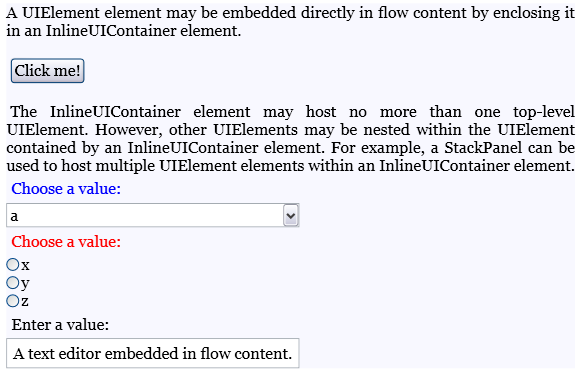
La figura seguente mostra come viene eseguito il rendering di questo esempio.
 screenshot del flusso
Nell'esempio seguente viene illustrato come utilizzare la Child proprietà a livello di codice.
Paragraph parx = new Paragraph();
Run run1 = new Run(" Text to precede the button... ");
Run run2 = new Run(" Text to follow the button... ");

// Create a new button to be hosted in the paragraph.
Button buttonx = new Button();
buttonx.Content = "Click me!";

// Create a new InlineUIContainer, and assign the button
// as the UI container's child.
InlineUIContainer uiCont = new InlineUIContainer();
uiCont.Child = buttonx;

// Add the text runs and UI container to the paragraph, in order.
parx.Inlines.Add(run1);
parx.Inlines.Add(uiCont);
parx.Inlines.Add(run2);
Dim parx As New Paragraph()
Dim run1 As New Run(" Text to precede the button... ")
Dim run2 As New Run(" Text to follow the button... ")

' Create a new button to be hosted in the paragraph.
Dim buttonx As New Button()
buttonx.Content = "Click me!"

' Create a new InlineUIContainer, and assign the button
' as the UI container's child.
Dim uiCont As New InlineUIContainer()
uiCont.Child = buttonx

' Add the text runs and UI container to the paragraph, in order.
parx.Inlines.Add(run1)
parx.Inlines.Add(uiCont)
parx.Inlines.Add(run2)
Commenti
Un InlineUIContainer può ospitare direttamente non più di un UIElement figlio. Tuttavia, l'elemento figlio ospitato da un InlineUIContainer può ospitare elementi figlio propri.
In XAML il wrapping di un UIElementInlineUIContainer oggetto equivale a impostarlo UIElement come valore della Child proprietà.
