BackgroundWorker Classe
Definizione
Importante
Alcune informazioni sono relative alla release non definitiva del prodotto, che potrebbe subire modifiche significative prima della release definitiva. Microsoft non riconosce alcuna garanzia, espressa o implicita, in merito alle informazioni qui fornite.
Esegue un'operazione su un thread separato.
public ref class BackgroundWorker : IDisposablepublic ref class BackgroundWorker : System::ComponentModel::Componentpublic class BackgroundWorker : IDisposablepublic class BackgroundWorker : System.ComponentModel.Componenttype BackgroundWorker = class
interface IDisposabletype BackgroundWorker = class
inherit ComponentPublic Class BackgroundWorker
Implements IDisposablePublic Class BackgroundWorker
Inherits Component- Ereditarietà
-
BackgroundWorker
- Ereditarietà
- Implementazioni
Esempio
Nell'esempio di codice seguente vengono illustrate le nozioni di base della BackgroundWorker classe per l'esecuzione asincrona di un'operazione dispendiosa in termini di tempo. La figura seguente mostra un esempio dell'output.
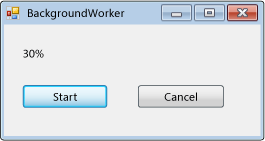
Per provare questo codice, creare un'applicazione Windows Form. Aggiungere un Label controllo denominato resultLabel e aggiungere due Button controlli denominati startAsyncButton e cancelAsyncButton. Creare Click gestori eventi per entrambi i pulsanti. Nella scheda Componenti della casella degli strumenti aggiungere un BackgroundWorker componente denominato backgroundWorker1. Creare DoWorkgestori eventi , ProgressChangede RunWorkerCompleted per .BackgroundWorker Nel codice per il modulo sostituire il codice esistente con il codice seguente.
using System;
using System.ComponentModel;
using System.Windows.Forms;

namespace BackgroundWorkerSimple;

public partial class Form1 : Form
{
    public Form1()
    {
        InitializeComponent();
        backgroundWorker1.WorkerReportsProgress = true;
        backgroundWorker1.WorkerSupportsCancellation = true;
    }

    void startAsyncButton_Click(object sender, EventArgs e)
    {
        if (!backgroundWorker1.IsBusy)
        {
            // Start the asynchronous operation.
            backgroundWorker1.RunWorkerAsync();
        }
    }

    void cancelAsyncButton_Click(object sender, EventArgs e)
    {
        if (backgroundWorker1.WorkerSupportsCancellation)
        {
            // Cancel the asynchronous operation.
            backgroundWorker1.CancelAsync();
        }
    }

    // This event handler is where the time-consuming work is done.
    void backgroundWorker1_DoWork(object sender, DoWorkEventArgs e)
    {
        BackgroundWorker worker = sender as BackgroundWorker;

        for (int i = 1; i <= 10; i++)
        {
            if (worker.CancellationPending)
            {
                e.Cancel = true;
                break;
            }
            else
            {
                // Perform a time consuming operation and report progress.
                System.Threading.Thread.Sleep(500);
                worker.ReportProgress(i * 10);
            }
        }
    }

    // This event handler updates the progress.
    void backgroundWorker1_ProgressChanged(object sender, ProgressChangedEventArgs e) =>
        resultLabel.Text = e.ProgressPercentage.ToString() + "%";

    // This event handler deals with the results of the background operation.
    void backgroundWorker1_RunWorkerCompleted(object sender, RunWorkerCompletedEventArgs e) =>
        resultLabel.Text = e.Cancelled ?
        "Canceled!"
        : e.Error != null ? "Error: " + e.Error.Message : "Done!";
}
Imports System.ComponentModel

Public Class Form1

    Public Sub New()
        InitializeComponent()
        backgroundWorker1.WorkerReportsProgress = True
        backgroundWorker1.WorkerSupportsCancellation = True
    End Sub

    Private Sub startAsyncButton_Click(ByVal sender As System.Object, _
    ByVal e As System.EventArgs) Handles startAsyncButton.Click
        If Not backgroundWorker1.IsBusy Then
            ' Start the asynchronous operation.
            backgroundWorker1.RunWorkerAsync()
        End If
    End Sub

    Private Sub cancelAsyncButton_Click(ByVal sender As System.Object, _
    ByVal e As System.EventArgs) Handles cancelAsyncButton.Click
        If backgroundWorker1.WorkerSupportsCancellation Then
            ' Cancel the asynchronous operation.
            backgroundWorker1.CancelAsync()
        End If
    End Sub

    ' This event handler is where the time-consuming work is done.
    Private Sub backgroundWorker1_DoWork(ByVal sender As System.Object, _
    ByVal e As DoWorkEventArgs) Handles backgroundWorker1.DoWork
        Dim worker As BackgroundWorker = CType(sender, BackgroundWorker)
        Dim i As Integer

        For i = 1 To 10
            If (worker.CancellationPending) Then
                e.Cancel = True
                Exit For
            Else
                ' Perform a time consuming operation and report progress.
                System.Threading.Thread.Sleep(500)
                worker.ReportProgress(i * 10)
            End If
        Next
    End Sub

    ' This event handler updates the progress.
    Private Sub backgroundWorker1_ProgressChanged(ByVal sender As System.Object, _
    ByVal e As ProgressChangedEventArgs) Handles backgroundWorker1.ProgressChanged
        resultLabel.Text = (e.ProgressPercentage.ToString() + "%")
    End Sub

    ' This event handler deals with the results of the background operation.
    Private Sub backgroundWorker1_RunWorkerCompleted(ByVal sender As System.Object, _
    ByVal e As RunWorkerCompletedEventArgs) Handles backgroundWorker1.RunWorkerCompleted
        If e.Cancelled Then
            resultLabel.Text = "Canceled!"
        ElseIf e.Error IsNot Nothing Then
            resultLabel.Text = "Error: " & e.Error.Message
        Else
            resultLabel.Text = "Done!"
        End If
    End Sub
End Class
Nell'esempio di codice seguente viene illustrato l'uso della BackgroundWorker classe per l'esecuzione asincrona di un'operazione dispendiosa in termini di tempo. La figura seguente mostra un esempio dell'output.
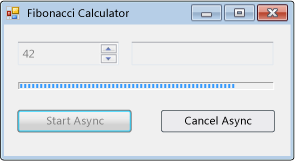
L'operazione calcola il numero di Fibonacci selezionato, segnala gli aggiornamenti dello stato durante il calcolo e consente l'annullamento di un calcolo in sospeso.
#using <System.Drawing.dll>
#using <System.dll>
#using <System.Windows.Forms.dll>

using namespace System;
using namespace System::Collections;
using namespace System::ComponentModel;
using namespace System::Drawing;
using namespace System::Threading;
using namespace System::Windows::Forms;

public ref class FibonacciForm: public System::Windows::Forms::Form
{
private:

   int numberToCompute;
   int highestPercentageReached;

   System::Windows::Forms::NumericUpDown^ numericUpDown1;
   System::Windows::Forms::Button^ startAsyncButton;
   System::Windows::Forms::Button^ cancelAsyncButton;
   System::Windows::Forms::ProgressBar^ progressBar1;
   System::Windows::Forms::Label ^ resultLabel;
   System::ComponentModel::BackgroundWorker^ backgroundWorker1;

public:
   FibonacciForm()
   {
      InitializeComponent();
      numberToCompute = highestPercentageReached = 0;
      InitializeBackgoundWorker();
   }


private:

   // Set up the BackgroundWorker object by
   // attaching event handlers.
   void InitializeBackgoundWorker()
   {
      backgroundWorker1->DoWork += gcnew DoWorkEventHandler( this, &FibonacciForm::backgroundWorker1_DoWork );
      backgroundWorker1->RunWorkerCompleted += gcnew RunWorkerCompletedEventHandler( this, &FibonacciForm::backgroundWorker1_RunWorkerCompleted );
      backgroundWorker1->ProgressChanged += gcnew ProgressChangedEventHandler( this, &FibonacciForm::backgroundWorker1_ProgressChanged );
   }

   void startAsyncButton_Click( System::Object^ /*sender*/, System::EventArgs^ /*e*/ )
   {

      // Reset the text in the result label.
      resultLabel->Text = String::Empty;

      // Disable the UpDown control until
      // the asynchronous operation is done.
      this->numericUpDown1->Enabled = false;

      // Disable the Start button until
      // the asynchronous operation is done.
      this->startAsyncButton->Enabled = false;

      // Enable the Cancel button while
      // the asynchronous operation runs.
      this->cancelAsyncButton->Enabled = true;

      // Get the value from the UpDown control.
      numberToCompute = (int)numericUpDown1->Value;

      // Reset the variable for percentage tracking.
      highestPercentageReached = 0;

      // Start the asynchronous operation.
      backgroundWorker1->RunWorkerAsync( numberToCompute );
   }

   void cancelAsyncButton_Click( System::Object^ /*sender*/, System::EventArgs^ /*e*/ )
   {
      // Cancel the asynchronous operation.
      this->backgroundWorker1->CancelAsync();

      // Disable the Cancel button.
      cancelAsyncButton->Enabled = false;
   }

   // This event handler is where the actual,
   // potentially time-consuming work is done.
   void backgroundWorker1_DoWork( Object^ sender, DoWorkEventArgs^ e )
   {
      // Get the BackgroundWorker that raised this event.
      BackgroundWorker^ worker = dynamic_cast<BackgroundWorker^>(sender);

      // Assign the result of the computation
      // to the Result property of the DoWorkEventArgs
      // object. This is will be available to the
      // RunWorkerCompleted eventhandler.
      e->Result = ComputeFibonacci( safe_cast<Int32>(e->Argument), worker, e );
   }

   // This event handler deals with the results of the
   // background operation.
   void backgroundWorker1_RunWorkerCompleted( Object^ /*sender*/, RunWorkerCompletedEventArgs^ e )
   {
      // First, handle the case where an exception was thrown.
      if ( e->Error != nullptr )
      {
         MessageBox::Show( e->Error->Message );
      }
      else
      if ( e->Cancelled )
      {
         // Next, handle the case where the user cancelled
         // the operation.
         // Note that due to a race condition in
         // the DoWork event handler, the Cancelled
         // flag may not have been set, even though
         // CancelAsync was called.
         resultLabel->Text = "Cancelled";
      }
      else
      {
         // Finally, handle the case where the operation
         // succeeded.
         resultLabel->Text = e->Result->ToString();
      }

      // Enable the UpDown control.
      this->numericUpDown1->Enabled = true;

      // Enable the Start button.
      startAsyncButton->Enabled = true;

      // Disable the Cancel button.
      cancelAsyncButton->Enabled = false;
   }

   // This event handler updates the progress bar.
   void backgroundWorker1_ProgressChanged( Object^ /*sender*/, ProgressChangedEventArgs^ e )
   {
      this->progressBar1->Value = e->ProgressPercentage;
   }

   // This is the method that does the actual work. For this
   // example, it computes a Fibonacci number and
   // reports progress as it does its work.
   long ComputeFibonacci( int n, BackgroundWorker^ worker, DoWorkEventArgs ^ e )
   {
      // The parameter n must be >= 0 and <= 91.
      // Fib(n), with n > 91, overflows a long.
      if ( (n < 0) || (n > 91) )
      {
         throw gcnew ArgumentException( "value must be >= 0 and <= 91","n" );
      }

      long result = 0;

      // Abort the operation if the user has cancelled.
      // Note that a call to CancelAsync may have set
      // CancellationPending to true just after the
      // last invocation of this method exits, so this
      // code will not have the opportunity to set the
      // DoWorkEventArgs.Cancel flag to true. This means
      // that RunWorkerCompletedEventArgs.Cancelled will
      // not be set to true in your RunWorkerCompleted
      // event handler. This is a race condition.
      if ( worker->CancellationPending )
      {
         e->Cancel = true;
      }
      else
      {
         if ( n < 2 )
         {
            result = 1;
         }
         else
         {
            result = ComputeFibonacci( n - 1, worker, e ) + ComputeFibonacci( n - 2, worker, e );
         }

         // Report progress as a percentage of the total task.
         int percentComplete = (int)((float)n / (float)numberToCompute * 100);
         if ( percentComplete > highestPercentageReached )
         {
            highestPercentageReached = percentComplete;
            worker->ReportProgress( percentComplete );
         }
      }

      return result;
   }

   void InitializeComponent()
   {
      this->numericUpDown1 = gcnew System::Windows::Forms::NumericUpDown;
      this->startAsyncButton = gcnew System::Windows::Forms::Button;
      this->cancelAsyncButton = gcnew System::Windows::Forms::Button;
      this->resultLabel = gcnew System::Windows::Forms::Label;
      this->progressBar1 = gcnew System::Windows::Forms::ProgressBar;
      this->backgroundWorker1 = gcnew System::ComponentModel::BackgroundWorker;
      (dynamic_cast<System::ComponentModel::ISupportInitialize^>(this->numericUpDown1))->BeginInit();
      this->SuspendLayout();

      //
      // numericUpDown1
      //
      this->numericUpDown1->Location = System::Drawing::Point( 16, 16 );
      array<Int32>^temp0 = {91,0,0,0};
      this->numericUpDown1->Maximum = System::Decimal( temp0 );
      array<Int32>^temp1 = {1,0,0,0};
      this->numericUpDown1->Minimum = System::Decimal( temp1 );
      this->numericUpDown1->Name = "numericUpDown1";
      this->numericUpDown1->Size = System::Drawing::Size( 80, 20 );
      this->numericUpDown1->TabIndex = 0;
      array<Int32>^temp2 = {1,0,0,0};
      this->numericUpDown1->Value = System::Decimal( temp2 );

      //
      // startAsyncButton
      //
      this->startAsyncButton->Location = System::Drawing::Point( 16, 72 );
      this->startAsyncButton->Name = "startAsyncButton";
      this->startAsyncButton->Size = System::Drawing::Size( 120, 23 );
      this->startAsyncButton->TabIndex = 1;
      this->startAsyncButton->Text = "Start Async";
      this->startAsyncButton->Click += gcnew System::EventHandler( this, &FibonacciForm::startAsyncButton_Click );

      //
      // cancelAsyncButton
      //
      this->cancelAsyncButton->Enabled = false;
      this->cancelAsyncButton->Location = System::Drawing::Point( 153, 72 );
      this->cancelAsyncButton->Name = "cancelAsyncButton";
      this->cancelAsyncButton->Size = System::Drawing::Size( 119, 23 );
      this->cancelAsyncButton->TabIndex = 2;
      this->cancelAsyncButton->Text = "Cancel Async";
      this->cancelAsyncButton->Click += gcnew System::EventHandler( this, &FibonacciForm::cancelAsyncButton_Click );

      //
      // resultLabel
      //
      this->resultLabel->BorderStyle = System::Windows::Forms::BorderStyle::Fixed3D;
      this->resultLabel->Location = System::Drawing::Point( 112, 16 );
      this->resultLabel->Name = "resultLabel";
      this->resultLabel->Size = System::Drawing::Size( 160, 23 );
      this->resultLabel->TabIndex = 3;
      this->resultLabel->Text = "(no result)";
      this->resultLabel->TextAlign = System::Drawing::ContentAlignment::MiddleCenter;

      //
      // progressBar1
      //
      this->progressBar1->Location = System::Drawing::Point( 18, 48 );
      this->progressBar1->Name = "progressBar1";
      this->progressBar1->Size = System::Drawing::Size( 256, 8 );
      this->progressBar1->Step = 2;
      this->progressBar1->TabIndex = 4;

      //
      // backgroundWorker1
      //
      this->backgroundWorker1->WorkerReportsProgress = true;
      this->backgroundWorker1->WorkerSupportsCancellation = true;

      //
      // FibonacciForm
      //
      this->ClientSize = System::Drawing::Size( 292, 118 );
      this->Controls->Add( this->progressBar1 );
      this->Controls->Add( this->resultLabel );
      this->Controls->Add( this->cancelAsyncButton );
      this->Controls->Add( this->startAsyncButton );
      this->Controls->Add( this->numericUpDown1 );
      this->Name = "FibonacciForm";
      this->Text = "Fibonacci Calculator";
      (dynamic_cast<System::ComponentModel::ISupportInitialize^>(this->numericUpDown1))->EndInit();
      this->ResumeLayout( false );
   }
};

[STAThread]
int main()
{
   Application::Run( gcnew FibonacciForm );
}
using System;
using System.ComponentModel;
using System.Drawing;
using System.Windows.Forms;

namespace BackgroundWorkerExample;

public class FibonacciForm : Form
{
    int numberToCompute;
    int highestPercentageReached;

    NumericUpDown numericUpDown1;
    Button startAsyncButton;
    Button cancelAsyncButton;
    ProgressBar progressBar1;
    Label resultLabel;
    BackgroundWorker backgroundWorker1;

    public FibonacciForm()
    {
        InitializeComponent();

        InitializeBackgroundWorker();
    }

    // Set up the BackgroundWorker object by
    // attaching event handlers.
    void InitializeBackgroundWorker()
    {
        backgroundWorker1.DoWork +=
             backgroundWorker1_DoWork;
        backgroundWorker1.RunWorkerCompleted +=

        backgroundWorker1_RunWorkerCompleted;
        backgroundWorker1.ProgressChanged +=

        backgroundWorker1_ProgressChanged;
    }

    void startAsyncButton_Click(object sender,
        EventArgs e)
    {
        // Reset the text in the result label.
        resultLabel.Text = string.Empty;

        // Disable the UpDown control until
        // the asynchronous operation is done.
        numericUpDown1.Enabled = false;

        // Disable the Start button until
        // the asynchronous operation is done.
        startAsyncButton.Enabled = false;

        // Enable the Cancel button while
        // the asynchronous operation runs.
        cancelAsyncButton.Enabled = true;

        // Get the value from the UpDown control.
        numberToCompute = (int)numericUpDown1.Value;

        // Reset the variable for percentage tracking.
        highestPercentageReached = 0;

        // Start the asynchronous operation.
        backgroundWorker1.RunWorkerAsync(numberToCompute);
    }

    void cancelAsyncButton_Click(object sender,
        EventArgs e)
    {
        // Cancel the asynchronous operation.
        backgroundWorker1.CancelAsync();

        // Disable the Cancel button.
        cancelAsyncButton.Enabled = false;
    }

    // This event handler is where the actual,
    // potentially time-consuming work is done.
    void backgroundWorker1_DoWork(object sender,
        DoWorkEventArgs e)
    {
        // Get the BackgroundWorker that raised this event.
        BackgroundWorker worker = sender as BackgroundWorker;

        // Assign the result of the computation
        // to the Result property of the DoWorkEventArgs
        // object. This is will be available to the
        // RunWorkerCompleted eventhandler.
        e.Result = ComputeFibonacci((int)e.Argument, worker, e);
    }

    // This event handler deals with the results of the
    // background operation.
    void backgroundWorker1_RunWorkerCompleted(
        object sender, RunWorkerCompletedEventArgs e)
    {
        // First, handle the case where an exception was thrown.
        if (e.Error != null)
        {
            _ = MessageBox.Show(e.Error.Message);
        }
        else if (e.Cancelled)
        {
            // Next, handle the case where the user canceled
            // the operation.
            // Note that due to a race condition in
            // the DoWork event handler, the Cancelled
            // flag may not have been set, even though
            // CancelAsync was called.
            resultLabel.Text = "Canceled";
        }
        else
        {
            // Finally, handle the case where the operation
            // succeeded.
            resultLabel.Text = e.Result.ToString();
        }

        // Enable the UpDown control.
        numericUpDown1.Enabled = true;

        // Enable the Start button.
        startAsyncButton.Enabled = true;

        // Disable the Cancel button.
        cancelAsyncButton.Enabled = false;
    }

    // This event handler updates the progress bar.
    void backgroundWorker1_ProgressChanged(object sender,
        ProgressChangedEventArgs e) => progressBar1.Value = e.ProgressPercentage;

    // This is the method that does the actual work. For this
    // example, it computes a Fibonacci number and
    // reports progress as it does its work.
    long ComputeFibonacci(int n, BackgroundWorker worker, DoWorkEventArgs e)
    {
        // The parameter n must be >= 0 and <= 91.
        // Fib(n), with n > 91, overflows a long.
        if (n is < 0 or > 91)
        {
            throw new ArgumentException(
                "value must be >= 0 and <= 91", nameof(n));
        }

        long result = 0;

        // Abort the operation if the user has canceled.
        // Note that a call to CancelAsync may have set
        // CancellationPending to true just after the
        // last invocation of this method exits, so this
        // code will not have the opportunity to set the
        // DoWorkEventArgs.Cancel flag to true. This means
        // that RunWorkerCompletedEventArgs.Cancelled will
        // not be set to true in your RunWorkerCompleted
        // event handler. This is a race condition.

        if (worker.CancellationPending)
        {
            e.Cancel = true;
        }
        else
        {
            result = n < 2
                ? 1
                : ComputeFibonacci(n - 1, worker, e) +
                         ComputeFibonacci(n - 2, worker, e);

            // Report progress as a percentage of the total task.
            int percentComplete =
                (int)(n / (float)numberToCompute * 100);
            if (percentComplete > highestPercentageReached)
            {
                highestPercentageReached = percentComplete;
                worker.ReportProgress(percentComplete);
            }
        }

        return result;
    }

    #region Windows Form Designer generated code

    void InitializeComponent()
    {
        numericUpDown1 = new NumericUpDown();
        startAsyncButton = new Button();
        cancelAsyncButton = new Button();
        resultLabel = new Label();
        progressBar1 = new ProgressBar();
        backgroundWorker1 = new BackgroundWorker();
        ((ISupportInitialize)numericUpDown1).BeginInit();
        SuspendLayout();
        //
        // numericUpDown1
        //
        numericUpDown1.Location = new Point(16, 16);
        numericUpDown1.Maximum = new decimal(new int[] {
            91,
            0,
            0,
            0});
        numericUpDown1.Minimum = new decimal(new int[] {
            1,
            0,
            0,
            0});
        numericUpDown1.Name = "numericUpDown1";
        numericUpDown1.Size = new Size(80, 20);
        numericUpDown1.TabIndex = 0;
        numericUpDown1.Value = new decimal(new int[] {
            1,
            0,
            0,
            0});
        //
        // startAsyncButton
        //
        startAsyncButton.Location = new Point(16, 72);
        startAsyncButton.Name = "startAsyncButton";
        startAsyncButton.Size = new Size(120, 23);
        startAsyncButton.TabIndex = 1;
        startAsyncButton.Text = "Start Async";
        startAsyncButton.Click += startAsyncButton_Click;
        //
        // cancelAsyncButton
        //
        cancelAsyncButton.Enabled = false;
        cancelAsyncButton.Location = new Point(153, 72);
        cancelAsyncButton.Name = "cancelAsyncButton";
        cancelAsyncButton.Size = new Size(119, 23);
        cancelAsyncButton.TabIndex = 2;
        cancelAsyncButton.Text = "Cancel Async";
        cancelAsyncButton.Click += cancelAsyncButton_Click;
        //
        // resultLabel
        //
        resultLabel.BorderStyle = BorderStyle.Fixed3D;
        resultLabel.Location = new Point(112, 16);
        resultLabel.Name = "resultLabel";
        resultLabel.Size = new Size(160, 23);
        resultLabel.TabIndex = 3;
        resultLabel.Text = "(no result)";
        resultLabel.TextAlign = ContentAlignment.MiddleCenter;
        //
        // progressBar1
        //
        progressBar1.Location = new Point(18, 48);
        progressBar1.Name = "progressBar1";
        progressBar1.Size = new Size(256, 8);
        progressBar1.Step = 2;
        progressBar1.TabIndex = 4;
        //
        // backgroundWorker1
        //
        backgroundWorker1.WorkerReportsProgress = true;
        backgroundWorker1.WorkerSupportsCancellation = true;
        //
        // FibonacciForm
        //
        ClientSize = new Size(1794, 927);
        Controls.Add(progressBar1);
        Controls.Add(resultLabel);
        Controls.Add(cancelAsyncButton);
        Controls.Add(startAsyncButton);
        Controls.Add(numericUpDown1);
        Name = "FibonacciForm";
        Text = "Fibonacci Calculator";
        ((ISupportInitialize)numericUpDown1).EndInit();
        ResumeLayout(false);
    }
    #endregion

    [STAThread]
    static void Main() => Application.Run(new FibonacciForm());
}
Imports System.ComponentModel
Imports System.Windows.Forms

Public Class FibonacciForm
    Inherits Form

    Private numberToCompute As Integer = 0
    Private highestPercentageReached As Integer = 0

    Private numericUpDown1 As NumericUpDown
    Private WithEvents startAsyncButton As Button
    Private WithEvents cancelAsyncButton As Button
    Private progressBar1 As ProgressBar
    Private resultLabel As Label
    Private WithEvents backgroundWorker1 As System.ComponentModel.BackgroundWorker


    Public Sub New()
        InitializeComponent()
    End Sub

    Private Sub startAsyncButton_Click(ByVal sender As System.Object,
    ByVal e As System.EventArgs) _
    Handles startAsyncButton.Click

        ' Reset the text in the result label.
        resultLabel.Text = [String].Empty

        ' Disable the UpDown control until
        ' the asynchronous operation is done.
        numericUpDown1.Enabled = False

        ' Disable the Start button until
        ' the asynchronous operation is done.
        startAsyncButton.Enabled = False

        ' Enable the Cancel button while
        ' the asynchronous operation runs.
        cancelAsyncButton.Enabled = True

        ' Get the value from the UpDown control.
        numberToCompute = CInt(numericUpDown1.Value)

        ' Reset the variable for percentage tracking.
        highestPercentageReached = 0


        ' Start the asynchronous operation.
        backgroundWorker1.RunWorkerAsync(numberToCompute)
    End Sub

    Private Sub cancelAsyncButton_Click(
    ByVal sender As System.Object,
    ByVal e As System.EventArgs) _
    Handles cancelAsyncButton.Click

        ' Cancel the asynchronous operation.
        backgroundWorker1.CancelAsync()

        ' Disable the Cancel button.
        cancelAsyncButton.Enabled = False

    End Sub

    ' This event handler is where the actual work is done.
    Private Sub backgroundWorker1_DoWork(
    ByVal sender As Object,
    ByVal e As DoWorkEventArgs) _
    Handles backgroundWorker1.DoWork

        ' Get the BackgroundWorker object that raised this event.
        Dim worker As BackgroundWorker =
            CType(sender, BackgroundWorker)

        ' Assign the result of the computation
        ' to the Result property of the DoWorkEventArgs
        ' object. This is will be available to the
        ' RunWorkerCompleted eventhandler.
        e.Result = ComputeFibonacci(e.Argument, worker, e)
    End Sub

    ' This event handler deals with the results of the
    ' background operation.
    Private Sub backgroundWorker1_RunWorkerCompleted(
    ByVal sender As Object, ByVal e As RunWorkerCompletedEventArgs) _
    Handles backgroundWorker1.RunWorkerCompleted

        ' First, handle the case where an exception was thrown.
        If (e.Error IsNot Nothing) Then
            MessageBox.Show(e.Error.Message)
        ElseIf e.Cancelled Then
            ' Next, handle the case where the user canceled the
            ' operation.
            ' Note that due to a race condition in
            ' the DoWork event handler, the Cancelled
            ' flag may not have been set, even though
            ' CancelAsync was called.
            resultLabel.Text = "Canceled"
        Else
            ' Finally, handle the case where the operation succeeded.
            resultLabel.Text = e.Result.ToString()
        End If

        ' Enable the UpDown control.
        numericUpDown1.Enabled = True

        ' Enable the Start button.
        startAsyncButton.Enabled = True

        ' Disable the Cancel button.
        cancelAsyncButton.Enabled = False
    End Sub

    ' This event handler updates the progress bar.
    Private Sub backgroundWorker1_ProgressChanged(
    ByVal sender As Object, ByVal e As ProgressChangedEventArgs) _
    Handles backgroundWorker1.ProgressChanged

        progressBar1.Value = e.ProgressPercentage

    End Sub

    ' This is the method that does the actual work. For this
    ' example, it computes a Fibonacci number and
    ' reports progress as it does its work.
    Function ComputeFibonacci(
        ByVal n As Integer,
        ByVal worker As BackgroundWorker,
        ByVal e As DoWorkEventArgs) As Long

        ' The parameter n must be >= 0 and <= 91.
        ' Fib(n), with n > 91, overflows a long.
        If n < 0 OrElse n > 91 Then
            Throw New ArgumentException(
                "value must be >= 0 and <= 91", "n")
        End If

        Dim result As Long = 0

        ' Abort the operation if the user has canceled.
        ' Note that a call to CancelAsync may have set
        ' CancellationPending to true just after the
        ' last invocation of this method exits, so this
        ' code will not have the opportunity to set the
        ' DoWorkEventArgs.Cancel flag to true. This means
        ' that RunWorkerCompletedEventArgs.Cancelled will
        ' not be set to true in your RunWorkerCompleted
        ' event handler. This is a race condition.
        If worker.CancellationPending Then
            e.Cancel = True
        Else
            If n < 2 Then
                result = 1
            Else
                result = ComputeFibonacci(n - 1, worker, e) +
                         ComputeFibonacci(n - 2, worker, e)
            End If

            ' Report progress as a percentage of the total task.
            Dim percentComplete As Integer =
                CSng(n) / CSng(numberToCompute) * 100
            If percentComplete > highestPercentageReached Then
                highestPercentageReached = percentComplete
                worker.ReportProgress(percentComplete)
            End If

        End If

        Return result

    End Function


    Private Sub InitializeComponent()
        numericUpDown1 = New NumericUpDown
        startAsyncButton = New Button
        cancelAsyncButton = New Button
        resultLabel = New Label
        progressBar1 = New ProgressBar
        backgroundWorker1 = New System.ComponentModel.BackgroundWorker
        CType(numericUpDown1, System.ComponentModel.ISupportInitialize).BeginInit()
        SuspendLayout()
        '
        'numericUpDown1
        '
        numericUpDown1.Location = New System.Drawing.Point(16, 16)
        numericUpDown1.Maximum = New Decimal(New Integer() {91, 0, 0, 0})
        numericUpDown1.Minimum = New Decimal(New Integer() {1, 0, 0, 0})
        numericUpDown1.Name = "numericUpDown1"
        numericUpDown1.Size = New System.Drawing.Size(80, 20)
        numericUpDown1.TabIndex = 0
        numericUpDown1.Value = New Decimal(New Integer() {1, 0, 0, 0})
        '
        'startAsyncButton
        '
        startAsyncButton.Location = New System.Drawing.Point(16, 72)
        startAsyncButton.Name = "startAsyncButton"
        startAsyncButton.Size = New System.Drawing.Size(120, 23)
        startAsyncButton.TabIndex = 1
        startAsyncButton.Text = "Start Async"
        '
        'cancelAsyncButton
        '
        cancelAsyncButton.Enabled = False
        cancelAsyncButton.Location = New System.Drawing.Point(153, 72)
        cancelAsyncButton.Name = "cancelAsyncButton"
        cancelAsyncButton.Size = New System.Drawing.Size(119, 23)
        cancelAsyncButton.TabIndex = 2
        cancelAsyncButton.Text = "Cancel Async"
        '
        'resultLabel
        '
        resultLabel.BorderStyle = BorderStyle.Fixed3D
        resultLabel.Location = New System.Drawing.Point(112, 16)
        resultLabel.Name = "resultLabel"
        resultLabel.Size = New System.Drawing.Size(160, 23)
        resultLabel.TabIndex = 3
        resultLabel.Text = "(no result)"
        resultLabel.TextAlign = System.Drawing.ContentAlignment.MiddleCenter
        '
        'progressBar1
        '
        progressBar1.Location = New System.Drawing.Point(18, 48)
        progressBar1.Name = "progressBar1"
        progressBar1.Size = New System.Drawing.Size(256, 8)
        progressBar1.TabIndex = 4
        '
        'backgroundWorker1
        '
        backgroundWorker1.WorkerReportsProgress = True
        backgroundWorker1.WorkerSupportsCancellation = True
        '
        'FibonacciForm
        '
        ClientSize = New System.Drawing.Size(292, 118)
        Controls.Add(progressBar1)
        Controls.Add(resultLabel)
        Controls.Add(cancelAsyncButton)
        Controls.Add(startAsyncButton)
        Controls.Add(numericUpDown1)
        Name = "FibonacciForm"
        Text = "Fibonacci Calculator"
        CType(numericUpDown1, System.ComponentModel.ISupportInitialize).EndInit()
        ResumeLayout(False)

    End Sub

    <STAThread()> _
    Shared Sub Main()
        Application.Run(New FibonacciForm)
    End Sub
End Class
Commenti
La BackgroundWorker classe consente di eseguire un'operazione su un thread dedicato separato. Le operazioni che richiedono molto tempo, ad esempio download e transazioni di database, possono causare l'aspetto dell'interfaccia utente come se non rispondesse durante l'esecuzione. Quando si vuole un'interfaccia utente reattiva e si riscontrano lunghi ritardi associati a tali operazioni, la BackgroundWorker classe fornisce una soluzione pratica.
Per eseguire un'operazione che richiede molto tempo in background, creare un oggetto BackgroundWorker e ascoltare gli eventi che segnalano lo stato di avanzamento dell'operazione e segnalano il completamento dell'operazione. È possibile creare l'oggetto a BackgroundWorker livello di codice oppure trascinarlo nel form dalla scheda Componenti della Casella degli strumenti. Se si crea BackgroundWorker in Progettazione Windows Form, verrà visualizzato nell'area di notifica dei componenti e le relative proprietà verranno visualizzate nella finestra Proprietà.
Per configurare un'operazione in background, aggiungere un gestore eventi per l'evento DoWork . Chiamare l'operazione dispendiosa in termini di tempo in questo gestore eventi. Per avviare l'operazione, chiamare RunWorkerAsync. Per ricevere notifiche degli aggiornamenti dello stato di avanzamento, gestire l'evento ProgressChanged . Per ricevere una notifica al termine dell'operazione, gestire l'evento RunWorkerCompleted .
Annotazioni
È necessario prestare attenzione a non modificare gli oggetti dell'interfaccia utente nel DoWork gestore eventi. Comunicare invece con l'interfaccia utente tramite gli ProgressChanged eventi e RunWorkerCompleted .
BackgroundWorker gli eventi non vengono sottoposto a marshalling attraverso AppDomain i limiti. Non usare un BackgroundWorker componente per eseguire operazioni multithreading in più di un AppDomainoggetto .
Se l'operazione in background richiede un parametro, chiamare RunWorkerAsync con il parametro . All'interno del DoWork gestore eventi è possibile estrarre il parametro dalla DoWorkEventArgs.Argument proprietà .
Per altre informazioni su BackgroundWorker, vedere Procedura: Eseguire un'operazione in background.
Costruttori
| Nome | Descrizione |
|---|---|
| BackgroundWorker() |
Inizializza una nuova istanza della classe BackgroundWorker. |
Proprietà
| Nome | Descrizione |
|---|---|
| CancellationPending |
Ottiene un valore che indica se l'applicazione ha richiesto l'annullamento di un'operazione in background. |
| CanRaiseEvents |
Ottiene un valore che indica se il componente può generare un evento. (Ereditato da Component) |
| Container |
Ottiene l'oggetto IContainer contenente l'oggetto Component. (Ereditato da Component) |
| DesignMode |
Ottiene un valore che indica se è Component attualmente in modalità progettazione. (Ereditato da Component) |
| Events |
Ottiene l'elenco dei gestori eventi associati a questo Componentoggetto . (Ereditato da Component) |
| IsBusy |
Ottiene un valore che indica se l'oggetto BackgroundWorker esegue un'operazione asincrona. |
| Site |
Ottiene o imposta l'oggetto ISite dell'oggetto Component. (Ereditato da Component) |
| WorkerReportsProgress |
Ottiene o imposta un valore che indica se BackgroundWorker può segnalare gli aggiornamenti dello stato di avanzamento. |
| WorkerSupportsCancellation |
Ottiene o imposta un valore che indica se supporta l'annullamento BackgroundWorker asincrono. |
Metodi
| Nome | Descrizione |
|---|---|
| CancelAsync() |
Richiede l'annullamento di un'operazione in background in sospeso. |
| CreateObjRef(Type) |
Crea un oggetto che contiene tutte le informazioni pertinenti necessarie per generare un proxy utilizzato per comunicare con un oggetto remoto. (Ereditato da MarshalByRefObject) |
| Dispose() |
Esegue attività definite dall'applicazione associate alla liberazione, al rilascio o alla reimpostazione di risorse non gestite. |
| Dispose() |
Rilascia tutte le risorse usate da Component. (Ereditato da Component) |
| Dispose(Boolean) |
Questo metodo non esegue alcuna operazione. |
| Dispose(Boolean) |
Rilascia le risorse non gestite usate da Component e, facoltativamente, rilascia le risorse gestite. (Ereditato da Component) |
| Equals(Object) |
Determina se l'oggetto specificato è uguale all'oggetto corrente. (Ereditato da Object) |
| GetHashCode() |
Funge da funzione hash predefinita. (Ereditato da Object) |
| GetLifetimeService() |
Obsoleti.
Recupera l'oggetto servizio di durata corrente che controlla i criteri di durata per questa istanza. (Ereditato da MarshalByRefObject) |
| GetService(Type) |
Restituisce un oggetto che rappresenta un servizio fornito da Component o da Container. (Ereditato da Component) |
| GetType() |
Ottiene il Type dell'istanza corrente. (Ereditato da Object) |
| InitializeLifetimeService() |
Obsoleti.
Ottiene un oggetto servizio di durata per controllare i criteri di durata per questa istanza. (Ereditato da MarshalByRefObject) |
| MemberwiseClone() |
Crea una copia superficiale del Objectcorrente. (Ereditato da Object) |
| MemberwiseClone(Boolean) |
Crea una copia superficiale dell'oggetto corrente MarshalByRefObject . (Ereditato da MarshalByRefObject) |
| OnDoWork(DoWorkEventArgs) |
Genera l'evento DoWork. |
| OnProgressChanged(ProgressChangedEventArgs) |
Genera l'evento ProgressChanged. |
| OnRunWorkerCompleted(RunWorkerCompletedEventArgs) |
Genera l'evento RunWorkerCompleted. |
| ReportProgress(Int32, Object) |
Genera l'evento ProgressChanged. |
| ReportProgress(Int32) |
Genera l'evento ProgressChanged. |
| RunWorkerAsync() |
Avvia l'esecuzione di un'operazione in background. |
| RunWorkerAsync(Object) |
Avvia l'esecuzione di un'operazione in background. |
| ToString() |
Restituisce una stringa che rappresenta l'oggetto corrente. (Ereditato da Object) |
| ToString() |
Restituisce un oggetto String contenente il nome dell'oggetto Component, se presente. Questo metodo non deve essere sottoposto a override. (Ereditato da Component) |
Eventi
| Nome | Descrizione |
|---|---|
| Disposed |
Si verifica quando il componente viene eliminato da una chiamata al Dispose() metodo . (Ereditato da Component) |
| DoWork |
Si verifica quando RunWorkerAsync() viene chiamato . |
| ProgressChanged |
Si verifica quando ReportProgress(Int32) viene chiamato . |
| RunWorkerCompleted |
Si verifica quando l'operazione in background è stata completata, è stata annullata o ha generato un'eccezione. |
