ContentControl.Content Proprietà
Definizione
Importante
Alcune informazioni sono relative alla release non definitiva del prodotto, che potrebbe subire modifiche significative prima della release definitiva. Microsoft non riconosce alcuna garanzia, espressa o implicita, in merito alle informazioni qui fornite.
Ottiene o imposta il contenuto di un oggetto ContentControl.
public:
 property System::Object ^ Content { System::Object ^ get(); void set(System::Object ^ value); };
[System.ComponentModel.Bindable(true)]
public object Content { get; set; }[<System.ComponentModel.Bindable(true)>]
member this.Content : obj with get, setPublic Property Content As ObjectValore della proprietà
Oggetto che contiene il contenuto del controllo. Il valore predefinito è null.
- Attributi
Esempio
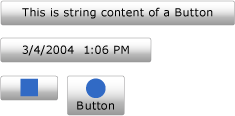
Nell'esempio seguente viene illustrato come creare quattro Button controlli con Content impostato su uno dei seguenti:
Annotazioni
Anche se la versione XAML (Extensible Application Markup Language) dell'esempio potrebbe usare i <Button.Content> tag intorno al contenuto di ogni pulsante, non è necessario. Per altre informazioni, vedere Cenni preliminari su XAML (WPF).
<!--Create a Button with a string as its content.-->
<Button>This is string content of a Button</Button>

<!--Create a Button with a DateTime object as its content.-->
<Button xmlns:sys="clr-namespace:System;assembly=mscorlib">
  <sys:DateTime>2004/3/4 13:6:55</sys:DateTime>
</Button>

<!--Create a Button with a single UIElement as its content.-->
<Button>
  <Rectangle Height="40" Width="40" Fill="Blue"/>
</Button>

<!--Create a Button with a panel that contains multiple objects
as its content.-->
<Button>
  <StackPanel>
    <Ellipse Height="40" Width="40" Fill="Blue"/>
    <TextBlock TextAlignment="Center">Button</TextBlock>
  </StackPanel>
</Button>
// Create a Button with a string as its content.
Button stringContent = new Button();
stringContent.Content = "This is string content of a Button";

// Create a Button with a DateTime object as its content.
Button objectContent = new Button();
DateTime dateTime1 = new DateTime(2004, 3, 4, 13, 6, 55);

objectContent.Content = dateTime1;

// Create a Button with a single UIElement as its content.
Button uiElementContent = new Button();

Rectangle rect1 = new Rectangle();
rect1.Width = 40;
rect1.Height = 40;
rect1.Fill = Brushes.Blue;
uiElementContent.Content = rect1;

// Create a Button with a panel that contains multiple objects
// as its content.
Button panelContent = new Button();
StackPanel stackPanel1 = new StackPanel();
Ellipse ellipse1 = new Ellipse();
TextBlock textBlock1 = new TextBlock();

ellipse1.Width = 40;
ellipse1.Height = 40;
ellipse1.Fill = Brushes.Blue;

textBlock1.TextAlignment = TextAlignment.Center;
textBlock1.Text = "Button";

stackPanel1.Children.Add(ellipse1);
stackPanel1.Children.Add(textBlock1);

panelContent.Content = stackPanel1;
' Add a string to a button.
Dim stringContent As New Button()
stringContent.Content = "This is string content of a Button"

' Add a DateTime object to a button.
Dim objectContent As New Button()
Dim dateTime1 As New DateTime(2004, 3, 4, 13, 6, 55)

objectContent.Content = dateTime1

' Add a single UIElement to a button.
Dim uiElementContent As New Button()

Dim rect1 As New Rectangle()
rect1.Width = 40
rect1.Height = 40
rect1.Fill = Brushes.Blue
uiElementContent.Content = rect1

' Add a panel that contains multpile objects to a button.
Dim panelContent As New Button()
Dim stackPanel1 As New StackPanel()
Dim ellipse1 As New Ellipse()
Dim textBlock1 As New TextBlock()

ellipse1.Width = 40
ellipse1.Height = 40
ellipse1.Fill = Brushes.Blue

textBlock1.TextAlignment = TextAlignment.Center
textBlock1.Text = "Button"

stackPanel1.Children.Add(ellipse1)
stackPanel1.Children.Add(textBlock1)

panelContent.Content = stackPanel1
La figura seguente mostra i quattro pulsanti creati nell'esempio precedente.
Commenti
Poiché la Content proprietà è di tipo Object, non esistono restrizioni sugli elementi che è possibile inserire in un oggetto ContentControl. L'oggetto Content viene visualizzato da un ContentPresenteroggetto , che si trova nell'oggetto ControlTemplateContentControldi . Ogni ContentControl tipo in WPF ha un ContentPresenter oggetto nel relativo valore predefinito ControlTemplate. Per altre informazioni sulla modalità di visualizzazione Contentdi ContentPresenter , vedere ContentPresenter.
Informazioni sulle proprietà di dipendenza
| Elemento | Valore |
|---|---|
| Campo Identificatore | ContentProperty |
Proprietà dei metadati impostate su true |
Nessuno |
Utilizzo degli attributi XAML
<object Content="content"/>
Utilizzo dell'elemento della proprietà XAML
<object> content</object>
Valori XAML
Content Testo o singolo oggetto.
