Nota
L'accesso a questa pagina richiede l'autorizzazione. È possibile provare ad accedere o modificare le directory.
L'accesso a questa pagina richiede l'autorizzazione. È possibile provare a modificare le directory.
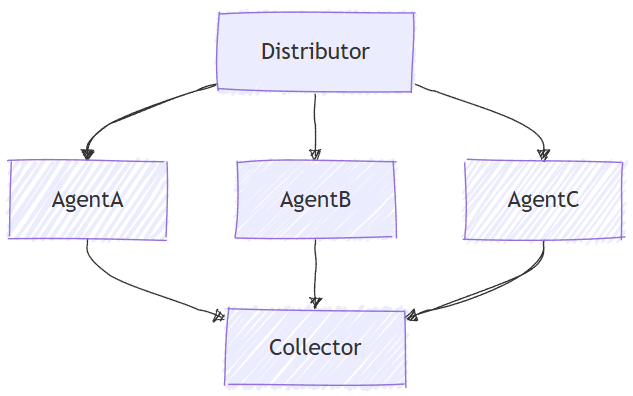
L'orchestrazione simultanea consente a più agenti di lavorare sulla stessa attività in parallelo. Ogni agente elabora l'input in modo indipendente e i relativi risultati vengono raccolti e aggregati. Questo approccio è particolarmente adatto per scenari in cui prospettive o soluzioni diverse sono preziose, ad esempio brainstorming, ragionamento di insieme o sistemi di voto.
Cosa Imparerai
- Come definire più agenti con competenze diverse
- Come orchestrare questi agenti per lavorare simultaneamente in una singola attività
- Come raccogliere ed elaborare i risultati
Nell'orchestrazione simultanea, più agenti lavorano contemporaneamente sulla stessa attività e in modo indipendente, fornendo prospettive diverse sullo stesso input.
Configurare il client OpenAI di Azure
using System;
using System.Collections.Generic;
using System.Linq;
using System.Threading.Tasks;
using Azure.AI.Projects;
using Azure.Identity;
using Microsoft.Agents.AI.Workflows;
using Microsoft.Extensions.AI;
using Microsoft.Agents.AI;

// 1) Set up the Azure OpenAI client
var endpoint = Environment.GetEnvironmentVariable("AZURE_OPENAI_ENDPOINT") ??
    throw new InvalidOperationException("AZURE_OPENAI_ENDPOINT is not set.");
var deploymentName = Environment.GetEnvironmentVariable("AZURE_OPENAI_DEPLOYMENT_NAME") ?? "gpt-4o-mini";
var client = new AIProjectClient(new Uri(endpoint), new DefaultAzureCredential())
    .GetProjectOpenAIClient()
    .GetProjectResponsesClient()
    .AsIChatClient(deploymentName);
Avvertimento
DefaultAzureCredential è utile per lo sviluppo, ma richiede un'attenta considerazione nell'ambiente di produzione. Nell'ambiente di produzione prendere in considerazione l'uso di credenziali specifiche ,ad esempio ManagedIdentityCredential, per evitare problemi di latenza, probe di credenziali indesiderate e potenziali rischi per la sicurezza dai meccanismi di fallback.
Definire gli agenti
Creare più agenti specializzati che funzioneranno contemporaneamente sulla stessa attività:
// 2) Helper method to create translation agents
static ChatClientAgent GetTranslationAgent(string targetLanguage, IChatClient chatClient) =>
    new(chatClient,
        $"You are a translation assistant who only responds in {targetLanguage}. Respond to any " +
        $"input by outputting the name of the input language and then translating the input to {targetLanguage}.");

// Create translation agents for concurrent processing
var translationAgents = (from lang in (string[])["French", "Spanish", "English"]
                         select GetTranslationAgent(lang, client));
Configurare l'orchestrazione simultanea
Compilare il flusso di lavoro usando AgentWorkflowBuilder per eseguire gli agenti in parallelo:
// 3) Build concurrent workflow
var workflow = AgentWorkflowBuilder.BuildConcurrent(translationAgents);
Eseguire il flusso di lavoro simultaneo e raccogliere i risultati
Eseguire il workflow ed elaborare gli eventi di tutti gli agenti in esecuzione simultanea:
// 4) Run the workflow
var messages = new List<ChatMessage> { new(ChatRole.User, "Hello, world!") };

await using StreamingRun run = await InProcessExecution.RunStreamingAsync(workflow, messages);
await run.TrySendMessageAsync(new TurnToken(emitEvents: true));

List<ChatMessage> result = new();
await foreach (WorkflowEvent evt in run.WatchStreamAsync())
{
    if (evt is AgentResponseUpdateEvent e)
    {
        Console.WriteLine($"{e.ExecutorId}: {e.Update.Text}");
    }
    else if (evt is WorkflowOutputEvent outputEvt)
    {
        result = outputEvt.As<List<ChatMessage>>()!;
        break;
    }
}

// Display aggregated results from all agents
Console.WriteLine("===== Final Aggregated Results =====");
foreach (var message in result)
{
    Console.WriteLine($"{message.Role}: {message.Text}");
}
Output di esempio
French_Agent: English detected. Bonjour, le monde !
Spanish_Agent: English detected. ¡Hola, mundo!
English_Agent: English detected. Hello, world!

===== Final Aggregated Results =====
User: Hello, world!
Assistant: English detected. Bonjour, le monde !
Assistant: English detected. ¡Hola, mundo!
Assistant: English detected. Hello, world!
Concetti chiave
- Esecuzione parallela: tutti gli agenti elaborano l'input simultaneamente e in modo indipendente
- AgentWorkflowBuilder.BuildConcurrent(): crea un flusso di lavoro simultaneo da una raccolta di agenti
- Aggregazione automatica: i risultati di tutti gli agenti vengono raccolti automaticamente nel risultato finale
-
Streaming di eventi: monitoraggio in tempo reale dell'avanzamento dell'agente tramite
AgentResponseUpdateEvent - Prospettive diverse: ogni agente porta la propria esperienza unica allo stesso problema
Gli agenti sono entità specializzate in grado di elaborare le attività. Il codice seguente definisce tre agenti: un esperto di ricerca, un esperto di marketing e un esperto legale.
import os

from agent_framework.foundry import FoundryChatClient
from azure.identity import AzureCliCredential

# 1) Create three domain agents using FoundryChatClient
chat_client = FoundryChatClient(
    project_endpoint=os.environ["FOUNDRY_PROJECT_ENDPOINT"],
    model=os.environ["FOUNDRY_MODEL"],
    credential=AzureCliCredential(),
)

researcher = chat_client.as_agent(
    instructions=(
        "You're an expert market and product researcher. Given a prompt, provide concise, factual insights,"
        " opportunities, and risks."
    ),
    name="researcher",
)

marketer = chat_client.as_agent(
    instructions=(
        "You're a creative marketing strategist. Craft compelling value propositions and target messaging"
        " aligned to the prompt."
    ),
    name="marketer",
)

legal = chat_client.as_agent(
    instructions=(
        "You're a cautious legal/compliance reviewer. Highlight constraints, disclaimers, and policy concerns"
        " based on the prompt."
    ),
    name="legal",
)
Configurare l'orchestrazione simultanea
La ConcurrentBuilder classe consente di costruire un flusso di lavoro per eseguire più agenti in parallelo. L'elenco degli agenti viene passato come partecipanti.
from agent_framework.orchestrations import ConcurrentBuilder

# 2) Build a concurrent workflow
# Participants are either Agents (type of SupportsAgentRun) or Executors
workflow = ConcurrentBuilder(participants=[researcher, marketer, legal]).build()
Eseguire il flusso di lavoro simultaneo e raccogliere i risultati
L'aggregatore predefinito produce un singolo AgentResponse messaggio di assistente per partecipante:
from agent_framework import AgentResponse

# 3) Run with a single prompt and print the aggregated agent responses
events = await workflow.run("We are launching a new budget-friendly electric bike for urban commuters.")
outputs = events.get_outputs()

if outputs:
    print("===== Final Aggregated Results =====")
    final: AgentResponse = outputs[0]
    for msg in final.messages:
        name = msg.author_name or "assistant"
        print(f"{'-' * 60}\n\n[{name}]:\n{msg.text}")
Output di esempio
===== Final Aggregated Results =====
------------------------------------------------------------

[researcher]:
**Insights:**

- **Target Demographic:** Urban commuters seeking affordable, eco-friendly transport;
    likely to include students, young professionals, and price-sensitive urban residents.
- **Market Trends:** E-bike sales are growing globally, with increasing urbanization,
    higher fuel costs, and sustainability concerns driving adoption.
...
------------------------------------------------------------

[marketer]:
**Value Proposition:**
"Empowering your city commute: Our new electric bike combines affordability, reliability, and
    sustainable design—helping you conquer urban journeys without breaking the bank."
...
------------------------------------------------------------

[legal]:
**Constraints, Disclaimers, & Policy Concerns for Launching a Budget-Friendly Electric Bike for Urban Commuters:**

**1. Regulatory Compliance**
- Verify that the electric bike meets all applicable federal, state, and local regulations
    regarding e-bike classification, speed limits, power output, and safety features.
Avanzato: executor di agenti personalizzati
L'orchestrazione simultanea supporta executor personalizzati che eseguono il wrapping degli agenti con logica aggiuntiva. Ciò è utile quando è necessario un maggiore controllo sul modo in cui gli agenti vengono inizializzati e sul modo in cui elaborano le richieste:
Definire executor di agenti personalizzati
from agent_framework import (
    AgentExecutorRequest,
    AgentExecutorResponse,
    Agent,
    Executor,
    WorkflowContext,
    handler,
)

class ResearcherExec(Executor):
    def __init__(self, chat_client: FoundryChatClient, id: str = "researcher"):
        self.agent = chat_client.as_agent(
            instructions=(
                "You're an expert market and product researcher. Given a prompt, provide concise, factual insights,"
                " opportunities, and risks."
            ),
            name=id,
        )
        super().__init__(id=id)

    @handler
    async def run(self, request: AgentExecutorRequest, ctx: WorkflowContext[AgentExecutorResponse]) -> None:
        response = await self.agent.run(request.messages)
        full_conversation = list(request.messages) + list(response.messages)
        await ctx.send_message(AgentExecutorResponse(self.id, response, full_conversation=full_conversation))

class MarketerExec(Executor):
    def __init__(self, chat_client: FoundryChatClient, id: str = "marketer"):
        self.agent = chat_client.as_agent(
            instructions=(
                "You're a creative marketing strategist. Craft compelling value propositions and target messaging"
                " aligned to the prompt."
            ),
            name=id,
        )
        super().__init__(id=id)

    @handler
    async def run(self, request: AgentExecutorRequest, ctx: WorkflowContext[AgentExecutorResponse]) -> None:
        response = await self.agent.run(request.messages)
        full_conversation = list(request.messages) + list(response.messages)
        await ctx.send_message(AgentExecutorResponse(self.id, response, full_conversation=full_conversation))
Creare flussi di lavoro utilizzando gestori personalizzati
chat_client = FoundryChatClient(
    project_endpoint=os.environ["FOUNDRY_PROJECT_ENDPOINT"],
    model=os.environ["FOUNDRY_MODEL"],
    credential=AzureCliCredential(),
)

researcher = ResearcherExec(chat_client)
marketer = MarketerExec(chat_client)
legal = LegalExec(chat_client)

workflow = ConcurrentBuilder(participants=[researcher, marketer, legal]).build()
Avanzato: Aggregatore personalizzato
Per impostazione predefinita, l'orchestrazione simultanea aggrega tutte le risposte dell'agente in un unico AgentResponse con un messaggio di assistente per partecipante. È possibile eseguire l'override di questo comportamento con un aggregatore personalizzato che elabora i risultati in modo specifico:
Il callback può essere sincrono o asincrono. Sono supportati anche oggetti chiamabili asincroni e wrapper che restituiscono un awaitable. Il flusso di lavoro attende il valore restituito prima di produrre l'output dell'aggregatore.
Definire un aggregatore personalizzato
from agent_framework import AgentExecutorResponse

# Create a summarizer agent for the aggregator
summarizer_agent = chat_client.as_agent(
    instructions=(
        "You are a helpful assistant that consolidates multiple domain expert outputs "
        "into one cohesive, concise summary with clear takeaways. Keep it under 200 words."
    ),
    name="summarizer",
)

# Define a custom aggregator callback
async def summarize_results(results: list[AgentExecutorResponse]) -> str:
    # Extract one final assistant message per agent
    expert_sections: list[str] = []
    for r in results:
        try:
            messages = getattr(r.agent_response, "messages", [])
            final_text = messages[-1].text if messages and hasattr(messages[-1], "text") else "(no content)"
            expert_sections.append(f"{r.executor_id}:\n{final_text}")
        except Exception as e:
            expert_sections.append(f"{r.executor_id}: (error: {type(e).__name__}: {e})")

    # Ask the model to synthesize a concise summary of the experts' outputs
    prompt = "\n\n".join(expert_sections)
    response = await summarizer_agent.run(prompt)
    # Return the model's final assistant text as the completion result
    return response.messages[-1].text if response.messages else ""
Creare un flusso di lavoro con l'aggregatore personalizzato
workflow = (
    ConcurrentBuilder(participants=[researcher, marketer, legal])
    .with_aggregator(summarize_results)
    .build()
)

output = None
async for event in workflow.run("We are launching a new budget-friendly electric bike for urban commuters.", stream=True):
    if event.type == "output":
        output = event.data

if output:
    print("===== Final Consolidated Output =====")
    print(output)
Esempio di output con aggregatore personalizzato
===== Final Consolidated Output =====
Urban e-bike demand is rising rapidly due to eco-awareness, urban congestion, and high fuel costs,
with market growth projected at a ~10% CAGR through 2030. Key customer concerns are affordability,
easy maintenance, convenient charging, compact design, and theft protection. Differentiation opportunities
include integrating smart features (GPS, app connectivity), offering subscription or leasing options, and
developing portable, space-saving designs. Partnering with local governments and bike shops can boost visibility.

Risks include price wars eroding margins, regulatory hurdles, battery quality concerns, and heightened expectations
for after-sales support. Accurate, substantiated product claims and transparent marketing (with range disclaimers)
are essential. All e-bikes must comply with local and federal regulations on speed, wattage, safety certification,
and labeling. Clear warranty, safety instructions (especially regarding batteries), and inclusive, accessible
marketing are required. For connected features, data privacy policies and user consents are mandatory.

Effective messaging should target young professionals, students, eco-conscious commuters, and first-time buyers,
emphasizing affordability, convenience, and sustainability. Slogan suggestion: "Charge Ahead—City Commutes Made
Affordable." Legal review in each target market, compliance vetting, and robust customer support policies are
critical before launch.
Output intermedi
Per impostazione predefinita, solo l'output dell'aggregatore si presenta come un evento del flusso di lavoro "output" (terminale). Passare intermediate_output_from con i partecipanti da designare come origini intermedie per esporre anche i rispettivi output individuali come eventi "intermediate":
workflow = ConcurrentBuilder(
    participants=[researcher, marketer, legal],
    intermediate_output_from=[researcher, marketer, legal],
).build()
È possibile gestire questi eventi in tempo reale in modalità di streaming:
from agent_framework import AgentResponseUpdate

# Track the last author to format streaming output.
last_author: str | None = None

async for event in workflow.run("Analyze our new product launch strategy.", stream=True):
    if event.type == "intermediate" and isinstance(event.data, AgentResponseUpdate):
        update = event.data
        author = update.author_name
        if author != last_author:
            if last_author is not None:
                print()  # Newline between different authors
            print(f"{author}: {update.text}", end="", flush=True)
            last_author = author
        else:
            print(update.text, end="", flush=True)
Concetti chiave
- Esecuzione parallela: tutti gli agenti funzionano contemporaneamente e in modo indipendente sull'attività
-
AgentResponse Output: l'aggregatore predefinito restituisce un singolo
AgentResponsemessaggio di assistente per partecipante (nessun prompt utente incluso) - Prospettive diverse: ogni agente porta la propria esperienza unica allo stesso problema
- Partecipanti Flessibili: È possibile utilizzare direttamente gli agenti o incapsularli in executor personalizzati
- Elaborazione personalizzata: eseguire l'override dell'aggregatore predefinito per sintetizzare i risultati in modi specifici del dominio
-
Output intermedi: passare
intermediate_output_from=[participant, ...]per esporre l'output di ogni partecipante elencato come eventi"intermediate", oltre all'evento"output"terminale dell'aggregatore
Go supporta flussi di lavoro simultanei dell'agente con agentworkflow.NewConcurrentWorkflowBuilder. È anche possibile creare manualmente lo stesso modello con edge fan-out e fan-in quando è necessario un comportamento dell'executor personalizzato.
Configurare la configurazione di Foundry
Configurare l'endpoint del progetto Foundry, la distribuzione del modello e l'autenticazione:
endpoint := os.Getenv("FOUNDRY_PROJECT_ENDPOINT")
model := cmp.Or(os.Getenv("FOUNDRY_MODEL"), "gpt-4o-mini")

token, err := azidentity.NewDefaultAzureCredential(nil)
if err != nil {
    return err
}
Avvertimento
azidentity.NewDefaultAzureCredential è utile per lo sviluppo, ma richiede un'attenta considerazione nell'ambiente di produzione. Nell'ambiente di produzione prendere in considerazione l'uso di credenziali specifiche, ad esempio azidentity.NewManagedIdentityCredential, per evitare problemi di latenza, probe di credenziali indesiderate e potenziali rischi per la sicurezza dai meccanismi di fallback.
Definire gli agenti
Creare più agenti specializzati che funzioneranno contemporaneamente sulla stessa attività:
newTranslationAgent := func(language string) *agent.Agent {
    return foundryprovider.NewAgent(
        endpoint,
        token,
        foundryprovider.ModelDeployment(model),
        foundryprovider.AgentConfig{
            Instructions: fmt.Sprintf(
                "You are a translation assistant who only responds in %s. Respond to any input by outputting the name of the input language and then translating the input to %s.",
                language,
                language,
            ),
            Config: agent.Config{Name: language},
        },
    )
}

agents := []*agent.Agent{
    newTranslationAgent("French"),
    newTranslationAgent("Spanish"),
    newTranslationAgent("English"),
}
Configurare l'orchestrazione simultanea
Compilare il flusso di lavoro con agentworkflow.NewConcurrentWorkflowBuilder:
wf, err := agentworkflow.NewConcurrentWorkflowBuilder(agents...).
    WithName("translation-concurrent").
    Build()
if err != nil {
    return err
}
Eseguire il flusso di lavoro simultaneo e raccogliere i risultati
Esegui il workflow con un messaggio utente e un token del turno. Quando l'emissione di eventi è abilitata, gli aggiornamenti dell'agente vengono visualizzati come eventi di output del flusso di lavoro prima dell'output aggregato finale.
run, err := inproc.Default.RunStreaming(ctx, wf, []*message.Message{message.NewText("Hello, world!")})
if err != nil {
    return err
}
defer run.Close(ctx)

emitEvents := true
if err := run.SendMessage(ctx, workflow.TurnToken{EmitEvents: &emitEvents}); err != nil {
    return err
}

for evt, err := range run.WatchStream(ctx) {
    if err != nil {
        return err
    }
    if output, ok := evt.(workflow.OutputEvent); ok {
        switch value := output.Output.(type) {
        case *agent.ResponseUpdate:
            fmt.Printf("%s: %s\n", output.ExecutorID, value.String())
        case []*message.Message:
            fmt.Println("===== Final Aggregated Results =====")
            for _, msg := range value {
                fmt.Printf("%s: %s\n", msg.Role, msg.String())
            }
        }
    }
}
Output di esempio
French: English detected. Bonjour, le monde !
Spanish: English detected. ¡Hola, mundo!
English: English detected. Hello, world!

===== Final Aggregated Results =====
assistant: English detected. Bonjour, le monde !
assistant: English detected. ¡Hola, mundo!
assistant: English detected. Hello, world!
Avanzato: executor di agenti personalizzati
Creare manualmente flussi di lavoro simultanei quando è necessario un comportamento dell'executor personalizzato. Un executor personalizzato può chiamare un agente e quindi partecipare a un workflow fan-out/fan-in.
agentExecutor := func(id string, ag *agent.Agent) workflow.ExecutorBinding {
    return workflow.BindNewExecutorFunc(id, func(_ string, executorID string) (*workflow.Executor, error) {
        return workflow.NewExecutor(executorID, func(ctx *workflow.Context, prompt string) (string, error) {
            response, err := ag.RunText(ctx, prompt).Collect()
            if err != nil {
                return "", err
            }
            return response.String(), nil
        }), nil
    })
}

researcher := agentExecutor("researcher", researcherAgent)
marketer := agentExecutor("marketer", marketerAgent)
aggregate := aggregateStrings("ConcurrentAggregationExecutor")

wf, err := workflow.NewBuilder(start).
    AddFanOutEdge(start, []workflow.ExecutorBinding{researcher, marketer}).
    AddFanInBarrierEdge([]workflow.ExecutorBinding{researcher, marketer}, aggregate).
    WithOutputFrom(aggregate).
    Build()
Avanzato: Aggregatore personalizzato
Usare WithAggregator per sostituire il comportamento di aggregazione dei messaggi predefinito:
wf, err := agentworkflow.NewConcurrentWorkflowBuilder(agents...).
    WithName("translation-concurrent").
    WithAggregator(func(_ context.Context, batches [][]*message.Message) []*message.Message {
        results := make([]*message.Message, 0, len(batches))
        for _, batch := range batches {
            if len(batch) > 0 {
                results = append(results, batch[len(batch)-1])
            }
        }
        return results
    }).
    Build()
if err != nil {
    return err
}
Output intermedi
Per impostazione predefinita, NewConcurrentWorkflowBuilder genera gli output dei partecipanti e del batching come output intermedi del flusso di lavoro e genera il risultato aggregato come output finale. Per i flussi di lavoro con executor personalizzati, contrassegna gli executor di diramazione come intermedi e l'aggregatore come terminale:
wf, err := workflow.NewBuilder(start).
    AddFanOutEdge(start, []workflow.ExecutorBinding{physics, chemistry}).
    AddFanInBarrierEdge([]workflow.ExecutorBinding{physics, chemistry}, aggregate).
    WithIntermediateOutputFrom(physics, chemistry).
    WithOutputFrom(aggregate).
    Build()
Ogni elemento workflow.OutputEvent include l'elemento ExecutorID che ha prodotto l'output. Usare OutputEvent.IsIntermediate() per distinguere gli output intermedi del ramo dall'aggregazione finale.
Concetti chiave
- Esecuzione parallela: tutti gli agenti o gli executor elaborano l'input in modo indipendente.
- agentworkflow. NewConcurrentWorkflowBuilder(): crea un flusso di lavoro simultaneo da una raccolta di agenti.
-
Edge fan-out/fan-in: i workflow simultanei personalizzati usano
AddFanOutEdgeeAddFanInBarrierEdge. - Aggregazione messaggi: l'aggregatore predefinito restituisce l'ultimo messaggio di ogni partecipante; gli aggregatori personalizzati possono sostituire tale comportamento.
- Streaming degli eventi: gli eventi di output possono esporre gli aggiornamenti dei singoli agenti e i risultati aggregati finali.
-
Output intermedi:
WithIntermediateOutputFromcontrassegna gli output selezionati conworkflow.OutputTagIntermediate.
Tip
Vedere l'esempio di modelli di flusso di lavoro simultanei e di flusso di lavoro agente per esempi eseguibili completi.