Nota
L'accesso a questa pagina richiede l'autorizzazione. È possibile provare ad accedere o modificare le directory.
L'accesso a questa pagina richiede l'autorizzazione. È possibile provare a modificare le directory.
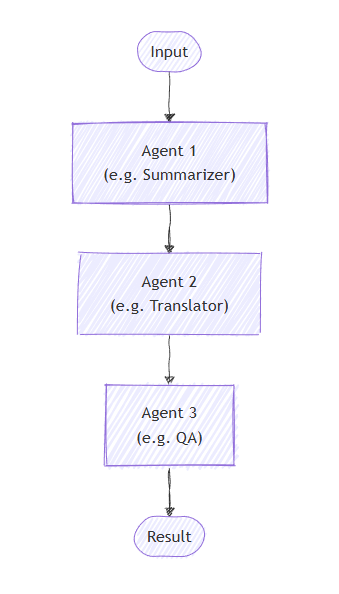
Nell'orchestrazione sequenziale gli agenti sono organizzati in una pipeline. Ogni agente elabora l'attività a sua volta, passando l'output all'agente successivo nella sequenza. Questo è ideale per i flussi di lavoro in cui ogni passaggio si basa su quello precedente, ad esempio la revisione dei documenti, le pipeline di elaborazione dei dati o il ragionamento a più fasi.
Importante
Per impostazione predefinita, ogni agente nella sequenza utilizza la conversazione completa dell'agente precedente, sia i messaggi di input forniti all'agente precedente che i relativi messaggi di risposta. È possibile configurare gli agenti in modo da utilizzare solo i messaggi di risposta dell'agente precedente. Per informazioni dettagliate, vedere Controllo del contesto tra gli agenti .
Cosa Imparerai
- Come creare una pipeline sequenziale di agenti
- Come concatenare gli agenti in cui ognuno si basa sull'output precedente
- Come aggiungere l'approvazione con intervento umano nel ciclo per le chiamate a strumenti sensibili
- Come combinare agenti con executor personalizzati per attività specializzate
- Come tenere traccia del flusso della conversazione attraverso la pipeline
Definire gli agenti
Nell'orchestrazione sequenziale, gli agenti sono organizzati in una pipeline in cui ogni agente elabora l'attività a sua volta, passando l'output all'agente successivo nella sequenza.
Configurare il client OpenAI di Azure
using System;
using System.Collections.Generic;
using System.Linq;
using System.Threading.Tasks;
using Azure.AI.Projects;
using Azure.Identity;
using Microsoft.Agents.AI.Workflows;
using Microsoft.Extensions.AI;
using Microsoft.Agents.AI;

// 1) Set up the Azure OpenAI client
var endpoint = Environment.GetEnvironmentVariable("AZURE_OPENAI_ENDPOINT") ??
    throw new InvalidOperationException("AZURE_OPENAI_ENDPOINT is not set.");
var deploymentName = Environment.GetEnvironmentVariable("AZURE_OPENAI_DEPLOYMENT_NAME") ?? "gpt-4o-mini";
var client = new AIProjectClient(new Uri(endpoint), new DefaultAzureCredential())
    .GetProjectOpenAIClient()
    .GetProjectResponsesClient()
    .AsIChatClient(deploymentName);
Avvertimento
DefaultAzureCredential è utile per lo sviluppo, ma richiede un'attenta considerazione nell'ambiente di produzione. Nell'ambiente di produzione prendere in considerazione l'uso di credenziali specifiche ,ad esempio ManagedIdentityCredential, per evitare problemi di latenza, probe di credenziali indesiderate e potenziali rischi per la sicurezza dai meccanismi di fallback.
Creare agenti specializzati che funzioneranno in sequenza:
// 2) Helper method to create translation agents
static ChatClientAgent GetTranslationAgent(string targetLanguage, IChatClient chatClient) =>
    new(chatClient,
        $"You are a translation assistant who only responds in {targetLanguage}. Respond to any " +
        $"input by outputting the name of the input language and then translating the input to {targetLanguage}.");

// Create translation agents for sequential processing
var translationAgents = (from lang in (string[])["French", "Spanish", "English"]
                         select GetTranslationAgent(lang, client));
Configurare l'orchestrazione sequenziale
Compilare il flusso di lavoro usando AgentWorkflowBuilder:
// 3) Build sequential workflow
var workflow = AgentWorkflowBuilder.BuildSequential(translationAgents);
Eseguire il flusso di lavoro sequenziale
Eseguire il flusso di lavoro ed elaborare gli eventi:
// 4) Run the workflow
var messages = new List<ChatMessage> { new(ChatRole.User, "Hello, world!") };

await using StreamingRun run = await InProcessExecution.RunStreamingAsync(workflow, messages);
await run.TrySendMessageAsync(new TurnToken(emitEvents: true));

string? lastExecutorId = null;
List<ChatMessage> result = [];
await foreach (WorkflowEvent evt in run.WatchStreamAsync())
{
    if (evt is AgentResponseUpdateEvent e)
    {
        if (e.ExecutorId != lastExecutorId)
        {
            lastExecutorId = e.ExecutorId;
            Console.WriteLine();
            Console.Write($"{e.ExecutorId}: ");
        }

        Console.Write(e.Update.Text);
    }
    else if (evt is WorkflowOutputEvent outputEvt)
    {
        result = outputEvt.As<List<ChatMessage>>()!;
        break;
    }
}

// Display final result
Console.WriteLine();
foreach (var message in result)
{
    Console.WriteLine($"{message.Role}: {message.Text}");
}
Output di esempio
French_Translation: User: Hello, world!
French_Translation: Assistant: English detected. Bonjour, le monde !
Spanish_Translation: Assistant: French detected. ¡Hola, mundo!
English_Translation: Assistant: Spanish detected. Hello, world!
Orchestrazione sequenziale con intervento umano nel ciclo
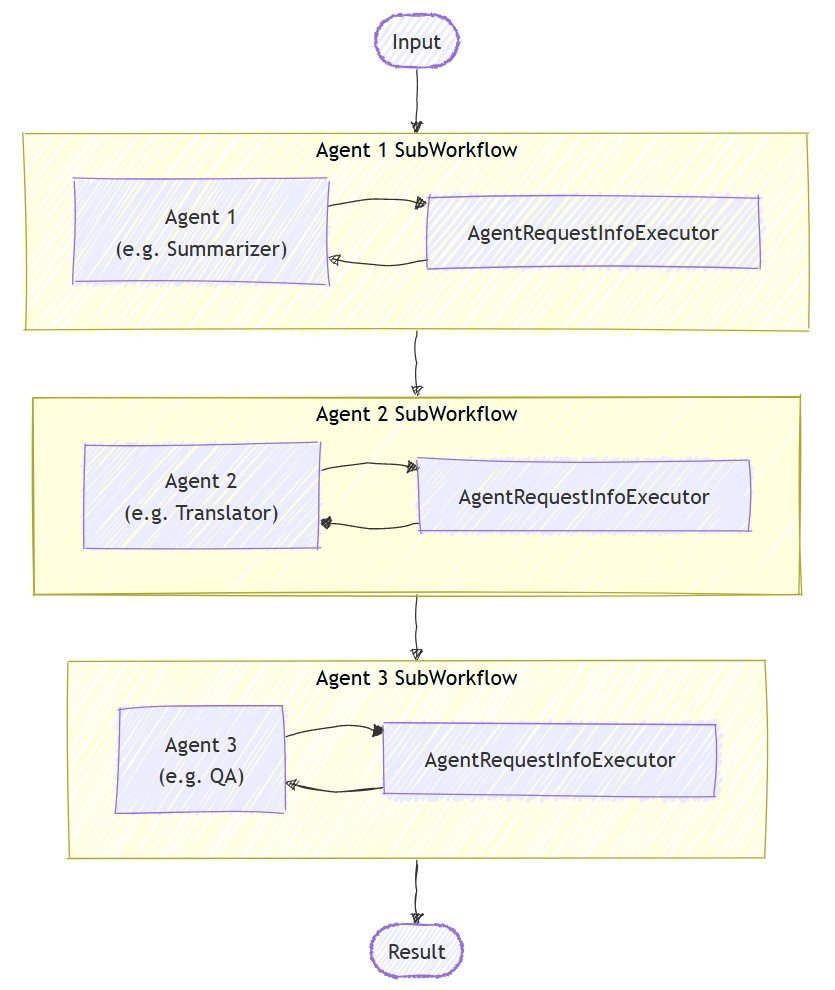
Le orchestrazioni sequenziali supportano le interazioni umane nel ciclo tramite l'approvazione degli strumenti. Quando gli agenti usano strumenti avvolti con ApprovalRequiredAIFunction, il flusso di lavoro si sospende e genera un RequestInfoEvent contenente ToolApprovalRequestContent. I sistemi esterni (ad esempio un operatore umano) possono esaminare la chiamata dello strumento, approvarla o rifiutarla e il flusso di lavoro riprende di conseguenza.
Tip
Per altri dettagli sul modello di richiesta e risposta, vedere Human-in-the-Loop.
Definire gli agenti con strumenti che richiedono approvazione
Creare agenti in cui gli strumenti sensibili vengono incapsulati con ApprovalRequiredAIFunction:
ChatClientAgent deployAgent = new(
    client,
    "You are a DevOps engineer. Check staging status first, then deploy to production.",
    "DeployAgent",
    "Handles deployments",
    [
        AIFunctionFactory.Create(CheckStagingStatus),
        new ApprovalRequiredAIFunction(AIFunctionFactory.Create(DeployToProduction))
    ]);

ChatClientAgent verifyAgent = new(
    client,
    "You are a QA engineer. Verify that the deployment was successful and summarize the results.",
    "VerifyAgent",
    "Verifies deployments");
Compilare ed eseguire con la gestione delle approvazioni
Creare il flusso di lavoro sequenziale come di consueto. Il flusso di approvazione viene gestito tramite il flusso di eventi:
var workflow = AgentWorkflowBuilder.BuildSequential([deployAgent, verifyAgent]);

await foreach (WorkflowEvent evt in run.WatchStreamAsync())
{
    if (evt is RequestInfoEvent e &&
        e.Request.TryGetDataAs(out ToolApprovalRequestContent? approvalRequest))
    {
        await run.SendResponseAsync(
            e.Request.CreateResponse(approvalRequest.CreateResponse(approved: true)));
    }
}
Annotazioni
AgentWorkflowBuilder.BuildSequential() supporta l'approvazione degli strumenti di default — non è necessaria alcuna configurazione aggiuntiva. Quando un agente chiama uno strumento wrappato con ApprovalRequiredAIFunction, il flusso di lavoro si sospende automaticamente e genera un RequestInfoEvent.
Tip
Per un esempio completo eseguibile di questo flusso di approvazione, vedere l'esempioGroupChatToolApproval. Lo stesso RequestInfoEvent modello di gestione si applica ad altre orchestrazioni.
Oltre l'approvazione dello strumento: Feedback interattivo
L'approvazione dello strumento consente a un utente di accettare o rifiutare una chiamata specifica di uno strumento, ma un'orchestrazione sequenziale non include un passaggio predefinito per sospendere il feedback degli utenti in formato libero tra gli agenti e non può restituire il controllo a un agente precedente. Quando un agente deve chiedere in modo interattivo all'utente altre informazioni ed eseguire l'iterazione prima di continuare; ad esempio, raccogliere i dettagli della prenotazione prima di chiamare uno strumento di prenotazione; usare invece uno degli approcci seguenti:
- L'orchestrazione del passaggio è interattiva per impostazione predefinita: quando un agente risponde senza effettuare il passaggio, il controllo torna all'utente per l'input successivo, consentendo uno scambio su più turni all'interno dell'orchestrazione. Limita ogni agente a un'unica destinazione di trasferimento per simulare un flusso sequenziale che comunque si interrompe in attesa dell'input dell'utente.
- Un flusso di lavoro personalizzato creato con
WorkflowBuildere unRequestPortti consente di inviare all'utente una richiesta con tipo definito in qualsiasi momento e di instradare la risposta di nuovo a un executor, che puoi collocare prima o dopo i tuoi agenti nella pipeline.
Concetti chiave
- Elaborazione sequenziale: ogni agente elabora l'output dell'agente precedente nell'ordine
- AgentWorkflowBuilder.BuildSequential(): crea un flusso di lavoro della pipeline da una raccolta di agenti
- ChatClientAgent: rappresenta un agente supportato da un client di chat con istruzioni specifiche
-
InProcessExecution.RunStreamingAsync(): esegue il flusso di lavoro e restituisce un
StreamingRunper lo streaming di eventi in tempo reale -
Gestione eventi: monitorare l'avanzamento dell'agente attraverso
AgentResponseUpdateEvente il completamento attraversoWorkflowOutputEvent - Approvazione degli strumenti: Avvolgere gli strumenti sensibili con per richiedere l'approvazione umana prima dell'esecuzione
-
RequestInfoEvent: generato quando uno strumento richiede l'approvazione; contiene
ToolApprovalRequestContentcon i dettagli della chiamata dello strumento -
Interactive HITL: l'orchestrazione sequenziale copre l'approvazione degli strumenti; per uno scambio interattivo in cui un agente raccoglie ulteriori informazioni dall'utente, usa l'orchestrazione handoff o un flusso di lavoro personalizzato
RequestPort
Nell'orchestrazione sequenziale, ogni agente elabora l'attività a sua volta, con il flusso dell'output che passa da uno a quello successivo. Per iniziare, definire gli agenti per un processo in due fasi:
import os
from agent_framework.foundry import FoundryChatClient
from azure.identity import AzureCliCredential

# 1) Create agents using FoundryChatClient
chat_client = FoundryChatClient(
    project_endpoint=os.environ["FOUNDRY_PROJECT_ENDPOINT"],
    model=os.environ["FOUNDRY_MODEL"],
    credential=AzureCliCredential(),
)

writer = chat_client.as_agent(
    instructions=(
        "You are a concise copywriter. Provide a single, punchy marketing sentence based on the prompt."
    ),
    name="writer",
)

reviewer = chat_client.as_agent(
    instructions=(
        "You are a thoughtful reviewer. Give brief feedback on the previous assistant message."
    ),
    name="reviewer",
)
Configurare l'orchestrazione sequenziale
La SequentialBuilder classe crea una pipeline in cui gli agenti elaborano le attività in ordine. Ogni agente vede la cronologia completa della conversazione e aggiunge la risposta:
from agent_framework.orchestrations import SequentialBuilder

# 2) Build sequential workflow: writer -> reviewer
workflow = SequentialBuilder(participants=[writer, reviewer]).build()
Eseguire il flusso di lavoro sequenziale
Eseguire il flusso di lavoro e raccogliere l'output finale. L'output del terminale è un oggetto AgentResponse contenente i messaggi di risposta dell'ultimo agente:
from agent_framework import AgentResponse

# 3) Run and print the last agent's response
events = await workflow.run("Write a tagline for a budget-friendly eBike.")
outputs = events.get_outputs()

if outputs:
    print("===== Final Response =====")
    final: AgentResponse = outputs[0]
    for msg in final.messages:
        name = msg.author_name or "assistant"
        print(f"[{name}]\n{msg.text}")
Output di esempio
===== Final Response =====
[reviewer]
This tagline clearly communicates affordability and the benefit of extended travel, making it
appealing to budget-conscious consumers. It has a friendly and motivating tone, though it could
be slightly shorter for more punch. Overall, a strong and effective suggestion!
Avanzato: integrazione di agenti con executor personalizzati
L'orchestrazione sequenziale supporta la combinazione di agenti con executor personalizzati per l'elaborazione specializzata. Ciò è utile quando è necessaria una logica personalizzata che non richiede un LLM:
Definire un executor personalizzato
Annotazioni
Quando un executor personalizzato segue un agente nella sequenza, il relativo gestore riceve AgentExecutorResponse (perché gli agenti sono internamente sottoposti a wrapping da AgentExecutor). Usare agent_response.full_conversation per accedere alla cronologia completa della conversazione. Un executor personalizzato usato come ultimo partecipante (terminatore) deve chiamare ctx.yield_output(AgentResponse(...)) affinché il suo output diventi l'output finale del flusso di lavoro.
from agent_framework import AgentExecutorResponse, AgentResponse, Executor, WorkflowContext, handler
from agent_framework import Message
from typing_extensions import Never

class Summarizer(Executor):
    """Terminator custom executor: consumes full conversation and yields a summary as the workflow's final answer."""

    @handler
    async def summarize(
        self,
        agent_response: AgentExecutorResponse,
        ctx: WorkflowContext[Never, AgentResponse]
    ) -> None:
        if not agent_response.full_conversation:
            await ctx.yield_output(AgentResponse(messages=[Message("assistant", ["No conversation to summarize."])]))
            return

        users = sum(1 for m in agent_response.full_conversation if m.role == "user")
        assistants = sum(1 for m in agent_response.full_conversation if m.role == "assistant")
        summary = Message("assistant", [f"Summary -> users:{users} assistants:{assistants}"])
        await ctx.yield_output(AgentResponse(messages=[summary]))
Creare un flusso di lavoro sequenziale misto
# Create a content agent
content = chat_client.as_agent(
    instructions="Produce a concise paragraph answering the user's request.",
    name="content",
)

# Build sequential workflow: content -> summarizer
summarizer = Summarizer(id="summarizer")
workflow = SequentialBuilder(participants=[content, summarizer]).build()
Output di esempio con executor personalizzato
===== Final Summary =====
Summary -> users:1 assistants:1
Controllare il contesto tra agenti
Per impostazione predefinita, ogni agente in un SequentialBuilder flusso di lavoro utilizza la conversazione completa dell'agente precedente (input e messaggi di risposta). L'impostazione chain_only_agent_responses=True configura tutti gli agenti nella sequenza in modo da utilizzare solo i messaggi di risposta dell'agente precedente:
workflow = SequentialBuilder(
    participants=[writer, translator, reviewer],
    chain_only_agent_responses=True,
).build()
Ciò è utile per le pipeline di traduzione, il perfezionamento progressivo e altri scenari in cui ogni agente deve concentrarsi esclusivamente sulla trasformazione dell'output dell'agente precedente senza essere influenzato dai turni di conversazione precedenti.
Per un esempio completo, vedere sequential_chain_only_agent_responses.py nel repository di Agent Framework.
Tip
Per un controllo più granulare sul flusso di contesto, incluse le funzioni di filtro personalizzate, vedere Modalità di contesto nel riferimento dell'executor dell'agente.
Output intermedi
Per impostazione predefinita, SequentialBuilder designa l'ultimo partecipante come origine di output del terminale (output_from). Solo l'output di quel partecipante appare come un evento "output".
Per visualizzare anche gli output dei partecipanti precedenti, passare intermediate_output_from con i partecipanti da designare come fonti intermedie. In questo modo i partecipanti vengono abbassati di livello implicitamente dal set predefinito finale, ma generano eventi "intermediate" anziché eventi "output":
workflow = SequentialBuilder(
    participants=[writer, reviewer, editor],
    intermediate_output_from=[writer, reviewer],
).build()
È possibile gestire in tempo reale sia gli eventi "intermediate" sia gli eventi "output" in modalità streaming:
from agent_framework import AgentResponseUpdate

# Track the last author to format streaming output.
last_author: str | None = None

async for event in workflow.run("Write a tagline for a budget-friendly eBike.", stream=True):
    if event.type in ("output", "intermediate") and isinstance(event.data, AgentResponseUpdate):
        update = event.data
        author = update.author_name
        if author != last_author:
            if last_author is not None:
                print()  # Newline between different authors
            label = "FINAL" if event.type == "output" else "intermediate"
            print(f"[{label}] {author}: {update.text}", end="", flush=True)
            last_author = author
        else:
            print(update.text, end="", flush=True)
Quando gli aggiornamenti trasmessi vengono combinati in messaggi, una modifica tra due valori author_name non vuoti avvia un nuovo messaggio. Questa modifica mantiene separato l'output trasmesso da ogni agente nella risposta finale. Un autore mancante non avvia un nuovo messaggio.
Orchestrazione sequenziale con intervento umano nel ciclo
Le orchestrazioni sequenziali supportano le interazioni umane nel ciclo in due modi: l'approvazione dello strumento per controllare le chiamate agli strumenti sensibili e richiedere informazioni per la sospensione dopo ogni risposta dell'agente per raccogliere feedback.
Tip
Per altri dettagli sul modello di richiesta e risposta, vedere Human-in-the-Loop.
Approvazione degli strumenti nei flussi di lavoro sequenziali
Usare @tool(approval_mode="always_require") per contrassegnare gli strumenti che richiedono l'approvazione umana prima dell'esecuzione. Il flusso di lavoro sospende e genera un request_info evento quando l'agente tenta di chiamare lo strumento.
@tool(approval_mode="always_require")
def execute_database_query(query: str) -> str:
    return f"Query executed successfully: {query}"


database_agent = Agent(
    client=chat_client,
    name="DatabaseAgent",
    instructions="You are a database assistant.",
    tools=[execute_database_query],
)

workflow = SequentialBuilder(participants=[database_agent]).build()
Elaborare il flusso di eventi e gestire le richieste di approvazione:
async def process_event_stream(stream):
    responses = {}
    async for event in stream:
        if event.type == "request_info" and event.data.type == "function_approval_request":
            responses[event.request_id] = event.data.to_function_approval_response(approved=True)
    return responses if responses else None

stream = workflow.run("Check the schema and update all pending orders", stream=True)

pending_responses = await process_event_stream(stream)
while pending_responses is not None:
    stream = workflow.run(stream=True, responses=pending_responses)
    pending_responses = await process_event_stream(stream)
Tip
Per un esempio eseguibile completo, vedere sequential_builder_tool_approval.py. L'approvazione degli strumenti funziona con SequentialBuilder senza alcuna configurazione aggiuntiva del builder.
Richiedi informazioni per commenti e suggerimenti dell'agente
Usare .with_request_info() per sospendere dopo la risposta di agenti specifici, consentendo l'input esterno (ad esempio la revisione umana) prima che inizi l'agente successivo:
I valori in agents devono corrispondere esattamente agli identificatori dell'agente di orchestrazione, incluso il caso. Il flusso di lavoro genera ValueError durante la costruzione per un identificatore sconosciuto o con maiuscole/minuscole non corrispondenti.
L'evento request_info include la risposta sottoposta a revisione. Il flusso di lavoro non genera tale risposta come output normale fino a quando non viene approvato. Se la ripresa del flusso di lavoro raggiunge un'altra sospensione delle informazioni di richiesta, il flusso di lavoro non genera comunque alcun output per la risposta appena in sospeso.
drafter = Agent(
    client=chat_client,
    name="drafter",
    instructions="You are a document drafter. Create a brief draft on the given topic.",
)

editor = Agent(
    client=chat_client,
    name="editor",
    instructions="You are an editor. Review and improve the draft. Incorporate any human feedback.",
)

finalizer = Agent(
    client=chat_client,
    name="finalizer",
    instructions="You are a finalizer. Create a polished final version.",
)

# Enable request info for the editor agent only
workflow = (
    SequentialBuilder(participants=[drafter, editor, finalizer])
    .with_request_info(agents=["editor"])
    .build()
)

async def process_event_stream(stream):
    responses = {}
    async for event in stream:
        if event.type == "request_info":
            responses[event.request_id] = AgentRequestInfoResponse.approve()
    return responses if responses else None

stream = workflow.run("Write a brief introduction to artificial intelligence.", stream=True)

pending_responses = await process_event_stream(stream)
while pending_responses is not None:
    stream = workflow.run(stream=True, responses=pending_responses)
    pending_responses = await process_event_stream(stream)
Tip
Vedi gli esempi completi: approvazione sequenziale degli strumenti e informazioni sulle richieste sequenziali.
Concetti chiave
- Contesto condiviso: per impostazione predefinita, ogni agente utilizza la conversazione completa dell'agente precedente, inclusi i messaggi di input e risposta
-
Controllo del contesto: usare
chain_only_agent_responses=Trueper configurare gli agenti per utilizzare solo i messaggi di risposta dell'agente precedente -
Output di AgentResponse: l'output del terminale del flusso di lavoro è un oggetto
AgentResponsecontenente la risposta dell'ultimo agente (non la conversazione completa) -
L'ordine è importante: gli agenti vengono eseguiti rigorosamente nell'ordine specificato nell'elenco
participants - Partecipanti flessibili: è possibile combinare agenti ed esecutori personalizzati in qualsiasi ordine
-
Contratto terminatore personalizzato: un executor personalizzato usato come ultimo partecipante deve chiamare
ctx.yield_output(AgentResponse(...))per produrre l'output del terminale -
Output intermedi: usare
intermediate_output_from=[...]ointermediate_output_from="all_other"per mostrare l'avanzamento dei partecipanti come eventi intermedi del flusso di lavoro, non solo l'output finale dell'ultimo partecipante -
Approvazione degli strumenti: usare
@tool(approval_mode="always_require")per operazioni sensibili che richiedono una revisione umana -
Richiedi informazioni: usare
.with_request_info(agents=[...])per sospendere dopo agenti specifici per commenti esterni
Go può compilare flussi di lavoro sequenziali dell'agente con workflow/agentworkflow.
NewSequentialWorkflowBuilder ospita ogni agente come executor del flusso di lavoro, li connette in ordine e restituisce il batch di messaggi finale come output del flusso di lavoro.
Configurare la configurazione di Foundry
endpoint := os.Getenv("FOUNDRY_PROJECT_ENDPOINT")
model := cmp.Or(os.Getenv("FOUNDRY_MODEL"), "gpt-4o-mini")

token, err := azidentity.NewDefaultAzureCredential(nil)
if err != nil {
    return err
}
Avvertimento
azidentity.NewDefaultAzureCredential è utile per lo sviluppo, ma richiede un'attenta considerazione nell'ambiente di produzione. Nell'ambiente di produzione prendere in considerazione l'uso di credenziali specifiche, ad esempio azidentity.NewManagedIdentityCredential, per evitare problemi di latenza, probe di credenziali indesiderate e potenziali rischi per la sicurezza dai meccanismi di fallback.
Definisci i tuoi agenti Go
Creare agenti specializzati che funzioneranno in sequenza:
newTranslationAgent := func(language string) *agent.Agent {
    return foundryprovider.NewAgent(
        endpoint,
        token,
        foundryprovider.ModelDeployment(model),
        foundryprovider.AgentConfig{
            Instructions: fmt.Sprintf(
                "You are a translation assistant who only responds in %s. Respond to any input by outputting the name of the input language and then translating the input to %s.",
                language,
                language,
            ),
            Config: agent.Config{Name: language},
        },
    )
}

frenchAgent := newTranslationAgent("French")
spanishAgent := newTranslationAgent("Spanish")
englishAgent := newTranslationAgent("English")
Configurare l'orchestrazione sequenziale
wf, err := agentworkflow.NewSequentialWorkflowBuilder(
    frenchAgent,
    spanishAgent,
    englishAgent,
).
    WithName("translation-pipeline").
    Build()
if err != nil {
    return err
}
Eseguire il flusso di lavoro sequenziale
Eseguire il flusso di lavoro ed elaborare gli eventi di output:
run, err := inproc.Default.RunStreaming(ctx, wf, []*message.Message{message.NewText("Hello, world!")})
if err != nil {
    return err
}
defer run.Close(ctx)

emitEvents := true
if err := run.SendMessage(ctx, workflow.TurnToken{EmitEvents: &emitEvents}); err != nil {
    return err
}

lastExecutorID := ""
for evt, err := range run.WatchStream(ctx) {
    if err != nil {
        return err
    }
    switch e := evt.(type) {
    case workflow.OutputEvent:
        switch value := e.Output.(type) {
        case *agent.ResponseUpdate:
            if e.ExecutorID != lastExecutorID {
                lastExecutorID = e.ExecutorID
                fmt.Printf("\n%s: ", e.ExecutorID)
            }
            fmt.Print(value.String())
        case []*message.Message:
            fmt.Println("\n===== Final Response =====")
            for _, msg := range value {
                fmt.Printf("%s: %s\n", msg.Role, msg.String())
            }
        }
    case workflow.ErrorEvent:
        return e.Error
    case workflow.ExecutorFailedEvent:
        return fmt.Errorf("executor %q failed: %w", e.ExecutorID, e.Error)
    }
}
Output di esempio
French: English detected. Bonjour, le monde !
Spanish: French detected. ¡Hola, mundo!
English: Spanish detected. Hello, world!

===== Final Response =====
assistant: Spanish detected. Hello, world!
Orchestrazione sequenziale con intervento umano nel ciclo
I flussi di lavoro sequenziali possono sospendere l'approvazione degli strumenti quando un agente ospitato usa uno strumento necessario per l'approvazione. Eseguire il wrapping dello strumento con tool.ApprovalRequiredFunc, quindi mettersi in ascolto di workflow.RequestInfoEvent e rispondere con ToolApprovalResponseContent.
Definire gli agenti con strumenti che richiedono approvazione
deployAgent := foundryprovider.NewAgent(
    endpoint,
    token,
    foundryprovider.ModelDeployment(model),
    foundryprovider.AgentConfig{
        Instructions: "You are a DevOps engineer. Check staging status first, then deploy to production.",
        Config: agent.Config{
            Name:  "DeployAgent",
            Tools: []tool.Tool{tool.ApprovalRequiredFunc(deployTool)},
        },
    },
)

verifyAgent := foundryprovider.NewAgent(
    endpoint,
    token,
    foundryprovider.ModelDeployment(model),
    foundryprovider.AgentConfig{
        Instructions: "You are a QA engineer. Verify that the deployment was successful and summarize the results.",
        Config:      agent.Config{Name: "VerifyAgent"},
    },
)

wf, err := agentworkflow.NewSequentialWorkflowBuilder(deployAgent, verifyAgent).
    WithName("deployment-pipeline").
    Build()
if err != nil {
    return err
}
Compilare ed eseguire con la gestione delle approvazioni
Gestire le richieste di approvazione nel flusso di eventi:
for evt, err := range run.WatchStream(ctx) {
    if err != nil {
        return err
    }

    requestEvent, ok := evt.(workflow.RequestInfoEvent)
    if !ok {
        continue
    }

    requestContent, ok := requestEvent.Request.Data.As(reflect.TypeFor[*message.ToolApprovalRequestContent]())
    if !ok {
        continue
    }

    approvalRequest := requestContent.(*message.ToolApprovalRequestContent)
    response, err := requestEvent.Request.CreateResponse(approvalRequest.CreateResponse(true, "approved"))
    if err != nil {
        return err
    }

    if err := run.SendResponse(ctx, response); err != nil {
        return err
    }
}
Avanzato: integrazione di agenti con executor personalizzati
Per le pipeline miste, ospita gli agenti con agentworkflow.New e collegali a esecutori personalizzati con workflow.NewBuilder:
writer := agentworkflow.New(writerAgent, agentworkflow.Config{})

summarizer := workflow.NewExecutor("Summarizer", func(messages []*message.Message) string {
    return summarizeMessages(messages)
}).Bind()

wf, err := workflow.NewBuilder(writer).
    AddEdge(writer, summarizer).
    WithOutputFrom(summarizer).
    Build()
if err != nil {
    return err
}
Controllare il contesto tra agenti
NewSequentialWorkflowBuilder usa la configurazione predefinita dell'agente ospitato, in cui ogni agente downstream riceve i messaggi in arrivo e i messaggi di risposta dell'agente precedente. Per concatenare solo le risposte dell'agente precedente, impostare WithChainOnlyAgentResponses(true):
wf, err := agentworkflow.NewSequentialWorkflowBuilder(frenchAgent, spanishAgent, englishAgent).
    WithChainOnlyAgentResponses(true).
    Build()
if err != nil {
    return err
}
Output intermedi
Per impostazione predefinita, NewSequentialWorkflowBuilder genera l'output di ogni partecipante come output intermedio del flusso di lavoro e genera il batch di messaggi finale come output del terminale. Per selezionare in modo esplicito gli output dei partecipanti desiderati, combinare WithIntermediateOutputFrom e WithOutputFrom:
wf, err := agentworkflow.NewSequentialWorkflowBuilder(frenchAgent, spanishAgent, englishAgent).
    WithIntermediateOutputFrom(frenchAgent, spanishAgent).
    WithOutputFrom(englishAgent).
    Build()
if err != nil {
    return err
}
Usare OutputEvent.IsIntermediate() per distinguere gli output intermedi dei partecipanti dagli output del terminale.
Concetti chiave
- Elaborazione sequenziale: ogni agente o executor elabora l'output del passaggio precedente nell'ordine.
- agentworkflow. NewSequentialWorkflowBuilder(): crea un flusso di lavoro della pipeline da una raccolta di agenti.
-
Agenti ospitati:
agentworkflow.Newespone le opzioni di configurazione dell'agente per l'inoltro dei messaggi, la riassegnazione dei ruoli, gli eventi di aggiornamento e l'intercettazione delle richieste. -
Esecutori personalizzati: le pipeline manuali
workflow.NewBuilderpossono combinare agenti ospitati ed esecutori deterministici. -
Approvazione dello strumento: gli strumenti necessari per l'approvazione sospendono il flusso di lavoro e generano
RequestInfoEventvalori contenentiToolApprovalRequestContent. -
Risultati intermedi:
WithIntermediateOutputFromcontrassegna i risultati dei partecipanti selezionati conworkflow.OutputTagIntermediate.
Tip
Vedere l'esempio di modelli di flusso di lavoro dell'agente e gli agenti nell'esempio di flussi di lavoro per flussi di lavoro sequenziali eseguibili completi.