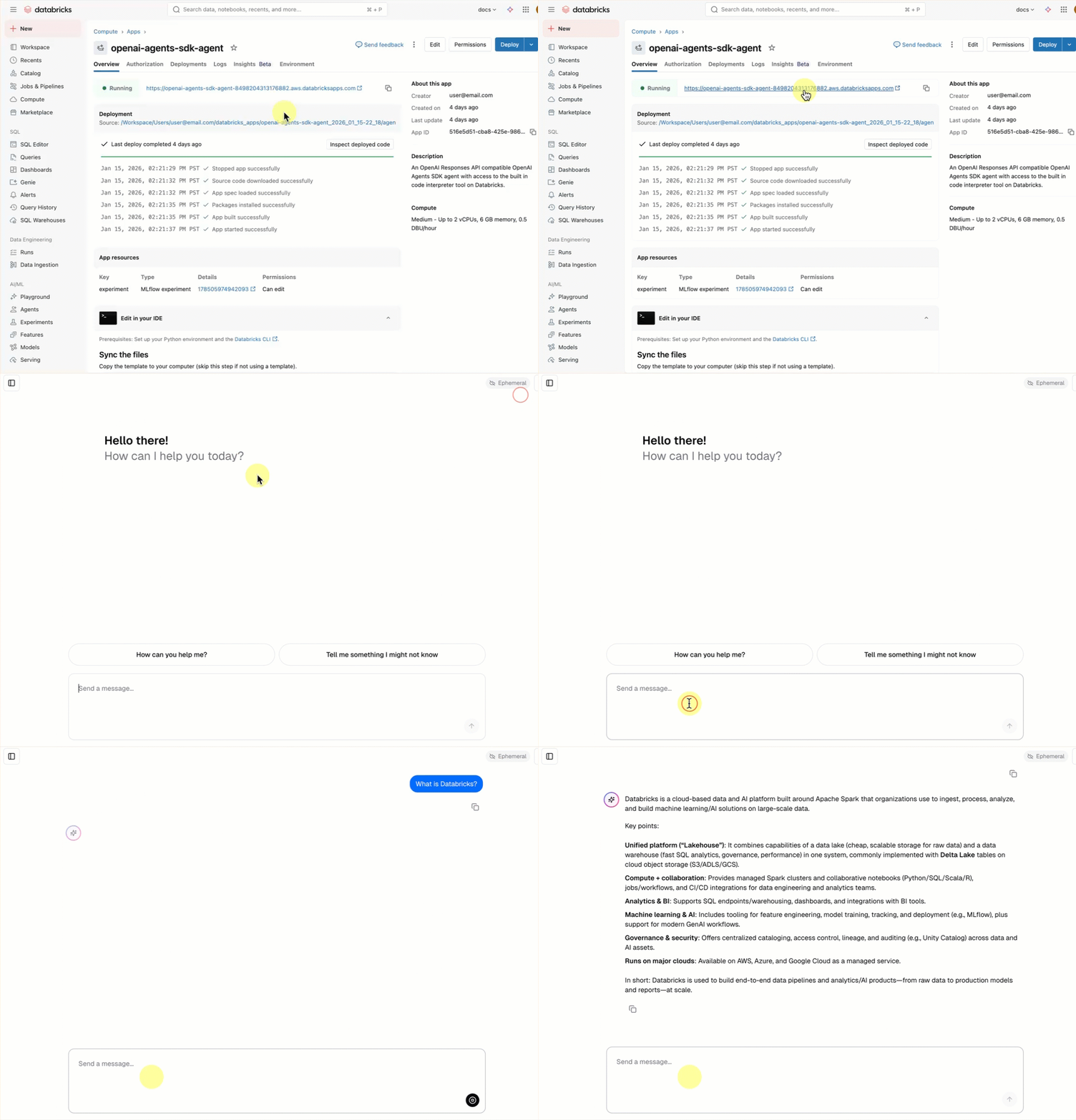
Condividi tramite


Introduzione agli agenti di intelligenza artificiale

Creare il primo agente di intelligenza artificiale usando Mosaic AI Agent Framework. In questa esercitazione si eseguiranno le seguenti attività:

  • Creare un agente usando Agent Framework.
  • Aggiungi uno strumento al tuo agente.
  • Distribuisci il tuo agente in un endpoint di servizio del modello di Databricks.

Per un'introduzione concettuale agli agenti e ad altre app di intelligenza artificiale di generazione, vedere Che cosa sono le app di intelligenza artificiale di generazione?

Requisiti

Per l'area di lavoro devono essere abilitate le funzionalità seguenti:

Notebook di esempio

Questo notebook contiene tutto il codice necessario per creare e distribuire il primo agente di intelligenza artificiale. Importare il notebook nell'area di lavoro di Azure Databricks per eseguirlo.

Demo dell'agente di Intelligenza Artificiale Mosaic

Ottieni il notebook

Definire l'agente

Un agente di intelligenza artificiale è costituito dai seguenti elementi:

  • Un modello linguistico di grandi dimensioni (LLM) che può ragionarsi e prendere decisioni
  • Strumenti che l'LLM può usare per eseguire più operazioni rispetto alla semplice generazione di testo, ad esempio l'esecuzione di codice Python o il recupero di dati

Eseguire il codice seguente in un notebook di Databricks per definire un semplice agente per chiamare strumenti.

  1. Installare i pacchetti Python necessari:

    %pip install -U -qqqq mlflow databricks-openai databricks-agents"
    dbutils.library.restartPython()
    
    • mlflow: usato per lo sviluppo dell'agente e il tracciamento dell'agente.
    • databricks-openai: usato per connettersi agli strumenti LLM ospitati in Databricks e accedere agli strumenti del catalogo Unity.
    • databricks-agents: usato per impacchettare e distribuire l'agente.
  2. Definire l'agente. Questo frammento di codice esegue le operazioni seguenti:

    • Si connette all'endpoint di gestione del modello Databricks usando il client OpenAI.
    • Abilita il tracciamento MLflow usando autolog(). Aggiunge una strumentazione tecnica che consente di vedere cosa fa il tuo agente quando invii una query.
    • Aggiunge lo strumento system.ai.python_exec al tuo agente. Questa funzione predefinita del catalogo unity consente all'agente di eseguire il codice Python.
    • Usa le funzioni helper MLflow (output_to_responses_items_stream, create_function_call_output_item) per convertire l'output LLM di streaming in un formato compatibile con l'API Risposte.
    import json
    import mlflow
    from databricks.sdk import WorkspaceClient
    from databricks_openai import UCFunctionToolkit, DatabricksFunctionClient
    # Import MLflow utilities for converting from chat completions to Responses API format
    from mlflow.types.responses import output_to_responses_items_stream, create_function_call_output_item
    
    # Enable automatic tracing for easier debugging
    mlflow.openai.autolog()
    
    # Get an OpenAI client configured to connect to Databricks model serving endpoints
    openai_client = WorkspaceClient().serving_endpoints.get_open_ai_client()
    
    # Load Databricks built-in tools (Python code interpreter)
    client = DatabricksFunctionClient()
    builtin_tools = UCFunctionToolkit(function_names=["system.ai.python_exec"], client=client).tools
    for tool in builtin_tools:
      del tool["function"]["strict"]
    
    def call_tool(tool_name, parameters):
      if tool_name == "system__ai__python_exec":
        return DatabricksFunctionClient().execute_function("system.ai.python_exec", parameters=parameters).value
      raise ValueError(f"Unknown tool: {tool_name}")
    
    def call_llm(prompt):
      for chunk in openai_client.chat.completions.create(
        model="databricks-claude-3-7-sonnet",
        messages=[{"role": "user", "content": prompt}],
        tools=builtin_tools,
        stream=True
      ):
        yield chunk.to_dict()
    
    def run_agent(prompt):
      """
      Send a user prompt to the LLM, and yield LLM + tool call responses
      The LLM is allowed to call the code interpreter tool if needed, to respond to the user
      """
      # Convert output into Responses API-compatible events
      for chunk in output_to_responses_items_stream(call_llm(prompt)):
        yield chunk.model_dump(exclude_none=True)
      # If the model executed a tool, call it and yield the tool call output in Responses API format
      if chunk.item.get('type') == 'function_call':
        tool_name = chunk.item["name"]
        tool_args = json.loads(chunk.item["arguments"])
        tool_result = call_tool(tool_name, tool_args)
        yield {"type": "response.output_item.done", "item": create_function_call_output_item(call_id=chunk.item["call_id"], output=tool_result)}
    

Test dell'agente

Testare l'agente eseguendo una query con un prompt che richiede l'esecuzione del codice Python:

for output_chunk in run_agent("What is the square root of 429?"):
  print(output_chunk)

Oltre all'output di LLM, nel notebook verranno visualizzate informazioni dettagliate sulla traccia. Queste tracce consentono di eseguire il debug di chiamate dell'agente lente o non riuscite. Queste tracce sono state aggiunte automaticamente usando mlflow.openai.autolog() .

Distribuire l'agente

Dopo aver creato un agente, è possibile creare un pacchetto e distribuirlo in un endpoint di gestione di Databricks. Iniziare a raccogliere commenti e suggerimenti su un agente distribuito condividendolo con altri utenti e chattare con esso usando un'interfaccia utente di chat predefinita.

Preparare il codice dell'agente per la distribuzione

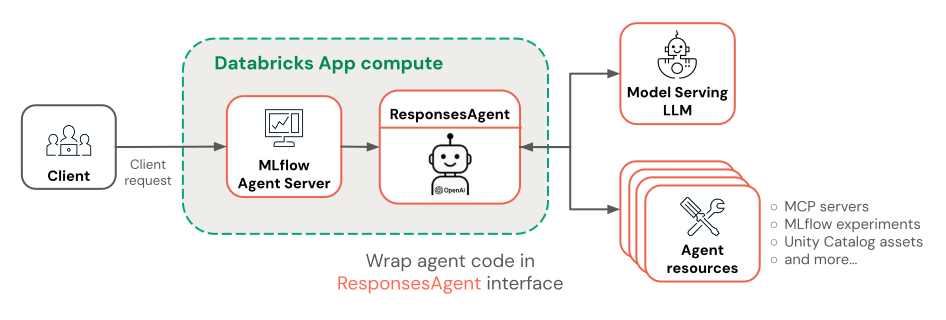
Per preparare il codice dell'agente per la distribuzione, avvolgilo utilizzando l'interfaccia ResponsesAgent di MLflow. L'interfaccia ResponsesAgent è il modo consigliato per creare pacchetti di agenti per la distribuzione in Azure Databricks.

  1. Per implementare l'interfaccia ResponsesAgent , definire sia (per le risposte di streaming) che predict_stream()predict() (per le richieste non di streaming) metodi. Poiché la logica dell'agente sottostante restituisce già eventi compatibili con l'API Risposte, l'implementazione è semplice:

    from mlflow.pyfunc import ResponsesAgent
    from mlflow.types.responses import ResponsesAgentRequest, ResponsesAgentResponse, ResponsesAgentStreamEvent
    
    class QuickstartAgent(ResponsesAgent):
      def predict_stream(self, request: ResponsesAgentRequest):
        # Extract the user's prompt from the request
        prompt = request.input[-1].content
        # Stream response items from our agent
        for chunk in run_agent(prompt):
          yield ResponsesAgentStreamEvent(**chunk)
    
      def predict(self, request: ResponsesAgentRequest) -> ResponsesAgentResponse:
        outputs = [
          event.item
          for event in self.predict_stream(request)
          if event.type == "response.output_item.done"
        ]
        return ResponsesAgentResponse(output=outputs)
    
  2. Aggiungere il codice seguente al notebook per testare la ResponsesAgent classe:

    from mlflow.types.responses import ResponsesAgentRequest
    
    AGENT = QuickstartAgent()
    
    # Create a ResponsesAgentRequest with input messages
    request = ResponsesAgentRequest(
      input=[
        {
          "role": "user",
          "content": "What's the square root of 429?"
        }
      ]
    )
    
    for event in AGENT.predict_stream(request):
      print(event)
    
  3. Combinare tutto il codice dell'agente in un singolo file in modo che sia possibile registrarlo e distribuirlo.

  • Consolidare tutto il codice dell'agente in una sola cella del notebook.
  • Nella parte superiore della cella, aggiungere il comando magico %%writefile quickstart_agent.py per salvare l'agente in un file.
  • Nella parte inferiore della cella chiamare mlflow.models.set_model() con l'oggetto agente. Indica a MLflow quale oggetto agente usare durante la gestione delle stime. Questo passaggio configura in modo efficace il punto di ingresso nel codice dell'agente.

La cella del notebook dovrebbe essere simile alla seguente:

%%writefile quickstart_agent.py

import json
from databricks.sdk import WorkspaceClient
from databricks_openai import UCFunctionToolkit, DatabricksFunctionClient

import mlflow
from mlflow.pyfunc import ResponsesAgent
from mlflow.types.responses import (
  ResponsesAgentRequest,
  ResponsesAgentResponse,
  ResponsesAgentStreamEvent,
  output_to_responses_items_stream,
  create_function_call_output_item
)

# Enable automatic tracing for deployed agent
mlflow.openai.autolog()

# Get an OpenAI client configured to talk to Databricks model serving endpoints
openai_client = WorkspaceClient().serving_endpoints.get_open_ai_client()

# Load Databricks built-in tools (Python code interpreter)
client = DatabricksFunctionClient()
builtin_tools = UCFunctionToolkit(function_names=["system.ai.python_exec"], client=client).tools
for tool in builtin_tools:
  del tool["function"]["strict"]

def call_tool(tool_name, parameters):
  if tool_name == "system__ai__python_exec":
    return DatabricksFunctionClient().execute_function("system.ai.python_exec", parameters=parameters).value
  raise ValueError(f"Unknown tool: {tool_name}")

def call_llm(prompt):
  for chunk in openai_client.chat.completions.create(
    model="databricks-claude-3-7-sonnet",
    messages=[{"role": "user", "content": prompt}],
    tools=builtin_tools,
    stream=True
  ):
    yield chunk.to_dict()

def run_agent(prompt):
  """
  Send a user prompt to the LLM, and yield LLM + tool call responses
  The LLM is allowed to call the code interpreter tool if needed, to respond to the user
  """
  # Convert output into Responses API-compatible events
  for chunk in output_to_responses_items_stream(call_llm(prompt)):
    yield chunk.model_dump(exclude_none=True)
  # If the model executed a tool, call it and yield the tool call output in Responses API format
  if chunk.item.get('type') == 'function_call':
    tool_name = chunk.item["name"]
    tool_args = json.loads(chunk.item["arguments"])
    tool_result = call_tool(tool_name, tool_args)
    yield {"type": "response.output_item.done", "item": create_function_call_output_item(call_id=chunk.item["call_id"], output=tool_result)}

class QuickstartAgent(ResponsesAgent):
  def predict_stream(self, request: ResponsesAgentRequest):
    # Extract the user's prompt from the request
    prompt = request.input[-1].content
    # Stream response items from our agent
    for chunk in run_agent(prompt):
      yield ResponsesAgentStreamEvent(**chunk)

  def predict(self, request: ResponsesAgentRequest) -> ResponsesAgentResponse:
    outputs = [
      event.item
      for event in self.predict_stream(request)
      if event.type == "response.output_item.done"
    ]
    return ResponsesAgentResponse(output=outputs)

AGENT = QuickstartAgent()
mlflow.models.set_model(AGENT)

Registrare l'agente

Accedi al tuo agente e registralo in Unity Catalog. In questo modo l'agente e le relative dipendenze vengono inseriti in un singolo artefatto per la distribuzione.

import mlflow
from mlflow.models.resources import DatabricksFunction, DatabricksServingEndpoint
from pkg_resources import get_distribution

# Change the catalog name ("main") and schema name ("default") to register the agent to a different location
registered_model_name = "main.default.quickstart_agent"

# Specify Databricks resources that the agent needs to access.
# This step lets Databricks automatically configure authentication
# so the agent can access these resources when it's deployed.
resources = [
  DatabricksServingEndpoint(endpoint_name="databricks-claude-3-7-sonnet"),
  DatabricksFunction(function_name="system.ai.python_exec"),
]

mlflow.set_registry_uri("databricks-uc")
logged_agent_info = mlflow.pyfunc.log_model(
  artifact_path="agent",
  python_model="quickstart_agent.py",
  extra_pip_requirements=[f"databricks-connect=={get_distribution('databricks-connect').version}"],
  resources=resources,
  registered_model_name=registered_model_name
)

Distribuire l'agente

Distribuire l'agente registrato su un endpoint di servizio:

from databricks import agents

deployment_info = agents.deploy(
  model_name=registered_model_name,
  model_version=logged_agent_info.registered_model_version,
  scale_to_zero=True
)

Dopo l'avvio dell'endpoint dell'agente, è possibile chattare con esso usando AI Playground o condividerlo con gli stakeholder per ottenere commenti e suggerimenti.

Passaggi successivi

Scegliere dove procedere in base agli obiettivi:

Misurare e migliorare la qualità dell'agente: vedere Avvio rapido per la valutazione dell'agente.

Creare agenti più avanzati: creare un agente che esegue rag usando dati non strutturati, gestisce conversazioni a più turni e usa Valutazione agente per misurare la qualità. Vedere Esercitazione: Compilare, valutare e distribuire un agente di recupero.

Informazioni su come creare agenti usando altri framework: informazioni su come creare agenti usando librerie comuni come LangGraph, Python puro e OpenAI. Vedere Creare agenti di intelligenza artificiale nel codice