Nota
L'accesso a questa pagina richiede l'autorizzazione. È possibile provare ad accedere o modificare le directory.
L'accesso a questa pagina richiede l'autorizzazione. È possibile provare a modificare le directory.
Importante
I plug-in MCP e API forniscono azioni all'interno di agenti dichiarativi. Non sono pacchetti di plugin installabili autonomamente: solo l'agente contenitore può accedere alle loro funzioni e ai loro strumenti. Per informazioni sulla relazione tra pacchetto e manifesto dell'azione, vedere Plug-in e azioni dichiarative dell'agente.
Suggerimento
Consigliato: Inizia con Work IQ Dev Tools per scenari di agenti dichiarativi e plug-in pro-code supportati. Vedere la guida introduttiva di WIQD. Le istruzioni basate su toolkit rimangono disponibili per i progetti e i flussi di lavoro esistenti che le richiedono. Controlla il supporto per le funzionalità e l'esperienza di destinazione prima di scegliere uno strumento: WIQD non si rivolge agli agenti del motore personalizzato.
I plug-in API sono azioni personalizzate per agenti dichiarativi che connettono un'API REST con una specifica OpenAPI a Microsoft 365 Copilot. Questa guida dimostra come aggiungere un plug-in API a un agente dichiarativo usando TypeSpec e il toolkit Microsoft 365 Agents.
Prerequisiti
- Requisiti specificati in Requisiti per le opzioni di estendibilità di Copilot
- Un'API REST esistente (questa procedura dettagliata usa l'API segnaposto JSON)
- Visual Studio Code
- Toolkit per agenti di Microsoft 365
- Un agente creato con Microsoft 365 Agents Toolkit e TypeSpec per Microsoft 365 Copilot
Suggerimento
Per ottenere risultati ottimali, assicurarsi che l'API che si sta generando segua le linee guida descritte in dettaglio in Come rendere efficace un documento OpenAPI nell'estensione di Copilot.
Configura il progetto plug-in API in VS Code
Questo articolo presuppone che si disponga già di un progetto agente dichiarativo creato con Microsoft 365 Agents Toolkit e TypeSpec. Aggiungere un plug-in API al progetto definendo le operazioni API REST in TypeSpec e quindi effettuare il provisioning dell'agente. Nelle sezioni seguenti viene illustrata ogni operazione.
- Se non si dispone già di un progetto agente, crearne uno seguendo Creare un agente dichiarativo. Quando richiesto, seleziona Inizia con TypeSpec per Microsoft 365 Copilot.
- Apri il progetto agente in Visual Studio Code e apri il
main.tspfile nella radice del progetto. - Definisci il plug-in API aggiungendo operazioni come
main.tspmostrato nelle sezioni seguenti. Al termine, eseguire il provisioning dell'agente come descritto in Effettuare il provisioning e testare le azioni personalizzate.
Aggiunta di un'operazione GET
Per iniziare, aggiungere un'operazione GET per elencare tutte le voci del post. Apri il main.tsp file e aggiungi un nuovo spazio PostsAPI dei nomi nello MyAgent spazio dei nomi con il contenuto seguente.
// Omitted for brevity
namespace MyAgent {
  // Omitted for brevity
  @service
  @server("https://jsonplaceholder.typicode.com")
  @actions(#{
    nameForHuman: "Posts APIs",
    descriptionForHuman: "Manage blog post items with the JSON Placeholder API.",
    descriptionForModel: "Read, create, update and delete blog post items with the JSON Placeholder API."
  })
  namespace PostsAPI {

    /**
     * List all blog post items.
     */
    @route("/posts")
    @get op listPosts(): PostItem[];

    /**
     * Structure of a blog post item.
     */
    model PostItem {
      /**
       * The ID of the user who created the post.
       */
      userId: integer;

      /**
       * The ID of the post.
       */
      @visibility(Lifecycle.Read)
      id: integer;

      /**
       * The title of the post.
       */
      title: string;

      /**
       * The body of the post.
       */
      body: string;
    }
  }
  // Omitted for brevity
}
Questo codice definisce il PostItem modello e l'API GET /postsREST.
Aggiunta di un'operazione GET con un parametro di query
L'operazione GET nell'esempio precedente non accetta parametri. Per abilitare il filtro in base all'ID utente, aggiornare l'operazione GET con un parametro di query facoltativo per filtrare i risultati in base all'ID utente.
Aprire il main.tsp file e sostituire l'operazione esistente listPosts con il contenuto seguente.
/**
 * List all blog post items.
  * @param userId The ID of the user who created the post. If not provided, all posts will be returned.
  */
@route("/posts")
@get op listPosts(@query userId?: integer): PostItem[];
Il @query userId? parametro aggiunto aggiorna listPosts l'API REST a GET /posts?userId={userId}.
Aggiungere una scheda adattiva a un'operazione GET
L'aggiunta di una scheda adattiva all'operazione modifica il listPosts modo in cui vengono eseguite le citazioni nella risposta generata.
Crea un nuovo file denominato post-card.json nella directory appPackage e aggiungi il contenuto seguente.
{
  "type": "AdaptiveCard",
  "$schema": "http://adaptivecards.io/schemas/adaptive-card.json",
  "version": "1.5",
  "body": [
    {
      "type": "Container",
      "$data": "${$root}",
      "items": [
        {
          "type": "TextBlock",
          "text": "**${if(title, title, 'N/A')}**",
          "wrap": true
        },
        {
          "type": "TextBlock",
          "text": "${if(body, body, 'N/A')}",
          "wrap": true
        }
      ]
    }
  ],
  "actions": [
    {
      "type": "Action.OpenUrl",
      "title": "Read More",
      "url": "https://www.bing.com/search?q=https://jsonplaceholder.typicode.com/posts/${id}"
    }
  ]
}
Apri il main.tsp file e aggiungi l'elemento @card decorator all'operazione listPosts , come illustrato nel frammento di codice seguente.
/**
 * List all blog post items.
  * @param userId The ID of the user who created the post. If not provided, all posts will be returned.
  */
@route("/posts")
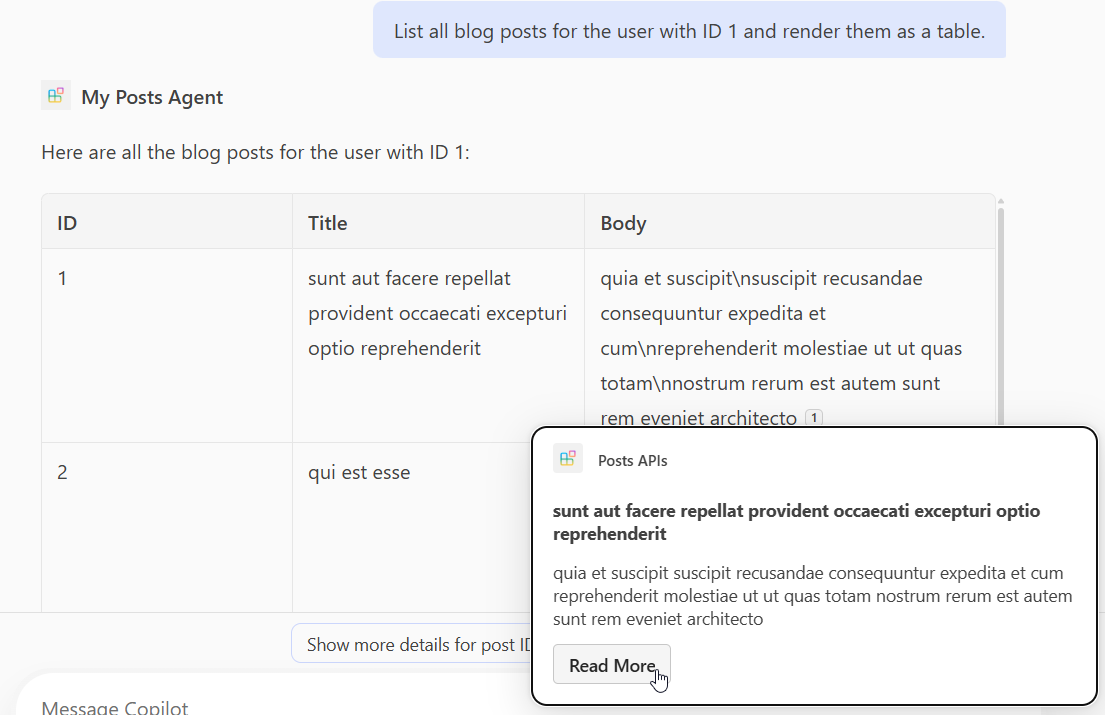
@card(#{ dataPath: "$", file: "post-card.json", properties: #{ title: "$.title" } })
@get op listPosts(@query userId?: integer): PostItem[];
Aggiunta di un'operazione POST
Apri il main.tsp file e all'interno dello spazio dei PostsAPI nomi aggiungi il contenuto seguente.
/**
 * Create a new blog post item.
 * @param post The post item to create.
 */
@route("/posts")
@post op createPost(@body post: PostItem): PostItem;
Questo codice definisce l'API POST /postsREST , che crea un nuovo post sul blog.
Aggiunta di un'operazione PATCH
Apri il main.tsp file e all'interno dello spazio dei PostsAPI nomi aggiungi il contenuto seguente.
/**
 * Updates a blog post item.
 * @param id The ID of the post to update.
 * @param post The updated post item.
 */
@route("/posts/{id}")
@patch op updatePost(@path id: integer, @body post: PostItem): PostItem;
Questo codice definisce l'API PATCH /posts/{id}REST, che aggiorna un post di blog esistente.
Aggiunta di un'operazione DELETE
Apri il main.tsp file e all'interno dello spazio dei PostsAPI nomi aggiungi il contenuto seguente.
/**
 * Deletes a blog post item.
 * @param id The ID of the post to delete.
 */
@route("/posts/{id}")
@delete op deletePost(@path id: integer): void;
Questo codice definisce l'API DELETE /posts/{id}REST , che elimina un post di blog esistente.
Effettuare il provisioning e testare le azioni personalizzate
Usare il riquadro Ciclo di vita nel Toolkit agenti di Microsoft 365 per eseguire il provisioning dell'agente e del relativo plug-in API, quindi testare le azioni personalizzate in Microsoft 365 Copilot.
- Seleziona l'icona di Microsoft 365 Agents Toolkit nella barra delle attività a sinistra.
- Nel riquadro Ciclo di vita selezionare Provisioning.
- Attendere il completamento del provisioning, quindi aprire https://m365.cloud.microsoft/ nel browser.
- Seleziona il tuo agente dall'elenco degli agenti.
- Testare l'agente con i prompt seguenti o provarne uno personalizzato.
Testare l'operazione GET
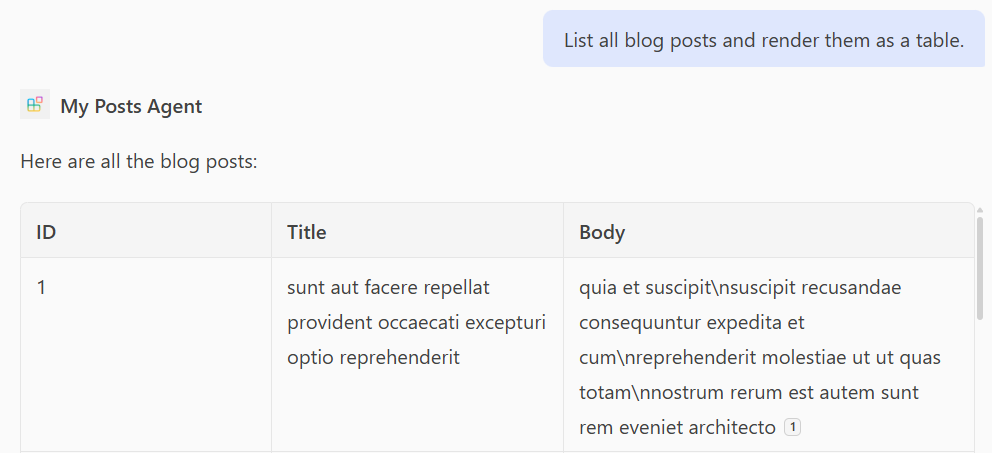
Prompt: "Elenca tutti i post del blog ed esegui il rendering come tabella".
Prompt: "Elenca tutti i post del blog per l'utente con ID 1 e visualizzali come tabella."
Testare l'operazione POST
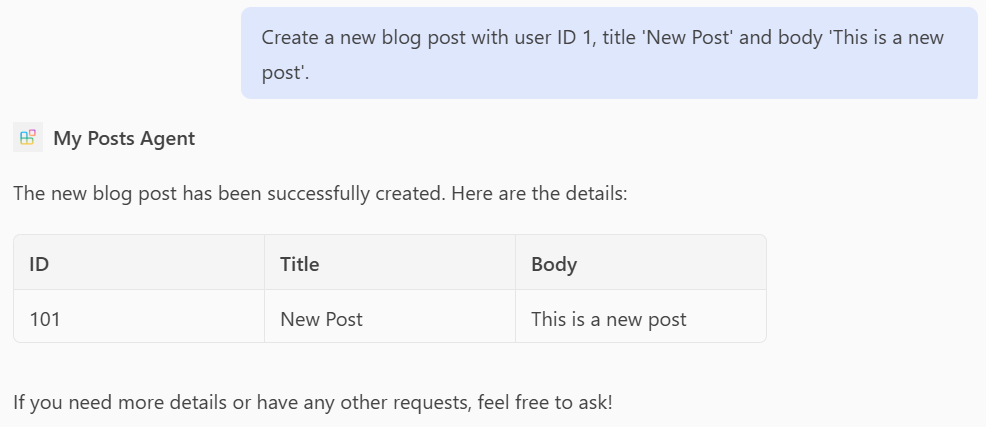
Prompt: "Crea un nuovo post sul blog con ID utente 1, titolo 'Nuovo post' e corpo 'Questo è un nuovo post'".
Testare l'operazione PATCH
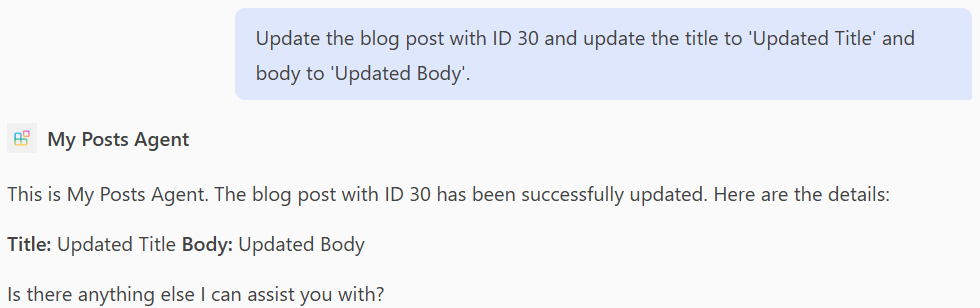
Prompt: "Aggiorna il post del blog con ID 30 e aggiorna il titolo in 'Titolo aggiornato' e il corpo in 'Corpo aggiornato'."
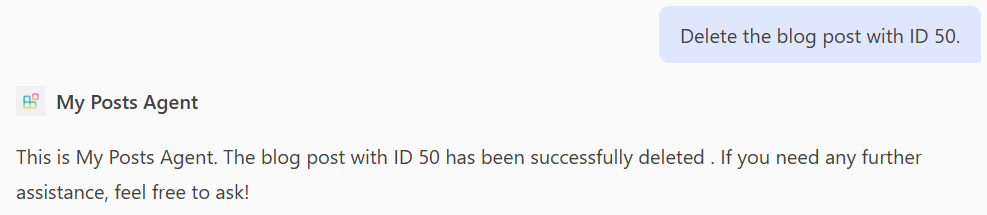
Testare l'operazione DELETE
Prompt: "Elimina il post di blog con ID 50."
Esempio di file completo main.tsp
Di seguito è riportato un esempio di file completo main.tsp con le GEToperazioni , POST, PATCH, e DELETE aggiunte.
import "@typespec/http";
import "@typespec/openapi3";
import "@microsoft/typespec-m365-copilot";

using TypeSpec.Http;
using TypeSpec.M365.Copilot.Actions;
using TypeSpec.M365.Copilot.Agents;

@agent(
  "My Posts Agent",
  "Declarative agent focusing on blog posts management."
)

@instructions("""
  You should help users with blog posts management.
  You can read, create, update and delete blog post items.
  You can also search for blog posts by user ID.
""")

@conversationStarter(#{
  title: "List Blog Posts",
  text: "List all blog posts and render them as a table."
})

@conversationStarter(#{
  title: "Lists a user's blog posts",
  text: "List all blog posts for the user with ID 1 and render them as a table."
})

@conversationStarter(#{
  title: "Delete a blog post",
  text: "Delete the blog post with ID 50."
})

@conversationStarter(#{
  title: "Update a blog post",
  text: "Update the blog post with ID 30 and update the title to 'Updated Title' and body to 'Updated Body'."
})

@conversationStarter(#{
  title: "Create a blog post",
  text: "Create a new blog post with user ID 1, title 'New Post' and body 'This is a new post'."
})

@conversationStarter(#{
  title: "Get a blog post",
  text: "Get all the details about the blog post with ID 10."
})

namespace MyAgent {
  @service
  @server("https://jsonplaceholder.typicode.com")
  @actions(#{
    nameForHuman: "Posts APIs",
    descriptionForHuman: "Manage blog post items on JSON Placeholder APIs.",
    descriptionForModel: "Read, create, update and delete blog post items on the JSON Placeholder APIs."
  })
  namespace PostsAPI {
    /**
     * List all blog post items.
     * @param userId The ID of the user who created the post. If not provided, all posts will be returned.
     */
    @route("/posts")
    @card(#{ dataPath: "$", file: "post-card.json", properties: #{ title: "$.title" } })
    @get op listPosts(@query userId?: integer): PostItem[];

    /**
     * Get a blog post item by ID.
     */
    @route("/posts/{id}")
    @card(#{ dataPath: "$", file: "post-card.json", properties: #{ title: "$.title" } })
    @get op getPost(@path id: integer): PostItem;

    /**
     * Create a new blog post item.
     * @param post The post item to create.
     */
    @route("/posts")
    @post op createPost(@body post: PostItem): PostItem;

    /**
     * Updates a blog post item.
     * @param id The ID of the post to update.
     * @param post The updated post item.
     */
    @route("/posts/{id}")
    @patch op updatePost(@path id: integer, @body post: PostItem): PostItem;

    /**
     * Deletes a blog post item.
     * @param id The ID of the post to delete.
     */
    @route("/posts/{id}")
    @delete op deletePost(@path id: integer): void;

    model PostItem {
      /**
       * The ID of the user who created the post.
       */
      userId: integer;

      /**
       * The ID of the post.
       */
      @visibility(Lifecycle.Read)
      id: integer;

      /**
       * The title of the post.
       */
      title: string;

      /**
       * The body of the post.
       */
      body: string;
    }
  }
}