Nota
L'accesso a questa pagina richiede l'autorizzazione. È possibile provare ad accedere o modificare le directory.
L'accesso a questa pagina richiede l'autorizzazione. È possibile provare a modificare le directory.
Viene fornita una breve esercitazione sull'aggiunta di effetti di disegno client a un'applicazione DirectWrite che visualizza il testo usando l'interfacciaIDWriteTextLayoute un renderer di testo personalizzato.
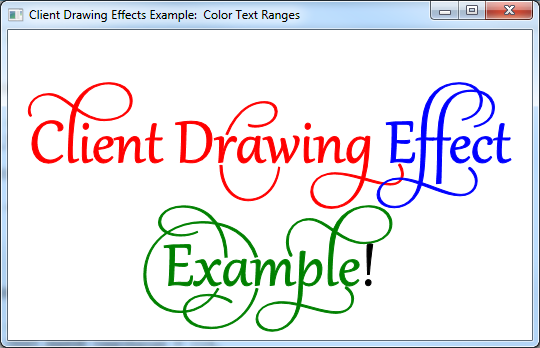
Il prodotto finale di questa esercitazione è un'applicazione che visualizza testo con intervalli di testo con un effetto di disegno a colori diverso su ognuno, come illustrato nella schermata seguente.
Nota
Questa esercitazione è destinata a essere un esempio semplificato di come creare effetti di disegno client personalizzati, non un esempio di un metodo semplice per il disegno di testo a colori. Per altre informazioni, vedere IDWriteTextLayout::SetDrawingEffect pagina di riferimento.
Questa esercitazione contiene le parti seguenti:
- Passaggio 1: Creare un layout di testo
- Passaggio 2: Implementare una classe personalizzata per effetti grafici
- passaggio 3: Implementare una classe di renderer di testo personalizzata
- Passaggio 4: Creare il renderer di testo
- Passaggio 5: creare un'istanza degli oggetti effetti di disegno a colori
- Passaggio 6: Impostare l'effetto disegno per intervalli di testo specifici
- Passaggio 7: Disegnare il layout di testo usando il renderer personalizzato
- Passaggio 8: Pulizia
Passaggio 1: Creare un layout di testo
Per iniziare, è necessaria un'applicazione con un oggetto IDWriteTextLayout. Se si dispone già di un'applicazione che visualizza il testo con un layout di testo o si usa il codice di esempio disegno personalizzato, passare al passaggio 2.
Per aggiungere un layout di testo, è necessario eseguire le operazioni seguenti:
Dichiarare un puntatore a un'interfaccia IDWriteTextLayout come membro di una classe.
IDWriteTextLayout* pTextLayout_;Alla fine del metodo CreateDeviceIndependentResources, creare un oggetto interfaccia IDWriteTextLayout chiamando il metodo CreateTextLayout.
// Create a text layout using the text format.
if (SUCCEEDED(hr))
{
    RECT rect;
    GetClientRect(hwnd_, &rect);
    float width  = rect.right  / dpiScaleX_;
    float height = rect.bottom / dpiScaleY_;

    hr = pDWriteFactory_->CreateTextLayout(
        wszText_,      // The string to be laid out and formatted.
        cTextLength_,  // The length of the string.
        pTextFormat_,  // The text format to apply to the string (contains font information, etc).
        width,         // The width of the layout box.
        height,        // The height of the layout box.
        &pTextLayout_  // The IDWriteTextLayout interface pointer.
        );
}
Infine, ricordarsi di rilasciare il layout di testo nel distruttore.
SafeRelease(&pTextLayout_);
Passaggio 2: Implementare una classe di effetto di disegno personalizzato
Oltre ai metodi ereditati da IUnknown, un'interfaccia personalizzata per l'effetto grafico del client non ha requisiti riguardo a ciò che deve implementare. In questo caso, la classe ColorDrawingEffect contiene semplicemente un valore D2D1_COLOR_F e dichiara i metodi per ottenere e impostare questo valore, nonché un costruttore in grado di impostare il colore inizialmente.
Dopo l'applicazione di un effetto di disegno client a un intervallo di testo in un oggetto IDWriteTextLayout, l'effetto di disegno viene passato al metodo IDWriteTextRenderer::DrawGlyphRun di esecuzione di qualsiasi run glifo che deve essere renderizzato. I metodi dell'effetto di disegno sono quindi disponibili per il renderer di testo.
Un effetto di disegno client può essere complesso quanto si desidera, portando più informazioni rispetto a questo esempio e fornendo metodi per modificare i glifi, creare oggetti da utilizzare per il disegno e così via.
Passaggio 3: Implementare una classe di renderer di testo personalizzata
Per sfruttare i vantaggi di un effetto di disegno client, è necessario implementare un renderer di testo personalizzato. Questo renderer di testo applicherà l'effetto di disegno passato dal metodo IDWriteTextLayout::Draw al frammento di glifo in corso di disegno.
Costruttore
Il costruttore per il renderer di testo personalizzato memorizza l'oggetto ID2D1Factory , che sarà utilizzato per creare oggetti Direct2D , e il target di rendering Direct2D su cui verrà disegnato il testo.
CustomTextRenderer::CustomTextRenderer(
    ID2D1Factory* pD2DFactory,
    ID2D1HwndRenderTarget* pRT
    )
:
cRefCount_(0),
pD2DFactory_(pD2DFactory),
pRT_(pRT)
{
    pD2DFactory_->AddRef();
    pRT_->AddRef();
}
Metodo DrawGlyphRun
Una serie di glifi è un insieme di glifi che condividono il medesimo formato, incluso l'effetto di disegno del client. Il metodo DrawGlyphRun gestisce il rendering del testo per l'esecuzione di un glifo specificato.
Creare prima di tutto un ID2D1PathGeometry e un ID2D1GeometrySinke quindi recuperare la struttura di esecuzione del glifo usando IDWriteFontFace::GetGlyphRunOutline. Trasformare quindi l'origine della geometria usando il metodo Direct2DID2D1Factory::CreateTransformedGeometry, come illustrato nel codice seguente.
HRESULT hr = S_OK;

// Create the path geometry.
ID2D1PathGeometry* pPathGeometry = NULL;
hr = pD2DFactory_->CreatePathGeometry(
        &pPathGeometry
        );

// Write to the path geometry using the geometry sink.
ID2D1GeometrySink* pSink = NULL;
if (SUCCEEDED(hr))
{
    hr = pPathGeometry->Open(
        &pSink
        );
}

// Get the glyph run outline geometries back from DirectWrite and place them within the
// geometry sink.
if (SUCCEEDED(hr))
{
    hr = glyphRun->fontFace->GetGlyphRunOutline(
        glyphRun->fontEmSize,
        glyphRun->glyphIndices,
        glyphRun->glyphAdvances,
        glyphRun->glyphOffsets,
        glyphRun->glyphCount,
        glyphRun->isSideways,
        glyphRun->bidiLevel%2,
        pSink
        );
}

// Close the geometry sink
if (SUCCEEDED(hr))
{
    hr = pSink->Close();
}

// Initialize a matrix to translate the origin of the glyph run.
D2D1::Matrix3x2F const matrix = D2D1::Matrix3x2F(
    1.0f, 0.0f,
    0.0f, 1.0f,
    baselineOriginX, baselineOriginY
    );

// Create the transformed geometry
ID2D1TransformedGeometry* pTransformedGeometry = NULL;
if (SUCCEEDED(hr))
{
    hr = pD2DFactory_->CreateTransformedGeometry(
        pPathGeometry,
        &matrix,
        &pTransformedGeometry
        );
}
Successivamente, dichiarare un Direct2D oggetto pennello a tinta unita.
ID2D1SolidColorBrush* pBrush = NULL;
Se il parametro clientDrawingEffect non è NULL, eseguire una query sull'oggetto per l'interfaccia ColorDrawingEffect. Questa operazione funzionerà perché questa classe verrà impostata come effetto di disegno client sugli intervalli di testo dell'oggetto layout di testo.
Una volta che si ha un puntatore all'interfaccia ColorDrawingEffect, è possibile ottenere il valore D2D1_COLOR_F che archivia utilizzando il metodo GetColor. Usare quindi il D2D1_COLOR_F per creare un ID2D1SolidColorBrush in tale colore.
Se il parametro clientDrawingEffect è NULL, è sufficiente creare un nero ID2D1SolidColorBrush.
// If there is a drawing effect create a color brush using it, otherwise create a black brush.
if (clientDrawingEffect != NULL)
{
    // Go from IUnknown to ColorDrawingEffect.
    ColorDrawingEffect *colorDrawingEffect;

    clientDrawingEffect->QueryInterface(__uuidof(ColorDrawingEffect), reinterpret_cast<void**>(&colorDrawingEffect));

    // Get the color from the ColorDrawingEffect object.
    D2D1_COLOR_F color;

    colorDrawingEffect->GetColor(&color);

    // Create the brush using the color specified by our ColorDrawingEffect object.
    if (SUCCEEDED(hr))
    {
        hr = pRT_->CreateSolidColorBrush(
            color,
            &pBrush);
    }

    SafeRelease(&colorDrawingEffect);
}
else
{
    // Create a black brush.
    if (SUCCEEDED(hr))
    {
        hr = pRT_->CreateSolidColorBrush(
            D2D1::ColorF(
            D2D1::ColorF::Black
            ),
            &pBrush);
    }
}
Infine, disegnare la geometria del contorno e riempirla usando il pennello a tinta unita appena creato.
if (SUCCEEDED(hr))
{
    // Draw the outline of the glyph run
    pRT_->DrawGeometry(
        pTransformedGeometry,
        pBrush
        );

    // Fill in the glyph run
    pRT_->FillGeometry(
        pTransformedGeometry,
        pBrush
        );
}
Distruttore
Non dimenticare di rilasciare la factory Direct2D e di eseguire il rendering della destinazione nel distruttore.
CustomTextRenderer::~CustomTextRenderer()
{
    SafeRelease(&pD2DFactory_);
    SafeRelease(&pRT_);
}
Passaggio 4: Creare il renderer di testo
Nelle risorse CreateDeviceDependent, creare l'oggetto renderer di testo personalizzato. Dipende dal dispositivo perché usa il ID2D1RenderTarget, che dipende dal dispositivo stesso.
// Create the text renderer
pTextRenderer_ = new CustomTextRenderer(
                        pD2DFactory_,
                        pRT_
                        );
Passaggio 5: Creare un'istanza degli Oggetti Effetto di Disegno a Colori
Istanze di oggetti ColorDrawingEffect in rosso, verde e blu.
// Instantiate some custom color drawing effects.
redDrawingEffect_ = new ColorDrawingEffect(
    D2D1::ColorF(
        D2D1::ColorF::Red
        )
    );

blueDrawingEffect_ = new ColorDrawingEffect(
    D2D1::ColorF(
        D2D1::ColorF::Blue
        )
    );

greenDrawingEffect_ = new ColorDrawingEffect(
    D2D1::ColorF(
        D2D1::ColorF::Green
        )
    );
Passaggio 6: Impostare l'effetto disegno per intervalli di testo specifici
Impostare l'effetto di disegno per intervalli di testo specifici usando il metodo IDWriteTextLayou::SetDrawingEffect e una struttura DWRITE_TEXT_RANGE.
// Set the drawing effects.

// Red.
if (SUCCEEDED(hr))
{
    // Set the drawing effect for the specified range.
    DWRITE_TEXT_RANGE textRange = {0,
                                   14};
    if (SUCCEEDED(hr))
    {
        hr = pTextLayout_->SetDrawingEffect(redDrawingEffect_, textRange);
    }
}

// Blue.
if (SUCCEEDED(hr))
{
    // Set the drawing effect for the specified range.
    DWRITE_TEXT_RANGE textRange = {14,
                                   7};
    if (SUCCEEDED(hr))
    {
        hr = pTextLayout_->SetDrawingEffect(blueDrawingEffect_, textRange);
    }
}

// Green.
if (SUCCEEDED(hr))
{
    // Set the drawing effect for the specified range.
    DWRITE_TEXT_RANGE textRange = {21,
                                   8};
    if (SUCCEEDED(hr))
    {
        hr = pTextLayout_->SetDrawingEffect(greenDrawingEffect_, textRange);
    }
}
Passaggio 7: Disegnare il layout di testo usando il renderer personalizzato
È necessario chiamare il metodo IDWriteTextLayout::Draw anziché il metodo ID2D1RenderTarget::DrawText o ID2D1RenderTarget::DrawTextLayout.
// Draw the text layout using DirectWrite and the CustomTextRenderer class.
hr = pTextLayout_->Draw(
        NULL,
        pTextRenderer_,  // Custom text renderer.
        origin.x,
        origin.y
        );
Passaggio 8: Pulire
Nel distruttore DemoApp rilasciare il renderer di testo personalizzato.
SafeRelease(&pTextRenderer_);
Successivamente, aggiungere il codice per rilasciare le classi degli effetti grafici del client.
SafeRelease(&redDrawingEffect_);
SafeRelease(&blueDrawingEffect_);
SafeRelease(&greenDrawingEffect_);