ハンドオフ オーケストレーションを使用すると、エージェントはコンテキストまたはユーザー要求に基づいて相互に制御を転送できます。 各エージェントは、適切な専門知識を持つ別のエージェントに会話を "ハンドオフ" し、適切なエージェントがタスクの各部分を処理できるようにします。 これは、カスタマー サポート、エキスパート システム、または動的委任を必要とするあらゆるシナリオで特に役立ちます。
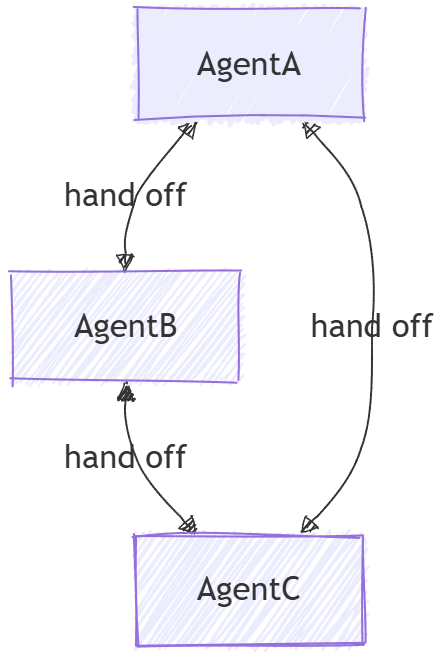
ハンドオフとツールとしてのエージェントの違い
エージェントとしてのツールは一般的にマルチエージェント パターンと見なされ、一見ハンドオフに似ている場合がありますが、2 つの間には基本的な違いがあります。
- 制御フロー: ハンドオフ オーケストレーションでは、定義されたルールに基づいてエージェント間で制御が明示的に渡されます。 各エージェントは、タスク全体を別のエージェントに渡すことができます。 ワークフローを管理する中央機関はありません。 これに対し、エージェントとしてのツールには、サブ タスクを他のエージェントに委任するプライマリ エージェントが含まれており、エージェントがサブ タスクを完了すると、コントロールはプライマリ エージェントに戻ります。
- タスクの所有権: ハンドオフでは、ハンドオフを受け取るエージェントがタスクの完全な所有権を取得します。 エージェントとしてのツールでは、プライマリ エージェントはタスクに対する全体的な責任を保持し、他のエージェントは特定のサブタスクを支援するツールとして扱われます。
- コンテキスト管理: ハンドオフ オーケストレーションでは、会話は完全に別のエージェントに渡されます。 受信側エージェントには、これまでに行われた内容の完全なコンテキストがあります。 エージェントとしてのツールでは、プライマリ エージェントは全体的なコンテキストを管理し、必要に応じてツール エージェントにのみ関連情報を提供できます。
ここでは、次の内容について学習します
- さまざまなドメインに特化したエージェントを作成する方法
- エージェント間でハンドオフ ルールを構成する方法
- 動的エージェント ルーティングを使用して対話型ワークフローを構築する方法
- エージェントの切り替えで複数ターンの会話を処理する方法
- 機密性の高い操作のツール承認を実装する方法 (HITL)
- 永続的なハンドオフ ワークフローにチェックポイント処理を使用する方法
ハンドオフ オーケストレーションでは、エージェントはコンテキストに基づいて相互に制御を転送できるため、動的ルーティングと特殊な専門知識の処理が可能になります。
Azure OpenAI クライアントを設定する
using System;
using System.Collections.Generic;
using System.Threading.Tasks;
using Azure.AI.OpenAI;
using Azure.Identity;
using Microsoft.Agents.AI.Workflows;
using Microsoft.Extensions.AI;
using Microsoft.Agents.AI;

// 1) Set up the Azure OpenAI client
var endpoint = Environment.GetEnvironmentVariable("AZURE_OPENAI_ENDPOINT") ??
    throw new InvalidOperationException("AZURE_OPENAI_ENDPOINT is not set.");
var deploymentName = Environment.GetEnvironmentVariable("AZURE_OPENAI_DEPLOYMENT_NAME") ?? "gpt-4o-mini";
var client = new AzureOpenAIClient(new Uri(endpoint), new AzureCliCredential())
    .GetChatClient(deploymentName)
    .AsIChatClient();
特殊なエージェントを定義する
ルーティング用のドメイン固有のエージェントとトリアージ エージェントを作成します。
// 2) Create specialized agents
ChatClientAgent historyTutor = new(client,
    "You provide assistance with historical queries. Explain important events and context clearly. Only respond about history.",
    "history_tutor",
    "Specialist agent for historical questions");

ChatClientAgent mathTutor = new(client,
    "You provide help with math problems. Explain your reasoning at each step and include examples. Only respond about math.",
    "math_tutor",
    "Specialist agent for math questions");

ChatClientAgent triageAgent = new(client,
    "You determine which agent to use based on the user's homework question. ALWAYS handoff to another agent.",
    "triage_agent",
    "Routes messages to the appropriate specialist agent");
ハンドオフルールを設定する
他のエージェントに渡すことができるエージェントを定義します。
// 3) Build handoff workflow with routing rules
var workflow = AgentWorkflowBuilder.StartHandoffWith(triageAgent)
    .WithHandoffs(triageAgent, [mathTutor, historyTutor]) // Triage can route to either specialist
    .WithHandoff(mathTutor, triageAgent)                  // Math tutor can return to triage
    .WithHandoff(historyTutor, triageAgent)               // History tutor can return to triage
    .Build();
対話型ハンドオフ ワークフローの実行
動的エージェント切り替えで複数ターンの会話を処理する:
// 4) Process multi-turn conversations
List<ChatMessage> messages = new();

while (true)
{
    Console.Write("Q: ");
    string userInput = Console.ReadLine()!;
    messages.Add(new(ChatRole.User, userInput));

    // Execute workflow and process events
    StreamingRun run = await InProcessExecution.StreamAsync(workflow, messages);
    await run.TrySendMessageAsync(new TurnToken(emitEvents: true));

    List<ChatMessage> newMessages = new();
    await foreach (WorkflowEvent evt in run.WatchStreamAsync().ConfigureAwait(false))
    {
        if (evt is AgentRunUpdateEvent e)
        {
            Console.WriteLine($"{e.ExecutorId}: {e.Data}");
        }
        else if (evt is WorkflowOutputEvent outputEvt)
        {
            newMessages = (List<ChatMessage>)outputEvt.Data!;
            break;
        }
    }

    // Add new messages to conversation history
    messages.AddRange(newMessages.Skip(messages.Count));
}
サンプルの相互作用
Q: What is the derivative of x^2?
triage_agent: This is a math question. I'll hand this off to the math tutor.
math_tutor: The derivative of x^2 is 2x. Using the power rule, we bring down the exponent (2) and multiply it by the coefficient (1), then reduce the exponent by 1: d/dx(x^2) = 2x^(2-1) = 2x.

Q: Tell me about World War 2
triage_agent: This is a history question. I'll hand this off to the history tutor.
history_tutor: World War 2 was a global conflict from 1939 to 1945. It began when Germany invaded Poland and involved most of the world's nations. Key events included the Holocaust, Pearl Harbor attack, D-Day invasion, and ended with atomic bombs on Japan.

Q: Can you help me with calculus integration?
triage_agent: This is another math question. I'll route this to the math tutor.
math_tutor: I'd be happy to help with calculus integration! Integration is the reverse of differentiation. The basic power rule for integration is: ∫x^n dx = x^(n+1)/(n+1) + C, where C is the constant of integration.
チャット クライアントを設定する
from agent_framework.azure import AzureOpenAIChatClient
from azure.identity import AzureCliCredential

# Initialize the Azure OpenAI chat client
chat_client = AzureOpenAIChatClient(credential=AzureCliCredential())
特殊なエージェントを定義する
ルーティング用のコーディネーターを使用してドメイン固有のエージェントを作成します。
# Create triage/coordinator agent
triage_agent = chat_client.create_agent(
    instructions=(
        "You are frontline support triage. Read the latest user message and decide whether "
        "to hand off to refund_agent, order_agent, or support_agent. Provide a brief natural-language "
        "response for the user. When delegation is required, call the matching handoff tool "
        "(`handoff_to_refund_agent`, `handoff_to_order_agent`, or `handoff_to_support_agent`)."
    ),
    name="triage_agent",
)

# Create specialist agents
refund_agent = chat_client.create_agent(
    instructions=(
        "You handle refund workflows. Ask for any order identifiers you require and outline the refund steps."
    ),
    name="refund_agent",
)

order_agent = chat_client.create_agent(
    instructions=(
        "You resolve shipping and fulfillment issues. Clarify the delivery problem and describe the actions "
        "you will take to remedy it."
    ),
    name="order_agent",
)

support_agent = chat_client.create_agent(
    instructions=(
        "You are a general support agent. Offer empathetic troubleshooting and gather missing details if the "
        "issue does not match other specialists."
    ),
    name="support_agent",
)
ハンドオフルールを設定する
HandoffBuilderを使用してハンドオフ ワークフローを構築します。
from agent_framework import HandoffBuilder

# Build the handoff workflow
workflow = (
    HandoffBuilder(
        name="customer_support_handoff",
        participants=[triage_agent, refund_agent, order_agent, support_agent],
    )
    .set_coordinator("triage_agent")
    .with_termination_condition(
        # Terminate after a certain number of user messages
        lambda conv: sum(1 for msg in conv if msg.role.value == "user") >= 10
    )
    .build()
)
より高度なルーティングのために、スペシャリストからスペシャリストへのハンドオフを構成できます。
# Enable return-to-previous and add specialist-to-specialist handoffs
workflow = (
    HandoffBuilder(
        name="advanced_handoff",
        participants=[coordinator, technical, account, billing],
    )
    .set_coordinator(coordinator)
    .add_handoff(coordinator, [technical, account, billing])  # Coordinator routes to all specialists
    .add_handoff(technical, [billing, account])  # Technical can route to billing or account
    .add_handoff(account, [technical, billing])  # Account can route to technical or billing
    .add_handoff(billing, [technical, account])  # Billing can route to technical or account
    .enable_return_to_previous(True)  # User inputs route directly to current specialist
    .build()
)
対話型ハンドオフ ワークフローの実行
ユーザー入力要求を使用して複数ターンの会話を処理する:
from agent_framework import RequestInfoEvent, HandoffUserInputRequest, WorkflowOutputEvent

# Start workflow with initial user message
events = [event async for event in workflow.run_stream("I need help with my order")]

# Process events and collect pending input requests
pending_requests = []
for event in events:
    if isinstance(event, RequestInfoEvent):
        pending_requests.append(event)
        request_data = event.data
        print(f"Agent {request_data.awaiting_agent_id} is awaiting your input")
        for msg in request_data.conversation[-3:]:
            print(f"{msg.author_name}: {msg.text}")

# Interactive loop: respond to requests
while pending_requests:
    user_input = input("You: ")

    # Send responses to all pending requests
    responses = {req.request_id: user_input for req in pending_requests}
    events = [event async for event in workflow.send_responses_streaming(responses)]

    # Process new events
    pending_requests = []
    for event in events:
        if isinstance(event, RequestInfoEvent):
            pending_requests.append(event)
        elif isinstance(event, WorkflowOutputEvent):
            print("Workflow completed!")
            conversation = event.data
            for msg in conversation:
                print(f"{msg.author_name}: {msg.text}")
詳細設定: ハンドオフ ワークフローでのツール承認
ハンドオフ ワークフローには、実行前に人間の承認を必要とするツールを含むエージェントを含めることができます。 これは、払い戻しの処理、購入、元に戻せないアクションの実行などの機密性の高い操作に役立ちます。
承認が必要なツールを定義する
from typing import Annotated
from agent_framework import ai_function

@ai_function(approval_mode="always_require")
def submit_refund(
    refund_description: Annotated[str, "Description of the refund reason"],
    amount: Annotated[str, "Refund amount"],
    order_id: Annotated[str, "Order ID for the refund"],
) -> str:
    """Submit a refund request for manual review before processing."""
    return f"Refund recorded for order {order_id} (amount: {amount}): {refund_description}"
承認が必要なツールを使用してエージェントを作成する
from agent_framework import ChatAgent
from agent_framework.azure import AzureOpenAIChatClient
from azure.identity import AzureCliCredential

client = AzureOpenAIChatClient(credential=AzureCliCredential())

triage_agent = client.create_agent(
    name="triage_agent",
    instructions=(
        "You are a customer service triage agent. Listen to customer issues and determine "
        "if they need refund help or order tracking. Use handoff_to_refund_agent or "
        "handoff_to_order_agent to transfer them."
    ),
)

refund_agent = client.create_agent(
    name="refund_agent",
    instructions=(
        "You are a refund specialist. Help customers with refund requests. "
        "When the user confirms they want a refund and supplies order details, "
        "call submit_refund to record the request."
    ),
    tools=[submit_refund],
)

order_agent = client.create_agent(
    name="order_agent",
    instructions="You are an order tracking specialist. Help customers track their orders.",
)
ユーザー入力要求とツール承認要求の両方を処理する
from agent_framework import (
    FunctionApprovalRequestContent,
    HandoffBuilder,
    HandoffUserInputRequest,
    RequestInfoEvent,
    WorkflowOutputEvent,
)

workflow = (
    HandoffBuilder(
        name="support_with_approvals",
        participants=[triage_agent, refund_agent, order_agent],
    )
    .set_coordinator("triage_agent")
    .build()
)

pending_requests: list[RequestInfoEvent] = []

# Start workflow
async for event in workflow.run_stream("My order 12345 arrived damaged. I need a refund."):
    if isinstance(event, RequestInfoEvent):
        pending_requests.append(event)

# Process pending requests - could be user input OR tool approval
while pending_requests:
    responses: dict[str, object] = {}

    for request in pending_requests:
        if isinstance(request.data, HandoffUserInputRequest):
            # Agent needs user input
            print(f"Agent {request.data.awaiting_agent_id} asks:")
            for msg in request.data.conversation[-2:]:
                print(f"  {msg.author_name}: {msg.text}")

            user_input = input("You: ")
            responses[request.request_id] = user_input

        elif isinstance(request.data, FunctionApprovalRequestContent):
            # Agent wants to call a tool that requires approval
            func_call = request.data.function_call
            args = func_call.parse_arguments() or {}

            print(f"\nTool approval requested: {func_call.name}")
            print(f"Arguments: {args}")

            approval = input("Approve? (y/n): ").strip().lower() == "y"
            responses[request.request_id] = request.data.create_response(approved=approval)

    # Send all responses and collect new requests
    pending_requests = []
    async for event in workflow.send_responses_streaming(responses):
        if isinstance(event, RequestInfoEvent):
            pending_requests.append(event)
        elif isinstance(event, WorkflowOutputEvent):
            print("\nWorkflow completed!")
永続ワークフローによるチェックポイント処理
ツールの承認が数時間または数日後に行われる可能性がある実行時間の長いワークフローの場合は、チェックポイント処理を使用します。
from agent_framework import FileCheckpointStorage

storage = FileCheckpointStorage(storage_path="./checkpoints")

workflow = (
    HandoffBuilder(
        name="durable_support",
        participants=[triage_agent, refund_agent, order_agent],
    )
    .set_coordinator("triage_agent")
    .with_checkpointing(storage)
    .build()
)

# Initial run - workflow pauses when approval is needed
pending_requests = []
async for event in workflow.run_stream("I need a refund for order 12345"):
    if isinstance(event, RequestInfoEvent):
        pending_requests.append(event)

# Process can exit here - checkpoint is saved automatically

# Later: Resume from checkpoint and provide approval
checkpoints = await storage.list_checkpoints()
latest = sorted(checkpoints, key=lambda c: c.timestamp, reverse=True)[0]

# Step 1: Restore checkpoint to reload pending requests
restored_requests = []
async for event in workflow.run_stream(checkpoint_id=latest.checkpoint_id):
    if isinstance(event, RequestInfoEvent):
        restored_requests.append(event)

# Step 2: Send responses
responses = {}
for req in restored_requests:
    if isinstance(req.data, FunctionApprovalRequestContent):
        responses[req.request_id] = req.data.create_response(approved=True)
    elif isinstance(req.data, HandoffUserInputRequest):
        responses[req.request_id] = "Yes, please process the refund."

async for event in workflow.send_responses_streaming(responses):
    if isinstance(event, WorkflowOutputEvent):
        print("Refund workflow completed!")
## Sample Interaction

```plaintext
User: I need help with my order

triage_agent: I'd be happy to help you with your order. Could you please provide more details about the issue?

User: My order 1234 arrived damaged

triage_agent: I'm sorry to hear that your order arrived damaged. I will connect you with a specialist.

support_agent: I'm sorry about the damaged order. To assist you better, could you please:
- Describe the damage
- Would you prefer a replacement or refund?

User: I'd like a refund

triage_agent: I'll connect you with the refund specialist.

refund_agent: I'll process your refund for order 1234. Here's what will happen next:
1. Verification of the damaged items
2. Refund request submission
3. Return instructions if needed
4. Refund processing within 5-10 business days

Could you provide photos of the damage to expedite the process?
主要概念
- 動的ルーティング: エージェントは、コンテキストに基づいて次の対話を処理するエージェントを決定できます
- AgentWorkflowBuilder.StartHandoffWith(): ワークフローを開始する初期エージェントを定義します
- WithHandoff() と WithHandoffs(): 特定のエージェント間でハンドオフ ルールを構成します
- コンテキストの保持: すべてのハンドオフで完全な会話履歴が保持されます
- 複数ターンのサポート: シームレスなエージェント切り替えによる継続的な会話をサポート
- 専門の専門知識: 各エージェントは、ハンドオフを通じて共同作業を行いながら、ドメインに重点を置いています
- 動的ルーティング: エージェントは、コンテキストに基づいて次の対話を処理するエージェントを決定できます
- HandoffBuilder: ハンドオフ ツールの自動登録を使用してワークフローを作成する
- set_coordinator(): 最初にユーザー入力を受け取るエージェントを定義します
- add_handoff(): エージェント間の特定のハンドオフ関係を構成します
- enable_return_to_previous(): ユーザー入力を現在のスペシャリストに直接ルーティングし、コーディネーターの再評価をスキップします
- コンテキストの保持: すべてのハンドオフで完全な会話履歴が保持されます
- 要求/応答サイクル: ワークフローはユーザー入力を要求し、応答を処理し、終了条件が満たされるまで続行します
-
ツールの承認: 人間の承認を必要とする機密性の高い操作に
@ai_function(approval_mode="always_require")を使用する -
FunctionApprovalRequestContent: エージェントが承認を必要とするツールを呼び出したときに生成されます。
create_response(approved=...)を使用して応答する -
チェックポイント処理: プロセスの再起動間で一時停止および再開できる永続的なワークフローに
with_checkpointing()を使用する - 専門の専門知識: 各エージェントは、ハンドオフを通じて共同作業を行いながら、ドメインに重点を置いています