グループ チャット オーケストレーションは、話者の選択と会話フローを決定するオーケストレーターによって調整された、複数のエージェント間のコラボレーション会話をモデル化します。 このパターンは、反復的な絞り込み、共同作業による問題解決、または多視点分析を必要とするシナリオに最適です。
内部的には、グループ チャット オーケストレーションは、中央にオーケストレーターを使用して、スター トポロジでエージェントをアセンブルします。 オーケストレーターは、ラウンドロビン、プロンプトベースの選択、会話コンテキストに基づくカスタム ロジックなど、次に話すエージェントを選択するためのさまざまな戦略を実装できるため、マルチエージェントコラボレーションのための柔軟で強力なパターンになります。
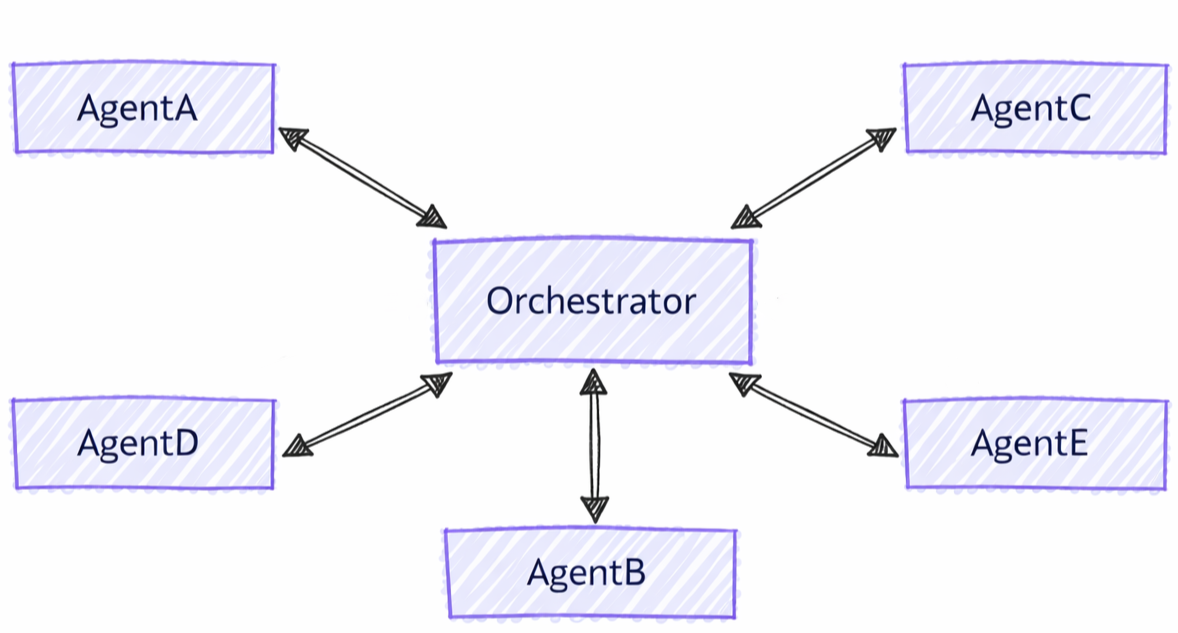
グループ チャットとその他のパターンの違い
グループ チャット オーケストレーションには、他のマルチエージェント パターンと比較して異なる特性があります。
- 集中調整: エージェントが直接制御を転送するハンドオフ パターンとは異なり、グループ チャットではオーケストレーターを使用して次に話すユーザーを調整します
- 反復的な精緻化: エージェントは、複数のラウンドで互いの応答を確認し、それに基づいて改善を行えます
- 柔軟なスピーカー選択: オーケストレーターは、さまざまな戦略 (ラウンド ロビン、プロンプト ベース、カスタム ロジック) を使用してスピーカーを選択できます
- 共有コンテキスト: すべてのエージェントが会話履歴全体を表示し、共同作業の絞り込みを有効にする
ここでは、次の内容について学習します
- グループ コラボレーション用の特殊なエージェントを作成する方法
- 話者の選択戦略を構成する方法
- 反復的なエージェント絞り込みを使用してワークフローを構築する方法
- カスタム オーケストレーターを使用して会話フローをカスタマイズする方法
Azure OpenAI クライアントを設定する
using System;
using System.Collections.Generic;
using System.Threading.Tasks;
using Azure.AI.Projects;
using Azure.Identity;
using Microsoft.Agents.AI.Workflows;
using Microsoft.Extensions.AI;
using Microsoft.Agents.AI;

// Set up the Azure OpenAI client
var endpoint = Environment.GetEnvironmentVariable("AZURE_OPENAI_ENDPOINT") ??
    throw new InvalidOperationException("AZURE_OPENAI_ENDPOINT is not set.");
var deploymentName = Environment.GetEnvironmentVariable("AZURE_OPENAI_DEPLOYMENT_NAME") ?? "gpt-4o-mini";
var client = new AIProjectClient(new Uri(endpoint), new DefaultAzureCredential())
    .GetProjectOpenAIClient()
    .GetProjectResponsesClient()
    .AsIChatClient(deploymentName);
Warning
DefaultAzureCredential は開発には便利ですが、運用環境では慎重に考慮する必要があります。 運用環境では、待機時間の問題、意図しない資格情報のプローブ、フォールバック メカニズムによる潜在的なセキュリティ リスクを回避するために、特定の資格情報 ( ManagedIdentityCredential など) を使用することを検討してください。
エージェントの定義
グループ会話でさまざまなロールに特化したエージェントを作成します。
// Create a copywriter agent
ChatClientAgent writer = new(client,
    "You are a creative copywriter. Generate catchy slogans and marketing copy. Be concise and impactful.",
    "CopyWriter",
    "A creative copywriter agent");

// Create a reviewer agent
ChatClientAgent reviewer = new(client,
    "You are a marketing reviewer. Evaluate slogans for clarity, impact, and brand alignment. " +
    "Provide constructive feedback or approval.",
    "Reviewer",
    "A marketing review agent");
Round-Robin Orchestrator を使用してグループ チャットを構成する
AgentWorkflowBuilderを使用してグループ チャット ワークフローを構築します。
// Build group chat with round-robin speaker selection
// The manager factory receives the list of agents and returns a configured manager
var workflow = AgentWorkflowBuilder
    .CreateGroupChatBuilderWith(agents =>
        new RoundRobinGroupChatManager(agents)
        {
            MaximumIterationCount = 5  // Maximum number of turns
        })
    .AddParticipants(writer, reviewer)
    .Build();
グループ チャット ワークフローを実行する
ワークフローを実行し、反復的な会話を観察します。
// Start the group chat
var messages = new List<ChatMessage> {
    new(ChatRole.User, "Create a slogan for an eco-friendly electric vehicle.")
};

await using StreamingRun run = await InProcessExecution.RunStreamingAsync(workflow, messages);
await run.TrySendMessageAsync(new TurnToken(emitEvents: true));

await foreach (WorkflowEvent evt in run.WatchStreamAsync().ConfigureAwait(false))
{
    if (evt is AgentResponseUpdateEvent update)
    {
        // Process streaming agent responses
        AgentResponse response = update.AsResponse();
        foreach (ChatMessage message in response.Messages)
        {
            Console.WriteLine($"[{update.ExecutorId}]: {message.Text}");
        }
    }
    else if (evt is WorkflowOutputEvent output)
    {
        // Workflow completed
        var conversationHistory = output.As<List<ChatMessage>>();
        Console.WriteLine("\n=== Final Conversation ===");
        foreach (var message in conversationHistory)
        {
            Console.WriteLine($"{message.AuthorName}: {message.Text}");
        }
        break;
    }
}
サンプルの相互作用
[CopyWriter]: "Green Dreams, Zero Emissions" - Drive the future with style and sustainability.

[Reviewer]: The slogan is good, but "Green Dreams" might be a bit abstract. Consider something
more direct like "Pure Power, Zero Impact" to emphasize both performance and environmental benefit.

[CopyWriter]: "Pure Power, Zero Impact" - Experience electric excellence without compromise.

[Reviewer]: Excellent! This slogan is clear, impactful, and directly communicates the key benefits.
The tagline reinforces the message perfectly. Approved for use.

[CopyWriter]: Thank you! The final slogan is: "Pure Power, Zero Impact" - Experience electric
excellence without compromise.
チャット クライアントを設定する
import os

from agent_framework.foundry import FoundryChatClient
from azure.identity import AzureCliCredential

# Initialize the Azure OpenAI client
client = FoundryChatClient(
    project_endpoint=os.environ["FOUNDRY_PROJECT_ENDPOINT"],
    model=os.environ["FOUNDRY_MODEL"],
    credential=AzureCliCredential(),
)
エージェントの定義
個別のロールを持つ特殊なエージェントを作成します。
from agent_framework import Agent

# Create a researcher agent
researcher = Agent(
    client=client,
    name="Researcher",
    description="Collects relevant background information.",
    instructions="Gather concise facts that help answer the question. Be brief and factual.",
)

# Create a writer agent
writer = Agent(
    client=client,
    name="Writer",
    description="Synthesizes polished answers using gathered information.",
    instructions="Compose clear, structured answers using any notes provided. Be comprehensive.",
)
シンプル セレクターを使用してグループ チャットを構成する
カスタム スピーカー選択ロジックを使用してグループ チャットを構築します。
from agent_framework.orchestrations import GroupChatBuilder, GroupChatState

def round_robin_selector(state: GroupChatState) -> str:
    """A round-robin selector function that picks the next speaker based on the current round index."""

    participant_names = list(state.participants.keys())
    return participant_names[state.current_round % len(participant_names)]


# Build the group chat workflow
workflow = GroupChatBuilder(
    participants=[researcher, writer],
    termination_condition=lambda conversation: len(conversation) >= 4,
    intermediate_output_from=[researcher, writer],
    selection_func=round_robin_selector,
).build()
Agent-Based Orchestrator を使用してグループ チャットを構成する
または、エージェントベースのオーケストレーターを使用してインテリジェントなスピーカーを選択することもできます。 オーケストレーターは、ツール、コンテキスト、および可観測性にアクセスできる完全な Agent です。
# Create orchestrator agent for speaker selection
orchestrator_agent = Agent(
    name="Orchestrator",
    description="Coordinates multi-agent collaboration by selecting speakers",
    instructions="""
You coordinate a team conversation to solve the user's task.

Guidelines:
- Start with Researcher to gather information
- Then have Writer synthesize the final answer
- Only finish after both have contributed meaningfully
""",
    client=client,
)

# Build group chat with agent-based orchestrator
workflow = GroupChatBuilder(
    participants=[researcher, writer],
    # Set a hard termination condition: stop after 4 assistant messages
    # The agent orchestrator will intelligently decide when to end before this limit but just in case
    termination_condition=lambda messages: sum(1 for msg in messages if msg.role == "assistant") >= 4,
    orchestrator_agent=orchestrator_agent,
    intermediate_output_from=[researcher, writer],
).build()
グループ チャット ワークフローを実行する
ワークフローを実行し、ストリーミング参加者の更新を処理します。 非ストリーミング ターミナル出力は AgentResponseです。ストリーミング ターミナルの出力は、 AgentResponseUpdate チャンクとして出力されます。
from agent_framework import AgentResponseUpdate, Message

task = "What are the key benefits of async/await in Python?"

print(f"Task: {task}\n")
print("=" * 80)

last_author: str | None = None
# Run the workflow with streaming enabled
stream = workflow.run(task, stream=True)
async for event in stream:
    if event.type in ("intermediate", "output") and isinstance(event.data, AgentResponseUpdate):
        # Print streaming agent updates
        author = event.data.author_name
        if author != last_author:
            if last_author is not None:
                print()
            print(f"[{author}]:", end=" ", flush=True)
            last_author = author
        print(event.data.text, end="", flush=True)
result = await stream.get_final_response()
if outputs := result.get_outputs():
    print("\n\n" + "=" * 80)
    print("Final Response:")
    print(outputs[-1])

print("\nWorkflow completed.")
サンプルの相互作用
Task: What are the key benefits of async/await in Python?

================================================================================

[Researcher]: Async/await in Python provides non-blocking I/O operations, enabling
concurrent execution without threading overhead. Key benefits include improved
performance for I/O-bound tasks, better resource utilization, and simplified
concurrent code structure using native coroutines.

[Writer]: The key benefits of async/await in Python are:

1. **Non-blocking Operations**: Allows I/O operations to run concurrently without
   blocking the main thread, significantly improving performance for network
   requests, file I/O, and database queries.

2. **Resource Efficiency**: Avoids the overhead of thread creation and context
   switching, making it more memory-efficient than traditional threading.

3. **Simplified Concurrency**: Provides a clean, synchronous-looking syntax for
   asynchronous code, making concurrent programs easier to write and maintain.

4. **Scalability**: Enables handling thousands of concurrent connections with
   minimal resource consumption, ideal for high-performance web servers and APIs.

--------------------------------------------------------------------------------

Workflow completed.
Foundry 構成の設定
endpoint := os.Getenv("FOUNDRY_PROJECT_ENDPOINT")
model := cmp.Or(os.Getenv("FOUNDRY_MODEL"), "gpt-4o-mini")

token, err := azidentity.NewDefaultAzureCredential(nil)
if err != nil {
    return err
}
Warning
azidentity.NewDefaultAzureCredential は開発には便利ですが、運用環境では慎重に考慮する必要があります。 運用環境では、待機時間の問題、意図しない資格情報のプローブ、フォールバック メカニズムによる潜在的なセキュリティ リスクを回避するために、 azidentity.NewManagedIdentityCredentialなどの特定の資格情報を使用することを検討してください。
エージェントの定義
会話で個別のロールを持つ特殊なエージェントを作成します。
copywriter := foundryprovider.NewAgent(
    endpoint,
    token,
    foundryprovider.ModelDeployment(model),
    foundryprovider.AgentConfig{
        Instructions: "You are a creative copywriter. Generate catchy slogans and marketing copy. Be concise and impactful.",
        Config:      agent.Config{Name: "CopyWriter"},
    },
)

reviewer := foundryprovider.NewAgent(
    endpoint,
    token,
    foundryprovider.ModelDeployment(model),
    foundryprovider.AgentConfig{
        Instructions: "You are a marketing reviewer. Evaluate slogans for clarity, impact, and brand alignment. Provide constructive feedback or approval.",
        Config:      agent.Config{Name: "Reviewer"},
    },
)
Round-Robin Manager を使用してグループ チャットを構成する
agentworkflow.NewGroupChatWorkflowBuilderを使用してグループ チャット ワークフローを構築します。 ビルダーは、マネージャー ファクトリと参加するエージェントを受け入れます。
NewRoundRobinGroupChatManager は、各エージェントを順番に選択し、構成された参加者ターンの最大数の後に停止します。
managerFactory := func(agents []*agent.Agent) *agentworkflow.GroupChatManager {
    return agentworkflow.NewRoundRobinGroupChatManager(
        agents,
        agentworkflow.RoundRobinGroupChatOptions{MaximumIterationCount: 5},
    )
}

wf, err := agentworkflow.NewGroupChatWorkflowBuilder(managerFactory, copywriter, reviewer).
    WithName("Marketing Review Group Chat").
    WithDescription("A copywriter and reviewer collaborate on marketing copy.").
    Build()
if err != nil {
    return err
}
グループ チャット ワークフローを実行する
ユーザー メッセージとターン トークンを使用してワークフローを実行します。 イベントの出力が有効になっている場合、参加者の更新は中間出力イベントとして到着し、最終的なトランスクリプトはターミナル出力イベントとして到着します。
run, err := inproc.Default.RunStreaming(ctx, wf, []*message.Message{
    message.NewText("Create a slogan for an eco-friendly electric vehicle."),
})
if err != nil {
    return err
}
defer run.Close(ctx)

emitEvents := true
if err := run.SendMessage(ctx, workflow.TurnToken{EmitEvents: &emitEvents}); err != nil {
    return err
}

lastExecutorID := ""
for evt, err := range run.WatchStream(ctx) {
    if err != nil {
        return err
    }

    switch e := evt.(type) {
    case workflow.OutputEvent:
        switch value := e.Output.(type) {
        case *agent.ResponseUpdate:
            if e.ExecutorID != lastExecutorID {
                lastExecutorID = e.ExecutorID
                fmt.Printf("\n[%s]: ", e.ExecutorID)
            }
            fmt.Print(value.String())
        case []*message.Message:
            fmt.Println("\n\n=== Final Conversation ===")
            for _, msg := range value {
                author := msg.AuthorName
                if author == "" {
                    author = string(msg.Role)
                }
                fmt.Printf("%s: %s\n", author, msg.String())
            }
        }
    case workflow.ErrorEvent:
        return e.Error
    case workflow.ExecutorFailedEvent:
        return fmt.Errorf("executor %q failed: %w", e.ExecutorID, e.Error)
    }
}
サンプルの相互作用
[CopyWriter]: "Pure Power, Zero Impact" - Experience electric performance without compromise.

[Reviewer]: This is clear and memorable. It communicates performance and sustainability directly.
Approved.

[CopyWriter]: The final slogan is: "Pure Power, Zero Impact" - Experience electric performance
without compromise.

=== Final Conversation ===
user: Create a slogan for an eco-friendly electric vehicle.
CopyWriter: "Pure Power, Zero Impact" - Experience electric performance without compromise.
Reviewer: This is clear and memorable. It communicates performance and sustainability directly. Approved.
CopyWriter: The final slogan is: "Pure Power, Zero Impact" - Experience electric performance without compromise.
主な概念
- 集中管理: グループ チャットではマネージャーを使用して話者の選択とフローを調整する
- AgentWorkflowBuilder.CreateGroupChatBuilderWith(): マネージャー ファクトリ関数を使用してワークフローを作成します
- RoundRobinGroupChatManager: ラウンドロビン方式でスピーカーを代替する組み込みマネージャー
- MaximumIterationCount: 終了前のエージェントターンの最大数を制御します
-
カスタム マネージャー:
RoundRobinGroupChatManagerの拡張またはカスタム ロジックの実装 - 反復的な絞り込み: エージェントは互いの貢献度を確認して改善します
- 共有コンテキスト: すべての参加者に会話履歴全体が表示されます
-
柔軟なオーケストレーター戦略: コンストラクター パラメーター (
selection_func、orchestrator_agent、またはorchestrator) を使用して、単純なセレクター、エージェント ベースのオーケストレーター、またはカスタム ロジックのいずれかを選択します。 - GroupChatBuilder: 構成可能なスピーカーの選択を使用してワークフローを作成します
- GroupChatState: 選択の決定のための会話状態を提供します
- 反復コラボレーション: エージェントは互いの貢献に基づいて構築されます
-
AgentResponse 出力: ターミナル出力は、オーケストレーターの完了メッセージを含む
AgentResponseです -
イベント ストリーミング:
AgentResponseUpdateイベントをリアルタイムで処理するworkflow.run(task, stream=True) -
中間出力: オーケストレーターのターミナル
intermediate_output_from=[participant, ...]イベントに加えて、"intermediate"イベントとして各参加者の出力を表示する"output"を渡します
- GroupChatWorkflowBuilder: 中心にグループ チャット ホストを含むスター トポロジ ワークフローを作成し、参加者としてホストされるエージェントを作成します
- GroupChatManager: 次の参加者を選択し、ブロードキャスト履歴を更新し、会話を終了できます
- NewRoundRobinGroupChatManager: 参加者をラウンドロビン順で交代させる組み込みのマネージャー
- RoundRobinGroupChatOptions: 参加者ターンの最大数とオプションの終了関数を構成します
- 出力イベント: 既定では、参加者の出力は中間イベントであり、グループ チャット ホストはターミナル トランスクリプトを生成します
-
カスタム マネージャー: カスタム スピーカーの選択またはチェックポイント状態の
SelectNextAgentとオプションのライフサイクル コールバックを実装する
詳細: カスタム スピーカーの選択
カスタム グループ チャット マネージャーを作成することで、カスタム マネージャー ロジックを実装できます。
public class ApprovalBasedManager : RoundRobinGroupChatManager
{
    private readonly string _approverName;

    public ApprovalBasedManager(IReadOnlyList<AIAgent> agents, string approverName)
        : base(agents)
    {
        _approverName = approverName;
    }

    // Override to add custom termination logic
    protected override ValueTask<bool> ShouldTerminateAsync(
        IReadOnlyList<ChatMessage> history,
        CancellationToken cancellationToken = default)
    {
        var last = history.LastOrDefault();
        bool shouldTerminate = last?.AuthorName == _approverName &&
            last.Text?.Contains("approve", StringComparison.OrdinalIgnoreCase) == true;

        return ValueTask.FromResult(shouldTerminate);
    }
}

// Use custom manager in workflow
var workflow = AgentWorkflowBuilder
    .CreateGroupChatBuilderWith(agents =>
        new ApprovalBasedManager(agents, "Reviewer")
        {
            MaximumIterationCount = 10
        })
    .AddParticipants(writer, reviewer)
    .Build();
会話の状態に基づいて高度な選択ロジックを実装できます。
def smart_selector(state: GroupChatState) -> str:
    """Select speakers based on conversation content and context."""
    conversation = state.conversation

    last_message = conversation[-1] if conversation else None

    # If no messages yet, start with Researcher
    if not last_message:
        return "Researcher"

    # Check last message content
    last_text = last_message.text.lower()

    # If researcher finished gathering info, switch to writer
    if "i have finished" in last_text and last_message.author_name == "Researcher":
        return "Writer"

    # Else continue with researcher until it indicates completion
    return "Researcher"

workflow = GroupChatBuilder(
    participants=[researcher, writer],
    selection_func=smart_selector,
).build()
Important
高度なシナリオで BaseGroupChatOrchestrator のカスタム実装を使用する場合は、 participant_registry、 max_rounds、 termination_conditionなど、すべてのプロパティを設定する必要があります。
max_rounds およびビルダーで設定 termination_condition は無視されます。
中間出力
既定では、オーケストレーターの最終出力のみが、ワークフロー "output"(terminal)イベントとして現れます。 中間ソースとして指定する参加者と intermediate_output_from を渡し、個々の出力を "intermediate" イベントとして表示します。
workflow = GroupChatBuilder(
    participants=[researcher, writer],
    termination_condition=lambda conversation: len(conversation) >= 4,
    selection_func=round_robin_selector,
    intermediate_output_from=[researcher, writer],
).build()
ビルダーのマネージャー ファクトリから GroupChatManager を返して、カスタム スピーカーの選択を実装します。
type approvalManager struct {
    agents []*agent.Agent
}

func newApprovalManager(agents []*agent.Agent) *agentworkflow.GroupChatManager {
    manager := &approvalManager{agents: agents}
    return &agentworkflow.GroupChatManager{
        SelectNextAgent: manager.selectNextAgent,
        ShouldTerminate: manager.shouldTerminate,
    }
}

func (m *approvalManager) selectNextAgent(_ context.Context, history []*message.Message) (*agent.Agent, error) {
    last := lastAssistantMessage(history)
    if last == nil || last.AuthorName == "Reviewer" {
        return m.agentByName("CopyWriter")
    }
    return m.agentByName("Reviewer")
}

func (m *approvalManager) shouldTerminate(_ context.Context, history []*message.Message, iterationCount int) (bool, error) {
    if iterationCount >= 10 {
        return true, nil
    }
    last := lastAssistantMessage(history)
    return last != nil &&
        last.AuthorName == "Reviewer" &&
        strings.Contains(strings.ToLower(last.String()), "approve"), nil
}

func (m *approvalManager) agentByName(name string) (*agent.Agent, error) {
    for _, currentAgent := range m.agents {
        if currentAgent.Name() == name {
            return currentAgent, nil
        }
    }
    return nil, fmt.Errorf("agent %q is not part of the group chat", name)
}

func lastAssistantMessage(history []*message.Message) *message.Message {
    for i := len(history) - 1; i >= 0; i-- {
        if history[i].Role == message.RoleAssistant {
            return history[i]
        }
    }
    return nil
}

wf, err := agentworkflow.NewGroupChatWorkflowBuilder(newApprovalManager, copywriter, reviewer).
    WithName("Approval Group Chat").
    Build()
GroupChatManager また、ブロードキャスト メッセージをフィルター処理したり、マネージャー所有の状態を保持したりする高度なマネージャーの UpdateHistory、 Reset、 OnCheckpoint、および OnCheckpointRestored コールバックもサポートしています。
中間出力
既定では、 GroupChatWorkflowBuilder は中間ワークフロー出力として参加者の出力を出力し、蓄積された会話トランスクリプトをターミナル出力として出力します。
OutputEvent.IsIntermediate()を使用して、参加者の更新と最終的なトランスクリプトを区別します。
if output, ok := evt.(workflow.OutputEvent); ok {
    if output.IsIntermediate() {
        fmt.Printf("intermediate from %s: %v\n", output.ExecutorID, output.Output)
        return nil
    }

    fmt.Printf("terminal output: %v\n", output.Output)
}
グループ チャット ビルダーで WithOutputFrom または WithIntermediateOutputFrom を呼び出すと、明示的な出力指定に切り替えます。 既定の最終的なトランスクリプトとすべての参加者の中間出力ではなく、選択した参加者の出力が必要な場合は、これらのメソッドを使用します。
コンテキスト同期
このガイドの冒頭で説明したように、グループ チャット内のすべてのエージェントには、同期された会話履歴が表示されます。
Agent Framework のエージェントは、エージェント セッション (AgentSession) に依存してコンテキストを管理します。 グループ チャット オーケストレーションでは、エージェントは同じセッション インスタンスを共有 しません が、オーケストレーターは各エージェントのセッションを各ターンの前に会話履歴と同期します。 オーケストレーターは、各エージェントのターン後に他のすべてのエージェントに応答をブロードキャストし、すべての参加者が次のターンの最新のコンテキストを持っていることを確認します。
Pythonは、ユーザー テキスト、インライン データ、URI、ホストされたファイル、ホストされたベクター ストアを同期されたグループ チャット履歴に保持します。 ユーザー以外のメッセージはテキストのみを保持し、関数呼び出し、関数の結果、承認ペイロード、およびその他のツールコントロールコンテンツはブロードキャスト前にフィルター処理されます。
Tip
参加者のテキストが共有履歴に登録されるか他の参加者に届く前に編集または非表示にするには、カスタムの GroupChatOrchestrator 参加者応答ハンドラーでフィルター処理します。 元の応答が既に格納およびブロードキャストされているため、 workflow.run() によって返されるイベントのフィルター処理は遅すぎます。
「グループ チャット応答のフィルタリングのサンプル」を参照してください。
このサンプルでは、共有履歴とブロードキャスト境界線を保護します。送信側エージェントのセッション、ツール、モデル プロバイダー、テレメトリ、または以前のワークフロー ライフサイクル イベントから元のコンテンツは削除されません。
Tip
エージェントの種類によって抽象化の実装が異なる場合があるため、AgentSessionは同じセッション インスタンスを共有しません。 同じセッション インスタンスを共有すると、各エージェントがコンテキストを処理および維持する方法に不整合が生じる可能性があります。
応答をブロードキャストした後、オーケストレーターは次の話者を決定し、選択したエージェントに要求を送信します。これで、応答を生成するための会話履歴が更新されます。
グループ チャットを使用するタイミング
グループ チャット オーケストレーションは、次の場合に最適です。
- 反復的な精錬: 複数回のレビューと改善
- 共同作業による問題解決: 補完的な専門知識を持つエージェントが連携
- コンテンツの作成: ドキュメント作成のためのライターレビュー担当者ワークフロー
- マルチパースペクティブ分析: 同じ入力に対する多様な視点の取得
- 品質保証: 自動レビューと承認プロセス
次のような場合は、別の方法を検討してください。
- 厳密な順次処理が必要です (シーケンシャル オーケストレーションを使用する)
- エージェントは完全に独立して動作する必要があります (同時実行オーケストレーションを使用する)
- エージェント間での直接引き継ぎが必要です (ハンドオフ オーケストレーションを使用)
- 複雑な動的計画が必要です (マゼンティック オーケストレーションを使用する)