このドキュメントは、Gateway API から次のリソースを使用するアプリケーションの例を設定するのに役立ちます。 以下を行うための手順を示します。
- HTTPS リスナーを 1 つ持つ Gateway リソースを作成します。
- バックエンド サービスを参照する HTTPRoute リソースを作成します。
- CA 証明書を持つ FrontendTLSPolicy リソースを作成します。
背景
相互トランスポート層セキュリティ (MTLS) は、通信を暗号化し、サービスに対するクライアントを識別するために証明書に依存するプロセスです。 これにより、Application Gateway for Containers は、認証されたデバイスからの接続のみを信頼することで、セキュリティ態勢をさらに強化できます。
次の図を参照してください。
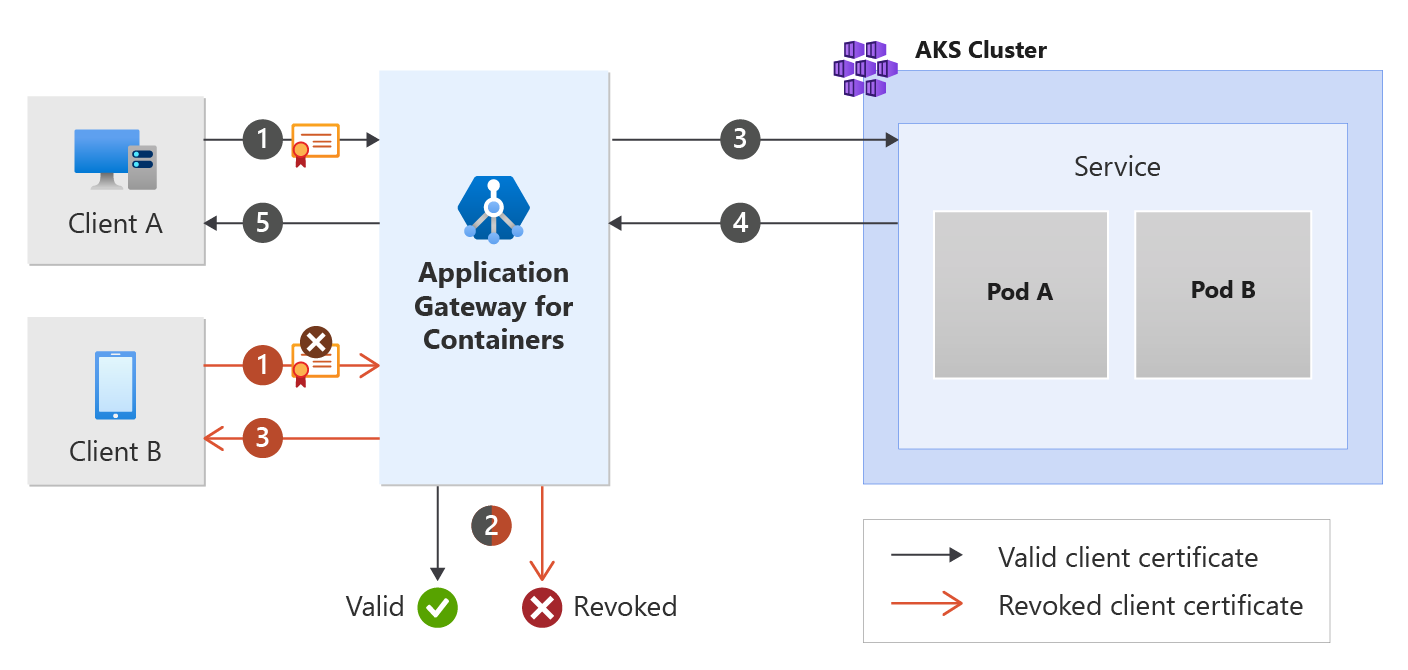
有効なクライアント証明書フローは、Application Gateway for Containers のフロントエンドに証明書を提示するクライアントを示しています。 Application Gateway for Containers は、証明書が有効であると判断し、要求をバックエンド ターゲットにプロキシします。 応答は最終的にクライアントに返されます。
失効したクライアント証明書フローは、Application Gateway for Containers のフロントエンドに失効した証明書を提示するクライアントを示しています。 Application Gateway for Containers は、証明書が有効でないと判断し、要求がクライアントにプロキシされるのを防ぎます。 クライアントは、HTTP 400 不正な要求と、対応する理由を受け取ります。
前提条件
BYO デプロイ戦略に従う場合は、Application Gateway for Containers リソースと ALB コントローラーを設定していることを確認します。
ALB マネージド デプロイ戦略に従う場合は、ALB コントローラーのプロビジョニングと、ApplicationLoadBalancer カスタム リソースを介した Application Gateway for Containers リソースのプロビジョニングが完了していることを確認します。
サンプル HTTP アプリケーションをデプロイします。
次の deployment.yaml ファイルをクラスターに適用してサンプル Web アプリケーションを作成し、サンプル シークレットをデプロイしてフロントエンド相互認証 (mTLS) のデモンストレーションを行います。
kubectl apply -f https://raw.githubusercontent.com/MicrosoftDocs/azure-docs/refs/heads/main/articles/application-gateway/for-containers/examples/https-scenario/ssl-termination/deployment.yamlこのコマンドによって、クラスターに次のものが作成されます。
-
test-infraという名前空間 -
echo名前空間内のtest-infraという 1 つのサービス -
echo名前空間内のtest-infraという 1 つのデプロイ -
listener-tls-secret名前空間にtest-infraと呼ばれる 1 つのシークレット
-
証明書の生成
この例では、ルート証明書を作成し、ルートからクライアント証明書を発行します。 ルート証明書とクライアント証明書を既に持っている場合は、これらの手順をスキップできます。
ルート証明書の秘密キーを生成する
openssl genrsa -out root.key 2048
ルート証明書を生成する
openssl req -x509 -new -nodes -key root.key -sha256 -days 1024 -out root.crt -subj "/C=US/ST=North Dakota/L=Fargo/O=Contoso/CN=contoso-root"
クライアント証明書の秘密キーを生成する
openssl genrsa -out client.key 2048
クライアント証明書の証明書署名要求を作成する
openssl req -new -key client.key -out client.csr -subj "/C=US/ST=North Dakota/L=Fargo/O=Contoso/CN=contoso-client"
ルート証明書によって署名されたクライアント証明書を生成する
openssl x509 -req -in client.csr -CA root.crt -CAkey root.key -CAcreateserial -out client.crt -days 1024 -sha256
必要な Gateway API リソースをデプロイする
ゲートウェイを作成する
kubectl apply -f - <<EOF
apiVersion: gateway.networking.k8s.io/v1
kind: Gateway
metadata:
  name: gateway-01
  namespace: test-infra
  annotations:
    alb.networking.azure.io/alb-namespace: alb-test-infra
    alb.networking.azure.io/alb-name: alb-test
spec:
  gatewayClassName: azure-alb-external
  listeners:
  - name: mtls-listener
    port: 443
    protocol: HTTPS
    allowedRoutes:
      namespaces:
        from: Same
    tls:
      mode: Terminate
      certificateRefs:
      - kind : Secret
        group: ""
        name: listener-tls-secret
EOF
Note
ALB コントローラーは、Azure Resource Manager で Application Gateway for Containers リソースを作成するときに、フロントエンド リソースに対して次の名前付け規則 ( fe-<eight randomly generated characters>) を使用します。
Azure で作成されたフロントエンド リソースの名前を変更する場合は、 独自のデプロイ戦略に従ってください。
ゲートウェイ リソースが作成されたら、状態が有効であること、リスナーが [プログラム済み] であること、ゲートウェイにアドレスが割り当てられていることを確認します。
kubectl get gateway gateway-01 -n test-infra -o yaml
ゲートウェイの作成に成功した出力例。
status:
  addresses:
  - type: IPAddress
    value: xxxx.yyyy.alb.azure.com
  conditions:
  - lastTransitionTime: "2023-06-19T21:04:55Z"
    message: Valid Gateway
    observedGeneration: 1
    reason: Accepted
    status: "True"
    type: Accepted
  - lastTransitionTime: "2023-06-19T21:04:55Z"
    message: Application Gateway For Containers resource has been successfully updated.
    observedGeneration: 1
    reason: Programmed
    status: "True"
    type: Programmed
  listeners:
  - attachedRoutes: 0
    conditions:
    - lastTransitionTime: "2023-06-19T21:04:55Z"
      message: ""
      observedGeneration: 1
      reason: ResolvedRefs
      status: "True"
      type: ResolvedRefs
    - lastTransitionTime: "2023-06-19T21:04:55Z"
      message: Listener is accepted
      observedGeneration: 1
      reason: Accepted
      status: "True"
      type: Accepted
    - lastTransitionTime: "2023-06-19T21:04:55Z"
      message: Application Gateway For Containers resource has been successfully updated.
      observedGeneration: 1
      reason: Programmed
      status: "True"
      type: Programmed
    name: https-listener
    supportedKinds:
    - group: gateway.networking.k8s.io
      kind: HTTPRoute
ゲートウェイが作成されたら、HTTPRoute リソースを作成します。
kubectl apply -f - <<EOF
apiVersion: gateway.networking.k8s.io/v1
kind: HTTPRoute
metadata:
  name: https-route
  namespace: test-infra
spec:
  parentRefs:
  - name: gateway-01
  rules:
  - backendRefs:
    - name: echo
      port: 80
EOF
HTTPRoute リソースが作成されたら、ルートが [承認済み] になり、Application Gateway for Containers リソースが [プログラム済み] になっていることを確認します。
kubectl get httproute https-route -n test-infra -o yaml
Application Gateway for Containers リソースの状態が正常に更新されたことを確認します。
status:
  parents:
  - conditions:
    - lastTransitionTime: "2023-06-19T22:18:23Z"
      message: ""
      observedGeneration: 1
      reason: ResolvedRefs
      status: "True"
      type: ResolvedRefs
    - lastTransitionTime: "2023-06-19T22:18:23Z"
      message: Route is Accepted
      observedGeneration: 1
      reason: Accepted
      status: "True"
      type: Accepted
    - lastTransitionTime: "2023-06-19T22:18:23Z"
      message: Application Gateway For Containers resource has been successfully updated.
      observedGeneration: 1
      reason: Programmed
      status: "True"
      type: Programmed
    controllerName: alb.networking.azure.io/alb-controller
    parentRef:
      group: gateway.networking.k8s.io
      kind: Gateway
      name: gateway-01
      namespace: test-infra
kubectl を使用して、クライアント証明書への証明書チェーンを含む Kubernetes シークレットを作成します。
kubectl create secret generic ca.bundle -n test-infra --from-file=ca.crt=root.crt
FrontendTLSPolicy を作成する
kubectl apply -f - <<EOF
apiVersion: alb.networking.azure.io/v1
kind: FrontendTLSPolicy
metadata:
  name: mtls-policy
  namespace: test-infra
spec:
  targetRef:
    group: gateway.networking.k8s.io
    kind: Gateway
    name: gateway-01
    namespace: test-infra
    sectionNames:
    - mtls-listener
  default:
    verify:
      caCertificateRef:
        name: ca.bundle
        group: ""
        kind: Secret
        namespace: test-infra
EOF
FrontendTLSPolicy オブジェクトが作成されたら、オブジェクトの状態を確認し、ポリシーが有効であることを確認します。
kubectl get frontendtlspolicy mtls-policy -n test-infra -o yaml
有効な FrontendTLSPolicy オブジェクト作成の出力例。
status:
  conditions:
  - lastTransitionTime: "2023-06-29T16:54:42Z"
    message: Valid FrontendTLSPolicy
    observedGeneration: 1
    reason: Accepted
    status: "True"
    type: Accepted
アプリケーションへのアクセスをテストする
これで、フロントエンドに割り当てられた FQDN を使用して、サンプル アプリケーションにトラフィックを送信する準備ができました。 次のコマンドを実行して、FQDN を取得します。
fqdn=$(kubectl get gateway gateway-01 -n test-infra -o jsonpath='{.status.addresses[0].value}')
クライアント証明書なしでフロントエンドの FQDN に curl を実行します。
curl --insecure https://$fqdn/
証明書が必要であることを示す応答アラートに注意してください。
curl: (56) OpenSSL SSL_read: OpenSSL/1.1.1k: error:1409445C:SSL routines:ssl3_read_bytes:tlsv13 alert certificate required, errno 0
生成されたクライアント証明書を提示する FQDN に を curl を実行します。
curl --cert client.crt --key client.key --insecure https://$fqdn/
応答は Application Gateway for Containers の背後にあるバックエンド サービスからのものであることに注意してください。
これで、ALB コントローラーをインストールし、バックエンド アプリケーションをデプロイし、クライアント証明書を使用して認証し、Application Gateway for Containers を介してバックエンド サービスからトラフィックが返されました。