Azure SQL Database または Azure SQL Managed Instance の容量エラーを解決する
適用対象:  Azure SQL Database Azure SQL Managed Instance
この記事では、Azure SQL Database または Azure SQL Managed Instance のリソースをデプロイする際の容量エラーを解決する方法について説明します。
超過クォータ
Azure SQL リソースをデプロイしようとしたときに次のエラーのいずれかが発生した場合は、クォータの増加を要求してください。
Server quota limit has been reached for this location. Please select a different location with lower server count.Could not perform the operation because server would exceed the allowed Database Throughput Unit quota of xx.- スケーリングの操作中に、次のエラーが表示される場合があります。
Could not perform the operation because server would exceed the allowed Database Throughput Unit quota of xx..
サブスクリプションへのアクセス
お客様のサブスクリプションが SQL リソース プロバイダー (RP) にまだ登録されていない場合、そのサブスクリプションには、選択したリージョンにサーバーを作成するためのアクセス権がないことがあります。
次のエラーが表示された場合は、ご使用のサブスクリプションを SQL RP に登録してください。
Your subscription does not have access to create a server in the selected region.Provisioning is restricted in this region. Please choose a different region. For exceptions to this rule please open a support request with issue type of 'Service and subscription limits'Location 'region name' is not accepting creation of new Windows Azure SQL Database servers for the subscription 'subscription id' at this time
リージョンの有効化
選択したリージョンが有効になっていない場合、ご使用のサブスクリプションには、そのリージョンにサーバーを作成するためのアクセス権がないことがあります。 これを解決するには、ご使用のサブスクリプションに対して特定のリージョンを有効にするためのサポート リクエストを提出します。
次のエラーが表示された場合は、特定のリージョンを有効にするためのサポート チケットを提出してください。
Your subscription does not have access to create a server in the selected region.Provisioning is restricted in this region. Please choose a different region. For exceptions to this rule please open a support request with issue type of 'Service and subscription limits'Location 'region name' is not accepting creation of new Windows Azure SQL Database servers for the subscription 'subscription id' at this time
SQL RP への登録
Azure SQL リソースをデプロイするには、ご使用のサブスクリプションを SQL リソース プロバイダー (RP) に登録します。
サブスクリプションは、Azure portal、Azure CLI、または Azure PowerShell を使用して登録できます。
Azure portal でサブスクリプションを登録するには、次の手順を実行します。
Azure portal を開き、 [すべてのサービス] に移動します。
[サブスクリプション] に移動し、目的のサブスクリプションを選択します。
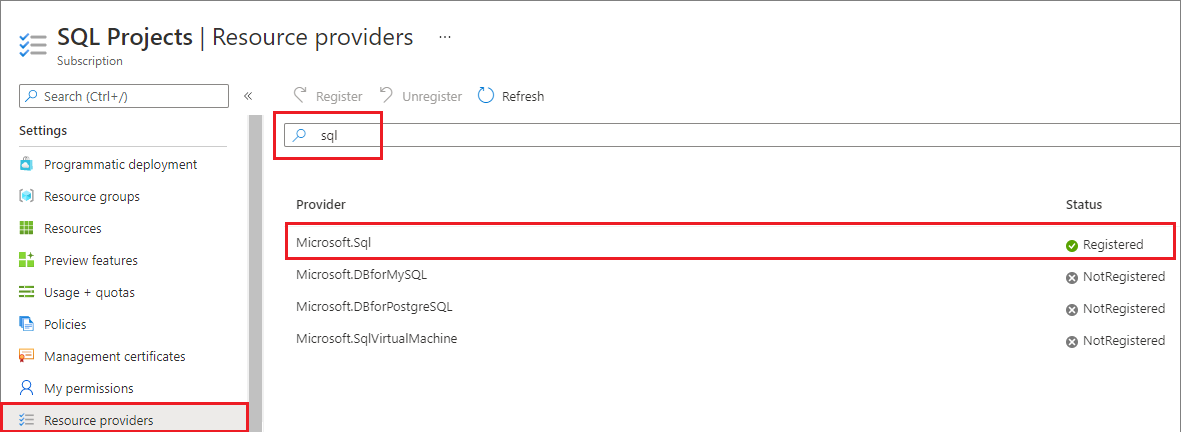
[サブスクリプション] ページで、 [設定] の [リソース プロバイダー] を選択します。
フィルターに「sql」と入力し、SQL 関連の拡張機能を表示します。
必要なアクションに応じて、Microsoft.Sql プロバイダーに対する [登録]、[再登録]、または [登録解除] を選びます。
プロビジョニングに関するその他の問題
プロビジョニングに関する問題が発生し続ける場合は、SQL Database のサポート トピックで [リージョン] のアクセス要求を作成し、Azure SQL Database または Azure SQL Managed Instance で使用したい DTU または仮想コア数を指定してください。
Azure プログラムのリージョン
Azure プログラム オファリング (Azure Pass、Imagine、Azure for Students、MPN、BizSpark、BizSpark Plus、Microsoft for Startups またはスポンサー プラン、Visual Studio サブスクリプションまたは MSDN) は、アクセスできるリージョンが限られています。
お客様のサブスクリプションが Azure プログラム オファリングの一部で、次のリージョンのいずれかへのアクセスを要求する場合は、代わりに代替リージョンの使用をご検討ください。
オーストラリア中部、オーストラリア中部 2、オーストラリア南東部、ブラジル南東部、カナダ東部、中国東部、中国北部、中国北部 2、フランス南部、ドイツ北部、西日本、JIO インド中部、JIO インド西部、韓国南部、ノルウェー西部、南アフリカ西部、インド南部、スイス西部、アラブ首長国連邦中部、英国西部、US DoD 中部、US DoD 東部、US Gov アリゾナ、US Gov テキサス、米国中西部、インド西部。
次のステップ
要求を送信すると、そのレビューが行われます。 フォームに指定した情報に基づいた回答を受け取ります。
Azure の他の制限の詳細については、「Azure サブスクリプションとサービスの制限、クォータ、制約」をご覧ください。