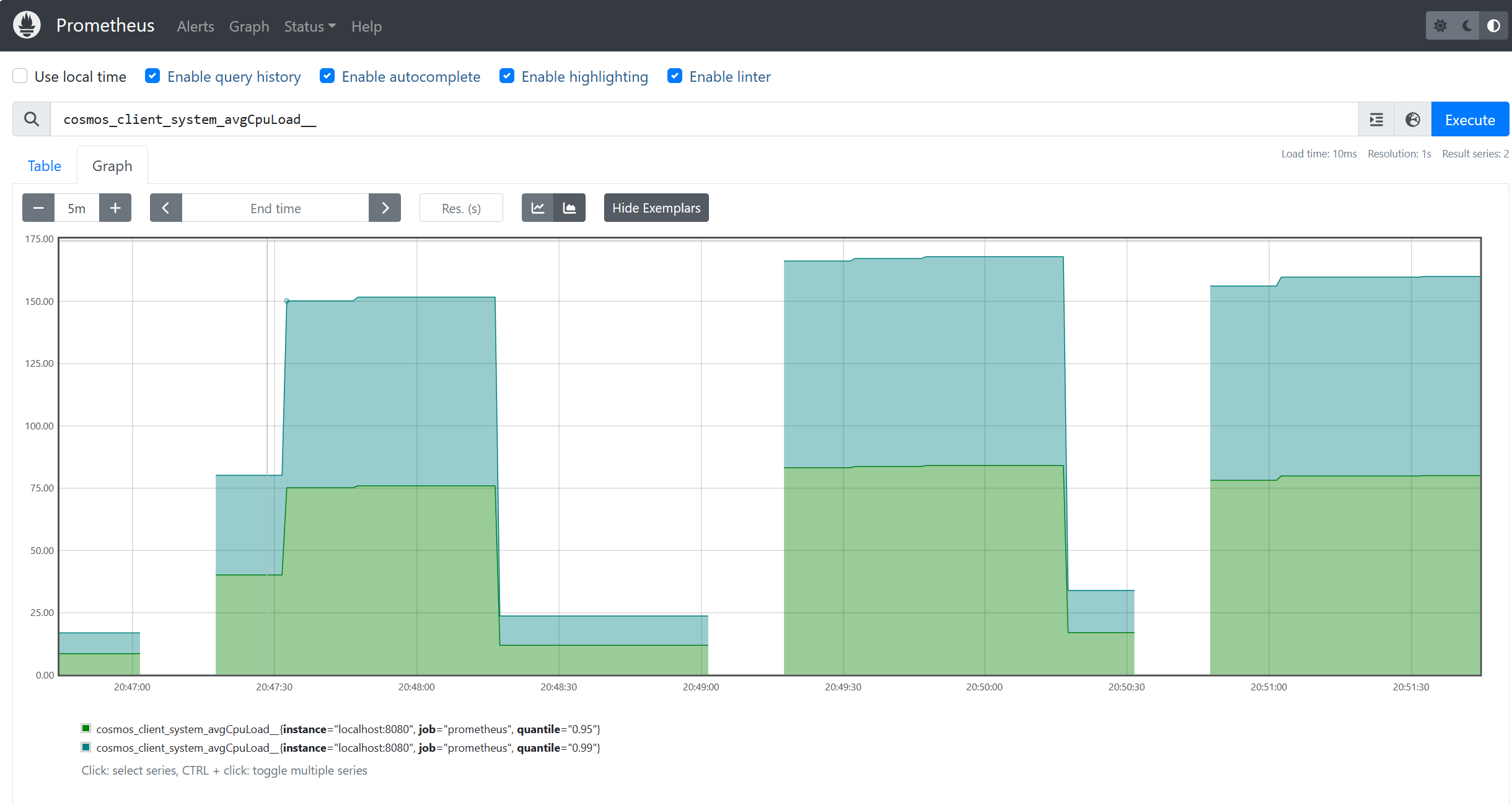
Java SDK for Azure Cosmos DB は、Prometheus などの一般的な可観測性システムのインストルメンテーションに Micrometer を使用してクライアント メトリックを実装します。 この記事には、このサンプルから取得した、メトリックを Prometheus にスクレイピングする手順とコード スニペットが含まれています。 SDK によって提供されるメトリックの完全な一覧は、こちらに記載されています。 クライアントが Azure Kubernetes Service (AKS) にデプロイされている場合は、カスタム スクレイピングを備えた Azure Monitor の Prometheus 用マネージド サービスを使うこともできます。こちらでドキュメントを参照してください。
Prometheus のメトリックを消費する
prometheus は、ここからダウンロードできます。 Prometheus を使って Azure Cosmos DB 用の Java SDK で Micrometer メトリックを使うには、まずレジストリとクライアントに必要なライブラリがインポートされていることを確認します。
<dependency>
    <groupId>io.micrometer</groupId>
    <artifactId>micrometer-registry-prometheus</artifactId>
    <version>1.6.6</version>
</dependency>

<dependency>
    <groupId>io.prometheus</groupId>
    <artifactId>simpleclient_httpserver</artifactId>
    <version>0.5.0</version>
</dependency>
アプリケーションで、prometheus レジストリをテレメトリ構成に指定します。さまざまな診断しきい値を設定できることに注意してください。これは、使用されるメトリックを最も関心のあるメトリックに制限するのに役立ちます。
//prometheus meter registry
PrometheusMeterRegistry prometheusRegistry = new PrometheusMeterRegistry(PrometheusConfig.DEFAULT);

//provide the prometheus registry to the telemetry config
CosmosClientTelemetryConfig telemetryConfig = new CosmosClientTelemetryConfig()
        .diagnosticsThresholds(
                new CosmosDiagnosticsThresholds()
                        // Any requests that violate (are lower than) any of the below thresholds that are set
                        // will not appear in "request-level" metrics (those with "rntbd" or "gw" in their name).
                        // The "operation-level" metrics (those with "ops" in their name) will still be collected.
                        // Use this to reduce noise in the amount of metrics collected.
                        .setRequestChargeThreshold(10)
                        .setNonPointOperationLatencyThreshold(Duration.ofDays(10))
                        .setPointOperationLatencyThreshold(Duration.ofDays(10))
        )
        // Uncomment below to apply sampling to help further tune client-side resource consumption related to metrics.
        // The sampling rate can be modified after Azure Cosmos DB Client initialization – so the sampling rate can be
        // modified without any restarts being necessary.
        //.sampleDiagnostics(0.25)
        .clientCorrelationId("samplePrometheusMetrics001")
        .metricsOptions(new CosmosMicrometerMetricsOptions().meterRegistry(prometheusRegistry)
                //.configureDefaultTagNames(CosmosMetricTagName.PARTITION_KEY_RANGE_ID)
                .applyDiagnosticThresholdsForTransportLevelMeters(true)
        );
//prometheus meter registry
PrometheusMeterRegistry prometheusRegistry = new PrometheusMeterRegistry(PrometheusConfig.DEFAULT);

//provide the prometheus registry to the telemetry config
CosmosClientTelemetryConfig telemetryConfig = new CosmosClientTelemetryConfig()
        .diagnosticsThresholds(
                new CosmosDiagnosticsThresholds()
                        // Any requests that violate (are lower than) any of the below thresholds that are set
                        // will not appear in "request-level" metrics (those with "rntbd" or "gw" in their name).
                        // The "operation-level" metrics (those with "ops" in their name) will still be collected.
                        // Use this to reduce noise in the amount of metrics collected.
                        .setRequestChargeThreshold(10)
                        .setNonPointOperationLatencyThreshold(Duration.ofDays(10))
                        .setPointOperationLatencyThreshold(Duration.ofDays(10))
        )
        // Uncomment below to apply sampling to help further tune client-side resource consumption related to metrics.
        // The sampling rate can be modified after Azure Cosmos DB Client initialization – so the sampling rate can be
        // modified without any restarts being necessary.
        //.sampleDiagnostics(0.25)
        .clientCorrelationId("samplePrometheusMetrics001")
        .metricsOptions(new CosmosMicrometerMetricsOptions().meterRegistry(prometheusRegistry)
                //.configureDefaultTagNames(CosmosMetricTagName.PARTITION_KEY_RANGE_ID)
                .applyDiagnosticThresholdsForTransportLevelMeters(true)
        );
ローカルの HttpServer サーバーを起動して、メーター レジストリ メトリックを Prometheus に公開します。
try {
    HttpServer server = HttpServer.create(new InetSocketAddress(8080), 0);
    server.createContext("/metrics", httpExchange -> {
        String response = prometheusRegistry.scrape();
        int i = 1;
        httpExchange.sendResponseHeaders(200, response.getBytes().length);
        try (OutputStream os = httpExchange.getResponseBody()) {
            os.write(response.getBytes());
        }
    });
    new Thread(server::start).start();
} catch (IOException e) {
    throw new RuntimeException(e);
}
clientTelemetryConfig を作る際に、必ず CosmosClient を渡してください。
//  Create async client
client = new CosmosClientBuilder()
    .endpoint(AccountSettings.HOST)
    .key(AccountSettings.MASTER_KEY)
    .clientTelemetryConfig(telemetryConfig)
    .consistencyLevel(ConsistencyLevel.SESSION) //make sure we can read our own writes
    .contentResponseOnWriteEnabled(true)
    .buildAsyncClient();
アプリケーション クライアントのエンドポイントを prometheus.yml に追加する場合は、ドメイン名とポートを "targets" に追加します。 たとえば、prometheus がアプリ クライアントと同じサーバーで実行されている場合は、localhost:8080にtargetsを追加できます。
scrape_configs:
  # The job name is added as a label `job=<job_name>` to any timeseries scraped from this config.
  - job_name: "prometheus"

    # metrics_path defaults to '/metrics'
    # scheme defaults to 'http'.

    static_configs:
      - targets: ["localhost:9090", "localhost:8080"]
これで、Prometheus からのメトリックを使用できるようになりました。