OpenAPI 3.0 仕様を使用して、Microsoft Foundry エージェントを外部 API に接続します。 OpenAPI ツールに接続するエージェントは、外部サービスを呼び出し、リアルタイム データを取得し、組み込み関数を超えて機能を拡張できます。
OpenAPI 仕様 では、既存のサービスをエージェントと統合できるように、HTTP API を記述する標準的な方法が定義されています。 Microsoft Foundry では、 anonymous、 API key、 managed identityの 3 つの認証方法がサポートされています。 認証方法の選択については、「認証方法 の選択」を参照してください。
利用サポート
✔️ (GA) は一般提供を示し、✔️(プレビュー) はパブリック プレビューを示し、ダッシュ (-) は機能が使用できないことを示します。
| Microsoft Foundry のサポート | Python SDK | C# SDK | JavaScript SDK | Java SDK | REST API | 基本エージェントのセットアップ | 標準エージェントのセットアップ |
|---|---|---|---|---|---|---|---|
| ✔️ | ✔️ (プレビュー) | ✔️ (プレビュー) | ✔️ (プレビュー) | ✔️ (プレビュー) | ✔️ (GA) | ✔️ | ✔️ |
注
Java の場合は、OpenAPI エージェント ツール用の com.azure:azure-ai-agents パッケージを使用します。
com.azure:azure-ai-projects パッケージは現在、OpenAPI エージェント ツールの種類を公開していません。
[前提条件]
開始する前に、以下の項目があることを確認します:
- 適切なアクセス許可を持つ Azure サブスクリプション。
- Azure RBAC ロール: Foundry プロジェクトの共同作成者または所有者。
- エンドポイントが構成された Foundry プロジェクト。
- プロジェクトにデプロイされた AI モデル。
- 基本または標準のエージェント環境。
- お好みの言語用にインストールされた SDK:
- Python:
azure-ai-projects(最新のプレリリース バージョン) - C#:
Azure.AI.Projects.OpenAI - TypeScript/JavaScript:
@azure/ai-projects - ジャワ:
com.azure:azure-ai-agents
- Python:
環境変数
| Variable | [説明] |
|---|---|
FOUNDRY_PROJECT_ENDPOINT |
Foundry プロジェクト エンドポイントの URL (外部の OpenAPI サービス エンドポイントではありません)。 |
FOUNDRY_MODEL_DEPLOYMENT_NAME |
あなたのデプロイされたモデル名。 |
OPENAPI_PROJECT_CONNECTION_NAME |
(API キー認証の場合)OpenAPI サービスのプロジェクト接続名。 |
- 次の要件を満たす OpenAPI 3.0 仕様ファイル:
- 各関数には、(OpenAPI ツールに必要な)
operationIdが必要です。 -
operationIdには、文字、-、および_のみを含める必要があります。 - モデルが使用する関数を効率的に決定するのに役立つわかりやすい名前を使用します。
- サポートされているコンテンツ タイプ: "application/json"、"application/json-patch+json"
- 各関数には、(OpenAPI ツールに必要な)
- マネージド ID 認証の場合: ターゲット サービス リソースの閲覧者ロール以上。
- API キー/トークン認証の場合: API キーまたはトークンで構成されたプロジェクト接続。 プロジェクトへの新しい接続の追加を参照してください。
注
FOUNDRY_PROJECT_ENDPOINT値は、外部の OpenAPI サービス エンドポイントではなく、Microsoft Foundry プロジェクト エンドポイントを参照します。 このエンドポイントは、Microsoft Foundry ポータルのプロジェクトの [概要] ページにあります。 このエンドポイントは、エージェント サービスを認証するために必要であり、仕様ファイルで定義されている OpenAPI エンドポイントとは別です。
制限事項を理解する
- OpenAPI 仕様には各操作の
operationIdを含める必要があり、operationIdには文字、-、および_のみを含めることができます。 - サポートされているコンテンツ タイプ:
application/json、application/json-patch+json。 - API キー認証の場合は、OpenAPI ツールごとに 1 つの API キー セキュリティ スキームを使用します。 複数のセキュリティ スキームが必要な場合は、複数の OpenAPI ツールを作成します。
コード例
注
- 最新のプレリリース パッケージが必要です。 詳細については、 クイック スタート を参照してください。
- 認証に API キーを使用する場合、接続 ID は
/subscriptions/{{subscriptionID}}/resourceGroups/{{resourceGroupName}}/providers/Microsoft.CognitiveServices/accounts/{{foundryAccountName}}/projects/{{foundryProjectName}}/connections/{{foundryConnectionName}}の形式にする必要があります。
Important
API キー認証を機能させるには、OpenAPI 仕様ファイルに次のものが含まれている必要があります。
- ヘッダー名やパラメーター名など、API キー構成を含む
securitySchemesセクション。 - セキュリティ スキームを参照する
securityセクション。 - 一致するキーの名前と値で構成されたプロジェクト接続。
これらの構成がないと、API キーは要求に含まれません。 詳細なセットアップ手順については、「 API キーを使用した認証」 セクションを参照してください。
トークンをプロジェクト接続に格納することで、トークン ベースの認証 (ベアラー トークンなど) を使用することもできます。 ベアラー トークン認証の場合は、キーが に設定され、値が Authorization に設定されたBearer <token>接続を作成します (<token>を実際のトークンに置き換えます)。
Bearer後にスペースが続く単語は、値に含まれている必要があります。 詳細については、「 ベアラー トークン接続の設定」を参照してください。
クイック検証
まず、環境が正しく構成されていることを確認します。
# Verify authentication and project connection
import os
from azure.identity import DefaultAzureCredential
from azure.ai.projects import AIProjectClient
from dotenv import load_dotenv

load_dotenv()

endpoint = os.environ["FOUNDRY_PROJECT_ENDPOINT"]

with DefaultAzureCredential() as credential, \
     AIProjectClient(endpoint=endpoint, credential=credential) as project_client:
    print(f"Successfully connected to project")
このコマンドがエラーなしで実行される場合は、OpenAPI ツールを使用してエージェントを作成する準備が整います。
完全なコード例
# Import required libraries
import os
import jsonref
from dotenv import load_dotenv
from typing import Any, cast
from azure.identity import DefaultAzureCredential
from azure.ai.projects import AIProjectClient
from azure.ai.projects.models import (
    PromptAgentDefinition,
    OpenApiTool,
    OpenApiFunctionDefinition,
    OpenApiAnonymousAuthDetails,
)

load_dotenv()

endpoint = os.environ["FOUNDRY_PROJECT_ENDPOINT"]

with (
    DefaultAzureCredential() as credential,
    AIProjectClient(endpoint=endpoint, credential=credential) as project_client,
    project_client.get_openai_client() as openai_client,
):

    weather_asset_file_path = os.path.abspath(os.path.join(os.path.dirname(__file__), "../assets/weather_openapi.json"))

    with open(weather_asset_file_path, "r") as f:
        openapi_weather = cast(dict[str, Any], jsonref.loads(f.read()))

    # Initialize agent OpenAPI tool using the read in OpenAPI spec
    weather_tool = OpenApiTool(
        openapi=OpenApiFunctionDefinition(
            name="get_weather",
            spec=openapi_weather,
            description="Retrieve weather information for a location.",
            auth=OpenApiAnonymousAuthDetails(),
        )
    )

    # If you want to use key-based authentication
    # IMPORTANT: Your OpenAPI spec must include securitySchemes and security sections
    # Example spec structure for API key auth:
    # {
    #   "components": {
    #     "securitySchemes": {
    #       "apiKeyHeader": {
    #         "type": "apiKey",
    #         "name": "x-api-key",  # This must match the key name in your project connection
    #         "in": "header"
    #       }
    #     }
    #   },
    #   "security": [{"apiKeyHeader": []}]
    # }
    #
    # For Bearer token authentication, use this securitySchemes structure instead:
    # {
    #   "components": {
    #     "securitySchemes": {
    #       "bearerAuth": {
    #         "type": "apiKey",
    #         "name": "Authorization",
    #         "in": "header"
    #       }
    #     }
    #   },
    #   "security": [{"bearerAuth": []}]
    # }
    # Then set connection key = "Authorization" and value = "Bearer <token>"
    # The word "Bearer" followed by a space MUST be included in the value.

    openapi_connection = project_client.connections.get(os.environ["OPENAPI_PROJECT_CONNECTION_NAME"])
    connection_id = openapi_connection.id
    print(f"OpenAPI connection ID: {connection_id}")

    openapi_key_auth_tool={
        "type": "openapi",
        "openapi":{
            "name": "TOOL_NAME",
            "spec": SPEC_NAME,  # Must include securitySchemes and security sections
            "auth": {
                "type": "project_connection",
                "security_scheme": {
                    "project_connection_id": connection_id
                }
            },
        }
    }

    # If you want to use Managed Identity authentication
    openapi_mi_auth_tool={
        "type": "openapi",
        "openapi":{
            "name": "TOOL_NAME",
            "description": "",
            "spec": SPEC_NAME,
            "auth": {
                "type": "managed_identity",
                "security_scheme": {
                    "audience": ""  #audience to the service, such as https://ai.azure.com
                }
            },
        }
    }

    agent = project_client.agents.create_version(
        agent_name="MyAgent",
        definition=PromptAgentDefinition(
            model=os.environ["FOUNDRY_MODEL_DEPLOYMENT_NAME"],
            instructions="You are a helpful assistant.",
            tools=[weather_tool],
        ),
    )
    print(f"Agent created (id: {agent.id}, name: {agent.name}, version: {agent.version})")

    response = openai_client.responses.create(
        input="What's the weather in Seattle?",
        extra_body={"agent_reference": {"name": agent.name, "type": "agent_reference"}},
    )
    print(f"Agent response: {response.output_text}")

    print("\nCleaning up...")
    project_client.agents.delete_version(agent_name=agent.name, agent_version=agent.version)
    print("Agent deleted")
このコードの動作
この例では、匿名認証を使用して wttr.in weather API を呼び出す OpenAPI ツールを使用してエージェントを作成します。 コードを実行する場合:
- ローカル JSON ファイルから天気 OpenAPI 仕様が読み込まれます。
- 匿名アクセス用に構成された天気ツールを使用してエージェントを作成します。
- シアトルの天気について質問するクエリを送信します。
- エージェントは OpenAPI ツールを使用して Weather API を呼び出し、書式設定された結果を返します。
- エージェントのバージョンを削除してクリーンアップします。
必要な入力
- 環境変数:
FOUNDRY_PROJECT_ENDPOINT、FOUNDRY_MODEL_DEPLOYMENT_NAME - ローカル ファイル:
weather_openapi.json(OpenAPI 仕様)
想定される出力
Agent created (id: asst_abc123, name: MyAgent23, version: 1)
Response created: The weather in Seattle is currently cloudy with a temperature of 52°F (11°C)...

Cleaning up...
Agent deleted
一般的なエラー
-
FileNotFoundError: 指定されたパスに OpenAPI 仕様ファイルが見つかりません -
KeyError: 必要な環境変数がありません -
AuthenticationError: 無効な資格情報または十分なアクセス許可がないか、API キー認証の OpenAPI 仕様にsecuritySchemesがありません - OpenAPI 仕様の無効な
operationId形式が原因でツールの登録エラーが発生する -
API キーが挿入されない: OpenAPI 仕様に
securitySchemesセクションとsecurityセクションの両方が含まれていること、およびキー名がプロジェクト接続と一致することを確認します
OpenAPI ツールでのエージェントの使用のサンプル
この例では、エージェントを使用して OpenAPI 仕様 で説明されているサービスを使用する方法を示します。 wttr.in サービスを 使用して、天気とその仕様ファイル weather_openapi.jsonを取得します。 この例では、Azure AI Projects クライアント ライブラリの同期メソッドを使用します。 非同期メソッドを使用する例については、GitHub の Azure SDK for .NET リポジトリの サンプル を参照してください。
class OpenAPIDemo
{
    // Utility method to get the OpenAPI specification file from the Assets folder.
    private static string GetFile([CallerFilePath] string pth = "")
    {
        var dirName = Path.GetDirectoryName(pth) ?? "";
        return Path.Combine(dirName, "Assets", "weather_openapi.json");
    }

    public static void Main()
    {
        // First, create an agent client and read the environment variables, which will be used in the next steps.
        var projectEndpoint = System.Environment.GetEnvironmentVariable("FOUNDRY_PROJECT_ENDPOINT");
        var modelDeploymentName = System.Environment.GetEnvironmentVariable("FOUNDRY_MODEL_DEPLOYMENT_NAME");
        AIProjectClient projectClient = new(endpoint: new Uri(projectEndpoint), tokenProvider: new DefaultAzureCredential());

        // Create an Agent with `OpenAPIAgentTool` and anonymous authentication.
        string filePath = GetFile();
        OpenAPIFunctionDefinition toolDefinition = new(
            name: "get_weather",
            spec: BinaryData.FromBytes(BinaryData.FromBytes(File.ReadAllBytes(filePath))),
            auth: new OpenAPIAnonymousAuthenticationDetails()
        );
        toolDefinition.Description = "Retrieve weather information for a location.";
        OpenAPITool openapiTool = new(toolDefinition);

        // Create the agent definition and the agent version.
        PromptAgentDefinition agentDefinition = new(model: modelDeploymentName)
        {
            Instructions = "You are a helpful assistant.",
            Tools = { openapiTool }
        };
        AgentVersion agentVersion = projectClient.Agents.CreateAgentVersion(
            agentName: "myAgent",
            options: new(agentDefinition));

        // Create a response object and ask the question about the weather in Seattle, WA.
        ProjectResponsesClient responseClient = projectClient.OpenAI.GetProjectResponsesClientForAgent(agentVersion.Name);
        ResponseResult response = responseClient.CreateResponse(
                userInputText: "Use the OpenAPI tool to print out, what is the weather in Seattle, WA today."
            );
        Console.WriteLine(response.GetOutputText());

        // Finally, delete all the resources created in this sample.
        projectClient.Agents.DeleteAgentVersion(agentName: agentVersion.Name, agentVersion: agentVersion.Version);
    }
}
このコードの動作
この C# の例では、匿名認証を使用して wttr.in から気象情報を取得する OpenAPI ツールを使用してエージェントを作成します。 コードを実行する場合:
- ローカル JSON ファイルから天気 OpenAPI 仕様を読み取ります。
- 気象ツールが構成されたエージェントを作成します。
- OpenAPI ツールを使用して、シアトルの天気に関する要求を送信します。
- エージェントは weather API を呼び出し、結果を返します。
- エージェントを削除してクリーンアップします。
必要な入力
- 環境変数:
FOUNDRY_PROJECT_ENDPOINT、FOUNDRY_MODEL_DEPLOYMENT_NAME - ローカル ファイル:
Assets/weather_openapi.json(OpenAPI 仕様)
想定される出力
The weather in Seattle, WA today is cloudy with temperatures around 52°F...
一般的なエラー
-
FileNotFoundException: Assets フォルダーに OpenAPI 仕様ファイルが見つかりません -
ArgumentNullException: 必要な環境変数がありません -
UnauthorizedAccessException: 無効な資格情報または RBAC アクセス許可が不十分です -
API キーが挿入されない: OpenAPI 仕様に、スキーム名が一致する
securitySchemes(components) セクションとsecurityセクションの両方が含まれていることを確認します
認証が必要な Web サービス上の OpenAPI ツールでエージェントを使用するサンプル
この例では、認証を必要とするシナリオでエージェントを使用して、OpenAPI 仕様のサービスを使用します。 TripAdvisor 仕様を使用します。
TripAdvisor サービスには、キーベースの認証が必要です。 Azure portal で接続を作成するには、Microsoft Foundry を開き、左側のパネルで [管理センター ] を選択し、[ 接続済みリソース] を選択します。 最後に、 カスタム キー の種類の新しい接続を作成します。
tripadvisor名前を付け、キーと値のペアを追加します。
keyという名前のキーを追加し、TripAdvisor キーを使用して値を入力します。
class OpenAPIConnectedDemo
{
    // Utility method to get the OpenAPI specification file from the Assets folder.
    private static string GetFile([CallerFilePath] string pth = "")
    {
        var dirName = Path.GetDirectoryName(pth) ?? "";
        return Path.Combine(dirName, "Assets", "tripadvisor_openapi.json");
    }

    public static void Main()
    {
        // First, we need to create agent client and read the environment variables, which will be used in the next steps.
        var projectEndpoint = System.Environment.GetEnvironmentVariable("FOUNDRY_PROJECT_ENDPOINT");
        var modelDeploymentName = System.Environment.GetEnvironmentVariable("FOUNDRY_MODEL_DEPLOYMENT_NAME");
        AIProjectClient projectClient = new(endpoint: new Uri(projectEndpoint), tokenProvider: new DefaultAzureCredential());

        // Create an Agent with `OpenAPIAgentTool` and authentication by project connection security scheme.
        string filePath = GetFile();
        AIProjectConnection tripadvisorConnection = projectClient.Connections.GetConnection("tripadvisor");
        OpenAPIFunctionDefinition toolDefinition = new(
            name: "tripadvisor",
            spec: BinaryData.FromBytes(BinaryData.FromBytes(File.ReadAllBytes(filePath))),
            auth: new OpenAPIProjectConnectionAuthenticationDetails(new OpenAPIProjectConnectionSecurityScheme(
                projectConnectionId: tripadvisorConnection.Id
            ))
        );
        toolDefinition.Description = "Trip Advisor API to get travel information.";
        OpenAPITool openapiTool = new(toolDefinition);

        // Create the agent definition and the agent version.
        PromptAgentDefinition agentDefinition = new(model: modelDeploymentName)
        {
            Instructions = "You are a helpful assistant.",
            Tools = { openapiTool }
        };
        AgentVersion agentVersion = projectClient.Agents.CreateAgentVersion(
            agentName: "myAgent",
            options: new(agentDefinition));

        // Create a response object and ask the question about the hotels in France.
        // Test the Web service access before you run production scenarios.
        // It can be done by setting:
        // ToolChoice = ResponseToolChoice.CreateRequiredChoice()`
        // in the ResponseCreationOptions. This setting will
        // force Agent to use tool and will trigger the error if it is not accessible.
        ProjectResponsesClient responseClient = projectClient.OpenAI.GetProjectResponsesClientForAgent(agentVersion.Name);
        CreateResponseOptions responseOptions = new()
        {
            ToolChoice = ResponseToolChoice.CreateRequiredChoice(),
            InputItems =
            {
                ResponseItem.CreateUserMessageItem("Recommend me 5 top hotels in paris, France."),
            }
        };
        ResponseResult response = responseClient.CreateResponse(
            options: responseOptions
        );
        Console.WriteLine(response.GetOutputText());

        // Finally, delete all the resources we have created in this sample.
        projectClient.Agents.DeleteAgentVersion(agentName: agentVersion.Name, agentVersion: agentVersion.Version);
    }
}
このコードの動作
この C# の例では、プロジェクト接続を介した API キー認証で OpenAPI ツールを使用する方法を示します。 コードを実行する場合:
- ローカル ファイルから TripAdvisor OpenAPI 仕様を読み込みます。
- API キーを含む
tripadvisorプロジェクト接続を取得します。 - 接続を認証に使用するように構成された TripAdvisor ツールを使用してエージェントを作成します。
- パリのホテルおすすめリクエストを送信します。
- エージェントは、格納されている API キーを使用して TripAdvisor API を呼び出し、結果を返します。
- エージェントを削除してクリーンアップします。
必要な入力
- 環境変数:
FOUNDRY_PROJECT_ENDPOINT、FOUNDRY_MODEL_DEPLOYMENT_NAME - ローカル ファイル:
Assets/tripadvisor_openapi.json - プロジェクト接続: 有効な API キーが構成された
tripadvisor
想定される出力
Here are 5 top hotels in Paris, France:
1. Hotel Name - Rating: 4.5/5, Location: ...
2. Hotel Name - Rating: 4.4/5, Location: ...
...
一般的なエラー
-
ConnectionNotFoundException:tripadvisorという名前のプロジェクト接続が見つかりません。 -
AuthenticationException: プロジェクト接続の API キーが無効であるか、OpenAPI 仕様のsecuritySchemes構成が見つからない、または正しくない。 - ツールが使用されていない:
ToolChoice = ResponseToolChoice.CreateRequiredChoice()ツールの使用を強制することを確認します。 -
API キーが API に渡されない: OpenAPI 仕様に適切な
securitySchemesとsecurityセクションが構成されていることを確認します。
OpenAPI ツール機能を使用して Java エージェントを作成する
この Java の例では、 com.azure:azure-ai-agents とローカルの OpenAPI 3.0 仕様ファイルを使用して、OpenAPI ツールを使用してエージェントを作成します。 このサンプルでは、匿名認証を使用し、パブリック API エンドポイントを呼び出します。
import com.azure.ai.agents.AgentsClient;
import com.azure.ai.agents.AgentsClientBuilder;
import com.azure.ai.agents.AgentsServiceVersion;
import com.azure.ai.agents.ConversationsClient;
import com.azure.ai.agents.ResponsesClient;
import com.azure.ai.agents.models.AgentReference;
import com.azure.ai.agents.models.AgentVersionDetails;
import com.azure.ai.agents.models.OpenApiAgentTool;
import com.azure.ai.agents.models.OpenApiAnonymousAuthDetails;
import com.azure.ai.agents.models.OpenApiFunctionDefinition;
import com.azure.ai.agents.models.PromptAgentDefinition;
import com.azure.core.util.BinaryData;
import com.azure.identity.DefaultAzureCredentialBuilder;
import com.azure.json.JsonProviders;
import com.azure.json.JsonReader;
import com.openai.models.conversations.Conversation;
import com.openai.models.conversations.items.ItemCreateParams;
import com.openai.models.responses.EasyInputMessage;
import com.openai.models.responses.Response;
import com.openai.models.responses.ResponseCreateParams;

import java.nio.file.Files;
import java.nio.file.Path;
import java.util.Arrays;

public class OpenApiAgentJavaSample {
    public static void main(String[] args) throws Exception {
        String endpoint = System.getenv("FOUNDRY_PROJECT_ENDPOINT");
        if (endpoint == null || endpoint.isBlank()) {
            endpoint = System.getenv("PROJECT_ENDPOINT");
        }

        String model = System.getenv("FOUNDRY_MODEL_DEPLOYMENT_NAME");
        if (model == null || model.isBlank()) {
            model = System.getenv("MODEL_DEPLOYMENT_NAME");
        }

        AgentsClientBuilder builder = new AgentsClientBuilder()
            .endpoint(endpoint)
            .credential(new DefaultAzureCredentialBuilder().build())
            .serviceVersion(AgentsServiceVersion.V2025_11_15_PREVIEW);

        AgentsClient agentsClient = builder.buildAgentsClient();
        ResponsesClient responsesClient = builder.buildResponsesClient();
        ConversationsClient conversationsClient = builder.buildConversationsClient();

        JsonReader reader = JsonProviders.createReader(Files.readAllBytes(Path.of("openapi_spec.json")));
        BinaryData spec = reader.getNullable(nonNullReader -> BinaryData.fromObject(nonNullReader.readUntyped()));

        OpenApiFunctionDefinition toolDefinition = new OpenApiFunctionDefinition(
            "httpbin_get",
            spec,
            new OpenApiAnonymousAuthDetails())
            .setDescription("Get request metadata from an OpenAPI endpoint.");

        PromptAgentDefinition agentDefinition = new PromptAgentDefinition(model)
            .setInstructions("Use the OpenAPI tool for HTTP request metadata.")
            .setTools(Arrays.asList(new OpenApiAgentTool(toolDefinition)));

        AgentVersionDetails agentVersion = agentsClient.createAgentVersion("openapiValidationAgentJava", agentDefinition);
        System.out.println("Agent: " + agentVersion.getName() + ", version: " + agentVersion.getVersion());

        Conversation conversation = conversationsClient.getConversationService().create();
        conversationsClient.getConversationService().items().create(
            ItemCreateParams.builder()
                .conversationId(conversation.id())
                .addItem(EasyInputMessage.builder()
                    .role(EasyInputMessage.Role.USER)
                    .content("Use the OpenAPI tool and summarize the returned URL and origin in one sentence.")
                    .build())
                .build());

        try {
            AgentReference agentReference = new AgentReference(agentVersion.getName()).setVersion(agentVersion.getVersion());
            ResponseCreateParams.Builder options = ResponseCreateParams.builder().maxOutputTokens(300L);
            Response response = responsesClient.createWithAgentConversation(agentReference, conversation.id(), options);

            String text = response.output().stream()
                .filter(item -> item.isMessage())
                .map(item -> item.asMessage().content()
                    .get(item.asMessage().content().size() - 1)
                    .asOutputText()
                    .text())
                .reduce((first, second) -> second)
                .orElse("<no message output>");

            System.out.println("Status: " + response.status().map(Object::toString).orElse("unknown"));
            System.out.println("Response: " + text);
        } finally {
            agentsClient.deleteAgentVersion(agentVersion.getName(), agentVersion.getVersion());
            System.out.println("Agent deleted");
        }
    }
}
このコードの動作
この Java の例では、OpenAPI ツールを使用してエージェントを作成し、会話スコープの応答を実行します。
-
openapi_spec.jsonから OpenAPI 仕様を読み込みます。 -
OpenApiAgentToolを使用してエージェント バージョンを作成します。 - 会話を作成し、ユーザー メッセージを追加します。
-
AgentReferenceと会話 ID を渡して応答を作成します。 - エージェントのバージョンを削除してクリーンアップします。
必要な入力
- 環境変数:
FOUNDRY_PROJECT_ENDPOINT(またはPROJECT_ENDPOINT) とFOUNDRY_MODEL_DEPLOYMENT_NAME(またはMODEL_DEPLOYMENT_NAME) - ローカル ファイル:
openapi_spec.json(OpenAPI 3.0 仕様)
想定される出力
Agent: openapiValidationAgentJava, version: 1
Status: completed
Response: The API response reports URL ... and origin ...
Agent deleted
一般的なエラー
-
Invalid OpenAPI specification: OpenAPI JSON をオブジェクトに解析してから、OpenApiFunctionDefinitionに渡します。 -
Invalid conversation id: 会話を作成し、conversation.id()にcreateWithAgentConversationを渡します。 -
AuthenticationFailedException:DefaultAzureCredentialサインイン アカウントのトークンを取得できることを確認します。
次の例は、REST API を使用して OpenAPI ツールを呼び出す方法を示しています。
匿名認証
curl --request POST \
  --url "$FOUNDRY_PROJECT_ENDPOINT/openai/v1/responses" \
  --header "Authorization: Bearer $AGENT_TOKEN" \
  --header "Content-Type: application/json" \
  --data '{
    "model": "'$FOUNDRY_MODEL_DEPLOYMENT_NAME'",
    "input": "Use the OpenAPI tool to get the weather in Seattle, WA today.",
    "tools": [
      {
        "type": "openapi",
        "openapi": {
          "name": "weather",
          "description": "Tool to get weather data",
          "auth": { "type": "anonymous" },
          "spec": {
            "openapi": "3.1.0",
            "info": {
              "title": "get weather data",
              "description": "Retrieves current weather data for a location.",
              "version": "v1.0.0"
            },
            "servers": [{ "url": "https://wttr.in" }],
            "paths": {
              "/{location}": {
                "get": {
                  "description": "Get weather information for a specific location",
                  "operationId": "GetCurrentWeather",
                  "parameters": [
                    {
                      "name": "location",
                      "in": "path",
                      "description": "City or location to retrieve the weather for",
                      "required": true,
                      "schema": { "type": "string" }
                    },
                    {
                      "name": "format",
                      "in": "query",
                      "description": "Format in which to return data. Always use 3.",
                      "required": true,
                      "schema": { "type": "integer", "default": 3 }
                    }
                  ],
                  "responses": {
                    "200": {
                      "description": "Successful response",
                      "content": {
                        "text/plain": {
                          "schema": { "type": "string" }
                        }
                      }
                    },
                    "404": { "description": "Location not found" }
                  }
                }
              }
            }
          }
        }
      }
    ]
  }'
API キー認証 (プロジェクト接続)
curl --request POST \
  --url "$FOUNDRY_PROJECT_ENDPOINT/openai/v1/responses" \
  --header "Authorization: Bearer $AGENT_TOKEN" \
  --header "Content-Type: application/json" \
  --data '{
    "model": "'$FOUNDRY_MODEL_DEPLOYMENT_NAME'",
    "input": "Use the OpenAPI tool to get the weather in Seattle, WA today.",
    "tools": [
      {
        "type": "openapi",
        "openapi": {
          "name": "weather",
          "description": "Tool to get weather data",
          "auth": {
            "type": "project_connection",
            "security_scheme": {
              "project_connection_id": "'$WEATHER_APP_PROJECT_CONNECTION_ID'"
            }
          },
          "spec": {
            "openapi": "3.1.0",
            "info": {
              "title": "get weather data",
              "description": "Retrieves current weather data for a location.",
              "version": "v1.0.0"
            },
            "servers": [{ "url": "https://wttr.in" }],
            "paths": {
              "/{location}": {
                "get": {
                  "description": "Get weather information for a specific location",
                  "operationId": "GetCurrentWeather",
                  "parameters": [
                    {
                      "name": "location",
                      "in": "path",
                      "description": "City or location to retrieve the weather for",
                      "required": true,
                      "schema": { "type": "string" }
                    },
                    {
                      "name": "format",
                      "in": "query",
                      "description": "Format in which to return data. Always use 3.",
                      "required": true,
                      "schema": { "type": "integer", "default": 3 }
                    }
                  ],
                  "responses": {
                    "200": {
                      "description": "Successful response",
                      "content": {
                        "text/plain": {
                          "schema": { "type": "string" }
                        }
                      }
                    },
                    "404": { "description": "Location not found" }
                  }
                }
              }
            },
            "components": {
              "securitySchemes": {
                "apiKeyHeader": {
                  "type": "apiKey",
                  "name": "x-api-key",
                  "in": "header"
                }
              }
            },
            "security": [
              { "apiKeyHeader": [] }
            ]
          }
        }
      }
    ]
  }'
マネージド ID の認証
curl --request POST \
  --url "$FOUNDRY_PROJECT_ENDPOINT/openai/v1/responses" \
  --header "Authorization: Bearer $AGENT_TOKEN" \
  --header "Content-Type: application/json" \
  --data '{
    "model": "'$FOUNDRY_MODEL_DEPLOYMENT_NAME'",
    "input": "Use the OpenAPI tool to get the weather in Seattle, WA today.",
    "tools": [
      {
        "type": "openapi",
        "openapi": {
          "name": "weather",
          "description": "Tool to get weather data",
          "auth": {
            "type": "managed_identity",
            "security_scheme": {
              "audience": "'$MANAGED_IDENTITY_AUDIENCE'"
            }
          },
          "spec": {
            "openapi": "3.1.0",
            "info": {
              "title": "get weather data",
              "description": "Retrieves current weather data for a location.",
              "version": "v1.0.0"
            },
            "servers": [{ "url": "https://wttr.in" }],
            "paths": {
              "/{location}": {
                "get": {
                  "description": "Get weather information for a specific location",
                  "operationId": "GetCurrentWeather",
                  "parameters": [
                    {
                      "name": "location",
                      "in": "path",
                      "description": "City or location to retrieve the weather for",
                      "required": true,
                      "schema": { "type": "string" }
                    },
                    {
                      "name": "format",
                      "in": "query",
                      "description": "Format in which to return data. Always use 3.",
                      "required": true,
                      "schema": { "type": "integer", "default": 3 }
                    }
                  ],
                  "responses": {
                    "200": {
                      "description": "Successful response",
                      "content": {
                        "text/plain": {
                          "schema": { "type": "string" }
                        }
                      }
                    },
                    "404": { "description": "Location not found" }
                  }
                }
              }
            }
          }
        }
      }
    ]
  }'
このコードの動作
この REST API の例では、さまざまな認証方法で OpenAPI ツールを呼び出す方法を示します。 要求:
- シアトルの天気について尋ねるクエリをエージェントに送信します。
- 気象 API 仕様と共に OpenAPI ツール定義をインラインで含めます。
- コメント付き代替手段として、3 つの認証オプション (匿名、プロジェクト接続経由の API キー、マネージド ID) が表示されます。
- エージェントはツールを使用して weather API を呼び出し、書式設定された結果を返します。
必要な入力
- 環境変数:
FOUNDRY_PROJECT_ENDPOINT、AGENT_TOKEN、FOUNDRY_MODEL_DEPLOYMENT_NAME。 - API キー認証の場合:
WEATHER_APP_PROJECT_CONNECTION_ID。 - マネージド ID 認証の場合:
MANAGED_IDENTITY_AUDIENCE。 - 要求本文でのインライン OpenAPI 仕様。
想定される出力
{
  "id": "resp_abc123",
  "object": "response",
  "output": [
    {
      "type": "message",
      "content": [
        {
          "type": "text",
          "text": "The weather in Seattle, WA today is cloudy with a temperature of 52°F (11°C)..."
        }
      ]
    }
  ]
}
一般的なエラー
-
401 Unauthorized: OpenAPI 仕様にAGENT_TOKENとsecuritySchemesがないため、無効または不足しているsecurity、または API キーが挿入されていません -
404 Not Found: エンドポイントまたはモデルのデプロイ名が正しくありません -
400 Bad Request: OpenAPI 仕様の形式が正しくないか、認証構成が無効です -
要求と共に送信されない API キー: OpenAPI 仕様の
components.securitySchemesセクションが正しく構成されており (空ではない)、プロジェクト接続キー名と一致するかどうかを確認します
OpenAPI ツール機能を使用してエージェントを作成する
次の TypeScript コード例は、 OpenApiTool および同期 Azure AI Projects クライアントを使用して、OpenAPI ツール機能を備えた AI エージェントを作成する方法を示しています。 エージェントは、OpenAPI 仕様で定義されている外部 API を呼び出すことができます。 この例の JavaScript バージョンについては、GitHub の Azure SDK for JavaScript リポジトリの サンプル を参照してください。
import { DefaultAzureCredential } from "@azure/identity";
import {
  AIProjectClient,
  OpenApiTool,
  OpenApiFunctionDefinition,
  OpenApiAnonymousAuthDetails,
} from "@azure/ai-projects";
import * as fs from "fs";
import * as path from "path";
import "dotenv/config";

const projectEndpoint = process.env["FOUNDRY_PROJECT_ENDPOINT"] || "<project endpoint>";
const deploymentName = process.env["FOUNDRY_MODEL_DEPLOYMENT_NAME"] || "<model deployment name>";
const weatherSpecPath = path.resolve(__dirname, "../assets", "weather_openapi.json");

function loadOpenApiSpec(specPath: string): unknown {
  if (!fs.existsSync(specPath)) {
    throw new Error(`OpenAPI specification not found at: ${specPath}`);
  }

  try {
    const data = fs.readFileSync(specPath, "utf-8");
    return JSON.parse(data);
  } catch (error) {
    throw new Error(`Failed to read or parse OpenAPI specification at ${specPath}: ${error}`);
  }
}

function createWeatherTool(spec: unknown): OpenApiTool {
  const auth: OpenApiAnonymousAuthDetails = { type: "anonymous" };
  const definition: OpenApiFunctionDefinition = {
    name: "get_weather",
    description: "Retrieve weather information for a location using wttr.in",
    spec,
    auth,
  };

  return {
    type: "openapi",
    openapi: definition,
  };
}

export async function main(): Promise<void> {
  console.log("Loading OpenAPI specifications from assets directory...");
  const weatherSpec = loadOpenApiSpec(weatherSpecPath);

  const project = new AIProjectClient(projectEndpoint, new DefaultAzureCredential());
  const openAIClient = await project.getOpenAIClient();

  console.log("Creating agent with OpenAPI tool...");

  const agent = await project.agents.createVersion("MyOpenApiAgent", {
    kind: "prompt",
    model: deploymentName,
    instructions:
      "You are a helpful assistant that can call external APIs defined by OpenAPI specs to answer user questions.",
    tools: [createWeatherTool(weatherSpec)],
  });
  console.log(`Agent created (id: ${agent.id}, name: ${agent.name}, version: ${agent.version})`);

  console.log("\nSending request to OpenAPI-enabled agent with streaming...");
  const streamResponse = await openAIClient.responses.create(
    {
      input:
        "What's the weather in Seattle and how should I plan my outfit for the day based on the forecast?",
      stream: true,
    },
    {
      body: {
        agent: { name: agent.name, type: "agent_reference" },
        tool_choice: "required",
      },
    },
  );

  // Process the streaming response
  for await (const event of streamResponse) {
    if (event.type === "response.created") {
      console.log(`Follow-up response created with ID: ${event.response.id}`);
    } else if (event.type === "response.output_text.delta") {
      process.stdout.write(event.delta);
    } else if (event.type === "response.output_text.done") {
      console.log("\n\nFollow-up response done!");
    } else if (event.type === "response.output_item.done") {
      const item = event.item as any;
      if (item.type === "message") {
        const content = item.content?.[item.content.length - 1];
        if (content?.type === "output_text" && content.annotations) {
          for (const annotation of content.annotations) {
            if (annotation.type === "url_citation") {
              console.log(
                `URL Citation: ${annotation.url}, Start index: ${annotation.start_index}, End index: ${annotation.end_index}`,
              );
            }
          }
        }
      } else if (item.type === "tool_call") {
        console.log(`Tool call completed: ${item.name ?? "unknown"}`);
      }
    } else if (event.type === "response.completed") {
      console.log("\nFollow-up completed!");
    }
  }

  // Clean up resources by deleting the agent version
  // This prevents accumulation of unused resources in your project
  console.log("\nCleaning up resources...");
  await project.agents.deleteVersion(agent.name, agent.version);
  console.log("Agent deleted");

  console.log("\nOpenAPI agent sample completed!");
}

main().catch((err) => {
  console.error("The sample encountered an error:", err);
});
このコードの動作
この TypeScript の例では、匿名認証を使用して気象データ用の OpenAPI ツールを使用してエージェントを作成します。 コードを実行する場合:
- ローカル JSON ファイルから天気 OpenAPI 仕様が読み込まれます。
- 気象ツールが構成されたエージェントを作成します。
- シアトルの天気と衣装の計画について尋ねるストリーミング要求を送信します。
- ストリーミング応答を処理し、到着時に差分を表示します。
-
tool_choice: "required"を使用してツールの使用を強制し、API が確実に呼び出されるようにします。 - エージェントを削除してクリーンアップします。
必要な入力
- 環境変数:
FOUNDRY_PROJECT_ENDPOINT、FOUNDRY_MODEL_DEPLOYMENT_NAME - ローカル ファイル:
../assets/weather_openapi.json(OpenAPI 仕様)
想定される出力
Loading OpenAPI specifications from assets directory...
Creating agent with OpenAPI tool...
Agent created (id: asst_abc123, name: MyOpenApiAgent, version: 1)

Sending request to OpenAPI-enabled agent with streaming...
Follow-up response created with ID: resp_xyz789
The weather in Seattle is currently...
Tool call completed: get_weather

Follow-up completed!

Cleaning up resources...
Agent deleted

OpenAPI agent sample completed!
一般的なエラー
-
Error: OpenAPI specification not found: ファイル パスが正しくないか、ファイルがありません - 環境変数が見つからないと初期化エラーが発生する
-
AuthenticationError: Azure 資格情報が無効です -
API キーが機能しない: 匿名から API キー認証に切り替える場合は、OpenAPI 仕様が
securitySchemesされ、security正しく構成されていることを確認します
プロジェクト接続で認証された OpenAPI ツールを使用するエージェントを作成する
次の TypeScript コード例は、プロジェクト接続を介して認証された OpenAPI ツールを使用する AI エージェントを作成する方法を示しています。 エージェントは、ローカル資産から TripAdvisor OpenAPI 仕様を読み込み、構成されたプロジェクト接続を介して API を呼び出すことができます。 この例の JavaScript バージョンについては、GitHub の Azure SDK for JavaScript リポジトリの サンプル を参照してください。
import { DefaultAzureCredential } from "@azure/identity";
import {
  AIProjectClient,
  OpenApiTool,
  OpenApiFunctionDefinition,
  OpenApiProjectConnectionAuthDetails,
} from "@azure/ai-projects";
import * as fs from "fs";
import * as path from "path";
import "dotenv/config";

const projectEndpoint = process.env["FOUNDRY_PROJECT_ENDPOINT"] || "<project endpoint>";
const deploymentName = process.env["FOUNDRY_MODEL_DEPLOYMENT_NAME"] || "<model deployment name>";
const tripAdvisorProjectConnectionId =
  process.env["TRIPADVISOR_PROJECT_CONNECTION_ID"] || "<tripadvisor project connection id>";
const tripAdvisorSpecPath = path.resolve(__dirname, "../assets", "tripadvisor_openapi.json");

function loadOpenApiSpec(specPath: string): unknown {
  if (!fs.existsSync(specPath)) {
    throw new Error(`OpenAPI specification not found at: ${specPath}`);
  }

  try {
    const data = fs.readFileSync(specPath, "utf-8");
    return JSON.parse(data);
  } catch (error) {
    throw new Error(`Failed to read or parse OpenAPI specification at ${specPath}: ${error}`);
  }
}

function createTripAdvisorTool(spec: unknown): OpenApiTool {
  const auth: OpenApiProjectConnectionAuthDetails = {
    type: "project_connection",
    security_scheme: {
      project_connection_id: tripAdvisorProjectConnectionId,
    },
  };

  const definition: OpenApiFunctionDefinition = {
    name: "get_tripadvisor_location_details",
    description:
      "Fetch TripAdvisor location details, reviews, or photos using the Content API via project connection auth.",
    spec,
    auth,
  };

  return {
    type: "openapi",
    openapi: definition,
  };
}

export async function main(): Promise<void> {
  console.log("Loading TripAdvisor OpenAPI specification from assets directory...");
  const tripAdvisorSpec = loadOpenApiSpec(tripAdvisorSpecPath);

  const project = new AIProjectClient(projectEndpoint, new DefaultAzureCredential());
  const openAIClient = await project.getOpenAIClient();

  console.log("Creating agent with OpenAPI project-connection tool...");

  const agent = await project.agents.createVersion("MyOpenApiConnectionAgent", {
    kind: "prompt",
    model: deploymentName,
    instructions:
      "You are a travel assistant that consults the TripAdvisor Content API via project connection to answer user questions about locations.",
    tools: [createTripAdvisorTool(tripAdvisorSpec)],
  });
  console.log(`Agent created (id: ${agent.id}, name: ${agent.name}, version: ${agent.version})`);

  console.log("\nSending request to TripAdvisor OpenAPI agent with streaming...");
  const streamResponse = await openAIClient.responses.create(
    {
      input:
        "Provide a quick overview of the TripAdvisor location 293919 including its name, rating, and review count.",
      stream: true,
    },
    {
      body: {
        agent: { name: agent.name, type: "agent_reference" },
        tool_choice: "required",
      },
    },
  );

  // Process the streaming response
  for await (const event of streamResponse) {
    if (event.type === "response.created") {
      console.log(`Follow-up response created with ID: ${event.response.id}`);
    } else if (event.type === "response.output_text.delta") {
      process.stdout.write(event.delta);
    } else if (event.type === "response.output_text.done") {
      console.log("\n\nFollow-up response done!");
    } else if (event.type === "response.output_item.done") {
      const item = event.item as any;
      if (item.type === "message") {
        const content = item.content?.[item.content.length - 1];
        if (content?.type === "output_text" && content.annotations) {
          for (const annotation of content.annotations) {
            if (annotation.type === "url_citation") {
              console.log(
                `URL Citation: ${annotation.url}, Start index: ${annotation.start_index}, End index: ${annotation.end_index}`,
              );
            }
          }
        }
      } else if (item.type === "tool_call") {
        console.log(`Tool call completed: ${item.name ?? "unknown"}`);
      }
    } else if (event.type === "response.completed") {
      console.log("\nFollow-up completed!");
    }
  }

  // Clean up resources by deleting the agent version
  // This prevents accumulation of unused resources in your project
  console.log("\nCleaning up resources...");
  await project.agents.deleteVersion(agent.name, agent.version);
  console.log("Agent deleted");

  console.log("\nTripAdvisor OpenAPI agent sample completed!");
}

main().catch((err) => {
  console.error("The sample encountered an error:", err);
});
このコードの動作
この TypeScript の例では、プロジェクト接続を介した API キー認証で OpenAPI ツールを使用する方法を示します。 コードを実行する場合:
- ローカル ファイルから TripAdvisor OpenAPI 仕様を読み込みます。
-
TRIPADVISOR_PROJECT_CONNECTION_ID環境変数を使用して認証を構成します。 - API キー認証にプロジェクト接続を使用する TripAdvisor ツールを使用してエージェントを作成します。
- TripAdvisor の場所の詳細に対するストリーミング要求を送信します。
-
tool_choice: "required"を使用してツールの使用を強制し、API が確実に呼び出されるようにします。 - ストリーミング応答を処理して表示します。
- エージェントを削除してクリーンアップします。
必要な入力
- 環境変数:
FOUNDRY_PROJECT_ENDPOINT、FOUNDRY_MODEL_DEPLOYMENT_NAME、TRIPADVISOR_PROJECT_CONNECTION_ID - ローカル ファイル:
../assets/tripadvisor_openapi.json - TripAdvisor API キーを使用して構成されたプロジェクト接続
想定される出力
Loading TripAdvisor OpenAPI specification from assets directory...
Creating agent with OpenAPI project-connection tool...
Agent created (id: asst_abc123, name: MyOpenApiConnectionAgent, version: 1)

Sending request to TripAdvisor OpenAPI agent with streaming...
Follow-up response created with ID: resp_xyz789
Location 293919 is the Eiffel Tower in Paris, France. It has a rating of 4.5 stars with over 140,000 reviews...
Tool call completed: get_tripadvisor_location_details

Follow-up completed!

Cleaning up resources...
Agent deleted

TripAdvisor OpenAPI agent sample completed!
一般的なエラー
-
Error: OpenAPI specification not found: ファイル パスを確認します。 - 接続が見つかりません:
TRIPADVISOR_PROJECT_CONNECTION_IDが正しく、接続が存在するかどうかを確認します。 -
AuthenticationException: プロジェクト接続の API キーが無効です。 -
API キーが要求に挿入されない: OpenAPI 仕様には、適切な
securitySchemes(componentsの下) とsecurityセクションが含まれている必要があります。securitySchemesのキー名は、プロジェクト接続のキーと一致している必要があります。 -
Content type is not supported: 現在サポートされているコンテンツ タイプは、application/jsonとapplication/json-patch+jsonの 2 つだけです。
セキュリティとデータに関する考慮事項
エージェントを OpenAPI ツールに接続すると、エージェントはユーザー入力から派生した要求パラメーターをターゲット API に送信できます。
- シークレット (API キーとトークン) にはプロジェクト接続を使用します。 OpenAPI 仕様ファイルまたはソース コードにシークレットを配置しないでください。
- 運用環境でツールを使用する前に、API が受け取るデータと返されるデータを確認します。
- 最小特権アクセスを使用します。 マネージド ID の場合は、ターゲット サービスに必要なロールのみを割り当てます。
API キー で認証する
API キー認証を使用すると、API キーやベアラー トークンなどのさまざまな方法を使用して、OpenAPI 仕様を認証できます。 OpenAPI 仕様ごとに使用できる API キー セキュリティ スキーマは 1 つだけです。複数のセキュリティ スキーマが必要な場合は、複数の OpenAPI 仕様ツールを作成します。
OpenAPI 仕様のセキュリティ スキーマを更新します。 これには、
securitySchemesセクションと、apiKey型の 1 つのスキームがあります。 例えば次が挙げられます。"securitySchemes": { "apiKeyHeader": { "type": "apiKey", "name": "x-api-key", "in": "header" } }通常は、接続内の
nameの名前に対応するkeyフィールドのみを更新する必要があります。 セキュリティ スキームに複数のスキームが含まれている場合は、そのうちの 1 つだけを保持します。securityセクションを含むように OpenAPI 仕様を更新します。"security": [ { "apiKeyHeader": [] } ]この記事で後述するように、API キーが格納され、接続経由で渡されるため、API キーが必要な OpenAPI 仕様のパラメーターを削除します。
API キーを格納する接続を作成します。
Foundry ポータルに移動し、プロジェクトを開きます。
シークレットを格納する接続を作成または選択します。 プロジェクトへの新しい接続の追加を参照してください。
注
後で API キーを生成し直す場合は、その新しいキーで接続を更新する必要があります。
次の情報を入力します
key: セキュリティ スキームの
nameフィールド。 この例では、x-api-keyとなります"securitySchemes": { "apiKeyHeader": { "type": "apiKey", "name": "x-api-key", "in": "header" } }値: YOUR_API_KEY
接続を作成した後は、SDK または REST API を使用して接続を使用できます。 この記事の上部にあるタブを使用して、コード例を確認します。
ベアラー トークン接続を設定する
API キーに使用されるのと同じ project_connection 認証の種類で、トークン ベースの認証 (ベアラー トークンなど) を使用できます。 主な違いは、OpenAPI 仕様とプロジェクト接続の両方を構成する方法です。
OpenAPI 仕様は次のようになります。
  BearerAuth:
    type: http
    scheme: bearer
    bearerFormat: JWT
以下を実行する必要があります。
ヘッダー名として
securitySchemesを使用するように OpenAPI 仕様のAuthorizationを更新します。"securitySchemes": { "bearerAuth": { "type": "apiKey", "name": "Authorization", "in": "header" } }スキームを参照する
securityセクションを追加します。"security": [ { "bearerAuth": [] } ]Foundry プロジェクトで カスタム キー 接続を作成します。
- Foundry ポータルに移動し、プロジェクトを開きます。
- シークレットを格納する接続を作成または選択します。 プロジェクトへの新しい接続の追加を参照してください。
- 次の値を入力します。
-
key:
Authorization(nameのsecuritySchemesフィールドと一致する必要があります) -
value:
Bearer <token>(<token>を実際のトークンに置き換えます)
-
key:
Important
値には、トークンの前にスペースが続く
Bearer単語を含める必要があります。 たとえば、Bearer eyJhbGciOiJSUzI1NiIs...と指定します。Bearerを省略すると、API は必要な承認スキーム プレフィックスなしで未加工のトークンを受け取り、要求は失敗します。接続を作成したら、API キー認証の場合と同じ方法で、コード内の
project_connection認証の種類で接続を使用します。 接続 ID では、/subscriptions/{{subscriptionID}}/resourceGroups/{{resourceGroupName}}/providers/Microsoft.CognitiveServices/accounts/{{foundryAccountName}}/projects/{{foundryProjectName}}/connections/{{foundryConnectionName}}と同じ形式が使用されます。
マネージド ID (Microsoft Entra ID) を使用して認証する
Microsoft Entra ID は、従業員が外部リソースへのアクセスに使用できるクラウドベースの ID およびアクセス管理サービスです。 Microsoft Entra ID を使用すると、API キーを使用しなくても、API にセキュリティを強化できます。 マネージド ID 認証を設定すると、エージェントは使用する Foundry ツールを使用して認証を行います。
マネージド ID を使用して認証を設定するには:
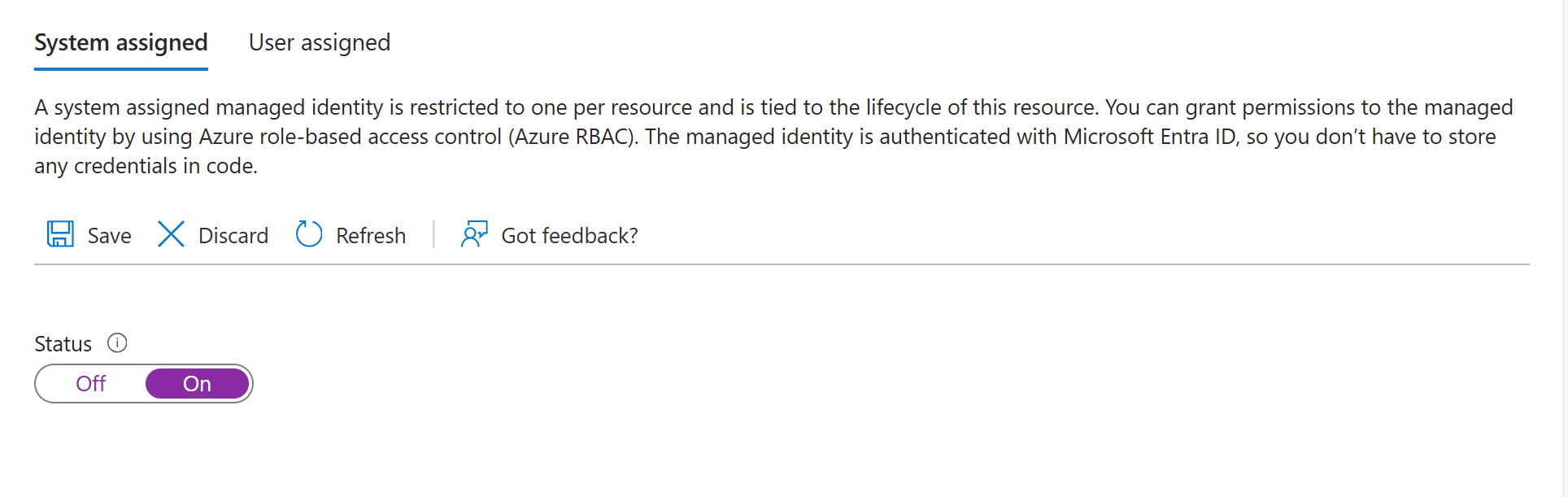
Foundry リソースでシステム割り当てマネージド ID が有効になっていることを確認します。
OpenAPI 仕様を使用して接続するサービスのリソースを作成します。
リソースへの適切なアクセス権を割り当てます。
リソースの [アクセス制御 ] を選択します。
[ 追加] を選択し、画面の上部にある ロールの割り当てを追加 します。
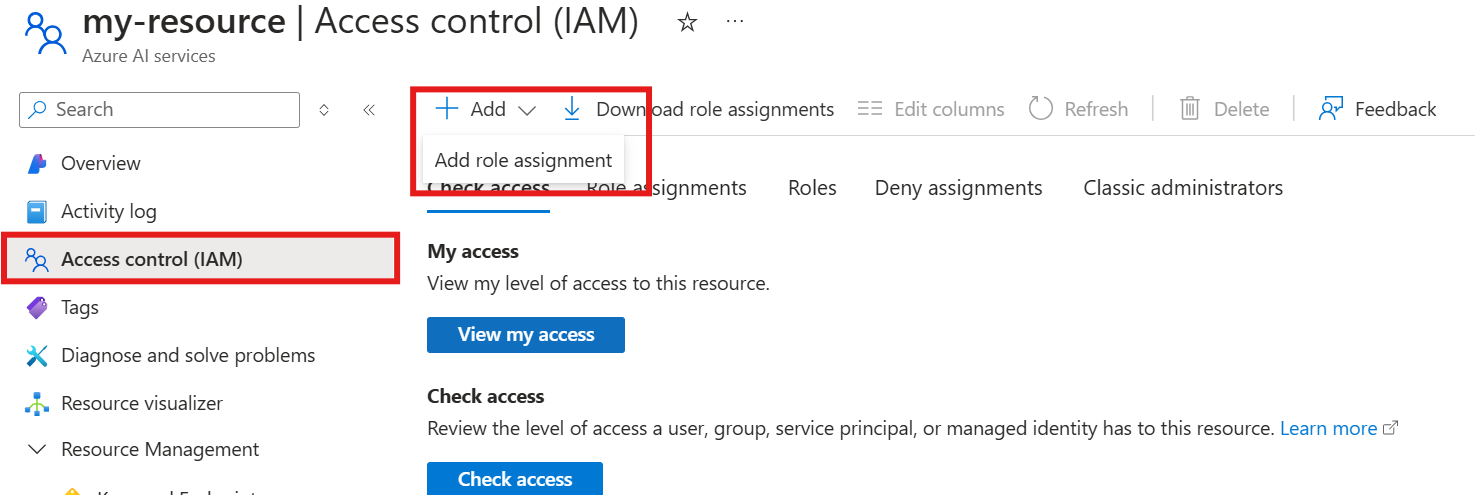
必要な適切なロールの割り当てを選択します。通常は、少なくとも 閲覧者 ロールが必要です。 その後、次へ を選択します。
[ マネージド ID] を 選択し、[ メンバーの選択] を選択します。
マネージド ID ドロップダウン メニューで Foundry アカウント を検索し、エージェントの Foundry アカウントを選択します。
完了を選択します。
セットアップが完了したら、Foundry ポータル、SDK、または REST API からツールを使用して続行できます。 この記事の上部にあるタブを使用して、コード サンプルを確認します。
一般的なエラーのトラブルシューティング
| 症状 | 想定される原因 | 解決策 |
|---|---|---|
| API キーは要求に含まれません。 |
securitySchemesセクションまたはsecurityセクションがない OpenAPI 仕様。 |
OpenAPI 仕様に、 components.securitySchemes と最上位レベルの security セクションの両方が含まれていることを確認します。 スキーム name がプロジェクト接続のキー名と一致していることを確認します。 |
| エージェントは OpenAPI ツールを呼び出しません。 | ツールの選択が設定されていないか、説明的でない operationId 。 |
tool_choice="required"を使用して、ツールの呼び出しを強制します。 モデルが適切な操作を選択できるように、 operationId 値がわかりやすいことを確認します。 |
| マネージド ID の認証は失敗します。 | マネージド ID が有効になっていないか、ロールの割り当てが不足しています。 | Foundry リソースでシステム割り当てマネージド ID を有効にします。 ターゲット サービスに必要なロール (閲覧者以上) を割り当てます。 |
| 要求が 400 (無効な要求) エラーで失敗します。 | OpenAPI 仕様が実際の API と一致しません。 | 実際の API に対して OpenAPI 仕様を検証します。 パラメーター名、型、および必須フィールドを確認します。 |
| 要求は 401 Unauthorized で失敗します。 | API キーまたはトークンが無効であるか、有効期限が切れています。 | API キー/トークンを再生成し、プロジェクト接続を更新します。 接続 ID が正しいことを確認します。 |
| ツールは予期しない応答形式を返します。 | 応答スキーマが OpenAPI 仕様で定義されていません。 | モデルの理解を深めるために、OpenAPI 仕様に応答スキーマを追加します。 |
operationId 検証エラー。 |
operationIdの文字が無効です。 |
-値には、文字、_、およびoperationIdのみを使用します。 数字と特殊文字を削除します。 |
| 接続が見つかりませんエラー。 | 接続名または ID が一致しません。 |
OPENAPI_PROJECT_CONNECTION_NAMEが Foundry プロジェクトの接続名と一致するかどうかを確認します。 |
| ベアラー トークンが正しく送信されませんでした。 | 接続値 Bearer プレフィックスがありません。 |
接続値を Bearer <token> に設定します ( Bearer という単語とトークンの前にスペースを付けます)。
securitySchemesを使用"name": "Authorization" OpenAPI 仕様を確認します。 |
認証方法を選択する
次の表は、OpenAPI ツールに適した認証方法を選択するのに役立ちます。
| 認証方法 | 最適な用途 | セットアップの複雑さ |
|---|---|---|
| アノニマス | 認証なしのパブリック API | 低 |
| API キー | キーベースのアクセス権を持つサードパーティ API | ミディアム |
| マネージド ID | Azure サービスと Microsoft Entra ID で保護された API | 中-高 |