Customer Service 用オムニチャネルには、Dynamics 365 Customer Service Enterprise の機能を拡張する一連の機能が用意されていて、組織はデジタル メッセージング チャネルを通して顧客と即座につながり、やり取りできるようになります。 Customer Service 用オムニチャネルにアクセスする際は、追加のライセンスが必要です。 詳細については、Dynamics 365 Customer Service 価格の概要 と Dynamics 365 Customer Service 価格プラン ページを参照してください。
このメソッドは、Webリソースに実装する必要があります。 このメソッドは、翻訳がオンになっていて、メッセージが会話の早い段階で宛先言語に翻訳されていない場合、顧客とエージェントの間で交換されるすべての会話メッセージに対して呼び出されます。
構文
function (conversationId, translationConfig): Object
パラメーター
| 名前 | タイプ | Description |
|---|---|---|
translationConfig |
JavaScript オブジェクト |
conversationId、messagePayload、translateToC1orC2 のキーと値のペアで構成されます。 |
パラメータの構造 translationConfig は次のとおりです。
export class UserType {
        public static readonly C1 = "Agent"; //Used if the sender of the message is agent
        public static readonly C2 = "Customer"; //Used if the sender of the message is customer
        public static readonly CONSULT = "Consult Agent"; //Used if the sender of the message is other than agent or customer
}

export class TranslateTo {
        public static readonly C1 = "Agent"; //Used if message is translated for agent
        public static readonly C2 = "Customer"; //Used if message is translated for customer
}

export class MessageContentType {
        public static readonly Text = "Text"; //Used if the content type is text
}

interface Sender {
        userType: UserType;  //Points to any static field in UserType type,Represents the type of the user who is sending this message
}

interface MessagePayload {
        content: string;                 //Contains the content to be translated
        contentType: MessageContentType;  //Points to any static field in MessageContentType type,Represents the type of message content. For example: "Text" etc.
        sender: Sender; //Implements Sender interface, Represents the sender of the message
}

interface translationConfig {
        conversationId: string;   //Unique Id for conversation in Omnichannel for Customer Service
        messagePayload: MessagePayload;  //Implements MessagePayload interface, Represents the payload for the message to be translated
        translateToC1orC2: TranslateTo;   //Points to any static field in TranslateTo type,Represents for whom the message has to be translated
 }
conversationConfig パラメーターのサンプルを次に示します。
translationConfig = {
  "conversationId": "2b330c52-6844-4d36-8e05-03c78c9681dc",
  "messagePayload": {
    "content": "Hello",
    "contentType": "Text",
    "sender": {
      "userType": "Agent"
    }
  },
  "translateToC1orC2": "Customer"
}
戻り値
インタフェースを実装する JavaScript オブジェクトに解決される Promise TranslatedMessageResponse 返します。
インターフェイス オブジェクト
export interface ErrorObject{
        isError: boolean; //mandatory field, represents true for error while executing this function else no
        errorCode: ErrorCodes; //mandatory field, represents the type of error based on errorCode
}

export interface TranslatedMessageResponse {
        translatedMessage: string;  //mandatory field, Contains the translated message
        sourceLanguage: string;       //mandatory field, represents the language locale of the original content
        destinationLanguage: string;  //mandatory field, represents the language locale of the translated content
        errorObject?: ErrorObject;  //optional field, represents the error object for any error scenarios
}
errorCode の ErrorObject パラメーターは、次のリストのエラーのみを表します。
| エラーメッセージ | エラー コード | Description |
|---|---|---|
| MESSAGE_TOO_LONG | 100 | 翻訳サービスが翻訳できない非常に長いメッセージのエラーコード |
| LANGUAGE_NOT_SUPPORTED | 101 | 翻訳サービスでサポートされていない言語のエラーコード |
| MESSAGE_NOT_TRANSLATED | 102 | 翻訳サービスによって翻訳されないメッセージのエラーコード |
| TRANSLATION_SERVICE_LIMIT_EXCEEDED | 103 | 翻訳サービスのクォータ制限を超えた場合のエラーコード |
| TRANSLATION_FAILED | 104 | 翻訳サービスがメッセージの翻訳に失敗した場合のエラーコード |
| UNRECOGNIZED_TEXT | 105 | テキストが翻訳サービスによって認識されない場合のエラーコード |
| UNRECOGNIZED_ERROR | 200 | エラーコード リストされたエラー以外のエラーがある場合。 |
インターフェイスの sourceLanguage および destinationLanguage パラメータ TranslatedMessageResponse ロケールIDを表します。 詳細: ロケール ID。
応答の例
{
  "translatedMessage": "Hola",
  "destinationLanguage": "3082",
  "errorObject": {
    "isError": false,
    "errorCode": null
  },
  "sourceLanguage": "3082"
}
注
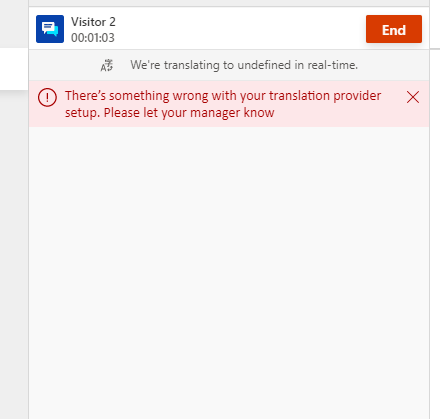
- このメソッドの実行中に例外が発生した場合、Customer Service 用オムニチャネルは再試行せず、代わりに翻訳失敗エラー メッセージを表示します。
- このメソッドの実行中のエラーは、
errorObjectで通知できます。 エラーが発生した場合、Customer Service 用オムニチャネルは再試行せず、代わりに指定されたエラー コードに基づいてエラー メッセージを表示します。 - 返された応答が無効または不完全な場合は、会話コントロールに翻訳バナーのエラーメッセージが表示されます。
- この方法が実装されていない場合、メッセージは変換されず、次のエラー メッセージがエージェントに表示されます。