この記事では、コード アプリの コンテンツ セキュリティ ポリシー (CSP) を構成する方法について説明します。 個々の CSP ディレクティブを設定し、CSP を適用するかレポートのみを使用するかを選択し、レポートを送信する場所を指定できます。
環境レベルでこれらの設定を設定して、環境内のすべてのコード アプリに適用します。
既定では、CSP は次のディレクティブ構成で適用されます。
<platform>値は、プラットフォームで必要な値を表します。
| ディレクティブ | デフォルト値 |
|---|---|
| frame-ancestors | 'self' https://*.powerapps.com |
| script-src | 'self' <platform> |
| img-src | 'self' data: <platform> |
| style-src | 'self' 'unsafe-inline' |
| font-src | 'self' |
| connect-src | 'none' |
| frame-src | 'self' |
| form-action | 'none' |
| base-uri | 'self' |
| child-src | 'none' |
| default-src | 'self' |
| manifest-src | 'none' |
| media-src | 'self' data: |
| object-src | 'self' data: |
| worker-src | 'none' |
ディレクティブをカスタマイズすると、指定した値が既定値に追加されます。
既定値が 'none'の場合、カスタム値によって既定値が置き換えられます。
環境に Dataverse インスタンスがある場合は、 Power Platform 管理センターで CSP 設定を構成できます。 それ以外の場合は、 REST API を使用して CSP を構成する手順を参照してください。
Note
大規模な管理では、環境 グループとルールを使用して、複数の環境に対して一度にこの設定を構成できます。
前提条件
- CSP 設定を構成するには、環境の管理者である必要があります。
Power Platform 管理センターを使用して CSP を構成する
コード アプリの CSP 設定にアクセスするには:
- Power Platform 管理センターにサインインします。
- ナビゲーション ウィンドウで、[管理] を選択 します。 管理ウィンドウで環境を選択します。
- 環境ページで、環境を選択します。
- コマンド バーで、設定を選択します。
- 製品を展開し、プライバシー + セキュリティ を選択します。
- [ コンテンツ セキュリティ ポリシー] で、[ アプリ ] タブを選択します。
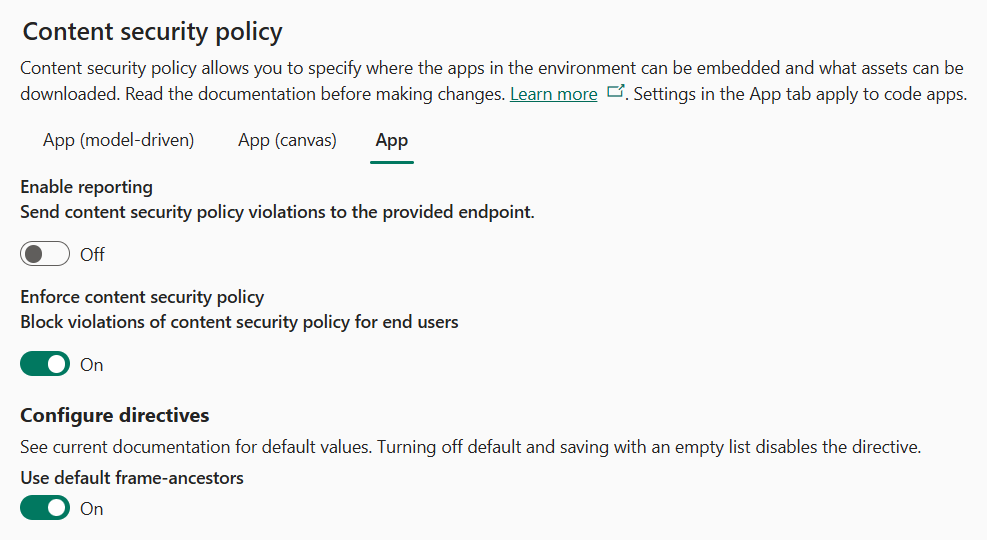
レポートを有効にする
[ レポートの有効化] トグルは、CSP 違反レポートを送信するかどうかを制御します。 有効にする場合は、有効なエンドポイントを指定します。 コンテンツ セキュリティ ポリシーの適用が有効になっているかどうかに関係なく、システムはこのエンドポイントに違反レポートを送信します。 レポートの詳細については、レポートの ドキュメントを参照してください。
![[レポートを有効にする] というラベルが付いたトグルと、URL を含むレポート エンドポイントというラベルのテキスト ボックスのスクリーンショット。](media/content-security-policy-reporting-setting.png)
ディレクティブを構成する
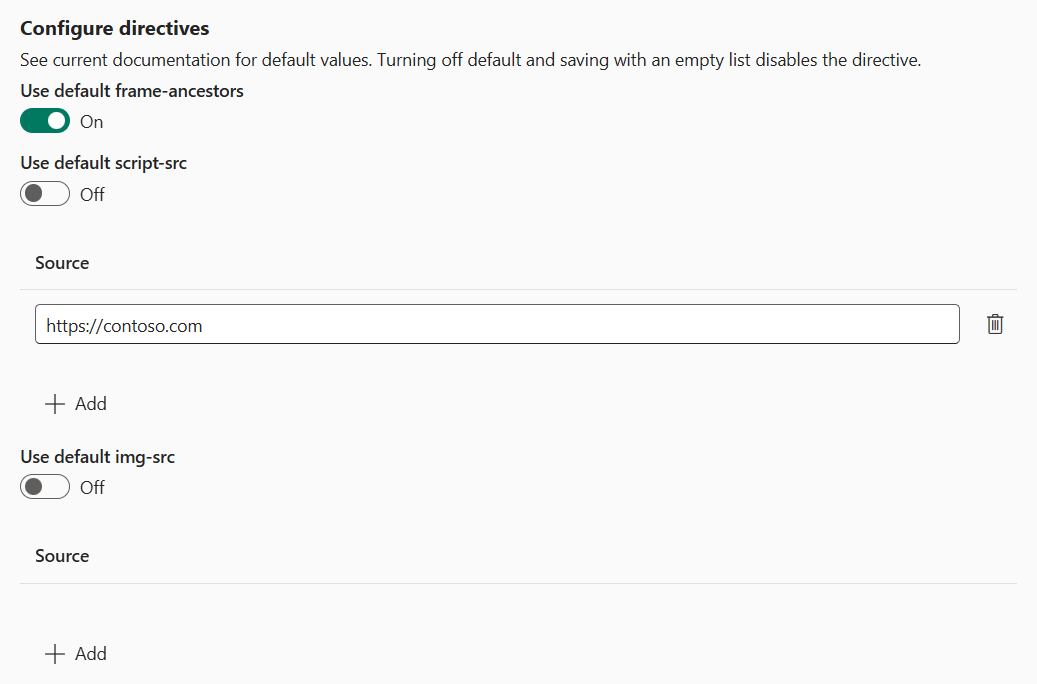
[ ディレクティブの構成 ] セクションを使用して、個々のディレクティブの値を制御します。 既定値をオンのままにした場合は、前に指定した既定値を使用します。 トグルをオフにした場合は、ディレクティブのカスタム値を追加できます。 カスタム値は、ディレクティブの既定値とマージされます。 トグルをオフにして[ソース]リストを空白のままにした場合は、ディレクティブを無効にします。
次の例は、構成が異なる 3 つの異なるディレクティブを示しています。
-
frame-ancestorsが有効になり、既定値を使用するように設定されます。 結果のディレクティブ値は次のとおりです。'self' https://*.powerapps.com -
script-srcが有効になり、別のソースが追加され、既定値とマージされます。 結果のディレクティブ値は次のとおりです。script-src 'self' https://contoso.com -
img-srcは無効です。 このディレクティブは、ポリシーから省略されます。
REST API を使用して CSP を構成する
Microsoft Power Platform API を使用して、CSP をプログラムで構成できます。
環境管理設定 API を使用して設定を管理します。https://api.powerplatform.com/environmentmanagement/environments/{environmentId}/settings
次の設定を実行できます。
PowerApps_CSPEnabledCodeAppsは、コード アプリに CSP を適用するかどうかを制御します。PowerApps_CSPReportingEndpointは、CSP 違反の報告を制御します。 この設定は、CSP 違反レポートが送信される有効な URL に設定するか、レポートが無効になっている場合にnullします。PowerApps_CSPConfigCodeAppsはディレクティブの構成です。 この設定を、次の形式で文字列化された JSON オブジェクトに設定します。{ "default-src": { "sources": [{ "source": "'self'" }] }, "style-src": { "sources": [{ "source": "'self'" }, { "source": "https://contoso.com" }] } // Additional directives }
PowerShell ヘルパー関数
REST API の呼び出しを簡略化するには、次の PowerShell 関数を使用します。
Get-CodeAppContentSecurityPolicy
Get-CodeAppContentSecurityPolicy関数を使用して、指定した環境のコード アプリの現在の CSP 設定を取得します。 この関数は、強制状態、レポート エンドポイント、および構成されたディレクティブを返します。
  <#
  .SYNOPSIS
    Retrieves the Content Security Policy settings for code apps in a Power Platform environment.

  .DESCRIPTION
    Gets the current CSP configuration for code apps, including enforcement status,
    reporting endpoint, and configured directives from the Power Platform API.

  .PARAMETER Env
    The environment ID of the Power Platform environment.

  .PARAMETER Token
    A secure string containing the authentication token for the Power Platform API.

  .PARAMETER ApiEndpoint
    The base URI of the Power Platform API. Defaults to 'https://api.powerplatform.com/'.

  .OUTPUTS
    A hashtable containing:
    - ReportingEndpoint: The URL where CSP violation reports are sent.
    - Enabled: Whether CSP enforcement is enabled.
    - Directives: A hashtable of CSP directives and their configured sources.

  .EXAMPLE
    Get-CodeAppContentSecurityPolicy -Token $token -Env "00000000-0000-0000-0000-000000000000"
  #>
function Get-CodeAppContentSecurityPolicy {
  [CmdletBinding()]
  param(
    [Parameter(Mandatory = $true)]
    [string]$Env,

    [Parameter(Mandatory = $true)]
    [securestring]$Token,

    [uri]$ApiEndpoint = 'https://api.powerplatform.com/'
  )
  $ErrorActionPreference = 'Stop'

  $escapedEnv = [System.Uri]::EscapeDataString($Env)
  $uri = [Uri]::new($ApiEndpoint, "/environmentmanagement/environments/$escapedEnv/settings?api-version=2022-03-01-preview&`$select=PowerApps_CSPReportingEndpoint,PowerApps_CSPEnabledCodeApps,PowerApps_CSPConfigCodeApps")

  $resp = Invoke-RestMethod -Uri $uri -Method Get -Authentication Bearer -Token $Token
  $data = $resp.objectResult[0];

  if ($null -ne $data.PowerApps_CSPConfigCodeApps) {
    $parsed = $data.PowerApps_CSPConfigCodeApps | ConvertFrom-Json -AsHashtable -Depth 10
    $config = @{}
    foreach ($directive in $parsed.Keys) {
      $sources = $parsed[$directive].sources | Select-Object -ExpandProperty source
      $config[$directive] = $sources
    }
  }

  @{
    ReportingEndpoint = $data.PowerApps_CSPReportingEndpoint
    Enabled           = $data.PowerApps_CSPEnabledCodeApps ?? $true
    Directives        = $config
  }
}
Set-CodeAppContentSecurityPolicy (コードアプリのコンテンツセキュリティポリシーを設定する)
Set-CodeAppContentSecurityPolicy関数を使用して、指定した環境のコード アプリの CSP 設定を更新します。 CSP の適用を有効または無効にしたり、レポート エンドポイントを構成したり、個々のディレクティブを更新したりできます。
<#
.SYNOPSIS
  Updates the Content Security Policy settings for code apps in a Power Platform environment.

.DESCRIPTION
  Configures CSP settings for code apps, including enabling or disabling enforcement,
  setting a reporting endpoint for violation reports, and updating CSP directives.

.PARAMETER Env
  The environment ID of the Power Platform environment.

.PARAMETER Token
  A secure string containing the authentication token for the Power Platform API.

.PARAMETER ApiEndpoint
  The base URI of the Power Platform API. Defaults to 'https://api.powerplatform.com/'.

.PARAMETER ReportingEndpoint
  The URL where CSP violation reports are sent. Pass $null to disable reporting.

.PARAMETER Enabled
  Whether to enable or disable CSP enforcement for code apps.

.PARAMETER Directives
  A hashtable of CSP directives and their source values. Replaces the entire directive collection.

.EXAMPLE
  Set-CodeAppContentSecurityPolicy -Token $token -Env "00000000-0000-0000-0000-000000000000" -Enabled $true

.EXAMPLE
  Set-CodeAppContentSecurityPolicy -Token $token -Env "00000000-0000-0000-0000-000000000000" -ReportingEndpoint "https://contoso.com/report"
#>
function Set-CodeAppContentSecurityPolicy {
  [CmdletBinding(SupportsShouldProcess = $true)]
  param(
    [Parameter(Mandatory = $true)]
    [string]$Env,

    [Parameter(Mandatory = $true)]
    [securestring]$Token,

    [uri]$ApiEndpoint = 'https://api.powerplatform.com/',

    [AllowNull()]
    [string]$ReportingEndpoint,

    [bool]$Enabled,

    [hashtable]$Directives
  )
  $payload = @{}

  if ($PSBoundParameters.ContainsKey('ReportingEndpoint')) {
    $payload['PowerApps_CSPReportingEndpoint'] = $ReportingEndpoint
  }

  if ($PSBoundParameters.ContainsKey('Enabled')) {
    $payload['PowerApps_CSPEnabledCodeApps'] = $Enabled
  }

  if ($PSBoundParameters.ContainsKey('Directives')) {
    $allowed = @(
      'Frame-Ancestors', 'Script-Src', 'Img-Src', 'Style-Src', 'Font-Src',
      'Connect-Src', 'Frame-Src', 'Form-Action', 'Base-Uri', 'Child-Src',
      'Default-Src', 'Manifest-Src', 'Media-Src', 'Object-Src', 'Worker-Src'
    )
    $textInfo = [System.Globalization.CultureInfo]::InvariantCulture.TextInfo
    $config = @{}
    foreach ($key in $Directives.Keys) {
      $directive = $textInfo.ToTitleCase($key)
      if ($allowed -notcontains $directive) {
        throw "Invalid CSP directive: $directive"
      }
      $sources = $Directives[$key] | ForEach-Object { @{ source = $_ } }
      $config[$directive] = @{ sources = @($sources) }
    }
    $payload['PowerApps_CSPConfigCodeApps'] = ($config | ConvertTo-Json -Depth 10 -Compress)
  }

  $escapedEnv = [System.Uri]::EscapeDataString($Env)
  $uri = [Uri]::new($ApiEndpoint, "/environmentmanagement/environments/$escapedEnv/settings?api-version=2022-03-01-preview")
  $body = $payload | ConvertTo-Json -Depth 10

  Invoke-RestMethod -Uri $uri -Method Patch -Authentication Bearer -Token $Token -Body $body -ContentType 'application/json' | Out-Null
}
認証
PowerShell 関数を使用するには、認証トークンを指定します。 このトークンを生成するには、 Microsoft 認証 CLI を使用します。 インストール手順については、そのドキュメントを参照してください。 ツールをインストールしたら、次のコマンドを使用して認証トークンを生成します。
$tenantId = "<your-tenant-id>"
$clientId = "9cee029c-6210-4654-90bb-17e6e9d36617" # This is the client id of the Power Platform CLI
$token = azureauth aad --resource "https://api.powerplatform.com/" --tenant $tenantId --client $clientId --output token | ConvertTo-SecureString -AsPlainText -Force
例
次の例では、 PowerShell ヘルパー関数 を使用して CSP 設定を管理する方法を示します。
設定を取得する
Get-CodeAppContentSecurityPolicy -Token $token -Env "<your-env-id>"
Name                           Value
----                           -----
Enabled                        True
ReportingEndpoint              http://constoso.com/report
Directives                     {[Frame-Ancestors, System.Object[]], [Script-Src, 'self']}
適用を有効または無効にする
-Enabled パラメーターを使用して、コード アプリに対して CSP の適用を有効または無効にします。
Set-CodeAppContentSecurityPolicy -Token $token -Env "<your-env-id>" -Enabled $true
レポートを有効または無効にする
-ReportingEndpoint パラメーターを使用して CSP 違反レポートを送信する場所を指定するか、$null渡してレポートを無効にします。
Set-CodeAppContentSecurityPolicy -Token $token -Env "<your-env-id>" -ReportingEndpoint "https://contoso.com/report"
レポートを無効にするには、 $null渡します。
Set-CodeAppContentSecurityPolicy -Token $token -Env "<your-env-id>" -ReportingEndpoint $null
ディレクティブを更新する
Warnung
ディレクティブを更新すると、ディレクティブ コレクション全体が置き換えられます。 既存のディレクティブを更新するには、最初にディレクティブを取り込んでから、それをその場で更新します。
ディレクティブを既定値にリセットするには、コレクションから省略します。 ディレクティブを完全に無効にするには、ディレクティブの空の配列を渡します。
$env = "<your-env-id>"
$directives = (Get-CodeAppContentSecurityPolicy -Token $token -Env $env).Directives
# Update existing directives
Set-CodeAppContentSecurityPolicy -Token $token -Env $env -Directives $directives