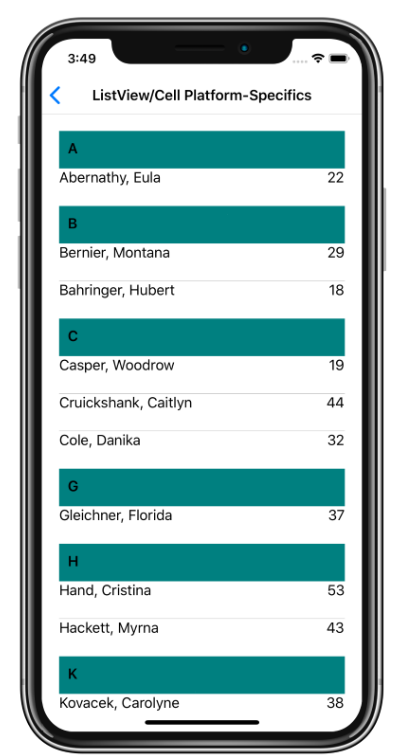
この iOS プラットフォーム固有では、Cell インスタンスの既定の背景色が設定されます。 これは、Cell.DefaultBackgroundColor のバインド可能なプロパティを Color に設定することによって XAML で使用されます。
<ContentPage ...
             xmlns:ios="clr-namespace:Xamarin.Forms.PlatformConfiguration.iOSSpecific;assembly=Xamarin.Forms.Core">
    <StackLayout Margin="20">
        <ListView ItemsSource="{Binding GroupedEmployees}"
                  IsGroupingEnabled="true">
            <ListView.GroupHeaderTemplate>
                <DataTemplate>
                    <ViewCell ios:Cell.DefaultBackgroundColor="Teal">
                        <Label Margin="10,10"
                               Text="{Binding Key}"
                               FontAttributes="Bold" />
                    </ViewCell>
                </DataTemplate>
            </ListView.GroupHeaderTemplate>
            ...
        </ListView>
    </StackLayout>
</ContentPage>
または、Fluent API を使用して C# から使用することもできます。
using Xamarin.Forms.PlatformConfiguration;
using Xamarin.Forms.PlatformConfiguration.iOSSpecific;
...

var viewCell = new ViewCell { View = ... };
viewCell.On<iOS>().SetDefaultBackgroundColor(Color.Teal);
ListView.On<iOS> メソッドは、このプラットフォーム固有設定が iOS でのみ実行されるように指定します。 Xamarin.Forms.PlatformConfiguration.iOSSpecific 名前空間の Cell.SetDefaultBackgroundColor メソッドは、セルの背景色を指定した Color に設定します。 さらに、Cell.DefaultBackgroundColor メソッドを使用して、現在のセルの背景色を取得できます。
その結果、Cell の背景色を特定の Color に設定できます。