ユーザーの目の位置と動きに基づいて、ユーザーの視線、注意、プレゼンスを追跡するためのサポートを提供します。
注
Windows Mixed Reality での視線入力については、「[Gaze]/windows/mixed-reality/mrtk-unity/features/input/gaze)」を参照してください。
重要なAPI群: Windows.Devices.Input.Preview, GazeDevicePreview, GazePointPreview, GazeInputSourcePreview
概要
視線入力は、神経筋疾患 (ALS など) や筋肉や神経機能の障害を伴う他の障害を持つユーザーの支援技術として特に役立つ、Windowsアプリケーションを操作して使用するための強力な方法です。
さらに、視線入力は、ゲーム (ターゲットの取得と追跡を含む) と従来の生産性アプリケーション、キオスク、従来の入力デバイス (キーボード、マウス、タッチ) が利用できないその他の対話型シナリオ、または他のタスク (ショッピング バッグの保持など) のためにユーザーの手を解放するのに役立つ、または役に立つ可能性があるその他の対話型シナリオの両方に、同様に魅力的な機会を提供します。
注
視線追跡ハードウェアのサポートは、Windows 10 Fall Creators UpdateEye control で導入されました。これは、目を使って画面上のポインターを制御し、スクリーン キーボードで入力し、テキスト読み上げを使用してユーザーと通信できるようにする組み込み機能です。 一連のWindows Runtime API (Windows。視線追跡ハードウェアと対話できるアプリケーションを構築するための Devices.Input.Preview) は、Windows 10 April 2018 Update (バージョン 1803、ビルド 17134) 以降で利用できます。
プライバシー
視線追跡デバイスによって収集される潜在的に機密性の高い個人データのため、アプリケーションのアプリ マニフェストで gazeInput 機能を宣言する必要があります (次の セットアップ セクションを参照)。 宣言すると、Windowsは自動的に同意ダイアログ (アプリの初回実行時) をユーザーに求めます。ここで、ユーザーは、アプリが視線追跡デバイスと通信してこのデータにアクセスするためのアクセス許可を付与する必要があります。
さらに、アプリが視線追跡データを収集、保存、または転送する場合は、アプリのプライバシーに関する声明でこれを説明し、App Developer Agreement と Microsoft Store ポリシーの個人情報に関するその他のすべての要件に従う必要があります。
セットアップ
Windows アプリで視線入力 API を使用するには、次の手順を実行する必要があります。
アプリ マニフェストで
gazeInput機能を指定します。Visual Studio マニフェスト デザイナーで Package.appxmanifest ファイルを開くか、View コードを選択し、次の
DeviceCapabilityをCapabilitiesノードに挿入して、手動で機能を追加します。<Capabilities> <DeviceCapability Name="gazeInput" /> </Capabilities>システム (組み込みまたは周辺機器) に接続され、オンになっているWindows対応の視線追跡デバイス。
サポートされている視線追跡デバイスの一覧については、「get started with eye control in Windows 10」を参照してください。
基本的な視線追跡
この例では、Windows アプリ内でユーザーの視線入力を追跡し、基本的なヒット テストでタイミング関数を使用して、特定の要素に対する視線フォーカスをどの程度維持できるかを示す方法を示します。
小さな楕円を使用して、視線ポイントがアプリケーション ビューポート内のどこにあるかを示します。一方、
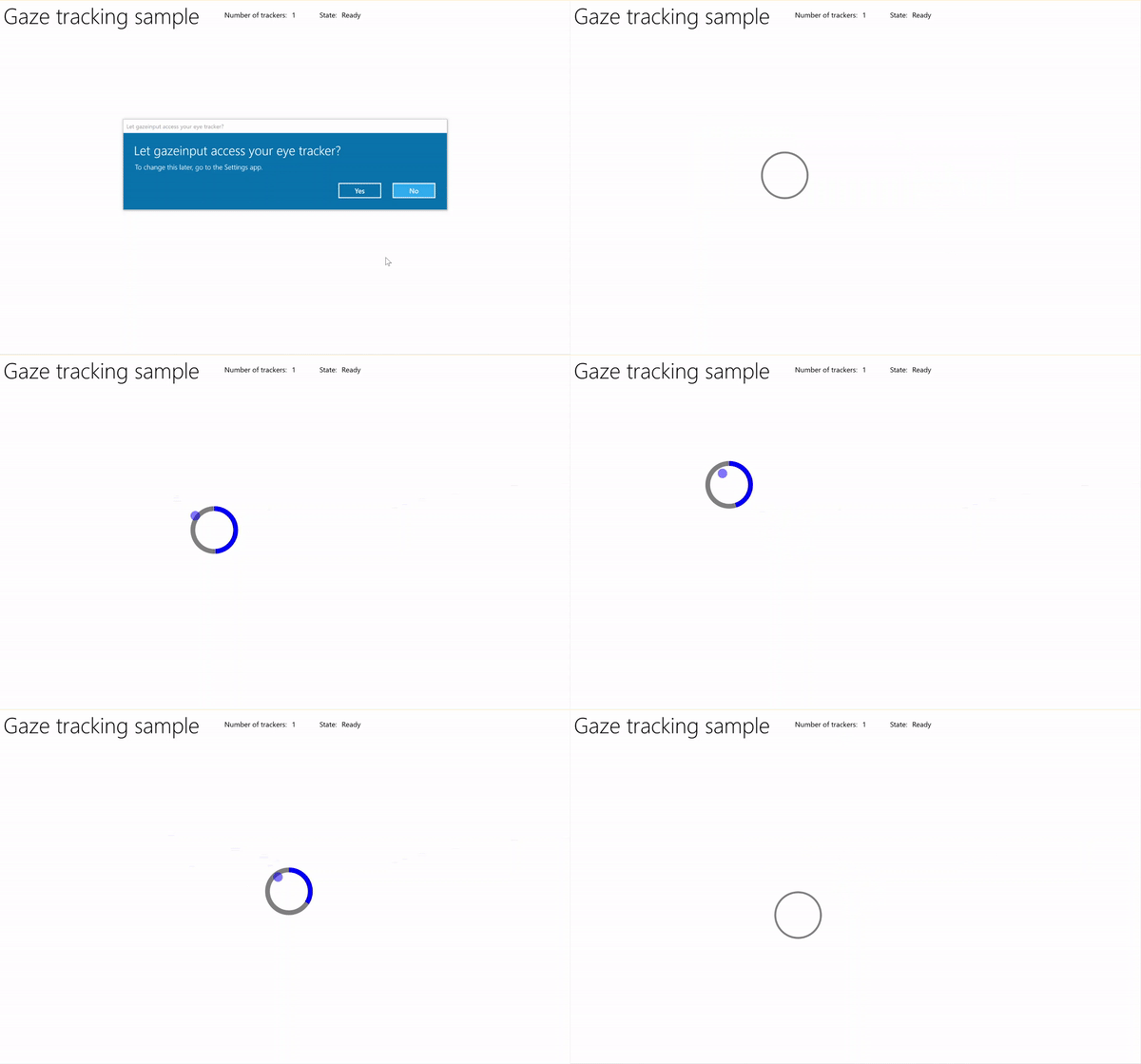
タイマーを使用した視線追跡のサンプル
「視線入力サンプル (基本)」からこのサンプルをダウンロード
まず、UI (MainPage.xaml) を設定します。
<Page
    x:Class="gazeinput.MainPage"
    xmlns="http://schemas.microsoft.com/winfx/2006/xaml/presentation"
    xmlns:x="http://schemas.microsoft.com/winfx/2006/xaml"
    xmlns:local="using:gazeinput"
    xmlns:d="http://schemas.microsoft.com/expression/blend/2008"
    xmlns:mc="http://schemas.openxmlformats.org/markup-compatibility/2006"
    xmlns:controls="using:Microsoft.Toolkit.Uwp.UI.Controls"
    mc:Ignorable="d">

    <Grid Background="{ThemeResource ApplicationPageBackgroundThemeBrush}">
        <Grid x:Name="containerGrid">
            <Grid.RowDefinitions>
                <RowDefinition Height="Auto"/>
                <RowDefinition Height="*"/>
            </Grid.RowDefinitions>
            <StackPanel x:Name="HeaderPanel"
                    Orientation="Horizontal"
                    Grid.Row="0">
                <StackPanel.Transitions>
                    <TransitionCollection>
                        <AddDeleteThemeTransition/>
                    </TransitionCollection>
                </StackPanel.Transitions>
                <TextBlock x:Name="Header"
                       Text="Gaze tracking sample"
                       Style="{ThemeResource HeaderTextBlockStyle}"
                       Margin="10,0,0,0" />
                <TextBlock x:Name="TrackerCounterLabel"
                       VerticalAlignment="Center"
                       Style="{ThemeResource BodyTextBlockStyle}"
                       Text="Number of trackers: "
                       Margin="50,0,0,0"/>
                <TextBlock x:Name="TrackerCounter"
                       VerticalAlignment="Center"
                       Style="{ThemeResource BodyTextBlockStyle}"
                       Text="0"
                       Margin="10,0,0,0"/>
                <TextBlock x:Name="TrackerStateLabel"
                       VerticalAlignment="Center"
                       Style="{ThemeResource BodyTextBlockStyle}"
                       Text="State: "
                       Margin="50,0,0,0"/>
                <TextBlock x:Name="TrackerState"
                       VerticalAlignment="Center"
                       Style="{ThemeResource BodyTextBlockStyle}"
                       Text="n/a"
                       Margin="10,0,0,0"/>
            </StackPanel>
            <Canvas x:Name="gazePositionCanvas" Grid.Row="1">
                <controls:RadialProgressBar
                    x:Name="GazeRadialProgressBar"
                    Value="0"
                    Foreground="Blue"
                    Background="White"
                    Thickness="4"
                    Minimum="0"
                    Maximum="100"
                    Width="100"
                    Height="100"
                    Outline="Gray"
                    Visibility="Collapsed"/>
                <Ellipse
                    x:Name="eyeGazePositionEllipse"
                    Width="20" Height="20"
                    Fill="Blue"
                    Opacity="0.5"
                    Visibility="Collapsed">
                </Ellipse>
            </Canvas>
        </Grid>
    </Grid>
</Page>
次に、アプリを初期化します。
このスニペットでは、グローバル オブジェクトを宣言し、 OnNavigatedTo ページ イベントをオーバーライドして 視線デバイス ウォッチャー を開始し、 OnNavigatedFrom ページ イベントを開始して 視線デバイス ウォッチャーを停止します。
using System;
using Windows.Devices.Input.Preview;
using Windows.UI.Xaml.Controls;
using Windows.UI.Xaml;
using Windows.Foundation;
using System.Collections.Generic;
using Windows.UI.Xaml.Media;
using Windows.UI.Xaml.Navigation;

namespace gazeinput
{
    public sealed partial class MainPage : Page
    {
        /// <summary>
        /// Reference to the user's eyes and head as detected
        /// by the eye-tracking device.
        /// </summary>
        private GazeInputSourcePreview gazeInputSource;

        /// <summary>
        /// Dynamic store of eye-tracking devices.
        /// </summary>
        /// <remarks>
        /// Receives event notifications when a device is added, removed,
        /// or updated after the initial enumeration.
        /// </remarks>
        private GazeDeviceWatcherPreview gazeDeviceWatcher;

        /// <summary>
        /// Eye-tracking device counter.
        /// </summary>
        private int deviceCounter = 0;

        /// <summary>
        /// Timer for gaze focus on RadialProgressBar.
        /// </summary>
        DispatcherTimer timerGaze = new DispatcherTimer();

        /// <summary>
        /// Tracker used to prevent gaze timer restarts.
        /// </summary>
        bool timerStarted = false;

        /// <summary>
        /// Initialize the app.
        /// </summary>
        public MainPage()
        {
            InitializeComponent();
        }

        /// <summary>
        /// Override of OnNavigatedTo page event starts GazeDeviceWatcher.
        /// </summary>
        /// <param name="e">Event args for the NavigatedTo event</param>
        protected override void OnNavigatedTo(NavigationEventArgs e)
        {
            // Start listening for device events on navigation to eye-tracking page.
            StartGazeDeviceWatcher();
        }

        /// <summary>
        /// Override of OnNavigatedFrom page event stops GazeDeviceWatcher.
        /// </summary>
        /// <param name="e">Event args for the NavigatedFrom event</param>
        protected override void OnNavigatedFrom(NavigationEventArgs e)
        {
            // Stop listening for device events on navigation from eye-tracking page.
            StopGazeDeviceWatcher();
        }
    }
}
次に、「視線デバイスウォッチャー」のメソッドを追加します。
StartGazeDeviceWatcherでは、CreateWatcher を呼び出し、視線追跡デバイス イベント リスナー (DeviceAdded、DeviceUpdated、DeviceRemoved) を宣言します。DeviceAddedでは、視線追跡デバイスの状態を確認します。 実行可能なデバイスの場合は、デバイス数を増やし、視線追跡を有効にします。 詳細については、次の手順を参照してください。DeviceUpdatedでは、デバイスが再調整されるとこのイベントがトリガーされるため、視線追跡も有効になります。DeviceRemovedでは、デバイス カウンターをデクリメントし、デバイス イベント ハンドラーを削除します。StopGazeDeviceWatcherでは、視線入力デバイスウォッチャーをシャットダウンします。
    /// <summary>
    /// Start gaze watcher and declare watcher event handlers.
    /// </summary>
    private void StartGazeDeviceWatcher()
    {
        if (gazeDeviceWatcher == null)
        {
            gazeDeviceWatcher = GazeInputSourcePreview.CreateWatcher();
            gazeDeviceWatcher.Added += this.DeviceAdded;
            gazeDeviceWatcher.Updated += this.DeviceUpdated;
            gazeDeviceWatcher.Removed += this.DeviceRemoved;
            gazeDeviceWatcher.Start();
        }
    }

    /// <summary>
    /// Shut down gaze watcher and stop listening for events.
    /// </summary>
    private void StopGazeDeviceWatcher()
    {
        if (gazeDeviceWatcher != null)
        {
            gazeDeviceWatcher.Stop();
            gazeDeviceWatcher.Added -= this.DeviceAdded;
            gazeDeviceWatcher.Updated -= this.DeviceUpdated;
            gazeDeviceWatcher.Removed -= this.DeviceRemoved;
            gazeDeviceWatcher = null;
        }
    }

    /// <summary>
    /// Eye-tracking device connected (added, or available when watcher is initialized).
    /// </summary>
    /// <param name="sender">Source of the device added event</param>
    /// <param name="e">Event args for the device added event</param>
    private void DeviceAdded(GazeDeviceWatcherPreview source,
        GazeDeviceWatcherAddedPreviewEventArgs args)
    {
        if (IsSupportedDevice(args.Device))
        {
            deviceCounter++;
            TrackerCounter.Text = deviceCounter.ToString();
        }
        // Set up gaze tracking.
        TryEnableGazeTrackingAsync(args.Device);
    }

    /// <summary>
    /// Initial device state might be uncalibrated,
    /// but device was subsequently calibrated.
    /// </summary>
    /// <param name="sender">Source of the device updated event</param>
    /// <param name="e">Event args for the device updated event</param>
    private void DeviceUpdated(GazeDeviceWatcherPreview source,
        GazeDeviceWatcherUpdatedPreviewEventArgs args)
    {
        // Set up gaze tracking.
        TryEnableGazeTrackingAsync(args.Device);
    }

    /// <summary>
    /// Handles disconnection of eye-tracking devices.
    /// </summary>
    /// <param name="sender">Source of the device removed event</param>
    /// <param name="e">Event args for the device removed event</param>
    private void DeviceRemoved(GazeDeviceWatcherPreview source,
        GazeDeviceWatcherRemovedPreviewEventArgs args)
    {
        // Decrement gaze device counter and remove event handlers.
        if (IsSupportedDevice(args.Device))
        {
            deviceCounter--;
            TrackerCounter.Text = deviceCounter.ToString();

            if (deviceCounter == 0)
            {
                gazeInputSource.GazeEntered -= this.GazeEntered;
                gazeInputSource.GazeMoved -= this.GazeMoved;
                gazeInputSource.GazeExited -= this.GazeExited;
            }
        }
    }
ここでは、デバイスが
IsSupportedDeviceで実行可能かどうかを確認し、有効な場合は、TryEnableGazeTrackingAsyncで視線追跡を有効にしようとします。TryEnableGazeTrackingAsyncでは、視線入力イベント ハンドラーを宣言し、GazeInputSourcePreview.GetForCurrentView() を呼び出して入力ソースへの参照を取得します (これは UI スレッドで呼び出す必要があります。「UI スレッドの応答性を維持する」を参照してください)。注
GazeInputSourcePreview.GetForCurrentView() は、互換性のある視線追跡デバイスが接続されていて、アプリケーションで必要な場合にのみ呼び出す必要があります。 それ以外の場合、同意ダイアログは不要です。
    /// <summary>
    /// Initialize gaze tracking.
    /// </summary>
    /// <param name="gazeDevice"></param>
    private async void TryEnableGazeTrackingAsync(GazeDevicePreview gazeDevice)
    {
        // If eye-tracking device is ready, declare event handlers and start tracking.
        if (IsSupportedDevice(gazeDevice))
        {
            timerGaze.Interval = new TimeSpan(0, 0, 0, 0, 20);
            timerGaze.Tick += TimerGaze_Tick;

            SetGazeTargetLocation();

            // This must be called from the UI thread.
            gazeInputSource = GazeInputSourcePreview.GetForCurrentView();

            gazeInputSource.GazeEntered += GazeEntered;
            gazeInputSource.GazeMoved += GazeMoved;
            gazeInputSource.GazeExited += GazeExited;
        }
        // Notify if device calibration required.
        else if (gazeDevice.ConfigurationState ==
                    GazeDeviceConfigurationStatePreview.UserCalibrationNeeded ||
                    gazeDevice.ConfigurationState ==
                    GazeDeviceConfigurationStatePreview.ScreenSetupNeeded)
        {
            // Device isn't calibrated, so invoke the calibration handler.
            System.Diagnostics.Debug.WriteLine(
                "Your device needs to calibrate. Please wait for it to finish.");
            await gazeDevice.RequestCalibrationAsync();
        }
        // Notify if device calibration underway.
        else if (gazeDevice.ConfigurationState ==
            GazeDeviceConfigurationStatePreview.Configuring)
        {
            // Device is currently undergoing calibration.
            // A device update is sent when calibration complete.
            System.Diagnostics.Debug.WriteLine(
                "Your device is being configured. Please wait for it to finish");
        }
        // Device is not viable.
        else if (gazeDevice.ConfigurationState == GazeDeviceConfigurationStatePreview.Unknown)
        {
            // Notify if device is in unknown state.
            // Reconfigure/recalbirate the device.
            System.Diagnostics.Debug.WriteLine(
                "Your device is not ready. Please set up your device or reconfigure it.");
        }
    }

    /// <summary>
    /// Check if eye-tracking device is viable.
    /// </summary>
    /// <param name="gazeDevice">Reference to eye-tracking device.</param>
    /// <returns>True, if device is viable; otherwise, false.</returns>
    private bool IsSupportedDevice(GazeDevicePreview gazeDevice)
    {
        TrackerState.Text = gazeDevice.ConfigurationState.ToString();
        return (gazeDevice.CanTrackEyes &&
                    gazeDevice.ConfigurationState ==
                    GazeDeviceConfigurationStatePreview.Ready);
    }
次に、視線イベントハンドラーを設定します。
GazeEnteredとGazeExitedの視線追跡楕円をそれぞれ表示および非表示にします。GazeMovedでは、GazeEnteredPreviewEventArgs の CurrentPoint によって提供される EyeGazePosition に基づいて視線追跡楕円を移動します。 また、 RadialProgressBar の視線フォーカス タイマーも管理します。これは、進行状況バーの位置変更をトリガーします。 詳細については、次の手順を参照してください。/// <summary> /// GazeEntered handler. /// </summary> /// <param name="sender">Source of the gaze entered event</param> /// <param name="e">Event args for the gaze entered event</param> private void GazeEntered( GazeInputSourcePreview sender, GazeEnteredPreviewEventArgs args) { // Show ellipse representing gaze point. eyeGazePositionEllipse.Visibility = Visibility.Visible; // Mark the event handled. args.Handled = true; } /// <summary> /// GazeExited handler. /// Call DisplayRequest.RequestRelease to conclude the /// RequestActive called in GazeEntered. /// </summary> /// <param name="sender">Source of the gaze exited event</param> /// <param name="e">Event args for the gaze exited event</param> private void GazeExited( GazeInputSourcePreview sender, GazeExitedPreviewEventArgs args) { // Hide gaze tracking ellipse. eyeGazePositionEllipse.Visibility = Visibility.Collapsed; // Mark the event handled. args.Handled = true; } /// <summary> /// GazeMoved handler translates the ellipse on the canvas to reflect gaze point. /// </summary> /// <param name="sender">Source of the gaze moved event</param> /// <param name="e">Event args for the gaze moved event</param> private void GazeMoved(GazeInputSourcePreview sender, GazeMovedPreviewEventArgs args) { // Update the position of the ellipse corresponding to gaze point. if (args.CurrentPoint.EyeGazePosition != null) { double gazePointX = args.CurrentPoint.EyeGazePosition.Value.X; double gazePointY = args.CurrentPoint.EyeGazePosition.Value.Y; double ellipseLeft = gazePointX - (eyeGazePositionEllipse.Width / 2.0f); double ellipseTop = gazePointY - (eyeGazePositionEllipse.Height / 2.0f) - (int)Header.ActualHeight; // Translate transform for moving gaze ellipse. TranslateTransform translateEllipse = new TranslateTransform { X = ellipseLeft, Y = ellipseTop }; eyeGazePositionEllipse.RenderTransform = translateEllipse; // The gaze point screen location. Point gazePoint = new Point(gazePointX, gazePointY); // Basic hit test to determine if gaze point is on progress bar. bool hitRadialProgressBar = DoesElementContainPoint( gazePoint, GazeRadialProgressBar.Name, GazeRadialProgressBar); // Use progress bar thickness for visual feedback. if (hitRadialProgressBar) { GazeRadialProgressBar.Thickness = 10; } else { GazeRadialProgressBar.Thickness = 4; } // Mark the event handled. args.Handled = true; } }最後に、このアプリの視線フォーカス タイマーを管理するために使用されるメソッドを次に示します。
DoesElementContainPointは、視線ポインターが進行状況バーの上にあるかどうかを確認します。 その場合は、視線タイマーが開始され、視線タイマーの各ティックごとに進捗バーが進行します。SetGazeTargetLocationは進行状況バーの初期位置を設定し、進行状況バーが完了した場合 (視線フォーカス タイマーに応じて)、進行状況バーをランダムな場所に移動します。/// <summary> /// Return whether the gaze point is over the progress bar. /// </summary> /// <param name="gazePoint">The gaze point screen location</param> /// <param name="elementName">The progress bar name</param> /// <param name="uiElement">The progress bar UI element</param> /// <returns></returns> private bool DoesElementContainPoint( Point gazePoint, string elementName, UIElement uiElement) { // Use entire visual tree of progress bar. IEnumerable<UIElement> elementStack = VisualTreeHelper.FindElementsInHostCoordinates(gazePoint, uiElement, true); foreach (UIElement item in elementStack) { //Cast to FrameworkElement and get element name. if (item is FrameworkElement feItem) { if (feItem.Name.Equals(elementName)) { if (!timerStarted) { // Start gaze timer if gaze over element. timerGaze.Start(); timerStarted = true; } return true; } } } // Stop gaze timer and reset progress bar if gaze leaves element. timerGaze.Stop(); GazeRadialProgressBar.Value = 0; timerStarted = false; return false; } /// <summary> /// Tick handler for gaze focus timer. /// </summary> /// <param name="sender">Source of the gaze entered event</param> /// <param name="e">Event args for the gaze entered event</param> private void TimerGaze_Tick(object sender, object e) { // Increment progress bar. GazeRadialProgressBar.Value += 1; // If progress bar reaches maximum value, reset and relocate. if (GazeRadialProgressBar.Value == 100) { SetGazeTargetLocation(); } } /// <summary> /// Set/reset the screen location of the progress bar. /// </summary> private void SetGazeTargetLocation() { // Ensure the gaze timer restarts on new progress bar location. timerGaze.Stop(); timerStarted = false; // Get the bounding rectangle of the app window. Rect appBounds = Windows.UI.ViewManagement.ApplicationView.GetForCurrentView().VisibleBounds; // Translate transform for moving progress bar. TranslateTransform translateTarget = new TranslateTransform(); // Calculate random location within gaze canvas. Random random = new Random(); int randomX = random.Next( 0, (int)appBounds.Width - (int)GazeRadialProgressBar.Width); int randomY = random.Next( 0, (int)appBounds.Height - (int)GazeRadialProgressBar.Height - (int)Header.ActualHeight); translateTarget.X = randomX; translateTarget.Y = randomY; GazeRadialProgressBar.RenderTransform = translateTarget; // Show progress bar. GazeRadialProgressBar.Visibility = Visibility.Visible; GazeRadialProgressBar.Value = 0; }