შენიშვნა
ამ გვერდზე წვდომა მოითხოვს ავტორიზაციას. შეგიძლიათ სცადოთ შესვლა ან შეცვალოთ დირექტორიები.
ამ გვერდზე წვდომა მოითხოვს ავტორიზაციას. შეგიძლიათ სცადოთ დირექტორიების შეცვლა.
Azure NetApp Files supports volume cross-zone and cross-region replication on the same source volume.
Requirements
- Cross-zone-region replication supports creating two replication relationships for a source volume: cross-zone replication, cross-region replication, or a combination.
- Cross-zone-region replication volumes must abide by the same requirements and considerations as individual cross-region and cross-zone replication volumes.
- You must break and delete the secondary relationship before you can perform a reverse resync operation with cross-zone-region replication. For more information, see Resync volumes after disaster recovery.
- Fan-out deployments are supported for two destination volumes: one source (read/write) volume and two destination volumes.
Note
Data protection is limited to two volumes.
Configure replication
On the source volume:
- If you're using an existing volume without an availability zone: populate it with an availability zone.
- If you're creating a new volume: create it with an availability zone.
Under Properties, take note of the source volume’s resource ID. The source volume's resource ID is required to complete the next two steps.
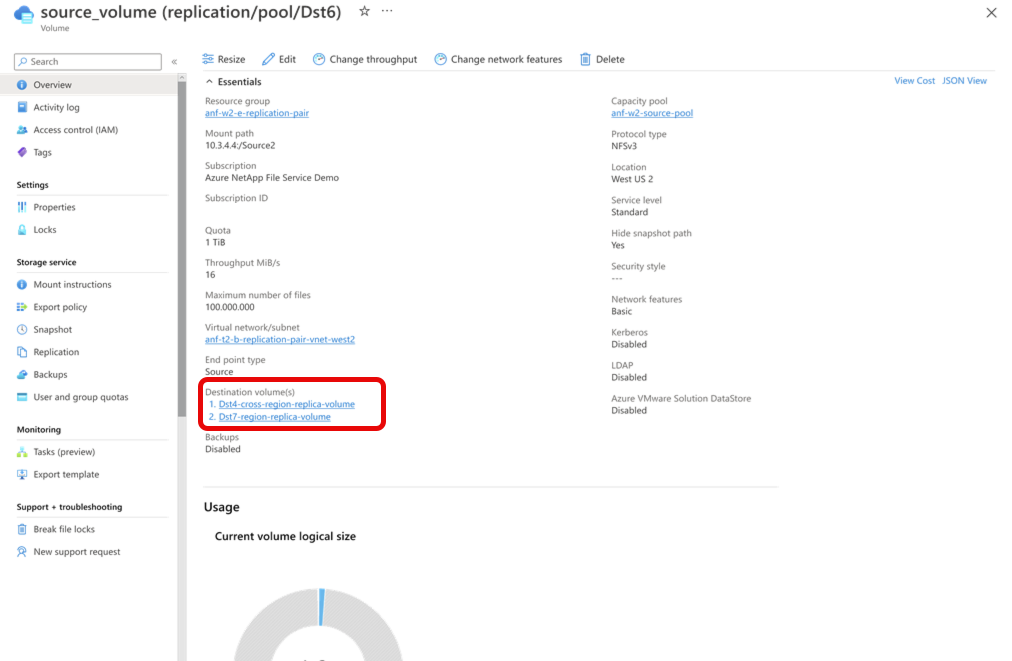
In the source volume’s menu, select Replication. Confirm there are two volumes listed under Destination volumes.
Note
With cross-zone-region replication, you can create a combination of a cross-zone and a cross-region replication relationship, two cross-region replication relationships, or two cross-zone replication relationships. The cross-zone relationship can be within the same zone.