Note
ამ გვერდზე წვდომა ავტორიზაციას მოითხოვს. შეგიძლიათ სცადოთ შესვლა ან დირექტორიების შეცვლა.
ამ გვერდზე წვდომა ავტორიზაციას მოითხოვს. შეგიძლიათ სცადოთ დირექტორიების შეცვლა.
This quickstart shows you how to generate Java unit tests by using GitHub Copilot modernization.
Prerequisites
- A GitHub account with GitHub Copilot enabled. You need a Free Tier, Pro, Pro+, Business, or Enterprise plan.
- Java JDK for the project's JDK version.
- Maven or Gradle to build Java projects.
- A Git-managed Java project using Maven or Gradle.
- For Maven-based projects: access to the public Maven Central repository.
- The latest version of Visual Studio Code. Must be version 1.113 or later.
- GitHub Copilot in Visual Studio Code. For setup instructions, see Set up GitHub Copilot in Visual Studio Code. Be sure to sign in to your GitHub account within Visual Studio Code.
- GitHub Copilot modernization. Restart Visual Studio Code after installation.
- The latest version of IntelliJ IDEA. Must be version 2023.3 or later.
- GitHub Copilot. Must be version 1.5.59 or later. For more instructions, see Set up GitHub Copilot in IntelliJ IDEA. Be sure to sign in to your GitHub account within IntelliJ IDEA.
- GitHub Copilot modernization. Restart IntelliJ IDEA after installation.
Install the GitHub Copilot CLI:
npm install -g @github/copilotInstall the GitHub Copilot modernization plugin:
copilot plugin marketplace add microsoft/modernize-java
copilot plugin install modernize-java@modernize-java
Note
An Azure account is required only for deploying resources to Azure, and isn't needed when using GitHub Copilot modernization to make code changes.
If you're using Gradle, only the Gradle wrapper version 5 or later is supported.
The Kotlin Domain Specific Language (DSL) isn't supported.
Generate unit tests
Use the following steps to generate unit tests:
Open a Java project in Visual Studio Code.
Open the GitHub Copilot Chat panel.
Enter a prompt such as the following example:
Generate unit tests for this Java project using #appmod-generate-tests-for-java
Use the following steps to generate unit tests:
Open a Java project in IntelliJ IDEA.
Open the GitHub Copilot Chat panel and ensure Agent Mode is selected.
Enter a prompt such as the following example:
Generate unit tests for this Java project using #appmod-generate-tests-for-java
Use the following steps to generate unit tests:
Open a terminal and navigate to your Java project directory.
Start the Copilot CLI:
copilot --model claude-sonnet-4.6Enter a prompt such as the following example:
Generate unit tests for this Java project using #appmod-generate-tests-for-java
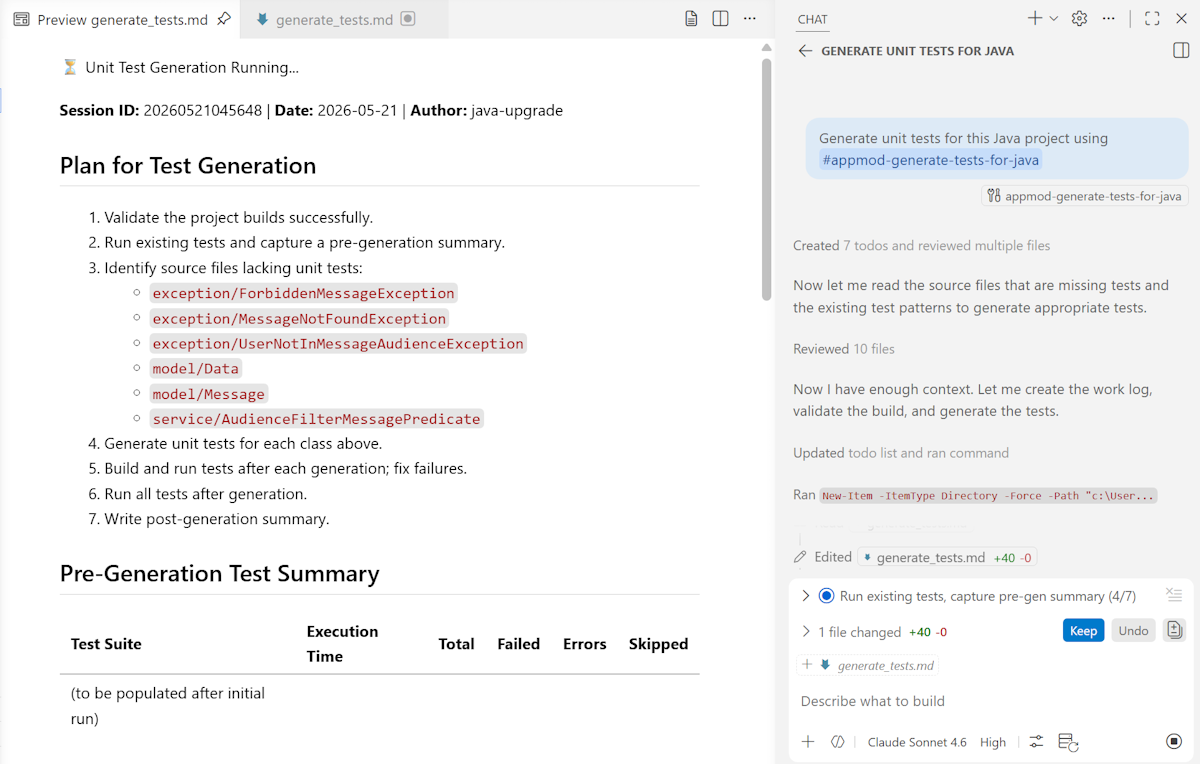
The agent analyzes the project, identifies source files lacking unit tests, and generates a generate_tests.md work log that tracks progress.
Review the results
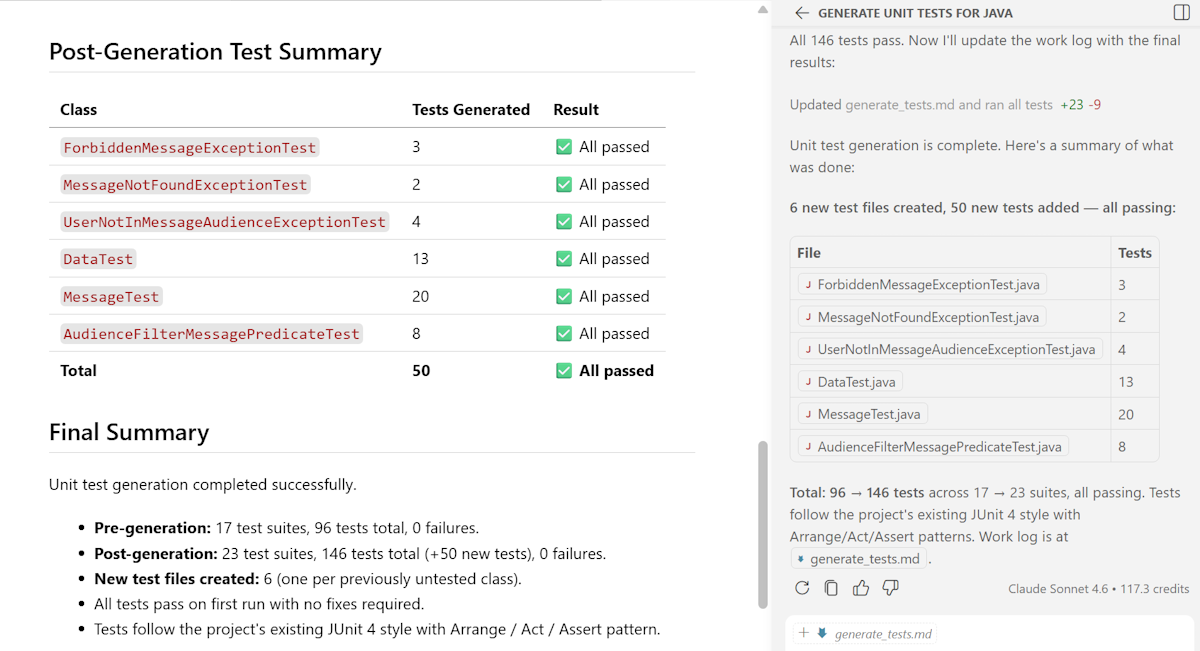
After test generation finishes, the work log shows a final summary that compares pre-generation and post-generation test results. This summary includes:
- Number of new test files created
- Total tests before and after generation
- Pass or fail status for each generated test class
The agent generates tests that follow the project's existing test patterns and validates that all tests pass before it finishes.