TaskbarItemInfo.ProgressState 속성
정의
중요
일부 정보는 릴리스되기 전에 상당 부분 수정될 수 있는 시험판 제품과 관련이 있습니다. Microsoft는 여기에 제공된 정보에 대해 어떠한 명시적이거나 묵시적인 보증도 하지 않습니다.
작업 표시줄 단추에 진행률 표시기가 표시되는 방식을 나타내는 값을 가져오거나 설정합니다.
public:
 property System::Windows::Shell::TaskbarItemProgressState ProgressState { System::Windows::Shell::TaskbarItemProgressState get(); void set(System::Windows::Shell::TaskbarItemProgressState value); };
public System.Windows.Shell.TaskbarItemProgressState ProgressState { get; set; }member this.ProgressState : System.Windows.Shell.TaskbarItemProgressState with get, setPublic Property ProgressState As TaskbarItemProgressState속성 값
작업 표시줄 단추에 진행률 표시기가 표시되는 방식을 나타내는 열거형 값입니다. 기본값은 None입니다.
예제
다음 예제에서는 코드에서 속성을 설정하는 ProgressState 방법을 보여줍니다. 상태는 백그라운드 작업이 사용자에 의해 중지되었는지, 오류로 끝났는지 또는 정상적으로 완료되었는지를 나타내기 위해 이벤트 처리기 BackgroundWorker.RunWorkerCompleted 에서 설정됩니다. 이 예제는 클래스에 제공된 더 큰 예제의 TaskbarItemInfo 일부입니다.
void bw_RunWorkerCompleted(object sender, RunWorkerCompletedEventArgs e)
{
    // When the task ends, change the ProgressState and Overlay
    // of the taskbar item to indicate a stopped task.
    if (e.Cancelled)
    {
        // The task was stopped by the user. Show the progress indicator
        // in the paused state.
        this.taskBarItemInfo1.ProgressState = TaskbarItemProgressState.Paused;
    }
    else if (e.Error != null)
    {
        // The task ended with an error. Show the progress indicator
        // in the error state.
        this.taskBarItemInfo1.ProgressState = TaskbarItemProgressState.Error;
    }
    else
    {
        // The task completed normally. Remove the progress indicator.
        this.taskBarItemInfo1.ProgressState = TaskbarItemProgressState.None;
    }
    // In all cases, show the 'Stopped' overlay.
    this.taskBarItemInfo1.Overlay = (DrawingImage)this.FindResource("StopImage");
}
Private Sub bw_RunWorkerCompleted(ByVal sender As Object, ByVal e As RunWorkerCompletedEventArgs)
    ' When the task ends, change the ProgressState and Overlay
    ' of the taskbar item to indicate a stopped task.
    If e.Cancelled = True Then
        ' The task was stopped by the user. Show the progress indicator
        ' in the paused state.
        Me.taskBarItemInfo1.ProgressState = TaskbarItemProgressState.Paused
    ElseIf e.Error IsNot Nothing Then
        ' The task ended with an error. Show the progress indicator
        ' in the error state.
        Me.taskBarItemInfo1.ProgressState = TaskbarItemProgressState.Error
    Else
        ' The task completed normally. Remove the progress indicator.
        Me.taskBarItemInfo1.ProgressState = TaskbarItemProgressState.None
        ' In all cases, show the 'Stopped' overlay.
        Me.taskBarItemInfo1.Overlay = Me.FindResource("StopImage")
    End If
End Sub
설명
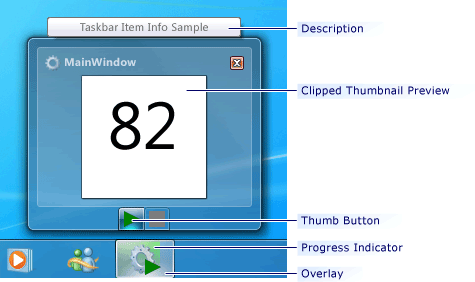
Windows 7 작업 표시줄 단추에 진행률 표시기를 표시하여 장기 실행 작업의 진행률을 전달할 수 있습니다. 표시기의 색은 열거형 값 중 하나를 포함하는 속성에 TaskbarItemProgressState 의해 ProgressState 결정됩니다. 이 Normal경우 ProgressState 표시기가 녹색입니다. 때 Paused표시기가 노란색입니다. 때 Error표시기가 빨간색입니다. 이러한 상태의 경우 속성은 ProgressValue 진행률 표시기로 채워지는 작업 표시줄 단추의 양을 결정합니다. ProgressValue 의 다른 값에 대해서는 무시됩니다 ProgressState. Indeterminate 는 전체 작업 표시줄 단추에 걸쳐 펄스 녹색 표시기를 표시합니다. 에 대한 None표시기가 표시되지 않습니다.
다음 그림에서는 상태의 작업 표시줄 진행률 표시기를 보여 줍니다 Normal .
 Windows 작업 표시줄 진행률 표시기
