다음을 통해 공유


AI 에이전트 시작

Mosaic AI 에이전트 프레임워크를 사용하여 첫 번째 AI 에이전트를 빌드합니다. 이 자습서에서는 다음을 수행합니다.

  • 에이전트 프레임워크를 사용하여 에이전트를 작성합니다.
  • 에이전트에 도구를 추가합니다.
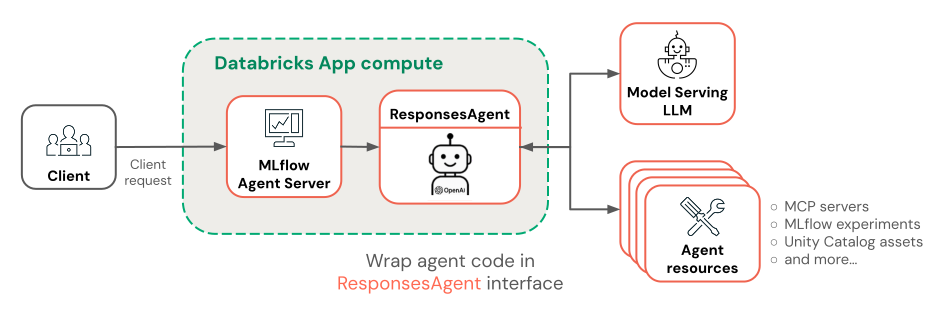
  • 엔드포인트를 제공하는 Databricks 모델에 에이전트를 배포합니다.

에이전트 및 기타 Gen AI 앱에 대한 개념적 소개는 Gen AI 앱이란?을 참조하세요.

요구 사항

작업 영역에는 다음 기능이 활성화되어 있어야 합니다.

예제 노트북

이 Notebook에는 첫 번째 AI 에이전트를 작성하고 배포하는 데 필요한 모든 코드가 포함되어 있습니다. Notebook을 Azure Databricks 작업 영역으로 가져와 실행합니다.

모자이크 AI 에이전트 데모

노트북 받기

에이전트 정의

AI 에이전트는 다음으로 구성됩니다.

  • 결정을 내리고 추론할 수 있는 LLM(대규모 언어 모델)
  • LLM이 Python 코드 실행 또는 데이터 가져오기와 같은 텍스트를 생성하는 것 이상을 수행하는 데 사용할 수 있는 도구

Databricks Notebook에서 다음 코드를 실행하여 간단한 도구 호출 에이전트를 정의합니다.

  1. 필요한 Python 패키지를 설치합니다.

    %pip install -U -qqqq mlflow databricks-openai databricks-agents"
    dbutils.library.restartPython()
    
    • mlflow: 에이전트 개발 및 에이전트 추적에 사용됩니다.
    • databricks-openai: Databricks 호스팅 LLM에 연결하고 Unity 카탈로그 도구에 액세스하는 데 사용됩니다.
    • databricks-agents: 에이전트를 패키지하고 배포하는 데 사용됩니다.
  2. 에이전트를 정의합니다. 이 코드 조각은 다음을 수행합니다.

    • OpenAI 클라이언트를 사용하여 엔드포인트를 제공하는 Databricks 모델에 연결합니다.
    • autolog()를 사용하여 MLflow 추적 기능을 활성화합니다. 이렇게 하면 쿼리를 제출할 때 에이전트가 수행하는 작업을 볼 수 있도록 계측이 추가됩니다.
    • 에이전트에 system.ai.python_exec 도구를 추가합니다. 이 기본 제공 Unity 카탈로그 함수를 사용하면 에이전트가 Python 코드를 실행할 수 있습니다.
    • MLflow 도우미 함수(output_to_responses_items_stream, create_function_call_output_item)를 사용하여 스트리밍 LLM 출력을 응답 API 호환 형식으로 변환합니다.
    import json
    import mlflow
    from databricks.sdk import WorkspaceClient
    from databricks_openai import UCFunctionToolkit, DatabricksFunctionClient
    # Import MLflow utilities for converting from chat completions to Responses API format
    from mlflow.types.responses import output_to_responses_items_stream, create_function_call_output_item
    
    # Enable automatic tracing for easier debugging
    mlflow.openai.autolog()
    
    # Get an OpenAI client configured to connect to Databricks model serving endpoints
    openai_client = WorkspaceClient().serving_endpoints.get_open_ai_client()
    
    # Load Databricks built-in tools (Python code interpreter)
    client = DatabricksFunctionClient()
    builtin_tools = UCFunctionToolkit(function_names=["system.ai.python_exec"], client=client).tools
    for tool in builtin_tools:
      del tool["function"]["strict"]
    
    def call_tool(tool_name, parameters):
      if tool_name == "system__ai__python_exec":
        return DatabricksFunctionClient().execute_function("system.ai.python_exec", parameters=parameters).value
      raise ValueError(f"Unknown tool: {tool_name}")
    
    def call_llm(prompt):
      for chunk in openai_client.chat.completions.create(
        model="databricks-claude-sonnet-4-5",
        messages=[{"role": "user", "content": prompt}],
        tools=builtin_tools,
        stream=True
      ):
        yield chunk.to_dict()
    
    def run_agent(prompt):
      """
      Send a user prompt to the LLM, and yield LLM + tool call responses
      The LLM is allowed to call the code interpreter tool if needed, to respond to the user
      """
      # Convert output into Responses API-compatible events
      for chunk in output_to_responses_items_stream(call_llm(prompt)):
        yield chunk.model_dump(exclude_none=True)
      # If the model executed a tool, call it and yield the tool call output in Responses API format
      if chunk.item.get('type') == 'function_call':
        tool_name = chunk.item["name"]
        tool_args = json.loads(chunk.item["arguments"])
        tool_result = call_tool(tool_name, tool_args)
        yield {"type": "response.output_item.done", "item": create_function_call_output_item(call_id=chunk.item["call_id"], output=tool_result)}
    

에이전트 테스트

Python 코드를 실행해야 하는 프롬프트를 사용하여 에이전트를 쿼리하여 테스트합니다.

for output_chunk in run_agent("What is the square root of 429?"):
  print(output_chunk)

LLM의 출력 외에도 Notebook에 직접 자세한 추적 정보가 표시됩니다. 이러한 추적은 느리거나 실패한 에이전트 호출을 디버그하는 데 도움이 됩니다. 이러한 추적은 mlflow.openai.autolog()을 사용하여 자동으로 추가되었습니다.

에이전트 배포

이제 에이전트가 있으므로 패키지하고 엔드포인트를 제공하는 Databricks에 배포할 수 있습니다. 다른 사용자와 공유하고 기본 제공 채팅 UI를 사용하여 채팅하여 배포된 에이전트에 대한 피드백 수집을 시작합니다.

배포를 위한 에이전트 코드 준비

배포를 위해 에이전트 코드를 준비하려면 MLflow의 ResponsesAgent 인터페이스를 사용하여 래핑합니다. 이 ResponsesAgent 인터페이스는 Azure Databricks에 배포하기 위해 에이전트를 패키지하는 데 권장되는 방법입니다.

  1. 인터페이스 ResponsesAgent를 구현하려면, predict_stream()(스트리밍 응답용) 및 predict()(비 스트리밍 요청용) 메서드를 모두 정의합니다. 기본 에이전트 논리는 이미 응답 API 호환 이벤트를 출력하므로 구현은 간단합니다.

    from mlflow.pyfunc import ResponsesAgent
    from mlflow.types.responses import ResponsesAgentRequest, ResponsesAgentResponse, ResponsesAgentStreamEvent
    
    class QuickstartAgent(ResponsesAgent):
      def predict_stream(self, request: ResponsesAgentRequest):
        # Extract the user's prompt from the request
        prompt = request.input[-1].content
        # Stream response items from our agent
        for chunk in run_agent(prompt):
          yield ResponsesAgentStreamEvent(**chunk)
    
      def predict(self, request: ResponsesAgentRequest) -> ResponsesAgentResponse:
        outputs = [
          event.item
          for event in self.predict_stream(request)
          if event.type == "response.output_item.done"
        ]
        return ResponsesAgentResponse(output=outputs)
    
  2. 다음 코드를 여러분의 노트북에 추가하여 ResponsesAgent 클래스를 테스트하세요.

    from mlflow.types.responses import ResponsesAgentRequest
    
    AGENT = QuickstartAgent()
    
    # Create a ResponsesAgentRequest with input messages
    request = ResponsesAgentRequest(
      input=[
        {
          "role": "user",
          "content": "What's the square root of 429?"
        }
      ]
    )
    
    for event in AGENT.predict_stream(request):
      print(event)
    
  3. 모든 에이전트 코드를 단일 파일로 결합하여 로그하고 배포할 수 있습니다.

  • 모든 에이전트 코드를 하나의 Notebook 셀에 통합합니다.
  • 셀의 맨 위에 %%writefile quickstart_agent.py 매직 커맨드를 추가하여 에이전트를 파일에 저장하세요.
  • 셀 아래쪽에서 에이전트 개체를 사용하여 호출 mlflow.models.set_model() 합니다. 이렇게 하면 예측을 처리할 때 사용할 에이전트 개체가 MLflow에 표시됩니다. 이 단계에서는 에이전트 코드에 대한 진입점을 효과적으로 구성합니다.

당신의 노트북 셀은 다음과 같아야 합니다.

%%writefile quickstart_agent.py

import json
from databricks.sdk import WorkspaceClient
from databricks_openai import UCFunctionToolkit, DatabricksFunctionClient

import mlflow
from mlflow.pyfunc import ResponsesAgent
from mlflow.types.responses import (
  ResponsesAgentRequest,
  ResponsesAgentResponse,
  ResponsesAgentStreamEvent,
  output_to_responses_items_stream,
  create_function_call_output_item
)

# Enable automatic tracing for deployed agent
mlflow.openai.autolog()

# Get an OpenAI client configured to talk to Databricks model serving endpoints
openai_client = WorkspaceClient().serving_endpoints.get_open_ai_client()

# Load Databricks built-in tools (Python code interpreter)
client = DatabricksFunctionClient()
builtin_tools = UCFunctionToolkit(function_names=["system.ai.python_exec"], client=client).tools
for tool in builtin_tools:
  del tool["function"]["strict"]

def call_tool(tool_name, parameters):
  if tool_name == "system__ai__python_exec":
    return DatabricksFunctionClient().execute_function("system.ai.python_exec", parameters=parameters).value
  raise ValueError(f"Unknown tool: {tool_name}")

def call_llm(prompt):
  for chunk in openai_client.chat.completions.create(
    model="databricks-claude-sonnet-4-5",
    messages=[{"role": "user", "content": prompt}],
    tools=builtin_tools,
    stream=True
  ):
    yield chunk.to_dict()

def run_agent(prompt):
  """
  Send a user prompt to the LLM, and yield LLM + tool call responses
  The LLM is allowed to call the code interpreter tool if needed, to respond to the user
  """
  # Convert output into Responses API-compatible events
  for chunk in output_to_responses_items_stream(call_llm(prompt)):
    yield chunk.model_dump(exclude_none=True)
  # If the model executed a tool, call it and yield the tool call output in Responses API format
  if chunk.item.get('type') == 'function_call':
    tool_name = chunk.item["name"]
    tool_args = json.loads(chunk.item["arguments"])
    tool_result = call_tool(tool_name, tool_args)
    yield {"type": "response.output_item.done", "item": create_function_call_output_item(call_id=chunk.item["call_id"], output=tool_result)}

class QuickstartAgent(ResponsesAgent):
  def predict_stream(self, request: ResponsesAgentRequest):
    # Extract the user's prompt from the request
    prompt = request.input[-1].content
    # Stream response items from our agent
    for chunk in run_agent(prompt):
      yield ResponsesAgentStreamEvent(**chunk)

  def predict(self, request: ResponsesAgentRequest) -> ResponsesAgentResponse:
    outputs = [
      event.item
      for event in self.predict_stream(request)
      if event.type == "response.output_item.done"
    ]
    return ResponsesAgentResponse(output=outputs)

AGENT = QuickstartAgent()
mlflow.models.set_model(AGENT)

에이전트를 기록하세요

에이전트를 기록하고 Unity 카탈로그에 등록합니다. 이렇게 하면 에이전트와 해당 종속성이 배포를 위한 단일 아티팩트로 패키지됩니다.

import mlflow
from mlflow.models.resources import DatabricksFunction, DatabricksServingEndpoint
from pkg_resources import get_distribution

# Change the catalog name ("main") and schema name ("default") to register the agent to a different location
registered_model_name = "main.default.quickstart_agent"

# Specify Databricks resources that the agent needs to access.
# This step lets Databricks automatically configure authentication
# so the agent can access these resources when it's deployed.
resources = [
  DatabricksServingEndpoint(endpoint_name="databricks-claude-sonnet-4-5"),
  DatabricksFunction(function_name="system.ai.python_exec"),
]

mlflow.set_registry_uri("databricks-uc")
logged_agent_info = mlflow.pyfunc.log_model(
  artifact_path="agent",
  python_model="quickstart_agent.py",
  extra_pip_requirements=[f"databricks-connect=={get_distribution('databricks-connect').version}"],
  resources=resources,
  registered_model_name=registered_model_name
)

에이전트 배포

서비스 엔드포인트에 등록된 에이전트를 배포합니다.

from databricks import agents

deployment_info = agents.deploy(
  model_name=registered_model_name,
  model_version=logged_agent_info.registered_model_version,
  scale_to_zero=True
)

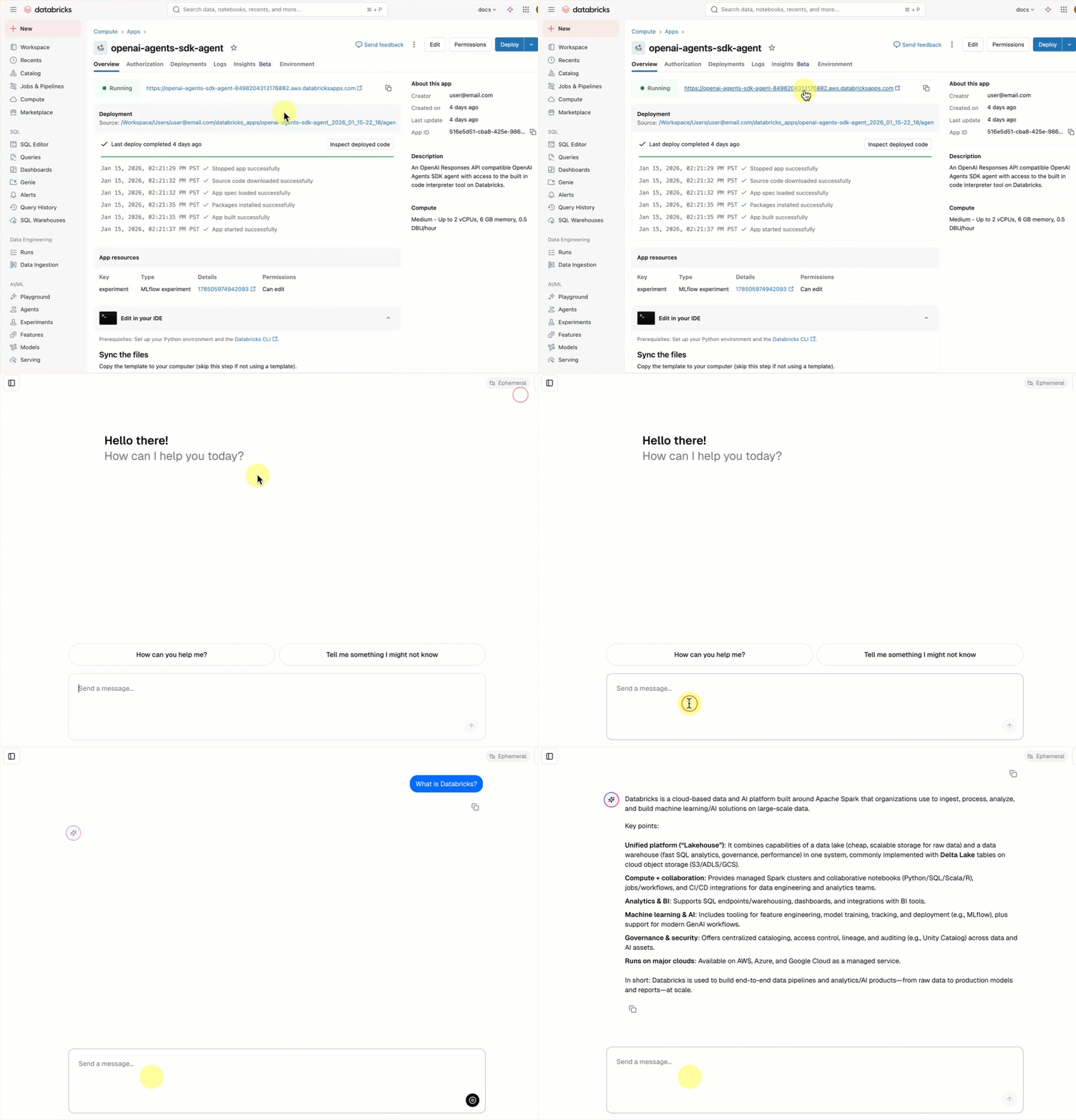
에이전트 엔드포인트가 시작된 후 AI Playground 를 사용하여 채팅하거나 관련자와 공유하여 피드백을 보낼 수 있습니다.

다음 단계

목표에 따라 다음으로 갈 위치를 선택합니다.

에이전트 품질 측정 및 개선: 에이전트 평가 빠른 시작을 참조하세요.

고급 에이전트 빌드: 구조화되지 않은 데이터를 사용하여 RAG를 수행하고, 다중 턴 대화를 처리하고, 에이전트 평가를 사용하여 품질을 측정하는 에이전트를 만듭니다. 자습서: 검색 에이전트 빌드, 평가 및 배포를 참조하세요.

다른 프레임워크를 사용하여 에이전트를 빌드하는 방법을 알아봅니다. LangGraph, 순수 Python 및 OpenAI와 같은 인기 있는 라이브러리를 사용하여 에이전트를 빌드하는 방법을 알아봅니다. 코드에서 작성자 AI 에이전트 참조