이 문서에서는 관리 ID를 사용하여 Azure Red Hat OpenShift 클러스터를 배포하는 방법을 보여줍니다. 서비스 주체를 사용하여 관리 ID를 사용하는 기존 클러스터는 마이그레이션할 수 없습니다. 관리 ID를 사용하는 새 Azure Red Hat OpenShift 클러스터를 만들어야 합니다.
Azure Red Hat OpenShift는 관리 ID 및 워크로드 ID를 지원하는 관리형 OpenShift 서비스입니다. 관리 ID 및 워크로드 ID는 클라이언트 비밀 자격 증명이 있는 서비스 주체와 같은 수명이 짧은 자격 증명 대신 수명이 짧은 토큰을 제공하여 워크로드 및 애플리케이션을 보호하는 경우 위험을 최소화하는 데 도움이 됩니다.
자세한 내용은 다음을 참조하세요.
필수 조건
Azure 포털을 사용하지 않는 경우 관리 ID 클러스터에 대해 완전히 지원되는 CLI 인수가 포함된 Azure CLI 버전 2.90.0 이상을 사용하고 있는지 확인합니다. 설치한 Azure CLI의 버전을 찾는 데 사용합니다 az --version . 설치 또는 업그레이드해야 하는 경우 Azure CLI 설치를 참조하세요.
Azure Red Hat OpenShift는 OpenShift 클러스터를 만들려면 최소 44개의 코어가 필요합니다. 새 Azure 구독에 대한 기본 Azure 리소스 할당량이 이 요구 사항을 충족하지 않습니다. 리소스 한도 증가를 요청하려면 VM 제품군 vCPU 할당량늘림을 참조하세요.
44개 코어는 다음과 같이 사용됩니다.
- 부트스트랩 머신: 8코어
- 컨트롤 플레인(마스터 머신): 24코어
- 컴퓨팅(작업자 머신): 12개 코어
설치가 완료되면 부트스트랩 머신이 제거되고 클러스터는 총 36개의 코어를 사용합니다. 자세한 내용은 Azure에 설치를 참조하세요.
다음 명령을 실행하여 CLI 또는 포털의 기본 가상 머신 크기인 표준 DSv5 가상 머신 크기에 대한 Azure 구독 할당량을 확인합니다.
LOCATION=eastus
az vm list-usage -l $LOCATION \
--query "[?contains(name.value, 'standardDSv5Family')]" -o table
사용 권한 확인
이 문서에서는 클러스터에 대한 가상 네트워크 및 관리 ID를 포함하는 리소스 그룹을 만듭니다. 리소스 그룹을 만들려면 리소스 그룹을 포함하는 리소스 그룹 또는 구독에 대한 기여자 및 사용자 액세스 관리자 권한 또는 소유자 권한이 필요합니다.
또한 관리 ID 집합을 만들고 클러스터에서 사용할 역할을 할당하려면 충분한 Microsoft Entra 권한(테넌트 멤버 사용자 또는 역할 애플리케이션 관리자가 할당한 게스트)이 필요합니다. 자세한 내용은 멤버 및 게스트를 참조하고Microsoft Entra ID를 가진 사용자에게 관리자 및 비지정자 역할을 할당합니다.
리소스 공급자 등록
Azure Red Hat OpenShift 리소스 공급자를 포함하여 일부 Azure 리소스 공급자를 사용하려면 등록해야 합니다. 리소스 공급자를 등록할 때 리소스 공급자가 리소스 만들기와 같은 특정 작업을 수행할 수 있도록 권한을 부여하는 서비스 주체를 구독에 만듭니다. Azure 포털을 사용하여 리소스 공급자를 등록하는 방법에 대한 지침 또는 리소스 공급자 등록에 대한 자세한 내용은 리소스 공급자 등록을 참조하세요.
여러 Azure 구독이 있는 경우 관련 구독 ID를 지정합니다.
az account set --subscription <SUBSCRIPTION ID>Microsoft.RedHatOpenShift리소스 공급자를 등록합니다.az provider register -n Microsoft.RedHatOpenShift --waitMicrosoft.Compute리소스 공급자를 등록합니다.az provider register -n Microsoft.Compute --waitMicrosoft.Storage리소스 공급자를 등록합니다.az provider register -n Microsoft.Storage --waitMicrosoft.Authorization리소스 공급자를 등록합니다.az provider register -n Microsoft.Authorization --wait
Red Hat 풀 비밀 가져오기(선택 사항)
Azure Red Hat OpenShift 끌어오기 비밀은 Red Hat OpenShift 구독의 비용을 변경하지 않습니다.
Red Hat 풀 비밀을 사용하면 클러스터가 OperatorHub의 운영자 등 다른 콘텐츠와 함께 Red Hat 컨테이너 레지스트리에 액세스할 수 있습니다. 이 단계는 선택 사항이지만 권장됩니다. 나중에 풀 비밀을 추가하려는 경우 이 지침을 따릅니다.
cloud.openshift.com 필드는 풀 시크릿에 그 필드가 포함되어 있어도 시크릿에서 삭제됩니다. 이 필드는 Red Hat으로 데이터를 전송하는 추가 모니터링 기능을 사용하도록 설정하므로 기본적으로 사용하지 않도록 설정됩니다. 이 기능을 사용하려면 원격 상태 보고 사용을 참조하세요.
Red Hat OpenShift 클러스터 관리자 포털로 이동하여 로그인합니다.
Red Hat 계정에 로그인하거나 비즈니스 전자 메일로 새 Red Hat 계정을 만들고 사용 약관에 동의해야 합니다.
끌어오기 암호 다운로드를 선택하여 Azure Red Hat OpenShift 클러스터에서 사용할 복사본을 저장합니다.
저장된
pull-secret.txt파일을 안전한 위치에 보관합니다. Red Hat 또는 인증된 파트너에 대한 샘플 또는 연산자를 포함하는 클러스터를 만들어야 하는 경우 이 파일은 각 클러스터 만들기에 사용됩니다.az aro create명령을 실행하는 경우--pull-secret @pull-secret.txt매개 변수를 사용하여 풀 시크릿을 참조할 수 있습니다.pull-secret.txt파일을 저장한 디렉터리에서az aro create을 실행하세요. 그렇지 않으면@pull-secret.txt를@/path/to/my/pull-secret.txt로 바꿉니다.풀 비밀을 복사하거나 다른 스크립트에서 참조하는 경우에는 풀 비밀을 유효한 JSON 문자열로 포맷해야 합니다.
클러스터에 대한 사용자 지정 도메인 준비(선택 사항)
az aro create 명령을 실행할 때 --domain foo.example.com 매개 변수를 사용하여 클러스터의 사용자 지정 도메인을 지정할 수 있습니다.
비고
Azure CLI를 통해 클러스터를 만들 때 도메인 이름을 추가하는 것은 선택 사항입니다. 포털을 통해 클러스터를 추가할 때 도메인 이름(또는 OpenShift 콘솔 및 API 서버에 대해 자동 생성된 DNS 이름의 일부로 사용되는 접두사)이 필요합니다. 자세한 내용은 빠른 시작: Azure Portal을 사용하여 Azure Red Hat OpenShift 클러스터 배포를 참조하세요.
클러스터에 사용자 지정 도메인을 제공하는 경우 다음 사항에 유의합니다.
- 클러스터를 만든 후에 지정된
--domain에 대해, DNS 서버에서 두 개의 DNS A 레코드를 만들어야 합니다.- api - API 서버 IP 주소 가리키기
- *.apps - 수신 IP 주소를 가리킵니다.
- 클러스터를 만든 후 다음 명령을 실행하여 이러한 값을 검색
az aro show $CLUSTER -g $RESOURCEGROUP --query '{api:apiserverProfile.ip, ingress:ingressProfiles[0].ip}'합니다.
- OpenShift 콘솔은 기본 제공 도메인
https://console-openshift-console.apps.example.com대신 URL(예:https://console-openshift-console.apps.<random>.<location>.aroapp.ioURL)에서 사용할 수 있습니다. - 기본적으로 OpenShift는 사용자 지정 도메인
*.apps.example.com에서 만든 모든 경로에 자체 서명된 인증서를 사용합니다. 클러스터에 연결한 후 사용자 지정 DNS를 사용하도록 선택하는 경우 OpenShift 설명서에 따라 수신 컨트롤러에 대한 사용자 지정 CA 와 API 서버에 대한 사용자 지정 CA를 구성해야 합니다.
Azure CLI 사용하여 설치
이 섹션에서는 Azure CLI 사용하여 관리 ID를 사용하여 Azure Red Hat OpenShift 클러스터를 만드는 방법을 설명합니다. CLI를 사용하여 클러스터를 만드는 방법에 대한 세 가지 옵션이 있습니다.
- 완전 자동화: CLI는 한 명령에서 필요한 사용자 할당 관리 ID, 역할 할당 및 클러스터 만들기 만들기를 처리합니다. 여전히 네트워킹 리소스를 미리 만들어야 합니다.
-
부분적으로 자동화됨: 클러스터 만들기는 다음 두 부분으로 구성됩니다.
- ID 및 역할 할당 만들기: CLI는 필요한 ID 및 역할 할당을 만듭니다.
- 클러스터 만들기: 방금 만든 관리 ID 이름(또는 리소스 ID)을 제공하는 클러스터 만들기 명령을 실행합니다.
-
수동: 필요한 사용자 할당 관리 ID 및 역할 할당을 만든 다음 클러스터 만들기 명령에 해당 ID를 제공합니다.
- 필요한 ID 및 역할 할당을 만들기 위해 실행할 명령을 CLI 출력하도록 할 수도 있습니다.
두 개의 빈 서브넷이 있는 가상 네트워크 만들기
두 개의 빈 서브넷이 있는 가상 네트워크를 만듭니다. 요구 사항을 충족하는 기존 가상 네트워크가 있는 경우 이 단계를 건너뜁니다.
네트워킹 및 요구 사항에 대한 자세한 내용은 Azure Red Hat OpenShift에 대한 네트워킹을 참조하세요.
명령을 실행하는 셸 환경에서 다음 변수를
az설정합니다.LOCATION=eastus # the location of your cluster RESOURCEGROUP=aro-rg # the name of the resource group where you want to create your cluster CLUSTER=cluster # the name of your cluster리소스 그룹을 만듭니다.
Azure 리소스 그룹은 Azure 리소스가 배포되고 관리되는 논리 그룹입니다. 리소스 그룹을 만들 때 위치를 지정하라는 메시지가 나타납니다. 이 위치는 리소스 그룹 메타데이터가 저장되는 위치이며 리소스를 만드는 동안 다른 지역을 지정하지 않으면 리소스가 Azure에서 실행되는 위치입니다. az group create 명령을 사용하여 리소스 그룹을 만듭니다.
비고
Azure 리소스 그룹을 만들 수 있는 모든 지역에서는 Azure Red Hat OpenShift를 사용할 수 없습니다. Azure Red Hat OpenShift가 지원되는 위치에 대한 정보는 사용 가능한 지역을 참조하세요.
az group create \
  --location $LOCATION \
  --name $RESOURCEGROUP
이전에 만든 동일한 리소스 그룹에 가상 네트워크, 마스터 및 작업자 서브넷을 만듭니다.
Azure Red Hat OpenShift 클러스터에는 마스터 및 작업자 노드에 대해 두 개의 빈 서브넷이 있는 가상 네트워크가 필요합니다. 새 가상 네트워크를 만들거나 기존 가상 네트워크를 사용할 수 있습니다.
az network vnet create \
   --resource-group $RESOURCEGROUP \
   --name aro-vnet \
   --address-prefixes 10.0.0.0/22
az network vnet subnet create \ --resource-group $RESOURCEGROUP \ --vnet-name aro-vnet \ --name master \ --address-prefixes 10.0.0.0/23az network vnet subnet create \ --resource-group $RESOURCEGROUP \ --vnet-name aro-vnet \ --name worker \ --address-prefixes 10.0.2.0/23
만들기 메서드
완전 자동화
완전히 자동화된 메서드를 사용하여 클러스터를 만들려면 매개 변수를 추가하는 다음 명령을 실행합니다 --enable-managed-identity . 또한 이 명령은 필요한 사용자 할당 관리 ID 및 역할 할당을 만듭니다. 끌어오기 비밀을 추가하거나 사용자 지정 도메인을 사용하려면 클러스터 만들기를 참조하세요.
az aro create \
    --resource-group $RESOURCEGROUP \
    --name $CLUSTER \
    --vnet aro-vnet \
    --master-subnet master \
    --worker-subnet worker \
    --version <VERSION> \
    --enable-managed-identity
클러스터 만들기가 시작됩니다. 특정 OpenShift 버전을 사용하려면 다른 Azure Red Hat OpenShift 버전 선택을 참조하세요. 클러스터가 준비되면 정리 를 참조하여 삭제하는 방법을 알아봅니다.
부분적으로 자동화됨
필요한 사용자 할당 관리 ID 및 역할 할당만 만들려면 다음 명령을 실행합니다.
az aro identity create-required \
    --resource-group $RESOURCEGROUP \
    --location $LOCATION \
    --vnet aro-vnet \
    --master-subnet master \
    --worker-subnet worker \
    --version <VERSION>
명령이 완료되면 생성된 각 관리 ID의 세부 정보가 표시됩니다.
Example:
[
  {
    "clientId": "22222222-2222-2222-2222-222222222222",
    "id": "/subscriptions/<SUBSCRIPTION>/resourcegroups/<RESOURCEGROUP>/providers/Microsoft.ManagedIdentity/userAssignedIdentities/aro-cluster",
    "isolationScope": "None",
    "location": "westus3",
    "name": "aro-cluster",
    "principalId": "33333333-3333-3333-3333-333333333333",
    "resourceGroup": "<RESOURCEGROUP>",
    "tags": {},
    "tenantId": "11111111-1111-1111-1111-111111111111",
    "type": "Microsoft.ManagedIdentity/userAssignedIdentities"
  },
[...]
클러스터 만들기 명령의 이전 명령에서 반환된 ID 이름 또는 리소스 ID를 계속 사용합니다.
Manual
필요한 사용자 할당 관리 ID 및 역할 할당을 독립적으로 만든 다음 클러스터를 만듭니다.
필요한 사용자 할당 관리 ID를 만듭니다. Azure Red Hat OpenShift 각각 할당된 기본 제공 역할이 필요한 9개의 관리 ID가 필요합니다.
- 핵심 OpenShift 연산자 관련 7개의 관리 ID입니다.
- Azure Red Hat OpenShift 서비스 운영자에 대한 하나의 관리 ID입니다.
- 클러스터의 사용을 가능하게 하기 위한 추가적인 ID입니다.
관리 ID 구성 요소는 다음과 같습니다.
- OpenShift 이미지 레지스트리 오퍼레이터 (image-registry)
- OpenShift 네트워크 오퍼레이터(cloud-network-config)
- OpenShift Disk Storage 오퍼레이터(disk-csi-driver)
- OpenShift File Storage 운영자(file-csi-driver)
- OpenShift 클러스터 인그레스 연산자(인그레스)
- OpenShift Cloud Controller Manager(cloud-controller-manager)
- 오픈시프트 머신 API 운영자 (machine-api)
- Azure Red Hat OpenShift 서비스 운영자(aro-operator)
Azure Red Hat OpenShift의 각 구성 요소에서 해당 업무를 수행하는 데 필요한 권한을 나타내는 8가지 관리 ID와 해당 기본 제공 역할이 있습니다. 또한 플랫폼에는 이전에 나열된 관리 ID 구성 요소(aro-cluster)에 대해 페더레이션 자격 증명 생성을 수행하려면 다른 ID인 클러스터 ID가 필요합니다.
Red Hat OpenShift 클러스터 운영자에 대한 자세한 내용은 클러스터 연산자 참조를 참조하세요.
Azure Red Hat OpenShift의 관리 ID에 대한 자세한 내용은 Azure Red Hat OpenShift의 관리 ID 이해를 참조하세요.
비고
를 사용하여
az aro identity get-requiredCLI에서 ID 만들기 및 역할 할당 명령을 가져올 수도 있습니다.필요한 ID를 만듭니다.
az identity create \
--resource-group $RESOURCEGROUP \
--name aro-cluster
az identity create \ --resource-group $RESOURCEGROUP \ --name cloud-controller-manageraz identity create \ --resource-group $RESOURCEGROUP \ --name ingressaz identity create \ --resource-group $RESOURCEGROUP \ --name machine-apiaz identity create \ --resource-group $RESOURCEGROUP \ --name disk-csi-driveraz identity create \ --resource-group $RESOURCEGROUP \ --name cloud-network-configaz identity create \ --resource-group $RESOURCEGROUP \ --name image-registryaz identity create \ --resource-group $RESOURCEGROUP \ --name file-csi-driveraz identity create \ --resource-group $RESOURCEGROUP \ --name aro-operator각 운영자 ID, 클러스터 ID 및 자사 서비스 주체에 필요한 역할 할당을 만듭니다.
비고
이 문서에서는 마스터 및 작업자 서브넷만 있다고 가정합니다. 설치 시 더 많은 클러스터 서브넷을 구성한 경우 필요한 운영자에 대해 해당 서브넷에 역할 할당 범위를 부여해야 합니다.
마스터 및 작업자 서브넷에 대한 다음 역할 할당은 NSG(네트워크 보안 그룹), 경로 테이블 또는 NAT(네트워크 주소 변환) 게이트웨이가 연결되어 있지 않은 것으로 가정합니다. 이러한 네트워크 리소스를 설치로 가져오는 경우 해당 추가 네트워크 리소스에 대한 운영자 ID 권한을 부여하는 더 많은 역할 할당을 만들어야 합니다. 다음 서브넷 또는 가상 네트워크에 대한 역할 할당이 필요한 각 운영자의 경우 추가 네트워크 리소스에 대한 역할 할당도 필요합니다.
SUBSCRIPTION_ID=$(az account show --query 'id' -o tsv)

# assign cluster identity permissions over the identities

az role assignment create \
    --assignee-object-id "$(az identity show --resource-group $RESOURCEGROUP --name aro-cluster --query principalId -o tsv)" \
    --assignee-principal-type ServicePrincipal \
    --role "/subscriptions/$SUBSCRIPTION_ID/providers/Microsoft.Authorization/roleDefinitions/ef318e2a-8334-4a05-9e4a-295a196c6a6e" \
    --scope "/subscriptions/$SUBSCRIPTION_ID/resourcegroups/$RESOURCEGROUP/providers/Microsoft.ManagedIdentity/userAssignedIdentities/aro-operator"

az role assignment create \
    --assignee-object-id "$(az identity show --resource-group $RESOURCEGROUP --name aro-cluster --query principalId -o tsv)" \
    --assignee-principal-type ServicePrincipal \
    --role "/subscriptions/$SUBSCRIPTION_ID/providers/Microsoft.Authorization/roleDefinitions/ef318e2a-8334-4a05-9e4a-295a196c6a6e" \
    --scope "/subscriptions/$SUBSCRIPTION_ID/resourcegroups/$RESOURCEGROUP/providers/Microsoft.ManagedIdentity/userAssignedIdentities/cloud-controller-manager"

az role assignment create \
    --assignee-object-id "$(az identity show --resource-group $RESOURCEGROUP --name aro-cluster --query principalId -o tsv)" \
    --assignee-principal-type ServicePrincipal \
    --role "/subscriptions/$SUBSCRIPTION_ID/providers/Microsoft.Authorization/roleDefinitions/ef318e2a-8334-4a05-9e4a-295a196c6a6e" \
    --scope "/subscriptions/$SUBSCRIPTION_ID/resourcegroups/$RESOURCEGROUP/providers/Microsoft.ManagedIdentity/userAssignedIdentities/ingress"

az role assignment create \
    --assignee-object-id "$(az identity show --resource-group $RESOURCEGROUP --name aro-cluster --query principalId -o tsv)" \
    --assignee-principal-type ServicePrincipal \
    --role "/subscriptions/$SUBSCRIPTION_ID/providers/Microsoft.Authorization/roleDefinitions/ef318e2a-8334-4a05-9e4a-295a196c6a6e" \
    --scope "/subscriptions/$SUBSCRIPTION_ID/resourcegroups/$RESOURCEGROUP/providers/Microsoft.ManagedIdentity/userAssignedIdentities/machine-api"

az role assignment create \
    --assignee-object-id "$(az identity show --resource-group $RESOURCEGROUP --name aro-cluster --query principalId -o tsv)" \
    --assignee-principal-type ServicePrincipal \
    --role "/subscriptions/$SUBSCRIPTION_ID/providers/Microsoft.Authorization/roleDefinitions/ef318e2a-8334-4a05-9e4a-295a196c6a6e" \
    --scope "/subscriptions/$SUBSCRIPTION_ID/resourcegroups/$RESOURCEGROUP/providers/Microsoft.ManagedIdentity/userAssignedIdentities/disk-csi-driver"

az role assignment create \
    --assignee-object-id "$(az identity show --resource-group $RESOURCEGROUP --name aro-cluster --query principalId -o tsv)" \
    --assignee-principal-type ServicePrincipal \
    --role "/subscriptions/$SUBSCRIPTION_ID/providers/Microsoft.Authorization/roleDefinitions/ef318e2a-8334-4a05-9e4a-295a196c6a6e" \
    --scope "/subscriptions/$SUBSCRIPTION_ID/resourcegroups/$RESOURCEGROUP/providers/Microsoft.ManagedIdentity/userAssignedIdentities/cloud-network-config"

az role assignment create \
    --assignee-object-id "$(az identity show --resource-group $RESOURCEGROUP --name aro-cluster --query principalId -o tsv)" \
    --assignee-principal-type ServicePrincipal \
    --role "/subscriptions/$SUBSCRIPTION_ID/providers/Microsoft.Authorization/roleDefinitions/ef318e2a-8334-4a05-9e4a-295a196c6a6e" \
    --scope "/subscriptions/$SUBSCRIPTION_ID/resourcegroups/$RESOURCEGROUP/providers/Microsoft.ManagedIdentity/userAssignedIdentities/image-registry"

az role assignment create \
    --assignee-object-id "$(az identity show --resource-group $RESOURCEGROUP --name aro-cluster --query principalId -o tsv)" \
    --assignee-principal-type ServicePrincipal \
    --role "/subscriptions/$SUBSCRIPTION_ID/providers/Microsoft.Authorization/roleDefinitions/ef318e2a-8334-4a05-9e4a-295a196c6a6e" \
    --scope "/subscriptions/$SUBSCRIPTION_ID/resourcegroups/$RESOURCEGROUP/providers/Microsoft.ManagedIdentity/userAssignedIdentities/file-csi-driver"

# assign vnet-level permissions for operators that require it, and subnets-level permission for operators that require it

az role assignment create \
    --assignee-object-id "$(az identity show --resource-group $RESOURCEGROUP --name cloud-controller-manager --query principalId -o tsv)" \
    --assignee-principal-type ServicePrincipal \
    --role "/subscriptions/$SUBSCRIPTION_ID/providers/Microsoft.Authorization/roleDefinitions/a1f96423-95ce-4224-ab27-4e3dc72facd4" \
    --scope "/subscriptions/$SUBSCRIPTION_ID/resourceGroups/$RESOURCEGROUP/providers/Microsoft.Network/virtualNetworks/aro-vnet/subnets/master"

az role assignment create \
    --assignee-object-id "$(az identity show --resource-group $RESOURCEGROUP --name cloud-controller-manager --query principalId -o tsv)" \
    --assignee-principal-type ServicePrincipal \
    --role "/subscriptions/$SUBSCRIPTION_ID/providers/Microsoft.Authorization/roleDefinitions/a1f96423-95ce-4224-ab27-4e3dc72facd4" \
    --scope "/subscriptions/$SUBSCRIPTION_ID/resourceGroups/$RESOURCEGROUP/providers/Microsoft.Network/virtualNetworks/aro-vnet/subnets/worker"

az role assignment create \
    --assignee-object-id "$(az identity show --resource-group $RESOURCEGROUP --name ingress --query principalId -o tsv)" \
    --assignee-principal-type ServicePrincipal \
    --role "/subscriptions/$SUBSCRIPTION_ID/providers/Microsoft.Authorization/roleDefinitions/0336e1d3-7a87-462b-b6db-342b63f7802c" \
    --scope "/subscriptions/$SUBSCRIPTION_ID/resourceGroups/$RESOURCEGROUP/providers/Microsoft.Network/virtualNetworks/aro-vnet/subnets/master"

az role assignment create \
    --assignee-object-id "$(az identity show --resource-group $RESOURCEGROUP --name ingress --query principalId -o tsv)" \
    --assignee-principal-type ServicePrincipal \
    --role "/subscriptions/$SUBSCRIPTION_ID/providers/Microsoft.Authorization/roleDefinitions/0336e1d3-7a87-462b-b6db-342b63f7802c" \
    --scope "/subscriptions/$SUBSCRIPTION_ID/resourceGroups/$RESOURCEGROUP/providers/Microsoft.Network/virtualNetworks/aro-vnet/subnets/worker"

az role assignment create \
    --assignee-object-id "$(az identity show --resource-group $RESOURCEGROUP --name machine-api --query principalId -o tsv)" \
    --assignee-principal-type ServicePrincipal \
    --role "/subscriptions/$SUBSCRIPTION_ID/providers/Microsoft.Authorization/roleDefinitions/0358943c-7e01-48ba-8889-02cc51d78637" \
    --scope "/subscriptions/$SUBSCRIPTION_ID/resourceGroups/$RESOURCEGROUP/providers/Microsoft.Network/virtualNetworks/aro-vnet/subnets/master"

az role assignment create \
    --assignee-object-id "$(az identity show --resource-group $RESOURCEGROUP --name machine-api --query principalId -o tsv)" \
    --assignee-principal-type ServicePrincipal \
    --role "/subscriptions/$SUBSCRIPTION_ID/providers/Microsoft.Authorization/roleDefinitions/0358943c-7e01-48ba-8889-02cc51d78637" \
    --scope "/subscriptions/$SUBSCRIPTION_ID/resourceGroups/$RESOURCEGROUP/providers/Microsoft.Network/virtualNetworks/aro-vnet/subnets/worker"

az role assignment create \
    --assignee-object-id "$(az identity show --resource-group $RESOURCEGROUP --name cloud-network-config --query principalId -o tsv)" \
    --assignee-principal-type ServicePrincipal \
    --role "/subscriptions/$SUBSCRIPTION_ID/providers/Microsoft.Authorization/roleDefinitions/be7a6435-15ae-4171-8f30-4a343eff9e8f" \
    --scope "/subscriptions/$SUBSCRIPTION_ID/resourceGroups/$RESOURCEGROUP/providers/Microsoft.Network/virtualNetworks/aro-vnet"

az role assignment create \
    --assignee-object-id "$(az identity show --resource-group $RESOURCEGROUP --name file-csi-driver --query principalId -o tsv)" \
    --assignee-principal-type ServicePrincipal \
    --role "/subscriptions/$SUBSCRIPTION_ID/providers/Microsoft.Authorization/roleDefinitions/0d7aedc0-15fd-4a67-a412-efad370c947e" \
    --scope "/subscriptions/$SUBSCRIPTION_ID/resourceGroups/$RESOURCEGROUP/providers/Microsoft.Network/virtualNetworks/aro-vnet"

az role assignment create \
    --assignee-object-id "$(az identity show --resource-group $RESOURCEGROUP --name image-registry --query principalId -o tsv)" \
    --assignee-principal-type ServicePrincipal \
    --role "/subscriptions/$SUBSCRIPTION_ID/providers/Microsoft.Authorization/roleDefinitions/8b32b316-c2f5-4ddf-b05b-83dacd2d08b5" \
    --scope "/subscriptions/$SUBSCRIPTION_ID/resourceGroups/$RESOURCEGROUP/providers/Microsoft.Network/virtualNetworks/aro-vnet"

az role assignment create \
    --assignee-object-id "$(az identity show --resource-group $RESOURCEGROUP --name aro-operator --query principalId -o tsv)" \
    --assignee-principal-type ServicePrincipal \
    --role "/subscriptions/$SUBSCRIPTION_ID/providers/Microsoft.Authorization/roleDefinitions/4436bae4-7702-4c84-919b-c4069ff25ee2" \
    --scope "/subscriptions/$SUBSCRIPTION_ID/resourceGroups/$RESOURCEGROUP/providers/Microsoft.Network/virtualNetworks/aro-vnet/subnets/master"

az role assignment create \
    --assignee-object-id "$(az identity show --resource-group $RESOURCEGROUP --name aro-operator --query principalId -o tsv)" \
    --assignee-principal-type ServicePrincipal \
    --role "/subscriptions/$SUBSCRIPTION_ID/providers/Microsoft.Authorization/roleDefinitions/4436bae4-7702-4c84-919b-c4069ff25ee2" \
    --scope "/subscriptions/$SUBSCRIPTION_ID/resourceGroups/$RESOURCEGROUP/providers/Microsoft.Network/virtualNetworks/aro-vnet/subnets/worker"

az role assignment create \
    --assignee-object-id "$(az ad sp list --display-name "Azure Red Hat OpenShift RP" --query '[0].id' -o tsv)" \
    --assignee-principal-type ServicePrincipal \
    --role "/subscriptions/$SUBSCRIPTION_ID/providers/Microsoft.Authorization/roleDefinitions/42f3c60f-e7b1-46d7-ba56-6de681664342" \
    --scope "/subscriptions/$SUBSCRIPTION_ID/resourceGroups/$RESOURCEGROUP/providers/Microsoft.Network/virtualNetworks/aro-vnet"
클러스터 만들기
클러스터를 만들려면 옵션 아래에 표시된 다음 명령을 실행합니다. 다음 옵션 중 하나를 사용하도록 선택하는 경우 이에 따라 명령을 수정합니다.
- 옵션 1: Red Hat 풀 시크릿을 전달하여 클러스터가 다른 콘텐츠와 함께 Red Hat 컨테이너 레지스트리에 액세스할 수 있도록 합니다. 명령에
--pull-secret @pull-secret.txt인수를 추가합니다. - 옵션 2: 사용자 지정 도메인을 사용합니다.
--domain foo.example.com을 사용자 지정 도메인으로 대체하는foo.example.com인수를 명령에 추가합니다.
필요한 환경 변수를 사용하여 클러스터를 만듭니다. 각 --assign-platform-workload-identity 플래그에 대해 첫 번째 인수는 지정된 ID에 사용할 OpenShift 연산자를 Azure Red Hat OpenShift 리소스 공급자에게 알려주는 키를 나타냅니다. 두 번째 인수는 ID 자체에 대한 참조를 나타냅니다.
az aro create \
    --resource-group $RESOURCEGROUP \
    --name $CLUSTER \
    --vnet aro-vnet \
    --master-subnet master \
    --worker-subnet worker \
    --version <VERSION> \
    --enable-managed-identity \
    --assign-cluster-identity aro-cluster \
    --assign-platform-workload-identity file-csi-driver file-csi-driver \
    --assign-platform-workload-identity cloud-controller-manager cloud-controller-manager \
    --assign-platform-workload-identity ingress ingress \
    --assign-platform-workload-identity image-registry image-registry \
    --assign-platform-workload-identity machine-api machine-api \
    --assign-platform-workload-identity cloud-network-config cloud-network-config \
    --assign-platform-workload-identity aro-operator aro-operator \
    --assign-platform-workload-identity disk-csi-driver disk-csi-driver
옵션으로 ID 리소스가 다른 지역 또는 리소스 그룹에 있는 경우 만들 전체 리소스 ID를 전달할 수 있습니다. 다음 예제를 참조하세요.
az aro create \
    --resource-group $RESOURCEGROUP \
    --name $CLUSTER \
    --vnet aro-vnet \
    --master-subnet master \
    --worker-subnet worker \
    --version <VERSION> \
    --enable-managed-identity \
    --assign-cluster-identity /subscriptions/$SUBSCRIPTION_ID/resourcegroups/$RESOURCEGROUP/providers/Microsoft.ManagedIdentity/userAssignedIdentities/aro-cluster \
    --assign-platform-workload-identity file-csi-driver /subscriptions/$SUBSCRIPTION_ID/resourcegroups/$RESOURCEGROUP/providers/Microsoft.ManagedIdentity/userAssignedIdentities/file-csi-driver \
    --assign-platform-workload-identity cloud-controller-manager /subscriptions/$SUBSCRIPTION_ID/resourcegroups/$RESOURCEGROUP/providers/Microsoft.ManagedIdentity/userAssignedIdentities/cloud-controller-manager \
    --assign-platform-workload-identity ingress /subscriptions/$SUBSCRIPTION_ID/resourcegroups/$RESOURCEGROUP/providers/Microsoft.ManagedIdentity/userAssignedIdentities/ingress \
    --assign-platform-workload-identity image-registry /subscriptions/$SUBSCRIPTION_ID/resourcegroups/$RESOURCEGROUP/providers/Microsoft.ManagedIdentity/userAssignedIdentities/image-registry \
    --assign-platform-workload-identity machine-api /subscriptions/$SUBSCRIPTION_ID/resourcegroups/$RESOURCEGROUP/providers/Microsoft.ManagedIdentity/userAssignedIdentities/machine-api \
    --assign-platform-workload-identity cloud-network-config /subscriptions/$SUBSCRIPTION_ID/resourcegroups/$RESOURCEGROUP/providers/Microsoft.ManagedIdentity/userAssignedIdentities/cloud-network-config \
    --assign-platform-workload-identity aro-operator /subscriptions/$SUBSCRIPTION_ID/resourcegroups/$RESOURCEGROUP/providers/Microsoft.ManagedIdentity/userAssignedIdentities/aro-operator \
    --assign-platform-workload-identity disk-csi-driver /subscriptions/$SUBSCRIPTION_ID/resourcegroups/$RESOURCEGROUP/providers/Microsoft.ManagedIdentity/userAssignedIdentities/disk-csi-driver
다른 Azure Red Hat OpenShift 버전 선택
클러스터를 만들 때 특정 버전의 Azure Red Hat OpenShift를 사용하도록 선택할 수 있습니다. 먼저 CLI를 사용하여 사용 가능한 Azure Red Hat OpenShift 버전을 쿼리합니다.
az aro get-versions --location <REGION>
버전이 선택되면 명령의 매개 변수를 --version 사용하여 지정합니다 az aro create .
Bicep을 사용하여 설치
이 섹션에서는 Bicep을 사용하여 관리 ID가 있는 Azure Red Hat OpenShift 클러스터를 만드는 방법을 설명합니다.
예제 Bicep 파일을 파일에 저장합니다. 이 예제에서는 azuredeploy.bicep으로 저장합니다.
명령을 실행하려는 셸 환경에서 다음 변수를
az설정합니다.LOCATION=eastus # the location of your cluster RESOURCEGROUP=aro-rg # the name of the resource group where you want to create your cluster CLUSTER=cluster # the name of your cluster VERSION=4.21.22 # the version of the cluster PULL_SECRET=$(cat pull-secret.txt) # the Red Hat pull secret JSON, provided as file or string클러스터 리소스와 클러스터 가상 네트워크 및 ID를 저장할 리소스 그룹을 만듭니다.
az group create --name $RESOURCEGROUP --location $LOCATION리소스 공급자의 경우 구독에 대한 일차 서비스 주체 개체 ID를 확인합니다.
ARO_RP_SP_OBJECT_ID=$(az ad sp list --display-name "Azure Red Hat OpenShift RP" --query '[0].id' -o tsv)Bicep 파일을 배포합니다.
az deployment group create \
  --name aroDeployment \
  --resource-group $RESOURCEGROUP \
  --template-file azuredeploy.bicep \
  --parameters location=$LOCATION \
  --parameters version=$VERSION \
  --parameters clusterName=$CLUSTER \
  --parameters rpObjectId=$ARO_RP_SP_OBJECT_ID
끌어오기 비밀 또는 사용자 지정 도메인에 선택적 매개 변수를 사용하는 경우 매개 변수 다음에
\줄 연속 백슬래시(rpObjectId)를 추가하고 배포 명령에 다음 매개 변수를 포함합니다.--parameters domain=$DOMAIN \ #optional --parameters pullSecret=$PULL_SECRET # optional
예제 Bicep 파일
비고
이 문서에서는 마스터 및 작업자 서브넷만 있다고 가정합니다. 설치 시 더 많은 클러스터 서브넷을 구성한 경우 필요한 운영자에 대해 해당 서브넷에 역할 할당 범위를 부여해야 합니다.
마스터 및 작업자 서브넷에 대한 다음 역할 할당은 NSG(네트워크 보안 그룹), 경로 테이블 또는 NAT(네트워크 주소 변환) 게이트웨이가 연결되어 있지 않은 것으로 가정합니다. 이러한 네트워크 리소스를 설치로 가져오는 경우 해당 추가 네트워크 리소스에 대한 운영자 ID 권한을 부여하는 더 많은 역할 할당을 만들어야 합니다. 다음 서브넷 또는 가상 네트워크에 대한 역할 할당이 필요한 각 운영자의 경우 추가 네트워크 리소스에 대한 역할 할당도 필요합니다.
@description('Location')
param location string = resourceGroup().location

@description('Domain Prefix')
param domain string

@description('Version of the OpenShift cluster')
param version string

@description('Pull secret from cloud.redhat.com. The json should be input as a string')
@secure()
param pullSecret string = ''

@description('Name of vNet')
param clusterVnetName string = 'aro-vnet'

@description('vNet Address Space')
param clusterVnetCidr string = '10.100.0.0/15'

@description('Worker node subnet address space')
param workerSubnetCidr string = '10.100.70.0/23'

@description('Master node subnet address space')
param masterSubnetCidr string = '10.100.76.0/24'

@description('Master Node VM Type')
param masterVmSize string = 'Standard_D8s_v3'

@description('Worker Node VM Type')
param workerVmSize string = 'Standard_D4s_v3'

@description('Worker Node Disk Size in GB')
@minValue(128)
param workerVmDiskSize int = 128

@description('Cidr for Pods')
param podCidr string = '10.128.0.0/14'

@metadata({
 description: 'Cidr of service'
})
param serviceCidr string = '172.30.0.0/16'

@description('Unique name for the cluster')
param clusterName string

@description('Api Server Visibility')
@allowed([
 'Private'
 'Public'
])
param apiServerVisibility string = 'Public'

@description('Ingress Visibility')
@allowed([
 'Private'
 'Public'
])
param ingressVisibility string = 'Public'

@description('The ObjectID of the Resource Provider Service Principal')
param rpObjectId string

@description('Specify if FIPS validated crypto modules are used')
@allowed([
 'Enabled'
 'Disabled'
])
param fips string = 'Disabled'

@description('Specify if master VMs are encrypted at host')
@allowed([
 'Enabled'
 'Disabled'
])
param masterEncryptionAtHost string = 'Disabled'

@description('Specify if worker VMs are encrypted at host')
@allowed([
 'Enabled'
 'Disabled'
])
param workerEncryptionAtHost string = 'Disabled'

var resourceGroupId = '/subscriptions/${subscription().subscriptionId}/resourceGroups/aro-${domain}-${location}'
var masterSubnetId=resourceId('Microsoft.Network/virtualNetworks/subnets', clusterVnetName, 'master')
var workerSubnetId=resourceId('Microsoft.Network/virtualNetworks/subnets', clusterVnetName, 'worker')

resource vnet 'Microsoft.Network/virtualNetworks@2023-06-01' = {
 name: clusterVnetName
 location: location
 properties: {
   addressSpace: { addressPrefixes: [ clusterVnetCidr ] }
   subnets: [
     {
       name: 'master'
       properties: {
         addressPrefixes: [ masterSubnetCidr ]
         serviceEndpoints: [ { service: 'Microsoft.ContainerRegistry' } ]
       }
     }
     {
       name: 'worker'
       properties: {
         addressPrefixes: [ workerSubnetCidr ]
         serviceEndpoints: [ { service: 'Microsoft.ContainerRegistry' } ]
       }
     }
   ]
 }
}

resource workerSubnet 'Microsoft.Network/virtualNetworks/subnets@2020-08-01' existing = {
 parent: vnet
 name: 'worker'
}

resource masterSubnet 'Microsoft.Network/virtualNetworks/subnets@2020-08-01' existing = {
 parent: vnet
 name: 'master'
}

// create required identities

resource cloudControllerManager 'Microsoft.ManagedIdentity/userAssignedIdentities@2023-01-31' = {
   name: 'cloud-controller-manager'
   location: location
}

resource ingress 'Microsoft.ManagedIdentity/userAssignedIdentities@2023-01-31' = {
   name: 'ingress'
   location: location
}

resource machineApi 'Microsoft.ManagedIdentity/userAssignedIdentities@2023-01-31' = {
   name: 'machine-api'
   location: location
}

resource diskCsiDriver 'Microsoft.ManagedIdentity/userAssignedIdentities@2023-01-31' = {
   name: 'disk-csi-driver'
   location: location
}

resource cloudNetworkConfig 'Microsoft.ManagedIdentity/userAssignedIdentities@2023-01-31' = {
   name: 'cloud-network-config'
   location: location
}

resource imageRegistry 'Microsoft.ManagedIdentity/userAssignedIdentities@2023-01-31' = {
   name: 'image-registry'
   location: location
}

resource fileCsiDriver 'Microsoft.ManagedIdentity/userAssignedIdentities@2023-01-31' = {
   name: 'file-csi-driver'
   location: location
}

resource aroOperator 'Microsoft.ManagedIdentity/userAssignedIdentities@2023-01-31' = {
   name: 'aro-operator'
   location: location
}

resource clusterMsi 'Microsoft.ManagedIdentity/userAssignedIdentities@2023-01-31' = {
   name: 'cluster'
   location: location
}

// create required role assignments on vnet / subnets

resource cloudControllerManagerMasterSubnetRoleAssignment 'Microsoft.Authorization/roleAssignments@2022-04-01' = {
   name: guid(masterSubnet.id, 'cloud-controller-manager')
   scope: masterSubnet
   properties: {
       principalId: cloudControllerManager.properties.principalId
       roleDefinitionId: subscriptionResourceId('Microsoft.Authorization/roleDefinitions', 'a1f96423-95ce-4224-ab27-4e3dc72facd4')
       principalType: 'ServicePrincipal'
   }
}

resource cloudControllerManagerWorkerSubnetRoleAssignment 'Microsoft.Authorization/roleAssignments@2022-04-01' = {
 name: guid(workerSubnet.id, 'cloud-controller-manager')
 scope: workerSubnet
 properties: {
     principalId: cloudControllerManager.properties.principalId
     roleDefinitionId: subscriptionResourceId('Microsoft.Authorization/roleDefinitions', 'a1f96423-95ce-4224-ab27-4e3dc72facd4')
     principalType: 'ServicePrincipal'
 }
}

resource ingressMasterSubnetRoleAssignment 'Microsoft.Authorization/roleAssignments@2022-04-01' = {
   name: guid(masterSubnet.id, 'ingress')
   scope: masterSubnet
   properties: {
       principalId: ingress.properties.principalId
       roleDefinitionId: subscriptionResourceId('Microsoft.Authorization/roleDefinitions', '0336e1d3-7a87-462b-b6db-342b63f7802c')
       principalType: 'ServicePrincipal'
   }
}

resource ingressWorkerSubnetRoleAssignment 'Microsoft.Authorization/roleAssignments@2022-04-01' = {
 name: guid(workerSubnet.id, 'ingress')
 scope: workerSubnet
 properties: {
     principalId: ingress.properties.principalId
     roleDefinitionId: subscriptionResourceId('Microsoft.Authorization/roleDefinitions', '0336e1d3-7a87-462b-b6db-342b63f7802c')
     principalType: 'ServicePrincipal'
 }
}

resource machineApiMasterSubnetRoleAssignment 'Microsoft.Authorization/roleAssignments@2022-04-01' = {
   name: guid(masterSubnet.id, 'machine-api')
   scope: masterSubnet
   properties: {
       principalId: machineApi.properties.principalId
       roleDefinitionId: subscriptionResourceId('Microsoft.Authorization/roleDefinitions', '0358943c-7e01-48ba-8889-02cc51d78637')
       principalType: 'ServicePrincipal'
   }
}

resource machineApiWorkerSubnetRoleAssignment 'Microsoft.Authorization/roleAssignments@2022-04-01' = {
   name: guid(workerSubnet.id, 'machine-api')
   scope: workerSubnet
   properties: {
       principalId: machineApi.properties.principalId
       roleDefinitionId: subscriptionResourceId('Microsoft.Authorization/roleDefinitions', '0358943c-7e01-48ba-8889-02cc51d78637')
       principalType: 'ServicePrincipal'
   }
}

resource cloudNetworkConfigVnetRoleAssignment 'Microsoft.Authorization/roleAssignments@2022-04-01' = {
   name: guid(vnet.id, 'cloud-network-config')
   scope: vnet
   properties: {
       principalId: cloudNetworkConfig.properties.principalId
       roleDefinitionId: subscriptionResourceId('Microsoft.Authorization/roleDefinitions', 'be7a6435-15ae-4171-8f30-4a343eff9e8f')
       principalType: 'ServicePrincipal'
   }
}

resource fileCsiDriverVnetRoleAssignment 'Microsoft.Authorization/roleAssignments@2022-04-01' = {
   name: guid(vnet.id, 'file-csi-driver')
   scope: vnet
   properties: {
       principalId: fileCsiDriver.properties.principalId
       roleDefinitionId: subscriptionResourceId('Microsoft.Authorization/roleDefinitions', '0d7aedc0-15fd-4a67-a412-efad370c947e')
       principalType: 'ServicePrincipal'
   }
}

resource imageRegistryVnetRoleAssignment 'Microsoft.Authorization/roleAssignments@2022-04-01' = {
   name: guid(vnet.id, 'image-registry')
   scope: vnet
   properties: {
       principalId: imageRegistry.properties.principalId
       roleDefinitionId: subscriptionResourceId('Microsoft.Authorization/roleDefinitions', '8b32b316-c2f5-4ddf-b05b-83dacd2d08b5')
       principalType: 'ServicePrincipal'
   }
}

resource aroOperatorMasterSubnetRoleAssignment 'Microsoft.Authorization/roleAssignments@2022-04-01' = {
   name: guid(masterSubnet.id, 'aro-operator')
   scope: masterSubnet
   properties: {
       principalId: aroOperator.properties.principalId
       roleDefinitionId: subscriptionResourceId('Microsoft.Authorization/roleDefinitions', '4436bae4-7702-4c84-919b-c4069ff25ee2')
       principalType: 'ServicePrincipal'
   }
}

resource aroOperatorWorkerSubnetRoleAssignment 'Microsoft.Authorization/roleAssignments@2022-04-01' = {
 name: guid(workerSubnet.id, 'aro-operator')
 scope: workerSubnet
 properties: {
     principalId: aroOperator.properties.principalId
     roleDefinitionId: subscriptionResourceId('Microsoft.Authorization/roleDefinitions', '4436bae4-7702-4c84-919b-c4069ff25ee2')
     principalType: 'ServicePrincipal'
 }
}

// create required role assignments on cluster MSI

resource clusterMsiRoleAssignmentCloudControllerManager 'Microsoft.Authorization/roleAssignments@2022-04-01' = {
   name: guid(cloudControllerManager.id, 'cluster')
   scope: cloudControllerManager
   properties: {
       principalId: clusterMsi.properties.principalId
       roleDefinitionId: subscriptionResourceId('Microsoft.Authorization/roleDefinitions', 'ef318e2a-8334-4a05-9e4a-295a196c6a6e')
       principalType: 'ServicePrincipal'
   }
}

resource clusterMsiRoleAssignmentIngress 'Microsoft.Authorization/roleAssignments@2022-04-01' = {
   name: guid(ingress.id, 'cluster')
   scope: ingress
   properties: {
       principalId: clusterMsi.properties.principalId
       roleDefinitionId: subscriptionResourceId('Microsoft.Authorization/roleDefinitions', 'ef318e2a-8334-4a05-9e4a-295a196c6a6e')
       principalType: 'ServicePrincipal'
   }
}

resource clusterMsiRoleAssignmentMachineApi 'Microsoft.Authorization/roleAssignments@2022-04-01' = {
   name: guid(machineApi.id, 'cluster')
   scope: machineApi
   properties: {
       principalId: clusterMsi.properties.principalId
       roleDefinitionId: subscriptionResourceId('Microsoft.Authorization/roleDefinitions', 'ef318e2a-8334-4a05-9e4a-295a196c6a6e')
       principalType: 'ServicePrincipal'
   }
}

resource clusterMsiRoleAssignmentDiskCsiDriver 'Microsoft.Authorization/roleAssignments@2022-04-01' = {
   name: guid(diskCsiDriver.id, 'cluster')
   scope: diskCsiDriver
   properties: {
       principalId: clusterMsi.properties.principalId
       roleDefinitionId: subscriptionResourceId('Microsoft.Authorization/roleDefinitions', 'ef318e2a-8334-4a05-9e4a-295a196c6a6e')
       principalType: 'ServicePrincipal'
   }
}

resource clusterMsiRoleAssignmentCloudNetworkConfig 'Microsoft.Authorization/roleAssignments@2022-04-01' = {
   name: guid(cloudNetworkConfig.id, 'cluster')
   scope: cloudNetworkConfig
   properties: {
       principalId: clusterMsi.properties.principalId
       roleDefinitionId: subscriptionResourceId('Microsoft.Authorization/roleDefinitions', 'ef318e2a-8334-4a05-9e4a-295a196c6a6e')
       principalType: 'ServicePrincipal'
   }
}

resource clusterMsiRoleAssignmentCloudImageRegistry 'Microsoft.Authorization/roleAssignments@2022-04-01' = {
   name: guid(imageRegistry.id, 'cluster')
   scope: imageRegistry
   properties: {
       principalId: clusterMsi.properties.principalId
       roleDefinitionId: subscriptionResourceId('Microsoft.Authorization/roleDefinitions', 'ef318e2a-8334-4a05-9e4a-295a196c6a6e')
       principalType: 'ServicePrincipal'
   }
}

resource clusterMsiRoleAssignmentCloudFileCsiDriver 'Microsoft.Authorization/roleAssignments@2022-04-01' = {
   name: guid(fileCsiDriver.id, 'cluster')
   scope: fileCsiDriver
   properties: {
       principalId: clusterMsi.properties.principalId
       roleDefinitionId: subscriptionResourceId('Microsoft.Authorization/roleDefinitions', 'ef318e2a-8334-4a05-9e4a-295a196c6a6e')
       principalType: 'ServicePrincipal'
   }
}

resource clusterMsiRoleAssignmentCloudAroOperator 'Microsoft.Authorization/roleAssignments@2022-04-01' = {
   name: guid(aroOperator.id, 'cluster')
   scope: aroOperator
   properties: {
       principalId: clusterMsi.properties.principalId
       roleDefinitionId: subscriptionResourceId('Microsoft.Authorization/roleDefinitions', 'ef318e2a-8334-4a05-9e4a-295a196c6a6e')
       principalType: 'ServicePrincipal'
   }
}

// create first party role assignment over the vnet

resource fpspRoleAssignment 'Microsoft.Authorization/roleAssignments@2022-04-01' = {
   name: guid(vnet.id, rpObjectId)
   scope: vnet
   properties: {
       principalId: rpObjectId
       roleDefinitionId: subscriptionResourceId('Microsoft.Authorization/roleDefinitions', '42f3c60f-e7b1-46d7-ba56-6de681664342')
       principalType: 'ServicePrincipal'
   }
}

// create cluster

resource cluster 'Microsoft.RedHatOpenShift/openShiftClusters@2025-07-25' = {
   name: clusterName
   location: location
   properties: {
       clusterProfile: {
           domain: domain
           #disable-next-line use-resource-id-functions
           resourceGroupId: resourceGroupId
           version: version
           fipsValidatedModules: fips
           pullSecret: pullSecret
       }
       networkProfile: {podCidr: podCidr, serviceCidr: serviceCidr}
       masterProfile: {
           vmSize: masterVmSize
           subnetId: masterSubnetId
           encryptionAtHost: masterEncryptionAtHost
       }
       workerProfiles: [{
           name: 'worker'
           count: 3
           diskSizeGB: workerVmDiskSize
           vmSize: workerVmSize
           subnetId: workerSubnetId
           encryptionAtHost: workerEncryptionAtHost
       }]
       apiserverProfile: {visibility: apiServerVisibility}
       ingressProfiles: [{name: 'default', visibility: ingressVisibility}]
       platformWorkloadIdentityProfile: {
           platformWorkloadIdentities: {
               'cloud-controller-manager': {resourceId: cloudControllerManager.id}
               ingress: {resourceId: ingress.id}
               'machine-api': {resourceId: machineApi.id}
               'disk-csi-driver': {resourceId: diskCsiDriver.id}
               'cloud-network-config': {resourceId: cloudNetworkConfig.id}
               'image-registry': {resourceId: imageRegistry.id}
               'file-csi-driver': {resourceId: fileCsiDriver.id}
               'aro-operator': {resourceId: aroOperator.id}
           }
       }
   }
   identity: {
       type: 'UserAssigned'
       userAssignedIdentities: {
           '${clusterMsi.id}': {}
       }
   }
}
ARM 템플릿을 사용하여 설치
이 섹션에서는 ARM 템플릿을 사용하여 관리 ID가 있는 Azure Red Hat OpenShift 클러스터를 만드는 방법을 설명합니다.
예제 ARM 템플릿을 파일에 저장합니다. 이 예제에서는 파일 이름을 azuredeploy.json.
명령을 실행하려는 셸 환경에서 다음 변수를
az설정합니다.LOCATION=eastus # the location of your cluster RESOURCEGROUP=aro-rg # the name of the resource group where you want to create your cluster CLUSTER=cluster # the name of your cluster VERSION=4.21.22 # the version of the cluster PULL_SECRET=$(cat pull-secret.txt) # the Red Hat pull secret JSON, provided as file or string클러스터 리소스와 클러스터 가상 네트워크 및 ID를 저장할 리소스 그룹을 만듭니다.
az group create --name $RESOURCEGROUP --location $LOCATION리소스 공급자의 경우 구독에 대한 일차 서비스 주체 개체 ID를 확인합니다.
ARO_RP_SP_OBJECT_ID=$(az ad sp list --display-name "Azure Red Hat OpenShift RP" --query '[0].id' -o tsv)ARM 템플릿을 배포합니다.
az deployment group create \
  --name aroDeployment \
  --resource-group $RESOURCEGROUP \
  --template-file azuredeploy.json \
  --parameters location=$LOCATION \
  --parameters version=$VERSION \
  --parameters clusterName=$CLUSTER \
  --parameters rpObjectId=$ARO_RP_SP_OBJECT_ID
끌어오기 비밀 또는 사용자 지정 도메인에 선택적 매개 변수를 사용하는 경우 매개 변수 다음에
\줄 연속 백슬래시(rpObjectId)를 추가하고 배포 명령에 다음 매개 변수를 포함합니다.--parameters domain=$DOMAIN \ #optional --parameters pullSecret=$PULL_SECRET # optional
ARM 템플릿 예제
비고
이 문서에서는 마스터 및 작업자 서브넷만 있다고 가정합니다. 설치 시 더 많은 클러스터 서브넷을 구성한 경우 필요한 운영자에 대해 해당 서브넷에 역할 할당 범위를 부여해야 합니다.
마스터 및 작업자 서브넷에 대한 다음 역할 할당은 NSG(네트워크 보안 그룹), 경로 테이블 또는 NAT(네트워크 주소 변환) 게이트웨이가 연결되어 있지 않은 것으로 가정합니다. 이러한 네트워크 리소스를 설치로 가져오는 경우 해당 추가 네트워크 리소스에 대한 운영자 ID 권한을 부여하는 더 많은 역할 할당을 만들어야 합니다. 다음 서브넷 또는 가상 네트워크에 대한 역할 할당이 필요한 각 운영자의 경우 추가 네트워크 리소스에 대한 역할 할당도 필요합니다.
{
  "$schema": "https://schema.management.azure.com/schemas/2019-04-01/deploymentTemplate.json#",
  "contentVersion": "1.0.0.0",
  "metadata": {
    "_generator": {
      "name": "bicep",
      "version": "0.38.33.27573",
      "templateHash": "9848565761041118745"
    }
  },
  "parameters": {
    "location": {
      "type": "string",
      "defaultValue": "[resourceGroup().location]",
      "metadata": {
        "description": "Location"
      }
    },
    "domain": {
      "type": "string",
      "metadata": {
        "description": "Domain Prefix"
      }
    },
    "version": {
      "type": "string",
      "metadata": {
        "description": "Version of the OpenShift cluster"
      }
    },
    "pullSecret": {
      "type": "securestring",
      "defaultValue": "",
      "metadata": {
        "description": "Pull secret from cloud.redhat.com. The json should be input as a string"
      }
    },
    "clusterVnetName": {
      "type": "string",
      "defaultValue": "aro-vnet",
      "metadata": {
        "description": "Name of vNet"
      }
    },
    "clusterVnetCidr": {
      "type": "string",
      "defaultValue": "10.100.0.0/15",
      "metadata": {
        "description": "vNet Address Space"
      }
    },
    "workerSubnetCidr": {
      "type": "string",
      "defaultValue": "10.100.70.0/23",
      "metadata": {
        "description": "Worker node subnet address space"
      }
    },
    "masterSubnetCidr": {
      "type": "string",
      "defaultValue": "10.100.76.0/24",
      "metadata": {
        "description": "Master node subnet address space"
      }
    },
    "masterVmSize": {
      "type": "string",
      "defaultValue": "Standard_D8s_v3",
      "metadata": {
        "description": "Master Node VM Type"
      }
    },
    "workerVmSize": {
      "type": "string",
      "defaultValue": "Standard_D4s_v3",
      "metadata": {
        "description": "Worker Node VM Type"
      }
    },
    "workerVmDiskSize": {
      "type": "int",
      "defaultValue": 128,
      "minValue": 128,
      "metadata": {
        "description": "Worker Node Disk Size in GB"
      }
    },
    "podCidr": {
      "type": "string",
      "defaultValue": "10.128.0.0/14",
      "metadata": {
        "description": "Cidr for Pods"
      }
    },
    "serviceCidr": {
      "type": "string",
      "defaultValue": "172.30.0.0/16",
      "metadata": {
        "description": "Cidr of service"
      }
    },
    "clusterName": {
      "type": "string",
      "metadata": {
        "description": "Unique name for the cluster"
      }
    },
    "apiServerVisibility": {
      "type": "string",
      "defaultValue": "Public",
      "allowedValues": [
        "Private",
        "Public"
      ],
      "metadata": {
        "description": "Api Server Visibility"
      }
    },
    "ingressVisibility": {
      "type": "string",
      "defaultValue": "Public",
      "allowedValues": [
        "Private",
        "Public"
      ],
      "metadata": {
        "description": "Ingress Visibility"
      }
    },
    "rpObjectId": {
      "type": "string",
      "metadata": {
        "description": "The ObjectID of the Resource Provider Service Principal"
      }
    },
    "fips": {
      "type": "string",
      "defaultValue": "Disabled",
      "allowedValues": [
        "Enabled",
        "Disabled"
      ],
      "metadata": {
        "description": "Specify if FIPS validated crypto modules are used"
      }
    },
    "masterEncryptionAtHost": {
      "type": "string",
      "defaultValue": "Disabled",
      "allowedValues": [
        "Enabled",
        "Disabled"
      ],
      "metadata": {
        "description": "Specify if master VMs are encrypted at host"
      }
    },
    "workerEncryptionAtHost": {
      "type": "string",
      "defaultValue": "Disabled",
      "allowedValues": [
        "Enabled",
        "Disabled"
      ],
      "metadata": {
        "description": "Specify if worker VMs are encrypted at host"
      }
    }
  },
  "variables": {
    "resourceGroupId": "[format('/subscriptions/{0}/resourceGroups/aro-{1}-{2}', subscription().subscriptionId, parameters('domain'), parameters('location'))]",
    "masterSubnetId": "[resourceId('Microsoft.Network/virtualNetworks/subnets', parameters('clusterVnetName'), 'master')]",
    "workerSubnetId": "[resourceId('Microsoft.Network/virtualNetworks/subnets', parameters('clusterVnetName'), 'worker')]"
  },
  "resources": [
    {
      "type": "Microsoft.Network/virtualNetworks",
      "apiVersion": "2023-06-01",
      "name": "[parameters('clusterVnetName')]",
      "location": "[parameters('location')]",
      "properties": {
        "addressSpace": {
          "addressPrefixes": [
            "[parameters('clusterVnetCidr')]"
          ]
        },
        "subnets": [
          {
            "name": "master",
            "properties": {
              "addressPrefixes": [
                "[parameters('masterSubnetCidr')]"
              ],
              "serviceEndpoints": [
                {
                  "service": "Microsoft.ContainerRegistry"
                }
              ]
            }
          },
          {
            "name": "worker",
            "properties": {
              "addressPrefixes": [
                "[parameters('workerSubnetCidr')]"
              ],
              "serviceEndpoints": [
                {
                  "service": "Microsoft.ContainerRegistry"
                }
              ]
            }
          }
        ]
      }
    },
    {
      "type": "Microsoft.ManagedIdentity/userAssignedIdentities",
      "apiVersion": "2023-01-31",
      "name": "cloud-controller-manager",
      "location": "[parameters('location')]"
    },
    {
      "type": "Microsoft.ManagedIdentity/userAssignedIdentities",
      "apiVersion": "2023-01-31",
      "name": "ingress",
      "location": "[parameters('location')]"
    },
    {
      "type": "Microsoft.ManagedIdentity/userAssignedIdentities",
      "apiVersion": "2023-01-31",
      "name": "machine-api",
      "location": "[parameters('location')]"
    },
    {
      "type": "Microsoft.ManagedIdentity/userAssignedIdentities",
      "apiVersion": "2023-01-31",
      "name": "disk-csi-driver",
      "location": "[parameters('location')]"
    },
    {
      "type": "Microsoft.ManagedIdentity/userAssignedIdentities",
      "apiVersion": "2023-01-31",
      "name": "cloud-network-config",
      "location": "[parameters('location')]"
    },
    {
      "type": "Microsoft.ManagedIdentity/userAssignedIdentities",
      "apiVersion": "2023-01-31",
      "name": "image-registry",
      "location": "[parameters('location')]"
    },
    {
      "type": "Microsoft.ManagedIdentity/userAssignedIdentities",
      "apiVersion": "2023-01-31",
      "name": "file-csi-driver",
      "location": "[parameters('location')]"
    },
    {
      "type": "Microsoft.ManagedIdentity/userAssignedIdentities",
      "apiVersion": "2023-01-31",
      "name": "aro-operator",
      "location": "[parameters('location')]"
    },
    {
      "type": "Microsoft.ManagedIdentity/userAssignedIdentities",
      "apiVersion": "2023-01-31",
      "name": "cluster",
      "location": "[parameters('location')]"
    },
    {
      "type": "Microsoft.Authorization/roleAssignments",
      "apiVersion": "2022-04-01",
      "scope": "[format('Microsoft.Network/virtualNetworks/{0}/subnets/{1}', parameters('clusterVnetName'), 'master')]",
      "name": "[guid(resourceId('Microsoft.Network/virtualNetworks/subnets', parameters('clusterVnetName'), 'master'), 'cloud-controller-manager')]",
      "properties": {
        "principalId": "[reference(resourceId('Microsoft.ManagedIdentity/userAssignedIdentities', 'cloud-controller-manager'), '2023-01-31').principalId]",
        "roleDefinitionId": "[subscriptionResourceId('Microsoft.Authorization/roleDefinitions', 'a1f96423-95ce-4224-ab27-4e3dc72facd4')]",
        "principalType": "ServicePrincipal"
      },
      "dependsOn": [
        "[resourceId('Microsoft.ManagedIdentity/userAssignedIdentities', 'cloud-controller-manager')]",
        "[resourceId('Microsoft.Network/virtualNetworks', parameters('clusterVnetName'))]"
      ]
    },
    {
      "type": "Microsoft.Authorization/roleAssignments",
      "apiVersion": "2022-04-01",
      "scope": "[format('Microsoft.Network/virtualNetworks/{0}/subnets/{1}', parameters('clusterVnetName'), 'worker')]",
      "name": "[guid(resourceId('Microsoft.Network/virtualNetworks/subnets', parameters('clusterVnetName'), 'worker'), 'cloud-controller-manager')]",
      "properties": {
        "principalId": "[reference(resourceId('Microsoft.ManagedIdentity/userAssignedIdentities', 'cloud-controller-manager'), '2023-01-31').principalId]",
        "roleDefinitionId": "[subscriptionResourceId('Microsoft.Authorization/roleDefinitions', 'a1f96423-95ce-4224-ab27-4e3dc72facd4')]",
        "principalType": "ServicePrincipal"
      },
      "dependsOn": [
        "[resourceId('Microsoft.ManagedIdentity/userAssignedIdentities', 'cloud-controller-manager')]",
        "[resourceId('Microsoft.Network/virtualNetworks', parameters('clusterVnetName'))]"
      ]
    },
    {
      "type": "Microsoft.Authorization/roleAssignments",
      "apiVersion": "2022-04-01",
      "scope": "[format('Microsoft.Network/virtualNetworks/{0}/subnets/{1}', parameters('clusterVnetName'), 'master')]",
      "name": "[guid(resourceId('Microsoft.Network/virtualNetworks/subnets', parameters('clusterVnetName'), 'master'), 'ingress')]",
      "properties": {
        "principalId": "[reference(resourceId('Microsoft.ManagedIdentity/userAssignedIdentities', 'ingress'), '2023-01-31').principalId]",
        "roleDefinitionId": "[subscriptionResourceId('Microsoft.Authorization/roleDefinitions', '0336e1d3-7a87-462b-b6db-342b63f7802c')]",
        "principalType": "ServicePrincipal"
      },
      "dependsOn": [
        "[resourceId('Microsoft.ManagedIdentity/userAssignedIdentities', 'ingress')]",
        "[resourceId('Microsoft.Network/virtualNetworks', parameters('clusterVnetName'))]"
      ]
    },
    {
      "type": "Microsoft.Authorization/roleAssignments",
      "apiVersion": "2022-04-01",
      "scope": "[format('Microsoft.Network/virtualNetworks/{0}/subnets/{1}', parameters('clusterVnetName'), 'worker')]",
      "name": "[guid(resourceId('Microsoft.Network/virtualNetworks/subnets', parameters('clusterVnetName'), 'worker'), 'ingress')]",
      "properties": {
        "principalId": "[reference(resourceId('Microsoft.ManagedIdentity/userAssignedIdentities', 'ingress'), '2023-01-31').principalId]",
        "roleDefinitionId": "[subscriptionResourceId('Microsoft.Authorization/roleDefinitions', '0336e1d3-7a87-462b-b6db-342b63f7802c')]",
        "principalType": "ServicePrincipal"
      },
      "dependsOn": [
        "[resourceId('Microsoft.ManagedIdentity/userAssignedIdentities', 'ingress')]",
        "[resourceId('Microsoft.Network/virtualNetworks', parameters('clusterVnetName'))]"
      ]
    },
    {
      "type": "Microsoft.Authorization/roleAssignments",
      "apiVersion": "2022-04-01",
      "scope": "[format('Microsoft.Network/virtualNetworks/{0}/subnets/{1}', parameters('clusterVnetName'), 'master')]",
      "name": "[guid(resourceId('Microsoft.Network/virtualNetworks/subnets', parameters('clusterVnetName'), 'master'), 'machine-api')]",
      "properties": {
        "principalId": "[reference(resourceId('Microsoft.ManagedIdentity/userAssignedIdentities', 'machine-api'), '2023-01-31').principalId]",
        "roleDefinitionId": "[subscriptionResourceId('Microsoft.Authorization/roleDefinitions', '0358943c-7e01-48ba-8889-02cc51d78637')]",
        "principalType": "ServicePrincipal"
      },
      "dependsOn": [
        "[resourceId('Microsoft.ManagedIdentity/userAssignedIdentities', 'machine-api')]",
        "[resourceId('Microsoft.Network/virtualNetworks', parameters('clusterVnetName'))]"
      ]
    },
    {
      "type": "Microsoft.Authorization/roleAssignments",
      "apiVersion": "2022-04-01",
      "scope": "[format('Microsoft.Network/virtualNetworks/{0}/subnets/{1}', parameters('clusterVnetName'), 'worker')]",
      "name": "[guid(resourceId('Microsoft.Network/virtualNetworks/subnets', parameters('clusterVnetName'), 'worker'), 'machine-api')]",
      "properties": {
        "principalId": "[reference(resourceId('Microsoft.ManagedIdentity/userAssignedIdentities', 'machine-api'), '2023-01-31').principalId]",
        "roleDefinitionId": "[subscriptionResourceId('Microsoft.Authorization/roleDefinitions', '0358943c-7e01-48ba-8889-02cc51d78637')]",
        "principalType": "ServicePrincipal"
      },
      "dependsOn": [
        "[resourceId('Microsoft.ManagedIdentity/userAssignedIdentities', 'machine-api')]",
        "[resourceId('Microsoft.Network/virtualNetworks', parameters('clusterVnetName'))]"
      ]
    },
    {
      "type": "Microsoft.Authorization/roleAssignments",
      "apiVersion": "2022-04-01",
      "scope": "[format('Microsoft.Network/virtualNetworks/{0}', parameters('clusterVnetName'))]",
      "name": "[guid(resourceId('Microsoft.Network/virtualNetworks', parameters('clusterVnetName')), 'cloud-network-config')]",
      "properties": {
        "principalId": "[reference(resourceId('Microsoft.ManagedIdentity/userAssignedIdentities', 'cloud-network-config'), '2023-01-31').principalId]",
        "roleDefinitionId": "[subscriptionResourceId('Microsoft.Authorization/roleDefinitions', 'be7a6435-15ae-4171-8f30-4a343eff9e8f')]",
        "principalType": "ServicePrincipal"
      },
      "dependsOn": [
        "[resourceId('Microsoft.ManagedIdentity/userAssignedIdentities', 'cloud-network-config')]",
        "[resourceId('Microsoft.Network/virtualNetworks', parameters('clusterVnetName'))]"
      ]
    },
    {
      "type": "Microsoft.Authorization/roleAssignments",
      "apiVersion": "2022-04-01",
      "scope": "[format('Microsoft.Network/virtualNetworks/{0}', parameters('clusterVnetName'))]",
      "name": "[guid(resourceId('Microsoft.Network/virtualNetworks', parameters('clusterVnetName')), 'file-csi-driver')]",
      "properties": {
        "principalId": "[reference(resourceId('Microsoft.ManagedIdentity/userAssignedIdentities', 'file-csi-driver'), '2023-01-31').principalId]",
        "roleDefinitionId": "[subscriptionResourceId('Microsoft.Authorization/roleDefinitions', '0d7aedc0-15fd-4a67-a412-efad370c947e')]",
        "principalType": "ServicePrincipal"
      },
      "dependsOn": [
        "[resourceId('Microsoft.ManagedIdentity/userAssignedIdentities', 'file-csi-driver')]",
        "[resourceId('Microsoft.Network/virtualNetworks', parameters('clusterVnetName'))]"
      ]
    },
    {
      "type": "Microsoft.Authorization/roleAssignments",
      "apiVersion": "2022-04-01",
      "scope": "[format('Microsoft.Network/virtualNetworks/{0}', parameters('clusterVnetName'))]",
      "name": "[guid(resourceId('Microsoft.Network/virtualNetworks', parameters('clusterVnetName')), 'image-registry')]",
      "properties": {
        "principalId": "[reference(resourceId('Microsoft.ManagedIdentity/userAssignedIdentities', 'image-registry'), '2023-01-31').principalId]",
        "roleDefinitionId": "[subscriptionResourceId('Microsoft.Authorization/roleDefinitions', '8b32b316-c2f5-4ddf-b05b-83dacd2d08b5')]",
        "principalType": "ServicePrincipal"
      },
      "dependsOn": [
        "[resourceId('Microsoft.ManagedIdentity/userAssignedIdentities', 'image-registry')]",
        "[resourceId('Microsoft.Network/virtualNetworks', parameters('clusterVnetName'))]"
      ]
    },
    {
      "type": "Microsoft.Authorization/roleAssignments",
      "apiVersion": "2022-04-01",
      "scope": "[format('Microsoft.Network/virtualNetworks/{0}/subnets/{1}', parameters('clusterVnetName'), 'master')]",
      "name": "[guid(resourceId('Microsoft.Network/virtualNetworks/subnets', parameters('clusterVnetName'), 'master'), 'aro-operator')]",
      "properties": {
        "principalId": "[reference(resourceId('Microsoft.ManagedIdentity/userAssignedIdentities', 'aro-operator'), '2023-01-31').principalId]",
        "roleDefinitionId": "[subscriptionResourceId('Microsoft.Authorization/roleDefinitions', '4436bae4-7702-4c84-919b-c4069ff25ee2')]",
        "principalType": "ServicePrincipal"
      },
      "dependsOn": [
        "[resourceId('Microsoft.ManagedIdentity/userAssignedIdentities', 'aro-operator')]",
        "[resourceId('Microsoft.Network/virtualNetworks', parameters('clusterVnetName'))]"
      ]
    },
    {
      "type": "Microsoft.Authorization/roleAssignments",
      "apiVersion": "2022-04-01",
      "scope": "[format('Microsoft.Network/virtualNetworks/{0}/subnets/{1}', parameters('clusterVnetName'), 'worker')]",
      "name": "[guid(resourceId('Microsoft.Network/virtualNetworks/subnets', parameters('clusterVnetName'), 'worker'), 'aro-operator')]",
      "properties": {
        "principalId": "[reference(resourceId('Microsoft.ManagedIdentity/userAssignedIdentities', 'aro-operator'), '2023-01-31').principalId]",
        "roleDefinitionId": "[subscriptionResourceId('Microsoft.Authorization/roleDefinitions', '4436bae4-7702-4c84-919b-c4069ff25ee2')]",
        "principalType": "ServicePrincipal"
      },
      "dependsOn": [
        "[resourceId('Microsoft.ManagedIdentity/userAssignedIdentities', 'aro-operator')]",
        "[resourceId('Microsoft.Network/virtualNetworks', parameters('clusterVnetName'))]"
      ]
    },
    {
      "type": "Microsoft.Authorization/roleAssignments",
      "apiVersion": "2022-04-01",
      "scope": "[format('Microsoft.ManagedIdentity/userAssignedIdentities/{0}', 'cloud-controller-manager')]",
      "name": "[guid(resourceId('Microsoft.ManagedIdentity/userAssignedIdentities', 'cloud-controller-manager'), 'cluster')]",
      "properties": {
        "principalId": "[reference(resourceId('Microsoft.ManagedIdentity/userAssignedIdentities', 'cluster'), '2023-01-31').principalId]",
        "roleDefinitionId": "[subscriptionResourceId('Microsoft.Authorization/roleDefinitions', 'ef318e2a-8334-4a05-9e4a-295a196c6a6e')]",
        "principalType": "ServicePrincipal"
      },
      "dependsOn": [
        "[resourceId('Microsoft.ManagedIdentity/userAssignedIdentities', 'cloud-controller-manager')]",
        "[resourceId('Microsoft.ManagedIdentity/userAssignedIdentities', 'cluster')]"
      ]
    },
    {
      "type": "Microsoft.Authorization/roleAssignments",
      "apiVersion": "2022-04-01",
      "scope": "[format('Microsoft.ManagedIdentity/userAssignedIdentities/{0}', 'ingress')]",
      "name": "[guid(resourceId('Microsoft.ManagedIdentity/userAssignedIdentities', 'ingress'), 'cluster')]",
      "properties": {
        "principalId": "[reference(resourceId('Microsoft.ManagedIdentity/userAssignedIdentities', 'cluster'), '2023-01-31').principalId]",
        "roleDefinitionId": "[subscriptionResourceId('Microsoft.Authorization/roleDefinitions', 'ef318e2a-8334-4a05-9e4a-295a196c6a6e')]",
        "principalType": "ServicePrincipal"
      },
      "dependsOn": [
        "[resourceId('Microsoft.ManagedIdentity/userAssignedIdentities', 'cluster')]",
        "[resourceId('Microsoft.ManagedIdentity/userAssignedIdentities', 'ingress')]"
      ]
    },
    {
      "type": "Microsoft.Authorization/roleAssignments",
      "apiVersion": "2022-04-01",
      "scope": "[format('Microsoft.ManagedIdentity/userAssignedIdentities/{0}', 'machine-api')]",
      "name": "[guid(resourceId('Microsoft.ManagedIdentity/userAssignedIdentities', 'machine-api'), 'cluster')]",
      "properties": {
        "principalId": "[reference(resourceId('Microsoft.ManagedIdentity/userAssignedIdentities', 'cluster'), '2023-01-31').principalId]",
        "roleDefinitionId": "[subscriptionResourceId('Microsoft.Authorization/roleDefinitions', 'ef318e2a-8334-4a05-9e4a-295a196c6a6e')]",
        "principalType": "ServicePrincipal"
      },
      "dependsOn": [
        "[resourceId('Microsoft.ManagedIdentity/userAssignedIdentities', 'cluster')]",
        "[resourceId('Microsoft.ManagedIdentity/userAssignedIdentities', 'machine-api')]"
      ]
    },
    {
      "type": "Microsoft.Authorization/roleAssignments",
      "apiVersion": "2022-04-01",
      "scope": "[format('Microsoft.ManagedIdentity/userAssignedIdentities/{0}', 'disk-csi-driver')]",
      "name": "[guid(resourceId('Microsoft.ManagedIdentity/userAssignedIdentities', 'disk-csi-driver'), 'cluster')]",
      "properties": {
        "principalId": "[reference(resourceId('Microsoft.ManagedIdentity/userAssignedIdentities', 'cluster'), '2023-01-31').principalId]",
        "roleDefinitionId": "[subscriptionResourceId('Microsoft.Authorization/roleDefinitions', 'ef318e2a-8334-4a05-9e4a-295a196c6a6e')]",
        "principalType": "ServicePrincipal"
      },
      "dependsOn": [
        "[resourceId('Microsoft.ManagedIdentity/userAssignedIdentities', 'cluster')]",
        "[resourceId('Microsoft.ManagedIdentity/userAssignedIdentities', 'disk-csi-driver')]"
      ]
    },
    {
      "type": "Microsoft.Authorization/roleAssignments",
      "apiVersion": "2022-04-01",
      "scope": "[format('Microsoft.ManagedIdentity/userAssignedIdentities/{0}', 'cloud-network-config')]",
      "name": "[guid(resourceId('Microsoft.ManagedIdentity/userAssignedIdentities', 'cloud-network-config'), 'cluster')]",
      "properties": {
        "principalId": "[reference(resourceId('Microsoft.ManagedIdentity/userAssignedIdentities', 'cluster'), '2023-01-31').principalId]",
        "roleDefinitionId": "[subscriptionResourceId('Microsoft.Authorization/roleDefinitions', 'ef318e2a-8334-4a05-9e4a-295a196c6a6e')]",
        "principalType": "ServicePrincipal"
      },
      "dependsOn": [
        "[resourceId('Microsoft.ManagedIdentity/userAssignedIdentities', 'cloud-network-config')]",
        "[resourceId('Microsoft.ManagedIdentity/userAssignedIdentities', 'cluster')]"
      ]
    },
    {
      "type": "Microsoft.Authorization/roleAssignments",
      "apiVersion": "2022-04-01",
      "scope": "[format('Microsoft.ManagedIdentity/userAssignedIdentities/{0}', 'image-registry')]",
      "name": "[guid(resourceId('Microsoft.ManagedIdentity/userAssignedIdentities', 'image-registry'), 'cluster')]",
      "properties": {
        "principalId": "[reference(resourceId('Microsoft.ManagedIdentity/userAssignedIdentities', 'cluster'), '2023-01-31').principalId]",
        "roleDefinitionId": "[subscriptionResourceId('Microsoft.Authorization/roleDefinitions', 'ef318e2a-8334-4a05-9e4a-295a196c6a6e')]",
        "principalType": "ServicePrincipal"
      },
      "dependsOn": [
        "[resourceId('Microsoft.ManagedIdentity/userAssignedIdentities', 'cluster')]",
        "[resourceId('Microsoft.ManagedIdentity/userAssignedIdentities', 'image-registry')]"
      ]
    },
    {
      "type": "Microsoft.Authorization/roleAssignments",
      "apiVersion": "2022-04-01",
      "scope": "[format('Microsoft.ManagedIdentity/userAssignedIdentities/{0}', 'file-csi-driver')]",
      "name": "[guid(resourceId('Microsoft.ManagedIdentity/userAssignedIdentities', 'file-csi-driver'), 'cluster')]",
      "properties": {
        "principalId": "[reference(resourceId('Microsoft.ManagedIdentity/userAssignedIdentities', 'cluster'), '2023-01-31').principalId]",
        "roleDefinitionId": "[subscriptionResourceId('Microsoft.Authorization/roleDefinitions', 'ef318e2a-8334-4a05-9e4a-295a196c6a6e')]",
        "principalType": "ServicePrincipal"
      },
      "dependsOn": [
        "[resourceId('Microsoft.ManagedIdentity/userAssignedIdentities', 'cluster')]",
        "[resourceId('Microsoft.ManagedIdentity/userAssignedIdentities', 'file-csi-driver')]"
      ]
    },
    {
      "type": "Microsoft.Authorization/roleAssignments",
      "apiVersion": "2022-04-01",
      "scope": "[format('Microsoft.ManagedIdentity/userAssignedIdentities/{0}', 'aro-operator')]",
      "name": "[guid(resourceId('Microsoft.ManagedIdentity/userAssignedIdentities', 'aro-operator'), 'cluster')]",
      "properties": {
        "principalId": "[reference(resourceId('Microsoft.ManagedIdentity/userAssignedIdentities', 'cluster'), '2023-01-31').principalId]",
        "roleDefinitionId": "[subscriptionResourceId('Microsoft.Authorization/roleDefinitions', 'ef318e2a-8334-4a05-9e4a-295a196c6a6e')]",
        "principalType": "ServicePrincipal"
      },
      "dependsOn": [
        "[resourceId('Microsoft.ManagedIdentity/userAssignedIdentities', 'aro-operator')]",
        "[resourceId('Microsoft.ManagedIdentity/userAssignedIdentities', 'cluster')]"
      ]
    },
    {
      "type": "Microsoft.Authorization/roleAssignments",
      "apiVersion": "2022-04-01",
      "scope": "[format('Microsoft.Network/virtualNetworks/{0}', parameters('clusterVnetName'))]",
      "name": "[guid(resourceId('Microsoft.Network/virtualNetworks', parameters('clusterVnetName')), parameters('rpObjectId'))]",
      "properties": {
        "principalId": "[parameters('rpObjectId')]",
        "roleDefinitionId": "[subscriptionResourceId('Microsoft.Authorization/roleDefinitions', '42f3c60f-e7b1-46d7-ba56-6de681664342')]",
        "principalType": "ServicePrincipal"
      },
      "dependsOn": [
        "[resourceId('Microsoft.Network/virtualNetworks', parameters('clusterVnetName'))]"
      ]
    },
    {
      "type": "Microsoft.RedHatOpenShift/openShiftClusters",
      "apiVersion": "2025-07-25",
      "name": "[parameters('clusterName')]",
      "location": "[parameters('location')]",
      "properties": {
        "clusterProfile": {
          "domain": "[parameters('domain')]",
          "resourceGroupId": "[variables('resourceGroupId')]",
          "version": "[parameters('version')]",
          "fipsValidatedModules": "[parameters('fips')]",
          "pullSecret": "[parameters('pullSecret')]"
        },
        "networkProfile": {
          "podCidr": "[parameters('podCidr')]",
          "serviceCidr": "[parameters('serviceCidr')]"
        },
        "masterProfile": {
          "vmSize": "[parameters('masterVmSize')]",
          "subnetId": "[variables('masterSubnetId')]",
          "encryptionAtHost": "[parameters('masterEncryptionAtHost')]"
        },
        "workerProfiles": [
          {
            "name": "worker",
            "count": 3,
            "diskSizeGB": "[parameters('workerVmDiskSize')]",
            "vmSize": "[parameters('workerVmSize')]",
            "subnetId": "[variables('workerSubnetId')]",
            "encryptionAtHost": "[parameters('workerEncryptionAtHost')]"
          }
        ],
        "apiserverProfile": {
          "visibility": "[parameters('apiServerVisibility')]"
        },
        "ingressProfiles": [
          {
            "name": "default",
            "visibility": "[parameters('ingressVisibility')]"
          }
        ],
        "platformWorkloadIdentityProfile": {
          "platformWorkloadIdentities": {
            "cloud-controller-manager": {
              "resourceId": "[resourceId('Microsoft.ManagedIdentity/userAssignedIdentities', 'cloud-controller-manager')]"
            },
            "ingress": {
              "resourceId": "[resourceId('Microsoft.ManagedIdentity/userAssignedIdentities', 'ingress')]"
            },
            "machine-api": {
              "resourceId": "[resourceId('Microsoft.ManagedIdentity/userAssignedIdentities', 'machine-api')]"
            },
            "disk-csi-driver": {
              "resourceId": "[resourceId('Microsoft.ManagedIdentity/userAssignedIdentities', 'disk-csi-driver')]"
            },
            "cloud-network-config": {
              "resourceId": "[resourceId('Microsoft.ManagedIdentity/userAssignedIdentities', 'cloud-network-config')]"
            },
            "image-registry": {
              "resourceId": "[resourceId('Microsoft.ManagedIdentity/userAssignedIdentities', 'image-registry')]"
            },
            "file-csi-driver": {
              "resourceId": "[resourceId('Microsoft.ManagedIdentity/userAssignedIdentities', 'file-csi-driver')]"
            },
            "aro-operator": {
              "resourceId": "[resourceId('Microsoft.ManagedIdentity/userAssignedIdentities', 'aro-operator')]"
            }
          }
        }
      },
      "identity": {
        "type": "UserAssigned",
        "userAssignedIdentities": {
          "[format('{0}', resourceId('Microsoft.ManagedIdentity/userAssignedIdentities', 'cluster'))]": {}
        }
      },
      "dependsOn": [
        "[resourceId('Microsoft.ManagedIdentity/userAssignedIdentities', 'aro-operator')]",
        "[resourceId('Microsoft.ManagedIdentity/userAssignedIdentities', 'cloud-controller-manager')]",
        "[resourceId('Microsoft.ManagedIdentity/userAssignedIdentities', 'cloud-network-config')]",
        "[resourceId('Microsoft.ManagedIdentity/userAssignedIdentities', 'cluster')]",
        "[resourceId('Microsoft.ManagedIdentity/userAssignedIdentities', 'disk-csi-driver')]",
        "[resourceId('Microsoft.ManagedIdentity/userAssignedIdentities', 'file-csi-driver')]",
        "[resourceId('Microsoft.ManagedIdentity/userAssignedIdentities', 'image-registry')]",
        "[resourceId('Microsoft.ManagedIdentity/userAssignedIdentities', 'ingress')]",
        "[resourceId('Microsoft.ManagedIdentity/userAssignedIdentities', 'machine-api')]"
      ]
    }
  ]
}
Azure Red Hat OpenShift 클러스터 만들기
Azure Portal에 로그인합니다.
Azure Portal 메뉴 또는 홈페이지의 왼쪽 위 페이지에 있는 세 개의 가로 막대 아래에서 모든 서비스를 선택합니다.
Azure Red Hat OpenShift 클러스터를 검색하고 선택합니다.
선택하고생성합니다.
기본 사항 탭에서 다음 옵션을 구성합니다.
-
프로젝트 세부 정보:
- Azure 구독을 선택합니다.
- 다음과 같이 Azure
test-aro-rg선택하거나 만듭니다.
-
인스턴스 세부 정보:
- Azure Red Hat OpenShift 클러스터의 지역을 선택합니다.
- 다음과 같이
testcluster입력합니다. -
도메인 이름(예:
testdomain)을 입력합니다. - OpenShift 클러스터 버전 선택
- 마스터 VM 크기 및 작업자 VM 크기를 선택합니다.
- 작업자 노드 수(만들 작업자 노드 수)를 선택합니다.

비고
도메인 이름 필드는 임의 문자열로 미리 채워집니다. example.com 같은 도메인 이름 또는 OpenShift 콘솔 및 API 서버에 대한 자동 생성된 DNS 이름의 일부로 사용되는 abc와 같은 문자열/접두사를 지정할 수 있습니다. 이 접두사는 리소스 그룹 이름이 지정되지 않은 경우 클러스터 VM을 호스트하기 위해 만들어진 리소스 그룹의 이름의 일부로도 사용됩니다.
-
프로젝트 세부 정보:
인증 탭에서 다음 섹션을 완료합니다.
관리 ID 또는 서비스 주체를 사용하여 클러스터에 대한 인증 메커니즘을 선택할 수 있습니다. 기본값은 관리 ID입니다.
관리 ID에서 ID 및 역할 만들기를 자동으로 선택하거나 기존 ID 및 역할 할당 사용
ID 및 역할 만들기를 자동으로 선택하면 로그인한 사용자에게 사용자 할당 관리 ID 및 역할 할당을 만들 수 있는 권한이 있어야 합니다. 필요한 사용자 할당 관리 ID 및 해당 기본 제공 역할을 사용하는 적절한 역할 할당이 사용자를 대신하여 수행됩니다.
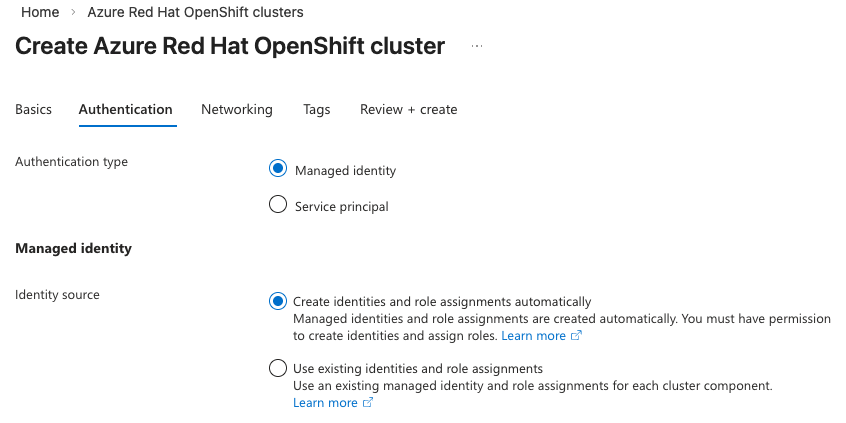
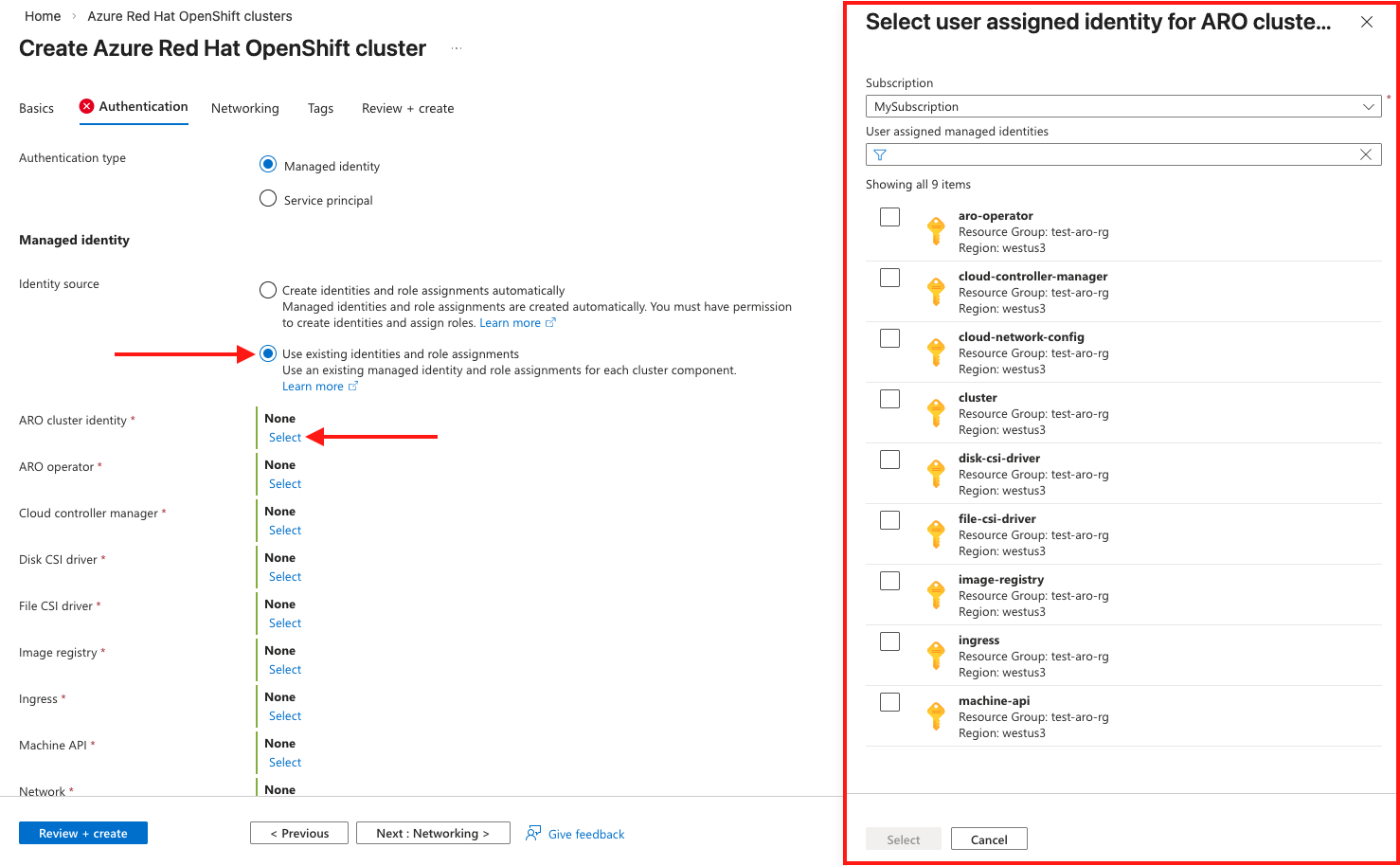
기존 ID 및 역할 할당 사용을 선택하는 경우 올바른 사용자 할당 관리 ID 및 해당 역할 할당이 이미 생성되어 있어야 합니다. 이 옵션을 선택하면 각 구성 요소에 대해 사용자 할당 관리 ID를 선택할 수 있는 아래 섹션이 확장됩니다.
비고
만들어야 하는 사용자 할당 관리 ID 및 역할 할당에 대한 자세한 내용은 ID 역할 할당 아키텍처 이해 를 참조하세요.
각 구성 요소에 대해 선택을 클릭하면 오른쪽에 ID 선택 블레이드가 열리고 해당 관리 ID를 선택할 수 있습니다.
네트워킹 탭에서 필수 옵션을 구성합니다.
비고
OpenShift 4를 실행하는 Azure Red Hat OpenShift 클러스터에는 컨트롤 플레인 및 작업자 노드에 사용할 두 개의 빈 서브넷이 있는 가상 네트워크가 필요합니다.
비고
기존 관리 ID를 사용하는 경우 기존 가상 네트워크 및 서브넷이 있어야 합니다. 클러스터 만들기 흐름의 일부로 새 가상 네트워크를 만들 수 없습니다.

태그 탭에서 태그를 추가하여 리소스를 구성합니다.

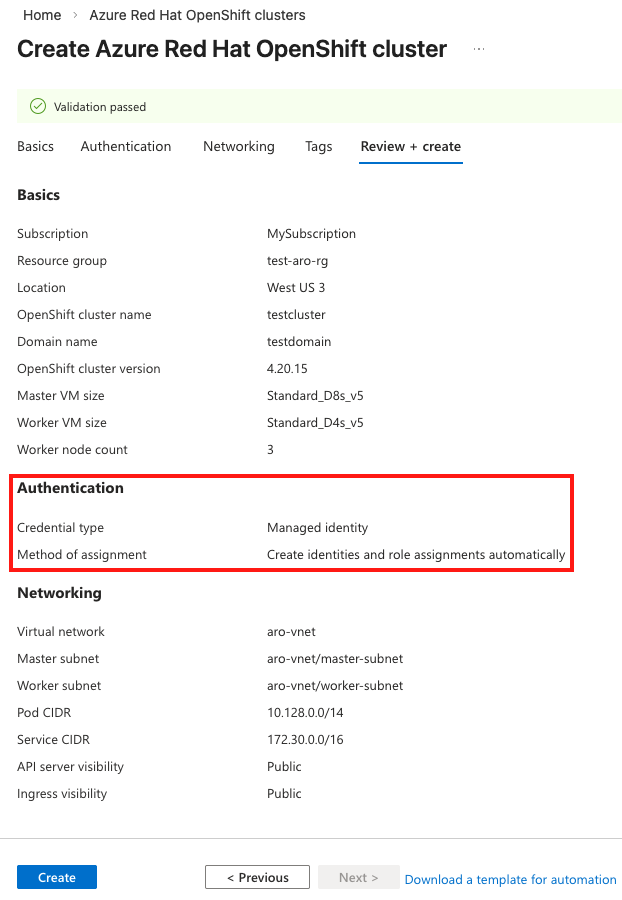
검토 + 만들기를 선택한 다음 유효성 검사가 완료되면 만들기를 선택합니다. 선택한 인증 메커니즘과 자동화된 ID 또는 기존 ID 흐름을 선택했는지 여부를 확인합니다.
Azure Red Hat OpenShift 클러스터를 만드는 데 약 45분이 걸립니다. 배포가 완료되면 다음 중 하나를 통해 리소스로 이동합니다.
- 리소스로 이동을 선택합니다.
- Azure Red Hat OpenShift 클러스터 리소스 그룹으로 이동하여 Azure Red Hat OpenShift 리소스를 선택합니다.


청소
관리 ID 클러스터를 삭제하려면 다음 명령을 실행합니다.
az aro delete -n $CLUSTER -g $RESOURCEGROUP
삭제 명령은 설치의 일부로 생성된 클러스터 할당 관리 ID를 정리하지 않습니다. ID 및 역할 할당을 수동으로 삭제해야 합니다.
관련 콘텐츠
자세한 내용은 Azure Red Hat OpenShift의 관리 ID 이해를 참조하세요.