FileDialog.Filter 속성
정의
중요
일부 정보는 릴리스되기 전에 상당 부분 수정될 수 있는 시험판 제품과 관련이 있습니다. Microsoft는 여기에 제공된 정보에 대해 어떠한 명시적이거나 묵시적인 보증도 하지 않습니다.
또는 에서 표시되는 파일 형식을 결정하는 필터 문자열을 OpenFileDialog 가져오거나 SaveFileDialog설정합니다.
public:
 property System::String ^ Filter { System::String ^ get(); void set(System::String ^ value); };
public string Filter { get; set; }member this.Filter : string with get, setPublic Property Filter As String속성 값
필터를 포함하는 A String 입니다. 기본값은 Empty필터가 적용되지 않고 모든 파일 형식이 표시됨을 의미합니다.
예외
필터 문자열이 잘못되었습니다.
예제
다음 예제에서는 속성을 사용하여 설정할 수 있는 여러 유형의 필터 문자열을 Filter 보여 줍니다.
OpenFileDialog dlg = new OpenFileDialog();

// Show all files
dlg.Filter = string.Empty;

dlg.ShowDialog();
Dim dlg As New OpenFileDialog()

' Show all files
dlg.Filter = String.Empty

dlg.ShowDialog()
OpenFileDialog dlg = new OpenFileDialog();

// Show all files
dlg.Filter = null;

dlg.ShowDialog();
Dim dlg As New OpenFileDialog()

' Show all files
dlg.Filter = Nothing

dlg.ShowDialog()
OpenFileDialog dlg = new OpenFileDialog();

// Filter by Word Documents
dlg.Filter = "Word Documents|*.doc";

dlg.ShowDialog();
Dim dlg As New OpenFileDialog()

' Filter by Word Documents
dlg.Filter = "Word Documents|*.doc"

dlg.ShowDialog()
OpenFileDialog dlg = new OpenFileDialog();

// Filter by Excel Worksheets
dlg.Filter = "Excel Worksheets|*.xls";

dlg.ShowDialog();
Dim dlg As New OpenFileDialog()

' Filter by Excel Worksheets
dlg.Filter = "Excel Worksheets|*.xls"

dlg.ShowDialog()
OpenFileDialog dlg = new OpenFileDialog();

// Filter by PowerPoint Presentations
dlg.Filter = "PowerPoint Presentations|*.ppt";

dlg.ShowDialog();
Dim dlg As New OpenFileDialog()

' Filter by PowerPoint Presentations
dlg.Filter = "PowerPoint Presentations|*.ppt"

dlg.ShowDialog()
OpenFileDialog dlg = new OpenFileDialog();

// Filter by Office Files
dlg.Filter = "Office Files|*.doc;*.xls;*.ppt";

dlg.ShowDialog();
Dim dlg As New OpenFileDialog()

' Filter by Office Files
dlg.Filter = "Office Files|*.doc;*.xls;*.ppt"

dlg.ShowDialog()
OpenFileDialog dlg = new OpenFileDialog();

// Filter by All Files
dlg.Filter = "All Files|*.*";

dlg.ShowDialog();
Dim dlg As New OpenFileDialog()

' Filter by All Files
dlg.Filter = "All Files|*.*"

dlg.ShowDialog()
OpenFileDialog dlg = new OpenFileDialog();

// Filter by Word Documents OR Excel Worksheets OR PowerPoint Presentations
//           OR Office Files
//           OR All Files
dlg.Filter = "Word Documents|*.doc|Excel Worksheets|*.xls|PowerPoint Presentations|*.ppt" +
             "|Office Files|*.doc;*.xls;*.ppt" +
             "|All Files|*.*";

dlg.ShowDialog();
Dim dlg As New OpenFileDialog()

' Filter by Word Documents OR Excel Worksheets OR PowerPoint Presentations
'           OR Office Files
'           OR All Files
dlg.Filter = "Word Documents|*.doc|Excel Worksheets|*.xls|PowerPoint Presentations|*.ppt" & "|Office Files|*.doc;*.xls;*.ppt" & "|All Files|*.*"

dlg.ShowDialog()
설명
null
Empty이 경우 Filter 모든 파일이 표시되고 폴더가 항상 표시됩니다.
속성을 설정하여 표시할 파일 형식의 하위 집합을 Filter 지정할 수 있습니다. 각 파일 형식은 다음과 같은 특정 형식의 파일을 나타낼 수 있습니다.
Word 문서(*.doc)
Excel 워크시트(*.xls)
PowerPoint 프레젠테이션(*.ppt)
또는 파일 형식은 다음과 같은 관련 파일 형식의 그룹을 나타낼 수 있습니다.
Office 파일 (*.doc, *.xls, *.ppt)
모든 파일(*.*)
표시되는 파일 형식의 하위 집합을 지정하려면 필터링할 하나 이상의 파일 형식을 지정하는 문자열 값(필터 문자열)을 사용하여 속성을 설정합니다Filter. 다음은 필터 문자열의 예상 형식을 보여줍니다.
FileType1[[|FileType2]...[|FileTypeN]]
다음 형식을 사용하여 각 파일 형식을 설명합니다.
Label|Extension1[[;Extension2]...[;ExtensionN]]
레이블 부분은 다음과 같이 파일 형식을 설명하는 사람이 읽을 수 있는 문자열 값입니다.
"Word 문서"
"Excel 워크시트"
"PowerPoint 프레젠테이션"
"Office 파일"
"모든 파일"
각 파일 형식은 하나 이상의 확장명에서 설명해야 합니다. 둘 이상의 확장을 사용하는 경우 각 확장 은 세미콜론(";")으로 구분되어야 합니다. 다음은 그 예입니다.
"*.doc"
"*.xls;"
"*.ppt"
"*.doc;*.xls;*.ppt"
"*.*"
다음은 유효한 Filter 문자열 값의 전체 예제입니다.
Word Documents|*.docExcel Worksheets|*.xlsPowerPoint Presentations|*.pptOffice Files|*.doc;*.xls;*.pptAll Files|*.*Word Documents|*.doc|Excel Worksheets|*.xls|PowerPoint Presentations|*.ppt|Office Files|*.doc;*.xls;*.ppt|All Files|*.*
필터에 포함된 각 파일 형식은 다음 그림과 같이 파일 형식의 파일(또는 아래SaveFileDialog의 드롭다운 목록)에 OpenFileDialog 별도의 항목으로 추가됩니다.
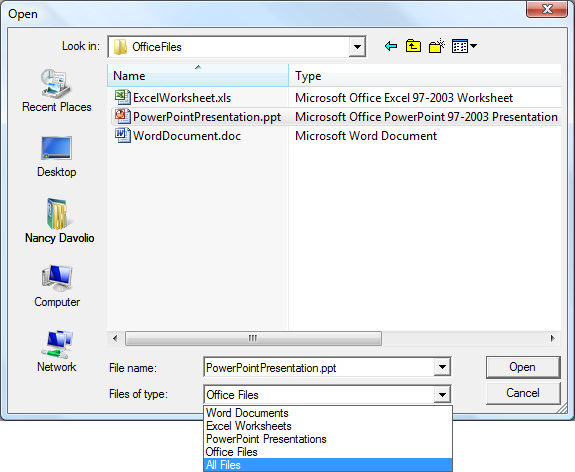
사용자는 필터링할 파일 형식을 이 목록에서 선택할 수 있습니다. 기본적으로 목록의 첫 번째 항목(예: 첫 번째 파일 형식)은 표시될 SaveFileDialog 때 OpenFileDialog 선택됩니다. 다른 파일 형식을 선택하도록 지정하려면 속성을 표시 OpenFileDialog 하기 전에 설정하거나 SaveFileDialog (호출ShowDialog하여) 설정합니다FilterIndex.
