TextBlock.LineStackingStrategy 속성
정의
중요
일부 정보는 릴리스되기 전에 상당 부분 수정될 수 있는 시험판 제품과 관련이 있습니다. Microsoft는 여기에 제공된 정보에 대해 어떠한 명시적이거나 묵시적인 보증도 하지 않습니다.
내의 각 텍스트 줄에 대해 줄 상자가 결정되는 메커니즘을 TextBlock가져오거나 설정합니다.
public:
 property System::Windows::LineStackingStrategy LineStackingStrategy { System::Windows::LineStackingStrategy get(); void set(System::Windows::LineStackingStrategy value); };
public System.Windows.LineStackingStrategy LineStackingStrategy { get; set; }member this.LineStackingStrategy : System.Windows.LineStackingStrategy with get, setPublic Property LineStackingStrategy As LineStackingStrategy속성 값
내의 각 텍스트 TextBlock줄에 대해 줄 상자가 결정되는 메커니즘입니다. 기본값은 MaxHeight입니다.
예제
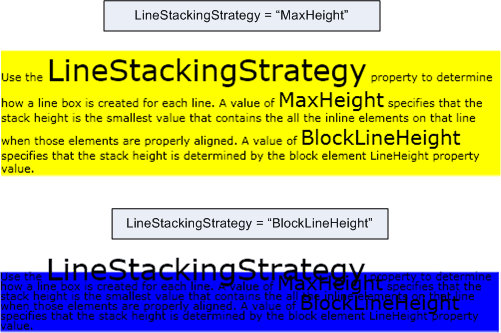
다음 예제에서는 속성을 사용 하 여 LineStackingStrategy 줄의 텍스트 줄에 대 한 줄 상자를 만드는 방법을 결정 하는 TextBlock방법을 보여 줍니다. 첫 번째 TextBlock 값은 LineStackingStrategy 값 MaxHeight 이고 두 번째 TextBlock 값은 .입니다 BlockLineHeight.
<Page xmlns="http://schemas.microsoft.com/winfx/2006/xaml/presentation"
  xmlns:x="http://schemas.microsoft.com/winfx/2006/xaml">
  <StackPanel>

    <!-- This TextBlock has a LineStackingStrategy set to "MaxHeight". -->
    <TextBlock LineStackingStrategy="MaxHeight" LineHeight="10" Width="500" TextWrapping="Wrap"
     Background="Yellow">
      Use the <Span FontSize="30">LineStackingStrategy</Span> property to determine how a line box is
      created for each line. A value of <Span FontSize="20">MaxHeight</Span> specifies that the stack
      height is the smallest value that contains all the inline elements on that line when those
      elements are properly aligned. A value of <Span FontSize="20">BlockLineHeight</Span> specifies
      that the stack height is determined by the block element LineHeight property value.
    </TextBlock>

    <!-- Here is the same TextBlock but the LineStackingStrategy is set to "BlockLineHeight". -->
    <TextBlock LineStackingStrategy="BlockLineHeight" LineHeight="10" Width="500" TextWrapping="Wrap"
     Background="Blue" Margin="0,40,0,0">
      Use the <Span FontSize="30">LineStackingStrategy</Span> property to determine how a line box is
      created for each line. A value of <Span FontSize="20">MaxHeight</Span> specifies that the stack
      height is the smallest value that contains all the inline elements on that line when those
      elements are properly aligned. A value of <Span FontSize="20">BlockLineHeight</Span> specifies
      that the stack height is determined by the block element LineHeight property value.
    </TextBlock>

  </StackPanel>
</Page>
다음 그림에서는 이전 코드의 결과를 보여 줍니다.
설명
이 종속성 속성에는 연결된 속성 사용도 있습니다. XAML에서 사용법은 <object TextBlock.LineStackingStrategy="value".../>개체가 a에 TextBlock포함된 개체 요소(일반적으로 흐름 요소)이고 값은 열거형의 LineStackingStrategy 문자열 값입니다. 코드에서 연결된 속성 사용은 다음에서 지원 GetLineStackingStrategy 됩니다 SetLineStackingStrategy. 연결된 속성 사용은 일반적이지 않습니다.
종속성 속성 정보
| Item | 가치 |
|---|---|
| 식별자 필드 | LineStackingStrategyProperty |
메타데이터 속성이 다음으로 설정됩니다. true |
AffectsMeasure, AffectsRender |
