Copilot Studio 및 Dynamics 365 for Customer Service 플랫폼은 채널 및 리치 미디어 메시지 유형에 따라 리치 미디어 메시지를 지원하는 방식이 약간 다릅니다. 이 문서에서는 Copilot Studio에서 리치 미디어 메시지를 지원하는 방법을 설명합니다.
Apple Messages for Business에 대한 에이전트 JSON 검색
- Copilot Service 관리 센터의 사이트 맵에서 지원 환경의 생산성을 선택합니다.
- 생산성 페이지에서 서식 있는 메시지에 대해 관리를 선택합니다.
- 사용 가능한 모든 목록 메시지 목록에서 대화에 보낼 리치 메시지를 선택합니다.
- Apple Messages for Business 리치 메시지의 경우 Microsoft.Omnichannel.sendMessageToConversation API를 사용하여 JSON 파일을 보냅니다.
라이브 채팅 양식, 라이브 채팅 사용자 지정 JSON 및 WhatsApp 제안 응답에 대한 에이전트 JSON 검색
Copilot Service 관리 센터의 사이트 맵에서 지원 환경의 생산성을 선택합니다.
생산성 페이지에서 서식 있는 메시지에 대해 관리를 선택합니다.
에이전트가 보낼 리치 미디어 메시지를 찾고, JSON을 사용할 수 있는 경우 Copilot Studio용 JSON 열 아래에 표시됩니다. JSON 보기 및 특정 채널 유형을 선택하여 JSON을 복사합니다.
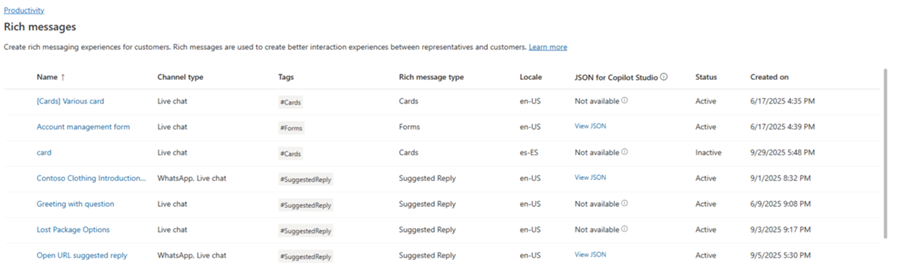
라이브 채팅 및 WhatsApp 리치 미디어 템플릿의 경우 Json을 Copilot Studio의 적응형 카드 노드에 직접 붙여넣을 수 있습니다.
Apple Messages for Business에 대한 서식 있는 메시지에 대한 JSON 샘플
이 섹션에는 Customer Service용 옴니채널의 비즈니스용 Apple 메시지 채널에서 사용할 수 있는 리치 메시지 유형에 대한 JSON 샘플이 포함되어 있습니다. 추가 정보: 리치 메시지 관리
비고
Forms 형식의 리치 메시지를 대화에 보낼 수 없습니다.
애플 페이
let applePayJSON = // <copy_and_paste_details_content>
applePayJSON.survey = { Questions: JSON.parse(applePayJSON.survey)[0].Questions, Answers: JSON.parse(applePayJSON.survey)[1].Answers };
applePayJSON.survey.Answers.AppleMessagesforBusinessJSON = JSON.parse(applePayJSON.survey.Answers.AppleMessagesforBusinessJSON);
applePayJSON.survey.Answers.AppleMessagesforBusinessJSON = JSON.stringify(applePayJSON.survey.Answers.AppleMessagesforBusinessJSON);
applePayJSON.survey = JSON.stringify(applePayJSON.survey);

// Can now send this payload using the API
Microsoft.Omnichannel.sendMessageToConversation(applePayJSON, false);

// Or take the JSON elsewhere for use in bringing your own logic
copy(applePayJSON);
Authentication
let authJSON = // <copy_and_paste_details_content>
authJSON.survey = { Questions: JSON.parse(authJSON.survey)[0].Questions, Answers: JSON.parse(authJSON.survey)[1].Answers };
authJSON.survey = JSON.stringify(authJSON.survey);

// Can now send this payload using the API
Microsoft.Omnichannel.sendMessageToConversation(authJSON, false);

// Or take the JSON elsewhere for use in bringing your own logic
copy(authJSON);
사용자 정의 JSON(iMessage 응용 프로그램)
let customJSON = // <copy_and_paste_details_content>
customJSON.survey = { Questions: JSON.parse(customJSON.survey)[0].Questions, Answers: JSON.parse(customJSON.survey)[1].Answers };
customJSON.survey.Answers.AppleMessagesforBusinessJSON = JSON.parse(customJSON.survey.Answers.AppleMessagesforBusinessJSON);
customJSON.survey.Answers.AppleMessagesforBusinessJSON = JSON.stringify(customJSON.survey.Answers.AppleMessagesforBusinessJSON);
customJSON.survey = JSON.stringify(customJSON.survey);

// Can now send this payload using the API
Microsoft.Omnichannel.sendMessageToConversation(customJSON, false);

// Or take the JSON elsewhere for use in bringing your own logic
copy(customJSON);
목록 선택기
listPickerJSON = // <copy_and_paste_details_content>
listPickerJSON.survey = { Questions: JSON.parse(lpFromDetails.survey)[0].Questions, Answers: JSON.parse(listPickerJSON.survey)[1].Answers };
listPickerJSON.survey = JSON.stringify(listPickerJSON.survey);

// Can now send this payload using the API
Microsoft.Omnichannel.sendMessageToConversation(listPickerJSON, false);

// Or take the JSON elsewhere for use in bringing your own logic
copy(listPickerJSON);
추천 답변
suggestedReplyJSON = // <copy_and_paste_details_content>
suggestedReplyJSON.survey = { Questions: JSON.parse(suggestedReplyJSON.survey)[0].Questions, Answers: JSON.parse(suggestedReplyJSON.survey)[1].Answers };
suggestedReplyJSON.survey = JSON.stringify(suggestedReplyJSON.survey);

// Can now send this payload using the API
Microsoft.Omnichannel.sendMessageToConversation(suggestedReplyJSON, false);

// Or take the JSON elsewhere for use in bringing your own logic
copy(suggestedReplyJSON);
시간 선택기
timePickerJSON = // <copy_and_paste_details_content>
timePickerJSON.survey = { Questions: JSON.parse(timePickerJSON.survey)[0].Questions, Answers: JSON.parse(timePickerJSON.survey)[1].Answers };
timePickerJSON.survey = JSON.stringify(timePickerJSON.survey);

// Can now send this payload using the API
Microsoft.Omnichannel.sendMessageToConversation(timePickerJSON, false);

// Or take the JSON elsewhere for use in bringing your own logic
copy(timePickerJSON);
비디오 리치 링크
videoRichLinkJSON = // <copy_and_paste_details_content>
videoRichLinkJSON.survey = { Questions: JSON.parse(videoRichLinkJSON.survey)[0].Questions, Answers: JSON.parse(videoRichLinkJSON.survey)[1].Answers };
timePickerJSON.survey = JSON.stringify(videoRichLinkJSON.survey);

// Can now send this payload using the API
Microsoft.Omnichannel.sendMessageToConversation(videoRichLinkJSON, false);

// Or take the JSON elsewhere for use in bringing your own logic
copy(videoRichLinkJSON);
웹사이트 리치 링크
websiteRichLinkJSON = // <copy_and_paste_details_content>
websiteRichLinkJSON.survey = { Questions: JSON.parse(websiteRichLinkJSON.survey)[0].Questions, Answers: JSON.parse(websiteRichLinkJSON.survey)[1].Answers };
timePickerJSON.survey = JSON.stringify(websiteRichLinkJSON.survey);

// Can now send this payload using the API
Microsoft.Omnichannel.sendMessageToConversation(websiteRichLinkJSON, false);

// Or take the JSON elsewhere for use in bringing your own logic
copy(websiteRichLinkJSON);
라이브 채팅 제안 회신 및 카드/캐러셀을 보내도록 상담원 구성
Copilot Studio는 제안된 답장과 기본 카드를 즉시 지원합니다. 메시지 보내기 - Microsoft Copilot Studio에서 자세히 알아보세요.
비고
Copilot Studio는 제안된 회신을 빠른 회신이라고 합니다.
관련 정보
라이브 채팅 SDK JavaScript API 참조
옴니채널 JavaScript API 참조
sendMessageToConversation