패싯을 사용하면 결과를 필터링하기 위한 링크 집합을 제공하여 자체 탐색을 사용할 수 있습니다. 이 자습서에서는 페이지 왼쪽에 패싯 탐색 구조가 배치되며, 레이블과 클릭 가능한 텍스트를 사용하여 결과를 트리밍합니다.
이 자습서에서는 다음 방법을 알아봅니다.
- 모델 속성을 IsFacetable 설정
- 앱에 패싯 탐색 추가
개요
패싯은 검색 인덱스의 필드를 기반으로 합니다. facet=[string]을 포함하는 쿼리 요청은 패싯 기준 필드를 제공합니다.
&facet=category&facet=amenities같은 여러 패싯을 포함하는 것이 일반적이며, 각 패싯은 앰퍼샌드(&) 문자로 구분됩니다. 패싯 탐색 구조를 구현하려면 패싯과 필터를 모두 지정해야 합니다. 필터는 클릭 이벤트에서 결과 범위를 좁히는 데 사용됩니다. 예를 들어 "예산"을 클릭하면 해당 기준에 따라 결과가 필터링됩니다.
이 자습서에서는 추가 페이징에서 만든 페이징 프로젝트를 확장하여 검색 결과 자습서에 추가합니다.
이 자습서의 완성된 최종 코드 버전은 다음 프로젝트에서 찾을 수 있습니다.
필수 조건
- 2a-add-paging(GitHub) 솔루션. 이 프로젝트는 이전 자습서에서 빌드된 사용자 고유의 버전이거나 GitHub의 복사본일 수 있습니다.
모델 속성을 IsFacetable로 설정
모델 속성을 패싯 검색에 배치하려면 IsFacetable태그를 지정해야 합니다.
Hotel 클래스를 검토합니다. 예를 들어 범주 및 태그가 IsFacetable태그로 지정되어 있지만, HotelName 와 설명 은 태그로 지정되지 않습니다.
public partial class Hotel
{
    [SimpleField(IsFilterable = true, IsKey = true)]
    public string HotelId { get; set; }

    [SearchableField(IsSortable = true)]
    public string HotelName { get; set; }

    [SearchableField(AnalyzerName = LexicalAnalyzerName.Values.EnLucene)]
    public string Description { get; set; }

    [SearchableField(AnalyzerName = LexicalAnalyzerName.Values.FrLucene)]
    [JsonPropertyName("Description_fr")]
    public string DescriptionFr { get; set; }

    [SearchableField(IsFilterable = true, IsSortable = true, IsFacetable = true)]
    public string Category { get; set; }

    [SearchableField(IsFilterable = true, IsFacetable = true)]
    public string[] Tags { get; set; }

    [SimpleField(IsFilterable = true, IsSortable = true, IsFacetable = true)]
    public bool? ParkingIncluded { get; set; }

    [SimpleField(IsFilterable = true, IsSortable = true, IsFacetable = true)]
    public DateTimeOffset? LastRenovationDate { get; set; }

    [SimpleField(IsFilterable = true, IsSortable = true, IsFacetable = true)]
    public double? Rating { get; set; }

    public Address Address { get; set; }

    [SimpleField(IsFilterable = true, IsSortable = true)]
    public GeographyPoint Location { get; set; }

    public Room[] Rooms { get; set; }
}
이 자습서의 일부로 태그를 변경하지 않으므로 변경되지 않은 hotel.cs 파일을 닫습니다.
비고
검색에서 요청된 필드가 적절하게 태그가 지정되지 않은 경우 패싯 검색에서 오류가 발생합니다.
앱에 패싯 탐색 추가
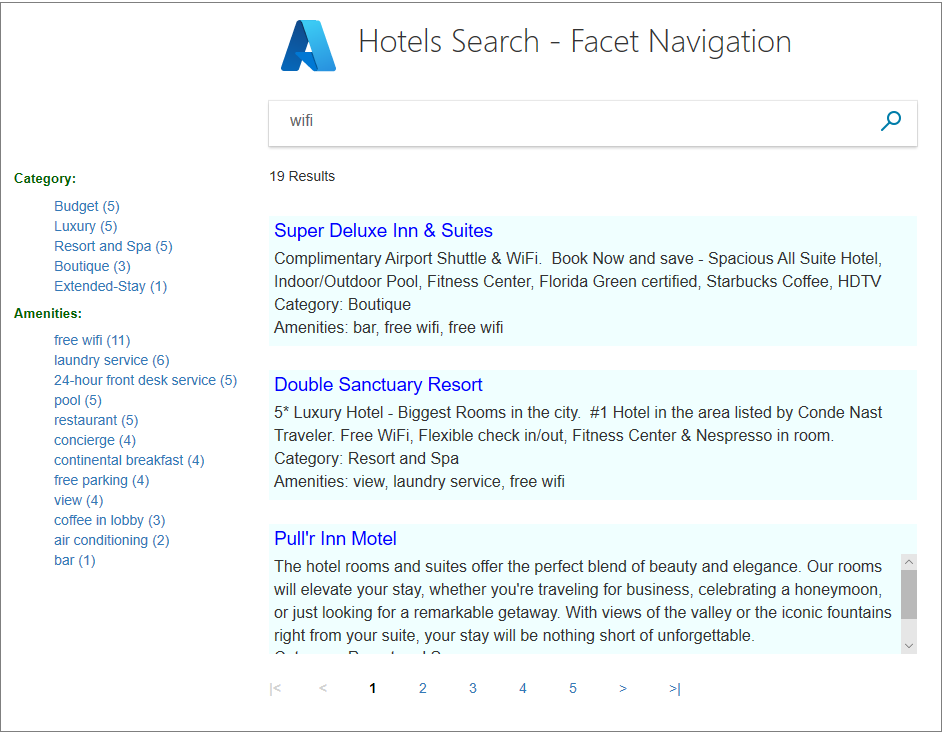
이 예제에서는 사용자가 결과의 왼쪽에 표시된 링크 목록에서 호텔 범주 하나 또는 편의 시설 하나를 선택할 수 있도록 합니다. 사용자는 먼저 일부 검색 텍스트를 입력한 다음 범주 또는 편의 시설을 선택하여 검색 결과를 점진적으로 좁힐 수 있습니다.
뷰에 패싯 목록을 전달하는 것은 컨트롤러의 작업입니다. 검색이 진행됨에 따라 사용자 선택을 유지하기 위해 임시 스토리지를 상태를 보존하기 위한 메커니즘으로 사용합니다.
SearchData 모델에 필터 문자열 추가
SearchData.cs 파일을 열고 SearchData 클래스에 문자열 속성을 추가하여 패싯 필터 문자열을 저장합니다.
public string categoryFilter { get; set; }
public string amenityFilter { get; set; }
패싯 작업 메서드 추가
홈 컨트롤러에는 패싯 새 작업 하나와 기존 인덱스 및 페이지 작업 및 RunQueryAsync 메서드에 대한 업데이트가 필요합니다.
Index(SearchData 모델) 작업 메서드를 바꿉니다.
public async Task<ActionResult> Index(SearchData model)
{
    try
    {
        // Ensure the search string is valid.
        if (model.searchText == null)
        {
            model.searchText = "";
        }

        // Make the search call for the first page.
        await RunQueryAsync(model, 0, 0, "", "").ConfigureAwait(false);
    }
    catch
    {
        return View("Error", new ErrorViewModel { RequestId = "1" });
    }

    return View(model);
}
PageAsync(SearchData 모델) 액션 메서드를 대체합니다.
public async Task<ActionResult> PageAsync(SearchData model)
{
    try
    {
        int page;

        // Calculate the page that should be displayed.
        switch (model.paging)
        {
            case "prev":
                page = (int)TempData["page"] - 1;
                break;

            case "next":
                page = (int)TempData["page"] + 1;
                break;

            default:
                page = int.Parse(model.paging);
                break;
        }

        // Recover the leftMostPage.
        int leftMostPage = (int)TempData["leftMostPage"];

        // Recover the filters.
        string catFilter = TempData["categoryFilter"].ToString();
        string ameFilter = TempData["amenityFilter"].ToString();

        // Recover the search text.
        model.searchText = TempData["searchfor"].ToString();

        // Search for the new page.
        await RunQueryAsync(model, page, leftMostPage, catFilter, ameFilter);
    }

    catch
    {
        return View("Error", new ErrorViewModel { RequestId = "2" });
    }
    return View("Index", model);
}
사용자가 패싯 링크를 클릭할 때 활성화할 FacetAsync(SearchData 모델) 작업 메서드를 추가합니다. 모델에는 범주 또는 편의 시설 검색 필터가 포함됩니다. PageAsync 작업 후에 추가합니다.
public async Task<ActionResult> FacetAsync(SearchData model)
{
    try
    {
        // Filters set by the model override those stored in temporary data.
        string catFilter;
        string ameFilter;
        if (model.categoryFilter != null)
        {
            catFilter = model.categoryFilter;
        } else
        {
            catFilter = TempData["categoryFilter"].ToString();
        }

        if (model.amenityFilter != null)
        {
            ameFilter = model.amenityFilter;
        } else
        {
            ameFilter = TempData["amenityFilter"].ToString();
        }

        // Recover the search text.
        model.searchText = TempData["searchfor"].ToString();

        // Initiate a new search.
        await RunQueryAsync(model, 0, 0, catFilter, ameFilter).ConfigureAwait(false);
    }
    catch
    {
        return View("Error", new ErrorViewModel { RequestId = "2" });
    }

    return View("Index", model);
}
검색 필터 설정
예를 들어 사용자가 특정 패싯을 선택하면 리조트 및 스파 범주를 클릭하면 이 범주로 지정된 호텔만 결과에 반환됩니다. 이러한 방식으로 검색 범위를 좁히려면 필터설정해야 합니다.
RunQueryAsync 메서드를 다음 코드로 바꿉다. 주로 범주 필터 문자열과 편의용 필터 문자열을 사용하여 SearchOptions의 Filter 매개 변수를 설정합니다.
private async Task<ActionResult> RunQueryAsync(SearchData model, int page, int leftMostPage, string catFilter, string ameFilter)
{
    InitSearch();

    string facetFilter = "";

    if (catFilter.Length > 0 && ameFilter.Length > 0)
    {
        // Both facets apply.
        facetFilter = $"{catFilter} and {ameFilter}";
    } else
    {
        // One, or zero, facets apply.
        facetFilter = $"{catFilter}{ameFilter}";
    }

    var options = new SearchOptions
    {
        Filter = facetFilter,

        SearchMode = SearchMode.All,

        // Skip past results that have already been returned.
        Skip = page * GlobalVariables.ResultsPerPage,

        // Take only the next page worth of results.
        Size = GlobalVariables.ResultsPerPage,

        // Include the total number of results.
        IncludeTotalCount = true,
    };

    // Return information on the text, and number, of facets in the data.
    options.Facets.Add("Category,count:20");
    options.Facets.Add("Tags,count:20");

    // Enter Hotel property names into this list, so only these values will be returned.
    options.Select.Add("HotelName");
    options.Select.Add("Description");
    options.Select.Add("Category");
    options.Select.Add("Tags");

    // For efficiency, the search call should be asynchronous, so use SearchAsync rather than Search.
    model.resultList = await _searchClient.SearchAsync<Hotel>(model.searchText, options).ConfigureAwait(false);

    // This variable communicates the total number of pages to the view.
    model.pageCount = ((int)model.resultList.TotalCount + GlobalVariables.ResultsPerPage - 1) / GlobalVariables.ResultsPerPage;

    // This variable communicates the page number being displayed to the view.
    model.currentPage = page;

    // Calculate the range of page numbers to display.
    if (page == 0)
    {
        leftMostPage = 0;
    }
    else if (page <= leftMostPage)
    {
        // Trigger a switch to a lower page range.
        leftMostPage = Math.Max(page - GlobalVariables.PageRangeDelta, 0);
    }
    else if (page >= leftMostPage + GlobalVariables.MaxPageRange - 1)
    {
        // Trigger a switch to a higher page range.
        leftMostPage = Math.Min(page - GlobalVariables.PageRangeDelta, model.pageCount - GlobalVariables.MaxPageRange);
    }
    model.leftMostPage = leftMostPage;

    // Calculate the number of page numbers to display.
    model.pageRange = Math.Min(model.pageCount - leftMostPage, GlobalVariables.MaxPageRange);

    // Ensure Temp data is stored for the next call.
    TempData["page"] = page;
    TempData["leftMostPage"] = model.leftMostPage;
    TempData["searchfor"] = model.searchText;
    TempData["categoryFilter"] = catFilter;
    TempData["amenityFilter"] = ameFilter;

    // Return the new view.
    return View("Index", model);
}
범주 및 태그 속성이 반환할 항목 선택 목록에 추가됩니다. 이 추가는 패싯 탐색이 작동하기 위한 요구 사항은 아니지만 이 정보를 사용하여 필터가 제대로 작동하는지 확인합니다.
뷰에 패싯 링크 목록 추가
관점에는 몇 가지 중요한 변경이 필요할 것입니다.
먼저 wwwroot/css 폴더에서 hotels.css 파일을 열고 다음 클래스를 추가합니다.
.facetlist {
    list-style: none;
}

.facetchecks {
    width: 250px;
    display: normal;
    color: #666;
    margin: 10px;
    padding: 5px;
}

.facetheader {
    font-size: 10pt;
    font-weight: bold;
    color: darkgreen;
}
보기의 경우 출력을 테이블로 구성하여 왼쪽의 패싯 목록과 오른쪽의 결과를 깔끔하게 정렬합니다. index.cshtml 파일을 엽니다. HTML <본문> 태그의 전체 내용을 다음 코드로 바꿉니다.
<body> @using (Html.BeginForm("Index", "Home", FormMethod.Post)) { <table> <tr> <td></td> <td> <h1 class="sampleTitle"> <img src="~/images/azure-logo.png" width="80" /> Hotels Search - Facet Navigation </h1> </td> </tr> <tr> <td></td> <td> <!-- Display the search text box, with the search icon to the right of it.--> <div class="searchBoxForm"> @Html.TextBoxFor(m => m.searchText, new { @class = "searchBox" }) <input value="" class="searchBoxSubmit" type="submit"> </div> </td> </tr> <tr> <td valign="top"> <div id="facetplace" class="facetchecks"> @if (Model != null && Model.resultList != null) { List<string> categories = Model.resultList.Facets["Category"].Select(x => x.Value.ToString()).ToList(); if (categories.Count > 0) { <h5 class="facetheader">Category:</h5> <ul class="facetlist"> @for (var c = 0; c < categories.Count; c++) { var facetLink = $"{categories[c]} ({Model.resultList.Facets["Category"][c].Count})"; <li> @Html.ActionLink(facetLink, "FacetAsync", "Home", new { categoryFilter = $"Category eq '{categories[c]}'" }, null) </li> } </ul> } List<string> tags = Model.resultList.Facets["Tags"].Select(x => x.Value.ToString()).ToList(); if (tags.Count > 0) { <h5 class="facetheader">Amenities:</h5> <ul class="facetlist"> @for (var c = 0; c < tags.Count; c++) { var facetLink = $"{tags[c]} ({Model.resultList.Facets["Tags"][c].Count})"; <li> @Html.ActionLink(facetLink, "FacetAsync", "Home", new { amenityFilter = $"Tags/any(t: t eq '{tags[c]}')" }, null) </li> } </ul> } } </div> </td> <td valign="top"> <div id="resultsplace"> @if (Model != null && Model.resultList != null) { // Show the result count. <p class="sampleText"> @Model.resultList.TotalCount Results </p> var results = Model.resultList.GetResults().ToList(); @for (var i = 0; i < results.Count; i++) { string amenities = string.Join(", ", results[i].Document.Tags); string fullDescription = results[i].Document.Description; fullDescription += $"\nCategory: {results[i].Document.Category}"; fullDescription += $"\nAmenities: {amenities}"; // Display the hotel name and description. @Html.TextAreaFor(m => results[i].Document.HotelName, new { @class = "box1" }) @Html.TextArea($"desc{i}", fullDescription, new { @class = "box2" }) } } </div> </td> </tr> <tr> <td></td> <td valign="top"> @if (Model != null && Model.pageCount > 1) { // If there is more than one page of results, show the paging buttons. <table> <tr> <td class="tdPage"> @if (Model.currentPage > 0) { <p class="pageButton"> @Html.ActionLink("|<", "PageAsync", "Home", new { paging = "0" }, null) </p> } else { <p class="pageButtonDisabled">|<</p> } </td> <td class="tdPage"> @if (Model.currentPage > 0) { <p class="pageButton"> @Html.ActionLink("<", "PageAsync", "Home", new { paging = "prev" }, null) </p> } else { <p class="pageButtonDisabled"><</p> } </td> @for (var pn = Model.leftMostPage; pn < Model.leftMostPage + Model.pageRange; pn++) { <td class="tdPage"> @if (Model.currentPage == pn) { // Convert displayed page numbers to 1-based and not 0-based. <p class="pageSelected">@(pn + 1)</p> } else { <p class="pageButton"> @Html.ActionLink((pn + 1).ToString(), "PageAsync", "Home", new { paging = @pn }, null) </p> } </td> } <td class="tdPage"> @if (Model.currentPage < Model.pageCount - 1) { <p class="pageButton"> @Html.ActionLink(">", "PageAsync", "Home", new { paging = "next" }, null) </p> } else { <p class="pageButtonDisabled">></p> } </td> <td class="tdPage"> @if (Model.currentPage < Model.pageCount - 1) { <p class="pageButton"> @Html.ActionLink(">|", "PageAsync", "Home", new { paging = Model.pageCount - 1 }, null) </p> } else { <p class="pageButtonDisabled">>|</p> } </td> </tr> </table> } </td> </tr> </table> } </body>Html.ActionLink 호출의 사용 여부를 확인하십시오. 이 호출은 사용자가 패싯 링크를 클릭할 때 유효한 필터 문자열을 컨트롤러에 전달합니다.
앱 실행 및 테스트
사용자에 대한 패싯 탐색의 장점은 한 번의 클릭으로 검색 범위를 좁힐 수 있다는 점이며, 다음 순서로 표시할 수 있습니다.
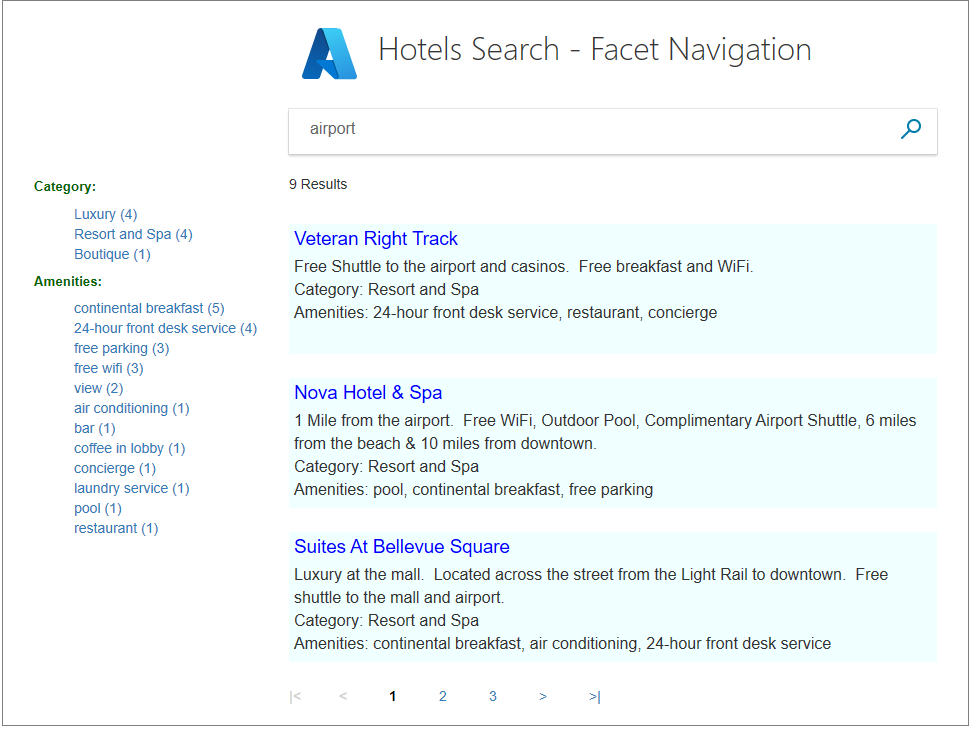
앱을 실행하고 검색 텍스트로 "airport"를 입력합니다. 패싯 목록이 왼쪽에 깔끔하게 표시되는지 확인합니다. 이러한 패싯은 텍스트 데이터에 "공항"이 있는 호텔에 적용되며 발생 빈도를 계산합니다.
 검색 범위 좁히기
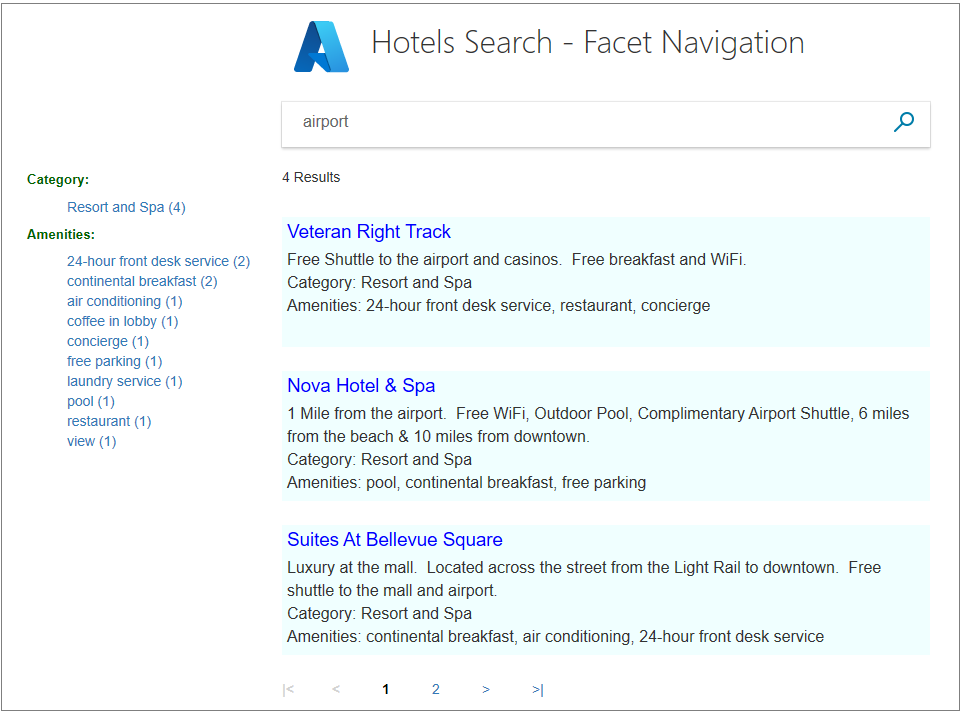
리조트 앤 스파 범주를 클릭합니다. 모든 결과가 이 범주에 있는지 확인합니다.
 좁히기
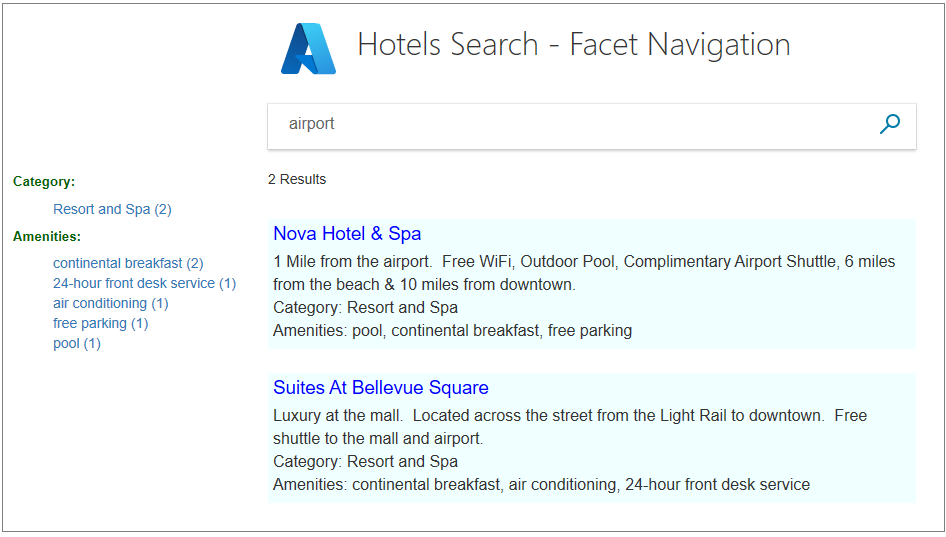
좁히기유럽식 조식 편의 시설을 클릭합니다. 선택한 편의 시설을 사용하여 모든 결과가 여전히 "리조트 및 스파" 범주에 속하는지 확인합니다.
다른 범주를 선택한 다음 하나의 편의 시설을 선택하고 축소 결과를 확인합니다. 그런 다음 반대로 시도해 보세요. 먼저 하나의 편의 시설, 그 다음 하나의 범주를 선택합니다. 빈 검색을 보내 페이지를 다시 설정합니다.
비고
패싯 목록(예: 범주)에서 하나의 항목이 선택되면 해당 범주 목록 내의 이전 선택 항목을 덮어씁니다.
주요 사항
이 프로젝트에서 다음 사항을 고려합니다.
- 패싯 탐색에 포함하려면 각 패싯 필드를 IsFacetable 속성으로 표시해야 합니다.
- 패싯 기능은 필터와 조합되어 결과를 제한합니다.
- 패싯은 순차적으로 누적되며, 각 선택 영역은 이전 선택 항목에 기반하여 결과를 더욱 좁힙니다.
다음 단계
다음 자습서에서는 결과 순서를 살펴보겠습니다. 이 시점까지 결과는 단순히 데이터베이스에 있는 순서대로 정렬됩니다.