눈의 위치와 움직임에 따라 사용자의 시선, 주의 및 현재 상태를 추적할 수 있도록 지원합니다.
메모
Windows Mixed Reality에서 응시 입력에 대한 자세한 내용은 [응시](/windows/mixed-reality/mrtk-unity/features/input/gaze)를 참조하세요.
중요한 API: Windows.Devices.Input.Preview, GazeDevicePreview, GazePointPreview, GazeInputSourcePreview
개요
응시 입력은 신경 근육 질환 (예 : ALS) 및 손상된 근육이나 신경 기능을 포함하는 다른 장애를 가진 사용자를위한 보조 기술로 특히 유용한 Windows 응용 프로그램을 상호 작용하고 사용하는 강력한 방법입니다.
또한 응시 입력은 게임(대상 획득 및 추적 포함)과 기존 생산성 애플리케이션, 키오스크 및 기존 입력 장치(키보드, 마우스, 터치)를 사용할 수 없거나 쇼핑백 보유와 같은 다른 작업에 대한 사용자의 손을 확보하는 것이 유용하거나 유용할 수 있는 기타 대화형 시나리오 모두에 대해 똑같이 매력적인 기회를 제공합니다.
메모
시선 추적 하드웨어에 대한 지원은 Windows 10 Fall Creators Update와 함께 아이 컨트롤 도입되었으며, 눈을 사용하여 화면 포인터를 제어하고, 화상 키보드로 입력하고, 텍스트 음성 변환을 사용하여 사람들과 통신할 수 있는 기본 제공 기능입니다. Windows 10 2018년 4월 업데이트(버전 1803, 빌드 17134) 이상에서는 시선 추적 하드웨어와 상호 작용할 수 있는 애플리케이션을 빌드하는 데 사용할 수 있는 Windows Runtime API 세트(Windows.Devices.Input.Preview)를 사용할 수 있습니다.
개인 정보 보호
시선 추적 디바이스에서 수집된 잠재적으로 중요한 개인 데이터로 인해 애플리케이션의 앱 매니페스트에서 기능을 선언 gazeInput 해야 합니다(다음 설치 섹션 참조). 선언되면 Windows 자동으로 사용자에게 동의 대화 상자(앱이 처음 실행될 때)를 묻는 메시지를 표시합니다. 여기서 사용자는 앱이 시선 추적 디바이스와 통신하고 이 데이터에 액세스할 수 있는 권한을 부여해야 합니다.
또한 앱이 시선 추적 데이터를 수집, 저장 또는 전송하는 경우 앱의 개인 정보 취급 방침에서 이를 설명하고 앱 개발자 계약 및 Microsoft Store 정책의 개인 정보에 대한 다른 모든 요구 사항을 따라야 합니다.
설치
Windows 앱에서 응시 입력 API를 사용하려면 다음을 수행해야 합니다.
앱 매니페스트에서
gazeInput기능을 지정하십시오.Visual Studio 매니페스트 디자이너에서 Package.appxmanifest 파일을 열거나 개 보기 코드를 선택하고 다음
DeviceCapabilityCapabilities노드에 삽입하여 기능을 수동으로 추가합니다.<Capabilities> <DeviceCapability Name="gazeInput" /> </Capabilities>시스템에 연결된 Windows 호환되는 시선 추적 디바이스(기본 제공 또는 주변 장치)가 켜져 있습니다.
지원되는 시선 추적 장치 목록은 Windows 10에서 아이 컨트롤로 시작하는Get을 참조하세요.
기본 시선 추적
이 예제에서는 Windows 앱 내에서 사용자의 응시를 추적하고 기본 적중 테스트에서 타이밍 함수를 사용하여 특정 요소에 대한 시선 포커스를 얼마나 잘 유지할 수 있는지를 나타내는 방법을 보여 줍니다.
작은 줄임표는 애플리케이션 뷰포트 내에서 응시 지점이 있는 위치를 표시하는 데 사용되며,
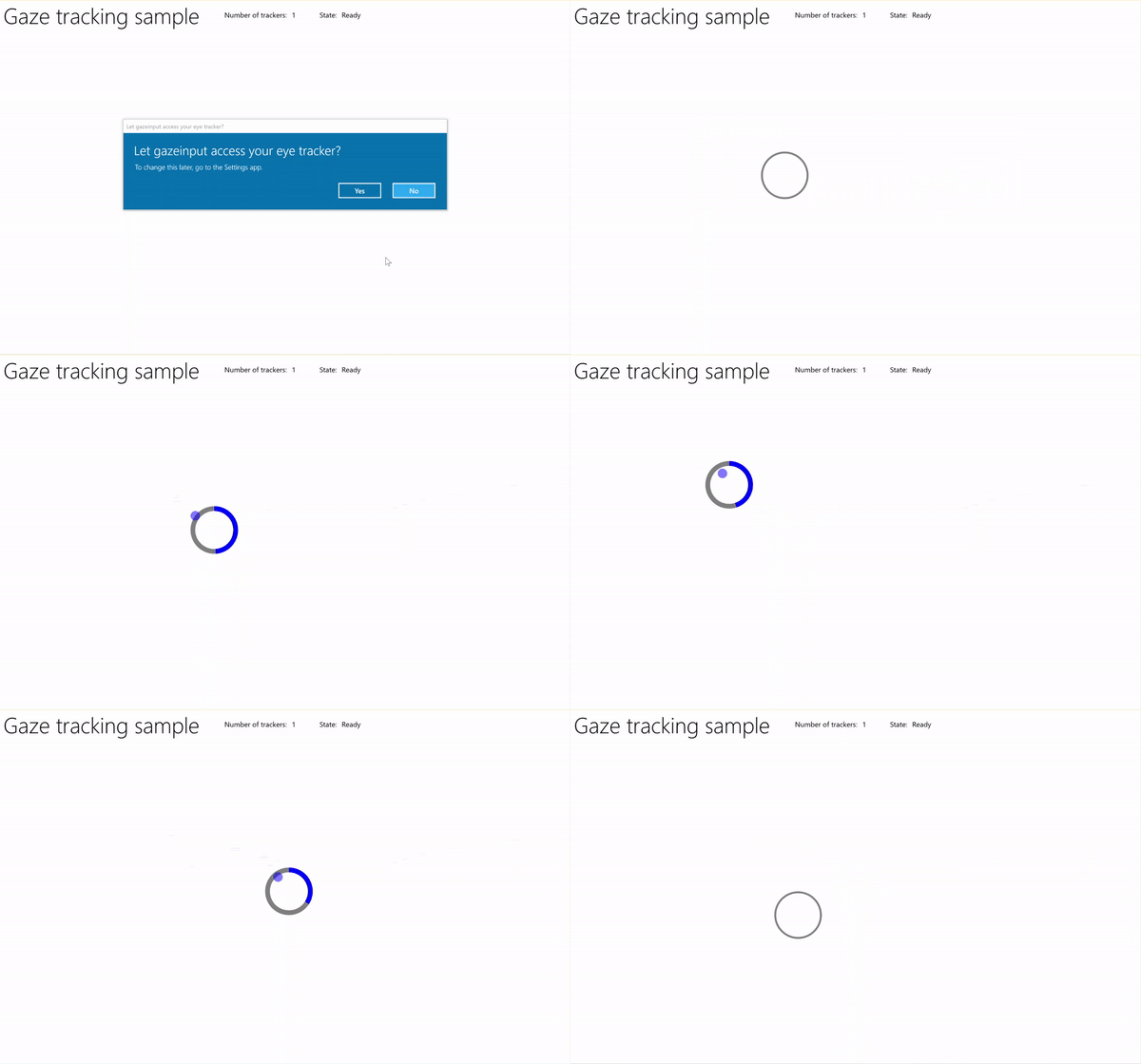
타이머 샘플을 통한 시선 추적
먼저 UI(MainPage.xaml)를 설정합니다.
<Page
    x:Class="gazeinput.MainPage"
    xmlns="http://schemas.microsoft.com/winfx/2006/xaml/presentation"
    xmlns:x="http://schemas.microsoft.com/winfx/2006/xaml"
    xmlns:local="using:gazeinput"
    xmlns:d="http://schemas.microsoft.com/expression/blend/2008"
    xmlns:mc="http://schemas.openxmlformats.org/markup-compatibility/2006"
    xmlns:controls="using:Microsoft.Toolkit.Uwp.UI.Controls"
    mc:Ignorable="d">

    <Grid Background="{ThemeResource ApplicationPageBackgroundThemeBrush}">
        <Grid x:Name="containerGrid">
            <Grid.RowDefinitions>
                <RowDefinition Height="Auto"/>
                <RowDefinition Height="*"/>
            </Grid.RowDefinitions>
            <StackPanel x:Name="HeaderPanel"
                    Orientation="Horizontal"
                    Grid.Row="0">
                <StackPanel.Transitions>
                    <TransitionCollection>
                        <AddDeleteThemeTransition/>
                    </TransitionCollection>
                </StackPanel.Transitions>
                <TextBlock x:Name="Header"
                       Text="Gaze tracking sample"
                       Style="{ThemeResource HeaderTextBlockStyle}"
                       Margin="10,0,0,0" />
                <TextBlock x:Name="TrackerCounterLabel"
                       VerticalAlignment="Center"
                       Style="{ThemeResource BodyTextBlockStyle}"
                       Text="Number of trackers: "
                       Margin="50,0,0,0"/>
                <TextBlock x:Name="TrackerCounter"
                       VerticalAlignment="Center"
                       Style="{ThemeResource BodyTextBlockStyle}"
                       Text="0"
                       Margin="10,0,0,0"/>
                <TextBlock x:Name="TrackerStateLabel"
                       VerticalAlignment="Center"
                       Style="{ThemeResource BodyTextBlockStyle}"
                       Text="State: "
                       Margin="50,0,0,0"/>
                <TextBlock x:Name="TrackerState"
                       VerticalAlignment="Center"
                       Style="{ThemeResource BodyTextBlockStyle}"
                       Text="n/a"
                       Margin="10,0,0,0"/>
            </StackPanel>
            <Canvas x:Name="gazePositionCanvas" Grid.Row="1">
                <controls:RadialProgressBar
                    x:Name="GazeRadialProgressBar"
                    Value="0"
                    Foreground="Blue"
                    Background="White"
                    Thickness="4"
                    Minimum="0"
                    Maximum="100"
                    Width="100"
                    Height="100"
                    Outline="Gray"
                    Visibility="Collapsed"/>
                <Ellipse
                    x:Name="eyeGazePositionEllipse"
                    Width="20" Height="20"
                    Fill="Blue"
                    Opacity="0.5"
                    Visibility="Collapsed">
                </Ellipse>
            </Canvas>
        </Grid>
    </Grid>
</Page>
다음으로, 앱을 초기화합니다.
이 코드 조각에서는 전역 개체를 선언하고 OnNavigatedTo 페이지 이벤트를 재정의하여 응시 장치 감시자를 시작하고 OnNavigatedFrom 페이지 이벤트를 재정의하여 응시 장치 감시자를 중지합니다.
using System;
using Windows.Devices.Input.Preview;
using Windows.UI.Xaml.Controls;
using Windows.UI.Xaml;
using Windows.Foundation;
using System.Collections.Generic;
using Windows.UI.Xaml.Media;
using Windows.UI.Xaml.Navigation;

namespace gazeinput
{
    public sealed partial class MainPage : Page
    {
        /// <summary>
        /// Reference to the user's eyes and head as detected
        /// by the eye-tracking device.
        /// </summary>
        private GazeInputSourcePreview gazeInputSource;

        /// <summary>
        /// Dynamic store of eye-tracking devices.
        /// </summary>
        /// <remarks>
        /// Receives event notifications when a device is added, removed,
        /// or updated after the initial enumeration.
        /// </remarks>
        private GazeDeviceWatcherPreview gazeDeviceWatcher;

        /// <summary>
        /// Eye-tracking device counter.
        /// </summary>
        private int deviceCounter = 0;

        /// <summary>
        /// Timer for gaze focus on RadialProgressBar.
        /// </summary>
        DispatcherTimer timerGaze = new DispatcherTimer();

        /// <summary>
        /// Tracker used to prevent gaze timer restarts.
        /// </summary>
        bool timerStarted = false;

        /// <summary>
        /// Initialize the app.
        /// </summary>
        public MainPage()
        {
            InitializeComponent();
        }

        /// <summary>
        /// Override of OnNavigatedTo page event starts GazeDeviceWatcher.
        /// </summary>
        /// <param name="e">Event args for the NavigatedTo event</param>
        protected override void OnNavigatedTo(NavigationEventArgs e)
        {
            // Start listening for device events on navigation to eye-tracking page.
            StartGazeDeviceWatcher();
        }

        /// <summary>
        /// Override of OnNavigatedFrom page event stops GazeDeviceWatcher.
        /// </summary>
        /// <param name="e">Event args for the NavigatedFrom event</param>
        protected override void OnNavigatedFrom(NavigationEventArgs e)
        {
            // Stop listening for device events on navigation from eye-tracking page.
            StopGazeDeviceWatcher();
        }
    }
}
다음으로 응시 장치 모니터링 메서드를 추가합니다.
여기서는
StartGazeDeviceWatcherCreateWatcher를 호출하고 시선 추적 디바이스 이벤트 수신기(DeviceAdded, DeviceUpdated 및 DeviceRemoved)를 선언합니다.에서
DeviceAdded시선 추적 디바이스의 상태를 확인합니다. 실행 가능한 디바이스인 경우 디바이스 수를 증가시키고 응시 추적을 사용하도록 설정합니다. 자세한 내용은 다음 단계를 참조하세요.또한
DeviceUpdated기기가 재보정되면 이 이벤트가 트리거되므로 응시 추적을 활성화합니다.여기서는
DeviceRemoved디바이스 카운터를 감소시키고 디바이스 이벤트 처리기를 제거합니다.StopGazeDeviceWatcher에서 시선 추적 장치 감시자를 종료합니다.
    /// <summary>
    /// Start gaze watcher and declare watcher event handlers.
    /// </summary>
    private void StartGazeDeviceWatcher()
    {
        if (gazeDeviceWatcher == null)
        {
            gazeDeviceWatcher = GazeInputSourcePreview.CreateWatcher();
            gazeDeviceWatcher.Added += this.DeviceAdded;
            gazeDeviceWatcher.Updated += this.DeviceUpdated;
            gazeDeviceWatcher.Removed += this.DeviceRemoved;
            gazeDeviceWatcher.Start();
        }
    }

    /// <summary>
    /// Shut down gaze watcher and stop listening for events.
    /// </summary>
    private void StopGazeDeviceWatcher()
    {
        if (gazeDeviceWatcher != null)
        {
            gazeDeviceWatcher.Stop();
            gazeDeviceWatcher.Added -= this.DeviceAdded;
            gazeDeviceWatcher.Updated -= this.DeviceUpdated;
            gazeDeviceWatcher.Removed -= this.DeviceRemoved;
            gazeDeviceWatcher = null;
        }
    }

    /// <summary>
    /// Eye-tracking device connected (added, or available when watcher is initialized).
    /// </summary>
    /// <param name="sender">Source of the device added event</param>
    /// <param name="e">Event args for the device added event</param>
    private void DeviceAdded(GazeDeviceWatcherPreview source,
        GazeDeviceWatcherAddedPreviewEventArgs args)
    {
        if (IsSupportedDevice(args.Device))
        {
            deviceCounter++;
            TrackerCounter.Text = deviceCounter.ToString();
        }
        // Set up gaze tracking.
        TryEnableGazeTrackingAsync(args.Device);
    }

    /// <summary>
    /// Initial device state might be uncalibrated,
    /// but device was subsequently calibrated.
    /// </summary>
    /// <param name="sender">Source of the device updated event</param>
    /// <param name="e">Event args for the device updated event</param>
    private void DeviceUpdated(GazeDeviceWatcherPreview source,
        GazeDeviceWatcherUpdatedPreviewEventArgs args)
    {
        // Set up gaze tracking.
        TryEnableGazeTrackingAsync(args.Device);
    }

    /// <summary>
    /// Handles disconnection of eye-tracking devices.
    /// </summary>
    /// <param name="sender">Source of the device removed event</param>
    /// <param name="e">Event args for the device removed event</param>
    private void DeviceRemoved(GazeDeviceWatcherPreview source,
        GazeDeviceWatcherRemovedPreviewEventArgs args)
    {
        // Decrement gaze device counter and remove event handlers.
        if (IsSupportedDevice(args.Device))
        {
            deviceCounter--;
            TrackerCounter.Text = deviceCounter.ToString();

            if (deviceCounter == 0)
            {
                gazeInputSource.GazeEntered -= this.GazeEntered;
                gazeInputSource.GazeMoved -= this.GazeMoved;
                gazeInputSource.GazeExited -= this.GazeExited;
            }
        }
    }
여기서는 디바이스가
IsSupportedDevice에서 실행 가능한지 확인하고, 실행 가능할 경우TryEnableGazeTrackingAsync에서 시선 추적 사용을 시도합니다.에서
TryEnableGazeTrackingAsync응시 이벤트 처리기를 선언하고 GazeInputSourcePreview.GetForCurrentView() 를 호출하여 입력 원본에 대한 참조를 가져옵니다(UI 스레드에서 호출해야 합니다. UI 스레드 응답 유지 참조).메모
호환되는 시선 추적 디바이스가 연결되고 애플리케이션에서 필요한 경우에만 GazeInputSourcePreview.GetForCurrentView() 를 호출해야 합니다. 그렇지 않으면 동의 대화 상자가 필요하지 않습니다.
    /// <summary>
    /// Initialize gaze tracking.
    /// </summary>
    /// <param name="gazeDevice"></param>
    private async void TryEnableGazeTrackingAsync(GazeDevicePreview gazeDevice)
    {
        // If eye-tracking device is ready, declare event handlers and start tracking.
        if (IsSupportedDevice(gazeDevice))
        {
            timerGaze.Interval = new TimeSpan(0, 0, 0, 0, 20);
            timerGaze.Tick += TimerGaze_Tick;

            SetGazeTargetLocation();

            // This must be called from the UI thread.
            gazeInputSource = GazeInputSourcePreview.GetForCurrentView();

            gazeInputSource.GazeEntered += GazeEntered;
            gazeInputSource.GazeMoved += GazeMoved;
            gazeInputSource.GazeExited += GazeExited;
        }
        // Notify if device calibration required.
        else if (gazeDevice.ConfigurationState ==
                    GazeDeviceConfigurationStatePreview.UserCalibrationNeeded ||
                    gazeDevice.ConfigurationState ==
                    GazeDeviceConfigurationStatePreview.ScreenSetupNeeded)
        {
            // Device isn't calibrated, so invoke the calibration handler.
            System.Diagnostics.Debug.WriteLine(
                "Your device needs to calibrate. Please wait for it to finish.");
            await gazeDevice.RequestCalibrationAsync();
        }
        // Notify if device calibration underway.
        else if (gazeDevice.ConfigurationState ==
            GazeDeviceConfigurationStatePreview.Configuring)
        {
            // Device is currently undergoing calibration.
            // A device update is sent when calibration complete.
            System.Diagnostics.Debug.WriteLine(
                "Your device is being configured. Please wait for it to finish");
        }
        // Device is not viable.
        else if (gazeDevice.ConfigurationState == GazeDeviceConfigurationStatePreview.Unknown)
        {
            // Notify if device is in unknown state.
            // Reconfigure/recalbirate the device.
            System.Diagnostics.Debug.WriteLine(
                "Your device is not ready. Please set up your device or reconfigure it.");
        }
    }

    /// <summary>
    /// Check if eye-tracking device is viable.
    /// </summary>
    /// <param name="gazeDevice">Reference to eye-tracking device.</param>
    /// <returns>True, if device is viable; otherwise, false.</returns>
    private bool IsSupportedDevice(GazeDevicePreview gazeDevice)
    {
        TrackerState.Text = gazeDevice.ConfigurationState.ToString();
        return (gazeDevice.CanTrackEyes &&
                    gazeDevice.ConfigurationState ==
                    GazeDeviceConfigurationStatePreview.Ready);
    }
다음으로, 응시 이벤트 처리기를 설정합니다.
응시 추적 타원을
GazeEntered에 표시하고GazeExited에 숨깁니다.GazeMoved에서는 GazeEnteredPreviewEventArgs의 CurrentPoint에서 제공하는 EyeGazePosition에 따라 응시 추적 타원을 이동합니다. 또한 RadialProgressBar에서 응시 포커스 타이머를 관리합니다. 그러면 진행률 표시줄의 위치가 변경됩니다. 자세한 내용은 다음 단계를 참조하세요./// <summary> /// GazeEntered handler. /// </summary> /// <param name="sender">Source of the gaze entered event</param> /// <param name="e">Event args for the gaze entered event</param> private void GazeEntered( GazeInputSourcePreview sender, GazeEnteredPreviewEventArgs args) { // Show ellipse representing gaze point. eyeGazePositionEllipse.Visibility = Visibility.Visible; // Mark the event handled. args.Handled = true; } /// <summary> /// GazeExited handler. /// Call DisplayRequest.RequestRelease to conclude the /// RequestActive called in GazeEntered. /// </summary> /// <param name="sender">Source of the gaze exited event</param> /// <param name="e">Event args for the gaze exited event</param> private void GazeExited( GazeInputSourcePreview sender, GazeExitedPreviewEventArgs args) { // Hide gaze tracking ellipse. eyeGazePositionEllipse.Visibility = Visibility.Collapsed; // Mark the event handled. args.Handled = true; } /// <summary> /// GazeMoved handler translates the ellipse on the canvas to reflect gaze point. /// </summary> /// <param name="sender">Source of the gaze moved event</param> /// <param name="e">Event args for the gaze moved event</param> private void GazeMoved(GazeInputSourcePreview sender, GazeMovedPreviewEventArgs args) { // Update the position of the ellipse corresponding to gaze point. if (args.CurrentPoint.EyeGazePosition != null) { double gazePointX = args.CurrentPoint.EyeGazePosition.Value.X; double gazePointY = args.CurrentPoint.EyeGazePosition.Value.Y; double ellipseLeft = gazePointX - (eyeGazePositionEllipse.Width / 2.0f); double ellipseTop = gazePointY - (eyeGazePositionEllipse.Height / 2.0f) - (int)Header.ActualHeight; // Translate transform for moving gaze ellipse. TranslateTransform translateEllipse = new TranslateTransform { X = ellipseLeft, Y = ellipseTop }; eyeGazePositionEllipse.RenderTransform = translateEllipse; // The gaze point screen location. Point gazePoint = new Point(gazePointX, gazePointY); // Basic hit test to determine if gaze point is on progress bar. bool hitRadialProgressBar = DoesElementContainPoint( gazePoint, GazeRadialProgressBar.Name, GazeRadialProgressBar); // Use progress bar thickness for visual feedback. if (hitRadialProgressBar) { GazeRadialProgressBar.Thickness = 10; } else { GazeRadialProgressBar.Thickness = 4; } // Mark the event handled. args.Handled = true; } }마지막으로 이 앱의 응시 포커스 타이머를 관리하는 데 사용되는 방법은 다음과 같습니다.
DoesElementContainPoint응시 포인터가 진행률 표시줄 위에 있는지 확인합니다. 그렇다면 응시 타이머를 시작하고 각 응시 타이머 틱의 진행률 표시줄을 증가합니다.SetGazeTargetLocation는 진행률 표시줄의 초기 위치를 설정하고 진행률 표시줄이 완료되면(응시 포커스 타이머에 따라) 진행률 표시줄을 임의의 위치로 이동합니다./// <summary> /// Return whether the gaze point is over the progress bar. /// </summary> /// <param name="gazePoint">The gaze point screen location</param> /// <param name="elementName">The progress bar name</param> /// <param name="uiElement">The progress bar UI element</param> /// <returns></returns> private bool DoesElementContainPoint( Point gazePoint, string elementName, UIElement uiElement) { // Use entire visual tree of progress bar. IEnumerable<UIElement> elementStack = VisualTreeHelper.FindElementsInHostCoordinates(gazePoint, uiElement, true); foreach (UIElement item in elementStack) { //Cast to FrameworkElement and get element name. if (item is FrameworkElement feItem) { if (feItem.Name.Equals(elementName)) { if (!timerStarted) { // Start gaze timer if gaze over element. timerGaze.Start(); timerStarted = true; } return true; } } } // Stop gaze timer and reset progress bar if gaze leaves element. timerGaze.Stop(); GazeRadialProgressBar.Value = 0; timerStarted = false; return false; } /// <summary> /// Tick handler for gaze focus timer. /// </summary> /// <param name="sender">Source of the gaze entered event</param> /// <param name="e">Event args for the gaze entered event</param> private void TimerGaze_Tick(object sender, object e) { // Increment progress bar. GazeRadialProgressBar.Value += 1; // If progress bar reaches maximum value, reset and relocate. if (GazeRadialProgressBar.Value == 100) { SetGazeTargetLocation(); } } /// <summary> /// Set/reset the screen location of the progress bar. /// </summary> private void SetGazeTargetLocation() { // Ensure the gaze timer restarts on new progress bar location. timerGaze.Stop(); timerStarted = false; // Get the bounding rectangle of the app window. Rect appBounds = Windows.UI.ViewManagement.ApplicationView.GetForCurrentView().VisibleBounds; // Translate transform for moving progress bar. TranslateTransform translateTarget = new TranslateTransform(); // Calculate random location within gaze canvas. Random random = new Random(); int randomX = random.Next( 0, (int)appBounds.Width - (int)GazeRadialProgressBar.Width); int randomY = random.Next( 0, (int)appBounds.Height - (int)GazeRadialProgressBar.Height - (int)Header.ActualHeight); translateTarget.X = randomX; translateTarget.Y = randomY; GazeRadialProgressBar.RenderTransform = translateTarget; // Show progress bar. GazeRadialProgressBar.Visibility = Visibility.Visible; GazeRadialProgressBar.Value = 0; }