Pastaba.
Prieigai prie šio puslapio reikalingas įgaliojimas. Galite bandyti prisijungti arba pakeisti katalogus.
Prieigai prie šio puslapio reikalingas įgaliojimas. Galite bandyti pakeisti katalogus.
Azure IoT is Microsoft's portfolio of services for connecting, managing, and deriving intelligence from IoT devices and industrial equipment at scale.
It uses a collection of cloud services, edge components, and SDKs, and applies the adaptive cloud approach to unify cloud-connected devices and on-premises operational technology (OT) environments under a common management, data, and AI model. Raw sensor telemetry flows through a consistent pipeline and ultimately becomes actionable intelligence for operations teams, data scientists, and business decision-makers.
The Azure IoT portfolio includes two primary platforms and two shared cloud services:
- Azure IoT Hub: Microsoft's platform for connected devices, enabling cloud-connected IoT solutions at scale. IoT Hub is suited for scenarios where devices connect directly to the cloud over standard protocols such as MQTT, AMQP, and HTTP.
- Azure IoT Operations: Microsoft's platform for connected operations, enabling edge-connected solutions for industrial and OT environments. Azure IoT Operations is Microsoft's primary recommendation for new edge-connected solutions.
- Azure Device Registry: A cloud service that represents IoT devices and industrial assets as standard Azure resources, regardless of whether they're connected through IoT Hub or Azure IoT Operations. Because devices and assets appear as native Azure resources, you can manage them by using familiar Azure tooling—Azure Resource Manager (ARM) templates, role-based access control (RBAC), Azure Policy, tags, and monitoring. Azure Device Registry is the key service that enables the adaptive cloud approach for device management across both connectivity patterns.
- Microsoft Fabric: The unified data platform that serves as the shared data plane for Azure IoT. Fabric ingests, stores, and analyzes telemetry from devices connected through IoT Hub or Azure IoT Operations, and provides real-time dashboards, reports, AI-ready data, and digital twin capabilities across your entire IoT estate.
Azure IoT supports two broad connectivity patterns, each suited to different business scenarios and device types. Many enterprise solutions combine both patterns:
- In a cloud-connected pattern, your IoT devices connect directly to the cloud where their messages are processed and analyzed. This pattern fits scenarios where devices can communicate over standard internet protocols and there are no constraints on direct cloud connectivity.
- In an edge-connected pattern, your IoT devices connect to a local edge environment that processes their messages before optionally forwarding them to the cloud. This pattern fits scenarios involving industrial protocols such as OPC UA, low-latency on-site processing, or security requirements that prevent direct internet connectivity.
The following sections give a high-level view of the components in each pattern. This article focuses on the key groups of components: devices, cloud services, and edge runtime.
Cloud-connected pattern
The cloud-connected pattern uses an integrated set of IoT devices, components, and services that connects those devices directly to the cloud. This pattern is well suited to scenarios where devices are geographically distributed and can communicate over standard internet protocols. An example is a fleet of delivery trucks that send sensor data to the cloud for analysis and visualization:
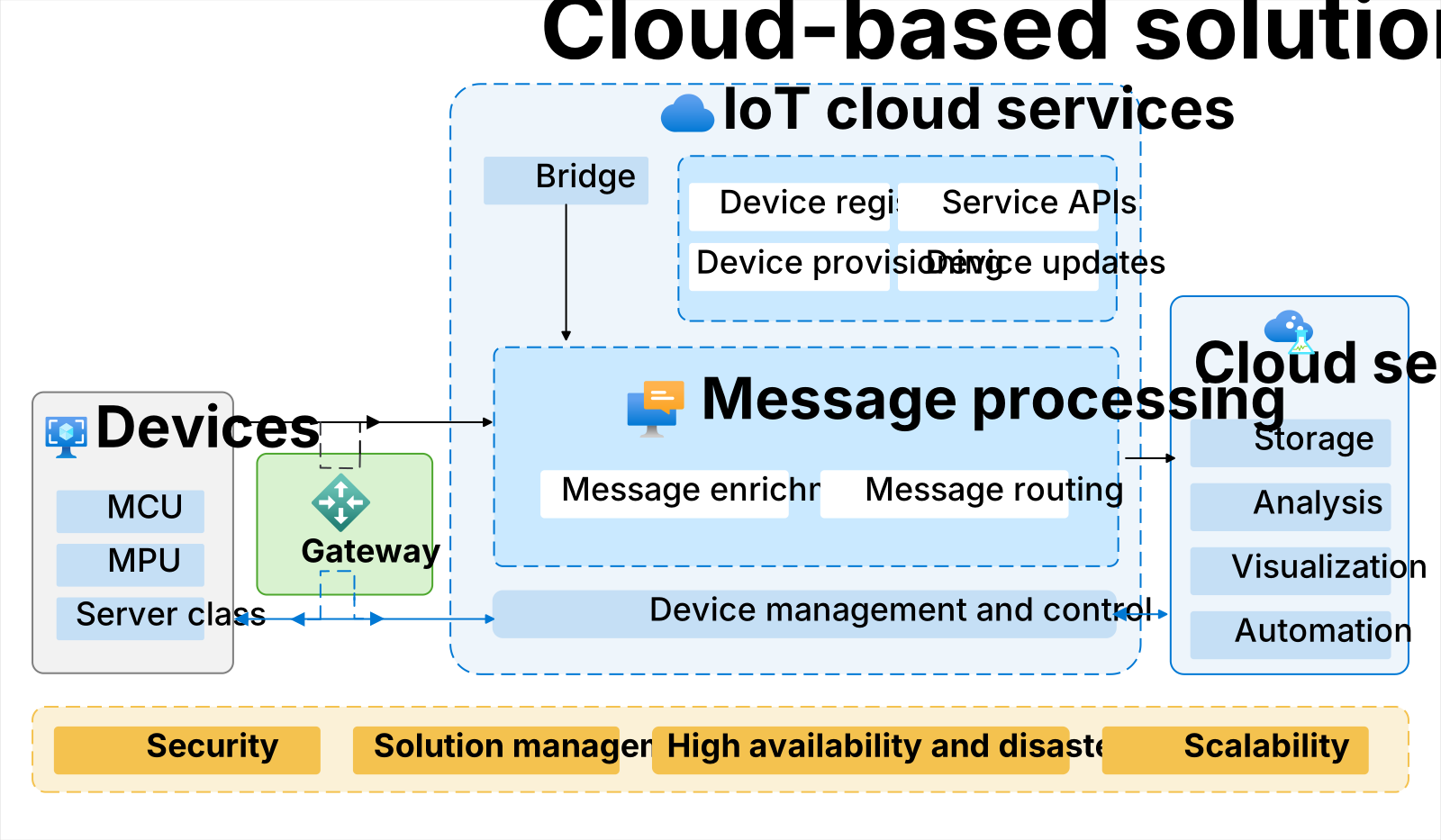
Build cloud-connected solutions with IoT Hub, Microsoft's platform for connected devices at scale. IoT Hub supports bidirectional messaging with millions of devices, device management, firmware updates, and integration with Azure Device Registry to expose your devices as manageable Azure resources. You can extend cloud-connected solutions with services such as Device Provisioning Service and Azure Digital Twins.
Edge-connected pattern
The edge-connected pattern uses an integrated set of IoT devices, components, and services that connects those devices to a nearby edge environment. This pattern is well suited to industrial and OT scenarios, for example:
- Devices that communicate by using local network protocols such as OPC UA that require an on-site connector.
- Environments where security requirements prevent devices from connecting directly to the public internet.
An edge-connected solution can also forward data from your devices to the cloud for further processing such as analysis and visualization:
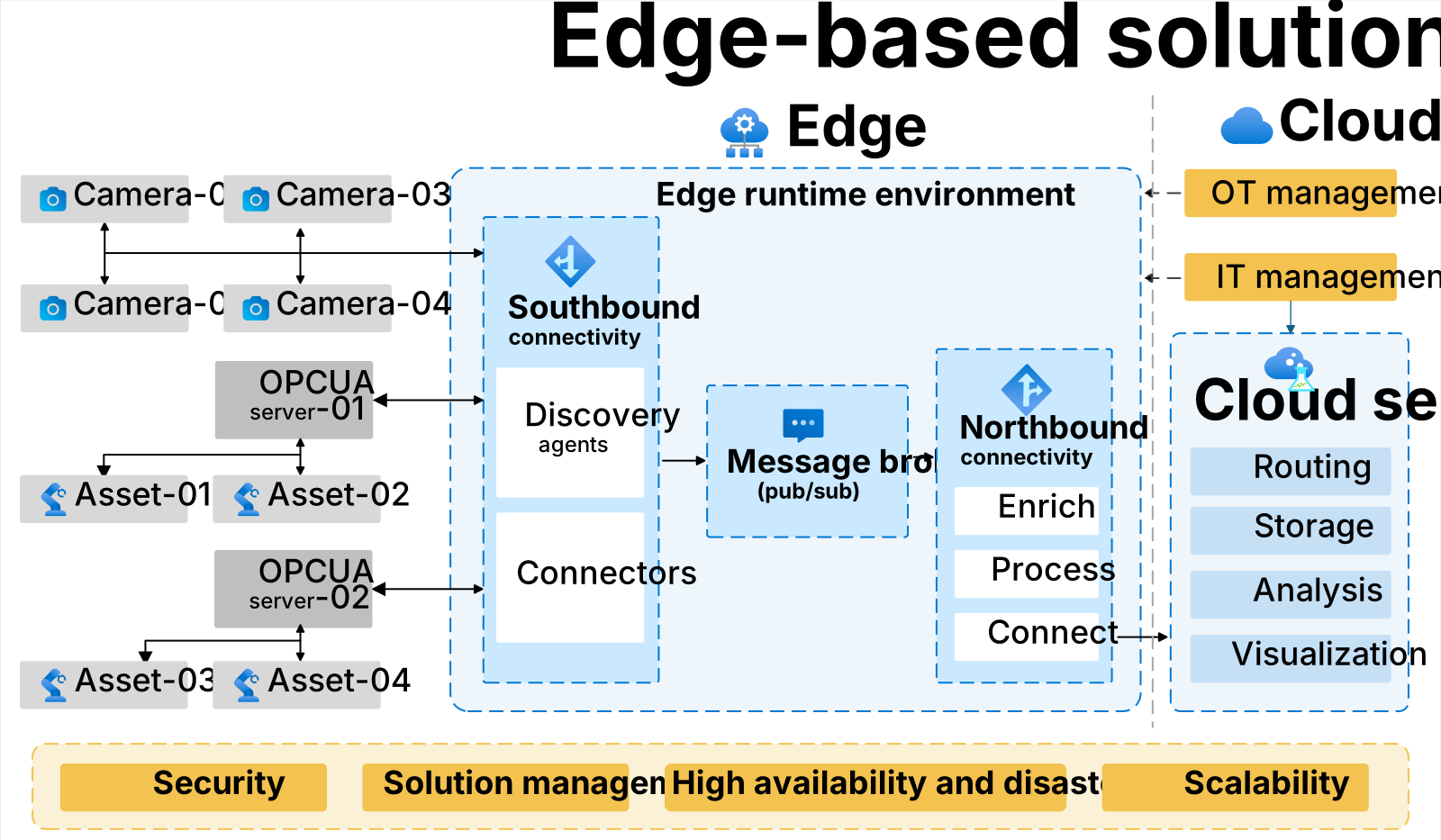
Build edge-connected solutions with Azure IoT Operations. Azure IoT Operations is Microsoft's recommended platform for new edge-connected solutions and is the foundation of the digital operations strategy for industrial and OT environments. Azure IoT Operations converges OT, IT, and data science across the cloud and edge by using a shared management plane (Azure Resource Manager) and a shared data plane (Microsoft Fabric). Azure Device Registry exposes the assets and devices connected through Azure IoT Operations as native Azure resources, enabling consistent management across your entire estate.
Devices and connectivity
Both connectivity patterns include devices that collect data from which you want to derive business insights. The following sections describe the device types in an Azure IoT solution and how they connect.
IoT device categories
It's helpful to categorize IoT devices as follows:
Cloud-connected device (category 1): Devices that connect directly to the cloud. This category includes devices that connect to cloud services such as IoT Hub by using standard protocols such as HTTP, MQTT, or AMQP. These devices aren't relevant in the edge-connected pattern (such as Azure IoT Operations).
Edge-connected device (category 2): Devices that connect to the cloud through an edge-based proxy or gateway. An example is a device that connects indirectly to the cloud through the MQTT broker in Azure IoT Operations.
Protocol-specific device (category 3): These devices connect to an edge-based runtime through a connector that enables the devices to use a specific protocol. For example, an OPC UA server and its attached devices connect through a connector for OPC UA. These devices aren't relevant in the cloud-connected pattern (such as Azure IoT Hub).
The following diagram shows the relationships between the device categories and the cloud services in the cloud-connected pattern:

The following diagram shows the relationships between the device categories and the edge runtime in the edge-connected pattern:

For simplicity, the previous diagrams show only data flows to the cloud or edge runtime. Many solutions enable command and control scenarios where the cloud or edge runtime sends commands to the devices. For example, a cloud service might send a command to an ONVIF compliant camera to zoom in.
Connectivity in the edge-connected pattern
In the edge-connected pattern, IoT devices connect to a local edge environment that processes their messages before forwarding them to the cloud for storage and analysis. Devices might use network communication protocols and standards such as:
- OPC UA in industrial environments.
- ONVIF for managing and monitoring video devices.
- MQTT as a standard messaging protocol for IoT devices.
In the edge-connected pattern diagram shown previously, the southbound connectors represent the protocols and standards that devices use to connect to the edge environment.
Device comparisons
The following table summarizes current options for devices and connectivity:
| Current offerings (GA) | Cloud-connected pattern | Edge-connected pattern |
|---|---|---|
| Connected object types | Category 1 and 2 IoT devices | Category 2 and 3 IoT devices |
| Device connectivity protocols | HTTP, AMQP, MQTT v3.1.1 | Azure IoT Operations enables MQTT v3.1.1 and MQTT v5 for category 2 devices; connectors enable other protocols such as OPC UA, ONVIF, and REST for category 3 devices. Custom connectors are possible. |
| Device implementation | Microsoft device SDKs and embedded device SDKs | Category 2 devices can use any MQTT library to connect to the MQTT broker. Category 3 devices typically come with standard firmware. |
| Device management | IoT DPS, Device Update, IoT Central, Azure Device Registry | In Azure IoT Operations, use Azure Device Registry. Use Akri to enable automated device discovery with native protocols. |
Services and applications
In the cloud-connected pattern, IoT-specific cloud services provide the infrastructure to connect, monitor, and control your devices. In the edge-connected pattern, the edge runtime environment hosts the services to connect, monitor, and control your devices. Other cloud services provide generic services such as storage, analysis, and visualizations to your solution.
Azure Device Registry
Azure Device Registry is a cloud service that works with both IoT Hub and Azure IoT Operations to provide a unified view of your devices and industrial assets as standard Azure resources. It's a key part of the adaptive cloud approach because it extends Azure's management plane—including RBAC, policy enforcement, tagging, scoping, and auditing—to your IoT estate. Key capabilities include:
- Unified asset representation: Devices connected through IoT Hub and assets connected through Azure IoT Operations are both expressed as ARM resources, making them visible and manageable through the Azure portal, Azure CLI, Bicep, and ARM templates.
- Schema and namespace management: Supports configuring message schemas, sampling frequency, and organizing assets into namespaces that mirror your physical environment.
- Bidirectional synchronization: Asset definitions and configurations in the registry synchronize with the edge, so changes made in the cloud are reflected on-site and vice versa.
- Integration with Azure tooling: Enables infrastructure-as-code workflows, centralized RBAC policies, and integration with Azure Monitor and Microsoft Defender for consistent governance across all sites.
Microsoft Fabric
Microsoft Fabric is the unified data platform for Azure IoT and is the shared data plane in the adaptive cloud approach. It ingests telemetry from devices connected through both IoT Hub and Azure IoT Operations, and turns raw device data into actionable insights for operations teams, data scientists, and business decision-makers. Key capabilities for IoT scenarios include:
- Real-Time Intelligence: Ingests and analyzes high-frequency telemetry streams from devices and assets, with support for anomaly detection, time-series analysis, and live operational dashboards.
- OneLake: A single, governed data lake that stores raw, cleansed, and curated device data from across all sites and systems, providing a consistent foundation for AI and analytics workloads.
- Fabric IQ and ontologies: Models the relationships between assets, locations, and data points by using semantic information models, making device data AI-ready and enabling digital twin scenarios.
- Power BI integration: Delivers rich visualizations and reports on device telemetry, operational KPIs, and process performance directly to the people who act on them.
- Microsoft Copilot integration: Lets operations teams and data professionals query and reason over device data by using natural language.
Both connectivity patterns route data to Microsoft Fabric. In the cloud-connected pattern, IoT Hub routes device telemetry to Fabric. In the edge-connected pattern, Azure IoT Operations processes and transforms data at the edge before forwarding it to Fabric, where it can be further analyzed and visualized.
AI and intelligence
A central goal of Azure IoT is turning raw device telemetry into AI-ready insights. This happens through a progressive data pipeline:
| Stage | Description | Where it happens |
|---|---|---|
| Raw telemetry | High-volume, high-frequency data collected from devices and assets | Device / asset |
| Structured data | Data bound to message schemas and information models | Azure IoT Operations (edge) |
| Contextualized and standardized | Asset context (location, type, relationships) added; data normalized to common units and formats | Azure IoT Operations + Azure Device Registry |
| Analysis-ready | Cleansed and aggregated data ingested into OneLake | Microsoft Fabric |
| AI-ready | Semantically enriched data, modeled with Fabric IQ ontologies, ready for AI consumption | Microsoft Fabric |
AI is applied at two levels in an Azure IoT solution:
- Edge AI: Azure IoT Operations supports running AI inference models directly on the edge cluster. This provides response times measured in milliseconds for high-priority scenarios such as quality inspection, anomaly detection, and safety monitoring, without requiring a round trip to the cloud.
- Cloud AI: Microsoft Fabric provides cloud-scale AI capabilities including Operations Agents—AI agents embedded in Real-Time Intelligence that continuously monitor telemetry streams and automatically take corrective or optimization actions. Azure AI Foundry provides a centralized platform for building, training, validating, and deploying custom AI models with enterprise-grade governance, and integrates with Fabric for model consumption at scale.
Fabric IQ ontologies are central to making this pipeline work end to end. By modeling the semantic relationships between assets, locations, and data points, Fabric IQ gives AI models and Copilot experiences the business context they need to produce meaningful insights—not just statistical anomalies, but findings grounded in how your operations actually work. For example, Fabric IQ can recognize that a temperature anomaly on a specific sensor belongs to a conveyor belt on a specific production line, enabling targeted maintenance recommendations rather than generic alerts.
Common AI scenarios in Azure IoT solutions include:
- Predictive maintenance: Detect early signs of equipment failure from telemetry trends and schedule maintenance before a breakdown occurs, reducing unplanned downtime.
- Process optimization: Identify bottlenecks and inefficiencies across production lines and recommend corrective actions in near real time.
- Anomaly detection: Continuously monitor live telemetry streams and alert operators to unusual patterns as they emerge.
- Connected workers: Surface AI-generated insights and recommendations to field workers through operational dashboards and natural language queries powered by Microsoft Copilot.
IoT cloud services
In a cloud-connected IoT solution, the IoT cloud services typically:
- Receive sensor data at scale from your devices, and determine how to process and store that data.
- Send commands from the cloud to specific devices.
- Provision devices and control which devices can connect to your infrastructure.
- Control the state of your devices and monitor their activities.
- Manage the firmware installed on your devices.
For example, in a remote monitoring solution for an oil pumping station, the services use sensor data from the pumps to identify anomalous behavior. When a cloud service identifies an anomaly, it can automatically send a command to the device to take a corrective action. This process implements an automated feedback loop between the device and the cloud that greatly increases the solution efficiency.
Edge runtime
In the edge-connected pattern, the on-premises services hosted in the edge runtime environment typically:
- Manage the connectivity to your devices through the southbound connectors.
- Receive data at scale from your devices, and determine where to route the messages for further processing.
- Forward commands from the cloud to specific devices.
- Perform some local message processing. In Azure IoT Operations, this processing takes place in the northbound connectors.
IoT services comparisons
The following table summarizes current service and edge application options:
| Current offerings (GA) | Cloud-connected pattern | Edge-connected pattern |
|---|---|---|
| Services | IoT Hub, IoT DPS, IoT Hub Device Update, Azure Digital Twins, Azure Device Registry | Azure IoT Operations, with Azure Device Registry. |
| Data platform | Microsoft Fabric (Real-Time Intelligence, OneLake, Power BI) | Microsoft Fabric (Real-Time Intelligence, OneLake, Power BI). Azure IoT Operations pre-processes and transforms data at the edge before forwarding it to Fabric. |
Deployment comparisons
The following table summarizes current deployment options:
| Current offerings (GA) | Cloud-connected pattern | Edge-connected pattern |
|---|---|---|
| Topology | Devices connect directly to cloud messaging services such as IoT Hub. Managed in the cloud using Azure Resource Manager (ARM) or IoT Hub service SDKs. | Azure IoT Operations provides a way to connect devices to an on-premises Kubernetes cluster. Devices connect to the Azure IoT Operations MQTT broker, either directly over standard networking protocols, or through intermediate devices. Managed in the cloud using Azure Arc-enabled services. |
| Infrastructure | Cloud services like IoT Hub, and standard computing devices that contain a CPU/MPU, or constrained and embedded devices that contain an MCU. | Azure IoT Operations, which runs on a Kubernetes cluster, and devices that connect to the cluster. Devices can include standard computing devices that contain a CPU/MPU, or constrained and embedded devices that contain an MCU. |
Solution management
Microsoft's Azure IoT strategy is built on the adaptive cloud approach, which unifies siloed teams, distributed sites, and disparate systems into a single operations, security, application, and data model. This approach enables the intelligent convergence of OT, IT, and data science, so you can use the same cloud and AI technologies to manage and monitor edge-connected, cloud-connected, and hybrid solutions.
The adaptive cloud approach has two key pillars:
- A shared management plane based on Azure Resource Manager (ARM). This plane extends Azure governance—RBAC, policy enforcement, auditing, and monitoring—to both cloud-connected devices and edge-based resources.
- A shared data plane based on Microsoft Fabric. This plane provides a unified platform for storing, processing, and analyzing data from cloud and edge sources, enabling AI-ready insights from the shopfloor to the boardroom.
Next steps
Suggested next steps to explore Azure IoT further include:
To learn more about Azure IoT architectures, see: