Pastaba.
Prieigai prie šio puslapio reikalingas įgaliojimas. Galite bandyti prisijungti arba pakeisti katalogus.
Prieigai prie šio puslapio reikalingas įgaliojimas. Galite bandyti pakeisti katalogus.
Smart tier automatically moves your data between the hot, cool, and cold access tiers based on usage patterns, optimizing your costs for these access tiers without setting up supplementary rulesets or policies. Smart tier is ideal for storing data on standard online tiers when access patterns are unclear and you don’t want to manage transitions.
By default, new data is stored in the hot tier. Any object that isn't accessed for 30 days is moved to the cool tier; after 90 days of inactivity, it transitions to the cold tier. If any of those objects are later accessed, they're transitioned back to the hot tier automatically and restart their tiering cycle. The automatic movement of inactive data to cooler tiers can lead to large cost savings over time. Access behavior, performance characteristics, and SLAs of the underlying capacity tier do apply to objects in smart tier.

Prerequisites
- A Standard general-purpose v2 (GPv2) storage account. Smart tier doesn't support legacy Standard general-purpose v1 (GPv1) accounts or premium storage accounts.
- Zone-redundant storage (ZRS, GZRS, or RA-GZRS).
- Smart tier works only on block blobs. Page blobs and append blobs aren't supported.
Known issues and considerations
- Smart tier is generally available in nearly all public regions with zonal redundancies. The Azure regions Israel Central, Qatar Central, and UAE North remain in Public Preview.
- Smart tier is in Public Preview for the Azure Government cloud regions as well as Microsoft Azure operated by 21Vianet (Azure in China).
- Redundancy conversions to non-zone redundant (LRS or GRS) accounts aren't supported.
- When a GZRS account fails over, convert the LRS account to zone-redundant within 60 days to continue smart tier support.
Enabling smart tier
Smart tier is available by default on supported storage accounts in generally available regions. Set the default account access tier to smart tier to enable it. After you enable smart tier on existing storage accounts, all blobs in the account that don't have an explicitly set access tier will move to smart tier. Blobs with an explicit tier set don't move to smart tier.
Smart tier is configured on the default account access tier. You can move objects out of smart tier by setting a different online tier or changing the default account access tier to another tier. Once moved to an explicit tier, objects can't be tiered back to smart tier. To set the default access tier setting for a storage account, see Set a blob's access tier.
Note
In regions where smart tier remains in Public Preview (Israel Central, Qatar Central, UAE North, Azure Government, and Azure operated by 21Vianet), enable access by registering the "Smart Tier (account level)" preview feature in the Azure portal preview features blade.
To set the default access tier to Smart for a storage account at create time in the Azure portal, follow these steps:
Navigate to the Storage accounts page, and select the Create button.
Fill out the Basics tab.
On the Advanced tab, under Blob storage, set the Access tier to Smart.
Select Review + Create to validate your settings and create your storage account.
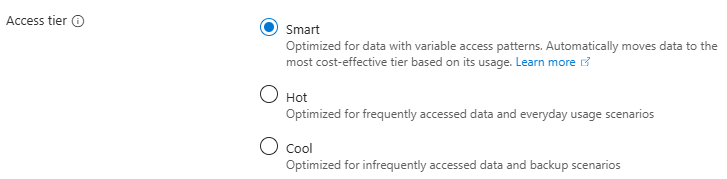
To update the default access tier to Smart for an existing storage account in the Azure portal, follow these steps:
Navigate to the storage account in the Azure portal.
Under Settings, select Configuration.
Locate the Blob access tier (default) setting, and select Smart. The default setting is Hot, if you have not previously set this property.
Save your changes.
Working with smart tier
All smart tiered objects are automatically managed across the underlying capacity tiers - hot, cool, and cold. Smart tier leverages the regular hot, cool, and cold access tiers in the background. These tiers are called the capacity tier. Smart tier doesn't support the archive tier. All objects created or moved onto smart tier-enabled accounts are stored in the hot capacity tier initially. Small objects in smart tier, below 128 KiB in size (SmartHot-small), don't move across capacity tiers and stay on the hot tier for efficiency. Regular tiering patterns apply once an object grows to at least 128 KiB in size.
All other objects remain in hot tier for 30 days and move to the cool tier if no access operation occurs.
The Get Blob and Put Blob operations are access operations and update the last access time of an object. However, Get Blob Properties, Get Blob Metadata, and Get Blob Tags aren't access operations. Those operations won't update the last access time of an object or impact the tiering behavior of smart tier objects.
After 60 more days without accessing objects on smart tier, they transition to the cold tier. No further transitions occur unless the object is accessed. The data always stays on online tiers, delivering you the regular availability, scale, and performance targets of Azure Blob storage.
Access operations against smart tier objects reset the tier transition timer and immediately move the object to hot tier. Blob lifecycle management doesn't impact objects on smart tier for tiering operations but will act on delete operations. Storage actions can't be used to influence tiering operations for objects on smart tier. Soft deleted objects continue to transition to cooler tiers until their deletion expiry period is met.
Billing details
Objects on smart tier are billed for the capacity meters and connected prices of the underlying capacity tier (hot, cool, or cold tier). There's no smart tier specific capacity meter or price, existing hot, cool, and cold tier capacity meters (data stored / month) are beeing used.
Smart tier charges a monthly monitoring operation for each object over 128 KiB managed by smart tier. No monitoring fee is billed for objects 128 KiB or smaller in size. Objects in smart tier aren't charged for tier transitions within smart tier, early deletion fees, or data retrieval operations.
All access operations billed for smart tier objects occur against the hot tier. This transaction includes the initial move to the hot tier for any object on other capacity tiers. Moving existing objects into smart tier doesn't trigger any tier transition transaction, moving blobs out of smart tier triggers a cool write operation per object. Versions and snapshots are billed at full content length.
The following table summarizes what's charged and what's free for objects on smart tier:
| Cost category | Charged | Free |
|---|---|---|
| Capacity | Underlying tier rates (hot, cool, or cold) | — |
| Monitoring | Charged a rate per 10K objects over 128 KiB | Objects 128 KiB or smaller |
| Tier transitions | Moving blobs out of smart tier (cool write tx per object) | All transitions within smart tier |
| Early deletion | — | Not charged |
| Data retrieval | — | Not charged |
| Access operations | Billed against hot tier rates | — |
For full pricing details, see Azure Blob Storage pricing.
Monitoring
You can monitor smart tier activity using the built-in storage account metrics available at no additional cost. To view these metrics, navigate to your storage account in the Azure portal and select Monitoring > Metrics.
To see how your objects are distributed across smart tier capacity tiers, configure the metric as follows:
- Set Metric Namespace to Blob.
- Set Metric to Blob Count or Blob Capacity depending on your requirement.
- Set Aggregation to Avg.
- Select Apply splitting and split by Blob tier and Blob type.
The following blob tier values are specific to smart tier:
| Blob tier value | Description |
|---|---|
| SmartHot | Objects currently on the hot capacity tier within smart tier |
| SmartCool | Objects that transitioned to the cool capacity tier after 30 days of inactivity |
| SmartCold | Objects that transitioned to the cold capacity tier after 90 days of inactivity |
| SmartHot-small | Objects below 128 KiB that remain on the hot tier and don't tier down |
| BlockBlob, Smart | Total objects managed by smart tier that are eligible for the monitoring fee (objects over 128 KiB) |
Objects with an explicitly set tier (not managed by smart tier) continue to appear under their respective standard tier values (for example, Hot, Cool, or Cold).
For more information, see Monitoring Azure Blob Storage.
Client tooling
The Azure portal supports smart tier. Smart tier requires the following minimum version of the REST API.
| Environment | Minimum version |
|---|---|
| REST API | 2025-08-01 |
Next steps
- Share your feedback about smart tier with us at smartblob@microsoft.com. We're excited to hear from you how we can improve smart tier even further.
- Set a blob's access tier
- Archive a blob
- Optimize costs by automatically managing the data lifecycle
- Best practices for using blob access tiers