Pastaba.
Prieigai prie šio puslapio reikalingas įgaliojimas. Galite bandyti prisijungti arba pakeisti katalogus.
Prieigai prie šio puslapio reikalingas įgaliojimas. Galite bandyti pakeisti katalogus.
When you add an app to Intune or use the built-in apps, the bundle ID of the app is also added. This bundle ID identifies the app, and you can use the bundle ID in your policies.
For example, you can use the bundle ID in an Intune device configuration profile to allow or block specific apps.
Applies to:
- Android
- iOS/iPadOS
- macOS
- Windows
This article lists the steps to get the app bundle IDs using the Intune admin center.
Get the app bundle ID
Sign in to the Microsoft Intune admin center.
Select Apps > All Apps.
Select Columns.

In the list, select App identifier > Apply.
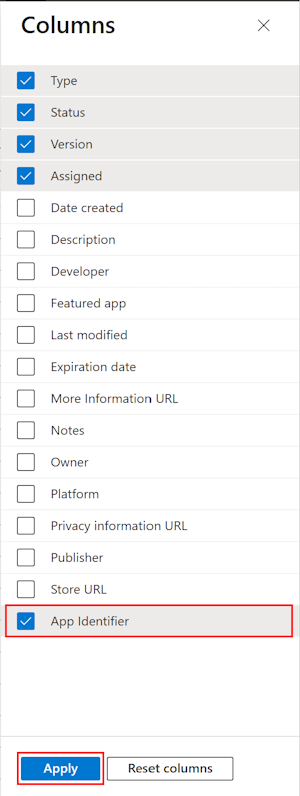
The App identifier column shows the bundle ID of the app.