Pastaba.
Prieigai prie šio puslapio reikalingas įgaliojimas. Galite bandyti prisijungti arba pakeisti katalogus.
Prieigai prie šio puslapio reikalingas įgaliojimas. Galite bandyti pakeisti katalogus.
An enclave is an isolated Azure Virtual Network that belongs to a community. It hosts one or more workloads that require network isolation, monitoring, and security boundaries. You can connect enclaves together using enclave endpoints to enable secure enclave-to-enclave communication.
Why create an enclave?
Enclaves give you boundaries for security, governance, and resource isolation. Each enclave provides:
- Network isolation: Enclaves are isolated from anything outside of the enclave default. Traffic is restricted to authorized Microsoft services and connections you explicitly enable using enclave endpoints.
- Built-in monitoring and audit logs: All activity in your enclave is automatically sent to a Log Analytics Workspace, giving you visibility into what's happening in your environment.
- Shared security policies: Resources within an enclave inherit the enclave's security posture, making it easier to apply consistent policies across workloads.
Architecture of an enclave
Enclaves come with the following platform-managed resources:
Networking
- Azure Virtual Network with Subnets: An isolated Virtual Network that you define and manage, restricted to authorized Microsoft services and controlled through Network Security Groups.
- Private Link integration: Private Endpoints and Private DNS Zones ensure all platform resources communicate privately within your network boundary.
Monitoring and Access
- Log Analytics Workspace: Provides diagnostic logging and monitoring for enclave resources. Azure Enclave and user-deployed resources can send logs here, with routing configurable via diagnostic settings.
- Azure Bastion: Provides secure RDP/SSH admin access to resources within the enclave.
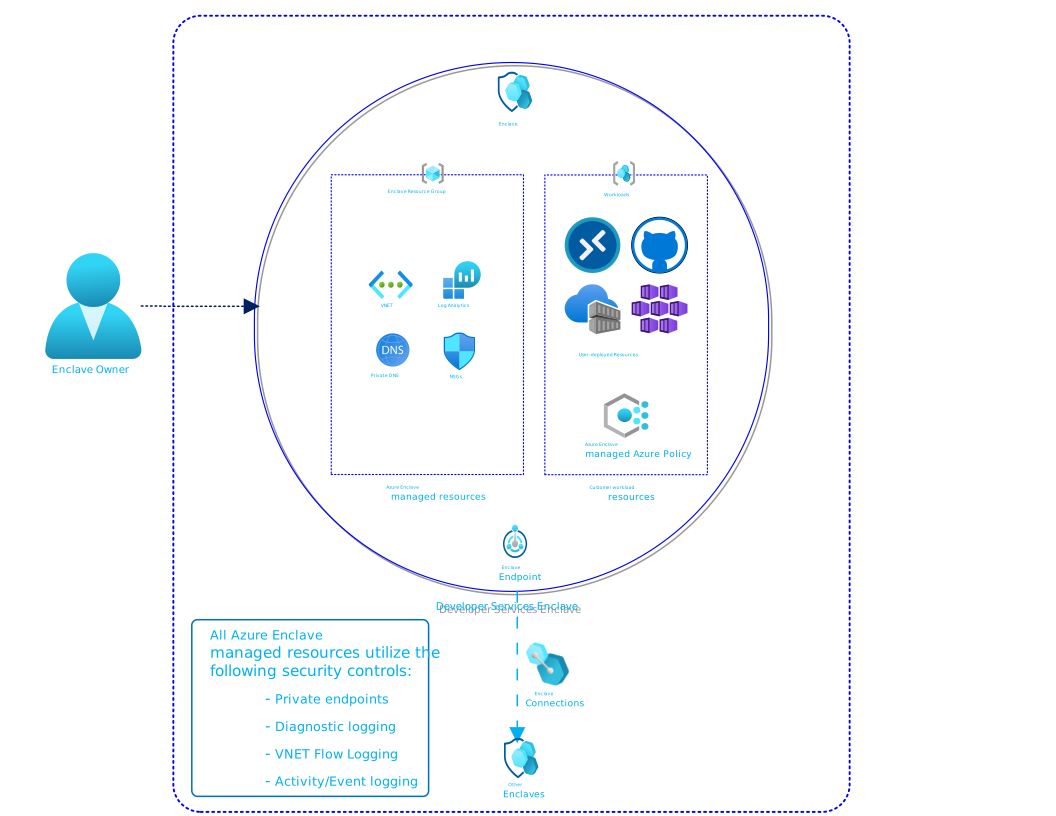
Enclave managed resource group
When you create an enclave, the Azure Enclave resource provider creates a managed resource group to hold all platform-managed resources. A deny assignment prevents unauthorized modifications to this resource group, protecting enclave isolation and security boundaries from accidental or malicious changes. This mechanism ensures platform-managed resources remain in a secure, consistent state.
Maintenance mode
Maintenance mode allows enclave owners to temporarily bypass the deny assignment restrictions for privileged maintenance tasks. Bypassing the deny assignment is useful when you need to make controlled changes to managed resources without losing isolation protection. Typical use cases include:
- Applying network configuration updates
- Updating enclave security policies
- Modifying monitoring or logging settings
Learn more about maintenance mode.
Azure Enclave is authoritative for the enclave Virtual Network
When Azure Enclave provisions an enclave, it creates and continuously manages the enclave Virtual Network as part of the isolated, zero-trust boundary. Azure Enclave is the authoritative control plane for that Virtual Network: it owns the network topology, routing, and the configuration that binds the Virtual Network to enclave connection management, including resource types and capabilities like enclave endpoints, enclave connections, and enclave subnet features.
Because the enclave holds this authoritative state, change the enclave Virtual Network and its resources only through the Azure Enclave management experience. Editing the Virtual Network directly, even if it's through Maintenance Mode (for example, through the Azure portal, Azure CLI, or ARM/Bicep outside of Azure Enclave) causes the configuration to drift. When the Virtual Network drifts out of Azure Enclave management, enclave connection management can no longer reliably reconcile the network, and features that depend on it can stop working:
- Enclave endpoints might fail to provision or resolve.
- Enclave connections might fail to establish, or be dropped.
- Enclave subnet features, such as delegated subnets and enclave-managed subnet settings, might become unavailable.
Important
Treat Azure Enclave as the single source of truth for the enclave Virtual Network. Make Virtual Network and subnet changes through the enclave's Manage experience rather than editing the Virtual Network directly.
Subnet delegation within the enclave
Subnets inside the enclave Virtual Network support Azure subnet delegation. Delegation designates a subnet for use by a specific Azure service so that the service can create and manage its service-specific resources within that subnet. Configure subnet delegation as part of creating or managing subnets through the enclave, so that the delegation is captured in the enclave's authoritative state and remains consistent with enclave connection management. Delegating a subnet directly on the Virtual Network instead of through Azure Enclave is an operation that can cause drift.
For the steps to add or manage subnets, see Create new subnet within an enclave Virtual Network.
Template
Managed Resources
The following resources types are deployed into the enclave managed resource group:
- Azure Virtual Network
- Subnets
- Network Security Groups
- Log Analytics Workspace
- Azure Bastion
- Private Endpoints
- Private DNS Zones